HTML 유효성 검사기는 마크업을 읽고 HTML 표준의 규칙을 위반하는 모든 위치를 나열합니다. 즉, 열린 태그, 허용되지 않는 위치의 요소, 동일한 id가 두 번, alt가 없는 이미지입니다.
표준적인 것은 validator.w3.org/nu에 있는 W3C Nu Html Checker입니다.
브라우저가 알려주지 않기 때문에 하나가 필요합니다. 단어 없이 손상된 HTML을 복구하고 결과적으로 트리를 그립니다. 아래에서 사례를 선택하고 작성된 내용과 브라우저가 구축한 내용을 비교하세요.
<!doctype html>
<html lang="en">
<head>
<meta charset="utf-8">
<meta name="viewport" content="width=device-width, initial-scale=1">
<title>See how the browser repairs HTML</title>
<style>
body { margin: 0; padding: 14px; font-family: system-ui, sans-serif; background: #f4f5f7; color: #1d2330; }
.presets { display: flex; flex-wrap: wrap; gap: 6px; margin-bottom: 10px; }
.presets button { font: inherit; font-size: 13px; padding: 6px 10px; border: 1px solid #cfd5de; border-radius: 99px; background: #fff; cursor: pointer; }
.presets button.on { background: #1d2330; color: #fff; border-color: #1d2330; }
.cols { display: grid; grid-template-columns: 1fr 1fr; gap: 10px; }
@media (max-width: 520px) { .cols { grid-template-columns: 1fr; } }
h3 { font-size: 13px; margin: 0 0 5px; color: #555; }
textarea, pre {
box-sizing: border-box; width: 100%; height: 190px; margin: 0; padding: 10px;
font: 13px/1.5 ui-monospace, Consolas, monospace; border-radius: 8px; border: 1px solid #d5d9e0;
}
textarea { resize: vertical; background: #fff; }
pre { background: #1d2330; color: #e6e9ef; overflow: auto; white-space: pre; }
.tag { color: #7dd3fc; } .txt { color: #fde68a; }
#note { font-size: 13px; margin: 10px 0 0; line-height: 1.5; }
</style>
</head>
<body>
<div class="presets" id="presets"></div>
<div class="cols">
<div><h3>What you wrote (edit it)</h3><textarea id="src" spellcheck="false"></textarea></div>
<div><h3>What the browser built</h3><pre id="tree"></pre></div>
</div>
<p id="note"></p>
<script>
const cases = {
'div in p': ['<p>Intro <div>Box</div> end</p>', 'The <div> closed the <p>. The stray </p> became a new, empty <p>.'],
'p in p': ['<p>Outer <p>Inner</p> tail</p>', 'A <p> cannot hold a <p>. The second one closed the first.'],
'unclosed b': ['<p><b>Bold</p><p>Next paragraph</p>', 'The unclosed <b> is reopened inside the next paragraph, so both are bold.'],
'text in table': ['<table><tr>Oops<td>Cell</td></tr></table>', 'Text is not allowed between rows, so it was moved out, above the table.'],
'a in a': ['<a href="#1">One <a href="#2">Two</a></a>', 'A link cannot contain a link. The first <a> was closed before the second.'],
};
const src = document.getElementById('src');
const tree = document.getElementById('tree');
const note = document.getElementById('note');
const esc = (s) => s.replace(/&/g, '&').replace(/</g, '<');
// Print the parsed tree: one line per element or text node, indented by depth
function draw(node, depth, out) {
for (const n of node.childNodes) {
const pad = ' '.repeat(depth);
if (n.nodeType === 1) {
out.push(pad + '<span class="tag"><' + n.localName + '></span>');
draw(n, depth + 1, out);
} else if (n.nodeType === 3 && n.textContent.trim()) {
out.push(pad + '<span class="txt">"' + esc(n.textContent.trim()) + '"</span>');
}
}
return out;
}
function update() {
// DOMParser runs the same HTML parser as the page itself
const doc = new DOMParser().parseFromString(src.value, 'text/html');
tree.innerHTML = draw(doc.body, 0, []).join('\n');
}
const bar = document.getElementById('presets');
for (const name in cases) {
const b = document.createElement('button');
b.textContent = name;
b.addEventListener('click', () => {
bar.querySelectorAll('button').forEach((x) => x.classList.toggle('on', x === b));
src.value = cases[name][0];
note.textContent = cases[name][1];
update();
});
bar.append(b);
}
src.addEventListener('input', () => { note.textContent = ''; update(); });
bar.firstChild.click();
</script>
</body>
</html>
오른쪽은 페이지 자체에서 사용하는 것과 동일한 HTML 파서를 실행하는 DOMParser에서 나옵니다. 아무 것도 발생하지 않으며 콘솔에도 아무 것도 나타나지 않습니다.
W3C 검증인이 확인하는 것
Nu 검사기는 마크업을 HTML 표준과 비교합니다. 여기에는 모양이나 동작이 아닌 구문과 구조가 포함됩니다.
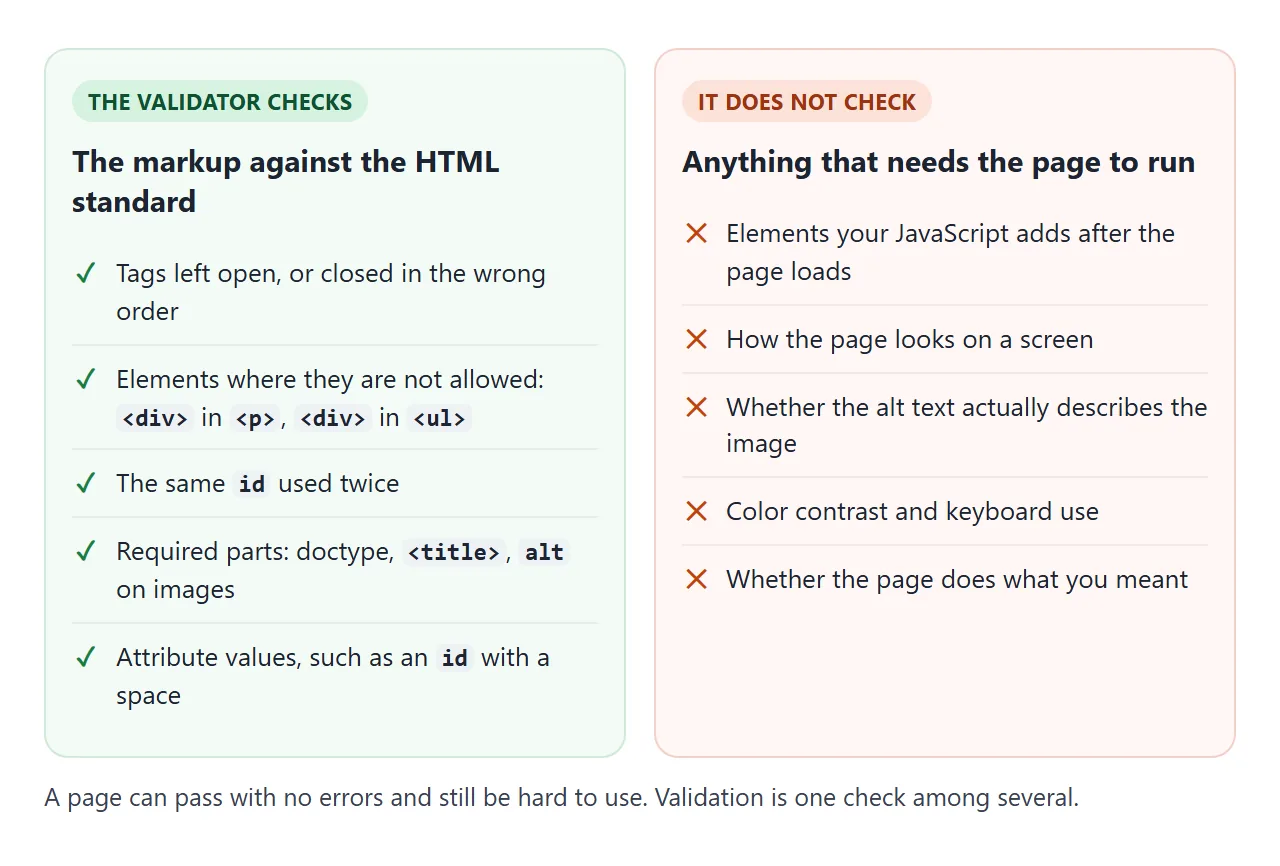
웹 주소, 파일 업로드, 텍스트 상자 붙여넣기 등 세 가지 방법이 있습니다. 단일 파일의 경우 문서 유형을 포함하여 전체 내용을 붙여넣으면 검사기가 브라우저와 동일한 시작을 볼 수 있습니다.
동일한 서비스가 스크립트에 응답합니다. 이 명령은 파일을 보내고 메시지를 JSON으로 다시 가져옵니다.
curl -H "Content-Type: text/html; charset=utf-8" \
  --data-binary @page.html \
  "https://validator.w3.org/nu/?out=json"
각 메시지에는 type(오류 또는 정보), 줄 번호 및 텍스트가 있습니다. Java가 있는 경우 검사기는 오프라인으로 vnu.jar로 실행됩니다.
계속해서 발생하는 오류
아래 메시지는 2026-09-26에 작은 테스트 파일에 대해 Nu 검사기가 반환한 내용입니다. 마지막 열은 브라우저가 동일한 마크업으로 수행하는 작업입니다.
| 실수 | 검증인이 말하는 것 | 브라우저가 하는 일 |
|---|---|---|
<p> 내부의 <div> |
범위에 "p" 요소가 없지만 "p" 종료 태그가 표시됩니다. | <div>에서 단락을 닫고 </p>에서 빈 <p>를 만듭니다. |
<b>는 닫히지 않았습니다. |
닫히지 않은 요소 "b". | 이후 텍스트에는 계속 굵은 글씨로 표시됩니다. |
동일한 id 두 번 |
ID '상자'가 중복되었습니다. | 둘 다 유지합니다. 조회는 첫 번째 항목만 찾습니다. |
alt가 없는 <img> |
"img" 요소에는 특정 조건을 제외하고 "alt" 속성이 있어야 합니다. | 이미지를 표시합니다. 스크린 리더는 텍스트를 읽지 않습니다. |
| 링크 안의 링크 | 시작 태그 "a"가 표시되었지만 동일한 유형의 요소가 이미 열려 있었습니다. | 두 번째 링크 전에 첫 번째 링크를 닫습니다. |
| 테이블 행 사이의 텍스트 | 테이블 내에서 공백이 아닌 문자가 잘못 배치되었습니다. | 테이블 위의 텍스트를 이동합니다. |
단락 안의 단락은 특별한 경우입니다. <p>의 종료 태그는 선택사항이고 두 번째 태그가 첫 번째 태그로 끝나기 때문에 <p>One<p>Two는 유효합니다. 유효성 검사기는 </p>에 종료할 항목이 남아 있지 않은 경우에만 불평합니다.
이미지 오류의 경우 이미지에 표시되는 내용을 나타내는 텍스트 또는 순수한 장식의 경우 alt=""로 수정됩니다. HTML의 대체 텍스트에서는 작성할 내용을 다룹니다.
페이지가 여전히 괜찮아 보이는 이유
HTML 파서에는 모든 실수에 대한 규칙이 있습니다. 결코 멈추지 않으며 오류도 표시하지 않습니다. 이것이 깨진 마크업이 여전히 렌더링되는 이유이며, 결과가 의도한 것과 다를 수 있는 이유입니다.
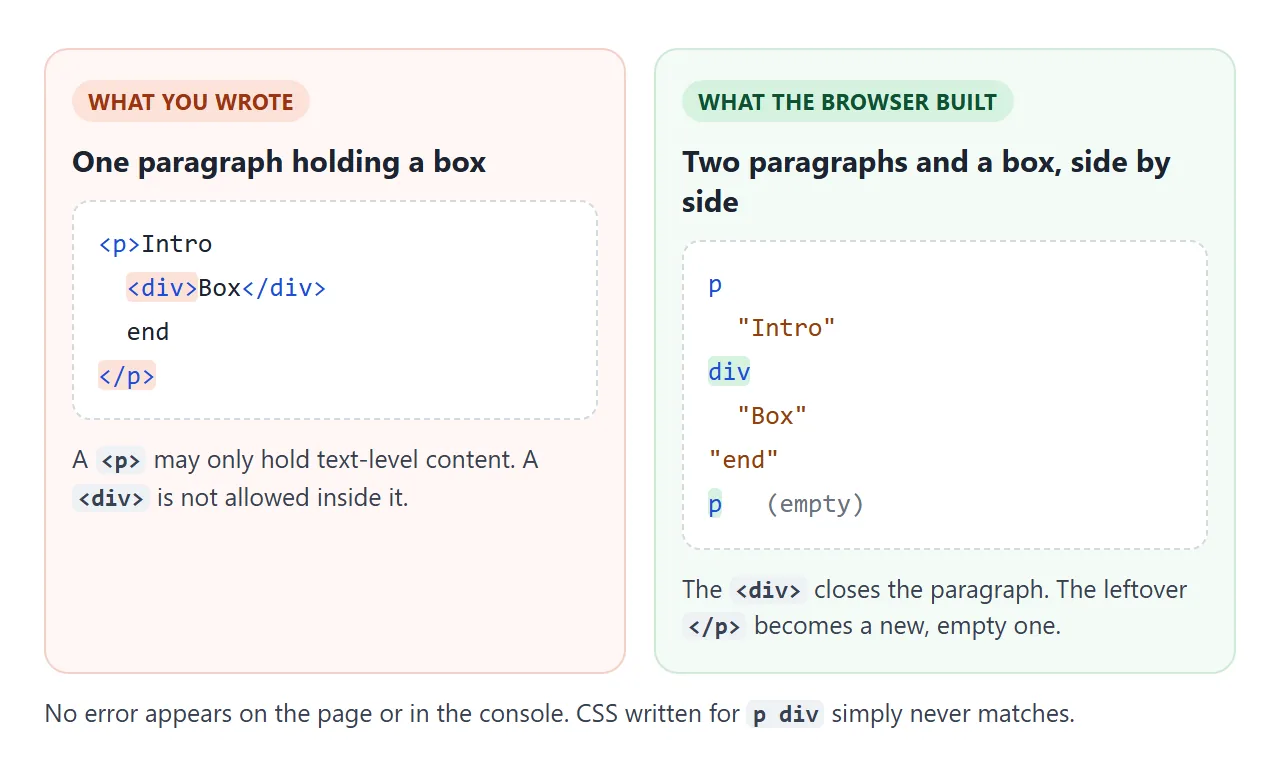
피해는 다른 곳에서 나타납니다. 적용되지 않는 스타일, 아무것도 찾지 못하는 querySelector, 다음 단락으로 퍼지는 대담한 실행. 페이지 트리는 실시간 예제가 포함된 DOM에서 다룹니다.
DOMParser는 스크립트에서 복구 내용을 볼 수 있도록 합니다. HTML로 구문 분석하면 항상 성공합니다. XML로 구문 분석하면 동일한 깨진 문자열이 대신 오류 요소를 생성합니다.
const bad = '<p><b></p>';
new DOMParser().parseFromString(bad, 'text/html')
  .querySelector('parsererror');        // null: repaired quietly
new DOMParser().parseFromString(bad, 'application/xml')
  .querySelector('parsererror');        // an element: XML refuses it
중복 ID는 조회보다 더 많이 중단됩니다.
하나의 id가 있는 두 요소가 모두 페이지에 유지됩니다. getElementById는 첫 번째를 반환하고 해당 ID를 가리키는 <label for>도 마찬가지입니다. 양식에서 두 번째 레이블을 클릭하면 커서가 잘못된 상자에 놓입니다.
<!doctype html>
<html lang="en">
<head>
<meta charset="utf-8">
<meta name="viewport" content="width=device-width, initial-scale=1">
<title>Duplicate ids</title>
<style>
  body { margin: 0; padding: 14px; font-family: system-ui, sans-serif; background: #f4f5f7; color: #1d2330; }
  .cols { display: grid; grid-template-columns: 1fr 1fr; gap: 10px; }
  @media (max-width: 520px) { .cols { grid-template-columns: 1fr; } }
  form { background: #fff; border-radius: 10px; padding: 12px; border: 2px solid #f3d1c8; }
  form.good { border-color: #cfe9d7; }
  h3 { font-size: 14px; margin: 0 0 8px; }
  label { display: block; font-size: 13px; margin-top: 8px; cursor: pointer; text-decoration: underline dotted; }
  input { box-sizing: border-box; width: 100%; font: inherit; padding: 6px 8px; margin-top: 3px; border: 1px solid #cfd5de; border-radius: 6px; }
  input:focus { outline: 3px solid #2563eb; }
  .out { font: 12.5px/1.5 ui-monospace, Consolas, monospace; margin-top: 10px; min-height: 3em; }
</style>
</head>
<body>
<div class="cols">
  <form id="bad">
    <h3>Same id twice</h3>
    <label for="email">Home email</label>
    <input id="email">
    <label for="email">Work email</label>
    <input id="email">
    <div class="out"></div>
  </form>
  <form id="good" class="good">
    <h3>Unique ids</h3>
    <label for="home">Home email</label>
    <input id="home">
    <label for="work">Work email</label>
    <input id="work">
    <div class="out"></div>
  </form>
</div>
<p style="font-size:13px">Click <b>Work email</b> in each form and watch which box gets the cursor.</p>

<script>
  // Report which input received focus, and what getElementById sees
  for (const form of document.forms) {
    const out = form.querySelector('.out');
    form.addEventListener('focusin', (e) => {
      const inputs = [...form.querySelectorAll('input')];
      const which = inputs.indexOf(e.target) === 0 ? 'the FIRST box' : 'the SECOND box';
      const id = e.target.id;
      const count = document.querySelectorAll('#' + id).length;
      out.textContent = 'Focused ' + which + '.\n' +
        'Elements with id="' + id + '": ' + count + '\n' +
        'getElementById returns the ' + (document.getElementById(id) === e.target ? 'focused box' : 'other box');
      out.style.whiteSpace = 'pre-line';
    });
  }
</script>
</body>
</html>
ID 이름을 바꾸지 않고 블록을 복사하는 것도 한 가지 방법입니다. 많은 요소에 동일한 후크가 필요한 경우 클래스를 사용하세요. id vs class는 각각이 적합한 시기를 설명하고, HTML 라벨은 for 링크를 다룹니다.
검증인의 메시지 읽기
각 메시지는 오류, 행과 열 범위, 강조 표시된 문제가 포함된 짧은 발췌문을 제공합니다. 이 줄은 파서가 발견한 곳이지만 항상 실수가 있는 곳은 아닙니다.
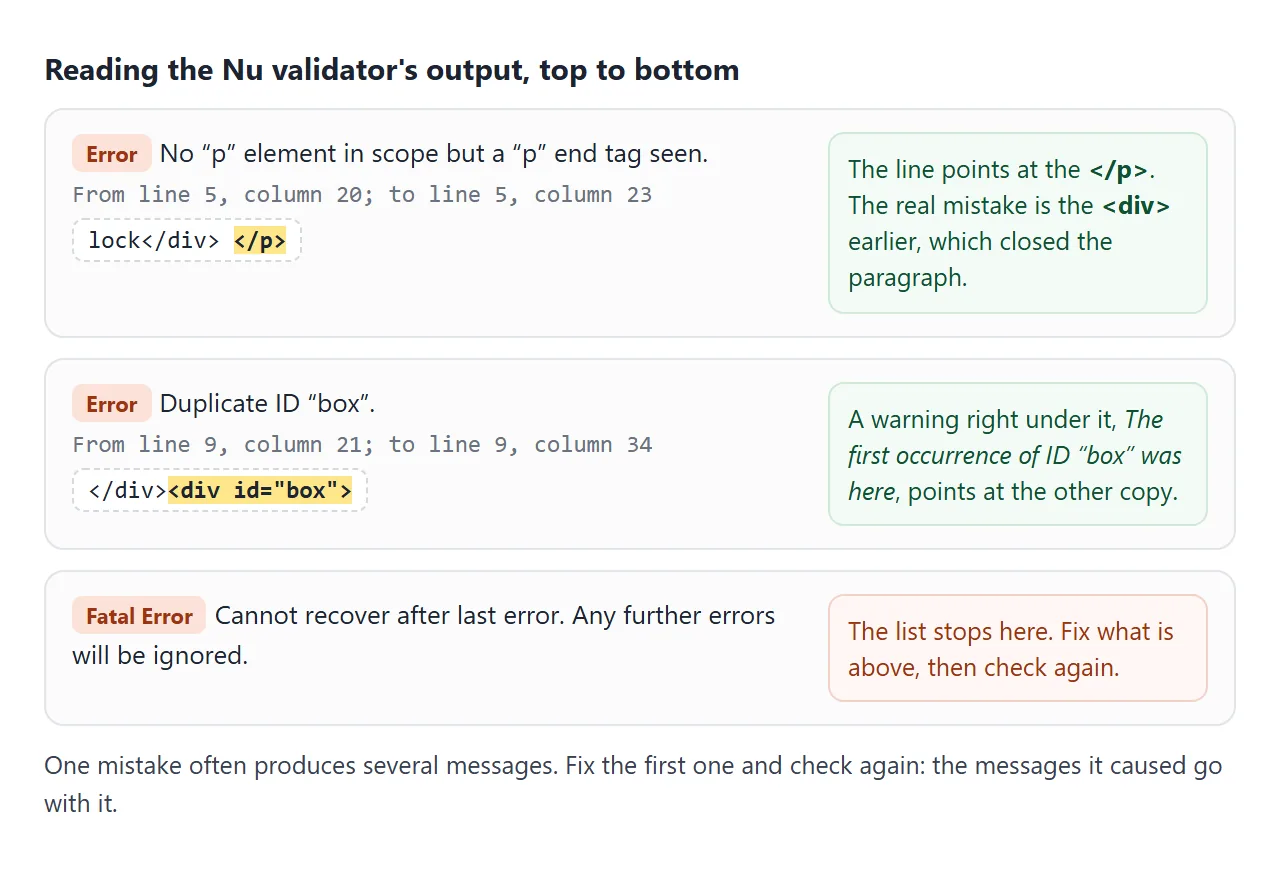
위에서부터 작업하세요. 한 번의 실수로 인해 여러 메시지가 생성될 수 있으며, 첫 번째 오류가 수정되면 나중에 오류가 사라질 수 있습니다.
테이블 내부에 직접 배치된 텍스트는 "마지막 오류 후 복구할 수 없습니다"라는 메시지로 테스트에서 검사기를 중지했으므로 문제가 해결될 때까지 그 이후에는 아무 것도 보고되지 않았습니다.
페이지에서 실행할 수 있는 작은 검사기
마지막 예는 하나의 스크립트 블록에 있는 검사기입니다. 소스의 태그를 탐색하여 닫히지 않은 태그와 이탈된 태그를 찾은 다음 중복 ID, alt가 없는 이미지, 제목 및 lang에 대해 DOMParser를 사용합니다.
<!doctype html>
<html lang="en">
<head>
<meta charset="utf-8">
<meta name="viewport" content="width=device-width, initial-scale=1">
<title>Small HTML checker</title>
<style>
body { margin: 0; padding: 14px; font-family: system-ui, sans-serif; background: #f4f5f7; color: #1d2330; }
textarea {
box-sizing: border-box; width: 100%; height: 230px; padding: 10px; resize: vertical;
font: 13px/1.5 ui-monospace, Consolas, monospace; border: 1px solid #d5d9e0; border-radius: 8px;
}
.bar { display: flex; gap: 8px; align-items: center; margin: 8px 0; flex-wrap: wrap; }
button { font: inherit; font-size: 14px; padding: 7px 14px; border: 0; border-radius: 8px; background: #1d2330; color: #fff; cursor: pointer; }
#sum { font-size: 13px; color: #555; }
ol { margin: 0; padding: 0; list-style: none; }
li { background: #fff; border-left: 4px solid #c2410c; border-radius: 6px; padding: 7px 10px; margin-bottom: 6px; font-size: 13px; line-height: 1.45; }
li.warn { border-left-color: #ca8a04; }
li.ok { border-left-color: #16a34a; }
li b { font-family: ui-monospace, Consolas, monospace; font-weight: 600; }
</style>
</head>
<body>
<textarea id="src" spellcheck="false"><!doctype html>
<html>
<head><title>Team page</title></head>
<body>
<p>Our team <div class="card">Ana</div></p>
<img src="ana.png">
<div id="card">Ben</div>
<div id="card">Cy</div>
<p>Contact <b>us today</p>
<section>Footer
</body>
</html></textarea>
<div class="bar"><button id="run">Check</button><span id="sum"></span></div>
<ol id="out"></ol>
<script>
const VOID = /^(area|base|br|col|embed|hr|img|input|link|meta|source|track|wbr)$/;
// End tags the HTML standard lets you leave out
const OPTIONAL = /^(html|head|body|p|li|dt|dd|tr|td|th|thead|tbody|tfoot|option|optgroup|colgroup|caption|rt|rp)$/;
// Starting one of these closes an open <p>
const CLOSES_P = /^(address|article|aside|blockquote|details|div|dl|fieldset|figure|footer|form|h[1-6]|header|hr|main|nav|ol|p|pre|section|table|ul)$/;
function check(html) {
const found = [];
const line = (i) => html.slice(0, i).split('\n').length;
const add = (kind, i, msg) => found.push({ kind, line: line(i), msg });
const stack = []; // open elements: { name, at }
const re = /<!--[\s\S]*?-->|<!doctype[^>]*>|<(\/?)([a-zA-Z][\w-]*)([^>]*)>/gi;
let m;
while ((m = re.exec(html))) {
const [, slash, raw, attrs] = m;
if (!raw) continue; // comment or doctype
const name = raw.toLowerCase();
if (!slash) {
if (CLOSES_P.test(name) && stack.length && stack.at(-1).name === 'p') {
// <p> after <p> is allowed: the end tag is optional
if (name !== 'p') add('warn', m.index, '<b><' + name + '></b> inside <b><p></b>: the browser closes the paragraph here.');
stack.pop();
}
if (name === 'a' && stack.some((e) => e.name === 'a')) add('err', m.index, 'Link inside a link. The browser closes the first <b><a></b>.');
if (/\/\s*$/.test(attrs) && !VOID.test(name)) add('err', m.index, '<b><' + name + '/></b>: the slash is ignored, so this element stays open.');
if (!VOID.test(name)) stack.push({ name, at: m.index });
if (name === 'script' || name === 'style') { // skip their contents
const end = html.toLowerCase().indexOf('</' + name, re.lastIndex);
re.lastIndex = end < 0 ? html.length : end;
}
continue;
}
const k = stack.map((e) => e.name).lastIndexOf(name);
if (k < 0) { add('err', m.index, 'Stray <b></' + name + '></b>: no open <b><' + name + '></b> to close.'); continue; }
for (const e of stack.splice(k).slice(1)) {
if (!OPTIONAL.test(e.name)) add('err', e.at, '<b><' + e.name + '></b> is never closed.');
}
}
for (const e of stack) if (!OPTIONAL.test(e.name)) add('err', e.at, '<b><' + e.name + '></b> is never closed.');
// Checks that are easier on the parsed tree
const doc = new DOMParser().parseFromString(html, 'text/html');
const seen = {};
doc.querySelectorAll('[id]').forEach((el) => { seen[el.id] = (seen[el.id] || 0) + 1; });
for (const id in seen) if (seen[id] > 1) add('err', html.indexOf('id="' + id + '"', html.indexOf('id="' + id + '"') + 1), 'Duplicate id <b>' + id + '</b> (' + seen[id] + ' elements).');
doc.querySelectorAll('img:not([alt])').forEach((img) => add('err', html.indexOf(img.getAttribute('src') || '<img'), '<b><img></b> without an alt attribute.'));
if (!/^\s*<!doctype html>/i.test(html)) add('err', 0, 'No <b><!doctype html></b> on the first line.');
if (!doc.title) add('err', 0, 'No <b><title></b>.');
if (!doc.documentElement.hasAttribute('lang') && /<html/i.test(html)) add('warn', html.search(/<html/i), 'No <b>lang</b> on <html>.');
return found.sort((a, b) => a.line - b.line);
}
document.getElementById('run').addEventListener('click', () => {
const list = check(document.getElementById('src').value);
const out = document.getElementById('out');
out.innerHTML = list.length ? '' : '<li class="ok">No problems found by these checks.</li>';
for (const f of list) {
const li = document.createElement('li');
li.className = f.kind;
li.innerHTML = 'Line ' + f.line + ': ' + f.msg;
out.append(li);
}
document.getElementById('sum').textContent = list.length + ' found';
});
document.getElementById('run').click();
</script>
</body>
</html>
작동 방식:
- 태그 탐색: 정규식은 각 시작 태그와 끝 태그를 찾습니다. 시작 태그는 스택에 쌓이고, 종료 태그는 스택에 쌓입니다. 자체 종료 태그 없이 표시되는 모든 항목이 보고됩니다.
- 선택적 종료 태그:
p,li,td및 이와 유사한 태그는 열린 상태로 유지될 수 있으므로 건너뜁니다. - 트리 확인:
querySelectorAll('[id]')는 ID를 계산하고img:not([alt])선택기는 누락된 Alt를 찾습니다.
테이블(테이블 행 사이의 텍스트가 아님)의 6개 오류 중 5개와 누락된 문서 유형, 제목 또는 언어를 포착합니다. 전체 표준은 아닙니다. 편집하는 동안 빠른 통과를 위해 사용하고 게시하기 전에 Nu 검사기를 사용하십시오.
작동하지 않을 때
| 당신이 보는 것 | 원인 | 수정 |
|---|---|---|
| 괜찮아 보이는 줄에 "범위에 p 요소가 없습니다." | 단락 앞부분의 블록 요소가 이미 닫혔습니다. | <p>를 <div>로 변경하거나 블록을 밖으로 이동하세요. |
| 유효성 검사기가 "복구할 수 없습니다"라는 메시지와 함께 중간에 중지됩니다. | 테이블 행 사이의 텍스트와 같은 치명적인 오류 | 해당 줄을 수정하고 다시 확인하세요. |
| 작성한 적이 없는 요소에 대한 오류 | 주소가 로그인 페이지나 오류 페이지 등 다른 페이지로 제공되었습니다. | 최종 HTML을 텍스트 입력에 붙여넣습니다. |
| 오류는 없지만 페이지가 여전히 손상된 것처럼 보입니다. | 유효성 검사기는 CSS 결과나 스크립트를 확인하지 않습니다. | 개발자 도구에서 라이브 트리 검사 |
| 라벨을 클릭하면 잘못된 필드에 초점이 맞춰집니다. | 두 요소가 id를 공유합니다. |
각 필드에 고유한 id를 지정하세요. |
lang에 대한 경고 |
<html>에는 언어가 없습니다. |
<html>에 lang="en"(또는 해당 언어)를 추가하세요. |
링크로 공유하세요
유효성 검사기 보고서는 독자가 보고서가 설명하는 페이지를 볼 수 있을 때 조치를 취하기가 더 쉽습니다. 스크린샷은 하나의 상태를 보여주며, .html 첨부 파일은 전화기에서 일반 코드로 열릴 수 있습니다.
작업 버전을 보내려면 페이지를 NOS 문서에 붙여넣고 공유 링크 만들기를 선택하세요. 링크할 HTML이 이를 안내합니다.
페이지는 작성된 대로 렌더링되고 해당 스크립트가 실행되므로 페이지를 여는 사람은 누구나 위의 검사기를 사용할 수 있습니다. 나중에 코드를 변경하면 동일한 링크에 새 버전이 표시됩니다.