An HTML validator reads your markup and lists every place where it breaks the rules of the HTML standard: tags left open, elements in places they are not allowed, the same id twice, an image with no alt.
The standard one is the W3C Nu Html Checker at validator.w3.org/nu.
You need one because the browser will not tell you. It repairs broken HTML without a word and draws whatever tree it ended up with. Pick a case below and compare what was written with what the browser built.
<!doctype html>
<html lang="en">
<head>
<meta charset="utf-8">
<meta name="viewport" content="width=device-width, initial-scale=1">
<title>See how the browser repairs HTML</title>
<style>
body { margin: 0; padding: 14px; font-family: system-ui, sans-serif; background: #f4f5f7; color: #1d2330; }
.presets { display: flex; flex-wrap: wrap; gap: 6px; margin-bottom: 10px; }
.presets button { font: inherit; font-size: 13px; padding: 6px 10px; border: 1px solid #cfd5de; border-radius: 99px; background: #fff; cursor: pointer; }
.presets button.on { background: #1d2330; color: #fff; border-color: #1d2330; }
.cols { display: grid; grid-template-columns: 1fr 1fr; gap: 10px; }
@media (max-width: 520px) { .cols { grid-template-columns: 1fr; } }
h3 { font-size: 13px; margin: 0 0 5px; color: #555; }
textarea, pre {
box-sizing: border-box; width: 100%; height: 190px; margin: 0; padding: 10px;
font: 13px/1.5 ui-monospace, Consolas, monospace; border-radius: 8px; border: 1px solid #d5d9e0;
}
textarea { resize: vertical; background: #fff; }
pre { background: #1d2330; color: #e6e9ef; overflow: auto; white-space: pre; }
.tag { color: #7dd3fc; } .txt { color: #fde68a; }
#note { font-size: 13px; margin: 10px 0 0; line-height: 1.5; }
</style>
</head>
<body>
<div class="presets" id="presets"></div>
<div class="cols">
<div><h3>What you wrote (edit it)</h3><textarea id="src" spellcheck="false"></textarea></div>
<div><h3>What the browser built</h3><pre id="tree"></pre></div>
</div>
<p id="note"></p>
<script>
const cases = {
'div in p': ['<p>Intro <div>Box</div> end</p>', 'The <div> closed the <p>. The stray </p> became a new, empty <p>.'],
'p in p': ['<p>Outer <p>Inner</p> tail</p>', 'A <p> cannot hold a <p>. The second one closed the first.'],
'unclosed b': ['<p><b>Bold</p><p>Next paragraph</p>', 'The unclosed <b> is reopened inside the next paragraph, so both are bold.'],
'text in table': ['<table><tr>Oops<td>Cell</td></tr></table>', 'Text is not allowed between rows, so it was moved out, above the table.'],
'a in a': ['<a href="#1">One <a href="#2">Two</a></a>', 'A link cannot contain a link. The first <a> was closed before the second.'],
};
const src = document.getElementById('src');
const tree = document.getElementById('tree');
const note = document.getElementById('note');
const esc = (s) => s.replace(/&/g, '&').replace(/</g, '<');
// Print the parsed tree: one line per element or text node, indented by depth
function draw(node, depth, out) {
for (const n of node.childNodes) {
const pad = ' '.repeat(depth);
if (n.nodeType === 1) {
out.push(pad + '<span class="tag"><' + n.localName + '></span>');
draw(n, depth + 1, out);
} else if (n.nodeType === 3 && n.textContent.trim()) {
out.push(pad + '<span class="txt">"' + esc(n.textContent.trim()) + '"</span>');
}
}
return out;
}
function update() {
// DOMParser runs the same HTML parser as the page itself
const doc = new DOMParser().parseFromString(src.value, 'text/html');
tree.innerHTML = draw(doc.body, 0, []).join('\n');
}
const bar = document.getElementById('presets');
for (const name in cases) {
const b = document.createElement('button');
b.textContent = name;
b.addEventListener('click', () => {
bar.querySelectorAll('button').forEach((x) => x.classList.toggle('on', x === b));
src.value = cases[name][0];
note.textContent = cases[name][1];
update();
});
bar.append(b);
}
src.addEventListener('input', () => { note.textContent = ''; update(); });
bar.firstChild.click();
</script>
</body>
</html>
The right-hand side comes from DOMParser, which runs the same HTML parser the page itself uses. Nothing is thrown, and nothing appears in the console.
What the W3C validator checks
The Nu checker compares the markup against the HTML standard. That covers syntax and structure, not appearance or behavior.
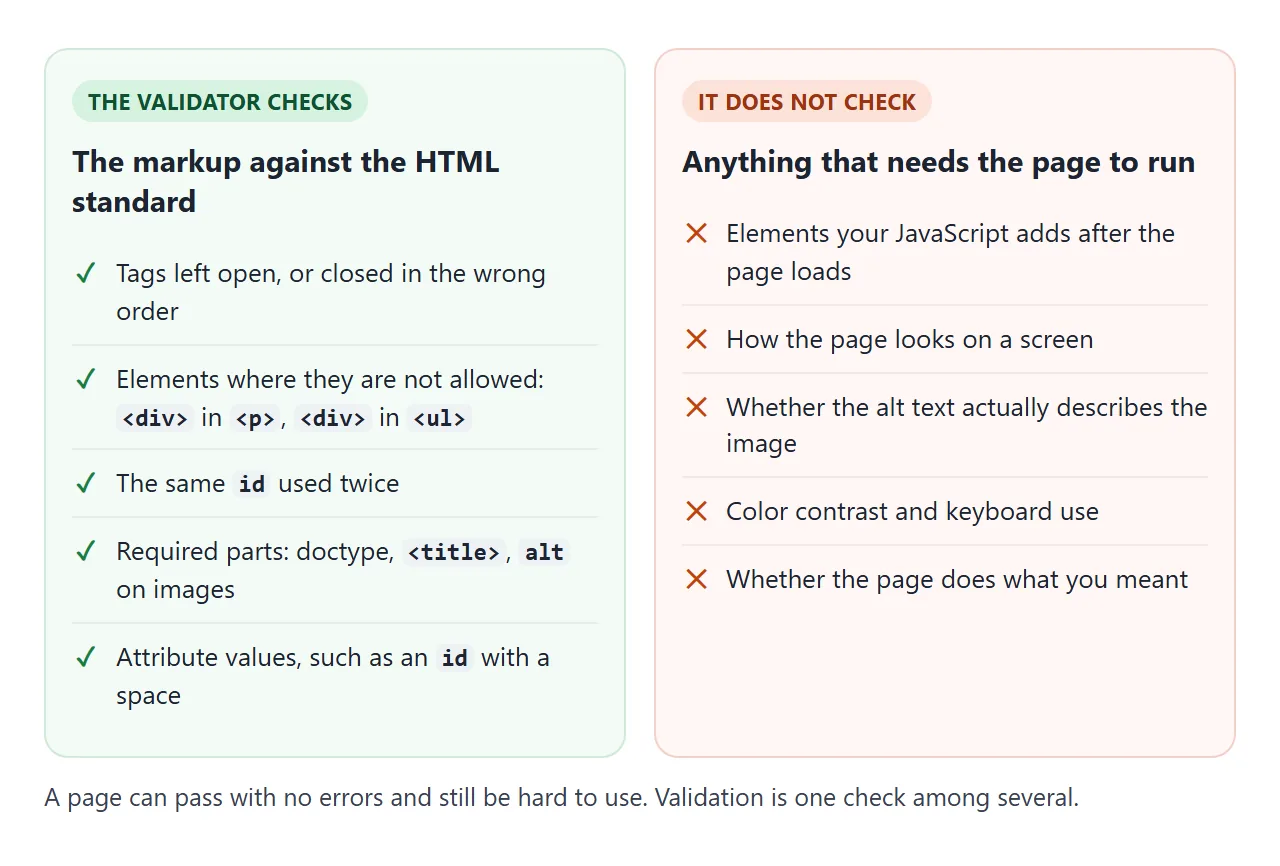
There are three ways in: a web address, a file upload, or a text box you paste into. For a single file, paste the whole thing, doctype included, so the checker sees the same start as a browser.
The same service answers scripts. This command sends a file and gets the messages back as JSON:
curl -H "Content-Type: text/html; charset=utf-8" \
  --data-binary @page.html \
  "https://validator.w3.org/nu/?out=json"
Each message has a type (error or info), a line number and the text. The checker also runs offline as vnu.jar if you have Java.
The errors that come up again and again
The messages below are what the Nu checker returned for small test files on 2026-09-26. The last column is what the browser does with the same markup.
| Mistake | What the validator says | What the browser does |
|---|---|---|
<div> inside <p> |
No “p” element in scope but a “p” end tag seen. | Closes the paragraph at the <div>, makes an empty <p> from the </p> |
<b> never closed |
Unclosed element “b”. | Keeps bold running into later text |
Same id twice |
Duplicate ID “box”. | Keeps both; lookups find only the first |
<img> without alt |
An “img” element must have an “alt” attribute, except under certain conditions. | Shows the image; screen readers get no text for it |
| Link inside a link | Start tag “a” seen but an element of the same type was already open. | Closes the first link before the second |
| Text between table rows | Misplaced non-space characters inside a table. | Moves the text above the table |
A paragraph inside a paragraph is a special case. <p>One<p>Two is valid, because the end tag of <p> is optional and the second one ends the first. The validator only complains when a </p> then has nothing left to close.
For the image error, the fix is text that says what the image shows, or alt="" for pure decoration. Alt text in HTML covers what to write.
Why the page still looked fine
The HTML parser has a rule for every mistake. It never stops and never shows an error. That is why broken markup still renders, and why the result can differ from what you meant.
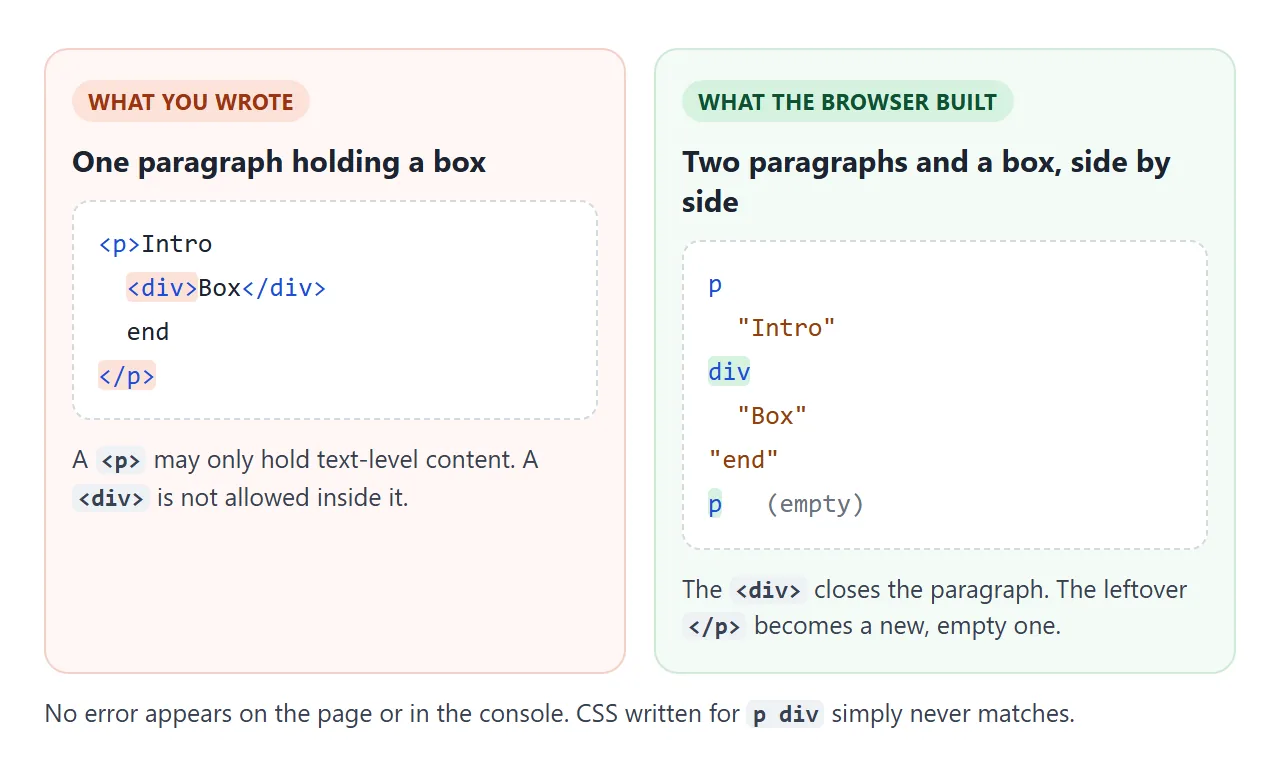
The damage shows up elsewhere: a style that does not apply, a querySelector that finds nothing, a bold run that spreads into the next paragraph. The page tree is covered in the DOM, with live examples.
DOMParser makes the repair visible from a script. Parsed as HTML it always succeeds. Parsed as XML, the same broken string produces an error element instead:
const bad = '<p><b></p>';
new DOMParser().parseFromString(bad, 'text/html')
  .querySelector('parsererror');        // null: repaired quietly
new DOMParser().parseFromString(bad, 'application/xml')
  .querySelector('parsererror');        // an element: XML refuses it
Duplicate ids break more than lookups
Two elements with one id both stay in the page. getElementById returns the first, and so does a <label for> pointing at that id. In a form, clicking the second label puts the cursor in the wrong box.
<!doctype html>
<html lang="en">
<head>
<meta charset="utf-8">
<meta name="viewport" content="width=device-width, initial-scale=1">
<title>Duplicate ids</title>
<style>
  body { margin: 0; padding: 14px; font-family: system-ui, sans-serif; background: #f4f5f7; color: #1d2330; }
  .cols { display: grid; grid-template-columns: 1fr 1fr; gap: 10px; }
  @media (max-width: 520px) { .cols { grid-template-columns: 1fr; } }
  form { background: #fff; border-radius: 10px; padding: 12px; border: 2px solid #f3d1c8; }
  form.good { border-color: #cfe9d7; }
  h3 { font-size: 14px; margin: 0 0 8px; }
  label { display: block; font-size: 13px; margin-top: 8px; cursor: pointer; text-decoration: underline dotted; }
  input { box-sizing: border-box; width: 100%; font: inherit; padding: 6px 8px; margin-top: 3px; border: 1px solid #cfd5de; border-radius: 6px; }
  input:focus { outline: 3px solid #2563eb; }
  .out { font: 12.5px/1.5 ui-monospace, Consolas, monospace; margin-top: 10px; min-height: 3em; }
</style>
</head>
<body>
<div class="cols">
  <form id="bad">
    <h3>Same id twice</h3>
    <label for="email">Home email</label>
    <input id="email">
    <label for="email">Work email</label>
    <input id="email">
    <div class="out"></div>
  </form>
  <form id="good" class="good">
    <h3>Unique ids</h3>
    <label for="home">Home email</label>
    <input id="home">
    <label for="work">Work email</label>
    <input id="work">
    <div class="out"></div>
  </form>
</div>
<p style="font-size:13px">Click <b>Work email</b> in each form and watch which box gets the cursor.</p>

<script>
  // Report which input received focus, and what getElementById sees
  for (const form of document.forms) {
    const out = form.querySelector('.out');
    form.addEventListener('focusin', (e) => {
      const inputs = [...form.querySelectorAll('input')];
      const which = inputs.indexOf(e.target) === 0 ? 'the FIRST box' : 'the SECOND box';
      const id = e.target.id;
      const count = document.querySelectorAll('#' + id).length;
      out.textContent = 'Focused ' + which + '.\n' +
        'Elements with id="' + id + '": ' + count + '\n' +
        'getElementById returns the ' + (document.getElementById(id) === e.target ? 'focused box' : 'other box');
      out.style.whiteSpace = 'pre-line';
    });
  }
</script>
</body>
</html>
Copying a block without renaming its ids is one way it happens. If you need the same hook on many elements, use a class. id vs class explains when each one fits, and HTML label covers the for link.
Reading the validator's messages
Each message gives the error, a line and column range, and a short extract with the problem highlighted. The line is where the parser noticed, which is not always where the mistake is.
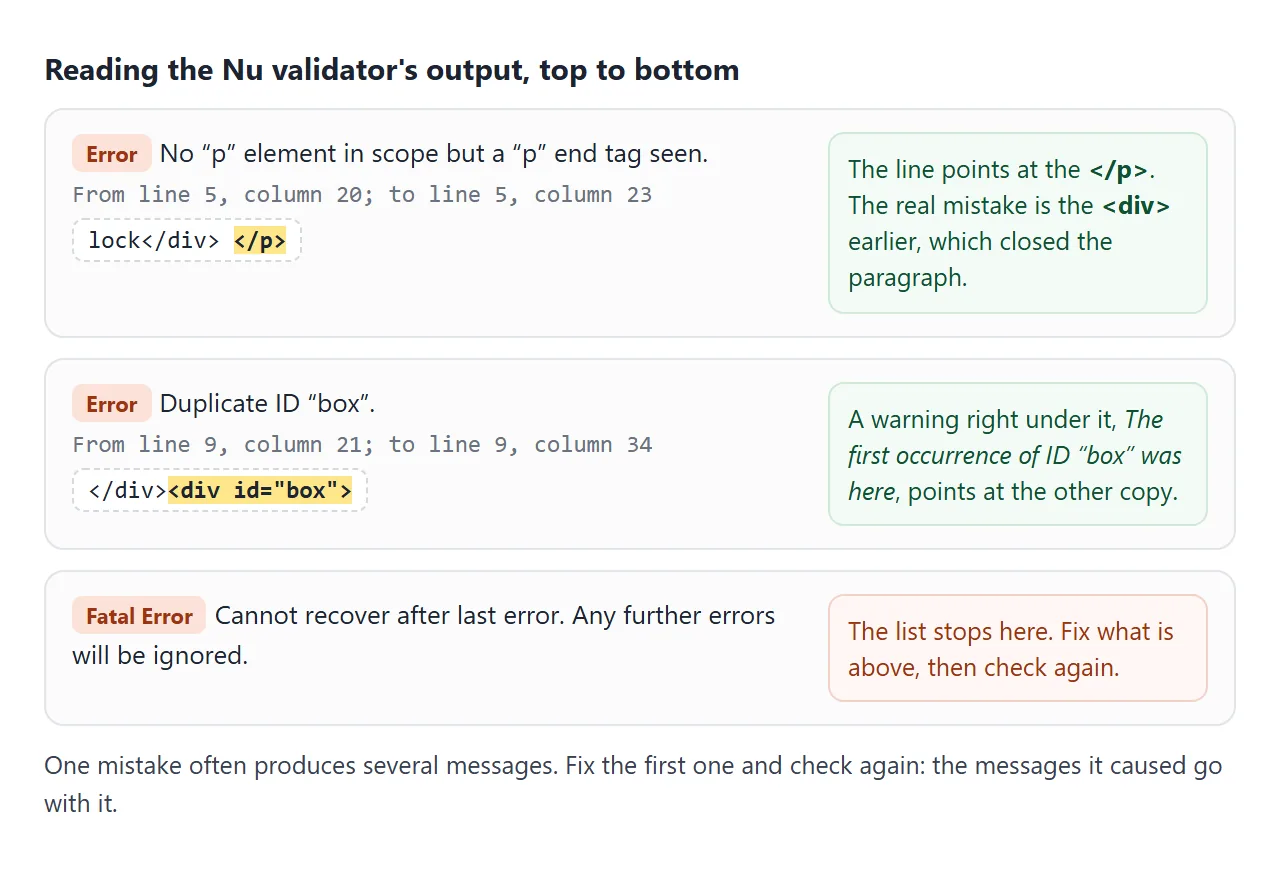
Work from the top. One mistake can produce several messages, and later ones can disappear once the first is fixed.
Text placed directly inside a table stopped the checker in our test with "Cannot recover after last error", so nothing after it was reported until that was fixed.
A small checker you can run in the page
The last example is a checker in one script block. It walks the tags in the source to catch unclosed and stray tags, then uses DOMParser for duplicate ids, images without alt, the title and lang.
<!doctype html>
<html lang="en">
<head>
<meta charset="utf-8">
<meta name="viewport" content="width=device-width, initial-scale=1">
<title>Small HTML checker</title>
<style>
body { margin: 0; padding: 14px; font-family: system-ui, sans-serif; background: #f4f5f7; color: #1d2330; }
textarea {
box-sizing: border-box; width: 100%; height: 230px; padding: 10px; resize: vertical;
font: 13px/1.5 ui-monospace, Consolas, monospace; border: 1px solid #d5d9e0; border-radius: 8px;
}
.bar { display: flex; gap: 8px; align-items: center; margin: 8px 0; flex-wrap: wrap; }
button { font: inherit; font-size: 14px; padding: 7px 14px; border: 0; border-radius: 8px; background: #1d2330; color: #fff; cursor: pointer; }
#sum { font-size: 13px; color: #555; }
ol { margin: 0; padding: 0; list-style: none; }
li { background: #fff; border-left: 4px solid #c2410c; border-radius: 6px; padding: 7px 10px; margin-bottom: 6px; font-size: 13px; line-height: 1.45; }
li.warn { border-left-color: #ca8a04; }
li.ok { border-left-color: #16a34a; }
li b { font-family: ui-monospace, Consolas, monospace; font-weight: 600; }
</style>
</head>
<body>
<textarea id="src" spellcheck="false"><!doctype html>
<html>
<head><title>Team page</title></head>
<body>
<p>Our team <div class="card">Ana</div></p>
<img src="ana.png">
<div id="card">Ben</div>
<div id="card">Cy</div>
<p>Contact <b>us today</p>
<section>Footer
</body>
</html></textarea>
<div class="bar"><button id="run">Check</button><span id="sum"></span></div>
<ol id="out"></ol>
<script>
const VOID = /^(area|base|br|col|embed|hr|img|input|link|meta|source|track|wbr)$/;
// End tags the HTML standard lets you leave out
const OPTIONAL = /^(html|head|body|p|li|dt|dd|tr|td|th|thead|tbody|tfoot|option|optgroup|colgroup|caption|rt|rp)$/;
// Starting one of these closes an open <p>
const CLOSES_P = /^(address|article|aside|blockquote|details|div|dl|fieldset|figure|footer|form|h[1-6]|header|hr|main|nav|ol|p|pre|section|table|ul)$/;
function check(html) {
const found = [];
const line = (i) => html.slice(0, i).split('\n').length;
const add = (kind, i, msg) => found.push({ kind, line: line(i), msg });
const stack = []; // open elements: { name, at }
const re = /<!--[\s\S]*?-->|<!doctype[^>]*>|<(\/?)([a-zA-Z][\w-]*)([^>]*)>/gi;
let m;
while ((m = re.exec(html))) {
const [, slash, raw, attrs] = m;
if (!raw) continue; // comment or doctype
const name = raw.toLowerCase();
if (!slash) {
if (CLOSES_P.test(name) && stack.length && stack.at(-1).name === 'p') {
// <p> after <p> is allowed: the end tag is optional
if (name !== 'p') add('warn', m.index, '<b><' + name + '></b> inside <b><p></b>: the browser closes the paragraph here.');
stack.pop();
}
if (name === 'a' && stack.some((e) => e.name === 'a')) add('err', m.index, 'Link inside a link. The browser closes the first <b><a></b>.');
if (/\/\s*$/.test(attrs) && !VOID.test(name)) add('err', m.index, '<b><' + name + '/></b>: the slash is ignored, so this element stays open.');
if (!VOID.test(name)) stack.push({ name, at: m.index });
if (name === 'script' || name === 'style') { // skip their contents
const end = html.toLowerCase().indexOf('</' + name, re.lastIndex);
re.lastIndex = end < 0 ? html.length : end;
}
continue;
}
const k = stack.map((e) => e.name).lastIndexOf(name);
if (k < 0) { add('err', m.index, 'Stray <b></' + name + '></b>: no open <b><' + name + '></b> to close.'); continue; }
for (const e of stack.splice(k).slice(1)) {
if (!OPTIONAL.test(e.name)) add('err', e.at, '<b><' + e.name + '></b> is never closed.');
}
}
for (const e of stack) if (!OPTIONAL.test(e.name)) add('err', e.at, '<b><' + e.name + '></b> is never closed.');
// Checks that are easier on the parsed tree
const doc = new DOMParser().parseFromString(html, 'text/html');
const seen = {};
doc.querySelectorAll('[id]').forEach((el) => { seen[el.id] = (seen[el.id] || 0) + 1; });
for (const id in seen) if (seen[id] > 1) add('err', html.indexOf('id="' + id + '"', html.indexOf('id="' + id + '"') + 1), 'Duplicate id <b>' + id + '</b> (' + seen[id] + ' elements).');
doc.querySelectorAll('img:not([alt])').forEach((img) => add('err', html.indexOf(img.getAttribute('src') || '<img'), '<b><img></b> without an alt attribute.'));
if (!/^\s*<!doctype html>/i.test(html)) add('err', 0, 'No <b><!doctype html></b> on the first line.');
if (!doc.title) add('err', 0, 'No <b><title></b>.');
if (!doc.documentElement.hasAttribute('lang') && /<html/i.test(html)) add('warn', html.search(/<html/i), 'No <b>lang</b> on <html>.');
return found.sort((a, b) => a.line - b.line);
}
document.getElementById('run').addEventListener('click', () => {
const list = check(document.getElementById('src').value);
const out = document.getElementById('out');
out.innerHTML = list.length ? '' : '<li class="ok">No problems found by these checks.</li>';
for (const f of list) {
const li = document.createElement('li');
li.className = f.kind;
li.innerHTML = 'Line ' + f.line + ': ' + f.msg;
out.append(li);
}
document.getElementById('sum').textContent = list.length + ' found';
});
document.getElementById('run').click();
</script>
</body>
</html>
How it works:
- Tag walk: a regular expression finds each start and end tag. Start tags go on a stack, end tags pop it. Anything popped without its own end tag is reported.
- Optional end tags:
p,li,tdand similar are allowed to stay open, so they are skipped. - Tree checks:
querySelectorAll('[id]')counts ids, and theimg:not([alt])selector finds missing alt.
It catches five of the six errors in the table (not text between table rows) plus a missing doctype, title or lang. It is not the whole standard. Use it for a quick pass while you edit, and the Nu checker before you publish.
When it does not work
| What you see | Cause | Fix |
|---|---|---|
| "No p element in scope" on a line that looks fine | A block element earlier in the paragraph already closed it | Change the <p> to a <div>, or move the block out |
| The validator stops partway with "Cannot recover" | A fatal error, such as text between table rows | Fix that line and check again |
| Errors about elements you never wrote | The address served a different page, such as a login or error page | Paste the final HTML into the text input |
| No errors, but the page still looks broken | The validator does not check CSS results or scripts | Inspect the live tree in the developer tools |
| Clicking a label focuses the wrong field | Two elements share the id |
Give each field its own id |
A warning about lang |
<html> has no language |
Add lang="en" (or your language) to <html> |
Share it as a link
A validator report is easier to act on when the reader can see the page it describes. A screenshot shows one state, and an .html attachment may open as plain code on a phone.
To send the working version, paste the page into a NOS document and choose Create share link. HTML to link walks through it.
The page renders as written and its scripts run, so the checker above works for whoever opens it. If you change the code later, the same link shows the new version.