Here, "amp" means AMP HTML, the restricted HTML format from the AMP project, not the & character and not an audio amplifier. The AMP spec describes it as a subset of HTML.
A valid AMP page is a single HTML file that follows a fixed list of rules.
Start with the rules. This checker reads a page and ticks off the markup requirements from the spec. Load the plain page to see what fails, or edit the AMP sample and watch the count change.
<!doctype html>
<html lang="en">
<head>
<meta charset="utf-8">
<meta name="viewport" content="width=device-width, initial-scale=1">
<title>AMP HTML rule checker</title>
<style>
  * { box-sizing: border-box; }
  body { margin: 0; padding: 12px; font-family: system-ui, sans-serif; background: #f4f5f7; color: #1d2330; }
  .bar { display: flex; gap: 8px; flex-wrap: wrap; margin-bottom: 8px; }
  button { font: inherit; font-size: 13px; padding: 6px 10px; border: 1px solid #c9ced8; background: #fff; border-radius: 8px; cursor: pointer; }
  button:hover { background: #eef1f5; }
  textarea { width: 100%; height: 150px; font: 12px/1.4 ui-monospace, Consolas, monospace; padding: 8px; border: 1px solid #c9ced8; border-radius: 8px; resize: vertical; }
  #sum { margin: 10px 0 6px; font-weight: 600; font-size: 14px; }
  ul { list-style: none; margin: 0; padding: 0; }
  li { display: flex; gap: 8px; padding: 5px 8px; margin-bottom: 4px; border-radius: 6px; font-size: 13px; line-height: 1.35; background: #fff; border-left: 4px solid; }
  li.ok { border-color: #1a8f4c; } li.no { border-color: #d9701c; background: #fff7f0; }
  li b { flex: 0 0 18px; }
  li.ok b { color: #1a8f4c; } li.no b { color: #d9701c; }
  small { display: block; color: #6b7280; margin-top: 8px; font-size: 12px; }
</style>
</head>
<body>
<div class="bar">
  <button id="amp" type="button">Load AMP sample</button>
  <button id="plain" type="button">Load plain page</button>
</div>
<textarea id="src" spellcheck="false" aria-label="Page source"></textarea>
<div id="sum"></div>
<ul id="out"></ul>
<small>A teaching checker for the rules in the AMP HTML spec. It is not the official validator.</small>

<script>
  const AMP = `<!doctype html>
<html amp lang="en">
<head>
<meta charset="utf-8">
<script async src="https://cdn.ampproject.org/v0.js"><\/script>
<title>Hello, AMPs</title>
<link rel="canonical" href="https://example.com/hello.html">
<meta name="viewport" content="width=device-width,minimum-scale=1,initial-scale=1">
<style amp-boilerplate>body{-webkit-animation:-amp-start 8s steps(1,end) 0s 1 normal both;-moz-animation:-amp-start 8s steps(1,end) 0s 1 normal both;-ms-animation:-amp-start 8s steps(1,end) 0s 1 normal both;animation:-amp-start 8s steps(1,end) 0s 1 normal both}@-webkit-keyframes -amp-start{from{visibility:hidden}to{visibility:visible}}@-moz-keyframes -amp-start{from{visibility:hidden}to{visibility:visible}}@-ms-keyframes -amp-start{from{visibility:hidden}to{visibility:visible}}@-o-keyframes -amp-start{from{visibility:hidden}to{visibility:visible}}@keyframes -amp-start{from{visibility:hidden}to{visibility:visible}}</style><noscript><style amp-boilerplate>body{-webkit-animation:none;-moz-animation:none;-ms-animation:none;animation:none}</style></noscript>
</head>
<body>
<h1>Hello AMPHTML World!</h1>
</body>
</html>`;

  const PLAIN = `<!doctype html>
<html lang="en">
<head>
<meta charset="utf-8">
<title>My page</title>
<style>h1 { color: red !important; }</style>
<script src="app.js"><\/script>
</head>
<body>
<h1>Hello</h1>
<img src="photo.jpg" width="600" height="400" alt="Photo">
</body>
</html>`;

  const src = document.getElementById('src');
  const out = document.getElementById('out');
  const sum = document.getElementById('sum');
  const bytes = (s) => new TextEncoder().encode(s).length;

  function run() {
    const text = src.value;
    const doc = new DOMParser().parseFromString(text, 'text/html');
    const head = doc.head;
    const root = doc.documentElement;
    const hasAmpAttr = root.getAttributeNames().some((n) => n === 'amp' || n.startsWith('⚡'));
    const first = head.firstElementChild;
    const viewport = head.querySelector('meta[name="viewport"]');
    const runtime = head.querySelector('script[async][src="https://cdn.ampproject.org/v0.js"]');
    const customStyles = doc.querySelectorAll('style[amp-custom]');
    let cssText = '';
    customStyles.forEach((s) => { cssText += s.textContent; });
    doc.querySelectorAll('[style]').forEach((el) => { cssText += el.getAttribute('style'); });
    let allCss = cssText;
    doc.querySelectorAll('style:not([amp-boilerplate]):not([amp-custom])').forEach((s) => { allCss += s.textContent; });
    const badScripts =[...doc.querySelectorAll('script')].filter((s) => {
      const t = (s.getAttribute('type') || '').toLowerCase();
      const fromAmp = (s.getAttribute('src') || '').startsWith('https://cdn.ampproject.org/');
      return !fromAmp && !['application/ld+json', 'application/json', 'text/plain'].includes(t);
    });
    const banned = ['img', 'video', 'iframe'].filter((t) => doc.querySelector(t));
    const formNeedsExt = doc.querySelector('form') && !doc.querySelector('script[custom-element="amp-form"]');

    const checks = [
      [/^\s*<!doctype html>/i.test(text), 'Starts with <!doctype html>'],
      [hasAmpAttr, 'The html tag has the amp attribute (or the lightning-bolt one)'],
      [/<head[\s>]/i.test(text) && /<body[\s>]/i.test(text), 'Has explicit head and body tags'],
      [!!first && first.matches('meta[charset]'), 'meta charset is the first thing in head'],
      [!!viewport && /width=device-width/.test(viewport.content), 'Viewport meta contains width=device-width'],
      [!!head.querySelector('link[rel="canonical"]'), 'Has link rel="canonical"'],
      [!!runtime, 'Loads https://cdn.ampproject.org/v0.js with async'],
      [!!head.querySelector('style[amp-boilerplate]') && /<noscript>\s*<style amp-boilerplate>/i.test(text), 'Has both amp-boilerplate style blocks'],
      [badScripts.length === 0, 'No author scripts (' + badScripts.length + ' found)'],
      [banned.length === 0, 'No img, video or iframe tags (' + (banned.join(', ') || 'none') + ' found)'],
      [!formNeedsExt, 'A form needs the amp-form extension script'],
      [customStyles.length <= 1, 'At most one style amp-custom tag (' + customStyles.length + ' found)'],
      [bytes(cssText) <= 75000, 'Author CSS is 75,000 bytes or less (' + bytes(cssText) + ' bytes)'],
      [!/!\s*important/i.test(allCss), 'No !important in author CSS'],
    ];

    out.innerHTML = '';
    let pass = 0;
    checks.forEach(([ok, label]) => {
      if (ok) pass++;
      const li = document.createElement('li');
      li.className = ok ? 'ok' : 'no';
      const mark = document.createElement('b');
      mark.textContent = ok ? '✓' : '✗';
      li.append(mark, label);
      out.append(li);
    });
    sum.textContent = pass + ' of ' + checks.length + ' checks pass';
  }

  document.getElementById('amp').addEventListener('click', () => { src.value = AMP; run(); });
  document.getElementById('plain').addEventListener('click', () => { src.value = PLAIN; run(); });
  src.addEventListener('input', run);
  src.value = AMP;
  run();
</script>
</body>
</html>
What AMP HTML is
AMP HTML keeps normal HTML syntax. What changes is what a file must contain and what it may not contain. The spec says the format exists to guarantee certain baseline performance characteristics.
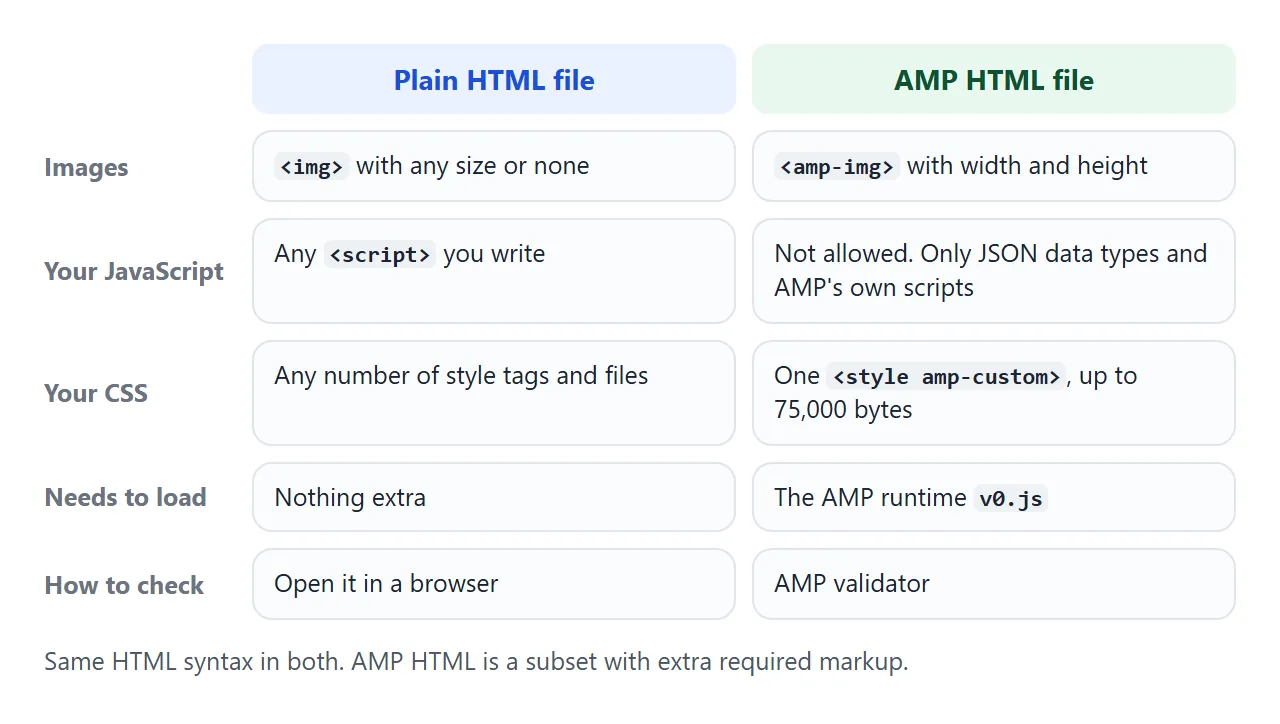
Because the file has to follow fixed rules, a validator can answer yes or no. That is what sets it apart from a free-form page.
The smallest AMP page
This is the starter page from the AMP docs. Every line in the head is required, and the page itself is only a heading.
<!doctype html>
<html amp lang="en">
  <head>
    <meta charset="utf-8">
    <script async src="https://cdn.ampproject.org/v0.js"></script>
    <title>Hello, AMPs</title>
    <link rel="canonical" href="https://example.com/hello.html">
    <meta name="viewport" content="width=device-width,minimum-scale=1,initial-scale=1">
    <style amp-boilerplate>body{-webkit-animation:-amp-start 8s steps(1,end) 0s 1 normal both;-moz-animation:-amp-start 8s steps(1,end) 0s 1 normal both;-ms-animation:-amp-start 8s steps(1,end) 0s 1 normal both;animation:-amp-start 8s steps(1,end) 0s 1 normal both}@-webkit-keyframes -amp-start{from{visibility:hidden}to{visibility:visible}}@-moz-keyframes -amp-start{from{visibility:hidden}to{visibility:visible}}@-ms-keyframes -amp-start{from{visibility:hidden}to{visibility:visible}}@-o-keyframes -amp-start{from{visibility:hidden}to{visibility:visible}}@keyframes -amp-start{from{visibility:hidden}to{visibility:visible}}</style><noscript><style amp-boilerplate>body{-webkit-animation:none;-moz-animation:none;-ms-animation:none;animation:none}</style></noscript>
  </head>
  <body>
    <h1>Hello AMPHTML World!</h1>
  </body>
</html>
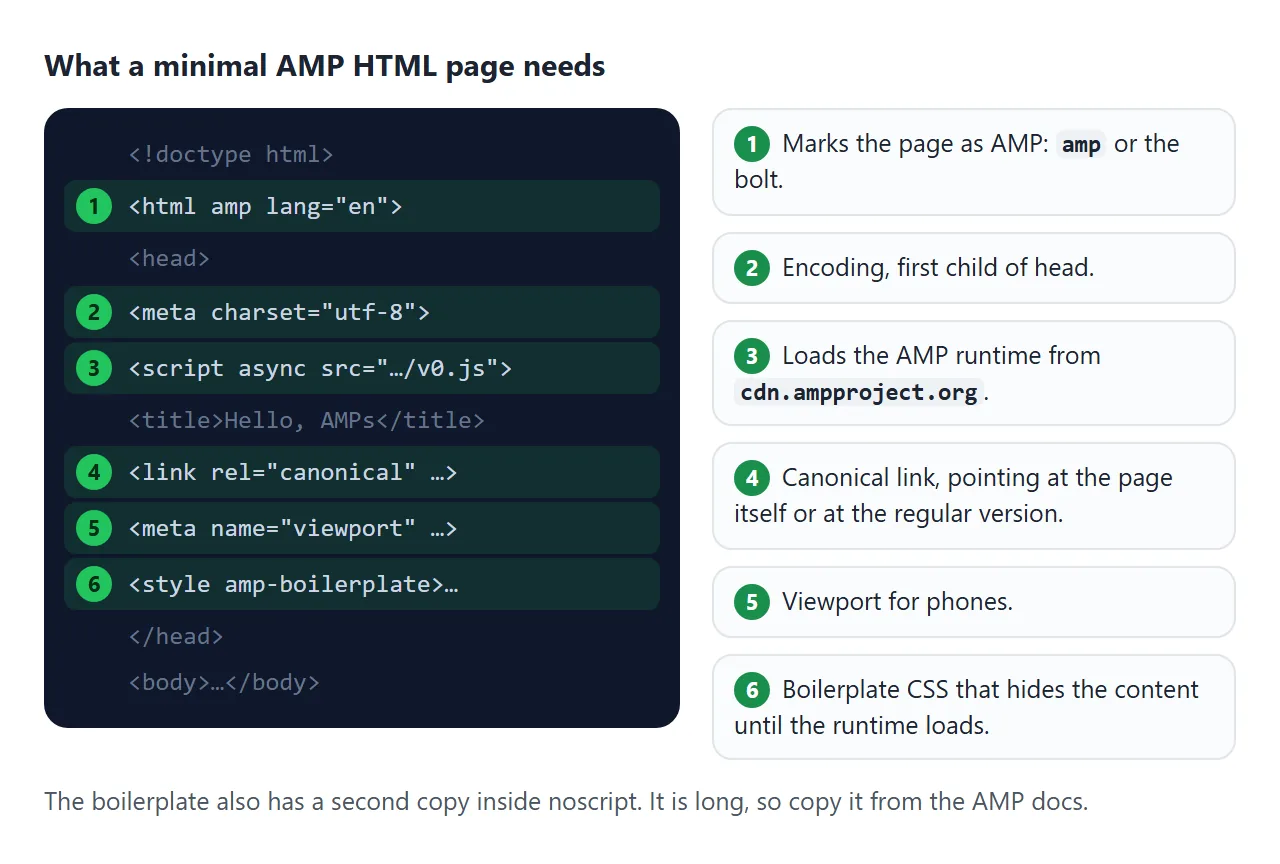
The canonical link should point to the page itself, as here, or to the regular HTML version of the same content.
When an AMP page is an alternative version of a normal page, the normal page links to it with a link tag whose rel is amphtml.
Why images need a width and a height
In AMP, an image is written with the amp-img tag, and every one needs a size in advance. The docs say the size lets the runtime know the aspect ratio without fetching the image.
<amp-img alt="A view of the sea" src="sea.jpg"
         width="900" height="675" layout="responsive"></amp-img>
The idea is not unique to AMP. MDN says that giving an img both width and height lets the browser calculate its aspect ratio before the image loads, and reserve the space. Try it. Both pictures arrive at the same moment.
<!doctype html>
<html lang="en">
<head>
<meta charset="utf-8">
<meta name="viewport" content="width=device-width, initial-scale=1">
<title>Reserve space for images</title>
<style>
  * { box-sizing: border-box; }
  body { margin: 0; padding: 12px; font-family: system-ui, sans-serif; background: #f4f5f7; color: #1d2330; }
  .bar { display: flex; gap: 8px; align-items: center; margin-bottom: 10px; flex-wrap: wrap; }
  button { font: inherit; font-size: 14px; padding: 7px 12px; border: 1px solid #c9ced8; background: #fff; border-radius: 8px; cursor: pointer; }
  .cols { display: grid; grid-template-columns: 1fr 1fr; gap: 10px; }
  @media (max-width: 520px) { .cols { grid-template-columns: 1fr; } }
  .panel { background: #fff; border-radius: 10px; padding: 10px; border-top: 4px solid; font-size: 14px; line-height: 1.4; }
  .bad { border-color: #d9701c; } .good { border-color: #1a8f4c; }
  h2 { margin: 0 0 6px; font-size: 14px; }
  .panel img { max-width: 100%; height: auto; border-radius: 6px; }
  .moved { margin: 6px 0 0; font-weight: 700; }
  .bad .moved { color: #b45309; } .good .moved { color: #15803d; }
  p { margin: 4px 0; }
</style>
</head>
<body>
<div class="bar">
  <button id="go" type="button">Load both images</button>
  <button id="reset" type="button">Reset</button>
</div>
<div class="cols">
  <div class="panel bad">
    <h2>No width or height</h2>
    <p>Line above the image</p>
    <img id="a" alt="">
    <p id="a-line">This line should stay put.</p>
    <p class="moved" id="a-out">Moved: -</p>
  </div>
  <div class="panel good">
    <h2>width="320" height="180"</h2>
    <p>Line above the image</p>
    <img id="b" width="320" height="180" alt="">
    <p id="b-line">This line should stay put.</p>
    <p class="moved" id="b-out">Moved: -</p>
  </div>
</div>

<script>
  // A 320x180 picture as an inline SVG data URI, so the demo needs no network
  const PIC = 'data:image/svg+xml,' + encodeURIComponent(
    '<svg xmlns="http://www.w3.org/2000/svg" width="320" height="180" viewBox="0 0 320 180">' +
    '<defs><linearGradient id="g" x1="0" y1="0" x2="1" y2="1"><stop offset="0" stop-color="#60a5fa"/>' +
    '<stop offset="1" stop-color="#1d4ed8"/></linearGradient></defs>' +
    '<rect width="320" height="180" fill="url(#g)"/><circle cx="240" cy="55" r="26" fill="#fde68a"/>' +
    '<path d="M0 180 L90 85 L150 140 L210 95 L320 180Z" fill="#0f172a" opacity=".55"/></svg>');

  const pairs = [['a', 'a-line', 'a-out'], ['b', 'b-line', 'b-out']];

  document.getElementById('go').addEventListener('click', () => {
    pairs.forEach(([imgId, lineId, outId]) => {
      const img = document.getElementById(imgId);
      const line = document.getElementById(lineId);
      const panel = line.closest('.panel');
      const offset = () => line.getBoundingClientRect().top - panel.getBoundingClientRect().top;
      const before = offset();
      img.addEventListener('load', () => {
        const after = offset();
        document.getElementById(outId).textContent = 'Moved: ' + Math.round(after - before) + ' px';
      }, { once: true });
      img.src = PIC;   // the "download" finishes now
    });
  });

  document.getElementById('reset').addEventListener('click', () => {
    pairs.forEach(([imgId, , outId]) => {
      document.getElementById(imgId).removeAttribute('src');
      document.getElementById(outId).textContent = 'Moved: -';
    });
  });
</script>
</body>
</html>
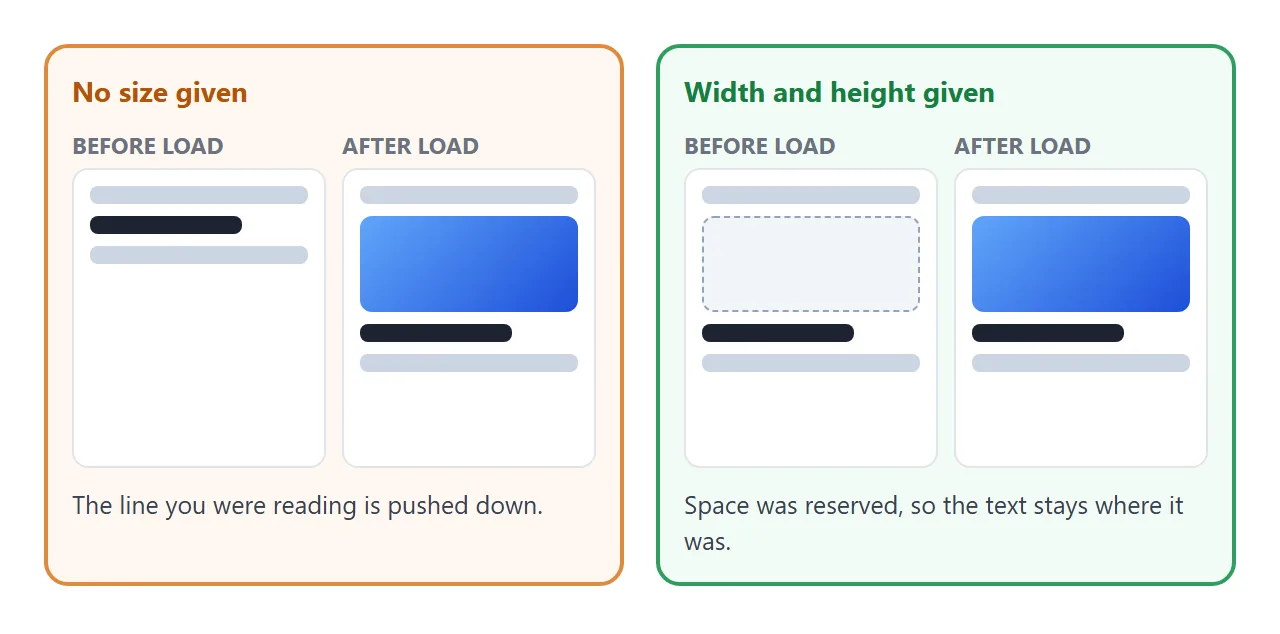
In a plain HTML file you get the same protection with the width and height attributes, or with the CSS aspect-ratio property.
Rules that trip people up
These come straight from the AMP HTML spec. They are easy to break by accident.
- No author scripts. A script tag is prohibited unless its type is
application/ld+json,application/jsonortext/plain. The runtime script and AMP component scripts are the exception. - One custom style tag. Author CSS goes in a single style tag with the
amp-customattribute. - A size limit. The author stylesheet and inline styles together must not exceed 75,000 bytes.
- No
!important. The spec does not allow it, because AMP needs to enforce its element sizing. - Forms need an extension. A form is allowed only if the
amp-formextension is included. - Required head items. Charset first, the runtime script, a canonical link, the viewport meta tag and both boilerplate blocks.
Check it before you publish
The AMP docs describe three ways to validate. Add #development=1 to the page address and read the browser console. Paste the page into the web validator at validator.ampproject.org. Or install the validator command line tool with npm.
Our checker above covers a subset of the rules. Use one of the official routes for a final answer. For plain pages, HTML validator covers the general tools.
Do you need AMP, or just a light page?
You can also write a light page without AMP: one file, one style tag, sized images and no framework. This page shows that approach and measures its own CSS against the AMP limit.
<!doctype html>
<html lang="en">
<head>
<meta charset="utf-8">
<meta name="viewport" content="width=device-width, initial-scale=1">
<title>A light article page</title>
<style id="page-css">
  * { box-sizing: border-box; }
  body { margin: 0; font-family: system-ui, sans-serif; color: #1d2330; background: #fff; line-height: 1.55; }
  main { max-width: 640px; margin: 0 auto; padding: 14px; }
  .hero { width: 100%; aspect-ratio: 2.4 / 1; border-radius: 10px; display: block; }
  h1 { font-size: 22px; line-height: 1.25; margin: 14px 0 4px; }
  .by { color: #6b7280; font-size: 13px; margin: 0 0 10px; }
  p { margin: 0 0 10px; }
  details { border: 1px solid #d9dde3; border-radius: 8px; padding: 8px 10px; margin: 0 0 10px; }
  summary { cursor: pointer; font-weight: 600; }
  .strip { display: flex; gap: 8px; overflow-x: auto; scroll-snap-type: x mandatory; padding-bottom: 6px; margin-bottom: 10px; }
  .strip svg { flex: 0 0 120px; aspect-ratio: 4 / 3; scroll-snap-align: start; border-radius: 8px; }
  .meter { margin-top: 12px; padding: 10px; border-radius: 8px; background: #f4f5f7; font-size: 13px; }
  .track { height: 10px; border-radius: 5px; background: #e1e4ea; margin-top: 6px; overflow: hidden; }
  .fill { height: 100%; background: #1a8f4c; width: 0; }
</style>
</head>
<body>
<main>
  <!-- Reserved box: aspect-ratio keeps the space before anything paints -->
  <svg class="hero" viewBox="0 0 240 100" preserveAspectRatio="xMidYMid slice" role="img" aria-label="Sunrise over hills">
    <rect width="240" height="100" fill="#bfdbfe"/>
    <circle cx="170" cy="42" r="14" fill="#fde68a"/>
    <path d="M0 100 L0 66 L60 40 L120 64 L180 46 L240 68 L240 100Z" fill="#15803d"/>
  </svg>
  <h1>A page that is light by design</h1>
  <p class="by">One file, one style tag, no scripts needed to read it</p>
  <p>Everything above the fold is plain HTML and CSS. The picture has a fixed shape, so the text below it never jumps when it paints.</p>

  <details>
    <summary>Expandable section (no JavaScript)</summary>
    <p>The details element opens and closes on its own. Click the summary again to close it.</p>
  </details>

  <div class="strip" aria-label="Scrollable pictures">
    <svg viewBox="0 0 80 60"><rect width="80" height="60" fill="#fecaca"/><circle cx="40" cy="30" r="14" fill="#ef4444"/></svg>
    <svg viewBox="0 0 80 60"><rect width="80" height="60" fill="#bbf7d0"/><rect x="22" y="16" width="36" height="28" fill="#16a34a"/></svg>
    <svg viewBox="0 0 80 60"><rect width="80" height="60" fill="#ddd6fe"/><path d="M40 12 L64 48 H16Z" fill="#7c3aed"/></svg>
  </div>

  <div class="meter">
    <span id="msg">Measuring...</span>
    <div class="track"><div class="fill" id="bar"></div></div>
  </div>
</main>

<script>
  // Measure this page's own CSS in bytes and compare it with the AMP author-CSS limit
  const LIMIT = 75000;
  const css = document.getElementById('page-css').textContent;
  const size = new TextEncoder().encode(css).length;
  document.getElementById('msg').textContent =
    'This page\'s CSS: ' + size.toLocaleString('en-US') + ' bytes. AMP\'s limit for author CSS: ' + LIMIT.toLocaleString('en-US') + ' bytes.';
  document.getElementById('bar').style.width = Math.max(1, size / LIMIT * 100) + '%';
</script>
</body>
</html>
AMP adds a runtime, a required boilerplate and a validator. Choose it when you want a page that a validator can certify against the AMP rules, or when a platform asks for that format. Otherwise page performance basics go a long way.
When it does not work
| Symptom | Cause | Fix |
|---|---|---|
| Validator says the script tag is not allowed | An author script is in the page | Remove it, or use an AMP component |
| Validator rejects an img tag | AMP uses its own image tag | Switch to amp-img with width and height |
| Page content is hidden | The runtime did not load, so the boilerplate still hides the body | Check the v0.js script tag and that its address is reachable |
| CSS error about size | Author CSS plus inline styles passed 75,000 bytes | Trim the CSS |
CSS error about !important |
The spec does not allow it | Raise selector specificity instead |
| Canonical error | The canonical link is missing | Point it at the page itself or at the regular version |
Share it as a link
An AMP file needs the AMP runtime from cdn.ampproject.org. That address is not one of the script hosts a NOS page can load from, so a real AMP page pasted into NOS will not behave as AMP.
The rule checker and the plain light page above are different: they need nothing outside the file.
To share a plain-HTML version, paste the page into a NOS document and choose Create share link. HTML to link walks through it. The page renders as written and its scripts run, so the people you send it to can try the checker themselves.
If you change the code later, the same link shows the new version. Pair it with a canonical link if the same content lives at more than one address.