An Airbnb welcome guide is one short page that answers what a guest needs in the first hour: the wifi, how to get in, what is odd about the place, how to check out and where to eat.
A guest arriving somewhere new wants those answers on a phone, in that order.
Build it as a web page with its own link. When the wifi password changes, you edit one line instead of sending a new file to everyone.
Here is a complete guide for a made-up flat. Tap the copy button, and tick the checkout list.
<!doctype html>
<html lang="en">
<head>
<meta charset="utf-8">
<meta name="viewport" content="width=device-width, initial-scale=1">
<title>Welcome to Linden Row Flat</title>
<style>
  * { box-sizing: border-box; }
  body { margin: 0; font-family: system-ui, sans-serif; background: #f3f6f4; color: #1f2a26; }
  .wrap { max-width: 560px; margin: 0 auto; padding: 22px 16px 30px; }
  h1 { font-size: 25px; margin: 0 0 4px; }
  .sub { margin: 0; color: #5a6b64; font-size: 14.5px; line-height: 1.45; }
  .updated { display: inline-block; margin-top: 10px; padding: 4px 10px; border-radius: 99px; background: #dcebe3; color: #24513d; font-size: 12.5px; font-weight: 600; }
  .card { background: #fff; border: 1px solid #dde6e1; border-radius: 14px; padding: 15px 16px; margin-top: 14px; }
  h2 { font-size: 13px; text-transform: uppercase; letter-spacing: 1.1px; color: #2f7a57; margin: 0 0 10px; }
  .k { font-size: 12.5px; color: #6b7c75; margin: 0 0 2px; }
  .net { font-size: 18px; font-weight: 700; margin: 0 0 10px; }
  .pass { display: block; font: 700 21px/1.3 ui-monospace, Consolas, monospace; letter-spacing: .06em; background: #eef4f0; border-radius: 8px; padding: 10px 12px; user-select: all; word-break: break-all; }
  .copy { margin-top: 10px; font: inherit; font-size: 14px; padding: 9px 14px; border: 0; border-radius: 8px; background: #2f7a57; color: #fff; cursor: pointer; }
  .msg { font-size: 13px; color: #24513d; margin-left: 8px; }
  ul { margin: 0; padding-left: 19px; }
  li { margin: 0 0 8px; font-size: 15px; line-height: 1.45; }
  li:last-child { margin-bottom: 0; }
  .check { list-style: none; padding: 0; }
  .check li { margin: 0; }
  .check label { display: flex; gap: 10px; align-items: flex-start; padding: 9px 0; border-bottom: 1px solid #edf2ef; font-size: 15px; line-height: 1.4; cursor: pointer; }
  .check li:last-child label { border-bottom: 0; }
  .check input { width: 20px; height: 20px; margin: 1px 0 0; flex: none; accent-color: #2f7a57; }
  .prog { font-size: 13px; color: #5a6b64; margin: 10px 0 0; }
  .help { background: #fff8ec; border-color: #f0dfbf; }
  .help h2 { color: #92600e; }
  .help p { margin: 0 0 6px; font-size: 15px; line-height: 1.45; }
  .help p:last-child { margin: 0; }
</style>
</head>
<body>
<div class="wrap">
  <h1>Welcome to Linden Row Flat</h1>
  <p class="sub">Everything you asked about before you asked it. Read the first two boxes now; the rest can wait.</p>
  <span class="updated">Updated 1 October 2026</span>

  <div class="card">
    <h2>Wifi</h2>
    <p class="k">Network name</p>
    <p class="net">LindenGuest</p>
    <p class="k">Password (tap it to select)</p>
    <code class="pass" id="pass">maple-river-4417</code>
    <button class="copy" id="copy" type="button">Copy password</button><span class="msg" id="msg"></span>
  </div>

  <div class="card">
    <h2>Getting in</h2>
    <ul>
      <li><b>Check-in from 3 pm.</b> The key box is on the wall to the left of the blue door.</li>
      <li>The box code is in your booking messages. Pull the lid up, then slide the key out.</li>
      <li>The flat is on the second floor. The stairs are inside the blue door.</li>
    </ul>
  </div>

  <div class="card">
    <h2>Things in the flat that are not obvious</h2>
    <ul>
      <li><b>Shower:</b> the water runs cold for about half a minute. Leave it running, then turn the lever to the red dot.</li>
      <li><b>Heating:</b> the dial in the hall. Turn it to 3 for a warm evening.</li>
      <li><b>Front door:</b> lift the handle slightly as you turn the key.</li>
      <li><b>Bins:</b> the kitchen bin goes in the green bin in the yard.</li>
    </ul>
  </div>

  <div class="card">
    <h2>Before you leave</h2>
    <ul class="check" id="list">
      <li><label><input type="checkbox"> Check out by 10 am</label></li>
      <li><label><input type="checkbox"> Put used towels in the bath</label></li>
      <li><label><input type="checkbox"> Take the kitchen bin to the yard</label></li>
      <li><label><input type="checkbox"> Turn the heating dial back to 1</label></li>
      <li><label><input type="checkbox"> Close the windows</label></li>
      <li><label><input type="checkbox"> Lock the door and return the key to the box</label></li>
    </ul>
    <p class="prog" id="prog">0 of 6 done</p>
  </div>

  <div class="card help">
    <h2>If something goes wrong</h2>
    <p><b>Message me first.</b> I usually answer within the hour.</p>
    <p>Emergency services in an urgent case: call the local emergency number from your phone.</p>
  </div>
</div>

<script>
  // Copy button: try the clipboard, fall back to selecting the text
  var pass = document.getElementById('pass');
  var msg = document.getElementById('msg');
  document.getElementById('copy').addEventListener('click', function () {
    var done = function () { msg.textContent = 'Copied'; };
    var fallback = function () {
      var r = document.createRange();
      r.selectNodeContents(pass);
      var s = window.getSelection();
      s.removeAllRanges();
      s.addRange(r);
      msg.textContent = 'Selected, now copy it';
    };
    if (navigator.clipboard && navigator.clipboard.writeText) {
      navigator.clipboard.writeText(pass.textContent).then(done, fallback);
    } else {
      fallback();
    }
  });

  // Checkout list: count the ticks
  var boxes = document.querySelectorAll('#list input');
  var prog = document.getElementById('prog');
  function count() {
    var n = 0;
    boxes.forEach(function (b) { if (b.checked) n++; });
    prog.textContent = n === boxes.length ? 'All done. Safe travels.' : n + ' of ' + boxes.length + ' done';
  }
  boxes.forEach(function (b) { b.addEventListener('change', count); });
</script>
</body>
</html>
Every name, time and password in it is invented. Replace them with yours, and the page works the same way.
What goes in the guide, and in what order
Put the things a guest needs soonest at the top, so they are on screen before any scrolling.
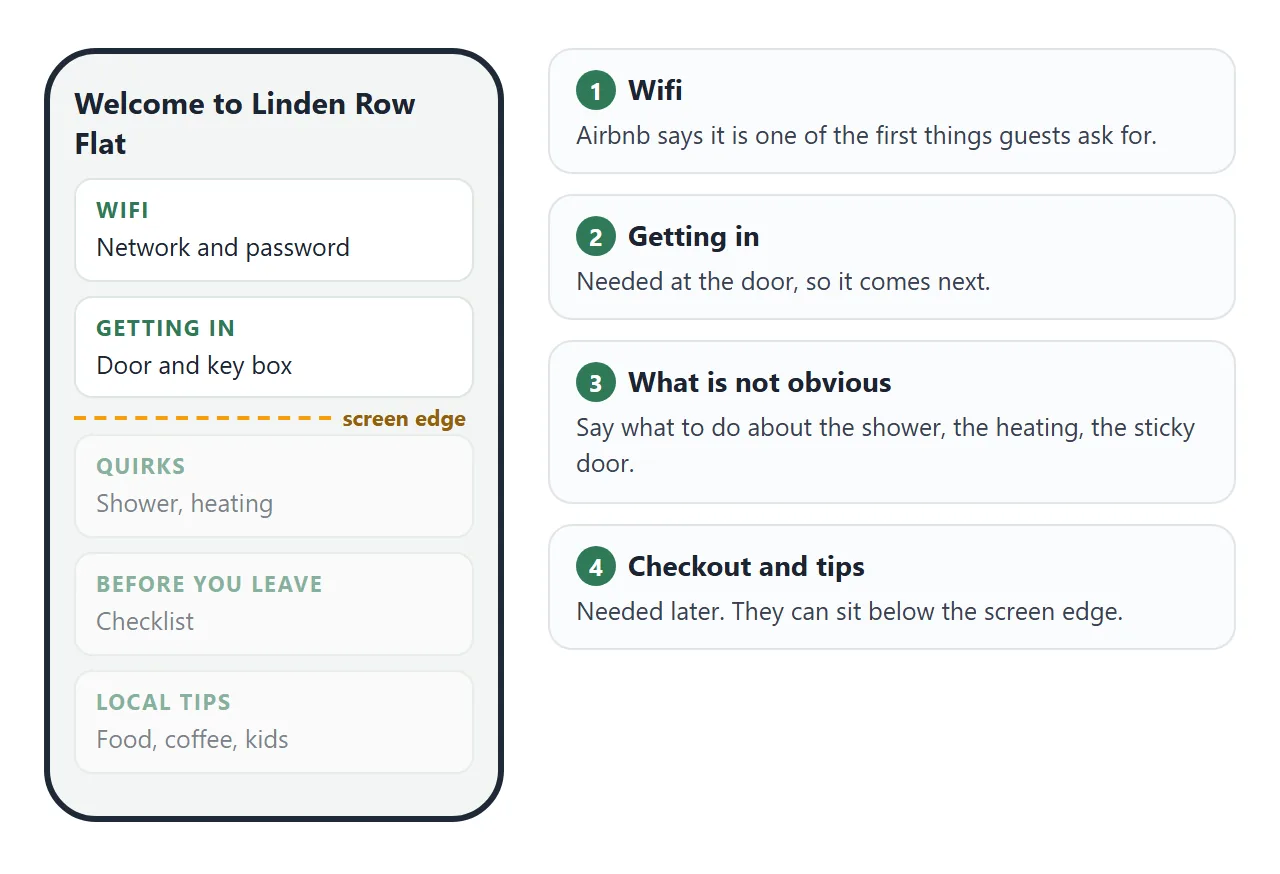
- Wifi. Airbnb's Resource Center says it is one of the first things guests ask for, and suggests putting it at the top of a house manual.
- Getting in. Say where the key box or lock is, and how to work it.
- What is not obvious. The shower, the heating, a door that sticks. Say what to do.
- Checkout. A short list with the time first.
- Local tips. A few places you actually use.
- How to reach you. Say when you usually answer.
Share the password of a guest network, not the one your own devices use. Sharing wifi details as a link covers that choice.
Keep the door code off the page. Anyone with the link can open it and pass it on, and NOS has no password option. Say instead where in the booking the code can be found.
As of October 2026, Airbnb shows guests the detailed check-in instructions 48 hours before check-in.
If you also keep an in-app or printed manual, a house manual for guests covers the same ground from the printed side.
Make it with AI
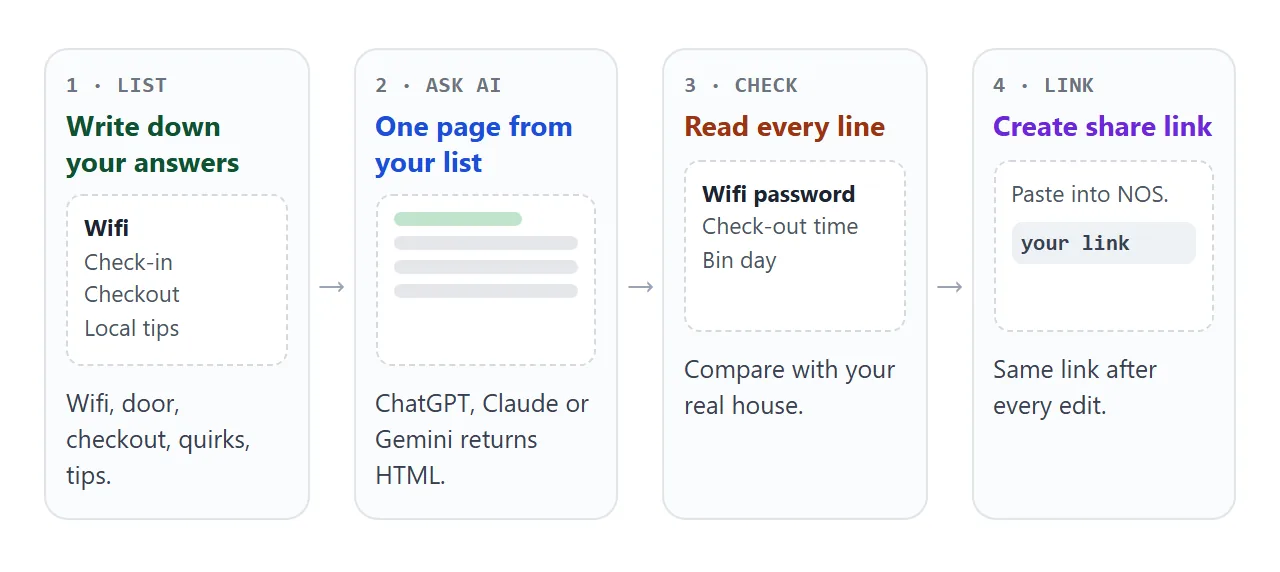
An assistant can turn your notes into the page. Paste this into ChatGPT, Claude or Gemini, and put your own details at the end.
Write one self-contained HTML page: a welcome guide for guests at my
short-term rental, [name of the place].
Make it readable on a phone, 390 px wide. Use only HTML, CSS and a little
JavaScript. No outside files, images or fonts.
Order: wifi, getting in, things that are not obvious, a checkout checklist
with tick boxes, local tips, how to reach me.
Do not put a door code on the page. Say it is in the booking messages.
Under the title add "Updated [date]".
Use only the facts I give you. Do not invent places or times.
My details:
[paste your notes]
Before you use the result, check these:
- The wifi. Letters, capitals and dashes must match your router exactly.
- Times. Check-in, checkout and any quiet hours.
- Local places. AI assistants can invent a cafe. Keep only places you know are real.
- No door code, no full address. Remove them if the assistant added them.
- No outside pictures. A photo linked from another website will not load on the shared page.
Send it as a link
Copy the whole page the assistant gave you and paste it into a NOS document. Choose Create share link. The page shows as you saw it, and its script runs, so the copy button and the checklist work. HTML to link walks through the steps.
Anyone with the link can open it in a browser, on a phone too, with no account. They cannot edit it. If you change the code later, the same link shows the new version.
A guest can tick the checkout list, but their ticks are not saved.
Getting the link to the guest
Airbnb has its own house manual tool, and its Resource Center describes guests opening it in the app. The page is a good fit when you want a layout of your own, or one guide for guests who book in different ways.
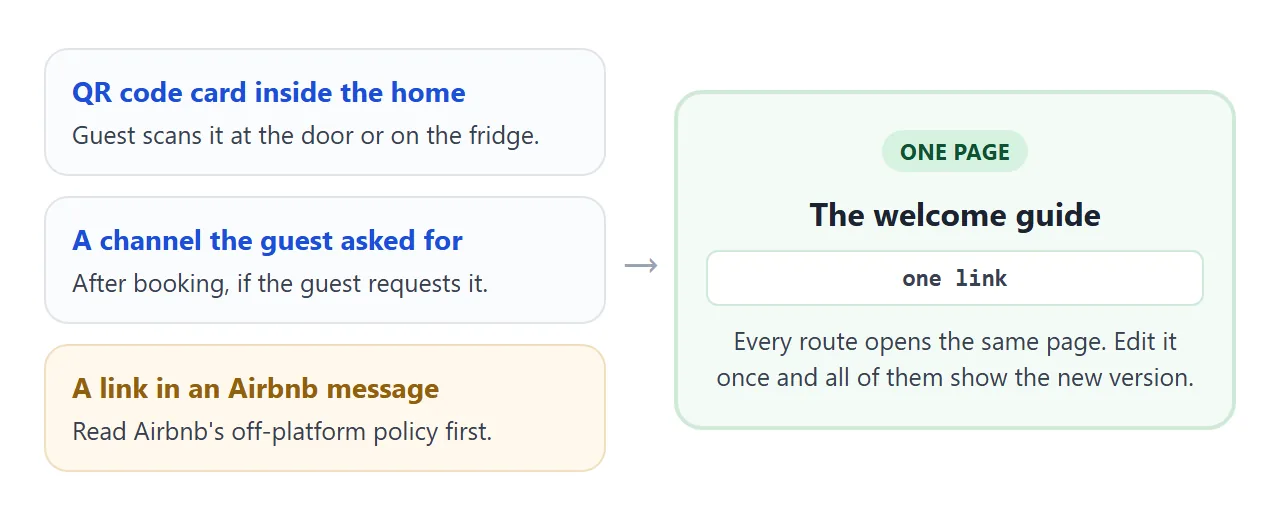
Airbnb's rules about messages matter here. As of October 2026, its Off-Platform and Fee Transparency Policy says that including links that take people off Airbnb in listings or messages is not allowed.
Its page on sending documents says you can share a link to a document hosted on a file-sharing platform such as Google Drive, Dropbox, OneDrive or WeTransfer. A NOS page is not named there, so read both pages before using the link in a message.
The same policy says that after booking, you may use another way of communicating, such as a chat app, if the guest requests it.
| Route | When the guest sees it | Worth knowing |
|---|---|---|
| Airbnb house manual | In the app, any time | Airbnb's own tool, no outside link needed |
| QR code card in the home | After arriving | Needs no message. QR codes that open a link shows how |
| A link in an Airbnb message | Before arrival | Read the off-platform policy first |
| A channel the guest asked for | Before arrival | Only after booking, and only if the guest requests it |
| Printed folder | After arriving | Goes out of date when anything changes |
Airbnb lets you schedule quick replies, for example one day before check-in at 10 am. Its Resource Center suggests 24 to 48 hours before check-in. Use that slot for whatever route you settle on.
Keep it correct
A guide goes wrong in small ways: a cafe closes, the heating dial moves, the wifi changes. Because the page keeps its facts in plain lists, you fix one line and nothing else.
The second example is a local tips page with a filter. Pick a type and the list changes. All the places sit in one list at the top of the code.
<!doctype html>
<html lang="en">
<head>
<meta charset="utf-8">
<meta name="viewport" content="width=device-width, initial-scale=1">
<title>Around Linden Row</title>
<style>
  * { box-sizing: border-box; }
  body { margin: 0; font-family: system-ui, sans-serif; background: #f7f4ee; color: #2a2620; }
  .wrap { max-width: 560px; margin: 0 auto; padding: 22px 16px 28px; }
  h1 { font-size: 24px; margin: 0 0 4px; }
  .sub { margin: 0 0 14px; color: #6d655a; font-size: 14.5px; line-height: 1.45; }
  .chips { display: flex; flex-wrap: wrap; gap: 8px; margin-bottom: 8px; }
  .chips button { font: inherit; font-size: 14px; padding: 8px 14px; border: 1px solid #d8cfbf; border-radius: 99px; background: #fff; color: #2a2620; cursor: pointer; }
  .chips button[aria-pressed="true"] { background: #2a2620; border-color: #2a2620; color: #fff; }
  .place { background: #fff; border: 1px solid #e6dfd1; border-radius: 12px; padding: 13px 15px; margin-top: 10px; }
  .top { display: flex; justify-content: space-between; align-items: baseline; gap: 10px; }
  .name { font-size: 16.5px; font-weight: 700; }
  .walk { font-size: 13px; color: #6d655a; white-space: nowrap; }
  .tag { display: inline-block; margin-top: 4px; font-size: 11.5px; font-weight: 700; letter-spacing: .6px; text-transform: uppercase; color: #8a5a1c; }
  .why { margin: 6px 0 0; font-size: 14.5px; line-height: 1.45; color: #403a31; }
  .empty { color: #6d655a; font-size: 14px; }
  .note { margin-top: 16px; font-size: 13px; color: #6d655a; line-height: 1.5; }
</style>
</head>
<body>
<div class="wrap">
  <h1>Around Linden Row</h1>
  <p class="sub">The places I send friends to. Walking times are from the front door.</p>
  <div class="chips" id="chips"></div>
  <div id="list"></div>
  <p class="note">Opening hours change. Check the sign on the door before you set out.</p>
</div>

<script>
  // To add a place, copy one line in PLACES and change the words
  var PLACES = [
    { name: "Pell's Bakery", type: 'Coffee', walk: 4, why: 'Opens early. Ask for the seeded loaf before it sells out.' },
    { name: 'Quay Street Market', type: 'Food', walk: 9, why: 'Stalls for lunch, and a fish counter if you are cooking.' },
    { name: 'The Wren Kitchen', type: 'Food', walk: 12, why: 'Small and friendly. Book a table if there are more than four of you.' },
    { name: 'Corner Grocer', type: 'Shops', walk: 2, why: 'Milk, bread and basics, close to the flat.' },
    { name: 'Hollin Park', type: 'Kids', walk: 7, why: 'A playground with a fenced corner for small children.' },
    { name: 'The Lamp Room Cafe', type: 'Coffee', walk: 6, why: 'Quiet tables and plug sockets if you need to work.' },
    { name: 'Harbour Steps', type: 'Walks', walk: 15, why: 'An easy loop along the water. Good in the evening light.' }
  ];
  var TYPES = ['All', 'Food', 'Coffee', 'Kids', 'Shops', 'Walks'];
  var current = 'All';
  var chips = document.getElementById('chips');
  var list = document.getElementById('list');

  function render() {
    chips.innerHTML = '';
    TYPES.forEach(function (t) {
      var b = document.createElement('button');
      b.type = 'button';
      b.textContent = t;
      b.setAttribute('aria-pressed', t === current ? 'true' : 'false');
      b.addEventListener('click', function () { current = t; render(); });
      chips.appendChild(b);
    });
    var shown = PLACES.filter(function (p) { return current === 'All' || p.type === current; });
    shown.sort(function (a, b) { return a.walk - b.walk; });
    list.innerHTML = '';
    shown.forEach(function (p) {
      var d = document.createElement('div');
      d.className = 'place';
      d.innerHTML = '<div class="top"><span class="name"></span><span class="walk"></span></div>' +
        '<span class="tag"></span><p class="why"></p>';
      d.querySelector('.name').textContent = p.name;
      d.querySelector('.walk').textContent = p.walk + ' min walk';
      d.querySelector('.tag').textContent = p.type;
      d.querySelector('.why').textContent = p.why;
      list.appendChild(d);
    });
  }
  render();
</script>
</body>
</html>
Add a tip each time a guest asks you something. After a few stays the page answers most of what you used to type out.
When it does not work
| What you see | Cause | Fix |
|---|---|---|
| The copy button only selects the text | The browser blocked clipboard access | Ask guests to hold the selected password and copy it |
| A guest cannot open the link | Part of the address was cut off when pasting | Send the whole address again |
| The link will not go through in an Airbnb message | Airbnb's rules limit links in messages | Use the card in the home, or read the policy |
| A photo shows as a blank box | The picture comes from another website, which the shared page blocks | Remove it, or ask for a drawing built into the page |
| A guest sees an old wifi password | They saved a screenshot or a copy | Ask them to open the link again |
| Ticks vanish when the guest reloads | A visitor's ticks are not saved | Treat the list as a reminder, not a record |