Astro here means the web framework from astro.build, not astrology or any other product called Astro. It builds a project into static files. The built index.html is an ordinary page, and with two settings it holds its own styles and script.
Here is a page shaped like one Astro builds: plain HTML, inline styles, and one small script. Click the button.
<!doctype html>
<html lang="en">
<head>
<meta charset="utf-8">
<meta name="viewport" content="width=device-width, initial-scale=1">
<title>Built page</title>
<style>
  /* In an Astro build, small stylesheets are inlined like this */
  body { margin: 0; padding: 18px; font-family: system-ui, sans-serif; background: #f4f5f7; color: #1d2330; }
  body.dark { background: #161b26; color: #e6e9f0; }
  .page { max-width: 460px; margin: 0 auto; }
  h1 { font-size: 22px; margin: 0 0 6px; }
  p { margin: 0 0 14px; line-height: 1.5; }
  ul { padding: 0; margin: 0 0 14px; list-style: none; }
  li { padding: 10px 12px; margin-bottom: 8px; border-radius: 8px; background: #fff; box-shadow: 0 1px 4px rgba(0, 0, 0, .1); }
  body.dark li { background: #232b3b; }
  button { font: inherit; padding: 8px 14px; border: 0; border-radius: 8px; background: #2563eb; color: #fff; cursor: pointer; }
  #state { margin-left: 8px; font-size: 13px; opacity: .8; }
</style>
</head>
<body>
<div class="page">
  <h1>My notes</h1>
  <p>Everything above the button is plain HTML. One small script handles the button.</p>
  <ul>
    <li>Install Astro</li>
    <li>Run the build</li>
    <li>Open the HTML it wrote</li>
  </ul>
  <button id="toggle" type="button">Toggle dark mode</button><span id="state">light</span>
</div>

<script type="module">
  // The same shape as a bundled Astro script: one tag, no imports needed here
  const btn = document.getElementById('toggle');
  const state = document.getElementById('state');
  btn.addEventListener('click', () => {
    const dark = document.body.classList.toggle('dark');
    state.textContent = dark ? 'dark' : 'light';
  });
</script>
</body>
</html>
You can edit this file and paste it anywhere HTML runs. The rest of this guide covers how to get from an Astro project to a file like it.
An .astro file is not HTML
An Astro page is a component. It starts with a code fence made of two --- lines, holds JavaScript, and ends with a template that looks like HTML.
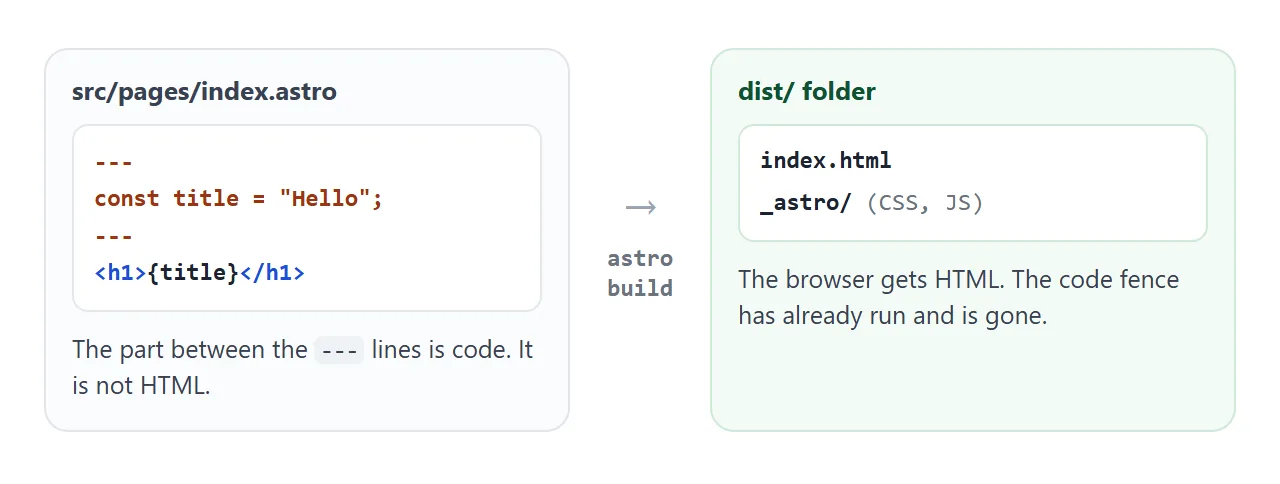
The Astro docs say the code in the fence runs at build time only and never reaches the browser. If you paste an .astro file into a browser, you see the fence and the braces as text.
The template does allow expressions in curly braces, and .map() to repeat an element:
---
const items = ["Dog", "Cat", "Platypus"];
---
<ul>
  {items.map((item) => (
    <li>{item}</li>
  ))}
</ul>
Astro also accepts .html files in src/pages. The docs warn that some Astro features do not work in them, so .astro is the usual choice.
Scripts: three kinds
By default an Astro component sends no JavaScript to the browser. Interactivity comes from script tags, and the tag decides what happens to your code.
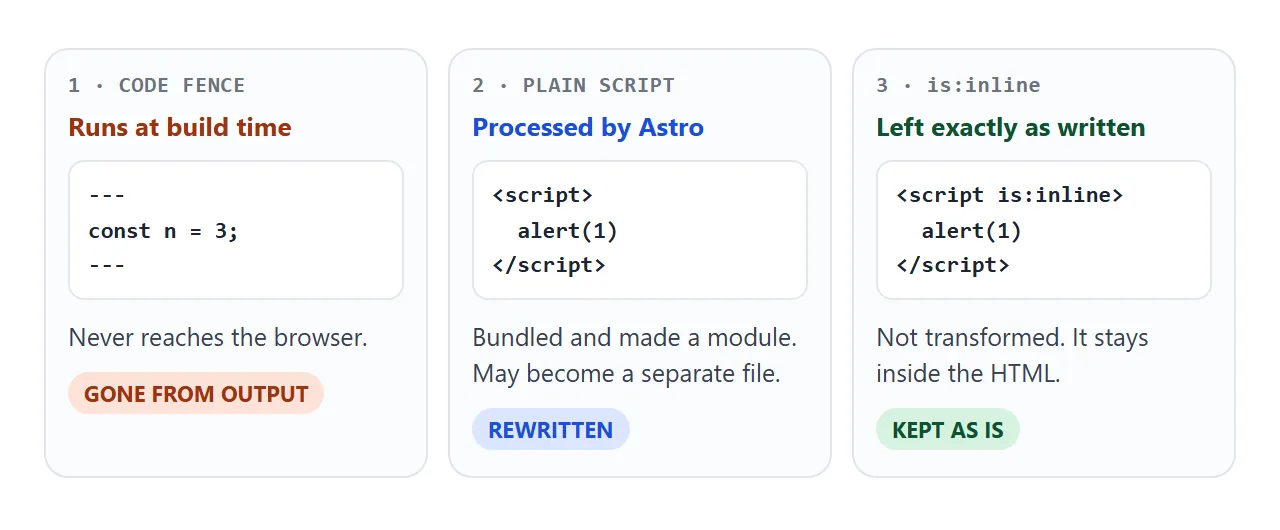
A plain <script> is processed: Astro bundles its imports and makes it a module. Small scripts are embedded in the HTML, so a larger one may become a separate file. A script with is:inline is rendered exactly as you wrote it.
For a single file, use is:inline. It also suits scripts from a CDN.
Astro calls an interactive piece on an otherwise static page an island. For a UI framework component, a directive such as client:visible loads its JavaScript only when it scrolls into view. The example below does the same idea in plain JavaScript.
<!doctype html>
<html lang="en">
<head>
<meta charset="utf-8">
<meta name="viewport" content="width=device-width, initial-scale=1">
<title>One island</title>
<style>
  body { margin: 0; padding: 12px; font-family: system-ui, sans-serif; background: #f4f5f7; color: #1d2330; }
  .scroller { height: 300px; overflow-y: auto; border: 1px solid #d5d9e0; border-radius: 12px; background: #fff; padding: 14px; }
  .block { padding: 12px; border-radius: 8px; background: #eef1f5; margin-bottom: 12px; font-size: 14px; }
  .spacer { height: 260px; }
  .island { border: 2px dashed #9aa3b2; border-radius: 10px; padding: 12px; }
  .island.live { border-color: #0f5132; background: #f4fbf6; }
  button { font: inherit; padding: 8px 14px; border: 0; border-radius: 8px; background: #2563eb; color: #fff; cursor: pointer; }
  #status { font-size: 13px; margin: 0 0 8px; color: #6b7280; }
  .live #status { color: #0f5132; font-weight: 600; }
</style>
</head>
<body>
<div class="scroller">
  <div class="block">Static HTML. No script touches this block.</div>
  <div class="block">Scroll down. The island below wakes up when it comes into view.</div>
  <div class="spacer"></div>
  <div class="island" id="island">
    <p id="status">Static: the button does nothing yet</p>
    <button id="count" type="button">Clicked 0 times</button>
  </div>
  <div class="block" style="margin-top:12px">More static HTML under the island.</div>
</div>

<script>
  const island = document.getElementById('island');
  const status = document.getElementById('status');
  const btn = document.getElementById('count');
  let hydrated = false, n = 0;

  // Hydrate: attach behaviour only to this one element, once it is visible
  function hydrate() {
    if (hydrated) return;
    hydrated = true;
    island.classList.add('live');
    status.textContent = 'Live: JavaScript is attached here only';
    btn.addEventListener('click', () => { n++; btn.textContent = 'Clicked ' + n + (n === 1 ? ' time' : ' times'); });
  }

  new IntersectionObserver((entries, obs) => {
    if (entries.some((e) => e.isIntersecting)) { hydrate(); obs.disconnect(); }
  }, { root: document.querySelector('.scroller') }).observe(island);
</script>
</body>
</html>
Styles: inline or linked
Astro scopes a component's <style> to that component. In the build, the build.inlineStylesheets option decides where the CSS goes. The default, auto, inlines stylesheets under a size limit and links the rest as files.
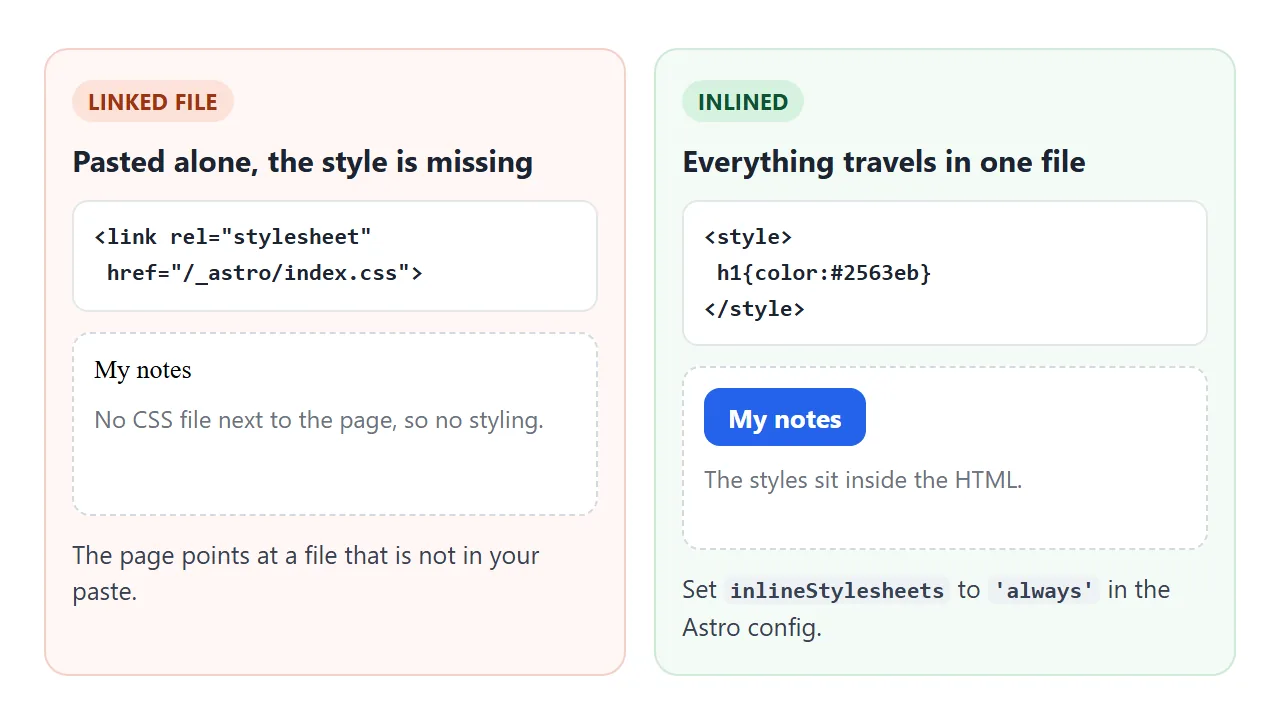
To keep all the CSS inside index.html, set the option to always:
// astro.config.mjs
import { defineConfig } from "astro/config";

export default defineConfig({
  build: { inlineStylesheets: "always" },
});
Images are separate. Use an inline SVG or a data: URI for any picture that must travel inside the file.
A finished example: data in, HTML out
This is the whole idea in one screen. The left side plays the code fence: a list of titles and a .map(). The right side is all the browser receives.
<!doctype html>
<html lang="en">
<head>
<meta charset="utf-8">
<meta name="viewport" content="width=device-width, initial-scale=1">
<title>Template to output</title>
<style>
body { margin: 0; padding: 14px; font-family: system-ui, sans-serif; background: #f4f5f7; color: #1d2330; }
.cols { display: grid; grid-template-columns: 1fr 1fr; gap: 12px; }
@media (max-width: 560px) { .cols { grid-template-columns: 1fr; } }
.pn { background: #fff; border: 1px solid #e1e4ea; border-radius: 12px; padding: 12px; min-width: 0; }
h2 { font-size: 13px; margin: 0 0 8px; letter-spacing: .3px; color: #6b7280; text-transform: uppercase; }
.tag { display: inline-block; font-size: 11px; font-weight: 700; padding: 3px 8px; border-radius: 99px; margin-bottom: 8px; }
.src .tag { background: #fde2da; color: #9a3412; }
.out .tag { background: #d6f2df; color: #0f5132; }
textarea { width: 100%; height: 86px; box-sizing: border-box; font: 13px/1.4 ui-monospace, Consolas, monospace; border: 1px solid #d5d9e0; border-radius: 8px; padding: 8px; }
#page ul { margin: 0; padding-left: 20px; }
pre { margin: 10px 0 0; padding: 10px; background: #0f1623; color: #d7e0f0; border-radius: 8px; font-size: 12px; line-height: 1.45; white-space: pre-wrap; word-break: break-word; }
#count { font-size: 13px; color: #374151; margin: 8px 0 0; }
</style>
</head>
<body>
<div class="cols">
<div class="pn src">
<span class="tag">BUILD TIME (the code fence)</span>
<h2>One title per line</h2>
<textarea id="items" aria-label="Titles">Install Astro
Write a page
Run the build</textarea>
<pre>const items = lines;
items.map(t => `<li>${t}</li>`)</pre>
</div>
<div class="pn out">
<span class="tag">WHAT THE BROWSER GETS</span>
<h2>The page</h2>
<div id="page"></div>
<pre id="html"></pre>
<p id="count"></p>
</div>
</div>
<script>
const input = document.getElementById('items');
const page = document.getElementById('page');
const html = document.getElementById('html');
const count = document.getElementById('count');
function esc(s) { return s.replace(/&/g, '&').replace(/</g, '<').replace(/>/g, '>'); }
function build() {
// The "frontmatter" step: data in, finished HTML out
const items = input.value.split('\n').map((s) => s.trim()).filter(Boolean);
const out = '<ul>\n' + items.map((t) => ' <li>' + esc(t) + '</li>').join('\n') + '\n</ul>';
page.innerHTML = out;
html.textContent = out; // shown as text so you can see the HTML itself
count.textContent = items.length + ' list item' + (items.length === 1 ? '' : 's') + ' in the output. The code on the left is not in it.';
}
input.addEventListener('input', build);
build();
</script>
</body>
</html>
Notice what the output does not contain: the array, the loop or the template. Astro ran them once, at build time, and wrote the result.
From a project to one file
- Run
npm run build. Astro writes static files to thedistfolder. - Set
build.inlineStylesheetstoalwaysinastro.config.mjs. - Write scripts as
<script is:inline>. - Open
dist/index.htmlas text. Look forlinkorscripttags that point to/_astro/. - Paste the page into a NOS document and share it.
npm run dev starts the dev server, on port 4321 unless you change it. npm run preview serves the built site so you can test it before sharing.
For the page to be sized correctly on a phone, check that the layout includes the viewport meta tag.
When it does not work
| What you see | Cause | Fix |
|---|---|---|
Code and --- lines show as text |
An .astro file was pasted, not the built HTML | Build, then use dist/index.html |
| The page is unstyled | The CSS is a linked file that was not pasted | Set inlineStylesheets to always |
| The button does nothing | The script is a separate file under /_astro/ | Use is:inline |
| A CORS error when opening from disk | Module script files can hit CORS errors on file: URLs | Use npm run preview, or inline the script |
| Pictures are broken | Images are files in /_astro/ | Inline SVG or a data: URI |
| A path starting with / finds nothing | The path starts at the site root, not at your file | Use paths relative to the file, or inline |
| A React component stays static | No client directive on it | Add client:load, or use plain JavaScript |
More on missing styles is in HTML not loading CSS. Astro is one of several tools in static site generators.
Share it as a link
An Astro project is source code. The people you send it to would need Node.js and a build step before they could see anything. A single built HTML file skips that.
Paste the page into a NOS document and choose Create share link. HTML to link walks through it. The page renders as written and its scripts run, so the people you send it to can click the button themselves.
If you change the code later, the same link shows the new version.
In NOS, images from other sites, iframes, fetch calls to other sites and form posts to a server are blocked. Inlining the CSS, the script and the images keeps the page working.
Scripts and styles from cdnjs.cloudflare.com, cdn.jsdelivr.net, cdn.tailwindcss.com, code.jquery.com and unpkg.com do load. Opening an HTML file on a phone covers the phone side.