Babel is a JavaScript compiler: it reads new syntax and writes older JavaScript. For a single HTML file, that means @babel/standalone, a build of Babel for browsers. Put your code in a <script type="text/babel"> block and Babel compiles it as the page opens.
Try it first. Type a name and press the button. The code in the block uses a private field, a class field, an arrow function and ??, and Babel rewrites all of it.
<!doctype html>
<html lang="en">
<head>
<meta charset="utf-8">
<meta name="viewport" content="width=device-width, initial-scale=1">
<title>Babel in one HTML file</title>
<style>
  body { margin: 0; padding: 18px; font-family: system-ui, sans-serif; background: #f4f5f7; color: #1d2330; }
  .card { max-width: 420px; background: #fff; border-radius: 12px; padding: 16px 18px; box-shadow: 0 4px 16px rgba(0, 0, 0, .08); }
  input { width: 100%; box-sizing: border-box; padding: 8px; font-size: 16px; border: 1px solid #cfd4dc; border-radius: 8px; }
  button { margin-top: 10px; padding: 8px 14px; font-size: 15px; border: 0; border-radius: 8px; background: #2563eb; color: #fff; cursor: pointer; }
  #out { margin: 12px 0 0; font-size: 18px; font-weight: 600; }
  #status { margin: 8px 0 0; font-size: 13px; color: #6b7280; }
  pre { margin: 12px 0 0; padding: 10px; max-height: 120px; overflow: auto; background: #0f172a; color: #e2e8f0; font-size: 12px; line-height: 1.45; border-radius: 8px; white-space: pre-wrap; word-break: break-all; }
</style>
<script src="https://cdn.jsdelivr.net/npm/@babel/standalone@7.29.9/babel.min.js"></script>
</head>
<body>
<div class="card">
  <label for="name">Your name</label>
  <input id="name" placeholder="leave empty for guest">
  <button id="add" type="button">Add one</button>
  <p id="out">Hello, guest! Count: 0</p>
  <p id="status">Compiling...</p>
  <pre id="js" aria-label="JavaScript after Babel"></pre>
</div>

<!-- The browser skips this block. Babel finds it, compiles it, and runs the result. -->
<script type="text/babel" data-presets="env" id="source">
  class Counter {
    #count = 0;                              // private field
    add = (n = 1) => (this.#count += n);     // class field with an arrow function
    get total() { return this.#count; }
  }
  const counter = new Counter();
  const nameBox = document.getElementById('name');
  const out = document.getElementById('out');

  const show = () => {
    const name = nameBox.value.trim() || null;
    out.textContent = `Hello, ${name ?? 'guest'}! Count: ${counter.total}`;
  };
  document.getElementById('add').addEventListener('click', () => { counter.add(); show(); });
  nameBox.addEventListener('input', show);
</script>

<script>
  // Show what Babel produced from the block above (same preset).
  const src = document.getElementById('source').textContent;
  const code = Babel.transform(src, { presets: ['env'] }).code;
  document.getElementById('js').textContent = code;
  document.getElementById('status').textContent = 'Babel ' + Babel.version + ' compiled the block. Output below:';
</script>
</body>
</html>
That is what "Babel in HTML" means here: writing JSX or modern syntax in one file, with no webpack, no npm and no build folder.
What happens when the page loads
A browser does not run a <script> whose type it does not recognise. MDN says the content is treated as a data block and is not processed. That is why text/babel is safe to write in a page.
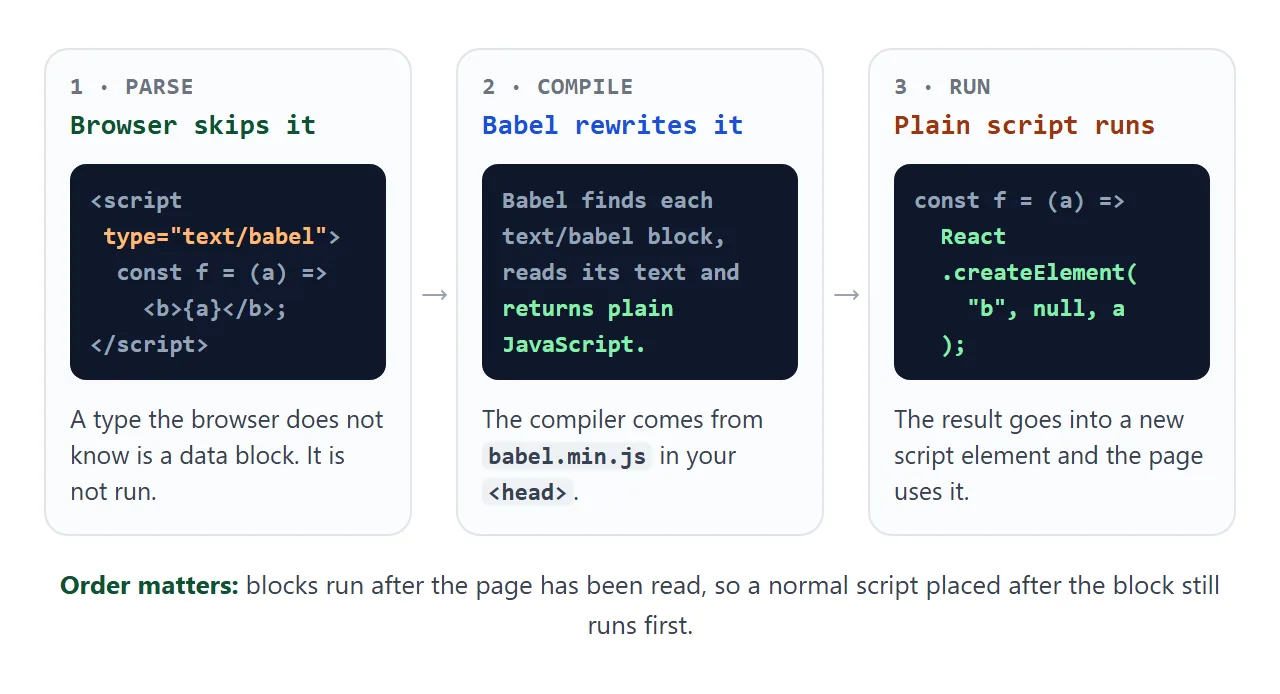
Babel finds each block, reads its text and puts the compiled result into a new script element. We measured the order: Babel runs after the page has been read, so a normal script placed after the block still runs first.
When Babel loads, the console prints a warning: "You are using the in-browser Babel transformer. Be sure to precompile your scripts for production". That is expected.
The smallest working page
Four steps give a working page:
- Load Babel. One script tag in the
<head>, with the version in the address. - Write a text/babel block. Add a
data-presetsattribute to say what to compile. - Load what the code uses first. JSX, for example, needs React.
- Open the page and read the console. Babel reports syntax errors there.
<script src="https://cdn.jsdelivr.net/npm/@babel/standalone@7.29.9/babel.min.js"></script>

<script type="text/babel" data-presets="env">
  const greet = (name = 'guest') => `Hello, ${name}!`;
  document.body.append(greet());
</script>
The Babel docs show the same tag with unpkg. jsDelivr serves the same file at a versioned address, and we loaded version 7.29.9 from it.
Presets decide what gets rewritten
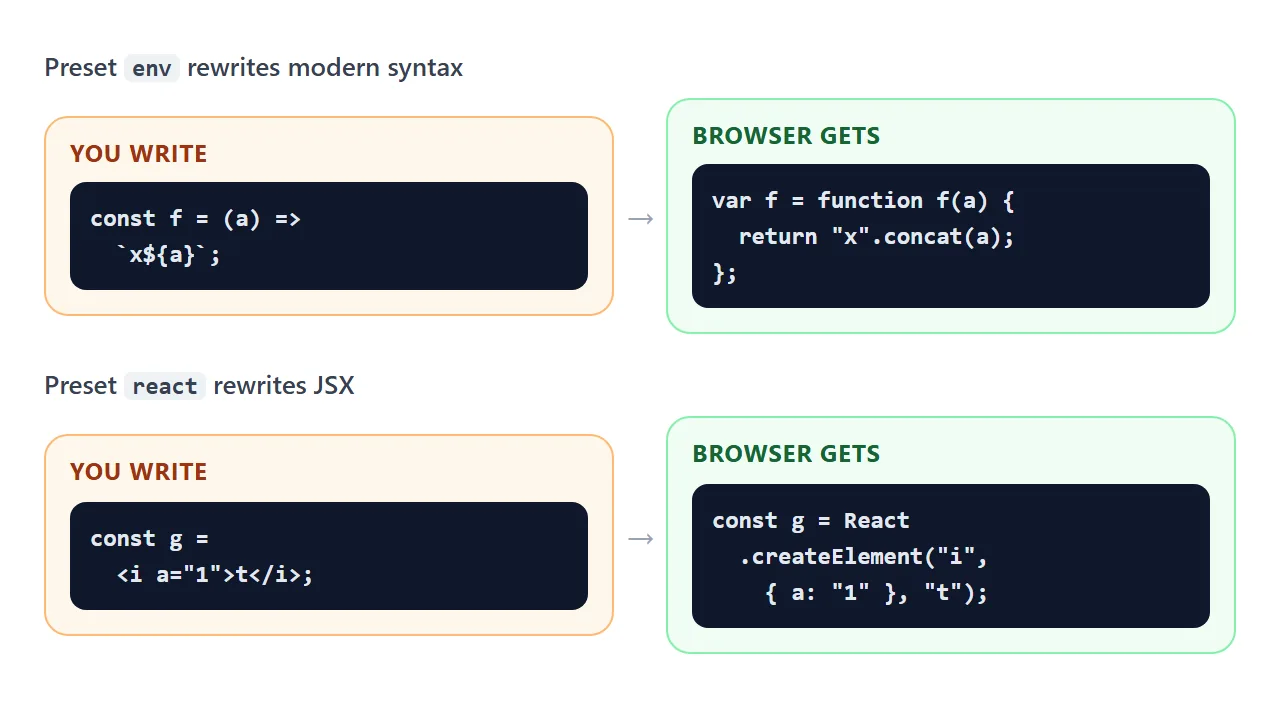
A preset is a ready-made bundle of plugins. The Babel docs describe @babel/preset-env as the one that includes the transforms needed for modern JavaScript. In a page you name presets in data-presets, separated by commas.
Two presets matter in a single file. env rewrites modern syntax and react rewrites JSX. Using both is written data-presets="env,react".
Try your own code in the playground. Pick a sample, change the preset, and read what Babel returns. The Typo sample shows how an error looks: Babel stops and nothing runs.
<!doctype html>
<html lang="en">
<head>
<meta charset="utf-8">
<meta name="viewport" content="width=device-width, initial-scale=1">
<title>Babel playground</title>
<style>
  body { margin: 0; padding: 16px; font-family: system-ui, sans-serif; background: #f4f5f7; color: #1d2330; }
  .row { display: flex; flex-wrap: wrap; gap: 8px; align-items: center; margin-bottom: 8px; }
  button { padding: 7px 12px; font-size: 14px; border: 1px solid #cfd4dc; border-radius: 8px; background: #fff; cursor: pointer; }
  button.on { background: #2563eb; color: #fff; border-color: #2563eb; }
  #go { background: #16a34a; color: #fff; border-color: #16a34a; }
  label { font-size: 13px; color: #4b5563; display: block; margin: 8px 0 4px; }
  textarea, pre { box-sizing: border-box; width: 100%; margin: 0; padding: 10px; font: 13px/1.45 ui-monospace, Consolas, monospace; border-radius: 8px; }
  textarea { height: 110px; border: 1px solid #cfd4dc; resize: vertical; }
  pre { height: 190px; overflow: auto; background: #0f172a; color: #e2e8f0; white-space: pre-wrap; word-break: break-all; }
  pre.err { background: #fff7ed; color: #9a3412; border: 1px solid #fdba74; }
  #info { font-size: 13px; color: #6b7280; margin: 6px 0 0; }
</style>
<script src="https://cdn.jsdelivr.net/npm/@babel/standalone@7.29.9/babel.min.js"></script>
</head>
<body>
<div class="row">
  <span style="font-size:13px">Sample:</span>
  <button type="button" data-sample="modern">Modern JS</button>
  <button type="button" data-sample="jsx">JSX</button>
  <button type="button" data-sample="bad">Typo</button>
</div>
<label for="src">Your code</label>
<textarea id="src" spellcheck="false"></textarea>
<div class="row" style="margin-top:8px">
  <span style="font-size:13px">Preset:</span>
  <button type="button" data-preset="env" class="on">env</button>
  <button type="button" data-preset="react">react</button>
  <button type="button" id="go">Compile</button>
</div>
<label for="js">What the browser would receive</label>
<pre id="js" tabindex="0"></pre>
<p id="info"></p>

<script>
  const samples = {
    modern: 'const total = (a, b = 2) => `Total: ${a + b}`;\nconst user = { name: null };\nconsole.log(user?.name ?? "guest", total(5));',
    jsx: 'const Card = ({ title }) => (\n  <div className="card">\n    <h1>{title}</h1>\n  </div>\n);',
    bad: 'const el = ;\nconst total = (a, b => a + b;'
  };
  const src = document.getElementById('src');
  const js = document.getElementById('js');
  const info = document.getElementById('info');
  let preset = 'env';

  function compile() {
    try {
      js.className = '';
      js.textContent = Babel.transform(src.value, { presets: [preset] }).code;
      info.textContent = 'Babel ' + Babel.version + ' with preset "' + preset + '". Compiled without errors.';
    } catch (err) {
      js.className = 'err';
      js.textContent = err.message;   // a syntax error stops the compile and gives a message
      info.textContent = 'Babel ' + Babel.version + ' reported an error. Nothing would run.';
    }
  }

  document.querySelectorAll('[data-sample]').forEach((b) => b.addEventListener('click', () => {
    const k = b.dataset.sample;
    src.value = samples[k];
    preset = k === 'jsx' ? 'react' : 'env';
    document.querySelectorAll('[data-preset]').forEach((p) => p.classList.toggle('on', p.dataset.preset === preset));
    compile();
  }));
  document.querySelectorAll('[data-preset]').forEach((b) => b.addEventListener('click', () => {
    preset = b.dataset.preset;
    document.querySelectorAll('[data-preset]').forEach((p) => p.classList.toggle('on', p === b));
    compile();
  }));
  document.getElementById('go').addEventListener('click', compile);

  src.value = samples.modern;
  compile();
</script>
</body>
</html>
The same compiler is also a function. It takes a string and returns a string, which is how the playground works:
const output = Babel.transform(input, { presets: ['env'] }).code;
The Babel docs also note that config files do not work in @babel/standalone, because there is no file system.
JSX needs React in scope
A browser cannot run JSX. In a normal script tag, the first <b> tag throws a SyntaxError. We measured Chromium's message as Unexpected token '<'.
With data-presets="react", Babel compiles JSX to React.createElement calls. The preset-react docs say this classic style needs React in scope. We measured it: with only Babel on the page, the block fails with "React is not defined".
Pin React 18.3.1 for a single HTML file. React 19 no longer produces UMD builds. When we asked jsDelivr for the UMD file of react 19.0.0 it returned a 404, and the React team recommends an ESM-based CDN for 19.
A finished example: a quick poll
This page loads React 18.3.1, ReactDOM and Babel, then writes a small component in JSX. Votes are stored in React state, and the form is handled in the page.
<!doctype html>
<html lang="en">
<head>
<meta charset="utf-8">
<meta name="viewport" content="width=device-width, initial-scale=1">
<title>Quick poll with React and Babel</title>
<style>
  body { margin: 0; padding: 18px; font-family: system-ui, sans-serif; background: #f4f5f7; color: #1d2330; }
  .card { max-width: 420px; background: #fff; border-radius: 12px; padding: 16px 18px; box-shadow: 0 4px 16px rgba(0, 0, 0, .08); }
  h1 { font-size: 18px; margin: 0 0 10px; }
  .opt { display: flex; align-items: center; gap: 10px; margin: 8px 0; }
  .opt button { flex: 1; text-align: left; padding: 9px 12px; font-size: 15px; border: 1px solid #cfd4dc; border-radius: 8px; background: #fff; cursor: pointer; position: relative; overflow: hidden; }
  .bar { position: absolute; left: 0; top: 0; bottom: 0; background: #dbeafe; z-index: 0; }
  .opt span.t { position: relative; z-index: 1; }
  .n { min-width: 28px; text-align: right; font-weight: 600; }
  form { display: flex; gap: 8px; margin-top: 12px; }
  input { flex: 1; min-width: 0; padding: 8px; font-size: 16px; border: 1px solid #cfd4dc; border-radius: 8px; }
  form button { padding: 8px 14px; font-size: 15px; border: 0; border-radius: 8px; background: #2563eb; color: #fff; cursor: pointer; }
  .note { font-size: 13px; color: #6b7280; margin: 10px 0 0; }
</style>
<!-- React 18 still ships browser-ready builds; Babel turns the JSX below into plain JavaScript -->
<script src="https://cdn.jsdelivr.net/npm/react@18.3.1/umd/react.production.min.js"></script>
<script src="https://cdn.jsdelivr.net/npm/react-dom@18.3.1/umd/react-dom.production.min.js"></script>
<script src="https://cdn.jsdelivr.net/npm/@babel/standalone@7.29.9/babel.min.js"></script>
</head>
<body>
<div id="root"></div>

<script type="text/babel" data-presets="react">
  const { useState } = React;

  function Poll() {
    const [options, setOptions] = useState([
      { label: 'Tabs', votes: 2 },
      { label: 'Spaces', votes: 3 },
    ]);
    const [text, setText] = useState('');
    const total = options.reduce((sum, o) => sum + o.votes, 0);

    const vote = (i) =>
      setOptions(options.map((o, j) => (j === i ? { ...o, votes: o.votes + 1 } : o)));

    const add = (e) => {
      e.preventDefault();                       // handled in the page, nothing is sent
      const label = text.trim();
      if (!label) return;
      setOptions([...options, { label, votes: 0 }]);
      setText('');
    };

    return (
      <div className="card">
        <h1>Which do you prefer?</h1>
        {options.map((o, i) => (
          <div className="opt" key={o.label}>
            <button type="button" onClick={() => vote(i)}>
              <div className="bar" style={{ width: total ? (o.votes / total) * 100 + '%' : 0 }} />
              <span className="t">{o.label}</span>
            </button>
            <span className="n">{o.votes}</span>
          </div>
        ))}
        <form onSubmit={add}>
          <input value={text} onChange={(e) => setText(e.target.value)} placeholder="Add an option" aria-label="New option" />
          <button type="submit">Add</button>
        </form>
        <p className="note" id="total">{total} votes in total</p>
      </div>
    );
  }

  ReactDOM.createRoot(document.getElementById('root')).render(<Poll />);
</script>
</body>
</html>
- Load order: React and ReactDOM come before Babel, and the text/babel block comes last.
- State:
useStateholds the options and the text box. - The form: the submit handler calls
preventDefault(), so nothing is sent anywhere.
Compile in the page, or before shipping
The cost of this approach is the compiler. We downloaded babel.min.js 7.29.9 and it measured 3.1 MB. Every visitor downloads it before your code runs.
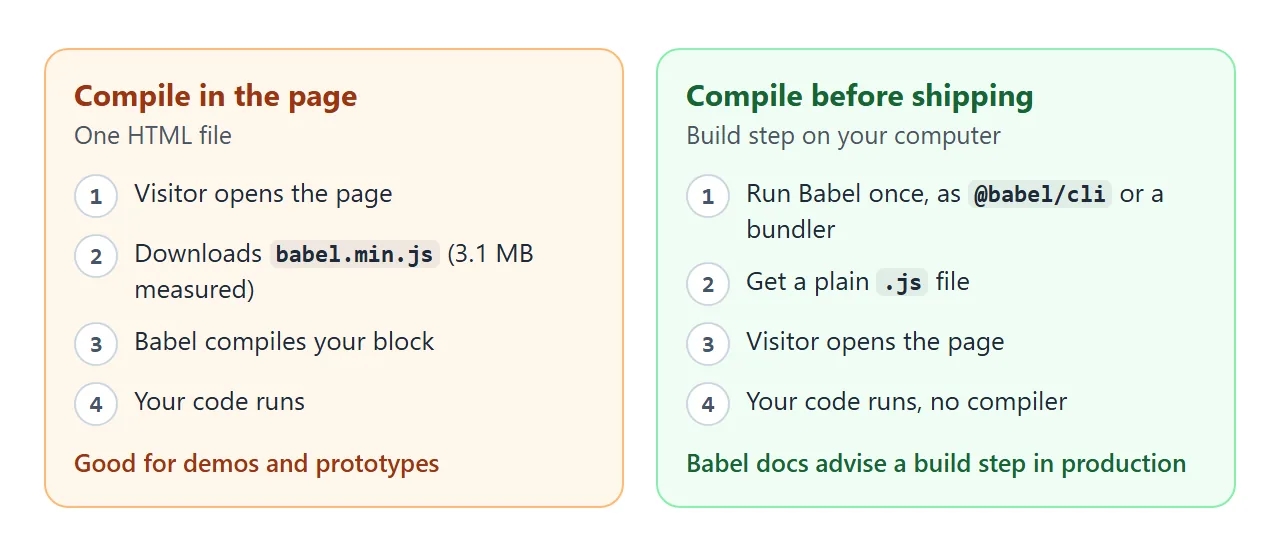
The Babel docs say that if you use Babel in production, you should normally not use @babel/standalone. They compile ahead of time instead:
npm install --save-dev @babel/core @babel/cli @babel/preset-env
npx babel src --out-dir lib
The usual end state is the same single file: paste the compiled JavaScript into a normal script tag and remove Babel. Hosting a built front end covers what to do with a full build.
When it does not work
| What you see | Cause | Fix |
|---|---|---|
| Nothing happens and there is no error | The Babel script did not load, so the block stays a data block | Check the address and the version in the script tag |
Unexpected token '<' |
JSX is inside a normal script tag | Use type="text/babel" and data-presets="react" |
React is not defined |
The react preset needs React, and it is not on the page | Load React and ReactDOM above the block |
| A 404 for the React file | React 19 has no UMD build | Load react@18.3.1 and react-dom@18.3.1 |
| A function from the block is undefined in a normal script | Babel runs the block after plain scripts | Keep the code in one text/babel block |
| Babel reports an error about experimental syntax jsx | Babel.transform was called with only env |
Add react to the presets |
| A console warning about the in-browser transformer | Normal for @babel/standalone |
Ignore it, or compile ahead of time |
| The page is slow to start | Babel is 3.1 MB and runs first | Paste the compiled JavaScript instead |
If the page stays blank, HTML JavaScript not working goes through the causes in order. Loading a CSS library from a CDN the same way is covered in adding Tailwind to an HTML file.
Share it as a link
A Babel page is easier to show working than to describe. An .html attachment may open as plain text on a phone. Opening an HTML file on a phone explains why.
To send the working version, paste the page into a NOS document and choose Create share link. HTML to link walks through it.
The page renders as written, its scripts run, and Babel and React load from jsDelivr, so anyone with the link can try it without an account. If you change the code later, the same link shows the new version.