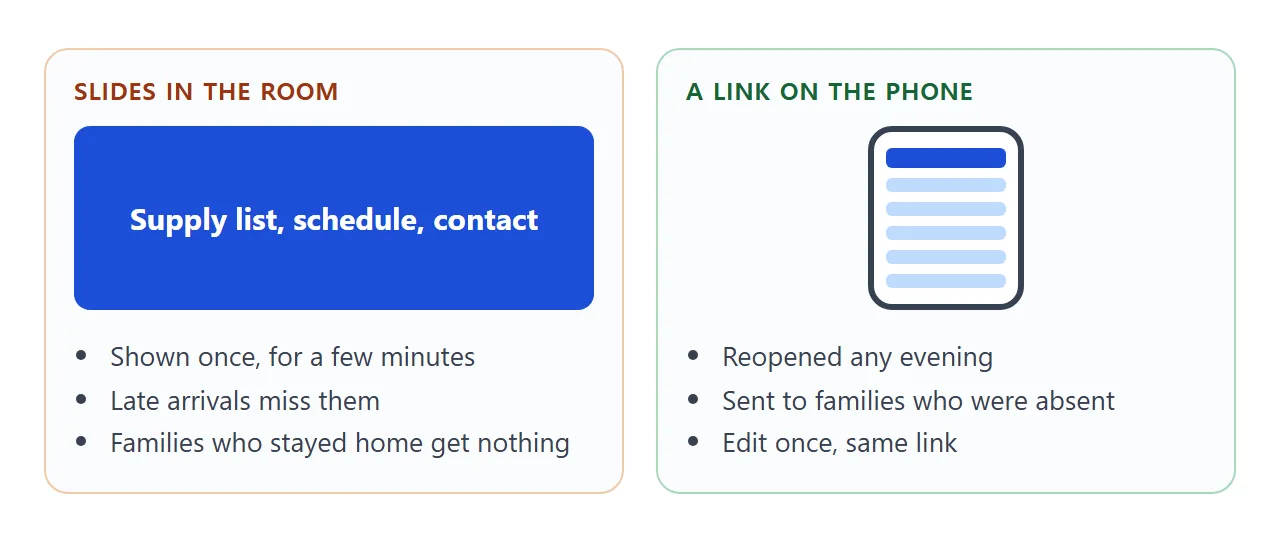
Keep your back to school night slides for the room, and put what families need later on a page behind a link. A slide shows for a minute, then the projector goes off. A link can be reopened at the kitchen table.
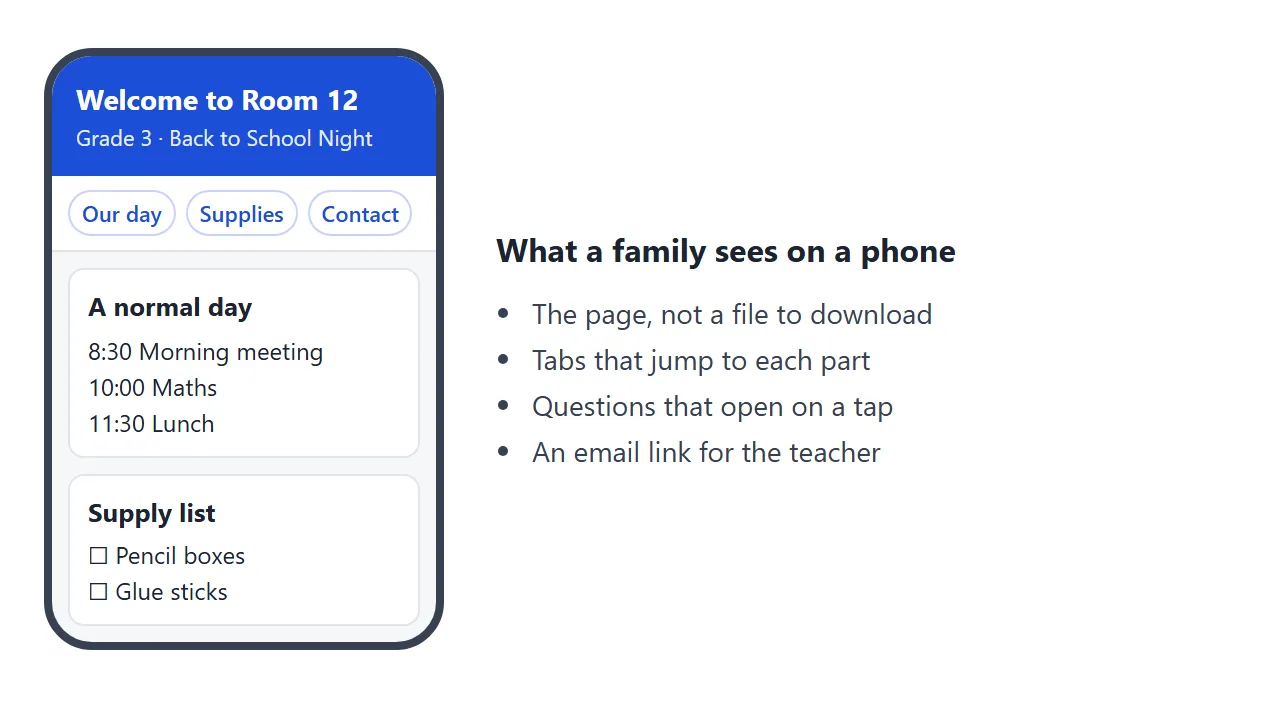
Here is one page you could send. It has the daily routine, a supply list with tick boxes, questions that open on a tap, and a contact line. Try it, then try it narrow.
<!doctype html>
<html lang="en">
<head>
<meta charset="utf-8">
<meta name="viewport" content="width=device-width, initial-scale=1">
<title>Room 12: Back to School Night</title>
<style>
* { box-sizing: border-box; }
body { margin: 0; font-family: system-ui, sans-serif; background: #f6f7f9; color: #1d2330; line-height: 1.5; }
header { background: #1d4ed8; color: #fff; padding: 22px 16px 18px; }
header h1 { margin: 0; font-size: 23px; }
header p { margin: 4px 0 0; font-size: 15px; opacity: .92; }
nav { display: flex; gap: 8px; padding: 10px 16px; background: #fff; border-bottom: 1px solid #e1e4ea; overflow-x: auto; position: sticky; top: 0; z-index: 1; }
nav a { flex: none; padding: 7px 12px; border: 1px solid #c7d2fe; border-radius: 999px; color: #1d4ed8; text-decoration: none; font-size: 14px; font-weight: 600; }
main { max-width: 620px; margin: 0 auto; padding: 8px 16px 32px; }
section { background: #fff; border: 1px solid #e1e4ea; border-radius: 12px; padding: 14px 16px; margin-top: 14px; }
h2 { margin: 0 0 8px; font-size: 18px; }
table { width: 100%; border-collapse: collapse; font-size: 15px; }
td { padding: 7px 4px; border-bottom: 1px solid #eef0f4; }
td:first-child { white-space: nowrap; font-weight: 600; width: 1%; padding-right: 14px; }
tr:last-child td { border-bottom: 0; }
ul.list { list-style: none; margin: 0; padding: 0; }
ul.list li { padding: 5px 0; }
ul.list label { cursor: pointer; }
#count { margin: 8px 0 0; font-weight: 700; color: #166534; min-height: 24px; }
details { border: 1px solid #e1e4ea; border-radius: 10px; padding: 10px 12px; margin-bottom: 8px; }
summary { cursor: pointer; font-weight: 600; }
details p { margin: 8px 0 0; }
.contact { background: #eef2ff; border-color: #c7d2fe; }
.contact a { color: #1d4ed8; font-weight: 600; word-break: break-all; }
</style>
</head>
<body>
<header>
<h1>Welcome to Room 12</h1>
<p>Grade 3 · Back to School Night · Ms. Alder</p>
</header>
<nav>
<a href="#day">Our day</a>
<a href="#supplies">Supplies</a>
<a href="#help">Questions</a>
<a href="#contact">Contact</a>
</nav>
<main>
<section id="day">
<h2>A normal day</h2>
<table>
<tr><td>8:30</td><td>Morning meeting and reading</td></tr>
<tr><td>10:00</td><td>Maths</td></tr>
<tr><td>11:30</td><td>Lunch and recess</td></tr>
<tr><td>12:30</td><td>Writing and science</td></tr>
<tr><td>2:30</td><td>Pack up and dismissal</td></tr>
</table>
</section>
<section id="supplies">
<h2>Supply list</h2>
<p>Tick items as you buy them. Nothing is sent anywhere.</p>
<ul class="list" id="items">
<li><label><input type="checkbox"> Two pencil boxes, labelled</label></li>
<li><label><input type="checkbox"> Four glue sticks</label></li>
<li><label><input type="checkbox"> One folder with pockets</label></li>
<li><label><input type="checkbox"> Water bottle</label></li>
<li><label><input type="checkbox"> Indoor shoes for the gym</label></li>
</ul>
<p id="count"></p>
</section>
<section id="help">
<h2>Questions families ask</h2>
<details><summary>How much homework is there?</summary><p>About 20 minutes a night: reading, plus one maths sheet on Mondays and Wednesdays.</p></details>
<details><summary>My child is absent. What do I do?</summary><p>Send a short note. Missed work goes in the blue tray by the door.</p></details>
<details><summary>Can I volunteer?</summary><p>Yes. Reading helpers are welcome on Thursday mornings. Tell me which weeks work for you.</p></details>
</section>
<section id="contact" class="contact">
<h2>Contact</h2>
<p>Email is the best way to reach me. I reply within two school days.</p>
<p><a href="mailto:room12@example.org">room12@example.org</a></p>
</section>
</main>
<script>
// Count ticked supplies and show a short message
const boxes = document.querySelectorAll('#items input');
const count = document.getElementById('count');
boxes.forEach((b) => b.addEventListener('change', () => {
const n = [...boxes].filter((x) => x.checked).length;
count.textContent = n === boxes.length ? 'Everything ticked. Ready!' : n + ' of ' + boxes.length + ' ticked';
}));
</script>
</body>
</html>
The page is built for a phone first. Large text, tabs at the top that jump to each part, and no pinching.
Make it with AI
You do not need to write code. Tell an AI what the evening covered and ask for one file.
Make a single-file HTML page for families of a Grade 3 class,
Room 12, teacher Ms. Alder. Sections: a normal school day (times),
a supply list with tick boxes, three questions families ask
(homework, absence, volunteering) that open on tap, and a contact
section with my email. Large text for phones, a row of links at
the top that jump to each section. No external images, fonts or
scripts. Return only the HTML.
Replace the details with yours. Then check the result before you copy it:
- Times, dates and numbers are what you meant. AI will invent plausible ones.
- Nothing about individual children is on the page.
- The email address is yours and spelled right.
- It reads well when the browser window is narrow.
If you already have slides, paste their text into the prompt and ask for the same sections. For more on turning AI slides into a page, see AI-generated slides in HTML.
Send it as a link
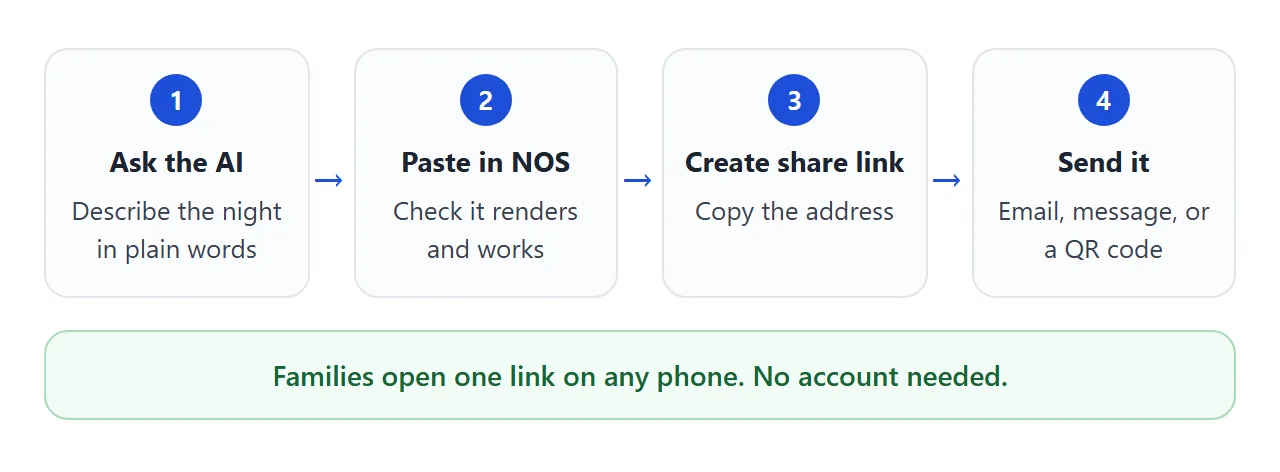
Open a NOS document and paste the HTML in. The page renders right there and its scripts run, so test the tabs and tick boxes yourself. Then choose Create share link and copy the address.
Anyone with that address can open the page in a browser, a phone included, with no account. They can read and use it, but they cannot edit it.
If you spot a wrong time tomorrow, fix the code in your NOS document. The same link then shows the new version. HTML to link walks through the steps.
Put the link where families look
A link is only useful if it lands somewhere families already look. Three places you can use:
- Email or a class message. Paste the address into the body, not as an attachment. Why links beat attachments explains the difference.
- Google Classroom. Google's help says an announcement can carry a link: choose the link icon, paste the address, add it. Guardian email summaries include announcements, as of October 2026. A teacher or administrator must invite the guardian, and the student needs a Google Workspace account.
- Paper. Print a QR code on the sign-in sheet or the letter that goes home. In Chrome on a computer, open the page, choose Share, then QR code, and download the image. Then scan it yourself before you print.
QR code for a link covers the printing side.
Slides file, Google Slides link or page link
Teachers often already have a deck. These are the ways to get something to families, and what to watch for with each.
| Way | Good for | Watch for |
|---|---|---|
| Slides file attached to an email | One family who asks for the deck | Families must open a file on their phone. A fix means sending it again |
| Link to a Google Slides file | When the deck is already finished | General access must be set to Anyone with the link, and your name and email show as owner |
| NOS page link | Schedule, supplies, contact, read on a phone | Visitors cannot edit it. You do not see who opened it |
| QR code on paper | Families at the door or in the folder | Test the scan. The code points to a link, so the page must already exist |
Google describes the Slides route on its help page on sharing a Slides file. If families should get the deck itself, that route is fine. If the deck is mostly a talk, a short page reads better on a phone.
A slide-style version
Some teachers want to keep the feel of slides. This version is a row of four slides that families swipe through on a phone, or move with the buttons or the arrow keys on a computer.
<!doctype html>
<html lang="en">
<head>
<meta charset="utf-8">
<meta name="viewport" content="width=device-width, initial-scale=1">
<title>Room 12 slides</title>
<style>
  * { box-sizing: border-box; }
  body { margin: 0; font-family: system-ui, sans-serif; background: #0f172a; color: #1d2330; }
  .wrap { max-width: 640px; margin: 0 auto; padding: 12px; }
  .deck { display: flex; overflow-x: auto; scroll-snap-type: x mandatory; scroll-behavior: smooth; gap: 12px; border-radius: 14px; }
  .slide { flex: 0 0 100%; scroll-snap-align: center; background: #fff; border-radius: 14px; padding: 22px 20px; min-height: 380px; }
  .slide h2 { margin: 0 0 10px; font-size: 24px; color: #1d4ed8; }
  .slide p, .slide li { font-size: 18px; line-height: 1.5; }
  .slide ul { padding-left: 22px; margin: 8px 0 0; }
  .big { font-size: 56px; font-weight: 800; color: #1d4ed8; margin: 6px 0; }
  .bar { display: flex; align-items: center; justify-content: space-between; margin-top: 12px; color: #e2e8f0; }
  button { font: inherit; font-weight: 600; padding: 10px 18px; border: 0; border-radius: 10px; background: #fff; color: #1d4ed8; cursor: pointer; }
  button:disabled { opacity: .4; cursor: default; }
  #pos { font-size: 15px; }
</style>
</head>
<body>
<div class="wrap">
  <div class="deck" id="deck" tabindex="0" aria-label="Slides">
    <div class="slide"><h2>Welcome, families</h2><p>Grade 3, Room 12. This page stays open on your phone after tonight. Swipe or use the buttons.</p><div class="big">Room 12</div></div>
    <div class="slide"><h2>Our week</h2><ul><li>Mon and Wed: maths sheet</li><li>Tue: library visit</li><li>Thu: reading helpers</li><li>Fri: show and tell</li></ul></div>
    <div class="slide"><h2>How you can help</h2><ul><li>Read together for 20 minutes</li><li>Label pencil boxes and bottles</li><li>Send a note when your child is away</li></ul></div>
    <div class="slide"><h2>Reach me</h2><p>Email: room12@example.org</p><p>I reply within two school days.</p></div>
  </div>
  <div class="bar">
    <button id="prev" type="button">Back</button>
    <span id="pos">1 / 4</span>
    <button id="next" type="button">Next</button>
  </div>
</div>
<script>
  const deck = document.getElementById('deck');
  const prev = document.getElementById('prev');
  const next = document.getElementById('next');
  const pos = document.getElementById('pos');
  const total = deck.children.length;

  // One slide plus the gap between slides
  function pitch() { return deck.children[1].offsetLeft - deck.children[0].offsetLeft; }
  function current() { return Math.round(deck.scrollLeft / pitch()); }
  function go(i) { deck.scrollTo({ left: Math.max(0, Math.min(total - 1, i)) * pitch() }); }
  function update() {
    const i = current();
    pos.textContent = (i + 1) + ' / ' + total;
    prev.disabled = i === 0;
    next.disabled = i === total - 1;
  }

  prev.addEventListener('click', () => go(current() - 1));
  next.addEventListener('click', () => go(current() + 1));
  deck.addEventListener('scroll', update);
  deck.addEventListener('keydown', (e) => {
    if (e.key === 'ArrowRight') { e.preventDefault(); go(current() + 1); }
    if (e.key === 'ArrowLeft') { e.preventDefault(); go(current() - 1); }
  });
  update();
</script>
</body>
</html>
It is still one page behind one link. Edit the text in the code and the same link shows the change. For a longer evening, the first page with its tabs is easier to find things in, because families jump straight to a part.
When it does not work
| Symptom | Cause | Fix |
|---|---|---|
| The page looks tiny on a phone | The AI left out the phone setting | Ask it to make the page mobile friendly, then paste again |
| A picture is missing | The AI used an outside image | Ask for shapes drawn in the page only |
| A parent says it will not open at all | A school or work network may block the address | Send the same link by text message and ask them to try mobile data |
| The tick boxes reset on reload | A visitor's ticks are not saved | Say the list is a reminder, not a record |
| You want to know who read it | A shared page does not report opens | Ask for a reply by email or a signature on the sheet |
| The QR code does not scan | It is too small or too blurry on paper | Print it larger and scan the printout before copying it |
If families still ask where to find the file on a phone, read opening an HTML file on a phone. The short answer is to send a link, not a file.