A bakery menu on the web is one page that lists each item with its price, a line about what it is, what it contains, and when you are open.
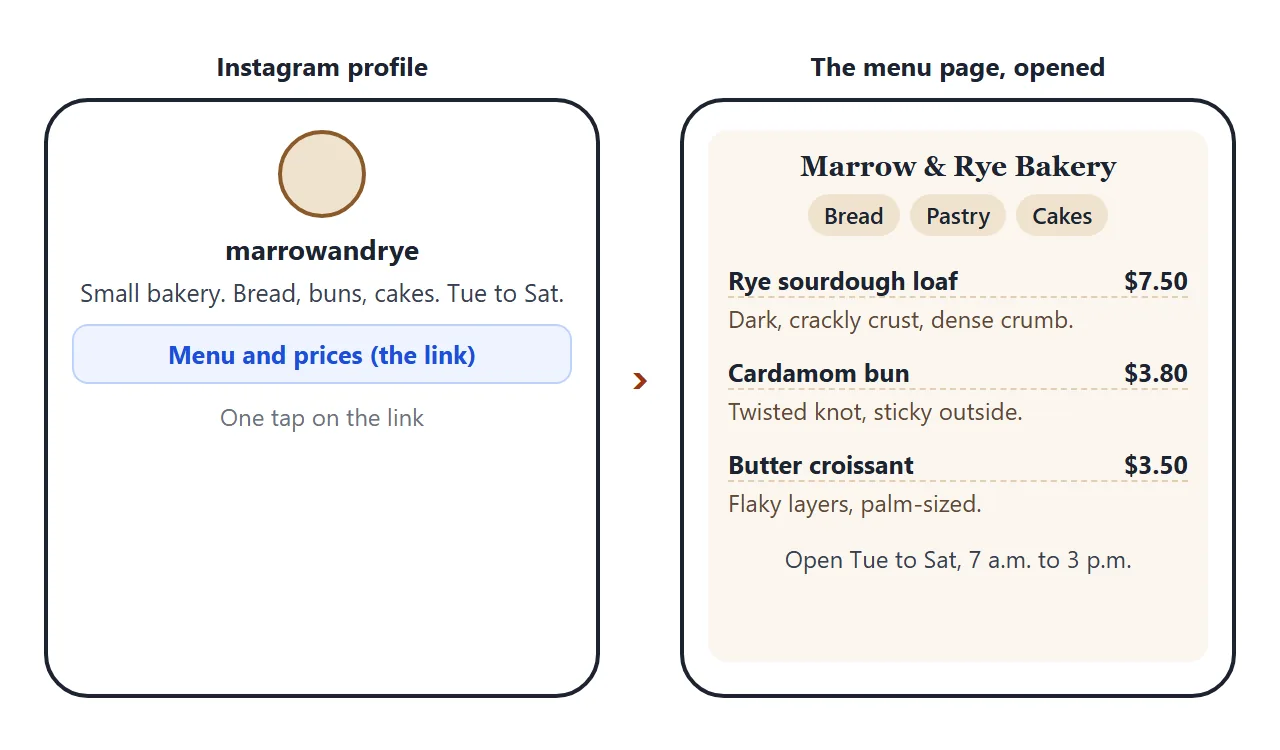
Put the page at a link, put the link in your bio, and anyone who taps it sees the same list you would hand across the counter.
You do not need menu software for that. The page is plain HTML, and an AI chat can write it from your price list. Below is a made-up bakery. Tap the section buttons, then tick Hide sold out items.
<!doctype html>
<html lang="en">
<head>
<meta charset="utf-8">
<meta name="viewport" content="width=device-width, initial-scale=1">
<title>Marrow & Rye Bakery - Menu</title>
<style>
* { box-sizing: border-box; }
body { margin: 0; font-family: Georgia, 'Times New Roman', serif; background: #fbf6ee; color: #3a2a1c; line-height: 1.5; }
.wrap { max-width: 560px; margin: 0 auto; padding: 20px 16px 36px; }
header { text-align: center; padding: 8px 0 14px; }
header svg { width: 44px; height: 44px; }
h1 { font-size: 26px; margin: 4px 0 2px; letter-spacing: .5px; }
.sub { margin: 0; font: 14px/1.4 system-ui, sans-serif; color: #7a6552; }
.today { background: #3a2a1c; color: #fbf6ee; border-radius: 10px; padding: 10px 14px; margin: 10px 0 14px; font: 14px/1.45 system-ui, sans-serif; }
.today b { color: #f2c46b; }
nav { display: flex; gap: 8px; flex-wrap: wrap; margin-bottom: 8px; }
nav a { font: 600 14px system-ui, sans-serif; color: #3a2a1c; background: #f0e3cf; padding: 8px 14px; border-radius: 99px; text-decoration: none; }
.opt { font: 14px system-ui, sans-serif; margin: 10px 0 0; color: #5d4936; }
.opt input { width: 18px; height: 18px; vertical-align: -3px; margin-right: 6px; }
h2 { font-size: 20px; margin: 26px 0 4px; padding-bottom: 6px; border-bottom: 2px solid #e5d3b8; scroll-margin-top: 8px; }
.item { padding: 12px 0; border-bottom: 1px dashed #e0cfb4; }
.row { display: flex; justify-content: space-between; gap: 12px; align-items: baseline; }
.name { font-weight: 700; font-size: 17px; }
.price { font: 700 16px system-ui, sans-serif; white-space: nowrap; }
.look { margin: 2px 0 0; font-size: 15px; color: #5d4936; }
.tags { margin: 4px 0 0; font: 13px/1.4 system-ui, sans-serif; color: #7a6552; }
.sold { opacity: .55; }
.sold .name::after { content: " - sold out today"; font: 600 13px system-ui, sans-serif; color: #b4472a; }
.hidden { display: none; }
footer { margin-top: 26px; font: 14px/1.5 system-ui, sans-serif; color: #5d4936; background: #f0e3cf; border-radius: 10px; padding: 12px 14px; }
footer p { margin: 0 0 6px; }
footer p:last-child { margin: 0; }
</style>
</head>
<body>
<div class="wrap">
<header>
<svg viewBox="0 0 44 44" aria-hidden="true"><circle cx="22" cy="22" r="21" fill="#f0e3cf"/><path d="M22 34V14M22 20c-4 0-6-3-6-6 4 0 6 3 6 6zm0 0c4 0 6-3 6-6-4 0-6 3-6 6zm0 7c-4 0-6-3-6-6 4 0 6 3 6 6zm0 0c4 0 6-3 6-6-4 0-6 3-6 6z" fill="none" stroke="#8a5a2b" stroke-width="2" stroke-linecap="round"/></svg>
<h1>Marrow & Rye Bakery</h1>
<p class="sub">Menu and prices. Last updated Friday 2 October.</p>
</header>
<div class="today"><b>Today:</b> the cardamom buns are out by 8 a.m. and usually gone by noon. Cakes need two days' notice.</div>
<nav>
<a href="#bread">Bread</a>
<a href="#pastry">Pastry</a>
<a href="#cakes">Cakes</a>
<a href="#drinks">Drinks</a>
</nav>
<p class="opt"><label><input type="checkbox" id="hide"> Hide sold out items</label></p>
<h2 id="bread">Bread</h2>
<div class="item">
<div class="row"><span class="name">Rye sourdough loaf</span><span class="price">$7.50</span></div>
<p class="look">Dark, crackly crust with a dense, slightly sour crumb. Slices well for toast.</p>
<p class="tags">Contains: wheat, rye</p>
</div>
<div class="item sold">
<div class="row"><span class="name">Seeded rolls, box of 4</span><span class="price">$5.50</span></div>
<p class="look">Small round rolls covered in sesame and poppy seeds.</p>
<p class="tags">Contains: wheat, sesame</p>
</div>
<h2 id="pastry">Pastry</h2>
<div class="item">
<div class="row"><span class="name">Cardamom bun</span><span class="price">$3.80</span></div>
<p class="look">Twisted into a knot, brushed with sugar syrup. Sticky outside, soft inside.</p>
<p class="tags">Contains: wheat, milk, egg</p>
</div>
<div class="item">
<div class="row"><span class="name">Butter croissant</span><span class="price">$3.50</span></div>
<p class="look">Flaky layers that shatter on the first bite, about the size of your palm.</p>
<p class="tags">Contains: wheat, milk</p>
</div>
<div class="item sold">
<div class="row"><span class="name">Plum frangipane tart</span><span class="price">$4.90</span></div>
<p class="look">A small tart with a ring of plum slices on an almond filling.</p>
<p class="tags">Contains: wheat, milk, egg, almond</p>
</div>
<h2 id="cakes">Cake (order two days ahead)</h2>
<div class="item">
<div class="row"><span class="name">Honey and lemon cake, 8 slices</span><span class="price">$28.00</span></div>
<p class="look">A round cake with white glaze and thin lemon rounds on top.</p>
<p class="tags">Contains: wheat, milk, egg</p>
</div>
<h2 id="drinks">Drinks</h2>
<div class="item">
<div class="row"><span class="name">Filter coffee</span><span class="price">$2.80</span></div>
<p class="look">Served in a white mug. One free refill.</p>
</div>
<footer>
<p><b>Open:</b> Tuesday to Saturday, 7 a.m. to 3 p.m. Closed Sunday and Monday.</p>
<p><b>Find us:</b> 14 Alder Lane, Fernwick.</p>
<p><b>Orders:</b> send us a message on Instagram or call 555-0142.</p>
<p>Allergens are listed per item. We bake nuts and sesame in the same kitchen, so ask us if you need to be sure.</p>
</footer>
</div>
<script>
// Show or hide the items marked with the class "sold"
const box = document.getElementById('hide');
box.addEventListener('change', () => {
document.querySelectorAll('.sold').forEach((el) => {
el.classList.toggle('hidden', box.checked);
});
});
</script>
</body>
</html>
What goes on the page
A menu that gets used is short on decoration and complete on facts. These are the parts the demo above has, in the order a customer looks for them:
- Sections as buttons at the top, so someone after bread does not scroll past the cakes.
- Name and price on one line, with the price lined up at the right.
- One line about the item: size, crust, filling, what it is good for.
- Contains: the allergens you are sure of, per item.
- A note for today: what sells out early, what needs ordering ahead.
- Hours, address and how to order at the bottom.
Describe the photos in words
Most bakeries have good photos of their bread. They will not appear on this page. Images that load from another address are blocked in NOS, so a picture copied from a website or a social post shows as an empty box.
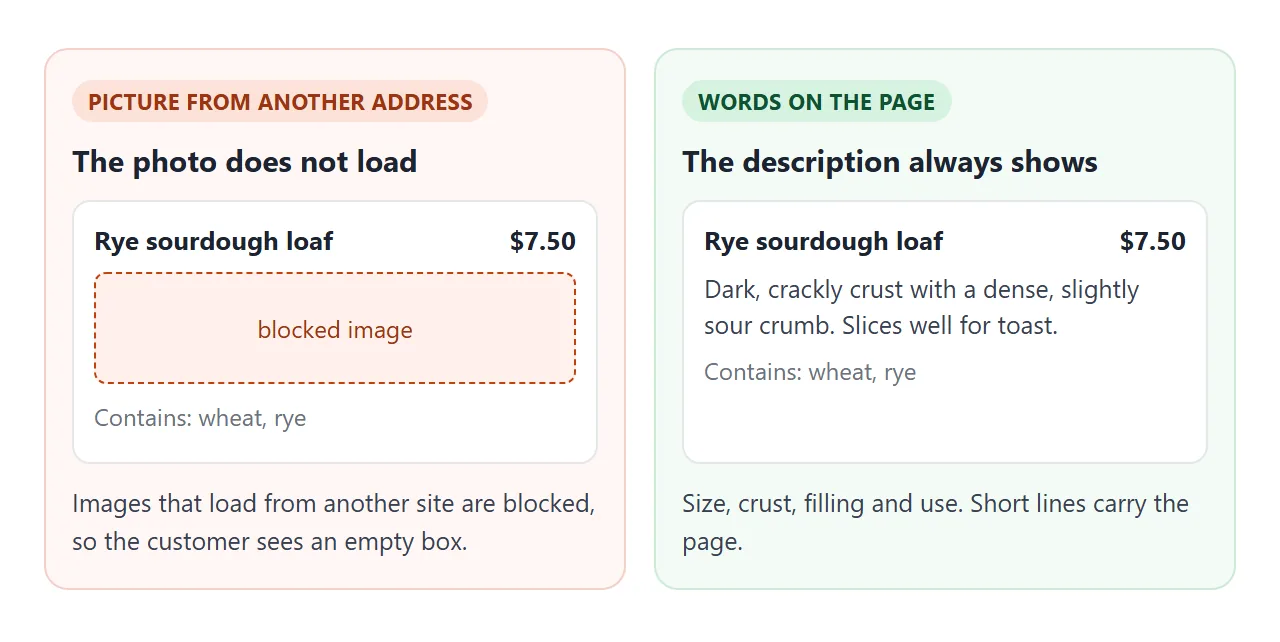
Words do the job well here. Say how big it is, what the crust is like, what is inside, and what it goes with.
If you want a little decoration, shapes drawn with CSS or inline SVG are part of the page itself, like the wheat mark in the demo.
Make it with AI
Give the chat your real list and tell it not to add anything. Paste this into ChatGPT, Claude or Gemini, and replace the square brackets with your own details:
Write one self-contained HTML page for a small bakery menu. Use only HTML, CSS and a little JavaScript. No images and no external files.

Bakery: [name], [town]. Open [days and hours]. Orders: [how to order].

Sections and items (name, price, one line about it, what it contains):
Bread:
- [item], [price], [one line], [allergens]
Pastry:
- [item], [price], [one line], [allergens]

Rules: it must read well on a phone. Put the section names as buttons at the top that jump to each section. Show the price on the same line as the name. Add a checkbox that hides items marked sold out. End with the hours, address and how to order. Do not invent any item, price or allergen. If something is missing, leave it out.
Then check the result against your own list. The AI writes confidently, and a wrong price on a menu is yours to answer for.
- Every price matches your list, and the dollar signs and decimals are right.
- Every allergen line says only what you told it. Add or correct them yourself.
- Hours and address are exactly as you gave them.
- No extra items were added to make a section look fuller.
- On a phone the buttons are easy to tap and nothing runs off the side.
Send it as a link
Paste the finished page into NOS and choose Create share link. HTML to link walks through it.
The link opens in a browser, on a phone too, with no account and nothing to install. The people who open it can read the page but cannot edit it.
When a price changes, edit the code in NOS. The link stays the same, so your bio, your printed QR code and any message you already sent all show the new version. Someone who already has the page open needs to reload it.
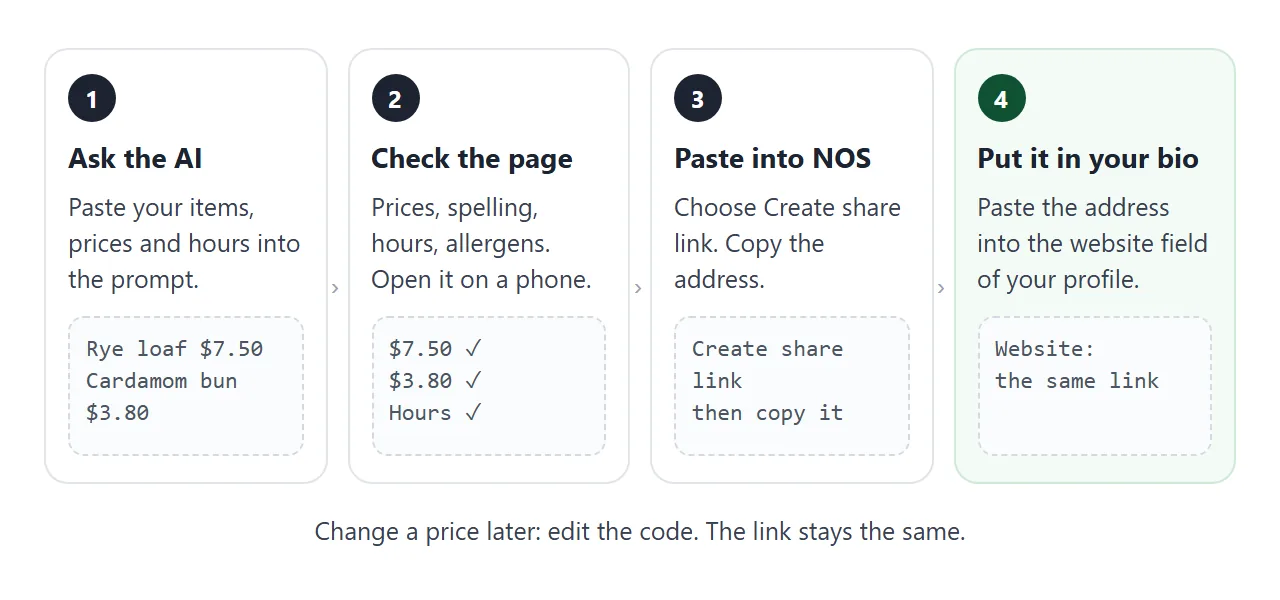
Then put the link where customers look. As of October 2026, these two places take a web address:
- Instagram: open your profile, choose Edit profile, and add the address as your website. Instagram's help page covers it. The screens can change, so follow the app if it differs.
- Google Business Profile: under Edit profile, Contact, there is a Menu link field. Google's help page describes it.
For a counter or a window, turn the same address into a QR code. QR code link shows how.
Ways to put a menu in front of customers
| Photo of the printed menu | PDF file | Page at a link | |
|---|---|---|---|
| Change a price | Take and post a new photo | Edit and send the file again | Edit the page, same link |
| Text readable on a phone | Only if the photo is sharp | Laid out for paper, may need zooming | Fits the screen |
| Sold out today | Not shown | Not shown | Mark the item |
| Old copies in circulation | Yes | Yes | No, one address |
If you already have a printed menu, a page does not replace it. It gives the customer who is not in the shop the same information. Menu link covers the restaurant version of the same idea.
A second page: pre-orders
Many bakeries take orders for Saturday loaves or a cake. This page lets a customer pick quantities and see the total.
A form inside the page works, but sending it to a server does not, so the page writes the order as a message. The customer copies it and sends it to you.
<!doctype html>
<html lang="en">
<head>
<meta charset="utf-8">
<meta name="viewport" content="width=device-width, initial-scale=1">
<title>Marrow & Rye Bakery - Pre-order list</title>
<style>
* { box-sizing: border-box; }
body { margin: 0; font-family: system-ui, sans-serif; background: #fbf6ee; color: #3a2a1c; line-height: 1.5; }
.wrap { max-width: 560px; margin: 0 auto; padding: 18px 16px 30px; }
h1 { font: 700 22px Georgia, serif; margin: 0 0 4px; }
.lead { margin: 0 0 14px; font-size: 14px; color: #6b5744; }
.line { display: grid; grid-template-columns: 1fr auto auto; gap: 10px; align-items: center; padding: 10px 0; border-bottom: 1px dashed #e0cfb4; }
.nm { font-weight: 600; }
.pr { font-size: 14px; color: #6b5744; }
.qty { display: flex; align-items: center; gap: 6px; }
.qty button { width: 36px; height: 36px; border-radius: 50%; border: 1px solid #cdb592; background: #fff; font-size: 20px; line-height: 1; color: #3a2a1c; cursor: pointer; }
.qty output { min-width: 22px; text-align: center; font-weight: 700; }
.total { display: flex; justify-content: space-between; font-weight: 700; font-size: 17px; padding: 14px 0 6px; }
label { display: block; font-size: 14px; font-weight: 600; margin: 12px 0 4px; }
input[type=text], input[type=date] { width: 100%; padding: 10px; font-size: 16px; border: 1px solid #cdb592; border-radius: 8px; background: #fff; }
.go { margin-top: 14px; width: 100%; padding: 12px; font-size: 16px; font-weight: 700; color: #fff; background: #8a5a2b; border: 0; border-radius: 10px; cursor: pointer; }
.msg { margin-top: 14px; display: none; }
.msg.on { display: block; }
textarea { width: 100%; height: 150px; padding: 10px; font: 15px/1.45 system-ui, sans-serif; border: 1px solid #cdb592; border-radius: 8px; background: #fff; resize: vertical; }
.hint { font-size: 13px; color: #6b5744; margin: 6px 0 0; }
.warn { color: #b4472a; font-size: 14px; margin: 8px 0 0; min-height: 20px; }
</style>
</head>
<body>
<div class="wrap">
<h1>Pre-order for Saturday</h1>
<p class="lead">Pick what you want, then copy the message and send it to us on Instagram or by text. We confirm by reply.</p>
<form id="f">
<div class="line" data-name="Rye sourdough loaf" data-price="7.50">
<span class="nm">Rye sourdough loaf</span><span class="pr">$7.50</span>
<span class="qty"><button type="button" data-d="-1" aria-label="One fewer rye loaf">-</button><output>0</output><button type="button" data-d="1" aria-label="One more rye loaf">+</button></span>
</div>
<div class="line" data-name="Cardamom bun" data-price="3.80">
<span class="nm">Cardamom bun</span><span class="pr">$3.80</span>
<span class="qty"><button type="button" data-d="-1" aria-label="One fewer cardamom bun">-</button><output>0</output><button type="button" data-d="1" aria-label="One more cardamom bun">+</button></span>
</div>
<div class="line" data-name="Butter croissant" data-price="3.50">
<span class="nm">Butter croissant</span><span class="pr">$3.50</span>
<span class="qty"><button type="button" data-d="-1" aria-label="One fewer croissant">-</button><output>0</output><button type="button" data-d="1" aria-label="One more croissant">+</button></span>
</div>
<div class="line" data-name="Honey and lemon cake" data-price="28.00">
<span class="nm">Honey and lemon cake</span><span class="pr">$28.00</span>
<span class="qty"><button type="button" data-d="-1" aria-label="One fewer lemon cake">-</button><output>0</output><button type="button" data-d="1" aria-label="One more lemon cake">+</button></span>
</div>
<div class="total"><span>Total</span><span id="total">$0.00</span></div>
<label for="who">Name for the order</label>
<input type="text" id="who" autocomplete="off">
<label for="when">Pick-up date</label>
<input type="date" id="when">
<button class="go" type="submit">Make my message</button>
<p class="warn" id="warn" role="status"></p>
</form>
<div class="msg" id="msg">
<label for="out">Your message (select it, copy it, send it)</label>
<textarea id="out" readonly></textarea>
<p class="hint">Nothing has been sent. This page only writes the text for you.</p>
</div>
</div>
<script>
const lines = [...document.querySelectorAll('.line')];
const money = (n) => '$' + n.toFixed(2);
function sum() {
let t = 0;
lines.forEach((l) => { t += Number(l.dataset.price) * Number(l.querySelector('output').textContent); });
document.getElementById('total').textContent = money(t);
return t;
}
// + and - buttons change the count on their own line
lines.forEach((l) => {
l.querySelectorAll('button').forEach((b) => {
b.addEventListener('click', () => {
const o = l.querySelector('output');
o.textContent = Math.max(0, Number(o.textContent) + Number(b.dataset.d));
sum();
});
});
});
document.getElementById('f').addEventListener('submit', (e) => {
e.preventDefault(); // keep the page here; nothing is sent anywhere
const warn = document.getElementById('warn');
const who = document.getElementById('who').value.trim();
const when = document.getElementById('when').value;
const picked = lines.filter((l) => Number(l.querySelector('output').textContent) > 0);
if (!picked.length || !who || !when) {
warn.textContent = 'Pick at least one item and fill in your name and the date.';
document.getElementById('msg').classList.remove('on');
return;
}
warn.textContent = '';
const text = picked.map((l) => l.querySelector('output').textContent + ' x ' + l.dataset.name).join('\n');
const out = document.getElementById('out');
out.value = 'Hi, I would like to pre-order for ' + when + ':\n' + text + '\nTotal: ' + money(sum()) + '\nName: ' + who;
document.getElementById('msg').classList.add('on');
out.focus();
out.select();
});
</script>
</body>
</html>
Prices live in two places in this page, the visible price and a data attribute on each line. Change both, or ask the AI to change them for you.
When it does not work
| What you see | Cause | Fix |
|---|---|---|
| A photo shows as an empty box | The picture loads from another address, which is blocked | Describe the item in words instead |
| The page looks tiny on a phone | The viewport meta tag is missing | Ask the AI to add it |
| The page shows an old price | The visitor still has the old page open | Reload the page |
| Items missing after you pasted | The chat cut the answer off | Ask it to continue, then paste the whole page |
| The section buttons do nothing | The ids do not match the button links | Ask the AI to match each button to its section |
| An allergen line is wrong | The AI guessed | Correct it by hand, and compare with your own list |
If a page looks wrong on a phone, HTML not loading images goes through the usual causes.