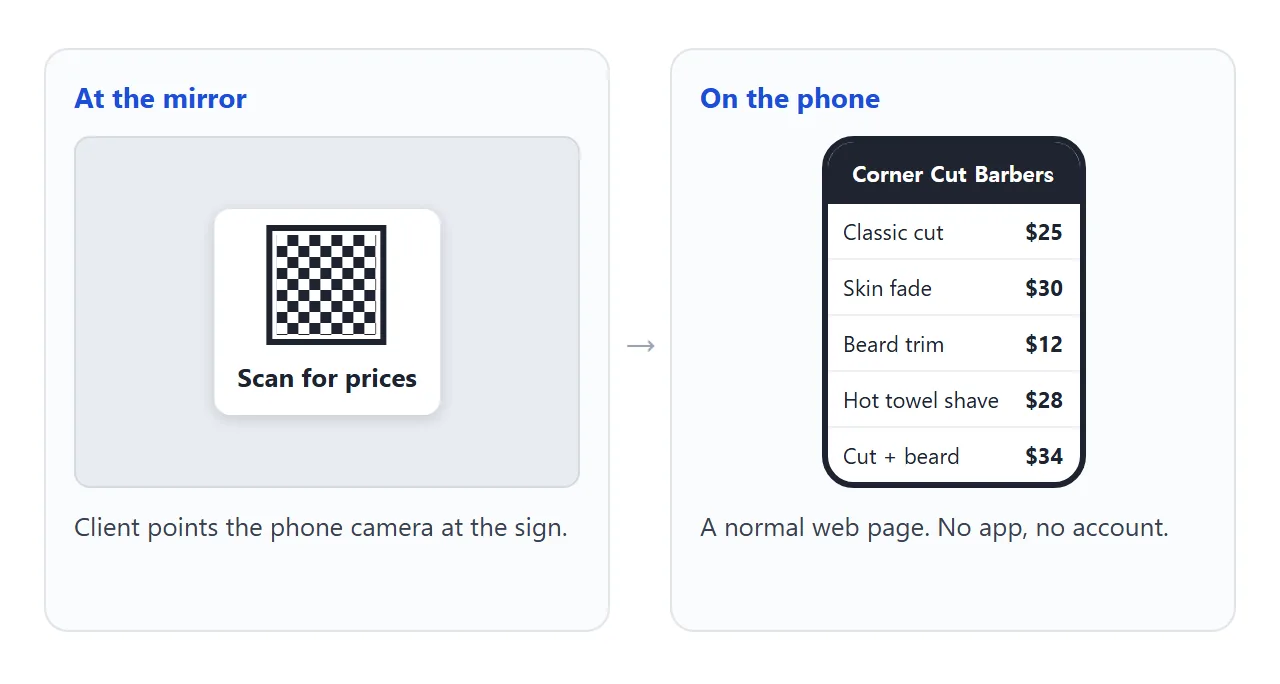
A barber price list works well as one web page that opens from a QR code at the chair. The client points the phone camera at the sign, the services and prices appear, and nobody downloads a file or an app.
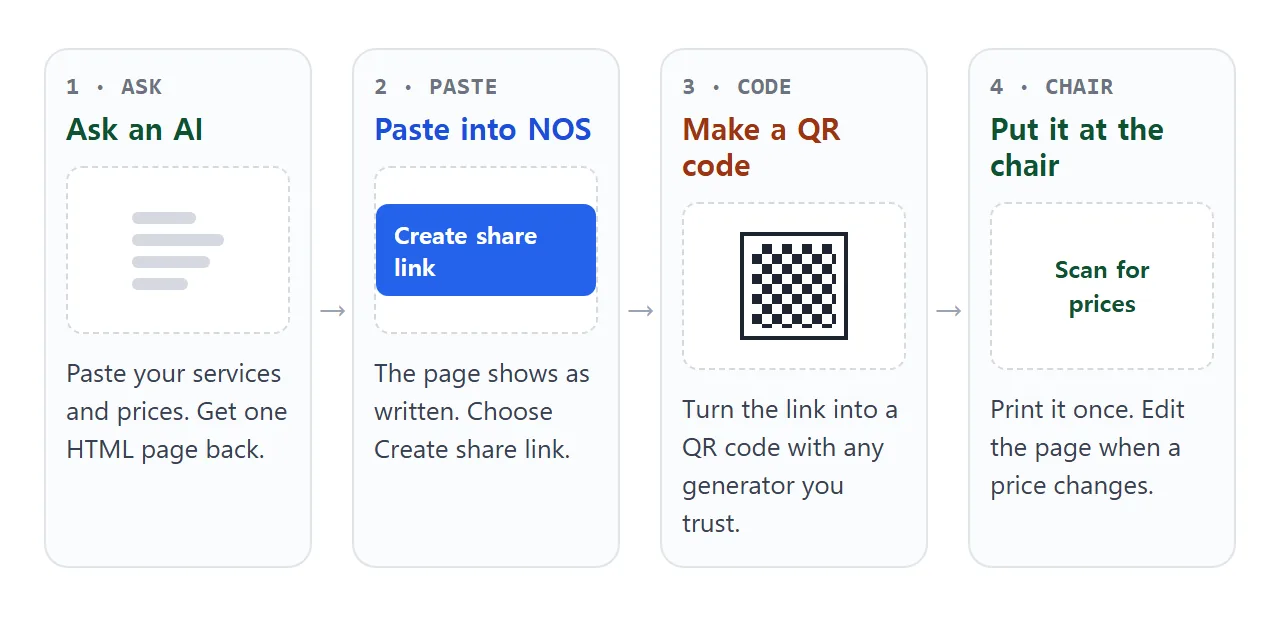
People ask how to create a brochure online for this kind of job. For a price list you do not need design software: one page with a short list is enough, and an AI chat can write it in a minute.
Here is a page you can copy. The shop is made up and the prices are examples. Scroll inside the frame, then replace the names and numbers with yours.
<!doctype html>
<html lang="en">
<head>
<meta charset="utf-8">
<meta name="viewport" content="width=device-width, initial-scale=1">
<title>Corner Cut Barbers - Prices</title>
<style>
* { box-sizing: border-box; }
body { margin: 0; font-family: system-ui, sans-serif; background: #f3f1ed; color: #1f2430; }
header { background: #1f2430; color: #fff; padding: 22px 20px 18px; text-align: center; }
header svg { width: 34px; height: 34px; }
header h1 { margin: 6px 0 2px; font-size: 24px; letter-spacing: .5px; }
header p { margin: 0; font-size: 13px; color: #c9ced9; }
main { max-width: 560px; margin: 0 auto; padding: 16px 16px 28px; }
.updated { text-align: center; font-size: 13px; color: #5b6272; margin: 4px 0 14px; }
section { background: #fff; border-radius: 12px; padding: 14px 16px 8px; margin-bottom: 14px; box-shadow: 0 1px 4px rgba(0,0,0,.08); }
h2 { margin: 0 0 6px; font-size: 13px; letter-spacing: 1.2px; text-transform: uppercase; color: #9a3412; }
.row { display: flex; align-items: baseline; gap: 8px; padding: 9px 0; border-top: 1px solid #eceef2; }
.row:first-of-type { border-top: 0; }
.name { font-weight: 600; }
.note { display: block; font-weight: 400; font-size: 13px; color: #5b6272; }
.dots { flex: 1; border-bottom: 1px dotted #b8bdc9; transform: translateY(-4px); min-width: 12px; }
.price { font-weight: 700; font-variant-numeric: tabular-nums; white-space: nowrap; }
.info { font-size: 14px; line-height: 1.55; text-align: center; color: #3a4150; }
.info b { color: #1f2430; }
</style>
</head>
<body>
<header>
<svg viewBox="0 0 24 24" fill="none" stroke="#fff" stroke-width="1.8" stroke-linecap="round" aria-hidden="true">
<circle cx="6" cy="6" r="3"/><circle cx="6" cy="18" r="3"/><path d="M8.5 7.5L20 18M8.5 16.5L20 6"/>
</svg>
<h1>Corner Cut Barbers</h1>
<p>Tue to Sat, 9:00 to 18:00 · Walk-ins welcome</p>
</header>
<main>
<p class="updated">Prices updated 1 October 2026 (example prices)</p>
<section>
<h2>Haircuts</h2>
<div class="row"><span class="name">Classic cut<span class="note">Scissors and clipper, 30 min</span></span><span class="dots"></span><span class="price">$25</span></div>
<div class="row"><span class="name">Skin fade<span class="note">40 min</span></span><span class="dots"></span><span class="price">$30</span></div>
<div class="row"><span class="name">Kids cut<span class="note">Under 12, 25 min</span></span><span class="dots"></span><span class="price">$18</span></div>
<div class="row"><span class="name">Senior cut<span class="note">Age 65 and over, 30 min</span></span><span class="dots"></span><span class="price">$20</span></div>
</section>
<section>
<h2>Beard and shave</h2>
<div class="row"><span class="name">Beard trim<span class="note">15 min</span></span><span class="dots"></span><span class="price">$12</span></div>
<div class="row"><span class="name">Hot towel shave<span class="note">30 min</span></span><span class="dots"></span><span class="price">$28</span></div>
<div class="row"><span class="name">Neck and line-up<span class="note">10 min</span></span><span class="dots"></span><span class="price">$8</span></div>
</section>
<section>
<h2>Combos</h2>
<div class="row"><span class="name">Cut + beard trim<span class="note">45 min</span></span><span class="dots"></span><span class="price">$34</span></div>
<div class="row"><span class="name">Skin fade + hot towel shave<span class="note">65 min</span></span><span class="dots"></span><span class="price">$52</span></div>
</section>
<section class="info">
<p><b>Cash and card.</b> Tips welcome.<br>Running late? Call 555-0142.</p>
</section>
</main>
</body>
</html>
What goes on the page
A price list is read standing up or sitting in the chair, usually for a few seconds. So the page should answer three questions at once: what do you do, how long does it take, and what does it cost.
- Updated date at the top. It tells the reader the prices are current. Price list link explains why this one line matters.
- Name, minutes and price on one row. The price goes on the right, in a column, so the eye can run down it.
- Groups with short headings. Haircuts, beard and shave, combos. Clients look for the thing they came for.
- Payment and a phone number. One short line at the bottom.
Leave off anything you would not pin to the wall of the shop. Anyone who has the link can open the page.
Make it with AI
Paste the prompt below into ChatGPT, Claude or Gemini. Fill in the square brackets with your own shop and list.
Write one self-contained HTML page: a price list for a barber shop called [SHOP NAME].
Mobile first. It must be easy to read on a phone held at arm's length.
No external images, fonts or scripts.
Top: shop name, opening hours, and the line "Prices updated [DATE]".
Then groups with a heading each: Haircuts, Beard and shave, Combos.
Each service is one row: the name, the minutes in small grey text,
and the price on the right with a dotted line between.
Use exactly these services and prices. Do not add, remove or round anything:
[PASTE YOUR LIST: service, minutes, price]
Bottom: payment methods and a phone number for running late.
Return only the HTML.
Then check the result before it goes on a wall:
- Every price. Compare the page with your own list, line by line. An AI can add a service you do not offer or change a number.
- The date and the phone number. Both are easy to leave as a placeholder.
- A narrow screen. Make your browser window narrow. If text is cramped, ask for a mobile-first layout. The viewport meta tag is usually the cause.
- No pictures from other sites. Images loaded from other websites are blocked in NOS. Ask for an inline drawing or no picture.
Send it as a link
Copy the HTML and paste it into a NOS document. Choose Create share link. HTML to link walks through it.
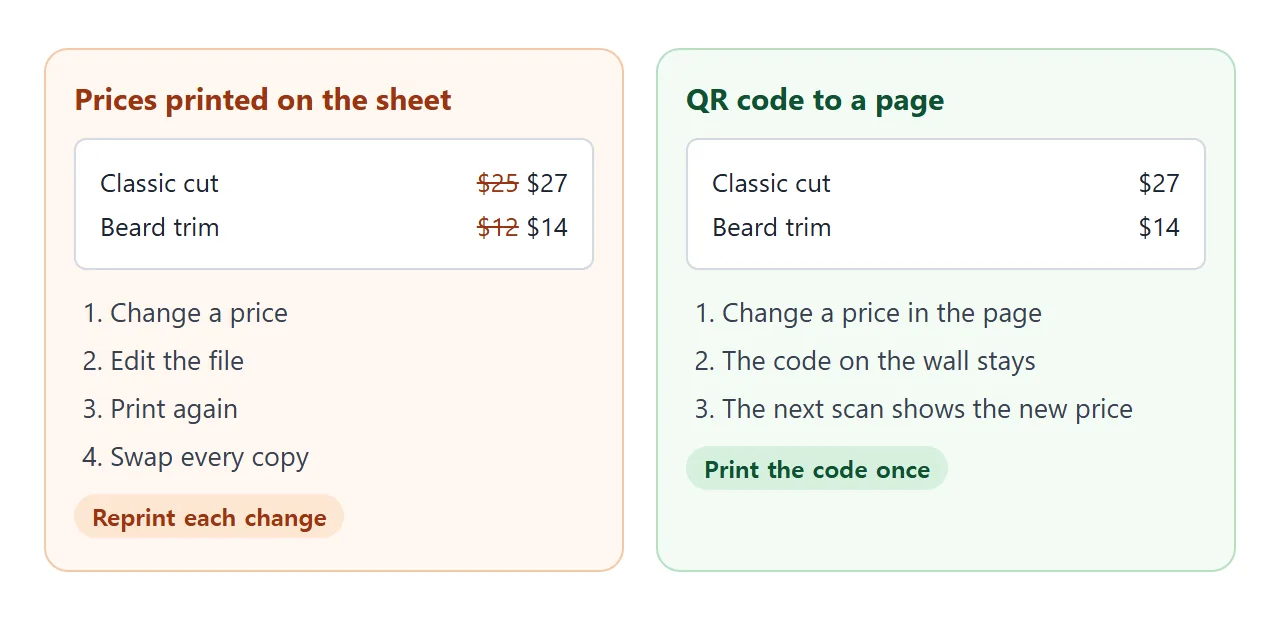
The client opens the link in a browser, on a phone too, with no account, and can read the page but not edit it. When you change a price, edit the code in your document. The link stays the same and shows the new version.
The QR code
A QR code encodes an address. Make one from your share link with any QR code generator you trust. QR code link covers size and contrast.
Scan it yourself before you print anything. Open the camera, point it at the code, and tap the link that appears.
Google's help for Pixel phones says you do not need to take a picture, and that Camera scan suggestions must be turned on in Camera settings.
Apple has a guide called "Scan a QR code with your iPhone camera". Steps can change, so check them on your own phone.
Where to put the sign
Put the code where the client looks while waiting and while sitting in the chair. Dark code on a light background, away from glare from the mirror lights, is easier to scan than a code on a glossy or patterned sign.
Under the code write three words, such as "Scan for prices", so people know what it opens. Add the plain link in small print for anyone whose phone does not scan.
Paper, file or link: what changes
The reason to use a link is the day a price moves.
| Way to show prices | When a price changes | What the client needs |
|---|---|---|
| Printed sheet in a frame | Edit, print, swap every copy | Nothing, but they must be at the chair |
| PDF sent as a file | New file, sent again | A way to open the file |
| Link behind a QR code | Edit the page, same link | A phone that scans QR codes |
| The same link in a message | Edit the page, same link | A browser |
For a longer look at sending lists to customers, see send a price list to customers.
Let clients add up their visit
A second page can do a little more. The client ticks the services they want and the page adds up the price and the time. It runs inside the page, so it works in a share link.
<!doctype html>
<html lang="en">
<head>
<meta charset="utf-8">
<meta name="viewport" content="width=device-width, initial-scale=1">
<title>Corner Cut Barbers - Build my visit</title>
<style>
  * { box-sizing: border-box; }
  body { margin: 0; font-family: system-ui, sans-serif; background: #f3f1ed; color: #1f2430; }
  header { background: #1f2430; color: #fff; padding: 16px 18px; }
  header h1 { margin: 0; font-size: 20px; }
  header p { margin: 2px 0 0; font-size: 13px; color: #c9ced9; }
  main { max-width: 560px; margin: 0 auto; padding: 14px 14px 120px; }
  label.item { display: flex; align-items: center; gap: 12px; background: #fff; border: 2px solid transparent; border-radius: 12px; padding: 12px 14px; margin-bottom: 8px; cursor: pointer; box-shadow: 0 1px 4px rgba(0,0,0,.08); }
  label.item:has(input:checked) { border-color: #166534; background: #f0fdf4; }
  label.item input { width: 22px; height: 22px; accent-color: #166534; flex: none; }
  .t { flex: 1; font-weight: 600; }
  .t small { display: block; font-weight: 400; color: #5b6272; font-size: 13px; }
  .p { font-weight: 700; font-variant-numeric: tabular-nums; }
  .bar { position: fixed; left: 0; right: 0; bottom: 0; background: #1f2430; color: #fff; padding: 12px 18px; display: flex; align-items: center; justify-content: space-between; gap: 12px; }
  .bar .sum { font-size: 13px; color: #c9ced9; line-height: 1.4; }
  .bar .sum b { display: block; color: #fff; font-size: 22px; font-variant-numeric: tabular-nums; }
  .bar button { border: 0; border-radius: 10px; padding: 11px 14px; font: inherit; font-weight: 700; background: #fff; color: #1f2430; cursor: pointer; }
  #list { margin: 0 0 10px; padding: 0; list-style: none; font-size: 14px; color: #3a4150; }
</style>
</head>
<body>
<header>
  <h1>Build my visit</h1>
  <p>Tick what you want. Example prices.</p>
</header>
<main>
  <label class="item"><input type="checkbox" data-name="Classic cut" data-price="25" data-min="30"><span class="t">Classic cut<small>30 min</small></span><span class="p">$25</span></label>
  <label class="item"><input type="checkbox" data-name="Skin fade" data-price="30" data-min="40"><span class="t">Skin fade<small>40 min</small></span><span class="p">$30</span></label>
  <label class="item"><input type="checkbox" data-name="Beard trim" data-price="12" data-min="15"><span class="t">Beard trim<small>15 min</small></span><span class="p">$12</span></label>
  <label class="item"><input type="checkbox" data-name="Hot towel shave" data-price="28" data-min="30"><span class="t">Hot towel shave<small>30 min</small></span><span class="p">$28</span></label>
  <label class="item"><input type="checkbox" data-name="Neck and line-up" data-price="8" data-min="10"><span class="t">Neck and line-up<small>10 min</small></span><span class="p">$8</span></label>
  <ul id="list"></ul>
</main>
<div class="bar">
  <div class="sum"><b id="total">$0</b><span id="mins">0 min</span></div>
  <button type="button" id="clear">Clear</button>
</div>

<script>
  const boxes = document.querySelectorAll('input[type=checkbox]');
  const totalEl = document.getElementById('total');
  const minsEl = document.getElementById('mins');
  const listEl = document.getElementById('list');

  function update() {
    let total = 0, mins = 0;
    const names = [];
    boxes.forEach((b) => {
      if (b.checked) {
        total += Number(b.dataset.price);
        mins += Number(b.dataset.min);
        names.push(b.dataset.name);
      }
    });
    totalEl.textContent = '$' + total;
    minsEl.textContent = mins + ' min';
    listEl.innerHTML = '';
    names.forEach((n) => {
      const li = document.createElement('li');
      li.textContent = n;
      listEl.appendChild(li);
    });
  }

  boxes.forEach((b) => b.addEventListener('change', update));
  document.getElementById('clear').addEventListener('click', () => {
    boxes.forEach((b) => { b.checked = false; });
    update();
  });
</script>
</body>
</html>
The ticks a client makes are not saved, and the owner's page does not change. Each person starts from a clean list. Ask the AI to "add checkboxes that total the price and minutes".
When it does not work
| What you see | Cause | Fix |
|---|---|---|
| The camera shows nothing at the sign | The code is small, shiny or at a steep angle, or scanning is off in the camera | Scan from the chair, reprint bigger on a matte sheet, and check the camera settings |
| A price on the page is wrong | The AI changed or invented it | Compare with your own list and ask the AI to correct that line |
| The sign opens a different page than the one you edit | The code was made from another link | Make the code again from the share link of the page you edit |
| The page looks cramped on a phone | The layout was made for a wide screen | Ask for a mobile-first layout |
| No picture shows | Images from other sites are blocked | Use an inline drawing or leave the picture out |
| A booking form does nothing | Sending a form to a server is blocked | Write your phone number on the page |