Mina's 30th is five weeks away. You made the group chat, sent the date, and since then someone asks "wait, which Saturday?" every few days.
A birthday countdown page fixes that. One link, the date in big numbers, the place underneath, and a clock that ticks down every time someone opens it.
It also turns into a small running joke. People open it just to see the days drop.
These days people ask ChatGPT, Claude or Gemini for a page like this and get it finished in one reply.
Here is one. Watch the seconds, tap a wish, and press "Preview the big moment" to see what happens at zero.
<!doctype html>
<html lang="en">
<head>
<meta charset="utf-8">
<meta name="viewport" content="width=device-width, initial-scale=1">
<title>Mina turns 30</title>
<style>
  * { box-sizing: border-box; }
  body { margin: 0; min-height: 100vh; background: linear-gradient(170deg, #2a1748 0%, #5b2a6e 55%, #c2456b 100%); color: #fff7f2; font-family: system-ui, -apple-system, "Segoe UI", sans-serif; overflow-x: hidden; }
  .page { position: relative; z-index: 1; max-width: 560px; margin: 0 auto; padding: 26px 18px 30px; text-align: center; }
  .balloons { position: fixed; z-index: 0; inset: 0; pointer-events: none; overflow: hidden; }
  .balloons span { position: absolute; bottom: -90px; width: 40px; height: 50px; border-radius: 50% 50% 46% 46%; opacity: .55; animation: float linear infinite; }
  .balloons span::after { content: ""; position: absolute; left: 50%; top: 100%; width: 1px; height: 40px; background: rgba(255,255,255,.4); }
  @keyframes float { to { transform: translateY(-1100px) rotate(8deg); } }
  .kick { position: relative; font-size: 13px; letter-spacing: .16em; text-transform: uppercase; color: #ffc2d1; margin: 0; font-weight: 700; }
  h1 { position: relative; font-family: Georgia, "Times New Roman", serif; font-size: clamp(38px, 11vw, 60px); line-height: 1.02; margin: 8px 0 18px; }
  h1 em { font-style: normal; background: linear-gradient(90deg, #ffd36e, #ff8fb1); -webkit-background-clip: text; background-clip: text; color: transparent; }
  .clock { position: relative; display: grid; grid-template-columns: repeat(4, 1fr); gap: 8px; }
  .unit { background: rgba(255,255,255,.1); border: 1px solid rgba(255,255,255,.18); border-radius: 16px; padding: 12px 4px 10px; backdrop-filter: blur(4px); }
  .unit b { display: block; font-size: clamp(30px, 9vw, 46px); font-variant-numeric: tabular-nums; line-height: 1; }
  .unit b.tick { animation: tick .35s ease; }
  @keyframes tick { 0% { transform: translateY(-6px); opacity: .3; } 100% { transform: none; opacity: 1; } }
  .unit small { font-size: 12.5px; color: #ffd9e3; letter-spacing: .06em; text-transform: uppercase; }
  .details { position: relative; margin: 16px 0 0; background: #fff7f2; color: #2a1748; border-radius: 18px; padding: 14px 16px; text-align: left; box-shadow: 0 16px 40px rgba(20, 5, 30, .35); }
  .details p { margin: 6px 0; font-size: 16px; line-height: 1.45; display: grid; grid-template-columns: 62px 1fr; gap: 6px; }
  .details p span:first-child { font-size: 12.5px; font-weight: 700; letter-spacing: .08em; text-transform: uppercase; color: #a2477a; padding-top: 3px; }
  .test { position: relative; margin-top: 14px; font: 600 14px system-ui, sans-serif; color: #fff7f2; background: rgba(255,255,255,.12); border: 1px solid rgba(255,255,255,.3); border-radius: 999px; padding: 10px 16px; cursor: pointer; }
  h2 { position: relative; margin: 28px 0 4px; font-family: Georgia, serif; font-size: 24px; }
  .sub { position: relative; margin: 0 0 14px; font-size: 14px; color: #ffd9e3; }
  .wishes { position: relative; list-style: none; margin: 0; padding: 0; display: grid; gap: 10px; text-align: left; }
  .wishes li { position: relative; background: rgba(255,255,255,.95); color: #2a1748; border-radius: 16px; padding: 14px 16px 12px; font-size: 15.5px; line-height: 1.45; cursor: pointer; transform: rotate(var(--r, 0deg)); transition: transform .2s; animation: in .5s ease backwards; }
  .wishes li:nth-child(odd) { --r: -.8deg; }
  .wishes li:nth-child(even) { --r: .9deg; background: #ffeef3; }
  .wishes li:active { transform: scale(.98); }
  .wishes li cite { display: block; margin-top: 6px; font-style: normal; font-weight: 700; font-size: 13.5px; color: #a2477a; }
  .heart { position: absolute; font-size: 22px; pointer-events: none; animation: up 1s ease-out forwards; }
  @keyframes up { to { transform: translateY(-60px) scale(1.4); opacity: 0; } }
  @keyframes in { from { opacity: 0; transform: translateY(10px); } }
  .party { position: fixed; inset: 0; display: none; flex-direction: column; align-items: center; justify-content: center; text-align: center; padding: 24px; background: radial-gradient(circle at 50% 40%, #6b3a7a, #2a1748 70%); z-index: 5; }
  .party.on { display: flex; animation: in .5s ease; }
  .party h3 { font-family: Georgia, serif; font-size: clamp(40px, 12vw, 64px); margin: 0 0 8px; line-height: 1.05; }
  .party p { margin: 0 0 18px; font-size: 17px; color: #ffe7ee; }
  .party button { font: 700 15px system-ui, sans-serif; border: 0; border-radius: 999px; padding: 12px 20px; background: #ffd36e; color: #2a1748; cursor: pointer; }
  canvas { position: fixed; inset: 0; pointer-events: none; z-index: 6; }
  .err { color: #ffd36e; font-size: 14px; }
</style>
</head>
<body>
<div class="balloons" id="balloons"></div>
<main class="page">
  <p class="kick">Save the night</p>
  <h1>Mina turns <em>30</em></h1>

  <div class="clock" aria-live="polite">
    <div class="unit"><b id="d">00</b><small>days</small></div>
    <div class="unit"><b id="h">00</b><small>hours</small></div>
    <div class="unit"><b id="m">00</b><small>min</small></div>
    <div class="unit"><b id="s">00</b><small>sec</small></div>
  </div>

  <div class="details">
    <p><span>When</span><span><time id="when" datetime="2026-11-14T19:00">Saturday 14 November 2026, 7:00 pm</time></span></p>
    <p><span>Where</span><span>The rooftop at Lantern Hall, 12 Canal Street</span></p>
    <p><span>Bring</span><span>Something gold. A story about Mina.</span></p>
  </div>
  <button class="test" id="test">Preview the big moment (5 seconds)</button>

  <h2>Wishes for Mina</h2>
  <p class="sub">Collected by Jae. Tap one to send a heart.</p>
  <ul class="wishes">
    <li>Thirty looks good on you already. Save me a dance on the roof.<cite>Hana</cite></li>
    <li>From the first day of college to now. Happy birthday, best friend.<cite>Leo</cite></li>
    <li>I will bring the gold confetti. You bring the speech.<cite>Ines</cite></li>
    <li>Can't make it to the party but I'll call at midnight. Love you.<cite>Grandma</cite></li>
  </ul>
</main>

<div class="party" id="party">
  <h3>Happy 30th, Mina!</h3>
  <p>It's party time. See you on the roof.</p>
  <button id="close">Back to the page</button>
</div>
<canvas id="fx"></canvas>

<script>
  // The countdown reads the date from the words on the page ("Saturday 14 November 2026, 7:00 pm").
  // Change those words and the countdown follows. The datetime attribute is only a fallback.
  const MONTHS = ['january','february','march','april','may','june','july','august','september','october','november','december'];
  const whenEl = document.getElementById('when');

  function readDate() {
    const t = whenEl.textContent.toLowerCase();
    const mi = MONTHS.findIndex((m) => t.includes(m) || t.includes(m.slice(0, 3) + ' '));
    const year = (t.match(/\b(20\d\d)\b/) || [])[1];
    const day = (t.replace(/\b20\d\d\b/, '').match(/\b(\d{1,2})(?:st|nd|rd|th)?\b(?!\s*[:.]\d)/) || [])[1];
    if (mi >= 0 && year && day) {
      let hh = 0, mm = 0;
      const tm = t.match(/(\d{1,2})(?:[:.](\d{2}))?\s*(am|pm)/) || t.match(/(\d{1,2})[:.](\d{2})/);
      if (tm) { hh = +tm[1]; mm = +(tm[2] || 0); if (tm[3] === 'pm' && hh < 12) hh += 12; if (tm[3] === 'am' && hh === 12) hh = 0; }
      return new Date(+year, mi, +day, hh, mm);
    }
    const fallback = new Date(whenEl.getAttribute('datetime'));
    return isNaN(fallback) ? null : fallback;
  }

  const els = ['d', 'h', 'm', 's'].map((id) => document.getElementById(id));
  let testTarget = null, celebrated = false;

  function setNum(el, v) {
    const s = String(v).padStart(2, '0');
    if (el.textContent !== s) { el.textContent = s; el.classList.remove('tick'); void el.offsetWidth; el.classList.add('tick'); }
  }

  function tick() {
    const target = testTarget || readDate();
    if (!target) { document.querySelector('.clock').innerHTML = '<p class="err">Check the date line: write it like 14 November 2026, 7:00 pm.</p>'; return; }
    let left = Math.max(0, target - Date.now());
    const sec = Math.floor(left / 1000);
    setNum(els[0], Math.floor(sec / 86400));
    setNum(els[1], Math.floor(sec % 86400 / 3600));
    setNum(els[2], Math.floor(sec % 3600 / 60));
    setNum(els[3], sec % 60);
    if (left === 0 && !celebrated) celebrate();
  }

  function celebrate() {
    celebrated = true;
    document.getElementById('party').classList.add('on');
    confetti();
  }
  document.getElementById('close').addEventListener('click', () => {
    document.getElementById('party').classList.remove('on');
    if (testTarget) { testTarget = null; celebrated = false; tick(); }
  });
  document.getElementById('test').addEventListener('click', () => { testTarget = new Date(Date.now() + 5000); celebrated = false; tick(); });

  function confetti() {
    const c = document.getElementById('fx'), x = c.getContext('2d');
    c.width = innerWidth; c.height = innerHeight;
    const cols = ['#ffd36e', '#ff8fb1', '#8fe3ff', '#b8f2a6', '#ffffff'];
    const bits = Array.from({ length: 160 }, () => ({ x: Math.random() * c.width, y: -20 - Math.random() * c.height * .6, w: 6 + Math.random() * 6, h: 8 + Math.random() * 8, vy: 2 + Math.random() * 3, vx: -1.5 + Math.random() * 3, r: Math.random() * 6, vr: -.2 + Math.random() * .4, col: cols[Math.floor(Math.random() * cols.length)] }));
    const t0 = performance.now();
    (function frame(t) {
      x.clearRect(0, 0, c.width, c.height);
      bits.forEach((b) => { b.y += b.vy; b.x += b.vx; b.r += b.vr; x.save(); x.translate(b.x, b.y); x.rotate(b.r); x.fillStyle = b.col; x.fillRect(-b.w / 2, -b.h / 2, b.w, b.h); x.restore(); });
      if (t - t0 < 4500) requestAnimationFrame(frame); else x.clearRect(0, 0, c.width, c.height);
    })(t0);
  }

  document.querySelectorAll('.wishes li').forEach((li) => li.addEventListener('click', (e) => {
    const h = document.createElement('span');
    h.className = 'heart'; h.textContent = '❤️';
    const r = li.getBoundingClientRect();
    h.style.left = (e.clientX - r.left - 10) + 'px'; h.style.top = (e.clientY - r.top - 20) + 'px';
    li.appendChild(h); setTimeout(() => h.remove(), 1000);
  }));

  const bl = document.getElementById('balloons');
  ['#ff8fb1', '#ffd36e', '#8fe3ff', '#c9a7ff', '#ff8fb1', '#ffd36e'].forEach((col, i) => {
    const b = document.createElement('span');
    b.style.background = col; b.style.left = (8 + i * 16) + '%';
    b.style.animationDuration = (14 + i * 2.5) + 's'; b.style.animationDelay = (-i * 3.1) + 's';
    bl.appendChild(b);
  });

  tick();
  setInterval(tick, 1000);
</script>
</body>
</html>
Three things that make friends come back to it
1. The date in words, right under the numbers. "33 days" is fun. "Saturday 14 November, 7 pm, the rooftop at Lantern Hall" is what people put in their calendar. Keep both on the first screen.
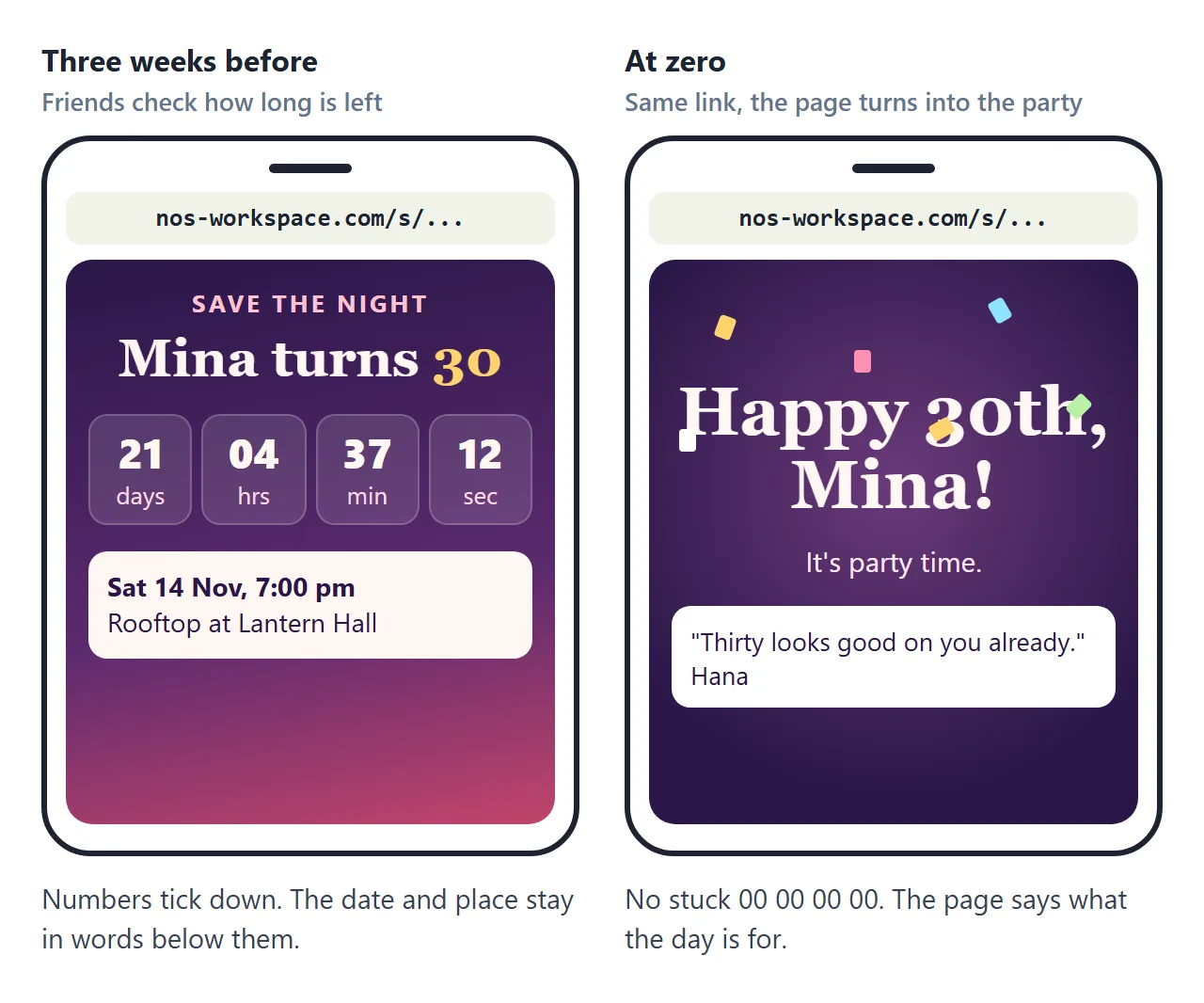
2. A plan for zero. On the day, the page should say happy birthday, not 00 00 00 00. Ask for a celebration screen: a big message, some confetti, the wishes. The countdown was the build-up; this is the payoff.
3. Wishes that keep arriving. Ask friends to send you a line for the birthday person. Add them to the page as they come in. A page that has two new wishes since yesterday gets opened again, and on the day it is a wall of messages from everyone.
Make it with AI
Open ChatGPT, Claude or Gemini and paste this. Change the words in capitals.
Make one complete HTML file: a birthday countdown page.
Whose birthday: NAME, turning AGE.
Party date and time, written out on the page in words:
DAY DATE MONTH YEAR, TIME. Read the countdown target
from that visible text, not from a separate value in
the script, so changing the words changes the countdown.
Show days, hours, minutes and seconds, with a small
animation when a number changes.
Under it: where (PLACE) and what to bring (ITEM).
Wishes wall: show these wishes as cards, each with the
sender's name: PASTE WISHES HERE
At zero: switch to a celebration screen that says
"MESSAGE" with confetti. Add a button that previews
this in 5 seconds so I can check it.
Rules: works on a phone, all CSS and JavaScript inside
the file, no images or fonts from other sites, nothing
sent anywhere. Use only my names, dates and wishes.
Do not invent any. If something is missing, write TODO.
"Read the countdown target from that visible text" matters most. If the date only lives inside the script, the words on the page and the clock can disagree, and changing one does not change the other.
The preview button matters second. Without it you find out what zero looks like at the party.
A birthday countdown does not have to be for one person. Here is a family board: it reads a plain list of names and birthdays, sorts them, and puts whoever is next in the big ring. Tap a name to count down to theirs.
<!doctype html>
<html lang="en">
<head>
<meta charset="utf-8">
<meta name="viewport" content="width=device-width, initial-scale=1">
<title>Okafor family birthdays</title>
<style>
  * { box-sizing: border-box; }
  body { margin: 0; min-height: 100vh; background: #f2f7f4; color: #17302a; font-family: system-ui, -apple-system, "Segoe UI", sans-serif; }
  .page { max-width: 560px; margin: 0 auto; padding: 22px 16px 28px; }
  .kick { margin: 0; font-size: 13px; font-weight: 700; letter-spacing: .14em; text-transform: uppercase; color: #3d8b74; }
  h1 { margin: 4px 0 16px; font-size: 26px; }
  .hero { position: relative; display: grid; grid-template-columns: 132px 1fr; gap: 16px; align-items: center; background: linear-gradient(140deg, #17302a, #24584a); color: #f2f7f4; border-radius: 22px; padding: 18px; box-shadow: 0 16px 34px rgba(23, 48, 42, .25); overflow: hidden; }
  .ring { position: relative; width: 132px; height: 132px; }
  .ring svg { width: 100%; height: 100%; transform: rotate(-90deg); }
  .ring circle { fill: none; stroke-width: 10; }
  .ring .bg { stroke: rgba(255,255,255,.14); }
  .ring .fg { stroke: url(#g); stroke-linecap: round; transition: stroke-dashoffset 1s ease; }
  .ring .mid { position: absolute; inset: 0; display: flex; flex-direction: column; align-items: center; justify-content: center; }
  .ring b { font-size: 40px; line-height: 1; font-variant-numeric: tabular-nums; }
  .ring small { font-size: 13px; color: #b9e3d4; }
  .who { font-size: 24px; font-weight: 800; margin: 0 0 4px; }
  .line { margin: 0; font-size: 15px; color: #cfe9df; line-height: 1.45; }
  .hms { margin-top: 10px; font: 700 18px system-ui, sans-serif; font-variant-numeric: tabular-nums; color: #ffd36e; }
  .today .ring b { font-size: 30px; }
  .spark { position: absolute; width: 8px; height: 8px; border-radius: 2px; animation: fall 2.4s linear infinite; }
  @keyframes fall { from { transform: translateY(-20px) rotate(0); } to { transform: translateY(240px) rotate(360deg); } }
  h2 { margin: 24px 2px 8px; font-size: 13px; letter-spacing: .1em; text-transform: uppercase; color: #5d7f74; }
  .list { list-style: none; margin: 0; padding: 0; display: grid; gap: 8px; }
  .list li { display: grid; grid-template-columns: 42px 1fr auto; gap: 12px; align-items: center; background: #fff; border: 1.5px solid #dbe9e2; border-radius: 16px; padding: 10px 12px; cursor: pointer; transition: border-color .2s, transform .2s; }
  .list li:hover { transform: translateY(-1px); }
  .list li.sel { border-color: #3d8b74; box-shadow: 0 0 0 3px rgba(61,139,116,.15); }
  .av { width: 42px; height: 42px; border-radius: 50%; display: grid; place-items: center; font-weight: 800; color: #fff; }
  .nm { display: block; font-weight: 700; font-size: 16px; }
  .dt { display: block; margin-top: 2px; font-size: 13.5px; color: #5d7f74; }
  .left { text-align: right; font-size: 13px; color: #5d7f74; }
  .left b { display: block; font-size: 20px; color: #17302a; font-variant-numeric: tabular-nums; }
  .foot { margin-top: 16px; font-size: 13.5px; color: #5d7f74; line-height: 1.5; }
</style>
</head>
<body>
<main class="page">
  <p class="kick">Okafor family</p>
  <h1>Whose birthday is next?</h1>

  <section class="hero" id="hero">
    <div class="ring">
      <svg viewBox="0 0 132 132" aria-hidden="true"><defs><linearGradient id="g" x1="0" x2="1"><stop offset="0" stop-color="#ffd36e"/><stop offset="1" stop-color="#7fe0b8"/></linearGradient></defs><circle class="bg" cx="66" cy="66" r="56"/><circle class="fg" id="arc" cx="66" cy="66" r="56"/></svg>
      <div class="mid"><b id="days">0</b><small id="unit">sleeps</small></div>
    </div>
    <div>
      <p class="who" id="who">...</p>
      <p class="line" id="line"></p>
      <p class="hms" id="hms"></p>
    </div>
  </section>

  <h2>Everyone (tap a name)</h2>
  <ul class="list" id="list">
    <li><span class="nm">Ada</span><span class="dt">14 November 2017</span></li>
    <li><span class="nm">Chidi</span><span class="dt">2 February 1984</span></li>
    <li><span class="nm">Ngozi</span><span class="dt">27 June 1986</span></li>
    <li><span class="nm">Grandpa Emeka</span><span class="dt">9 August 1951</span></li>
    <li><span class="nm">Kemi</span><span class="dt">30 December 2020</span></li>
  </ul>
  <p class="foot">Names and dates are made up. The page reads the list above, so a new line here is a new birthday on the board.</p>
</main>
<script>
  const MONTHS = ['january','february','march','april','may','june','july','august','september','october','november','december'];
  const COLS = ['#e2683c', '#3d8b74', '#7a5bd6', '#c2456b', '#3f8f9d', '#b8860b'];
  const items = [...document.querySelectorAll('#list li')];

  function parse(li) {
    const t = li.querySelector('.dt').textContent.toLowerCase();
    const mi = MONTHS.findIndex((m) => t.includes(m) || t.includes(m.slice(0, 3)));
    const day = (t.match(/\b(\d{1,2})\b/) || [])[1];
    const year = (t.match(/\b(\d{4})\b/) || [])[1];
    if (mi < 0 || !day) return null;
    return { name: li.querySelector('.nm').textContent.trim(), m: mi, d: +day, y: year ? +year : null };
  }
  function nextOf(p, now) {
    let n = new Date(now.getFullYear(), p.m, p.d);
    const today = new Date(now.getFullYear(), now.getMonth(), now.getDate());
    if (n < today) n = new Date(now.getFullYear() + 1, p.m, p.d);
    return n;
  }

  let picked = null;
  items.forEach((li, i) => {
    const p = parse(li);
    const av = document.createElement('span');
    av.className = 'av'; av.style.background = COLS[i % COLS.length];
    av.textContent = p ? p.name.split(' ').map((w) => w[0]).join('').slice(0, 2) : '?';
    li.prepend(av);
    const wrap = document.createElement('div');
    wrap.append(li.querySelector('.nm'), li.querySelector('.dt'));
    li.insertBefore(wrap, av.nextSibling);
    const left = document.createElement('span'); left.className = 'left'; li.appendChild(left);
    li.addEventListener('click', () => { picked = li; draw(); });
  });

  function draw() {
    const now = new Date();
    const today = new Date(now.getFullYear(), now.getMonth(), now.getDate());
    const rows = items.map((li) => ({ li, p: parse(li) })).filter((r) => r.p);
    rows.forEach((r) => { r.next = nextOf(r.p, now); r.days = Math.round((r.next - today) / 86400000); });
    rows.sort((a, b) => a.days - b.days);
    rows.forEach((r, k) => {
      r.li.style.order = k;
      r.li.querySelector('.left').innerHTML = r.days === 0 ? '<b>Today</b>' : '<b>' + r.days + '</b>' + (r.days === 1 ? 'sleep' : 'sleeps');
    });
    document.getElementById('list').style.display = 'grid';
    const sel = rows.find((r) => r.li === picked) || rows[0];
    if (!sel) return;
    items.forEach((li) => li.classList.toggle('sel', li === sel.li));
    const hero = document.getElementById('hero');
    const age = sel.p.y ? sel.next.getFullYear() - sel.p.y : null;
    document.getElementById('who').textContent = sel.p.name;
    const dateWords = sel.next.toLocaleDateString('en-GB', { weekday: 'long', day: 'numeric', month: 'long' });
    if (sel.days === 0) {
      hero.classList.add('today');
      document.getElementById('days').textContent = 'Today';
      document.getElementById('unit').textContent = '';
      document.getElementById('line').textContent = (age ? 'Turns ' + age + ' today. ' : '') + 'Happy birthday!';
      document.getElementById('hms').textContent = '';
      sparks(true);
    } else {
      hero.classList.remove('today');
      document.getElementById('days').textContent = sel.days;
      document.getElementById('unit').textContent = sel.days === 1 ? 'sleep' : 'sleeps';
      document.getElementById('line').textContent = (age ? 'Turns ' + age + ' on ' : 'Birthday on ') + dateWords + '.';
      const ms = sel.next - now, s = Math.floor(ms / 1000);
      document.getElementById('hms').textContent = Math.floor(s / 86400) + 'd ' + String(Math.floor(s % 86400 / 3600)).padStart(2, '0') + 'h ' + String(Math.floor(s % 3600 / 60)).padStart(2, '0') + 'm ' + String(s % 60).padStart(2, '0') + 's to go';
      sparks(false);
    }
    const C = 2 * Math.PI * 56, arc = document.getElementById('arc');
    arc.style.strokeDasharray = C;
    arc.style.strokeDashoffset = C * Math.min(1, sel.days / 365);
  }

  let sparking = null;
  function sparks(on) {
    if (sparking === on) return;
    sparking = on;
    const hero = document.getElementById('hero');
    hero.querySelectorAll('.spark').forEach((s) => s.remove());
    if (!on) return;
    for (let i = 0; i < 18; i++) {
      const s = document.createElement('span');
      s.className = 'spark'; s.style.left = (Math.random() * 100) + '%'; s.style.top = '-10px';
      s.style.background = ['#ffd36e', '#7fe0b8', '#ff8fb1'][i % 3];
      s.style.animationDelay = (-Math.random() * 2.4) + 's';
      hero.appendChild(s);
    }
  }

  draw();
  setInterval(draw, 1000);
</script>
</body>
</html>
Getting it to your friends
You have a birthday countdown. The AI gave it to you as HTML code, though, and code in a group chat is just a wall of text.
The first wall is the group chat. Paste the code and friends see code. Send it as a file and some download it, some cannot open it on their phone, and nobody sees the clock ticking. To be a page people tap, it has to live somewhere.
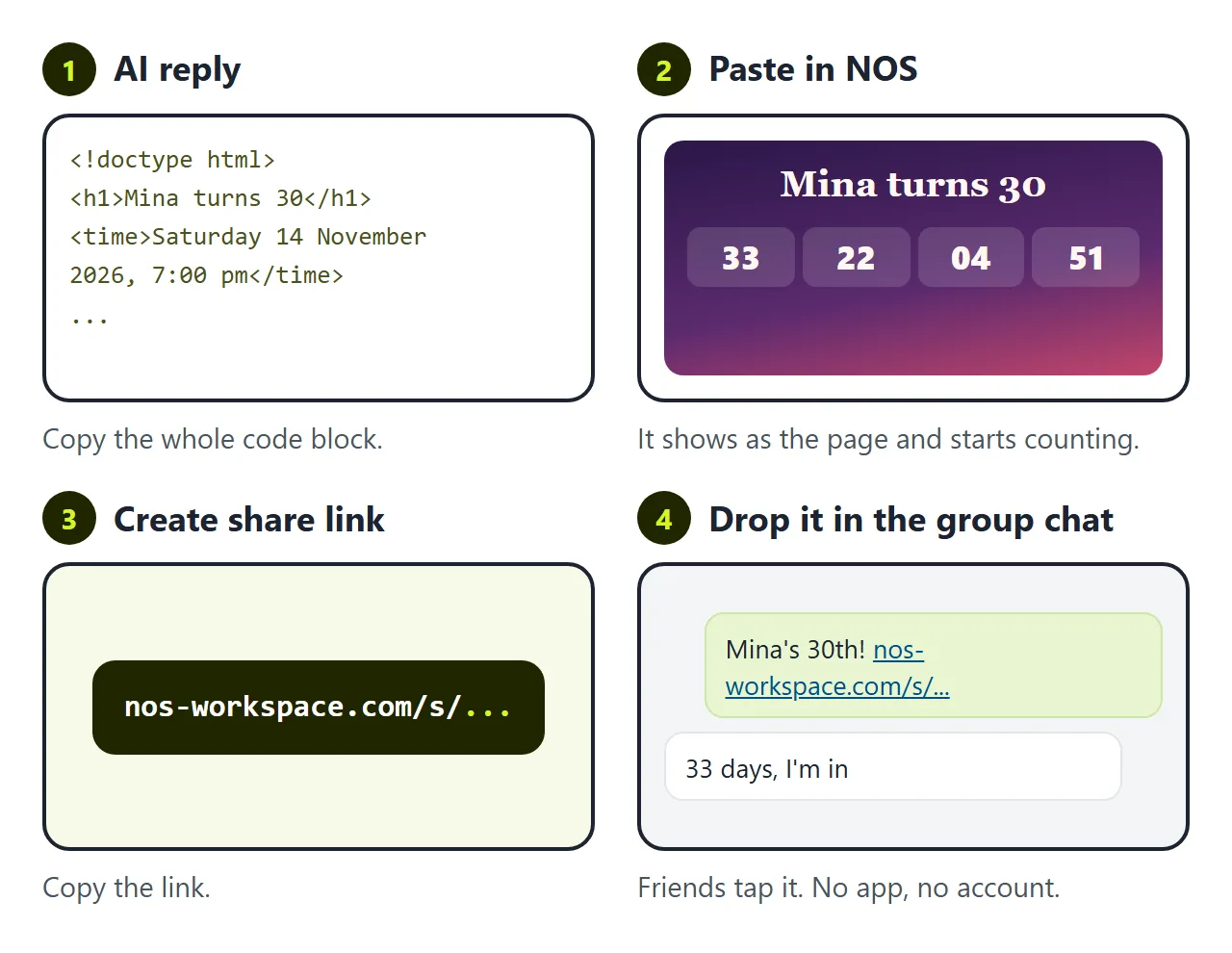
In NOS you paste the code into a document and it turns into the page right away, already counting. Choose Create share link and drop the link in the chat. Friends tap it and see the page. They do not need an account, and they cannot edit it.
The second wall is the party moving. The rooftop is booked on the 14th. The party moves to Saturday the 21st. Or the date stays and the venue changes to Jae's flat.
If you ask the AI again, you wait for a new reply. It often changes the colours, the wishes or the wording while it is at it, so you check the whole page again. Then you have a new file and a new link, and half the chat still has the old one counting to the wrong day.
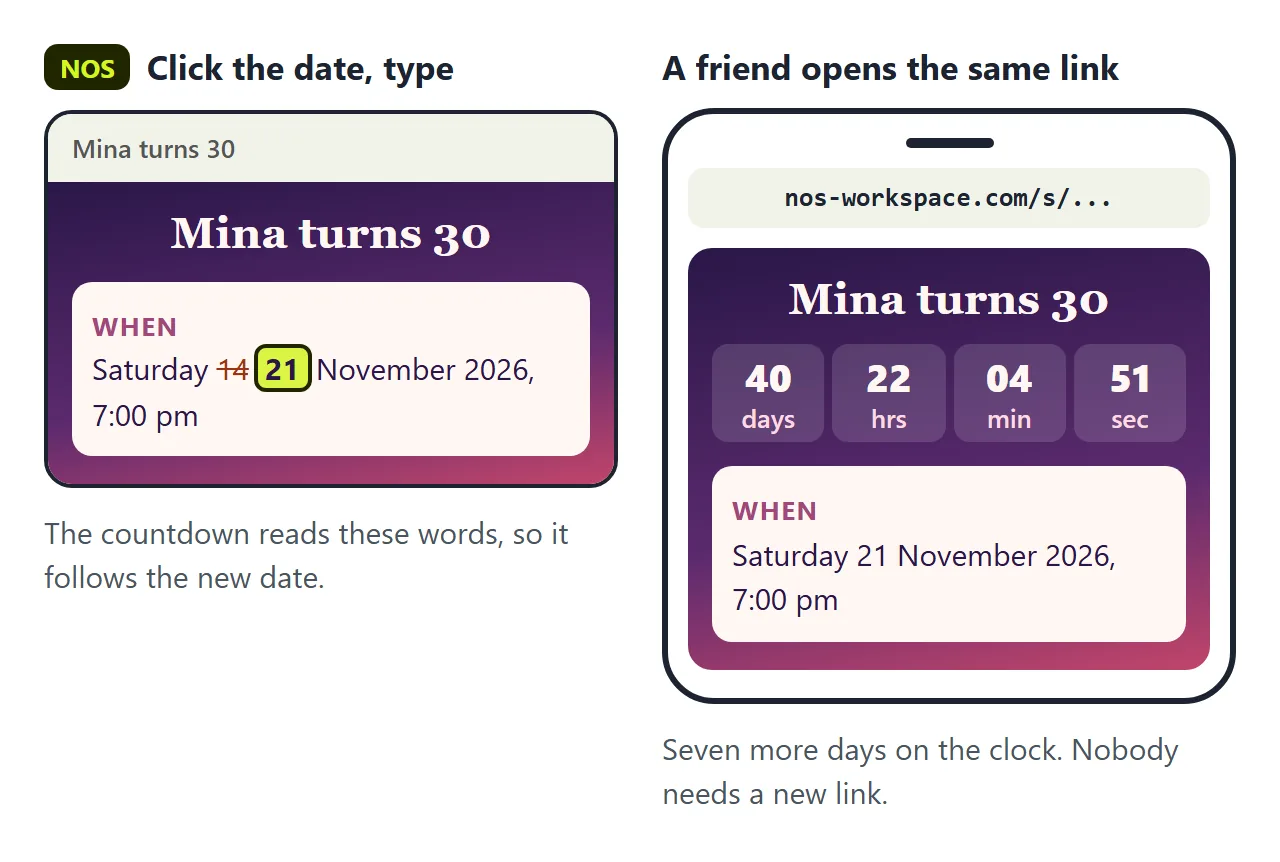
In NOS you click the date on the page and type the new one. Because the countdown reads those words, the clock jumps to the new date. The place works the same way: click it and type. The link in the chat does not change, and everyone who opens it sees the 21st.
New wishes go in the same way. Click the last wish, and add the next one under it.
What it does not do
The wishes wall is written by you. Friends cannot post on it from the page, and nothing they tap is sent anywhere. They send you their wish, you add it.
The clock runs on each phone's own time. The script reads the date as local time on that phone (MDN: Date), so a friend in another time zone counts down to 7 pm where they are. For a party everyone travels to, write the time zone next to the time and ask the AI to count to that zone.
For the invitation itself, with replies, see Birthday invitation with ChatGPT. For the code behind a countdown, see HTML countdown timer.