A birthday invitation website, for a child's party, can be one page at one link. It holds the time, the address, what to bring and a number to text. Parents open it on a phone. There is no form, so they reply by message.
If you have been asking which free online invitation maker is best, this is a different route. You describe the party in plain words, an AI writes the page, and you share it as a link. Here is a page you could send.
<!doctype html>
<html lang="en">
<head>
<meta charset="utf-8">
<meta name="viewport" content="width=device-width, initial-scale=1">
<title>Nora is turning 7 - party on Saturday 17 October</title>
<style>
  * { box-sizing: border-box; }
  body { margin: 0; background: #fff7ed; font-family: system-ui, -apple-system, "Segoe UI", sans-serif; color: #1f2937; line-height: 1.55; }
  .page { max-width: 560px; margin: 0 auto; padding: 0 0 32px; background: #fff; min-height: 100vh; }
  .hero { background: #fde68a; padding: 24px 20px 18px; text-align: center; }
  .hero svg { width: 150px; height: 96px; display: block; margin: 0 auto 6px; }
  .hero p { margin: 0; font-size: 14px; letter-spacing: .06em; text-transform: uppercase; color: #92400e; }
  h1 { margin: 4px 0 0; font-size: 30px; line-height: 1.15; color: #7c2d12; }
  .when { margin: 0; padding: 14px 20px; background: #7c2d12; color: #fff; text-align: center; font-size: 19px; font-weight: 700; }
  .when span { display: block; font-size: 15px; font-weight: 400; opacity: .92; }
  section { padding: 0 20px; }
  h2 { margin: 24px 0 8px; font-size: 13px; letter-spacing: .08em; text-transform: uppercase; color: #9a3412; }
  p { margin: 0 0 10px; font-size: 17px; }
  .place { border: 1px solid #fed7aa; background: #fffaf3; border-radius: 12px; padding: 12px 14px; }
  .place b { display: block; font-size: 18px; }
  label.item { display: flex; align-items: center; gap: 12px; padding: 11px 12px; border: 1px solid #e5e7eb; border-radius: 10px; margin-bottom: 8px; font-size: 17px; cursor: pointer; }
  label.item input { width: 22px; height: 22px; flex: none; accent-color: #c2410c; }
  .count { font-size: 15px; color: #6b7280; margin-top: 4px; }
  details { border: 1px solid #e5e7eb; border-radius: 10px; margin-bottom: 8px; background: #fff; }
  summary { padding: 12px 14px; font-size: 17px; font-weight: 600; cursor: pointer; }
  details p { padding: 0 14px; margin: 0 0 12px; font-size: 16px; }
  .reply { margin-top: 24px; border: 2px solid #c2410c; border-radius: 14px; padding: 14px 16px; background: #fff7ed; }
  .reply b { font-size: 19px; display: block; margin-bottom: 4px; }
  .reply .num { font-size: 24px; font-weight: 800; color: #7c2d12; letter-spacing: .02em; }
  .reply p { font-size: 16px; margin: 6px 0 0; }
</style>
</head>
<body>
<div class="page">
  <div class="hero">
    <!-- balloons drawn in SVG, so no image file is needed -->
    <svg viewBox="0 0 150 96" role="img" aria-label="Three balloons">
      <path d="M40 60 Q46 78 60 94 M75 54 Q70 76 78 94 M112 62 Q104 80 92 94" stroke="#92400e" stroke-width="1.5" fill="none"/>
      <ellipse cx="40" cy="36" rx="22" ry="27" fill="#ef4444"/>
      <ellipse cx="75" cy="30" rx="23" ry="28" fill="#3b82f6"/>
      <ellipse cx="112" cy="38" rx="21" ry="26" fill="#22c55e"/>
    </svg>
    <p>You are invited</p>
    <h1>Nora is turning 7</h1>
  </div>

  <p class="when">Saturday 17 October 2026<span>2:00pm to 4:30pm</span></p>

  <section>
    <h2>Where</h2>
    <div class="place"><b>Willow Park Pavilion</b>14 Garden Lane, behind the playground. Look for the balloons on the gate.</div>

    <h2>What to bring</h2>
    <label class="item"><input type="checkbox"> A warm jacket, we are outside</label>
    <label class="item"><input type="checkbox"> A water bottle with your child's name</label>
    <label class="item"><input type="checkbox"> Shoes that can get muddy</label>
    <p class="count" id="count">Nothing ticked yet. The ticks are just a reminder for you.</p>

    <h2>Good to know</h2>
    <details>
      <summary>Do I stay or can I drop off?</summary>
      <p>Either is fine. If you drop off, please be back at 4:30pm at the pavilion.</p>
    </details>
    <details>
      <summary>What about food and allergies?</summary>
      <p>Pizza and fruit, with no nuts. Tell us about any allergy when you reply.</p>
    </details>
    <details>
      <summary>Does Nora want a present?</summary>
      <p>No presents, please. Your child's company is plenty.</p>
    </details>

    <div class="reply">
      <b>Please reply by Saturday 10 October</b>
      <span class="num">555 0142</span>
      <p>Send a text message with your child's name, yes or no, and any allergy. There is no form on this page.</p>
    </div>
  </section>
</div>

<script>
  // Count the ticked boxes. Ticks stay on this screen only.
  const boxes = document.querySelectorAll('label.item input');
  const count = document.getElementById('count');
  boxes.forEach((b) => b.addEventListener('change', () => {
    const n = document.querySelectorAll('label.item input:checked').length;
    count.textContent = n === boxes.length
      ? 'All packed. See you on Saturday!'
      : n + ' of ' + boxes.length + ' ticked. The ticks are just a reminder for you.';
  }));
</script>
</body>
</html>
Tap the questions and tick a box or two. Then make the browser window narrow, to see it as it looks on a phone.
What goes on the page
A parent deciding whether to say yes needs a few answers. Put them on the page, in this order:
- When. The weekday, the date, the start and the end time.
- Where. The place name, the street, and one thing to look for on arrival.
- What to bring. A short list. Jacket, water bottle, shoes.
- Stay or drop off. And the pick-up time.
- Food and allergies. What you will serve, and where to say about an allergy.
- Presents. Yes or no.
- How to reply. A number, and a date to reply by.
Anyone who has the link can open the page. Use the child's first name only, and think about whether the full street address belongs on the page or should go only to parents who say yes.
Make it with AI
You do not need to write code. Tell an AI the details and ask for one file. Use your own details in place of these.
Make a single-file HTML page that is a birthday party
invitation for parents. Child: Nora, turning 7.
Saturday 17 October 2026, 2:00pm to 4:30pm.
Willow Park Pavilion, 14 Garden Lane, behind the playground.
What to bring, as tick boxes: a warm jacket, a water bottle
with the child's name, shoes that can get muddy.
Three questions that open on tap: stay or drop off, food and
allergies, presents. Pizza and fruit, no nuts, no presents.
At the bottom, a box: "Please reply by Saturday 10 October",
the number 555 0142, and "send a text with your child's name,
yes or no, and any allergy".
Large text for phones. No form, no input boxes, no external
images, fonts or scripts. Return only the HTML.
Check the result before you copy it:
- The date, the weekday and both times are what you meant. Look at a calendar.
- The address and the phone number are yours and spelled right.
- It has no form and no Submit button.
- Nothing is missing because it points to an outside picture.
- It reads well when the window is narrow.
Send it as a link
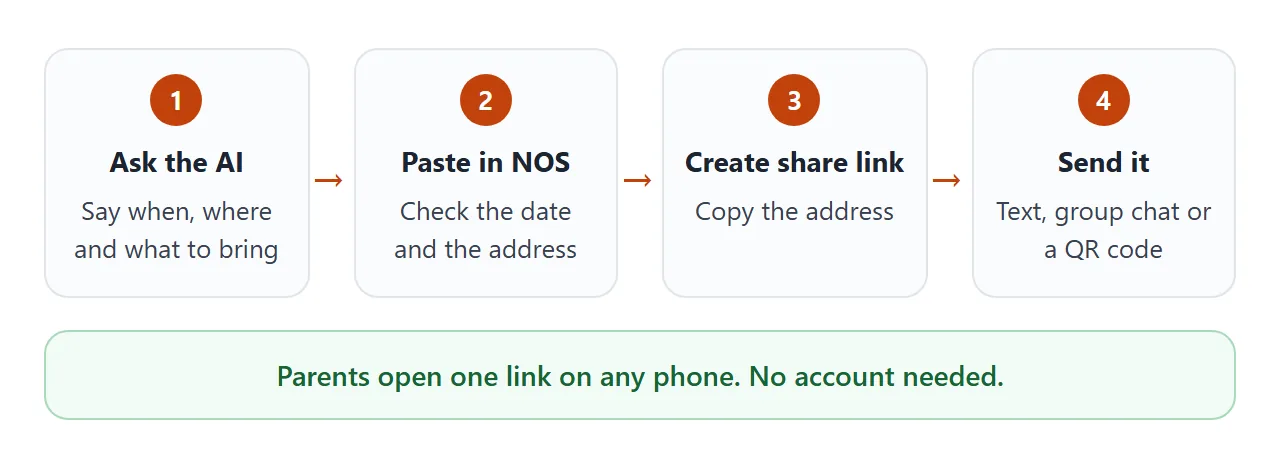
Open a NOS document and paste the HTML in. The page renders right there and its scripts run, so test the questions and tick boxes yourself. Then choose Create share link and copy the address.
Anyone with that address can open the page in a browser, a phone included, with no account. They can read it and use it, but they cannot edit it.
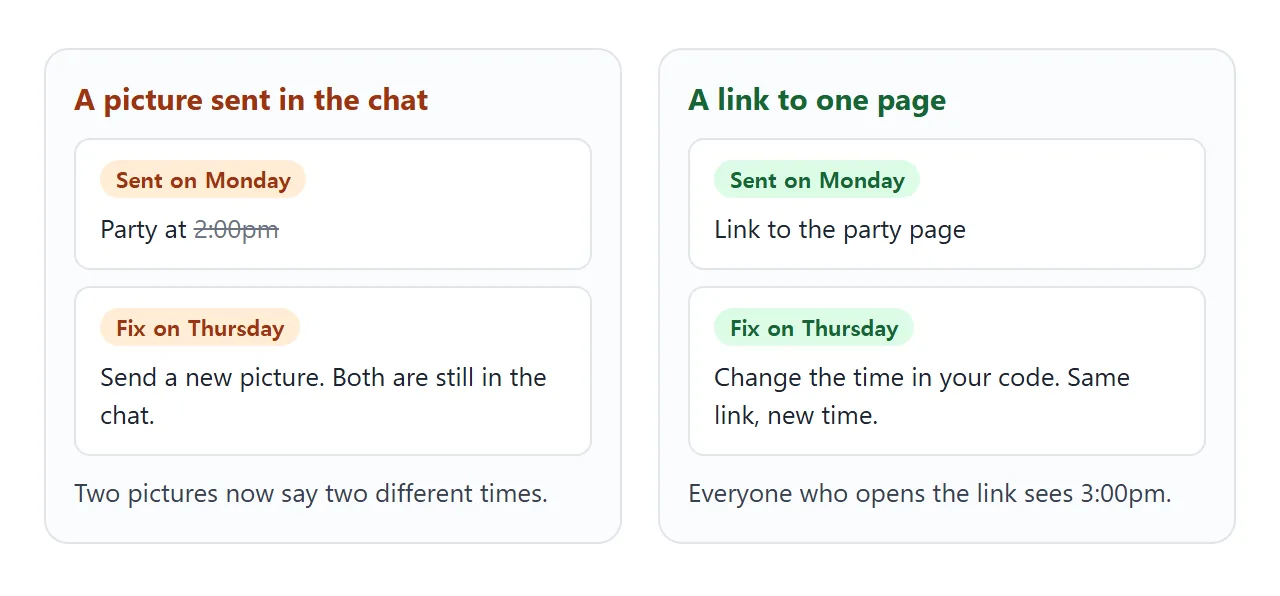
If the time moves, fix the code in your NOS document. The same link then shows the new version. HTML to link walks through the steps.
Replies come by message
There is no form on this page, and that is a choice. A NOS page can handle a form inside the page, but it cannot send one to a server, so nothing would arrive. A text message to your phone arrives.
Put your number on the page in plain words, with a date to reply by, and say what to include.
A phone number can also be written as a tel: link. MDN lists it among the link types browsers support, and says what happens depends on the device. Test it from your share link on your own phone first.
To make replying easy, you can add a small helper that writes the message for the parent. It sends nothing. It builds the text, and the parent pastes it into their own message.
<!doctype html>
<html lang="en">
<head>
<meta charset="utf-8">
<meta name="viewport" content="width=device-width, initial-scale=1">
<title>Reply to Nora's party</title>
<style>
  * { box-sizing: border-box; }
  body { margin: 0; background: #f3f4f6; font-family: system-ui, -apple-system, "Segoe UI", sans-serif; color: #1f2937; line-height: 1.55; }
  .page { max-width: 560px; margin: 0 auto; background: #fff; padding: 22px 20px 30px; min-height: 100vh; }
  .tag { margin: 0; font-size: 13px; letter-spacing: .06em; text-transform: uppercase; color: #9a3412; }
  h1 { margin: 4px 0 8px; font-size: 26px; line-height: 1.15; }
  p { margin: 0 0 10px; font-size: 16px; }
  h2 { margin: 20px 0 8px; font-size: 13px; letter-spacing: .08em; text-transform: uppercase; color: #6b7280; }
  .note { background: #fffbeb; border: 1px solid #fde68a; border-radius: 12px; padding: 10px 14px; font-size: 15px; color: #78350f; }
  input[type=text] { width: 100%; font: inherit; font-size: 17px; padding: 11px 12px; border: 1px solid #d1d5db; border-radius: 10px; }
  label.opt { display: flex; align-items: center; gap: 12px; padding: 11px 12px; border: 1px solid #e5e7eb; border-radius: 10px; margin-bottom: 8px; font-size: 17px; cursor: pointer; }
  label.opt input { width: 22px; height: 22px; flex: none; accent-color: #c2410c; }
  textarea { width: 100%; min-height: 120px; padding: 12px; font: inherit; font-size: 16px; border: 1px solid #d1d5db; border-radius: 10px; background: #f9fafb; resize: vertical; }
  .btn { margin-top: 10px; font: inherit; font-size: 17px; font-weight: 600; padding: 10px 18px; min-height: 46px; border: 0; border-radius: 10px; background: #c2410c; color: #fff; cursor: pointer; }
  .small { font-size: 14px; color: #6b7280; margin-top: 8px; }
</style>
</head>
<body>
<div class="page">
  <p class="tag">Nora's 7th birthday, Saturday 17 October</p>
  <h1>Tell us if you are coming</h1>
  <p>Fill in the three parts below. A message appears at the bottom. Select it, then paste it into a text message to 555 0142.</p>
  <div class="note">Nothing is sent from this page. It only writes the message for you.</div>

  <h2>Your child's name</h2>
  <input type="text" id="name" placeholder="For example, Theo" autocomplete="off">

  <h2>Can your child come?</h2>
  <label class="opt"><input type="radio" name="yn" value="yes" checked> Yes, we will be there</label>
  <label class="opt"><input type="radio" name="yn" value="no"> Sorry, we cannot make it</label>

  <h2>Anything we should know?</h2>
  <label class="opt"><input type="checkbox" class="extra" value="has an allergy"> An allergy</label>
  <label class="opt"><input type="checkbox" class="extra" value="will be dropped off"> We will drop off</label>
  <label class="opt"><input type="checkbox" class="extra" value="a parent will stay"> A parent will stay</label>

  <h2>Your message</h2>
  <textarea id="msg" readonly aria-label="Message to send"></textarea>
  <button class="btn" id="pick" type="button">Select the message</button>
  <p class="small" id="hint"></p>
</div>

<script>
  const name = document.getElementById('name');
  const msg = document.getElementById('msg');
  const hint = document.getElementById('hint');

  function build() {
    const who = name.value.trim() || '(child\'s name)';
    const yes = document.querySelector('input[name="yn"]:checked').value === 'yes';
    const extras = [...document.querySelectorAll('.extra:checked')].map((e) => e.value);
    let text = 'Hi! ' + who + (yes ? ' can come' : ' cannot come') + ' to Nora\'s party on Saturday 17 October.';
    if (yes && extras.length) text += ' Note: ' + extras.join(', ') + '.';
    if (yes && extras.includes('has an allergy')) text += ' I will message the details.';
    msg.value = text;
  }

  document.querySelectorAll('input').forEach((i) => i.addEventListener('input', build));
  document.getElementById('pick').addEventListener('click', () => {
    msg.focus();
    msg.select();
    hint.textContent = 'Selected. Now copy it (hold and choose Copy on a phone) and paste it into a text message.';
  });
  build();
</script>
</body>
</html>
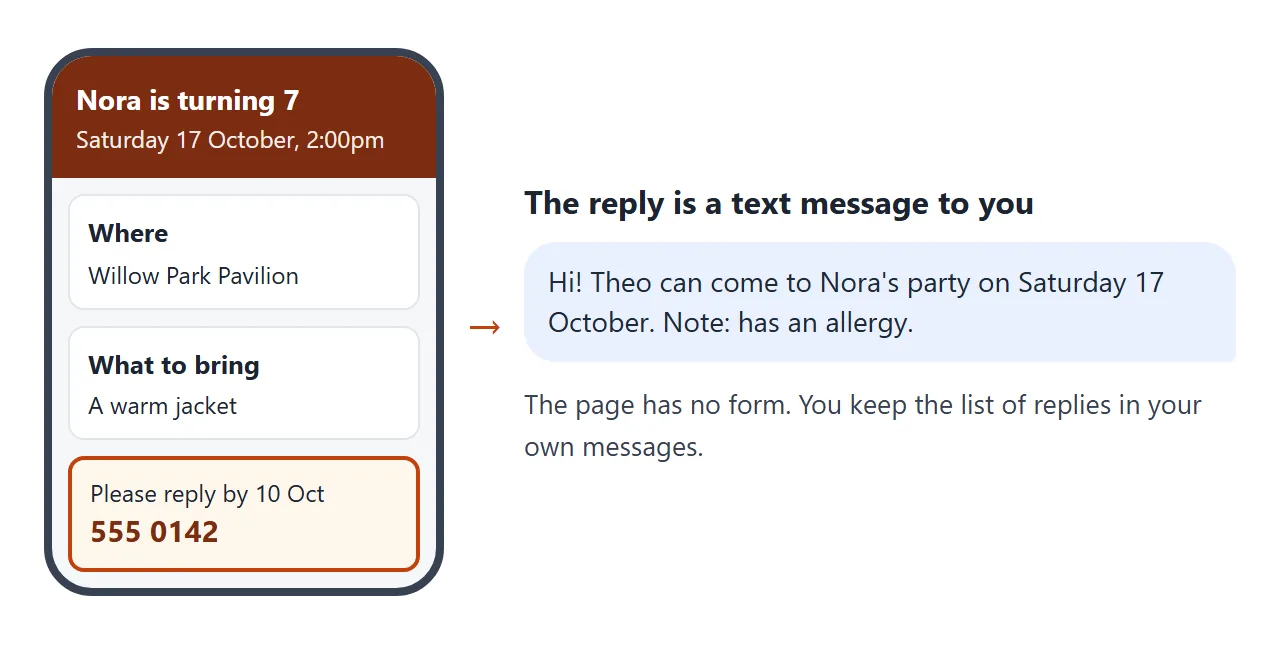
Replies then sit in your own messages, one per child, which is easy to scan when you need to count plates and goodie bags. If you want a tidy list, copy them into a note as they arrive.
Ways to send the invitation
The page is one way to give parents the details. These are the usual ones, and what each does when you have to change something.
| Way | What a parent gets | If the time changes |
|---|---|---|
| Picture in the chat | An image to open and read | Send a new picture. The old one stays in the chat |
| Details typed in a message | Plain text, nothing to open | Send another message |
| Link to a NOS page | A page in the browser, phone included, no account | Change the code. The same link shows the new time |
| QR code on a card | A code that leads to the same link | Same as the link. The printed code does not change |
A QR code on a printed card points to your link, so the page must already exist.
Google's help says that in Chrome on a computer you open the page, choose the three dots, then Cast, save, and share, then Create QR code, and that you can download it (as of October 2026).
Scan the printout yourself before you hand out the cards. QR code for a link covers the printing side.
For the longer view of invitations, see HTML for event invites. Why a link usually works better than a file is in why links beat attachments.
When it does not work
| Symptom | Cause | Fix |
|---|---|---|
| The page looks tiny on a phone | The AI left out the phone setting | Ask it to make the page mobile friendly, then paste again |
| A picture is missing | The AI used a picture from another site | Ask for shapes drawn in the page only |
| A Submit button does nothing | A page cannot send a form to a server | Remove the form and ask for a text reply |
| The tick boxes reset on reload | A visitor's ticks are not saved | Call the list a reminder, not a record |
| You cannot tell who has seen it | A shared page does not report opens | Ask for a reply by text message |
| The weekday does not match the date | The two were written separately | Check a calendar, fix the code, and message the change |
| The QR code does not scan | It is too small or too blurry on paper | Print it larger and scan the printout |
If a parent asks where to find the file on their phone, send the link and not the file. Opening an HTML file on a phone explains why.