Yes, ChatGPT can write a birthday invitation as a web page, and Claude and Gemini can too. You give it the names, date, time and place, it returns one block of HTML, and you send guests a link to the page instead of a file.
A question such as "What is the best free online invitation maker?" has a short alternative: describe the invitation to an AI chat and get the page back as text you can change.
Here is the kind of page the prompt below produces. Open it on a phone if you can.
<!doctype html>
<html lang="en">
<head>
<meta charset="utf-8">
<meta name="viewport" content="width=device-width, initial-scale=1">
<title>Poppy is turning 7</title>
<style>
  * { box-sizing: border-box; }
  body {
    margin: 0; padding: 20px 14px 28px;
    font-family: system-ui, -apple-system, "Segoe UI", sans-serif;
    font-size: 18px; line-height: 1.5; color: #20302a;
    background: #fff4d6;
  }
  .card {
    position: relative; overflow: hidden;
    max-width: 480px; margin: 0 auto; padding: 28px 22px 26px;
    background: #fff; border-radius: 20px; text-align: center;
    box-shadow: 0 8px 28px rgba(0, 0, 0, .12);
    border-top: 10px solid #2f9e63;
  }
  .dot { position: absolute; border-radius: 50%; opacity: .85; }
  .d1 { width: 16px; height: 16px; background: #ff7a59; top: 24px; left: 20px; }
  .d2 { width: 10px; height: 10px; background: #3b82f6; top: 54px; right: 28px; }
  .d3 { width: 14px; height: 14px; background: #f5b700; top: 110px; right: 14px; }
  .d4 { width: 9px; height: 9px; background: #2f9e63; top: 96px; left: 12px; }
  .big { font-size: 56px; line-height: 1; margin: 6px 0 4px; }
  .kicker { margin: 0; font-size: 16px; letter-spacing: .08em; text-transform: uppercase; color: #5a6b63; }
  h1 { margin: 6px 0 4px; font-size: 34px; line-height: 1.15; color: #17724a; }
  .theme { margin: 0 0 18px; color: #4b5b54; }
  .when {
    margin: 0 0 14px; padding: 12px 10px; border-radius: 12px; background: #eaf7ef;
  }
  .when strong { display: block; font-size: 22px; line-height: 1.25; }
  .where { margin: 0 0 14px; }
  .count { margin: 0 0 16px; font-weight: 600; color: #b45309; }
  .rsvp { margin: 0; padding-top: 16px; border-top: 2px dashed #d6e5dc; }
  .rsvp a {
    display: inline-block; margin-top: 8px; padding: 12px 22px;
    border-radius: 999px; background: #2f9e63; color: #fff; font-weight: 700;
    text-decoration: none;
  }
</style>
</head>
<body>
<main class="card">
  <span class="dot d1"></span><span class="dot d2"></span><span class="dot d3"></span><span class="dot d4"></span>

  <div class="big" aria-hidden="true">🦖</div>
  <p class="kicker">You are invited to</p>
  <h1>Poppy is turning 7!</h1>
  <p class="theme">A dinosaur party. Come dressed as your favourite one.</p>

  <p class="when">
    <strong><time datetime="2026-11-14T14:00">Saturday 14 November 2026</time></strong>
    2:00 pm to 4:30 pm
  </p>

  <p class="where"><strong>Maple Hall</strong><br>12 Orchard Lane, Fairview</p>

  <p class="count" id="count"></p>

  <p class="rsvp">
    Please reply to Sam by Saturday 7 November.<br>
    <a href="tel:+15550142">Call Sam: 555 0142</a>
  </p>
</main>

<script>
  // Days left until the party, counted from the visitor's own date
  const party = new Date(2026, 10, 14);           // months start at 0, so 10 = November
  const today = new Date();
  today.setHours(0, 0, 0, 0);
  const days = Math.round((party - today) / 86400000);
  const el = document.getElementById('count');
  if (days > 1) el.textContent = days + ' days to go!';
  else if (days === 1) el.textContent = 'Tomorrow!';
  else if (days === 0) el.textContent = 'Today is the day!';
  else el.hidden = true;
</script>
</body>
</html>
The page is one column with large text, so it reads on a small screen without pinching. The days-to-go line is a few lines of script that count from the date on the guest's own device.
Make it with AI: a prompt you can paste
Fill in the square brackets, then paste the whole thing into ChatGPT, Claude or Gemini.
Write a birthday invitation as one HTML page.

Details:
- Who: [name] is turning [age]
- Date: [weekday, day, month, year]
- Time: [start] to [end]
- Place: [venue name, street address]
- Theme or dress: [theme, or write none]
- Reply to: [name and phone or email] by [date]

Rules:
- One file, with all CSS inside a style tag.
- No images from the web, no web fonts, no external scripts.
  Decorate with colours, shapes and emoji.
- Include the viewport meta tag. Design for a phone first:
  one column, body text at least 18px.
- Write the weekday and the month in words, never 14/11.
- Put every word a person might change in plain HTML text,
  not in JavaScript and not inside an image.
- Use only the details above. If something is missing,
  write TODO there. Do not invent addresses, phone numbers or rules.
- Reply with the code only, in one code block.
The "write TODO" rule matters. Without it an AI may fill a gap with a plausible address or phone number, and nobody notices until a guest turns up in the wrong street.
The page ends up public to anyone with the link. Leave out anything you would not pin to a notice board, such as a door code.
Check the result before you change anything
Paste the code into a NOS document and look at the preview first. A chat window can show a page differently from a full browser, as the chat preview article explains.
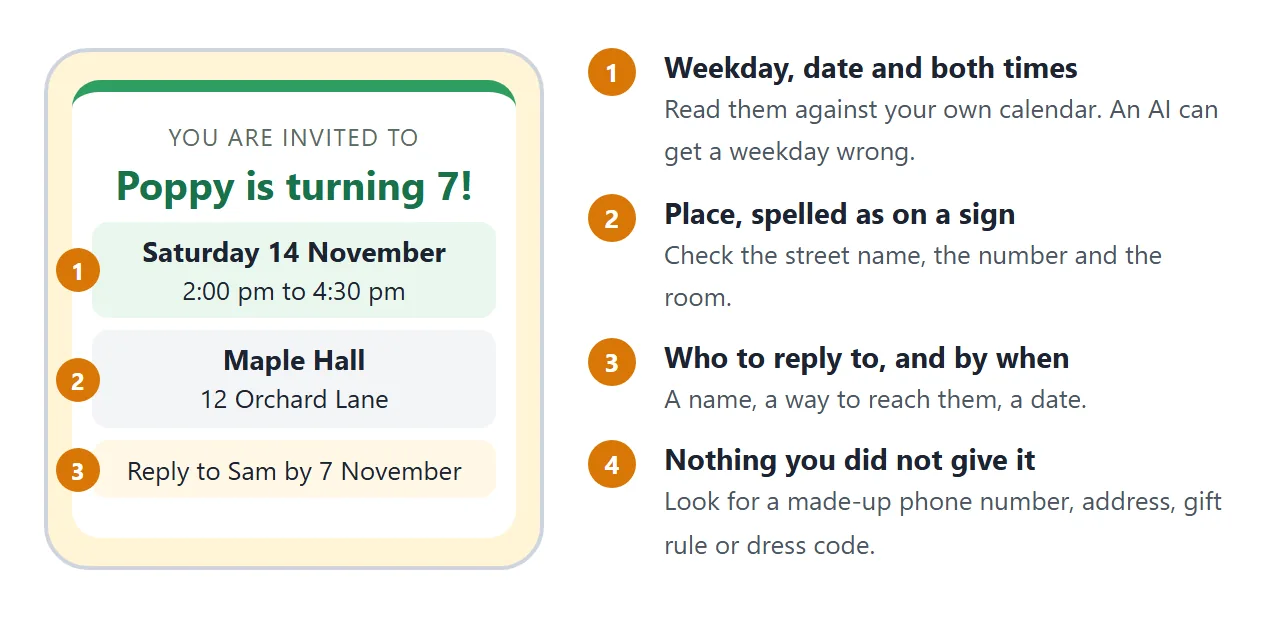
Read it as a guest would. Check the weekday against a real calendar, because a date and its weekday are the details most worth checking. Read the place letter by letter, and look for any phone number, rule or promise you never gave it.
Then check that the page says who to reply to and by when. If it does not, add it in the next step.
Edit the text after you preview it
You do not need to read the code to change the words. The text a guest sees sits between tags, and you only change the words.
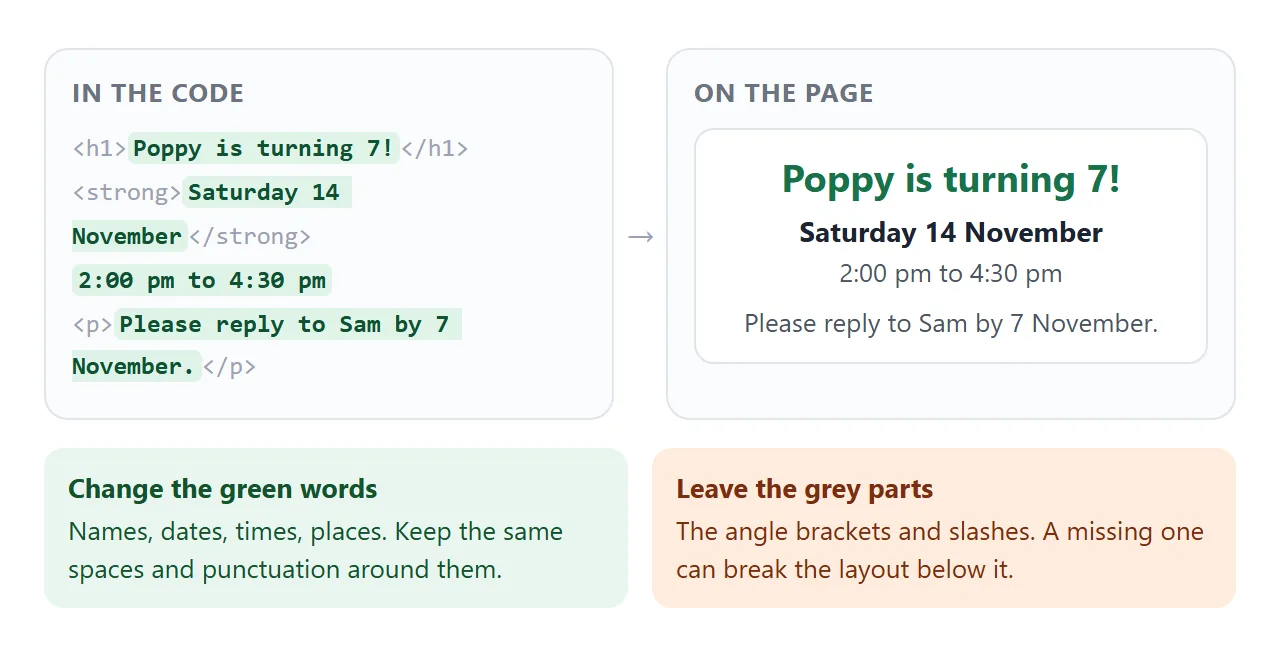
There are two ways to make a change. Both end with the new version shown in the preview.
- Edit the code yourself. Find the old words, type the new ones, keep everything around them. Good for a time, a name or a date.
- Ask the AI for one change. Paste the old code back with a request such as "Change only the time to 3:00 pm to 5:30 pm. Keep everything else the same and give me the full code again." Good when you want a different tone or a new line.
Two places can hide a second copy of the date. The <time> element has a datetime value in machine-readable form, and a countdown keeps the date inside its script.
When you change a date, ask the AI to list every place the old one appears.
For more ways to change AI-written HTML without coding, see editing HTML without coding.
Another version: a dinner with a reply box
The same details can go into a different design. Ask for "an elegant dark evening style" and "a box that writes the guest's reply as a message" and you get a page like this.
<!doctype html>
<html lang="en">
<head>
<meta charset="utf-8">
<meta name="viewport" content="width=device-width, initial-scale=1">
<title>Maya's 40th dinner</title>
<style>
  * { box-sizing: border-box; }
  body {
    margin: 0; padding: 18px 14px 28px;
    font-family: Georgia, "Times New Roman", serif;
    font-size: 18px; line-height: 1.5; color: #f3ead8;
    background: #1c2433;
  }
  .wrap { max-width: 480px; margin: 0 auto; }
  .top { text-align: center; padding: 18px 8px 8px; }
  .top p { margin: 0; }
  .small { font-size: 15px; letter-spacing: .14em; text-transform: uppercase; color: #d9b26a; }
  h1 { margin: 8px 0 6px; font-size: 40px; line-height: 1.1; font-weight: 400; }
  .rule { width: 60px; height: 2px; margin: 14px auto; background: #d9b26a; border: 0; }
  .details { margin: 0 0 18px; text-align: center; }
  .details strong { color: #d9b26a; font-weight: 400; }
  form { padding: 18px 16px; border: 1px solid #44506a; border-radius: 14px; background: #232d42; }
  form h2 { margin: 0 0 10px; font-size: 20px; font-weight: 400; color: #d9b26a; }
  label { display: block; margin: 10px 0 4px; font-size: 16px; }
  input[type=text], input[type=number] {
    width: 100%; padding: 10px; font: inherit; font-size: 17px;
    border: 1px solid #5b6885; border-radius: 8px; background: #1c2433; color: #f3ead8;
  }
  .choice { display: flex; gap: 18px; margin: 4px 0; }
  .choice label { display: flex; align-items: center; gap: 8px; margin: 0; font-size: 18px; }
  button {
    margin-top: 16px; padding: 12px 20px; font: inherit; font-size: 17px; font-weight: 700;
    border: 0; border-radius: 999px; background: #d9b26a; color: #1c2433; cursor: pointer;
  }
  button.alt { background: transparent; color: #d9b26a; border: 1px solid #d9b26a; margin-left: 6px; }
  #out { margin-top: 16px; }
  #out textarea {
    width: 100%; min-height: 96px; padding: 10px; font: inherit; font-size: 17px;
    border: 1px solid #5b6885; border-radius: 8px; background: #1c2433; color: #f3ead8;
  }
  .note { margin: 6px 0 0; font-size: 14px; color: #aeb7c9; }
</style>
</head>
<body>
<div class="wrap">
  <div class="top">
    <p class="small">Dinner to celebrate</p>
    <h1>Maya turns 40</h1>
    <hr class="rule">
  </div>

  <p class="details">
    <strong><time datetime="2026-11-21T19:00">Saturday 21 November 2026, 7:00 pm</time></strong><br>
    The Lantern Room, 8 Harbour Street<br>
    Dress: smart casual
  </p>

  <form id="reply">
    <h2>Will you come?</h2>
    <div class="choice">
      <label><input type="radio" name="answer" value="Yes" checked> Yes</label>
      <label><input type="radio" name="answer" value="No"> No</label>
    </div>
    <label for="who">Your name</label>
    <input type="text" id="who" name="who" placeholder="Your name">
    <label for="n">How many people, including you?</label>
    <input type="number" id="n" name="n" min="1" max="6" value="1">
    <label for="diet">Food we should know about</label>
    <input type="text" id="diet" name="diet" placeholder="Optional">
    <button type="submit">Write my reply</button>
    <p class="note">Nothing is sent from this page. It writes a message for you to copy.</p>
    <div id="out" hidden>
      <textarea id="msg" readonly></textarea>
      <button type="button" class="alt" id="pick">Select the text</button>
    </div>
  </form>
</div>

<script>
  const form = document.getElementById('reply');
  const out = document.getElementById('out');
  const msg = document.getElementById('msg');

  form.addEventListener('submit', (e) => {
    e.preventDefault();                       // no server: show the answer on the page
    const d = new FormData(form);
    const name = (d.get('who') || '').trim() || 'A guest';
    let text;
    if (d.get('answer') === 'Yes') {
      text = name + ': yes, ' + d.get('n') + ' of us for Maya\'s dinner on 21 November.';
      const diet = (d.get('diet') || '').trim();
      if (diet) text += ' Food note: ' + diet + '.';
    } else {
      text = name + ': sorry, we cannot make Maya\'s dinner on 21 November.';
    }
    msg.value = text;
    out.hidden = false;
  });

  document.getElementById('pick').addEventListener('click', () => { msg.focus(); msg.select(); });
</script>
</body>
</html>
The box does not send anything. Sending a form to a server is blocked on a NOS page, and the reply goes back through the chat, text or email you used to send the link. The page only removes the typing.
Send it as a link
Paste the finished code into a NOS document and choose Create share link. HTML to link walks through it. The link opens in a browser, on a phone too, with no account, and a visitor cannot change the page.
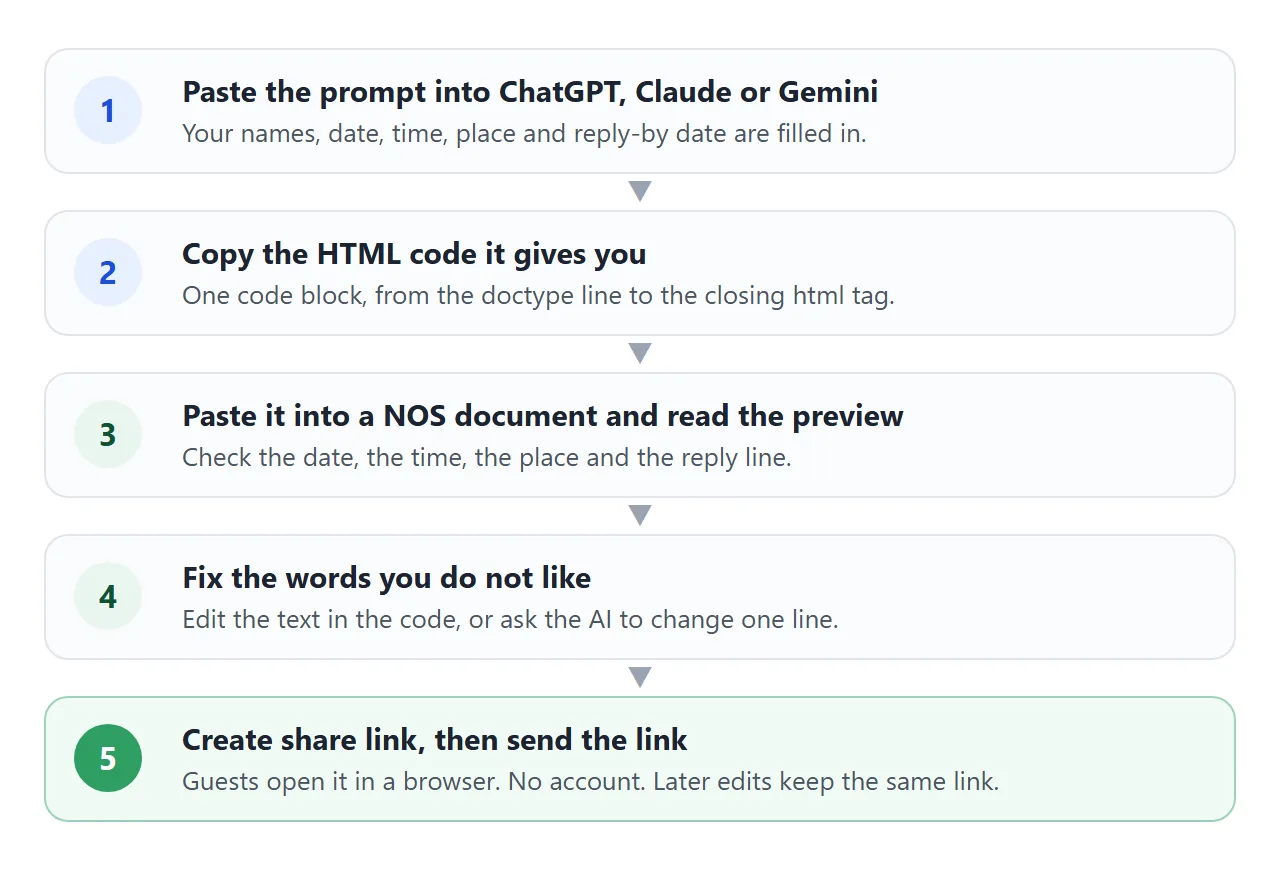
The page renders as written and its scripts run, so the days-to-go line works. If you change the code later, for example the time, the same link shows the new version. That is why a link suits an invitation better than a file.
Send the link the way you would send any link: in a text, an email or a group chat. For a printed card, a QR code can point to the same page. For more on dates, calendars and maps, see the invitation template guide.
| Attached HTML file | Screenshot | Share link | |
|---|---|---|---|
| What a guest does | Downloads it, then opens it in a browser | Looks at the picture | Taps the link |
| Tap-to-call number | Works once opened in a browser | No, it is a picture | Works as a tel link, depending on the device |
| You find a mistake | Send a new file | Send a new picture | Edit the page, same link |
MDN notes that how a tel link behaves varies with the device. Check the number on your own phone before you send it.
When it does not work
| Symptom | Cause | Fix |
|---|---|---|
| The preview shows code as text | Words from the chat were pasted with the code | Copy only the code block, from the doctype line to the closing html tag |
| The page is blank or cut off | The answer stopped early | Ask for the full code again, or ask it to continue |
| The weekday is wrong | The AI wrote it without checking a calendar | Fix it by hand against a real calendar |
| Pictures are missing | The code uses images from another site, which are blocked | Ask for shapes, emoji or an inline SVG instead |
| Old date still shows somewhere | The date is also in a time tag or a script | Ask the AI to list every place the date appears |
| The reply form sends nothing | Sending a form to a server is blocked | Reply by message; use a box that writes the reply |
| The layout broke after an edit | A bracket or slash was deleted | Paste the previous code back and edit again |