An anniversary website can be one page: a timeline of years, a note under each, and the details of the day. Need a cheap site builder for a simple personal page? Maybe not. An AI writes it and a link shares it.
Here is a page you could send to guests for a surprise party. Tap a year to open its note.
<!doctype html>
<html lang="en">
<head>
<meta charset="utf-8">
<meta name="viewport" content="width=device-width, initial-scale=1">
<title>Forty years of Ana and Tomas</title>
<style>
  * { box-sizing: border-box; }
  body { margin: 0; background: #f3efe8; font-family: Georgia, "Times New Roman", serif; color: #2b2622; line-height: 1.55; }
  .page { max-width: 580px; margin: 0 auto; background: #fffdf8; min-height: 100vh; padding-bottom: 28px; }
  .hero { background: #3b2f2f; color: #f6e7c8; text-align: center; padding: 26px 20px 22px; }
  .hero svg { width: 120px; height: 70px; display: block; margin: 0 auto 8px; }
  .hero small { display: block; font: 600 13px system-ui, sans-serif; letter-spacing: .12em; text-transform: uppercase; color: #d9b36a; }
  h1 { margin: 6px 0 4px; font-size: 32px; line-height: 1.15; font-weight: 700; }
  .hero p { margin: 0; font-size: 17px; font-style: italic; }
  section { padding: 0 20px; }
  h2 { margin: 26px 0 10px; font: 700 13px system-ui, sans-serif; letter-spacing: .1em; text-transform: uppercase; color: #8a5a2b; }
  .tools { display: flex; gap: 8px; margin-bottom: 12px; }
  .tools button { font: 600 14px system-ui, sans-serif; padding: 9px 14px; border: 1px solid #c9b48a; background: #fff; color: #5b4423; border-radius: 999px; cursor: pointer; min-height: 40px; }
  .line { position: relative; margin: 0; padding: 0 0 0 26px; list-style: none; }
  .line::before { content: ""; position: absolute; left: 7px; top: 8px; bottom: 8px; width: 2px; background: #d9c7a3; }
  .line li { position: relative; margin-bottom: 10px; }
  .line li::before { content: ""; position: absolute; left: -26px; top: 14px; width: 16px; height: 16px; border-radius: 50%; background: #fffdf8; border: 3px solid #b5812f; }
  details { border: 1px solid #e6dcc6; border-radius: 10px; background: #fff; }
  summary { padding: 10px 14px; cursor: pointer; list-style: none; font-size: 18px; }
  summary::-webkit-details-marker { display: none; }
  summary b { display: block; font: 700 13px system-ui, sans-serif; color: #b5812f; letter-spacing: .06em; }
  details p { margin: 0; padding: 0 14px 12px; font-size: 16px; color: #4a3f36; }
  .when { margin: 0; padding: 14px 16px; border-radius: 12px; background: #3b2f2f; color: #f6e7c8; font-size: 20px; font-weight: 700; text-align: center; }
  .when span { display: block; font: 400 15px system-ui, sans-serif; color: #e8d6ae; }
  .box { margin-top: 12px; border: 1px solid #e6dcc6; border-radius: 12px; padding: 12px 14px; background: #fff; font-size: 17px; }
  .box b { display: block; }
  .shh { margin-top: 12px; padding: 10px 14px; border-radius: 10px; background: #fdecc8; font: 600 15px/1.45 system-ui, sans-serif; color: #6b4a12; }
  .num { font: 800 24px system-ui, sans-serif; color: #3b2f2f; letter-spacing: .02em; }
</style>
</head>
<body>
<div class="page">
  <div class="hero">
    <svg viewBox="0 0 120 70" role="img" aria-label="Two interlocked rings">
      <circle cx="48" cy="35" r="24" fill="none" stroke="#d9b36a" stroke-width="6"/>
      <circle cx="72" cy="35" r="24" fill="none" stroke="#f6e7c8" stroke-width="6"/>
    </svg>
    <small>40th anniversary</small>
    <h1>Forty years of Ana and Tomas</h1>
    <p>Together since 14 June 1986</p>
  </div>

  <section>
    <h2>The years, one tap at a time</h2>
    <div class="tools">
      <button type="button" id="openAll">Open all notes</button>
      <button type="button" id="closeAll">Close all</button>
    </div>
    <ol class="line">
      <li><details><summary><b>1986</b>A wedding in the rain</summary><p>The tent leaked, the band played on, and nobody went home early.</p></details></li>
      <li><details><summary><b>1989</b>The flat with the green door</summary><p>Two rooms, one kettle, and a window that never quite closed.</p></details></li>
      <li><details><summary><b>1994</b>Daniela arrives</summary><p>Tomas drove to the hospital with the handbrake on. We still bring it up.</p></details></li>
      <li><details><summary><b>1998</b>The caravan summer</summary><p>Six weeks, one road map, and the best ice cream any of us can remember.</p></details></li>
      <li><details><summary><b>2007</b>The year of the bread</summary><p>Tomas learned to bake. The first loaf could have been used as a doorstop.</p></details></li>
      <li><details><summary><b>2019</b>The long walk</summary><p>Ana finished the whole coast path. Tomas carried the snacks.</p></details></li>
    </ol>

    <h2>The party</h2>
    <p class="when">Saturday 17 October 2026<span>3:00pm, Harbour Room, 9 Alder Street</span></p>
    <p class="shh">It is a surprise. Please arrive by 2:30pm and keep this link to yourself.</p>
    <div class="box">
      <b>Send a memory</b>
      Text one or two lines about Ana and Tomas by Saturday 10 October. We will read a few out.
      <span class="num">555 0188</span>
    </div>
  </section>
</div>

<script>
  // Open or close every note at once
  const notes = document.querySelectorAll('details');
  document.getElementById('openAll').addEventListener('click', () => notes.forEach((d) => { d.open = true; }));
  document.getElementById('closeAll').addEventListener('click', () => notes.forEach((d) => { d.open = false; }));
</script>
</body>
</html>
Try Open all notes, then make the window narrow to see it as a phone shows it.
What goes on the page
An anniversary page reads best when it is short. A guest, or the person you made it for, should see the point in the first screen. Put these in, in this order:
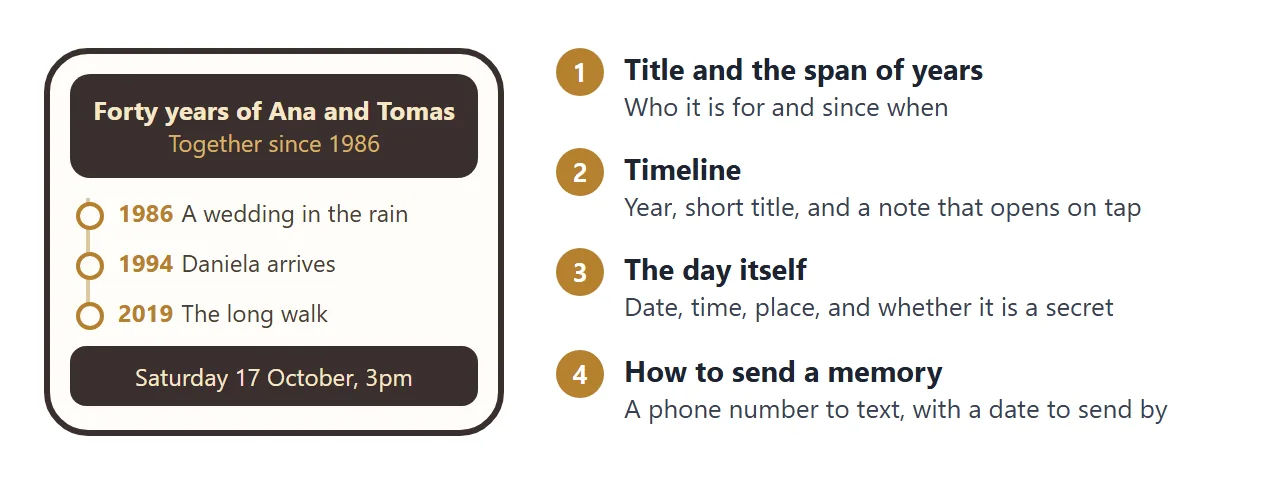
- Who and how long. Two names and the span of years.
- A timeline. Five to eight moments, each with a year and a few words.
- A note for each. One or two lines that open on tap, so the page stays short.
- The day. Date, time and place, if there is a party.
- How to send a memory. A number to text and a date to send by.
Write the date in words, such as Saturday 17 October 2026, and check the weekday on a calendar.
Make it with AI
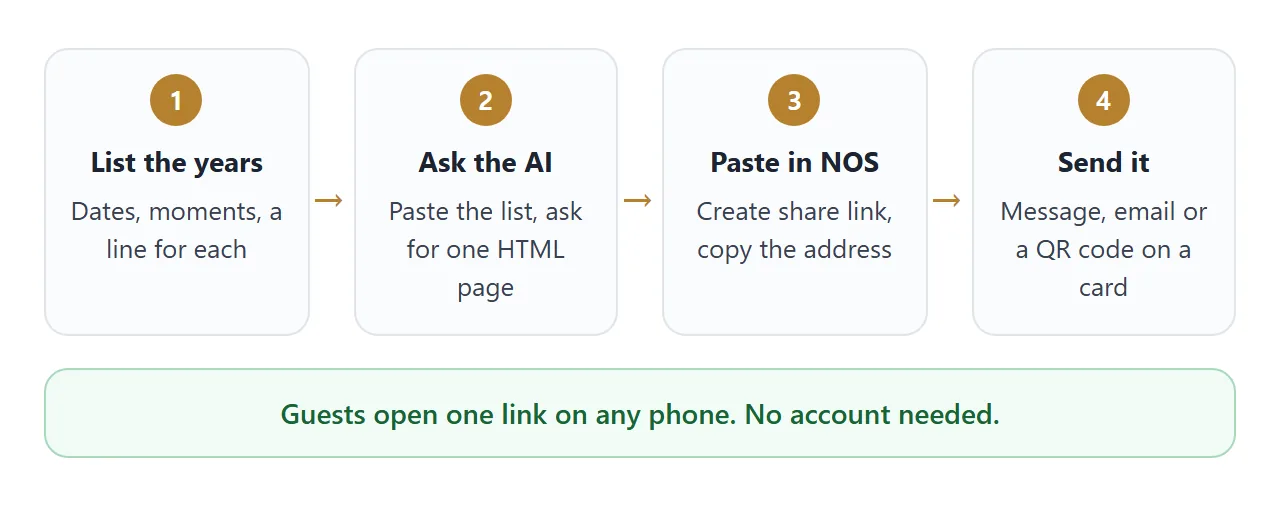
You do not need to write code. Give an AI the list of years and ask for one file. Swap in your own names and dates.
Make a single-file HTML page for a 40th wedding
anniversary party. Names: Ana and Tomas. Together
since 14 June 1986.
Header with both names and "Forty years".
A vertical timeline with these moments, each with a
year, a short title, and a note that opens when
tapped: 1986 A wedding in the rain; 1994 Daniela
arrives; 2019 The long walk.
Then the party: Saturday 17 October 2026, 3:00pm,
Harbour Room, 9 Alder Street. Say it is a surprise.
At the bottom: "Text a memory to 555 0188 by
Saturday 10 October".
Warm colours, large text for phones. No form, no
input boxes, no external images, fonts or scripts.
Return only the HTML.
Check the result before you copy it:
- Names, years, the date and the weekday are what you meant.
- Every note opens and closes when tapped.
- It has no form and no Submit button.
- Nothing is missing because it points to an outside picture.
- It reads well when the window is narrow.
Send it as a link
Open a NOS document and paste the HTML in. The page renders right there and its scripts run, so you can test the notes yourself. Then choose Create share link and copy the address.
Anyone with that address can open the page in a browser, a phone included, with no account. They can read it, but they cannot edit it. HTML to link walks through the steps.
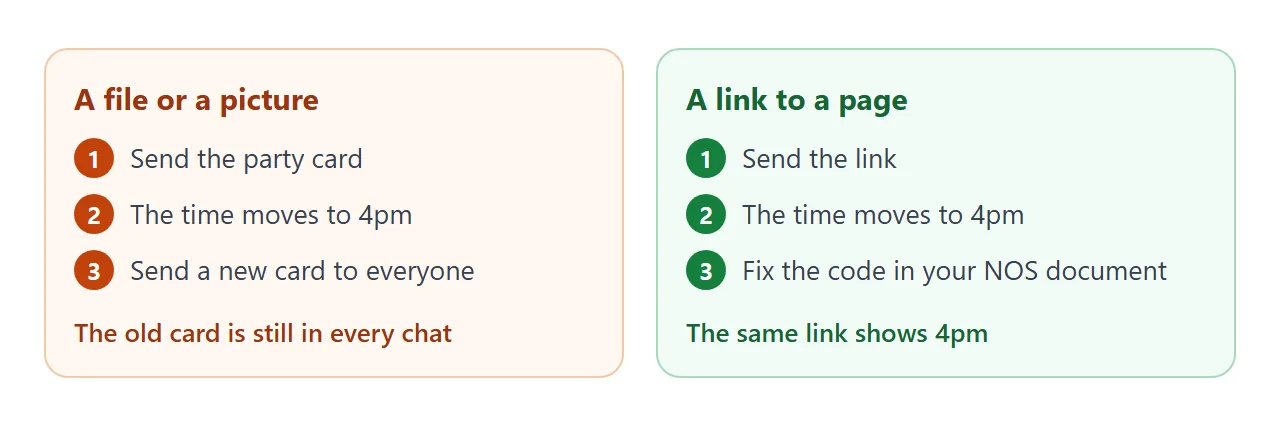
If the time or the place changes, fix the code in your NOS document. The same link shows the new version.
A page for one person
The same idea works for a partner. This version has no party details. It has a countdown and four notes marked "open when", each hidden until it is tapped.
<!doctype html>
<html lang="en">
<head>
<meta charset="utf-8">
<meta name="viewport" content="width=device-width, initial-scale=1">
<title>Five years, Mia and Sam</title>
<style>
  * { box-sizing: border-box; }
  body { margin: 0; background: #1f2a44; font-family: system-ui, -apple-system, "Segoe UI", sans-serif; color: #1f2937; line-height: 1.5; }
  .page { max-width: 520px; margin: 0 auto; padding: 24px 18px 32px; }
  .top { text-align: center; color: #fde7ee; padding: 6px 0 18px; }
  .top svg { width: 64px; height: 58px; }
  .top small { display: block; font-size: 13px; letter-spacing: .12em; text-transform: uppercase; color: #f4a6bd; }
  h1 { margin: 4px 0 6px; font-size: 32px; line-height: 1.15; color: #fff; }
  .count { margin: 12px auto 0; display: inline-block; padding: 8px 18px; border-radius: 999px; background: #f4a6bd; color: #3a1020; font-weight: 800; font-size: 17px; }
  .card { background: #fff; border-radius: 14px; margin-bottom: 12px; overflow: hidden; }
  .card > button { width: 100%; text-align: left; padding: 15px 16px; font: 700 18px system-ui, sans-serif; color: #1f2a44; background: #fff; border: 0; cursor: pointer; min-height: 52px; display: flex; justify-content: space-between; gap: 10px; }
  .card > button span { color: #c2410c; font-weight: 800; }
  .card .note { display: none; padding: 0 16px 16px; font-size: 17px; color: #374151; }
  .card.open .note { display: block; }
  .card.open > button span { transform: rotate(45deg); }
  .foot { margin-top: 18px; text-align: center; color: #c9d1e6; font-size: 15px; }
</style>
</head>
<body>
<div class="page">
  <div class="top">
    <svg viewBox="0 0 64 58" role="img" aria-label="A heart"><path d="M32 54 C6 36 2 20 12 10 C20 3 30 8 32 16 C34 8 44 3 52 10 C62 20 58 36 32 54Z" fill="#f4a6bd"/></svg>
    <small>Our fifth anniversary</small>
    <h1>Five years, Mia</h1>
    <div class="count" id="count">Counting...</div>
  </div>

  <div class="card"><button type="button" aria-expanded="false">Open when you need a laugh <span>+</span></button>
    <div class="note">Remember the night we built the wardrobe backwards and only noticed when the doors would not close? I laughed for a week.</div></div>
  <div class="card"><button type="button" aria-expanded="false">Open when you miss me <span>+</span></button>
    <div class="note">Look at the wall clock. In one hour I will be thinking of you too. It is not science, but it works.</div></div>
  <div class="card"><button type="button" aria-expanded="false">Open when work was awful <span>+</span></button>
    <div class="note">You are better at your job than you think. Tonight I am cooking, and you are doing nothing.</div></div>
  <div class="card"><button type="button" aria-expanded="false">Open on the day <span>+</span></button>
    <div class="note">Tuesday 3 November, 7:00pm. Wear something warm. I booked the table by the window, the one from our first date.</div></div>

  <p class="foot">Made for Mia, from Sam</p>
</div>

<script>
  // Days left until the anniversary, counted from today's date
  const target = new Date(2026, 10, 3);
  const today = new Date(); today.setHours(0, 0, 0, 0);
  const days = Math.round((target - today) / 86400000);
  document.getElementById('count').textContent =
    days > 1 ? days + ' days to go' :
    days === 1 ? 'Tomorrow!' :
    days === 0 ? 'Today is the day' : 'Happy anniversary';

  // Tap a card to open or close its note
  document.querySelectorAll('.card > button').forEach((b) => {
    b.addEventListener('click', () => {
      const card = b.parentElement;
      const open = card.classList.toggle('open');
      b.setAttribute('aria-expanded', open);
    });
  });
</script>
</body>
</html>
The countdown is a few lines of script that count the days from today. It runs in the browser and uses the date on the device that opens the page.
Anyone who has the link can open the page, so send it only to the person it is for. Use first names, and leave out any address you would not put on a card.
For more on the timeline itself, see timeline to link.
Ways to share it compared
A timeline can travel in several ways. They differ most when something changes.
| Way | What the person gets | If the date changes |
|---|---|---|
| Photo of a card in a chat | An image to open and read | Send a new image. The old one stays |
| Document attached to an email | A file to download and open | Send a new file |
| Link to a NOS page | A page in the browser, phone included, no account | Change the code. The same link shows it |
| QR code on a printed card | A code that leads to the same link | Same as the link. The printed code does not change |
Google's help says that in Chrome on a computer you open the page, choose the three dots, then Cast, save, and share, then Create QR code, and that you can download it (as of October 2026). Scan the printout yourself before you hand out cards.
For party details on their own, see invitation to link. Why a link usually beats a file is in why links beat attachments.
When it does not work
| Symptom | Cause | Fix |
|---|---|---|
| A photo is missing | The AI used a picture from another site | Ask for shapes drawn in the page only |
| The text is tiny on a phone | The AI left out the phone setting | Ask for a mobile-friendly page and paste again |
| A Submit button does nothing | A page cannot send a form to a server | Remove the form and ask guests to text |
| The person you surprised saw the link | It went to a chat they are also in | Send it by direct message to guests only |
| Opened notes close on reload | A visitor's changes are not saved | Treat the page as read-only and fix the code |
| The weekday does not match the date | They were written separately | Check a calendar, fix the code, and message the change |
| The countdown shows a wrong number | The date in the code is wrong | Change the target date and test it |
If a relative asks where to find the file on their phone, send the link and not the file. Opening an HTML file on a phone explains why.