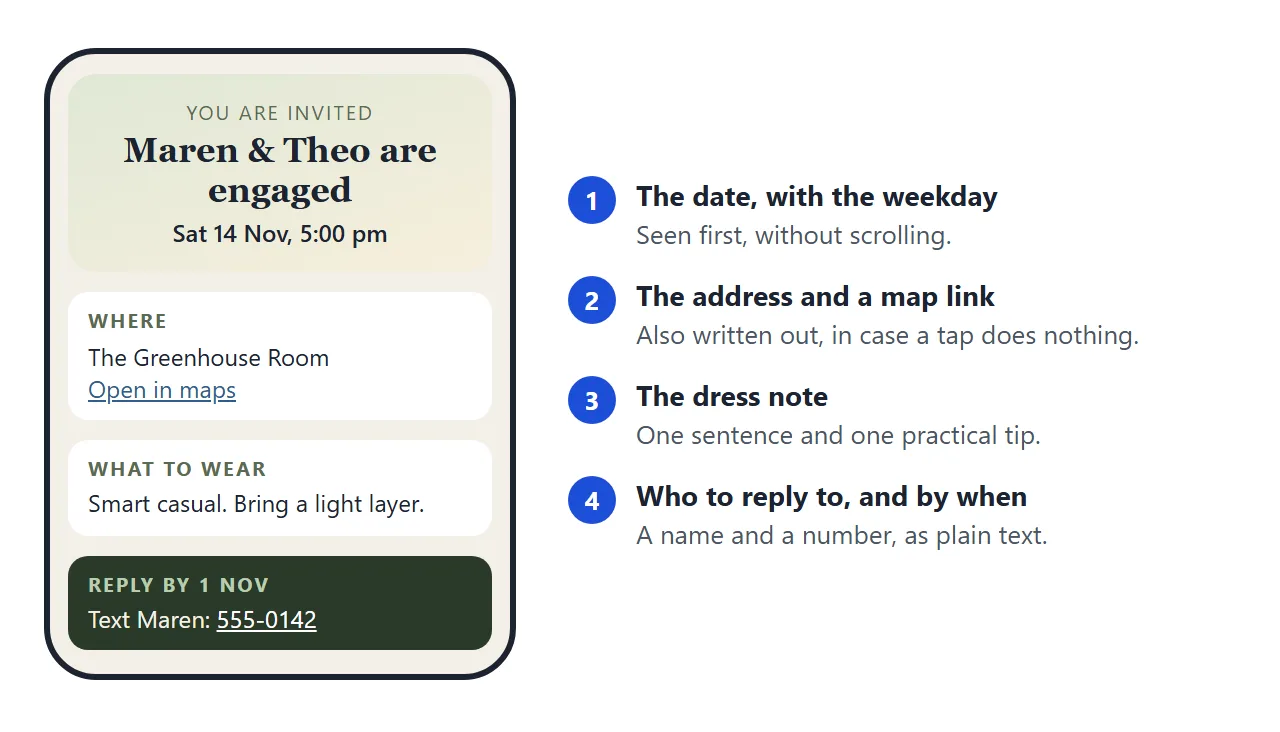
An engagement party website can be a single page: the date with the weekday, the address, a line about what to wear, and a name and number to reply to.
If you were about to search for a free online invitation maker, this is the smaller alternative. You describe the party to an AI chat, get one file, and send one link.
Here is a page of that kind. Open the "Good to know" sections, and look at it at phone width too.
<!doctype html>
<html lang="en">
<head>
<meta charset="utf-8">
<meta name="viewport" content="width=device-width, initial-scale=1">
<title>Engagement party: Maren and Theo, Saturday 14 November</title>
<style>
* { box-sizing: border-box; }
body {
margin: 0; background: #f3efe6; color: #2b2f2a;
font-family: system-ui, -apple-system, "Segoe UI", sans-serif; line-height: 1.5;
}
.page { max-width: 560px; margin: 0 auto; padding: 20px 16px 36px; }
header {
text-align: center; padding: 28px 18px 24px; border-radius: 18px;
background: linear-gradient(160deg, #dfe8d6, #f7efdc);
}
header svg { width: 74px; height: 44px; }
.kicker { margin: 6px 0 0; font-size: 13px; letter-spacing: .12em; text-transform: uppercase; color: #5b6b52; }
h1 { margin: 6px 0 4px; font: 700 30px/1.15 Georgia, "Times New Roman", serif; }
.when { margin: 0; font-size: 18px; font-weight: 600; }
.count { display: inline-block; margin-top: 12px; padding: 4px 12px; border-radius: 999px; background: #fff; font-size: 14px; color: #3f5136; }
section { margin-top: 14px; padding: 16px 18px; background: #fff; border-radius: 14px; }
h2 { margin: 0 0 8px; font-size: 13px; letter-spacing: .1em; text-transform: uppercase; color: #5b6b52; }
p { margin: 0 0 8px; }
p:last-child { margin-bottom: 0; }
.big { font-size: 17px; font-weight: 600; }
a { color: #2f5d8a; }
.tags { display: flex; flex-wrap: wrap; gap: 8px; margin: 10px 0 0; padding: 0; list-style: none; }
.tags li { padding: 4px 11px; border-radius: 999px; background: #eef3e8; font-size: 14px; }
.tags li.skip { background: #fbeee4; }
details { border-top: 1px solid #ece7da; padding: 10px 0; }
details:first-of-type { border-top: 0; padding-top: 0; }
summary { cursor: pointer; font-weight: 600; }
details p { margin-top: 6px; }
.reply { background: #2b3a2a; color: #f3efe6; }
.reply h2 { color: #b9cdb0; }
.reply a { color: #fff; }
</style>
</head>
<body>
<div class="page">
<header>
<svg viewBox="0 0 74 44" aria-hidden="true">
<circle cx="26" cy="26" r="15" fill="none" stroke="#b08a3e" stroke-width="3.5"/>
<circle cx="48" cy="26" r="15" fill="none" stroke="#b08a3e" stroke-width="3.5"/>
<path d="M37 6 l4 5 -4 5 -4 -5z" fill="#d9b45a"/>
</svg>
<p class="kicker">You are invited to celebrate</p>
<h1>Maren & Theo are engaged</h1>
<p class="when">Saturday 14 November 2026, 5:00 pm</p>
<span class="count" id="count"></span>
</header>
<section>
<h2>Where</h2>
<p class="big">The Greenhouse Room<br>12 Alder Lane, Fairhollow</p>
<p><a href="https://www.google.com/maps/search/?api=1&query=12+Alder+Lane+Fairhollow">Open in maps</a></p>
<p>Free parking behind the building. Doors open at 4:45 pm. We finish around 9:00 pm.</p>
</section>
<section>
<h2>What to wear</h2>
<p class="big">Smart casual. Come as you are, a little dressed up.</p>
<p>The room is warm, but we step into the garden for the toast, so bring a light layer.</p>
<ul class="tags">
<li>Dresses and shirts</li>
<li>Flat or block heels</li>
<li>Any colour you like</li>
<li class="skip">No white, please</li>
</ul>
</section>
<section>
<h2>Good to know</h2>
<details>
<summary>Food and drink</summary>
<p>Dinner is served at 6:00 pm. Tell us about allergies when you reply and we will pass it on.</p>
</details>
<details>
<summary>Gifts</summary>
<p>Your company is the gift. There is no registry.</p>
</details>
<details>
<summary>Bringing a guest or children</summary>
<p>Your invitation names who is invited. If you are unsure, just ask us.</p>
</details>
</section>
<section class="reply">
<h2>Please reply by Sunday 1 November</h2>
<p>Text or call Maren on <a href="tel:+15550142">555-0142</a> and say how many are coming.</p>
<p>Or email <a href="mailto:maren.example@example.com">maren.example@example.com</a>.</p>
</section>
</div>
<script>
// Days left until the party, counted in whole calendar days.
const party = new Date(2026, 10, 14); // month 10 = November
const today = new Date();
today.setHours(0, 0, 0, 0);
const days = Math.round((party - today) / 86400000);
const el = document.getElementById('count');
if (days > 1) el.textContent = days + ' days to go';
else if (days === 1) el.textContent = 'Tomorrow!';
else if (days === 0) el.textContent = 'Today!';
else el.textContent = 'Thank you for celebrating with us';
</script>
</body>
</html>
Everything a guest asks about is on the first screen or one scroll away. That is the whole idea: the page answers the questions you would otherwise answer one message at a time.
Make it with AI
You do not need to write the code. Give ChatGPT, Claude or Gemini your details and ask for a single file. Replace everything in square brackets, and keep the last lines, which stop the AI from inventing facts.
Write one self-contained HTML file for an engagement party page.
It must work on a phone and use no external images or fonts.

Details:
- Couple: [names]
- Date and time: [weekday, date, start and end time]
- Place: [venue name and full address, with the town]
- Parking or how to get there: [one line]
- Dress note: [what to wear, and one practical tip]
- Food and gifts: [one line each]
- Reply to: [name and phone number], by [date]

Sections in this order: date, where, what to wear, good to know, reply.
Use a calm colour palette and a serif heading.
Make the address a link to a map, and also write it out as text.
Write the phone number as a tel: link and also as text.
Do not add a form. Do not invent any detail I did not give you.
Where something is missing, write TODO.
Then check the result before you send it. The AI can get a weekday wrong or fill a gap with a plausible guess.
- Does the weekday match your calendar?
- Are the times and the address exactly yours?
- Is the phone number right, digit by digit?
- Is any line about parking, food or gifts something you never said?
Also open it on a phone. If something is off, tell the chat what to change in plain words and ask for the whole file again. Invitation to link covers the same checks for any event invitation.
Send it as a link
Copy the HTML the AI gave you, paste it into a NOS document and choose Create share link. HTML to link walks through it. The page renders as written, with its scripts running, such as the days-to-go counter above.
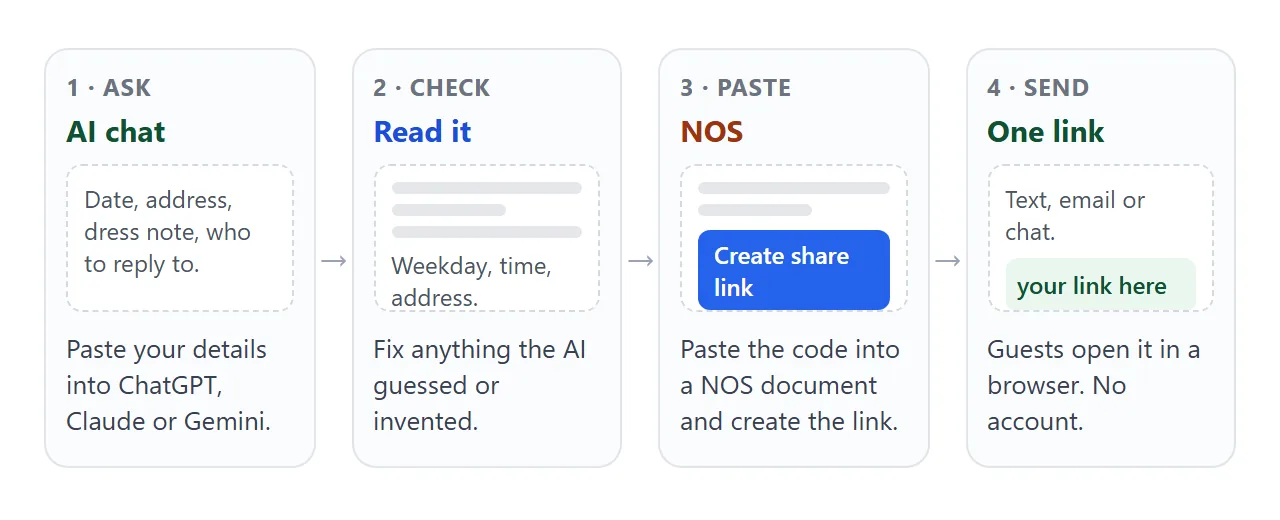
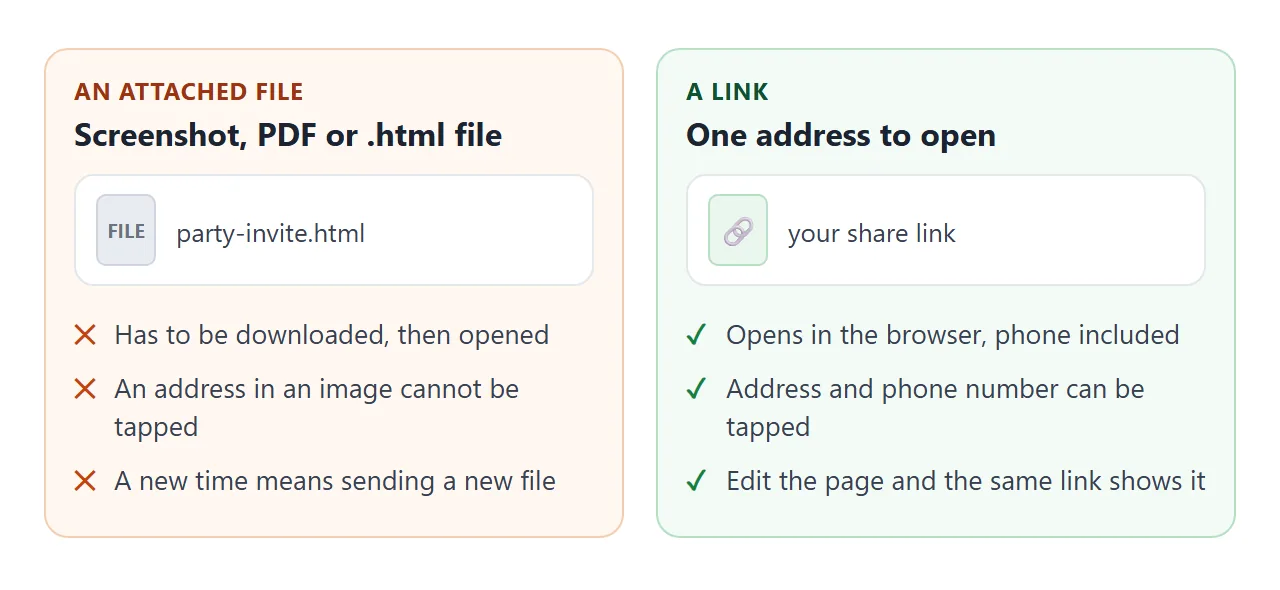
Anyone with the link opens it in a browser, on a phone too. They need no account and cannot edit the page. If you change the code later, the same link shows the new version, so you never resend a corrected invitation.
The link is plain text, so it fits where your guests already are: a text message, an email, a group chat. Keep the invitation message short and let the page carry the details.
Dress notes people can use
A label such as "cocktail" or "smart casual" means different things to different people. Add what you actually hope to see, and one practical reason: grass swallows thin heels, evenings cool down, a toast moves outside.
This page splits the notes by time of day and adds a rain plan. Tap the three tabs.
<!doctype html>
<html lang="en">
<head>
<meta charset="utf-8">
<meta name="viewport" content="width=device-width, initial-scale=1">
<title>Garden engagement party: dress notes</title>
<style>
* { box-sizing: border-box; }
body {
margin: 0; background: #eef3f7; color: #1f2933;
font-family: system-ui, -apple-system, "Segoe UI", sans-serif; line-height: 1.5;
}
.page { max-width: 560px; margin: 0 auto; padding: 20px 16px 32px; }
header { padding: 22px 20px; border-radius: 18px; color: #fff;
background: linear-gradient(150deg, #3d6b8f, #6b9a7d); }
header p { margin: 0; }
.kicker { font-size: 13px; letter-spacing: .12em; text-transform: uppercase; opacity: .85; }
h1 { margin: 4px 0 6px; font-size: 28px; line-height: 1.15; }
.meta { font-size: 16px; }
section { margin-top: 14px; padding: 16px 18px; background: #fff; border-radius: 14px; }
h2 { margin: 0 0 10px; font-size: 13px; letter-spacing: .1em; text-transform: uppercase; color: #3d6b8f; }
.tabs { display: flex; gap: 6px; margin-bottom: 12px; }
.tabs button {
flex: 1; padding: 9px 4px; border: 1px solid #c9d6e0; border-radius: 10px;
background: #f6f9fb; font: inherit; font-size: 14px; color: #1f2933; cursor: pointer;
}
.tabs button[aria-selected="true"] { background: #3d6b8f; border-color: #3d6b8f; color: #fff; font-weight: 600; }
.panel p { margin: 0 0 8px; }
.panel ul { margin: 0; padding-left: 20px; }
.panel li { margin-bottom: 4px; }
.timeline { margin: 0; padding: 0; list-style: none; }
.timeline li { display: flex; gap: 12px; padding: 6px 0; border-top: 1px solid #edf1f4; }
.timeline li:first-child { border-top: 0; }
.timeline b { min-width: 64px; }
.note { margin: 0; font-size: 14px; color: #52606d; }
</style>
</head>
<body>
<div class="page">
<header>
<p class="kicker">Garden party for Ines & Jonas</p>
<h1>Sunday 6 June, 2:00 pm</h1>
<p class="meta">The Marlowe garden, 8 Orchard Row. Park on the street.</p>
</header>
<section>
<h2>What to wear</h2>
<div class="tabs" role="tablist">
<button type="button" role="tab" aria-selected="true" data-tab="day">Afternoon</button>
<button type="button" role="tab" aria-selected="false" data-tab="eve">After 6 pm</button>
<button type="button" role="tab" aria-selected="false" data-tab="rain">If it rains</button>
</div>
<div class="panel" id="day">
<p><b>Light and relaxed.</b> Sundresses, linen shirts, anything you can sit on a lawn in.</p>
<ul>
<li>Flat shoes or wedges. Thin heels sink into grass.</li>
<li>Sunglasses and a hat are welcome.</li>
</ul>
</div>
<div class="panel" id="eve" hidden>
<p><b>Bring a layer.</b> The garden cools down once the sun drops behind the wall.</p>
<ul>
<li>A jacket, shawl or jumper.</li>
<li>The string lights go on at 6:30 pm.</li>
</ul>
</div>
<div class="panel" id="rain" hidden>
<p><b>We move indoors.</b> Same time, same address, through the side gate into the hall.</p>
<ul>
<li>Dress as you planned. The hall is dry and warm.</li>
<li>We will update this page by 10:00 am on the day.</li>
</ul>
</div>
</section>
<section>
<h2>The afternoon</h2>
<ul class="timeline">
<li><b>2:00 pm</b><span>Welcome drinks</span></li>
<li><b>3:30 pm</b><span>Lunch is served</span></li>
<li><b>5:00 pm</b><span>Toast and cake</span></li>
<li><b>8:00 pm</b><span>Wrap up</span></li>
</ul>
</section>
<section>
<h2>Reply</h2>
<p>Tell Ines how many of you are coming by Sunday 23 May.</p>
<p class="note">Message her in the chat where you got this link.</p>
</section>
</div>
<script>
// Show one panel at a time and mark the chosen tab.
const tabs = document.querySelectorAll('.tabs button');
const panels = document.querySelectorAll('.panel');
tabs.forEach((tab) => {
tab.addEventListener('click', () => {
tabs.forEach((t) => t.setAttribute('aria-selected', String(t === tab)));
panels.forEach((p) => { p.hidden = p.id !== tab.dataset.tab; });
});
});
</script>
</body>
</html>
To get this version, add one sentence to the prompt: "Show the dress notes as three tabs: afternoon, evening and if it rains." Keep each tab to a sentence and two bullets so it reads at a glance.
Map, phone and email links
A map link, a phone link and an email link are ordinary links, and a guest taps them on a phone. Google documents a search link for Maps, as of October 2026:
<a href="https://www.google.com/maps/search/?api=1&query=12+Alder+Lane+Fairhollow">Open in maps</a>
Spaces become plus signs or %20, and commas become %2C. HTML link to a map location shows the other forms. For calls and email, MDN lists the tel: and mailto: link types, and says cellular devices dial a tel: number.
Whether a tap does something depends on the guest's device, so write the address and number out as text as well. Nothing then depends on a tap.
Replies work the same way. The page cannot send a reply back to you, so name one person, one number and one date, and let guests text or email you. Calendar invite link covers putting the date into guests' calendars.
Ways to send the details compared
| Way to send | What the guest does | When the time changes |
|---|---|---|
| Typed in a message | Scrolls back to find it later | You send another message |
| Screenshot or image | Pinches to read it; the address cannot be tapped | You make and send a new image |
| Attached file | Downloads and opens it, see opening HTML on a phone | You send a new file |
| Share link | Taps it; the page opens in the browser | You edit the page; the same link shows it |
When it does not work
| What you see | Cause | Fix |
|---|---|---|
| The weekday does not match the date | The AI guessed it | Check your calendar and ask for a corrected file |
| The map opens the wrong place | The address was short or had a typo | Use the full address with the town, and test the link on your phone |
| The phone number does not dial | The device has no calling app, or the number has no country code | Write the number out as text next to the link |
| A picture is missing | Images loaded from other sites are blocked | Ask for shapes in CSS or inline SVG instead |
| Guests cannot reply on the page | The page cannot send a form to you | Ask guests to text or email the person named on the page |
| A guest sees the old time | They kept a screenshot or a file copy | Send the link again and edit the page, not the message |
| The AI added a detail you never gave | It filled a gap | Ask for TODO in every gap, then fill it yourself |
To be sized correctly on a phone, a page also needs the viewport meta tag. Want a QR code on the printed card? See QR code link.