A capability statement template is a one-page layout with four parts: your core competencies, your past performance, what sets you apart, and your company data. Build it as a web page and you send one link instead of a file.
That also fixes a small problem. A page made inside an AI chat lives in that chat, and the buyer you want to send it to is not in it. A share link opens for anyone you give it to, with no account.
Here is a page you can copy. The company is made up. Type a buyer's name into the header, and use the buttons to show only the past work that fits.
<!doctype html>
<html lang="en">
<head>
<meta charset="utf-8">
<meta name="viewport" content="width=device-width, initial-scale=1">
<title>Capability statement</title>
<style>
  * { box-sizing: border-box; }
  body { margin: 0; font-family: system-ui, -apple-system, "Segoe UI", sans-serif; color: #1d2330; background: #eef1f5; line-height: 1.5; }
  .page { max-width: 760px; margin: 0 auto; background: #fff; }
  header { background: #12324a; color: #fff; padding: 22px 22px 18px; }
  .mark { display: inline-grid; place-items: center; width: 40px; height: 40px; border-radius: 9px; background: #f2b84b; color: #12324a; font-weight: 800; margin-bottom: 8px; }
  h1 { margin: 0; font-size: 1.5rem; line-height: 1.2; }
  .pitch { margin: 6px 0 0; color: #cfe0ee; }
  .prep { margin: 10px 0 0; font-size: .85rem; color: #f2b84b; }
  .data { display: grid; grid-template-columns: repeat(2, 1fr); gap: 1px; background: #dde3ea; border-bottom: 1px solid #dde3ea; }
  .data div { background: #f7f9fb; padding: 9px 22px; font-size: .85rem; }
  .data b { display: block; font-size: .7rem; letter-spacing: .06em; text-transform: uppercase; color: #5b6676; }
  section { padding: 16px 22px 4px; }
  h2 { margin: 0 0 8px; font-size: .8rem; letter-spacing: .08em; text-transform: uppercase; color: #12324a; border-bottom: 2px solid #f2b84b; padding-bottom: 4px; }
  ul { margin: 0; padding-left: 1.1rem; }
  li { margin: 0 0 5px; }
  .filter { display: flex; flex-wrap: wrap; gap: 6px; margin-bottom: 10px; }
  .filter button { font: inherit; font-size: .8rem; padding: 5px 11px; border-radius: 99px; border: 1px solid #b8c3cf; background: #fff; color: #12324a; cursor: pointer; }
  .filter button[aria-pressed="true"] { background: #12324a; color: #fff; border-color: #12324a; }
  .proj { border: 1px solid #dde3ea; border-radius: 10px; padding: 10px 13px; margin-bottom: 9px; }
  .proj h3 { margin: 0; font-size: .95rem; }
  .meta { font-size: .8rem; color: #5b6676; margin: 2px 0 5px; }
  .proj p { margin: 0; font-size: .9rem; }
  .result { color: #0f5132; font-weight: 600; }
  .contact { background: #f7f9fb; margin-top: 12px; padding: 16px 22px 20px; border-top: 1px solid #dde3ea; font-size: .92rem; }
  .contact p { margin: 0 0 2px; }
  .note { font-size: .75rem; color: #7a8594; margin-top: 8px; }
  label { font-size: .8rem; color: #cfe0ee; }
  input { font: inherit; font-size: .85rem; padding: 4px 8px; border-radius: 6px; border: 1px solid #5b7a93; background: #0e2a3f; color: #fff; width: 100%; max-width: 280px; }
  @media print { body { background: #fff; } label, input, .filter { display: none; } }
</style>
</head>
<body>
<div class="page">
  <header>
    <div class="mark">MR</div>
    <h1>Marlow Ridge Mapping LLC</h1>
    <p class="pitch">Boundary, topographic and as-built surveys for public works and small developers.</p>
    <p class="prep" id="prep">Prepared for: your agency or company</p>
    <label for="who">Type the buyer's name</label><br>
    <input id="who" placeholder="e.g. Riverbend County" autocomplete="off">
  </header>

  <div class="data">
    <div><b>UEI</b>replace with yours</div>
    <div><b>CAGE</b>replace with yours</div>
    <div><b>NAICS</b>replace with yours</div>
    <div><b>Status</b>Small business (add certifications you hold)</div>
  </div>

  <section>
    <h2>Core competencies</h2>
    <ul>
      <li>Boundary and easement surveys</li>
      <li>Topographic mapping with drone and ground control</li>
      <li>As-built surveys for roads, drainage and utilities</li>
      <li>Survey data delivered in CAD and PDF within 10 working days (example)</li>
    </ul>
  </section>

  <section>
    <h2>Past performance</h2>
    <div class="filter" id="filter" role="group" aria-label="Filter past performance">
      <button type="button" data-tag="all" aria-pressed="true">All</button>
      <button type="button" data-tag="roads" aria-pressed="false">Roads</button>
      <button type="button" data-tag="buildings" aria-pressed="false">Buildings</button>
    </div>
    <div class="proj" data-tag="roads">
      <h3>Riverbend County Public Works</h3>
      <div class="meta">As-built survey, Mill Road resurfacing · 2025</div>
      <p>Surveyed 4.2 km of road and drainage. <span class="result">Delivered 3 days ahead of the agreed date.</span></p>
    </div>
    <div class="proj" data-tag="buildings">
      <h3>Tallis Hospital Group</h3>
      <div class="meta">Topographic survey, parking structure site · 2024</div>
      <p>Drone-based site model for design team. <span class="result">Design team used it without a re-survey.</span></p>
    </div>
    <div class="proj" data-tag="roads">
      <h3>Northgate Port Authority</h3>
      <div class="meta">Boundary and easement survey, access road · 2024</div>
      <p>Resolved a boundary conflict on two parcels. <span class="result">Plat accepted on first submission.</span></p>
    </div>
  </section>

  <section>
    <h2>Differentiators</h2>
    <ul>
      <li>One licensed surveyor does the fieldwork and signs the plan</li>
      <li>Same-week site visits inside the county (example)</li>
      <li>Plain-language cover note with every deliverable</li>
    </ul>
  </section>

  <div class="contact">
    <p><b>Contact:</b> Ana Fontaine (fictional), owner</p>
    <p>ana@marlowridge.example · 555-0142 · Riverbend, USA</p>
    <p class="note">Example page. Every name, number and result above is made up.</p>
  </div>
</div>

<script>
  // Show only the past-performance cards that match the buyer
  const buttons = document.querySelectorAll('#filter button');
  const cards = document.querySelectorAll('.proj');
  buttons.forEach((b) => b.addEventListener('click', () => {
    buttons.forEach((x) => x.setAttribute('aria-pressed', x === b));
    cards.forEach((c) => { c.hidden = b.dataset.tag !== 'all' && c.dataset.tag !== b.dataset.tag; });
  }));

  // Put the buyer's name in the header
  const who = document.getElementById('who');
  const prep = document.getElementById('prep');
  who.addEventListener('input', () => {
    prep.textContent = 'Prepared for: ' + (who.value.trim() || 'your agency or company');
  });
</script>
</body>
</html>
What goes on the page
SBA training pages describe the statement as often a government buyer's first impression of your business. So the first screen has to say who you are and what you do. The four parts below are common practice, not a required form.
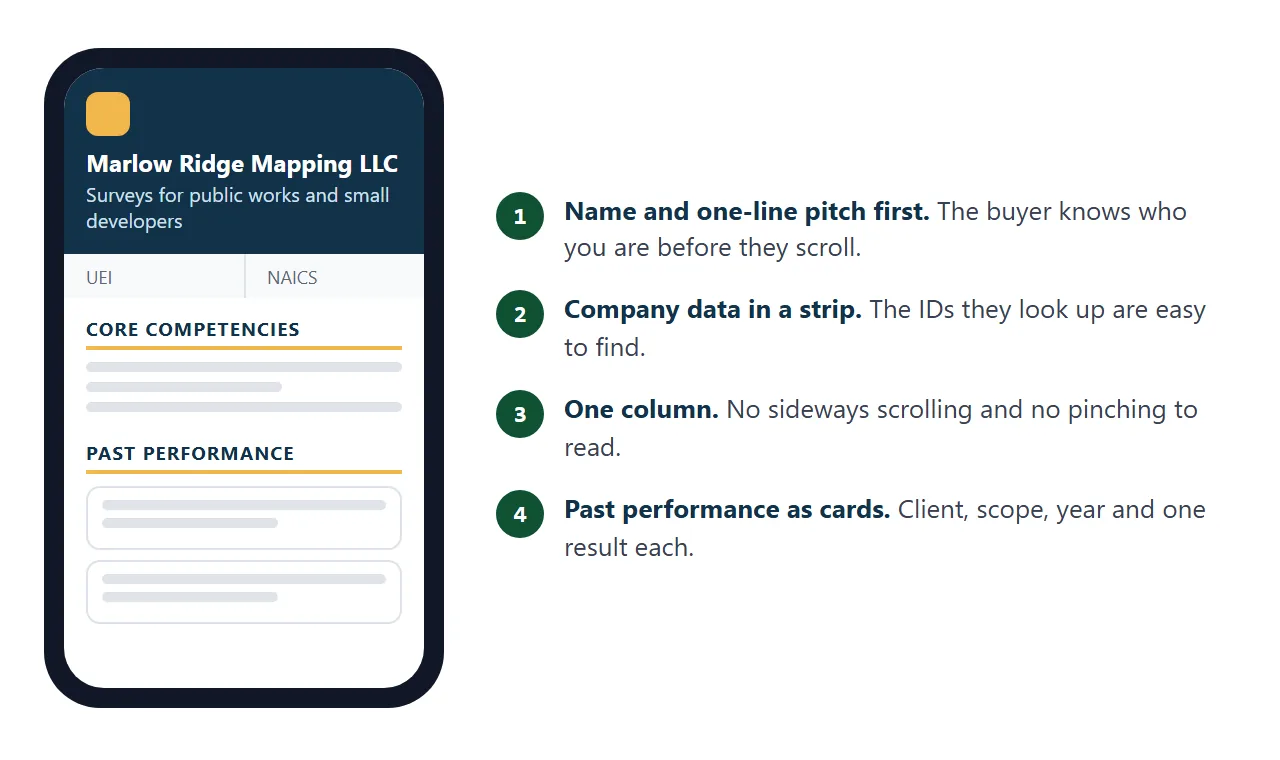
| Part | What to write | Keep it to |
|---|---|---|
| Core competencies | What you deliver, in the words the buyer uses | 4 to 6 short lines |
| Past performance | Client, what you did, year, one real result | 3 projects |
| Differentiators | Why you, in a fact the buyer can check | 3 lines |
| Company data | Your registration IDs, codes, certifications, contact | A small strip |
Fill the data strip from your own registration records, not from memory. If a solicitation asks for specific identifiers, put those in.
Make it with AI
Give an AI your facts and ask for one HTML file. Paste this into ChatGPT, Claude or Gemini, then add your details at the end.
Make a capability statement as ONE self-contained HTML file.
Sections, in this order: header (business name, one-line pitch),
company data strip, core competencies (4-6 short lines),
past performance (3 projects: client, what I did, year, one result),
differentiators (3 lines), contact.
Rules: use only the facts I give. Never invent a client, a number,
a certification or an ID. Where I gave nothing, write TODO.
Inline CSS only, no external images or fonts. One column that
reads well at 390 px wide, and prints on one sheet.
My facts:
[paste your business name, services, projects, IDs, contact]
Then check the result before you send anything.
- Every name and number is yours. AI fills gaps with believable text. Delete anything you cannot show.
- No TODO is left, and no placeholder such as "replace with yours".
- It reads on a phone. Open it on one. If text is tiny, see the viewport meta tag.
- Contact details work. Call the number, send a test email.
Send it as a link
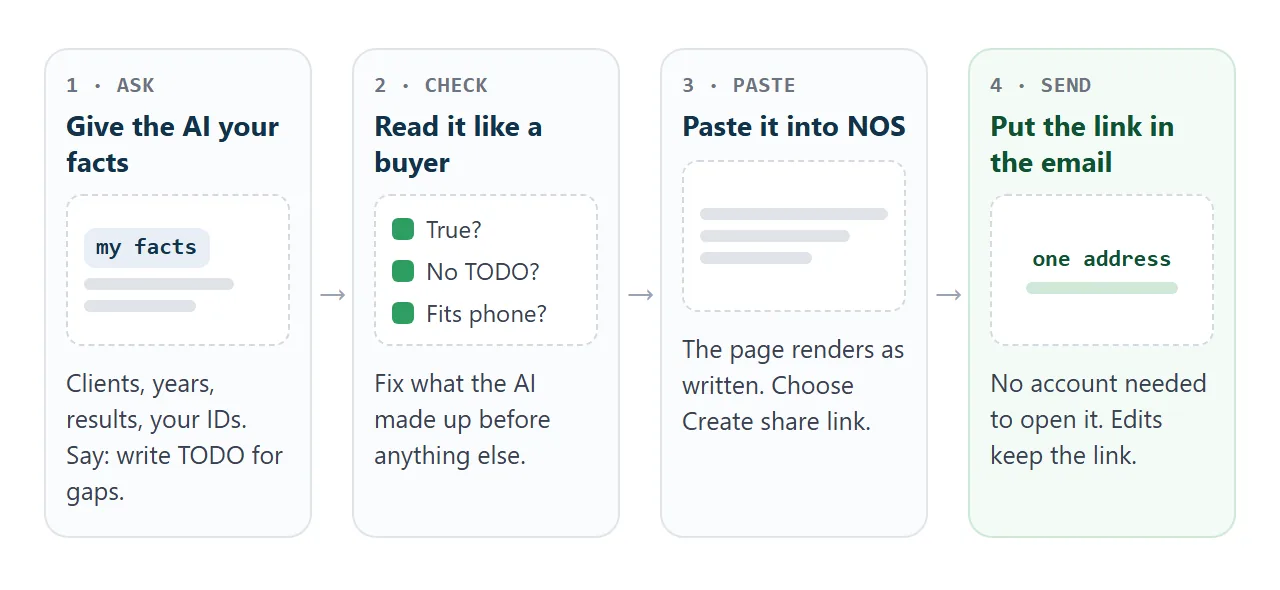
- Open a NOS document and paste the HTML in. The page renders as written, scripts included.
- Choose Create share link. HTML to link walks through it.
- Paste the link into your email, in the body, with one line saying what it is.
The buyer taps the link and the page opens in their browser, on a phone too. They need no account and cannot edit it.
If you fix a typo later, the same link shows the new version. NOS does not show who opened it, so end the email with a question that invites a reply.
Anyone with the link can open it, so leave out anything you would not put on a public notice board.
For printed material, a QR code can point to the same link. See QR code link.
Link, attachment or PDF
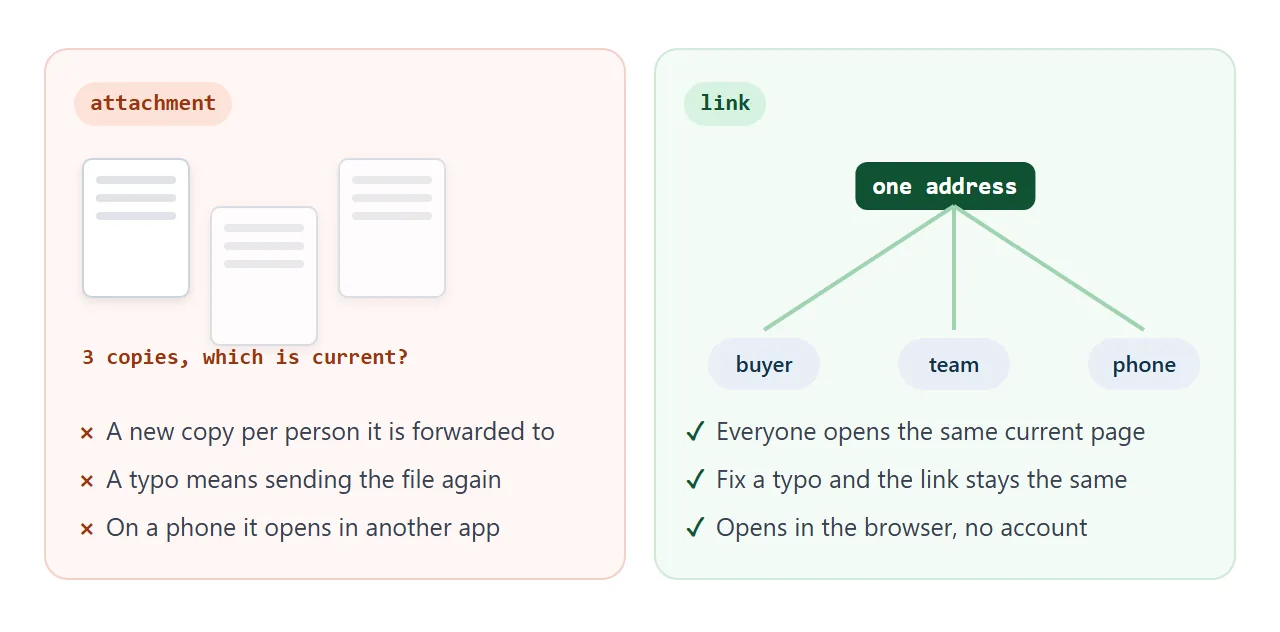
| Link to the page | Attached file | Upload to a portal | |
|---|---|---|---|
| What the buyer does | Taps and reads | Downloads, opens an app | Follows the portal's steps |
| Fixing a typo | Edit, same link | Send a new file | Upload again |
| On a phone | Opens in the browser | Depends on the app | Depends on the portal |
| Use it when | Introducing yourself by email | Someone asks for a file | A solicitation says so |
If you need a file, make one from the same page. In Chrome on a computer, choose Print and set the destination to Save as PDF (Chrome Help, as of October 2026). For more on the choice, see HTML vs PDF for clients.
Tailor it for one opportunity
One generic page rarely fits every buyer. When you answer a specific request, make a second page that mirrors it: their requirement, then your matching work. Tick the checklist at the bottom before sending.
<!doctype html>
<html lang="en">
<head>
<meta charset="utf-8">
<meta name="viewport" content="width=device-width, initial-scale=1">
<title>Capability statement for one opportunity</title>
<style>
  * { box-sizing: border-box; }
  body { margin: 0; padding: 16px; font-family: system-ui, -apple-system, "Segoe UI", sans-serif; color: #1d2330; background: #eef1f5; line-height: 1.5; }
  .wrap { max-width: 720px; margin: 0 auto; }
  .card { background: #fff; border: 1px solid #dde3ea; border-radius: 12px; padding: 16px 18px; margin-bottom: 12px; }
  h1 { margin: 0 0 2px; font-size: 1.25rem; }
  .sub { margin: 0; color: #5b6676; font-size: .9rem; }
  h2 { margin: 0 0 8px; font-size: .8rem; letter-spacing: .08em; text-transform: uppercase; color: #12324a; }
  .req { border-top: 1px solid #e6eaf0; padding: 9px 0; }
  .req:first-of-type { border-top: 0; }
  .ask { font-weight: 600; font-size: .92rem; }
  .ans { margin: 2px 0 0; font-size: .9rem; }
  .ans b { color: #0f5132; }
  details { margin-top: 4px; font-size: .85rem; color: #4a5565; }
  summary { cursor: pointer; color: #1d4ed8; }
  .check { display: flex; gap: 9px; align-items: flex-start; padding: 5px 0; font-size: .92rem; cursor: pointer; }
  .check input { margin-top: 4px; width: 17px; height: 17px; }
  .bar { height: 8px; border-radius: 99px; background: #e6eaf0; overflow: hidden; margin: 6px 0 8px; }
  .bar i { display: block; height: 100%; width: 0; background: #2f9e62; transition: width .2s; }
  #status { font-weight: 600; font-size: .9rem; }
  #status.ok { color: #0f5132; }
</style>
</head>
<body>
<div class="wrap">
  <div class="card">
    <h1>Response to: Road Survey Support, Mill Road Corridor</h1>
    <p class="sub">Marlow Ridge Mapping LLC (fictional) · for Riverbend County Public Works</p>
  </div>

  <div class="card">
    <h2>What you asked for, and what we have done</h2>
    <div class="req">
      <div class="ask">As-built survey of roads and drainage</div>
      <p class="ans"><b>Done:</b> 4.2 km of Mill Road, 2025, delivered 3 days early (example).</p>
      <details><summary>More detail</summary>Ground control plus drone capture. Deliverables in CAD and PDF, with a one-page cover note.</details>
    </div>
    <div class="req">
      <div class="ask">Experience with county public works</div>
      <p class="ans"><b>Done:</b> Riverbend County Public Works, 2025 (example).</p>
      <details><summary>More detail</summary>Name the contact who can confirm it, with their permission.</details>
    </div>
    <div class="req">
      <div class="ask">Turnaround within 10 working days</div>
      <p class="ans"><b>Yes:</b> our last three deliveries met 10 working days (example).</p>
      <details><summary>More detail</summary>Only write what you can show. If you cannot, say what you can promise.</details>
    </div>
  </div>

  <div class="card">
    <h2>Check before you send the link</h2>
    <div class="bar"><i id="fill"></i></div>
    <label class="check"><input type="checkbox"> Every client, number and date is true and mine</label>
    <label class="check"><input type="checkbox"> No TODO or placeholder text is left</label>
    <label class="check"><input type="checkbox"> The buyer's own words are in the headings</label>
    <label class="check"><input type="checkbox"> Opened on my phone: nothing is cut off</label>
    <label class="check"><input type="checkbox"> Contact details work: I called the number</label>
    <div id="status">0 of 5 done</div>
  </div>
</div>

<script>
  const boxes = document.querySelectorAll('.check input');
  const fill = document.getElementById('fill');
  const status = document.getElementById('status');

  function update() {
    const done = [...boxes].filter((b) => b.checked).length;
    fill.style.width = (done / boxes.length * 100) + '%';
    status.textContent = done === boxes.length ? 'All checked. Ready to send.' : done + ' of ' + boxes.length + ' done';
    status.className = done === boxes.length ? 'ok' : '';
  }
  boxes.forEach((b) => b.addEventListener('change', update));
</script>
</body>
</html>
Paste the tailored page into a new NOS document, so the general statement and its link stay as they are. For a longer pitch with prices, see proposal link.
When it does not work
| Symptom | Cause | Fix |
|---|---|---|
| The page looks tiny on a phone | No viewport tag, or a fixed wide layout | Ask the AI for a one-column layout with a viewport tag |
| Your logo or photo is missing | Images loaded from other sites are blocked | Use text, or an inline SVG drawn in the page |
| A contact form does nothing | Sending a form to a server is blocked | Show your email and phone as plain text |
| It lists a client you never had | The AI filled a gap | Delete it, and re-run the prompt with only real facts |
| TODO shows on the page | You left a gap unfilled | Fill it, or remove the line |
| A portal rejects the link | It wants a file | Save the page as a PDF and upload that |