A celebration of life program is the order of the service: times, who speaks, the music, and where to go afterwards. You do not need a site builder for it. Ask an AI chat for one page and send it as a link.
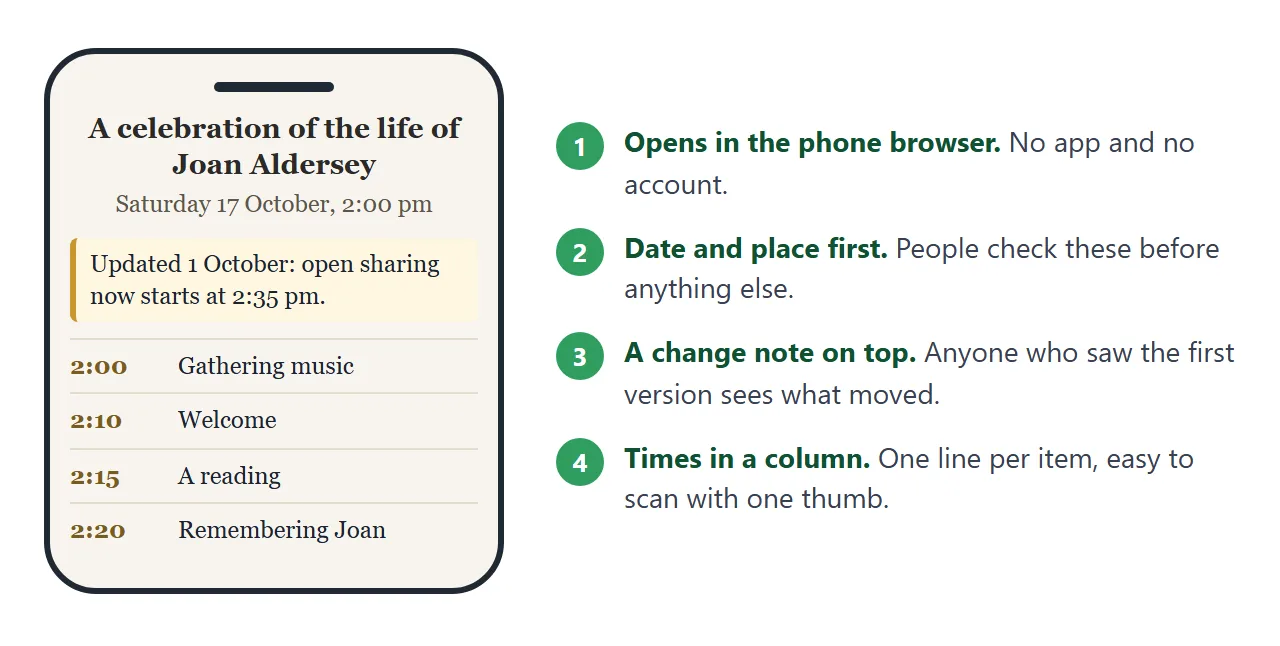
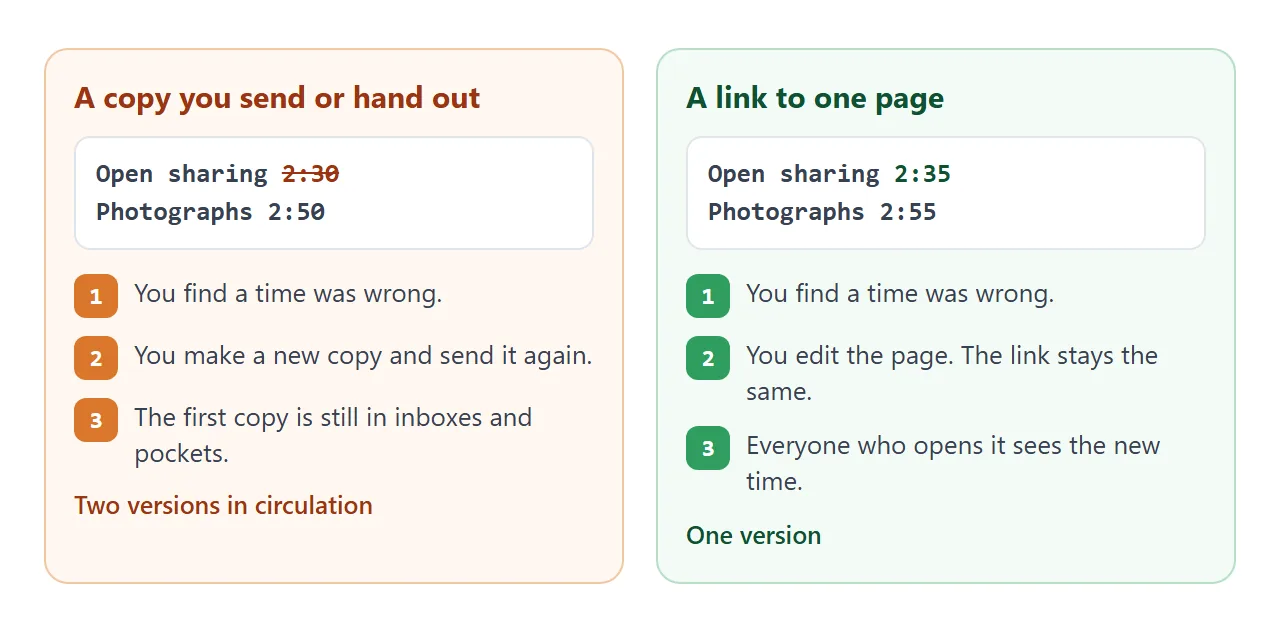
Times and names sometimes change in the last days. A printed or attached copy cannot follow the change. A link shows whatever the page says now. Here is a program of that kind, with a made-up person and place.
<!doctype html>
<html lang="en">
<head>
<meta charset="utf-8">
<meta name="viewport" content="width=device-width, initial-scale=1">
<title>Celebration of life for Joan Aldersey</title>
<style>
* { box-sizing: border-box; }
body {
margin: 0; font-family: Georgia, "Times New Roman", serif; font-size: 17px;
background: #f7f4ee; color: #2b2a28; line-height: 1.55;
}
body.big { font-size: 21px; }
.wrap { max-width: 640px; margin: 0 auto; padding: 24px 16px 36px; }
header { text-align: center; padding-bottom: 14px; border-bottom: 1px solid #d9d1c5; }
.emblem { width: 72px; height: 72px; display: block; margin: 0 auto 8px; }
h1 { font-size: 1.7em; margin: 0; font-weight: 600; line-height: 1.2; }
.sub { margin: 4px 0 0; color: #5d564a; }
.when { margin: 10px 0 0; font-weight: 600; color: #4b3f2f; }
.notice { margin: 16px 0 0; padding: 10px 14px; background: #fff7e0; border-left: 4px solid #c9962b; border-radius: 6px; font-size: .92em; }
.tools { text-align: right; margin: 14px 0 4px; }
.tools button {
font: inherit; font-size: .85em; padding: 6px 12px; border-radius: 8px; cursor: pointer;
background: #fff; border: 1px solid #b9ad98; color: #3d372d;
}
.tools button[aria-pressed="true"] { background: #4b3f2f; color: #fff; border-color: #4b3f2f; }
h2 { font-size: 1.15em; margin: 22px 0 8px; color: #4b3f2f; }
ol.order { list-style: none; margin: 0; padding: 0; }
ol.order li {
display: grid; grid-template-columns: 5.2em 1fr; gap: 4px 12px;
padding: 11px 0; border-bottom: 1px solid #e3dccf;
}
ol.order time { font-weight: 700; color: #7a5c20; font-variant-numeric: tabular-nums; }
ol.order .what { font-weight: 600; }
ol.order .who { display: block; color: #5d564a; font-weight: 400; font-size: .92em; }
details { margin-top: 6px; font-size: .92em; }
summary { cursor: pointer; color: #6b4e12; }
details p { margin: 6px 0 0; padding: 8px 12px; background: #fff; border-radius: 8px; }
.card { background: #fff; border-radius: 12px; padding: 12px 16px; box-shadow: 0 2px 8px rgba(0,0,0,.06); }
.card p { margin: 0 0 6px; }
.card p:last-child { margin: 0; }
footer { margin-top: 24px; text-align: center; color: #5d564a; font-size: .85em; }
</style>
</head>
<body>
<div class="wrap">
<header>
<svg class="emblem" viewBox="0 0 72 72" role="img" aria-label="A simple sprig of leaves">
<circle cx="36" cy="36" r="34" fill="#ece3d1"/>
<path d="M36 58V24" stroke="#6f8a58" stroke-width="3" stroke-linecap="round"/>
<path d="M36 44c-10 0-14-6-14-12 8 0 14 4 14 12z" fill="#8fb078"/>
<path d="M36 34c10 0 14-6 14-12-8 0-14 4-14 12z" fill="#8fb078"/>
<path d="M36 24c-5-3-6-9-4-13 5 2 7 8 4 13z" fill="#a8c490"/>
</svg>
<h1>A celebration of the life of Joan Aldersey</h1>
<p class="sub"><time datetime="1948-04-03">3 April 1948</time> – <time datetime="2026-09-20">20 September 2026</time></p>
<p class="when"><time datetime="2026-10-17T14:00">Saturday 17 October 2026, 2:00 pm</time><br>Fernhill Garden Hall (a made-up place for this example)</p>
<p class="notice"><b>Updated 1 October:</b> open sharing now starts at 2:35 pm. The photographs follow it.</p>
</header>
<div class="tools"><button type="button" id="size" aria-pressed="false">Larger text</button></div>
<h2>Order of service</h2>
<ol class="order">
<li><time datetime="14:00">2:00 pm</time><div><span class="what">Gathering music</span><span class="who">Piano, played by Rosa Trent</span></div></li>
<li><time datetime="14:10">2:10 pm</time><div><span class="what">Welcome</span><span class="who">Daniel Aldersey, her son</span></div></li>
<li><time datetime="14:15">2:15 pm</time><div><span class="what">A reading</span><span class="who">Priya Nair, a friend</span>
<details><summary>Read the words</summary><p>A short poem chosen by the family. Its words are printed here so everyone can follow along.</p></details></div></li>
<li><time datetime="14:20">2:20 pm</time><div><span class="what">Remembering Joan</span><span class="who">Margaret Hale, her sister</span></div></li>
<li><time datetime="14:30">2:30 pm</time><div><span class="what">A song she loved</span><span class="who">Recorded, all welcome to sing</span></div></li>
<li><time datetime="14:35">2:35 pm</time><div><span class="what">Open sharing</span><span class="who">Anyone who would like to say a few words</span></div></li>
<li><time datetime="14:55">2:55 pm</time><div><span class="what">Photographs</span><span class="who">A slideshow of her garden years</span></div></li>
<li><time datetime="15:00">3:00 pm</time><div><span class="what">Closing words</span><span class="who">Daniel Aldersey</span></div></li>
<li><time datetime="15:05">3:05 pm</time><div><span class="what">Tea, cake and conversation</span><span class="who">In the hall, everyone welcome</span></div></li>
</ol>
<h2>Good to know</h2>
<div class="card">
<p><b>Please wear:</b> something colourful. Joan liked colour.</p>
<p><b>Step-free access:</b> the main door has a ramp.</p>
<p><b>Questions:</b> reply to the message that brought you this page.</p>
</div>
<footer>This page shows the current order. If a time changes, this same link shows the new one.</footer>
</div>
<script>
// Toggle a larger text size for easier reading
const btn = document.getElementById('size');
btn.addEventListener('click', () => {
const on = document.body.classList.toggle('big');
btn.setAttribute('aria-pressed', on);
btn.textContent = on ? 'Normal text' : 'Larger text';
});
</script>
</body>
</html>
What goes in a celebration of life program
People open it on a phone, often from a message, and look for the same few things. Put those first.
- Date, time and place. At the top, before anything else.
- The order of service. One line per item: the time, what it is, and who does it.
- Words people may want to follow. A reading or the title of a song.
- Practical details. What to wear, access to the building, and what happens afterwards.
- Where to ask. One sentence saying who to reply to.
Ask each person named on the page whether they are happy to be named, and whether the time suits them.
Make it with AI
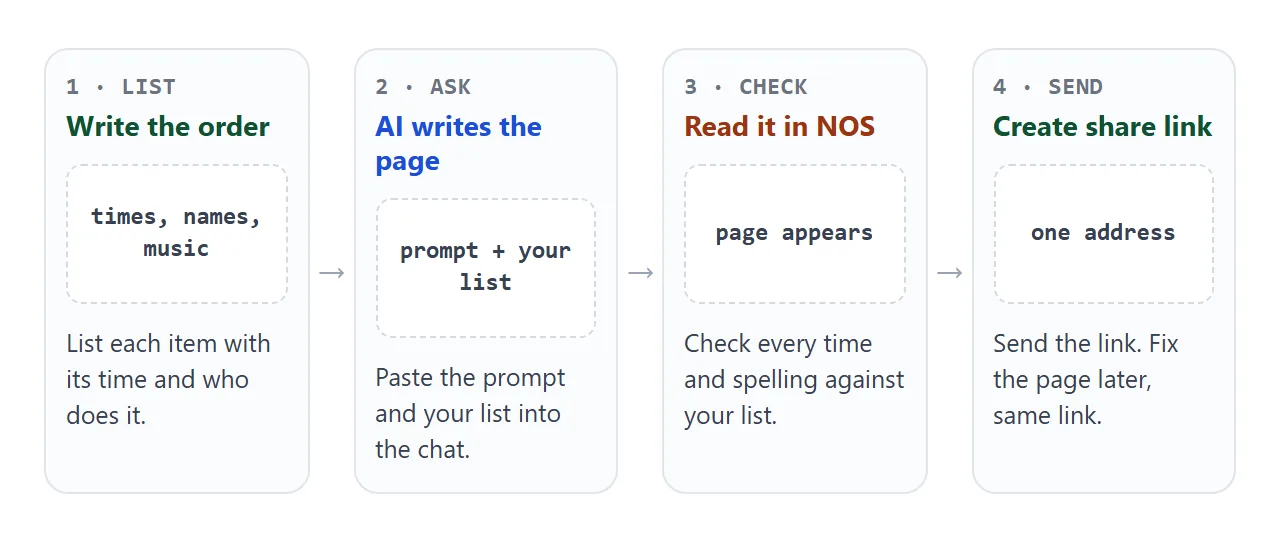
An AI chat such as ChatGPT, Claude or Gemini can write the page from your list. Paste this prompt, then replace the bracketed parts.
Write one complete HTML page, in a single file, as the order of service
for a celebration of life. Use a calm, light layout with large text.
It must work on a phone. Do not load anything from other websites:
no external images, scripts or fonts.
Use only the facts I give you. Do not invent times, names, readings or quotes.
Put the date, time and place at the top, then a notice line I can edit,
then the order of service as a list with one line per item,
then practical details, then where to send a question.
Draw any picture as a simple inline SVG.

Name: [name]
Dates: [born] to [died]
When and where: [date, time, place]
Order: [time, item, who] one item per line
Practical: [what to wear, access, afterwards]
Questions to: [for example "reply to the message you received"]
When the page comes back, check these before anything else:
- Every time matches your list, and the order is the one you meant.
- Every name is spelled the way the person spells it.
- No reading, quote or detail appears that you did not provide.
- The page reads well when you shrink the browser window to phone width.
If something is wrong, tell the chat the correction in plain words, then copy the new version. Host ChatGPT HTML output covers the copy step.
Send it as a link
Copy the HTML from the chat, paste it into a NOS document, and choose Create share link. HTML to link walks through it. The page renders as written.
The people you send it to open it in a browser, phone included, with no account. They cannot edit it.
Open the link on your own phone before you send it. Check the date and place at the top, then scroll down to the end.
For a printed sheet at the venue, a QR code can point to the same link. QR code link explains how. Event landing page covers a page that also holds directions and parking.
Correct it after you have sent it
When a time moves, every later time moves with it. Work that out first, then change the page once.
<!doctype html>
<html lang="en">
<head>
<meta charset="utf-8">
<meta name="viewport" content="width=device-width, initial-scale=1">
<title>Timing sheet</title>
<style>
* { box-sizing: border-box; }
body { margin: 0; font-family: system-ui, "Segoe UI", sans-serif; font-size: 16px; background: #f4f6f8; color: #1f2933; line-height: 1.45; }
.wrap { max-width: 640px; margin: 0 auto; padding: 18px 14px 30px; }
h1 { font-size: 20px; margin: 0 0 4px; }
p.hint { margin: 0 0 14px; color: #52606d; font-size: 14px; }
.start { display: flex; align-items: center; gap: 10px; margin-bottom: 12px; }
input[type="time"], input[type="number"], input[type="text"] {
font: inherit; padding: 7px 8px; border: 1px solid #b8c2cc; border-radius: 8px; background: #fff; min-width: 0;
}
table { width: 100%; border-collapse: collapse; background: #fff; border-radius: 10px; overflow: hidden; box-shadow: 0 1px 4px rgba(0,0,0,.08); }
th { text-align: left; font-size: 13px; color: #52606d; padding: 8px 10px; background: #e9eef3; }
td { padding: 6px 10px; border-top: 1px solid #e5eaef; vertical-align: middle; }
td.t { font-weight: 700; white-space: nowrap; font-variant-numeric: tabular-nums; color: #7a4a05; width: 5.5em; }
td.m { width: 6em; }
td.m input { width: 100%; }
td.x { width: 2.4em; text-align: right; }
td.x button { border: 0; background: none; font-size: 18px; color: #7b8794; cursor: pointer; padding: 2px 6px; }
.add { display: flex; gap: 8px; margin: 12px 0; }
.add input[type="text"] { flex: 1; }
button.go { font: inherit; padding: 7px 14px; border: 0; border-radius: 8px; background: #2f5d8a; color: #fff; cursor: pointer; }
.sum { margin: 4px 0 14px; font-weight: 600; }
label { font-size: 14px; color: #52606d; display: block; margin-bottom: 4px; }
textarea { width: 100%; height: 150px; font: 14px/1.4 ui-monospace, Consolas, monospace; padding: 8px; border: 1px solid #b8c2cc; border-radius: 8px; background: #fff; }
</style>
</head>
<body>
<div class="wrap">
<h1>Timing sheet</h1>
<p class="hint">Change the start time or any length in minutes. Every clock time below updates. Then paste the list at the bottom into your AI chat.</p>
<div class="start">
<label for="start" style="margin:0">Starts at</label>
<input type="time" id="start" value="14:00">
</div>
<table>
<thead><tr><th>Time</th><th>Item</th><th>Min</th><th></th></tr></thead>
<tbody id="rows"></tbody>
</table>
<form class="add" id="addForm">
<input type="text" id="newName" placeholder="Add an item, e.g. Second reading" aria-label="New item name">
<button class="go" type="submit">Add</button>
</form>
<p class="sum" id="sum"></p>
<label for="out">Plain list to paste into the chat</label>
<textarea id="out" readonly></textarea>
</div>
<script>
const items = [
{ name: 'Gathering music', min: 10 },
{ name: 'Welcome', min: 5 },
{ name: 'A reading', min: 5 },
{ name: 'Remembering Joan', min: 10 },
{ name: 'A song she loved', min: 5 },
{ name: 'Open sharing', min: 20 },
{ name: 'Photographs', min: 5 },
{ name: 'Closing words', min: 5 }
];
const rows = document.getElementById('rows');
const startEl = document.getElementById('start');
function clock(total) {
const h24 = Math.floor(total / 60) % 24;
const m = total % 60;
const h = h24 % 12 === 0 ? 12 : h24 % 12;
return h + ':' + String(m).padStart(2, '0') + (h24 < 12 ? ' am' : ' pm');
}
function render() {
const parts = startEl.value.split(':');
let t = (parseInt(parts[0], 10) || 0) * 60 + (parseInt(parts[1], 10) || 0);
const first = t;
rows.innerHTML = '';
const lines = [];
items.forEach((it, i) => {
const tr = document.createElement('tr');
tr.innerHTML = '<td class="t"></td><td class="n"></td>' +
'<td class="m"><input type="number" min="1" max="120" aria-label="Minutes"></td>' +
'<td class="x"><button type="button" aria-label="Remove">×</button></td>';
tr.children[0].textContent = clock(t);
tr.children[1].textContent = it.name;
const num = tr.querySelector('input');
num.value = it.min;
num.addEventListener('change', () => { it.min = Math.max(1, parseInt(num.value, 10) || 1); render(); });
tr.querySelector('button').addEventListener('click', () => { items.splice(i, 1); render(); });
rows.appendChild(tr);
lines.push(clock(t) + ' ' + it.name);
t += it.min;
});
lines.push(clock(t) + ' Tea, cake and conversation');
document.getElementById('sum').textContent =
'The service runs ' + (t - first) + ' minutes, ending at ' + clock(t) + '.';
document.getElementById('out').value = lines.join('\n');
}
startEl.addEventListener('change', render);
document.getElementById('addForm').addEventListener('submit', (e) => {
e.preventDefault();
const box = document.getElementById('newName');
const name = box.value.trim();
if (!name) return;
items.push({ name: name, min: 5 });
box.value = '';
render();
});
render();
</script>
</body>
</html>
Paste the new list into the chat and say what changed, for example that open sharing now starts at 2:35. Copy the new HTML, replace the old code in NOS, and the same link shows it. Add a line at the top saying what changed.
A visitor can open a reading or press a button, but nothing they do is saved. In View mode, the owner's own changes, such as ticks and added rows, are saved. Treat the page as something you publish, not a form guests fill in.
Link, attachment or print
A program can travel three ways. They differ most on the day you find a mistake.
| Printed sheet | Attachment | Link | |
|---|---|---|---|
| Needs an account to open | No | No, but opening depends on the phone and the mail app | No |
| Fix a time after sending | Reprint. Copies already handed out stay as they were | Send the file again. The old one stays in inboxes | Edit the page. The same link shows the new version |
| Everyone sees the same version | Only if you collect the old ones | Only if everyone opens the newest | Yes |
A link and a printed sheet work well together. Print the sheet for the day and say on it that the page has the latest order. Share a file without login compares more ways to send.
When it does not work
| What you see | Cause | Fix |
|---|---|---|
| A time or a name is wrong | The AI guessed a detail, or a line was mistyped | Correct it in the chat, copy the new version, paste it again |
| A picture is an empty box | The page asks another website for the image | Ask the AI to draw it as inline SVG, and check on a phone |
| The text is tiny on a phone | The page has no phone sizing | Ask the chat to make it work on a phone |
| Someone cannot open an attached file | An attachment depends on the phone and the app | Send the link, see open HTML on a phone |
| People ask for a password | NOS has no password feature | Send the link only to the people you choose |
| A guest's tick or added line vanishes | A visitor's changes are not saved | Make the change yourself in the page |
| Printed sheets show the old time | They were printed before the change | Say on the sheet that the page is the current order |