A choose your own adventure in HTML is one file. Each scene is a block of text, and each choice is a button that shows another scene.
You can ask an AI chat to write that file from your story plan. Then you send students a link, so each of them reads and chooses on their own phone, tablet or laptop.
Try one first. Pick a route, use Go back, and read an ending.
<!doctype html>
<html lang="en">
<head>
<meta charset="utf-8">
<meta name="viewport" content="width=device-width, initial-scale=1">
<title>The Lantern at Gull Rock</title>
<style>
  * { box-sizing: border-box; }
  body { margin: 0; padding: 14px; font-family: Georgia, 'Times New Roman', serif; background: #e9edf3; color: #1d2330; }
  .book { max-width: 620px; margin: 0 auto; background: #fffdf8; border-radius: 14px; overflow: hidden; box-shadow: 0 6px 22px rgba(20, 30, 60, .14); }
  .top { background: #1f2f4d; color: #f3ead2; padding: 12px 18px; display: flex; justify-content: space-between; align-items: center; gap: 10px; font: 600 13px system-ui, sans-serif; }
  .top .book-title { letter-spacing: .02em; }
  .top .count { opacity: .8; font-weight: 500; }
  .page { padding: 18px 20px 6px; min-height: 250px; }
  h1 { margin: 0 0 10px; font-size: 22px; line-height: 1.25; }
  .page p { margin: 0 0 12px; font-size: 17px; line-height: 1.55; }
  .end-tag { display: inline-block; margin: 0 0 10px; padding: 4px 10px; border-radius: 99px; background: #fde9c8; color: #7a4a05; font: 700 12px system-ui, sans-serif; }
  .path { margin: 4px 0 12px; padding: 10px 12px; background: #f1f4f9; border-radius: 8px; font: 14px/1.5 system-ui, sans-serif; color: #384257; }
  .choices { padding: 4px 20px 12px; display: grid; gap: 10px; }
  .choices button { width: 100%; min-height: 48px; padding: 10px 14px; border: 2px solid #1f2f4d; border-radius: 10px; background: #fff; color: #1f2f4d; font: 600 16px/1.3 system-ui, sans-serif; text-align: left; cursor: pointer; }
  .choices button:hover, .choices button:focus-visible { background: #1f2f4d; color: #fff; outline: none; }
  .choices button.primary { background: #1f2f4d; color: #fff; }
  .tools { padding: 0 20px 16px; display: flex; gap: 14px; font: 14px system-ui, sans-serif; }
  .tools button { padding: 6px 2px; border: 0; background: none; color: #3b5ba5; text-decoration: underline; font: inherit; cursor: pointer; }
  .tools button[hidden] { display: none; }
</style>
</head>
<body>
<div class="book">
  <div class="top"><span class="book-title">The Lantern at Gull Rock</span><span class="count" id="count"></span></div>
  <div class="page" id="page" aria-live="polite"></div>
  <div class="choices" id="choices"></div>
  <div class="tools">
    <button type="button" id="back">Go back</button>
    <button type="button" id="restart">Start over</button>
  </div>
</div>

<script>
  // Every scene lives in this one object. Edit the words, keep the ids.
  // "set" remembers something the reader picked up. "if" / "unless" show a line only then.
  const story = {
    start: {
      title: 'The storm',
      text: [
        { t: 'Rain hammers the windows of the keeper\'s cottage on Gull Rock. The lighthouse has been dark since sunset, and somewhere out in the storm a ship is searching for the shore.' },
        { t: 'A note on the table reads: "Lamp room, top of the stairs. Supplies in the cellar."' }
      ],
      choices: [
        { label: 'Go down to the cellar first', to: 'cellar' },
        { label: 'Climb the stairs at once', to: 'stairs' }
      ]
    },
    cellar: {
      title: 'The cellar',
      set: 'lantern',
      text: [{ t: 'Between the crates you find a brass lantern, still half full of oil. You light it and take it with you.' }],
      choices: [{ label: 'Climb the stairs', to: 'stairs' }]
    },
    stairs: {
      title: 'The stairs',
      text: [
        { t: 'Sixty-one steps wind up inside the tower.' },
        { if: 'lantern', t: 'Your lantern throws a warm circle on the wall. Names are scratched into the stone, left by keepers long ago.' },
        { unless: 'lantern', t: 'You count the steps in the dark, one hand on the cold wall.' }
      ],
      choices: [{ label: 'Open the lamp room door', to: 'lamp' }]
    },
    lamp: {
      title: 'The lamp room',
      text: [
        { t: 'At the top, the great lens stands cold and dark. The sea beyond the glass is black.' },
        { if: 'lantern', t: 'Your lantern\'s flame is steady enough to light the wick.' },
        { unless: 'lantern', t: 'Feeling along a shelf, you find a tin of matches. Only two are dry.' }
      ],
      choices: [
        { label: 'Light the great lamp', to: 'lit' },
        { if: 'lantern', label: 'Signal the ship from the window', to: 'signal' },
        { unless: 'lantern', label: 'Wait at the window for dawn', to: 'dawn' }
      ]
    },
    lit: {
      title: 'The beam',
      end: true,
      text: [
        { t: 'The lamp catches, flares, and begins to turn. A white beam sweeps the water, and far out a ship\'s horn answers.' },
        { if: 'lantern', t: 'You are still holding the lantern. You set it down at last.' }
      ]
    },
    signal: {
      title: 'Three and three',
      end: true,
      text: [{ t: 'You hold the lantern against the glass and swing it slowly, three times, then three more. Out in the storm a small light swings back.' }]
    },
    dawn: {
      title: 'First light',
      end: true,
      text: [{ t: 'The wind through a cracked pane puts out both matches. You wait. At first light the ship is a grey shape in the harbour mouth. It found the shore without you, and you wonder what the lamp would have done.' }]
    }
  };

  const page = document.getElementById('page');
  const choicesBox = document.getElementById('choices');
  const backBtn = document.getElementById('back');
  const restartBtn = document.getElementById('restart');
  const count = document.getElementById('count');

  let trail = [];   // one entry per scene visited: { id, have }

  function show(item, have) {
    if (item.if && !have[item.if]) return false;
    if (item.unless && have[item.unless]) return false;
    return true;
  }

  function go(id) {
    const last = trail[trail.length - 1];
    const have = Object.assign({}, last ? last.have : {});
    if (story[id].set) have[story[id].set] = true;
    trail.push({ id: id, have: have });
    render();
  }

  function render() {
    const cur = trail[trail.length - 1];
    const scene = story[cur.id];
    page.innerHTML = '';
    if (scene.end) {
      const tag = document.createElement('span');
      tag.className = 'end-tag';
      tag.textContent = 'The end';
      page.appendChild(tag);
    }
    const h = document.createElement('h1');
    h.textContent = scene.title;
    page.appendChild(h);
    scene.text.filter((p) => show(p, cur.have)).forEach((p) => {
      const el = document.createElement('p');
      el.textContent = p.t;
      page.appendChild(el);
    });
    choicesBox.innerHTML = '';
    if (scene.end) {
      const path = document.createElement('div');
      path.className = 'path';
      path.textContent = 'Your path: ' + trail.map((s) => story[s.id].title).join(' → ');
      page.appendChild(path);
      addChoice('Read it again', 'start-over', true);
    } else {
      (scene.choices || []).filter((c) => show(c, cur.have)).forEach((c) => addChoice(c.label, c.to, false));
    }
    backBtn.hidden = trail.length < 2;
    count.textContent = scene.end ? 'Ending' : 'Scene ' + trail.length;
  }

  function addChoice(label, target, primary) {
    const b = document.createElement('button');
    b.type = 'button';
    b.textContent = label;
    if (primary) b.className = 'primary';
    b.addEventListener('click', () => {
      if (target === 'start-over') { trail = []; go('start'); } else { go(target); }
    });
    choicesBox.appendChild(b);
  }

  backBtn.addEventListener('click', () => { if (trail.length > 1) { trail.pop(); render(); } });
  restartBtn.addEventListener('click', () => { trail = []; go('start'); });

  go('start');
</script>
</body>
</html>
How the story page works
The whole story lives in one JavaScript object, with one entry per scene. An entry has a title, the text, and the choices. A choice names the scene it leads to.
cellar: {
  title: 'The cellar',
  text: [{ t: 'You find a brass lantern.' }],
  choices: [{ label: 'Climb the stairs', to: 'stairs' }]
}
To change the story, change the words inside the quotes. To add a scene, copy an entry, give it a new name, and point a choice at that name.
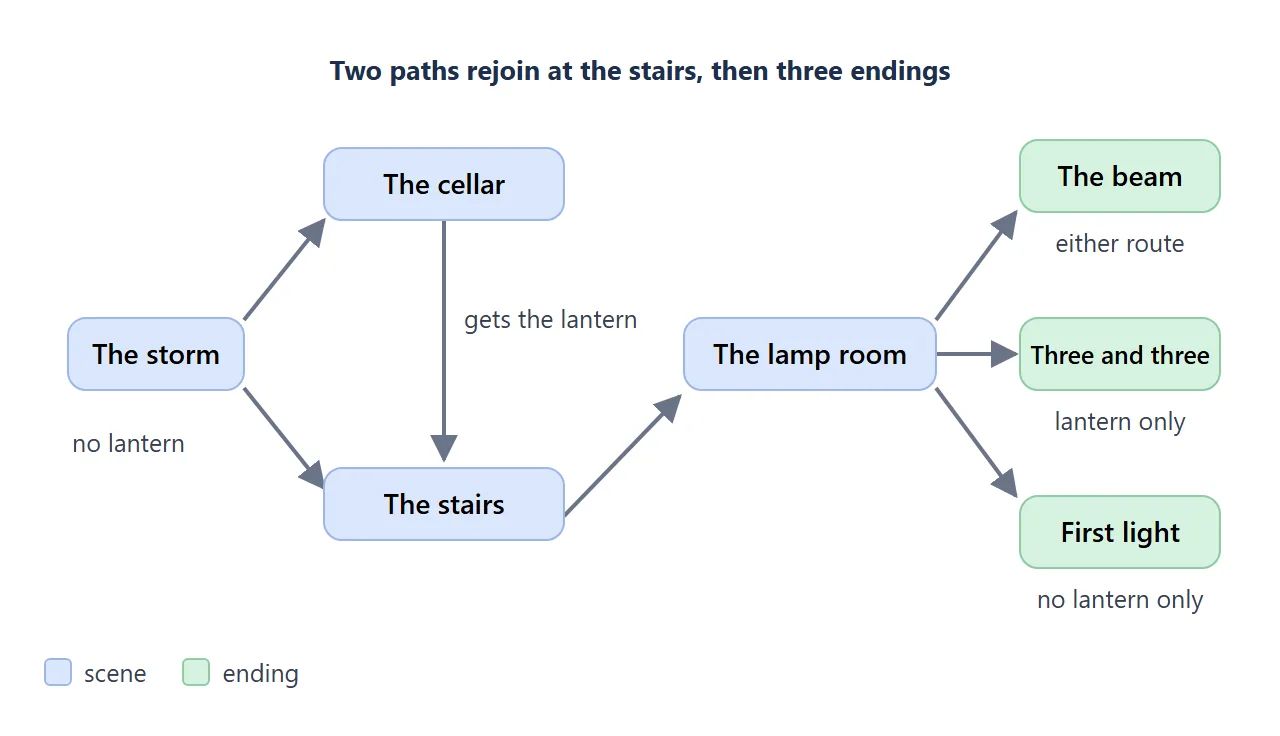
Two ideas keep a story small enough to finish. First, branches rejoin: both routes in the demo arrive at the stairs. Second, the page remembers one earlier choice. The lantern changes a line on the stairs and the choices in the lamp room.
Branching stories: writing one, and where it lives goes into why rejoining matters.
Make it with AI
Fill in the two square-bracket parts and paste this into ChatGPT, Claude or Gemini.
Write one self-contained HTML file for a choose-your-own-adventure
story for [grade level] students.
Story: [premise, genre and reading level in one or two sentences]

Rules:
- One file. Inline CSS and JavaScript only. No external images,
  fonts, scripts or links.
- Put all scenes in one JavaScript object named story. Each scene has
  a title, text (an array of paragraphs) and choices (a label and the
  id of the scene it leads to).
- 8 to 10 scenes, 3 endings, at most 2 choices per scene.
  Branches must rejoin.
- Remember one earlier choice and show its effect in a later scene.
- Add a Go back button and a Start over button.
- At each ending, list the scenes the reader went through.
- Large readable text on a phone, with buttons that are easy to tap.
- Include a viewport meta tag. Do not save anything in the browser.
Return only the HTML.
Keep student names and personal details out of the prompt. Your school's own rules on AI tools are the guide here.
What to check in the result
- Every choice goes to a scene. A typo in a scene name gives a blank page.
- All the endings can be reached, and each one reads like an ending.
- The remembered choice really changes the later scene.
- The reading level and tone suit your class. Read it aloud once.
- No pictures or fonts from other websites. Fixing AI-generated HTML covers pages that come back broken.
Send it as a link
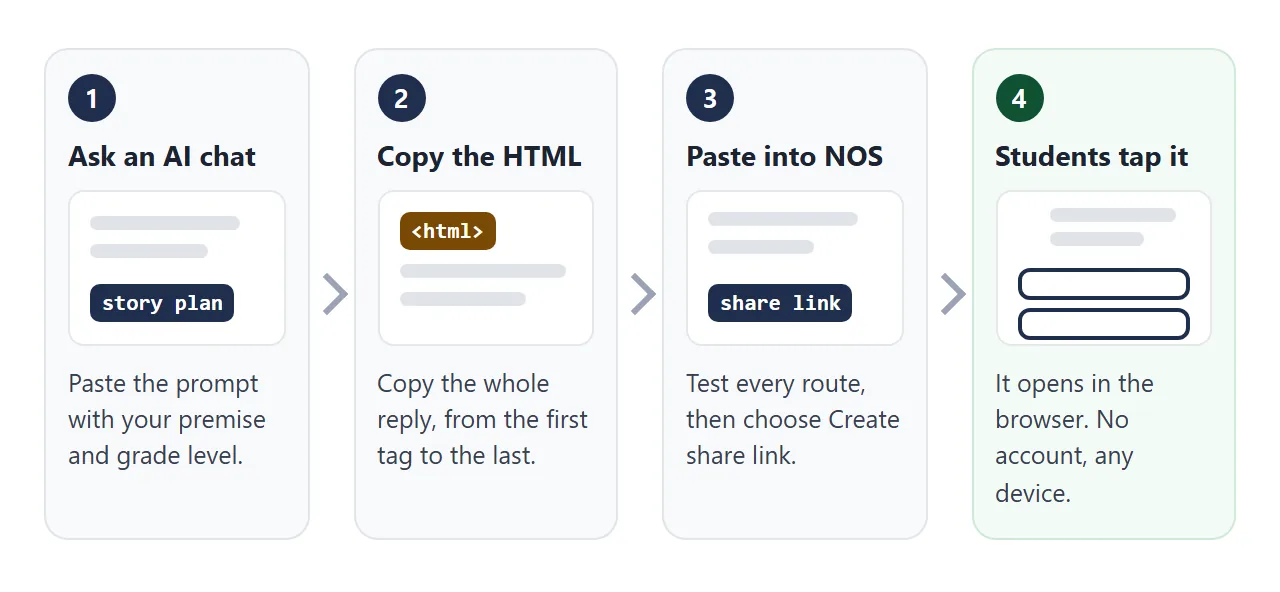
- Copy the whole HTML reply, from the first tag to the last.
- Paste it into a NOS document.
- Choose Create share link.
- Send the link.
The page renders as written and its scripts run, so the choice buttons work. Anyone with the link can open it in a browser, phone included, without an account. Readers cannot edit it.
If you spot a typo later, edit the code. The same link shows the new version, so you do not send anything again. HTML to link walks through the steps.
On a NOS page, images from other sites, iframes and requests to other sites are blocked. That is why the prompt asks for a self-contained file.
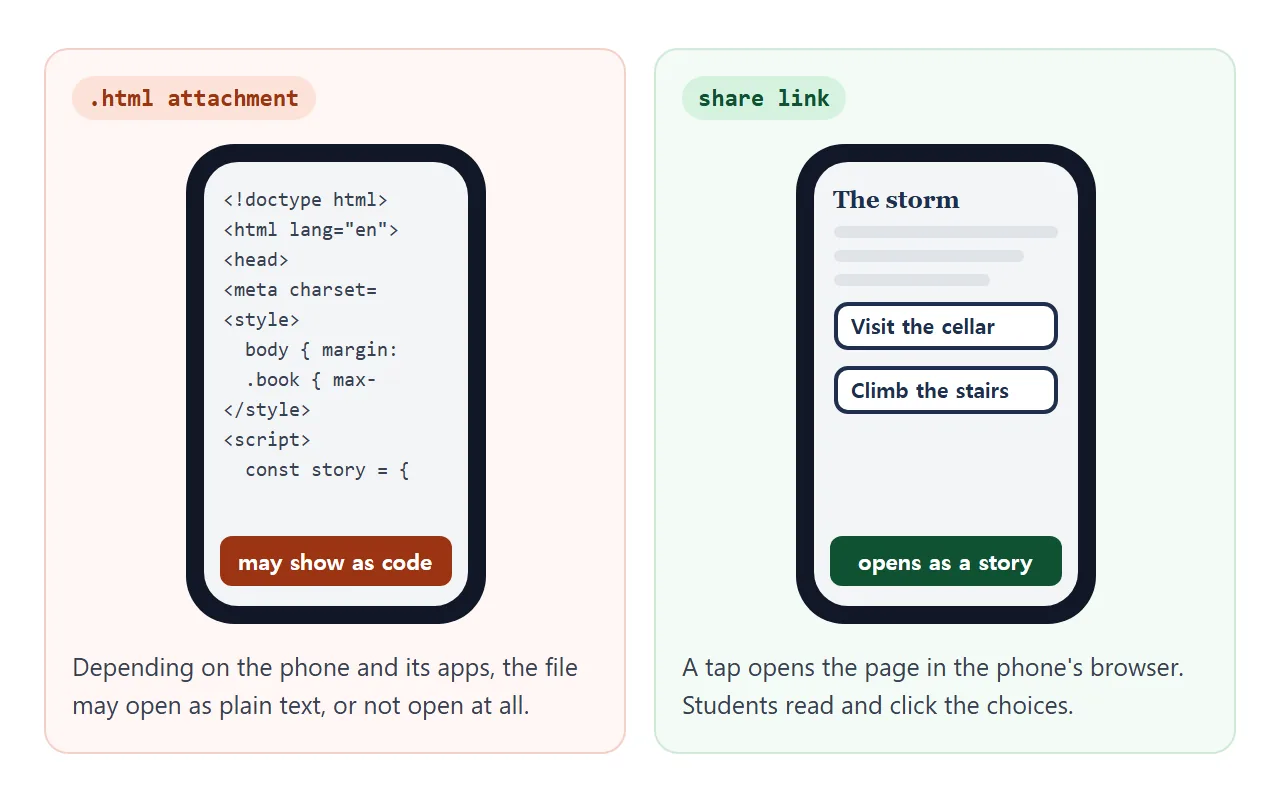
An attachment depends on the student's phone and apps. Opening an HTML file on a phone explains why, and why links beat attachments compares the two.
Google Classroom, Canvas and paper
As of October 2026, Google's Classroom help says to create a post, choose Add, then Link, and enter the URL. For a reading, go to Classwork, then Add, Material, Attachment, Link. The pages list plan conditions for YouTube attachments and recordings, not for links.
In Canvas, a module can hold an External URL item. Its dialog has an option to load the URL in a new browser tab; Canvas then shows the page outside Canvas. Settings can differ by school, so try it in a student view.
For a paper handout, turn the link into a QR code: QR code for a link.
Ways to share the story compared
| Way | What students do | Watch for |
|---|---|---|
| Attach the .html file | Download it, then open it | A phone may show code or have no app for it |
| NOS share link | Tap the link | The page must be self-contained |
| Link in a Classroom post | Tap the link attachment | Check what students see before the lesson |
| Link as a Canvas module item | Open the module item | Choose the new tab option. Canvas then shows the page outside Canvas |
| QR code on paper | Scan it with a camera | Make the link first, then the code |
Test every route before students do
Every choice is a promise that something follows. Two choice points with two options each make four routes, so a longer story needs a list. The path check below is one you can copy.
<!doctype html>
<html lang="en">
<head>
<meta charset="utf-8">
<meta name="viewport" content="width=device-width, initial-scale=1">
<title>Path check</title>
<style>
  * { box-sizing: border-box; }
  body { margin: 0; padding: 14px; font-family: system-ui, 'Segoe UI', sans-serif; background: #eceef1; color: #1d2330; }
  .sheet { max-width: 640px; margin: 0 auto; background: #fff; border-radius: 14px; padding: 18px 18px 20px; box-shadow: 0 4px 16px rgba(0, 0, 0, .1); }
  h1 { margin: 0 0 4px; font-size: 20px; line-height: 1.25; }
  .sub { margin: 0 0 14px; color: #5b6475; font-size: 14px; }
  .meter { display: flex; align-items: center; gap: 10px; margin-bottom: 6px; font-size: 14px; font-weight: 600; }
  .bar { flex: 1; height: 10px; border-radius: 99px; background: #e3e7ee; overflow: hidden; }
  .bar span { display: block; height: 100%; width: 0; background: #2f9e5b; transition: width .2s; }
  .done-msg { min-height: 20px; margin: 0 0 10px; font-size: 14px; color: #0f5132; font-weight: 600; }
  h2 { margin: 16px 0 8px; font-size: 15px; }
  ul { list-style: none; margin: 0; padding: 0; }
  li { border: 1px solid #e1e4ea; border-radius: 10px; margin-bottom: 8px; }
  label { display: flex; gap: 12px; align-items: flex-start; padding: 10px 12px; cursor: pointer; font-size: 15px; line-height: 1.4; }
  input[type=checkbox] { width: 22px; height: 22px; margin: 1px 0 0; flex: none; accent-color: #2f9e5b; }
  label small { display: block; margin-top: 2px; color: #5b6475; font-size: 13px; }
  li.ticked { background: #f4fbf6; border-color: #cfe9d7; }
  summary { margin-top: 16px; font-size: 15px; font-weight: 700; cursor: pointer; }
  .qs { margin: 8px 0 0; padding-left: 20px; font-size: 15px; line-height: 1.5; }
  .qs li { border: 0; margin: 0 0 6px; }
  button { margin-top: 12px; padding: 8px 14px; border: 1px solid #c9cfda; border-radius: 8px; background: #fff; font: 600 14px system-ui, sans-serif; cursor: pointer; }
</style>
</head>
<body>
<div class="sheet">
  <h1>Path check: The Lantern at Gull Rock</h1>
  <p class="sub">Walk every route yourself before students do. Tick each one when you reach its ending.</p>

  <div class="meter"><span id="num">0 of 8 done</span><div class="bar"><span id="fill"></span></div></div>
  <p class="done-msg" id="msg"></p>

  <h2>Routes through the story</h2>
  <ul id="routes">
    <li><label><input type="checkbox"><span>Cellar, lantern, light the great lamp<small>The beam ending, with the lantern line</small></span></label></li>
    <li><label><input type="checkbox"><span>Cellar, lantern, signal the ship<small>Three and three</small></span></label></li>
    <li><label><input type="checkbox"><span>Stairs at once, light the great lamp<small>The beam ending, without the lantern line</small></span></label></li>
    <li><label><input type="checkbox"><span>Stairs at once, wait for dawn<small>First light</small></span></label></li>
  </ul>

  <h2>Checks before sharing</h2>
  <ul id="checks">
    <li><label><input type="checkbox"><span>Every choice leads to a scene<small>No blank page, no dead end</small></span></label></li>
    <li><label><input type="checkbox"><span>Go back and Start over both work</span></label></li>
    <li><label><input type="checkbox"><span>Read it on a phone<small>Text is readable, buttons are easy to tap</small></span></label></li>
    <li><label><input type="checkbox"><span>Read the text aloud once<small>Reading level and tone fit the class</small></span></label></li>
  </ul>

  <details>
  <summary>Questions for after reading</summary>
  <ol class="qs">
    <li>Which ending did you reach? Which choice made the difference?</li>
    <li>What did the lantern change in the stairs and lamp room scenes?</li>
    <li>Find a choice where the paths join again. Why might the author have joined them?</li>
  </ol>
  </details>

  <button type="button" id="reset">Clear all ticks</button>
</div>

<script>
  const boxes = document.querySelectorAll('input[type=checkbox]');
  const num = document.getElementById('num');
  const fill = document.getElementById('fill');
  const msg = document.getElementById('msg');

  function update() {
    const done = document.querySelectorAll('input[type=checkbox]:checked').length;
    num.textContent = done + ' of ' + boxes.length + ' done';
    fill.style.width = (done / boxes.length * 100) + '%';
    msg.textContent = done === boxes.length ? 'All routes and checks done. Ready to share.' : '';
    boxes.forEach((b) => b.closest('li').classList.toggle('ticked', b.checked));
  }

  boxes.forEach((b) => b.addEventListener('change', update));
  document.getElementById('reset').addEventListener('click', () => {
    boxes.forEach((b) => { b.checked = false; });
    update();
  });
  update();
</script>
</body>
</html>
If you paste this checklist into NOS and open your own page in View mode, the ticks you make are saved. Ticks made by someone else with the link are not.
Then open the link once on a phone and on a school device. Check that the text is readable and the buttons are easy to tap. A page without the viewport meta tag can look tiny on a phone.
When it does not work
| What you see | Cause | Fix |
|---|---|---|
| A choice shows a blank page | The scene name in the choice has a typo | Compare each choice target with the scene names, or ask the AI to check them |
| The file opens as code on a phone | It was sent as an attachment | Send a share link instead |
| The page looks tiny on a phone | The viewport meta tag is missing | Ask the AI to add it |
| Pictures or fonts are missing | Outside images are blocked | Ask for CSS shapes or inline SVG |
| The AI wrote 30 scenes | The prompt had no size limit | Ask for 8 to 10 scenes, 3 endings, branches that rejoin |
| Students see the old version | The old page is still open | Reload the page. The link is the same |
| Students cannot reach the link in Classroom or Canvas | Settings can differ by school or class | Test from a student view and ask your administrator |