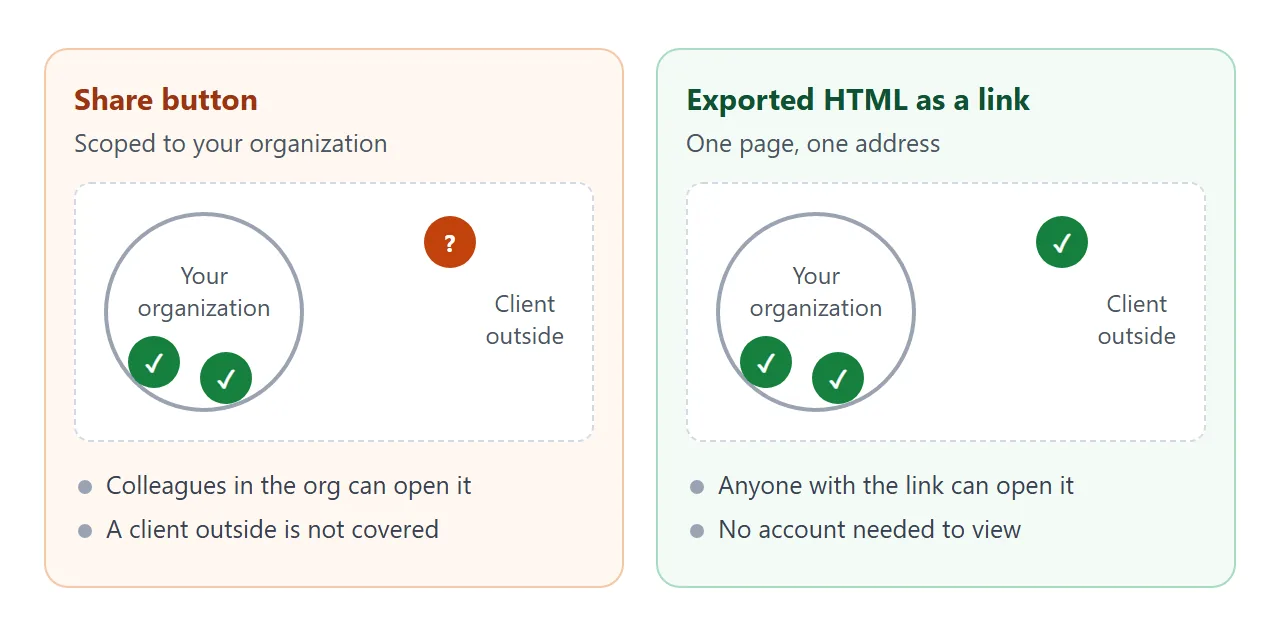
The Share button in Claude Design works inside your organization. Anthropic's launch post describes organization-scoped sharing. A feature request on Anthropic's GitHub (August 2026) states the gap plainly: "There is no way to let someone outside your organization view anything you produce, at any plan tier."
For a freelancer, the client is outside. The way round it is to export the HTML and send a plain link.
Here is what a client page can look like. Tap the tabs, then press the button.
<!doctype html>
<html lang="en">
<head>
<meta charset="utf-8">
<meta name="viewport" content="width=device-width, initial-scale=1">
<title>Concept review</title>
<style>
* { box-sizing: border-box; }
body { margin: 0; padding: 18px 14px 24px; font-family: system-ui, sans-serif; background: #f4f5f7; color: #1d2330; }
.wrap { max-width: 640px; margin: 0 auto; }
.kicker { font-size: 12px; letter-spacing: .08em; text-transform: uppercase; color: #6b7280; }
h1 { font-size: 22px; margin: 4px 0 4px; }
.sub { margin: 0 0 14px; font-size: 14px; color: #4b5563; }
.tabs { display: flex; gap: 8px; flex-wrap: wrap; margin-bottom: 12px; }
.tab { border: 1px solid #d5d9e0; background: #fff; border-radius: 999px; padding: 8px 14px; font: inherit; font-size: 14px; cursor: pointer; }
.tab[aria-selected="true"] { background: #1d2330; color: #fff; border-color: #1d2330; }
.card { background: #fff; border-radius: 14px; padding: 16px; box-shadow: 0 4px 16px rgba(0,0,0,.08); }
.logo { height: 120px; border-radius: 10px; display: grid; place-items: center; color: #fff; font-weight: 700; font-size: 26px; letter-spacing: .02em; }
.swatches { display: flex; gap: 8px; margin: 12px 0 8px; }
.sw { width: 34px; height: 34px; border-radius: 8px; border: 1px solid rgba(0,0,0,.1); }
.card p { margin: 6px 0 0; font-size: 14px; line-height: 1.5; color: #374151; }
.actions { margin-top: 14px; display: flex; gap: 10px; align-items: center; flex-wrap: wrap; }
.pick { border: 0; background: #0f766e; color: #fff; border-radius: 10px; padding: 10px 16px; font: inherit; font-size: 14px; font-weight: 600; cursor: pointer; }
.msg { font-size: 14px; color: #0f5132; min-height: 20px; }
</style>
</head>
<body>
<div class="wrap">
<div class="kicker">Brand refresh · Round 1</div>
<h1>Harbor & Pine Bakery</h1>
<p class="sub">Three logo concepts. Tap a tab to compare, then pick your favourite.</p>
<div class="tabs" role="tablist" id="tabs"></div>
<div class="card">
<div class="logo" id="logo"></div>
<div class="swatches" id="swatches"></div>
<p id="note"></p>
<div class="actions">
<button class="pick" id="pick" type="button">I like this one</button>
<span class="msg" id="msg" aria-live="polite"></span>
</div>
</div>
</div>
<script>
// Fictional concepts; replace with your own
const concepts = [
{ name: 'Concept A', mark: 'H&P', bg: '#0f766e', colors: ['#0f766e', '#f4e9d8', '#c2410c'], note: 'Rounded and warm. Works well small, on bags and stickers.' },
{ name: 'Concept B', mark: 'Harbor & Pine', bg: '#1e3a5f', colors: ['#1e3a5f', '#e8eef5', '#d4a017'], note: 'Calm and classic. Needs a wide space, best for the shop sign.' },
{ name: 'Concept C', mark: 'HP', bg: '#7c2d12', colors: ['#7c2d12', '#fdf2e0', '#365314'], note: 'Bold two-letter stamp. Strong on packaging, less friendly on the web.' }
];
let current = 0;
const tabs = document.getElementById('tabs');
function show(i) {
current = i;
const c = concepts[i];
document.getElementById('logo').style.background = c.bg;
document.getElementById('logo').textContent = c.mark;
document.getElementById('swatches').innerHTML = c.colors.map(x => '<div class="sw" style="background:' + x + '"></div>').join('');
document.getElementById('note').textContent = c.note;
document.getElementById('msg').textContent = '';
tabs.querySelectorAll('.tab').forEach((t, k) => t.setAttribute('aria-selected', k === i));
}
concepts.forEach((c, i) => {
const b = document.createElement('button');
b.className = 'tab'; b.type = 'button'; b.setAttribute('role', 'tab'); b.textContent = c.name;
b.addEventListener('click', () => show(i));
tabs.appendChild(b);
});
// The choice is shown on screen only; nothing is sent anywhere
document.getElementById('pick').addEventListener('click', () => {
document.getElementById('msg').textContent = 'Noted: ' + concepts[current].name + '. Reply to my email with this name.';
});
show(0);
</script>
</body>
</html>
It is one HTML file. Nothing in it needs Claude, an account or a server, which is why it survives being sent to someone who has none of those.
Export the HTML from Claude Design
Open your finished design and use the Export button. Anthropic's help center lists several formats there, including standalone HTML, PDF, PowerPoint and a ZIP download (as of October 2026). Choose standalone HTML.
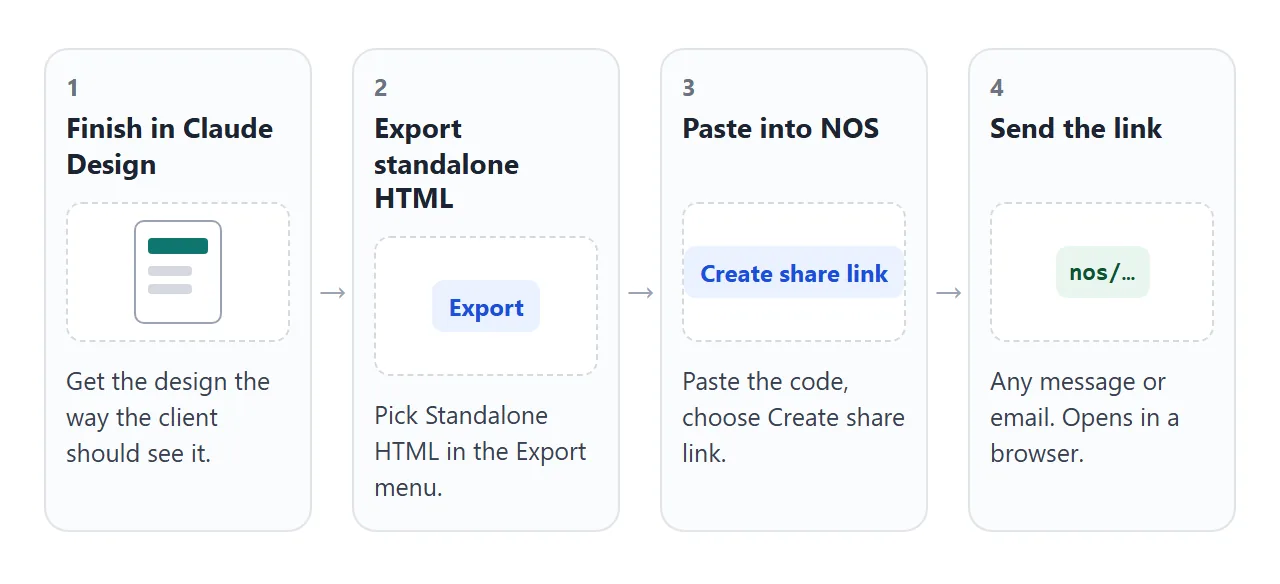
Open the exported file in your own browser first. Double-click it. If it looks right there, it is ready for the next step. If an image is missing, fix that before you share anything.
Make it with AI
You can also ask Claude to produce the page in a form that is safe to send. Paste this into Claude Design, ChatGPT or Gemini and swap in your details.
Make one self-contained HTML page for a client review.
Project: [brand refresh for a bakery, round 1].
Show three concepts as tabs. Each tab shows a logo mark, three colour swatches and one sentence of notes.
Add one button, "I like this one", that shows a message on screen only.
Rules: one file, CSS and JavaScript inside it, no external images, fonts or scripts. Draw any picture as inline SVG or CSS.
It must work on a phone at 390 px wide. Add a viewport meta tag.
Check three things in the result. Every picture is inline SVG or a CSS shape, not a file name. The tabs and button respond when you click them. The page reads well at phone width, which you can test by narrowing the browser window.
Send it as a link
Copy the HTML, paste it into a NOS document, and choose Create share link. HTML to link walks through it. The page renders as written and its scripts run, so the client can click tabs and buttons themselves.
The link opens in a browser, phone included, with no account. Visitors cannot edit the page. If you fix a colour or a typo later, change the code and the same link shows the new version.
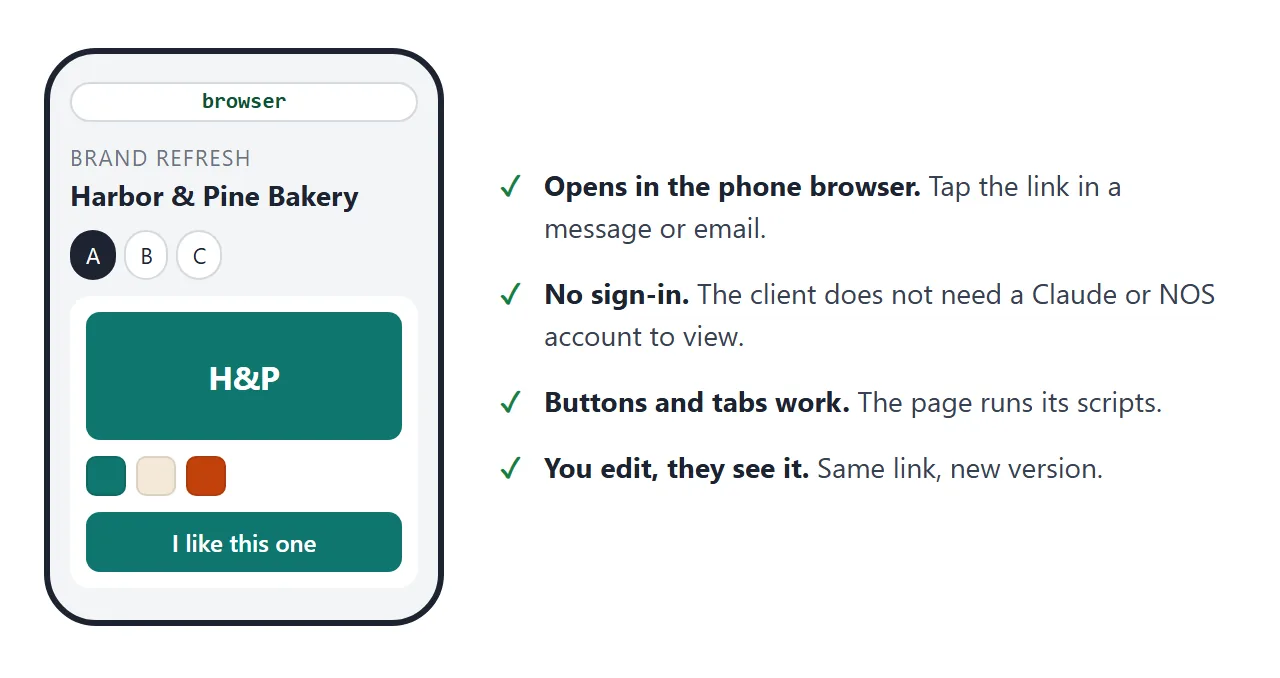
Two limits matter for design work. Images from other sites, iframes and requests to other sites are blocked on a NOS page.
A form cannot send data to a server either. That is why the prompt above asks for inline pictures and an on-screen message. For the longer story, see share HTML from Claude.
Ways to share a design compared
| Way | Who can open it | What to know |
|---|---|---|
| Share button in Claude Design | People you grant access to, scoped to your organization | Permissions are view, comment or edit |
| Exported HTML sent as a file | Anyone who has the file | Can be hard to open on a phone |
| Exported HTML as a NOS link | Anyone with the link, no account | Buttons work, visitors cannot edit |
| PDF export | Anyone who has the file | A fixed set of pages, not a web page |
| Partner export such as Vercel or Netlify | Set by that service | Listed in the Export menu as of October 2026 |
A PDF is fine for a final proof. For a review where the client clicks, flips tabs or picks an option, a link is easier. HTML or PDF for client documents gives four questions to decide.
A second page worth sending: project status
Clients ask where things stand. A status page answers it with one link you update instead of a new email each week.
<!doctype html>
<html lang="en">
<head>
<meta charset="utf-8">
<meta name="viewport" content="width=device-width, initial-scale=1">
<title>Project status</title>
<style>
* { box-sizing: border-box; }
body { margin: 0; padding: 18px 14px 24px; font-family: system-ui, sans-serif; background: #f4f5f7; color: #1d2330; }
.wrap { max-width: 640px; margin: 0 auto; background: #fff; border-radius: 14px; padding: 18px; box-shadow: 0 4px 16px rgba(0,0,0,.08); }
h1 { font-size: 20px; margin: 0 0 2px; }
.sub { margin: 0 0 14px; font-size: 14px; color: #4b5563; }
.bar { height: 10px; border-radius: 999px; background: #e5e7eb; overflow: hidden; }
.fill { height: 100%; width: 0; background: #0f766e; transition: width .25s; }
.count { margin: 6px 0 14px; font-size: 13px; color: #4b5563; }
ul { list-style: none; margin: 0; padding: 0; }
li { border-top: 1px solid #eceef1; }
label { display: flex; gap: 12px; align-items: flex-start; padding: 12px 2px; cursor: pointer; font-size: 15px; line-height: 1.4; }
input[type=checkbox] { width: 20px; height: 20px; margin: 1px 0 0; flex: none; accent-color: #0f766e; }
.due { display: block; font-size: 13px; color: #6b7280; }
input:checked + span .t { color: #6b7280; text-decoration: line-through; }
.note { margin: 14px 0 0; font-size: 13px; color: #6b7280; }
</style>
</head>
<body>
<div class="wrap">
<h1>Website redesign: deliverables</h1>
<p class="sub">Studio Lantern for Harbor & Pine Bakery</p>
<div class="bar"><div class="fill" id="fill"></div></div>
<div class="count" id="count"></div>
<ul id="list">
<li><label><input type="checkbox" checked><span><span class="t">Kick-off call and brief</span><span class="due">Done 3 Sept</span></span></label></li>
<li><label><input type="checkbox" checked><span><span class="t">Three logo concepts</span><span class="due">Done 12 Sept</span></span></label></li>
<li><label><input type="checkbox"><span><span class="t">Final logo files</span><span class="due">Due 26 Sept</span></span></label></li>
<li><label><input type="checkbox"><span><span class="t">Homepage design</span><span class="due">Due 3 Oct</span></span></label></li>
<li><label><input type="checkbox"><span><span class="t">Handover and source files</span><span class="due">Due 10 Oct</span></span></label></li>
</ul>
<p class="note">Updated by the studio. Ticks you make as a visitor are not saved.</p>
</div>
<script>
const boxes = document.querySelectorAll('#list input');
function update() {
const done = [...boxes].filter(b => b.checked).length;
document.getElementById('fill').style.width = (done / boxes.length * 100) + '%';
document.getElementById('count').textContent = done + ' of ' + boxes.length + ' deliverables done';
}
boxes.forEach(b => b.addEventListener('change', update));
update();
</script>
</body>
</html>
In NOS, ticks you make as the owner in View mode are saved, and a visitor's ticks are not. So the client sees your progress, and cannot change it. For a prototype with feedback, see send a prototype to a client.
When it does not work
| Symptom | Cause | Fix |
|---|---|---|
| Pictures are missing on the link | They point to separate files or other sites | Ask Claude for inline SVG or CSS, export again |
| Fonts look different | A font was loaded from a source that is blocked | Use a system font, or a Google Fonts link |
| The "I like this one" button does nothing | The page tried to send data to a server | Show the choice on screen and ask for a reply by email |
| The exported file will not open on a phone | Tapping an HTML attachment often does not show the page | Send a link instead |
| You get a ZIP of files | You chose the ZIP download, not Standalone HTML | Export again with Standalone HTML |
| Share dialog has no outside option | Sharing is scoped to your organization | Use the exported HTML link |
If you print the link, a QR code link takes a client from paper to the page.