A wedding website made in Claude reaches guests best as a link to a plain web page, not as a Claude share. As of October 2026, Claude's help centre says people need a Claude account to open a shared artifact, with one exception.
Most guests will not have one. Copy the HTML out of Claude and send a link of your own.
Here is a finished page to start from. It has the date, a map link, the day's schedule, an RSVP that writes a reply message, and a short list of questions. Scroll it, fill in the form, then take the code.
<!doctype html>
<html lang="en">
<head>
<meta charset="utf-8">
<meta name="viewport" content="width=device-width, initial-scale=1">
<title>Hana and Theo, 17 April 2027</title>
<style>
* { box-sizing: border-box; }
body { margin: 0; font-family: Georgia, "Times New Roman", serif; color: #2f3a33; background: #faf7f0; line-height: 1.55; }
.wrap { max-width: 560px; margin: 0 auto; padding: 0 18px; }
header { text-align: center; padding: 34px 18px 26px; background: linear-gradient(#e8efe4, #faf7f0); }
header svg { width: 120px; height: 70px; }
h1 { margin: 6px 0 4px; font-size: 34px; font-weight: 400; letter-spacing: .5px; }
.when { font-family: system-ui, sans-serif; font-size: 14px; letter-spacing: 2px; text-transform: uppercase; color: #5d7263; }
#count { margin-top: 10px; font-family: system-ui, sans-serif; font-size: 14px; color: #5d7263; }
h2 { font-size: 22px; font-weight: 400; margin: 30px 0 10px; text-align: center; }
.card { background: #fff; border: 1px solid #e3e0d4; border-radius: 12px; padding: 14px 16px; margin-bottom: 10px; font-family: system-ui, sans-serif; font-size: 15px; }
.card b { display: block; font-family: Georgia, serif; font-size: 17px; font-weight: 400; margin-bottom: 2px; }
.card a { color: #3f6b4f; }
ul.times { list-style: none; margin: 0; padding: 0; font-family: system-ui, sans-serif; font-size: 15px; }
ul.times li { display: flex; gap: 14px; padding: 9px 0; border-bottom: 1px dashed #d9d5c6; }
ul.times time { flex: 0 0 64px; color: #3f6b4f; font-weight: 600; }
form { font-family: system-ui, sans-serif; font-size: 15px; }
label { display: block; margin: 10px 0 4px; font-weight: 600; }
input[type=text], input[type=number], textarea { width: 100%; padding: 10px; font: inherit; border: 1px solid #cfcab8; border-radius: 8px; background: #fff; }
.choice { display: flex; gap: 8px; flex-wrap: wrap; }
.choice label { display: flex; align-items: center; gap: 6px; margin: 0; padding: 10px 12px; border: 1px solid #cfcab8; border-radius: 8px; background: #fff; font-weight: 400; }
button { margin-top: 14px; padding: 11px 18px; font: 600 15px system-ui, sans-serif; color: #fff; background: #3f6b4f; border: 0; border-radius: 8px; cursor: pointer; }
button.alt { background: #fff; color: #3f6b4f; border: 1px solid #3f6b4f; }
#reply { display: none; margin-top: 14px; }
#reply textarea { height: 110px; }
#note { font-size: 13px; color: #5d7263; margin-top: 6px; }
details { background: #fff; border: 1px solid #e3e0d4; border-radius: 12px; padding: 12px 16px; margin-bottom: 8px; font-family: system-ui, sans-serif; font-size: 15px; }
summary { cursor: pointer; font-weight: 600; }
footer { text-align: center; padding: 28px 18px 40px; font-size: 14px; color: #7c877f; }
</style>
</head>
<body>
<header>
<svg viewBox="0 0 120 70" aria-hidden="true">
<path d="M60 64 C60 40 60 26 60 8" stroke="#6f9a7d" stroke-width="2" fill="none"/>
<path d="M60 50 C42 48 32 38 28 26 C44 28 56 36 60 50Z" fill="#9dbfa8"/>
<path d="M60 38 C78 36 88 26 92 14 C76 16 64 24 60 38Z" fill="#b9d2c0"/>
<path d="M60 58 C76 58 88 52 96 42 C80 40 66 46 60 58Z" fill="#9dbfa8"/>
<circle cx="60" cy="8" r="5" fill="#d9a9a0"/>
</svg>
<div class="when">We are getting married</div>
<h1>Hana & Theo</h1>
<div class="when">Saturday 17 April 2027</div>
<div id="count"></div>
</header>
<div class="wrap">
<h2>Where and when</h2>
<div class="card"><b>Fernhill Barn</b>12 Orchard Lane, Marlow Hill<br>
<a href="https://www.openstreetmap.org/search?query=Marlow%20Hill" target="_blank" rel="noopener">Open the map</a></div>
<div class="card"><b>Dress code</b>Garden party. Flat shoes are kind to the lawn.</div>
<h2>The day</h2>
<ul class="times">
<li><time>14:00</time> Guests arrive, welcome drinks on the lawn</li>
<li><time>15:00</time> Ceremony in the orchard</li>
<li><time>16:00</time> Photos and a long afternoon tea</li>
<li><time>18:30</time> Dinner in the barn</li>
<li><time>21:00</time> Dancing</li>
</ul>
<h2>Will you come?</h2>
<form id="rsvp">
<label for="name">Your name</label>
<input type="text" id="name" name="name" required placeholder="e.g. Mara Quill">
<label>Can you make it?</label>
<div class="choice">
<label><input type="radio" name="att" value="Yes, I will be there" checked> Yes</label>
<label><input type="radio" name="att" value="Sorry, I cannot come"> No</label>
</div>
<label for="n">How many people in your party?</label>
<input type="number" id="n" name="n" min="1" max="6" value="1">
<label for="diet">Food allergies or needs</label>
<input type="text" id="diet" name="diet" placeholder="Optional">
<button type="submit">Write my reply</button>
</form>
<div id="reply">
<textarea id="msg" readonly aria-label="Your reply"></textarea>
<button type="button" class="alt" id="copy">Copy reply</button>
<p id="note">Paste this into a message to Hana and Theo.</p>
</div>
<h2>Good to know</h2>
<details><summary>Is there parking?</summary><p>Yes, a field next to the barn. A shuttle runs from Marlow Hill station every 30 minutes from 13:00.</p></details>
<details><summary>Are children welcome?</summary><p>Yes. There will be a quiet corner with games during dinner.</p></details>
<details><summary>What if it rains?</summary><p>The ceremony moves into the barn. Bring a coat for the walk between the two.</p></details>
</div>
<footer>See you in April. Hana & Theo</footer>
<script>
// Days to go, worked out in the guest's own browser
const day = new Date(2027, 3, 17);
const left = Math.ceil((day - new Date()) / 86400000);
document.getElementById('count').textContent =
left > 1 ? left + ' days to go' : left === 1 ? 'Tomorrow!' : left === 0 ? 'Today!' : 'Thank you for celebrating with us';
// The form never leaves the page: it builds a message the guest sends themselves
const form = document.getElementById('rsvp');
const box = document.getElementById('reply');
const msg = document.getElementById('msg');
form.addEventListener('submit', (e) => {
e.preventDefault();
const d = new FormData(form);
const diet = d.get('diet') ? ' Food needs: ' + d.get('diet') + '.' : '';
msg.value = 'Hi Hana and Theo, this is ' + d.get('name') + '. ' + d.get('att') +
'. Party of ' + d.get('n') + '.' + diet;
box.style.display = 'block';
msg.focus();
msg.select();
});
document.getElementById('copy').addEventListener('click', async () => {
const note = document.getElementById('note');
try {
await navigator.clipboard.writeText(msg.value);
note.textContent = 'Copied. Paste it into a message to Hana and Theo.';
} catch (err) {
msg.select(); // clipboard blocked: the text is selected, press copy on your keyboard
note.textContent = 'Text selected. Copy it, then paste it into a message.';
}
});
</script>
</body>
</html>
Make it with AI
Paste this into Claude, ChatGPT or Gemini. Change the details in brackets first.
Make a wedding website as ONE complete HTML file.
Names: [Hana and Theo]. Date: [Saturday 17 April 2027].
Venue: [Fernhill Barn, 12 Orchard Lane].
Schedule: [14:00 arrive, 15:00 ceremony, 18:30 dinner].
Sections: names and date, where and when, the day,
RSVP, and three short questions.
Rules: all CSS and JavaScript inside the file, no outside
images or libraries (use inline SVG or CSS shapes), works on
a phone, one column. The RSVP must not send anything: on
submit, show a reply message the guest can copy.
Then check the result before you share it.
- The file starts with a doctype line and ends with a closing html tag.
- The date, the day of the week and the times agree with each other.
- There are no picture addresses starting with https. Those pictures are blocked on a NOS link.
- No guest phone numbers, home addresses or spreadsheet contents are in the code.
Why not just share it from Claude
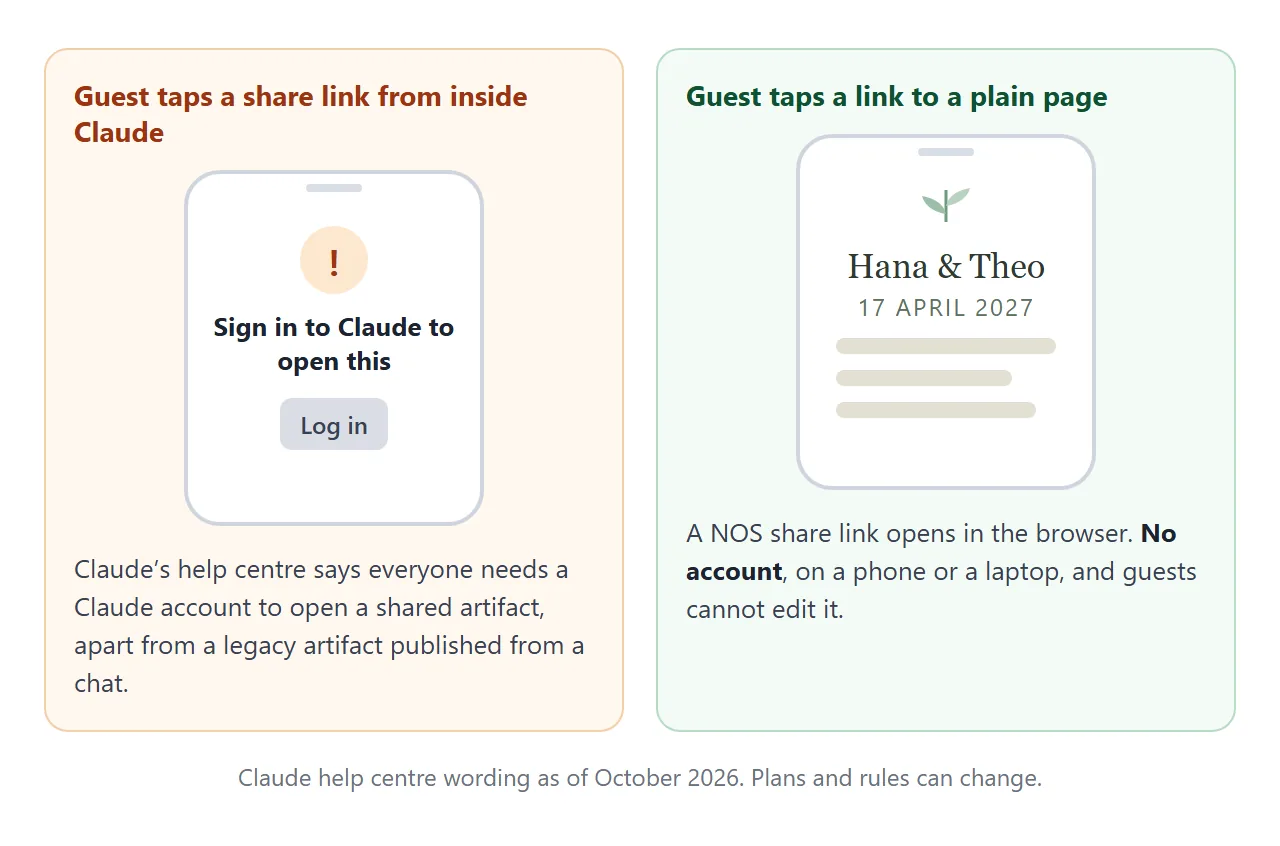
Claude's own sharing is built for people who use Claude. Its help centre says people without a Claude account "can't open a shared artifact, even with the link", unless it is a legacy artifact published from a chat.
It also notes that sharing an artifact made in a chat gives viewers access to the attachments and files in that chat. If you uploaded a guest list to build the page, check before you share.
Send it as a link
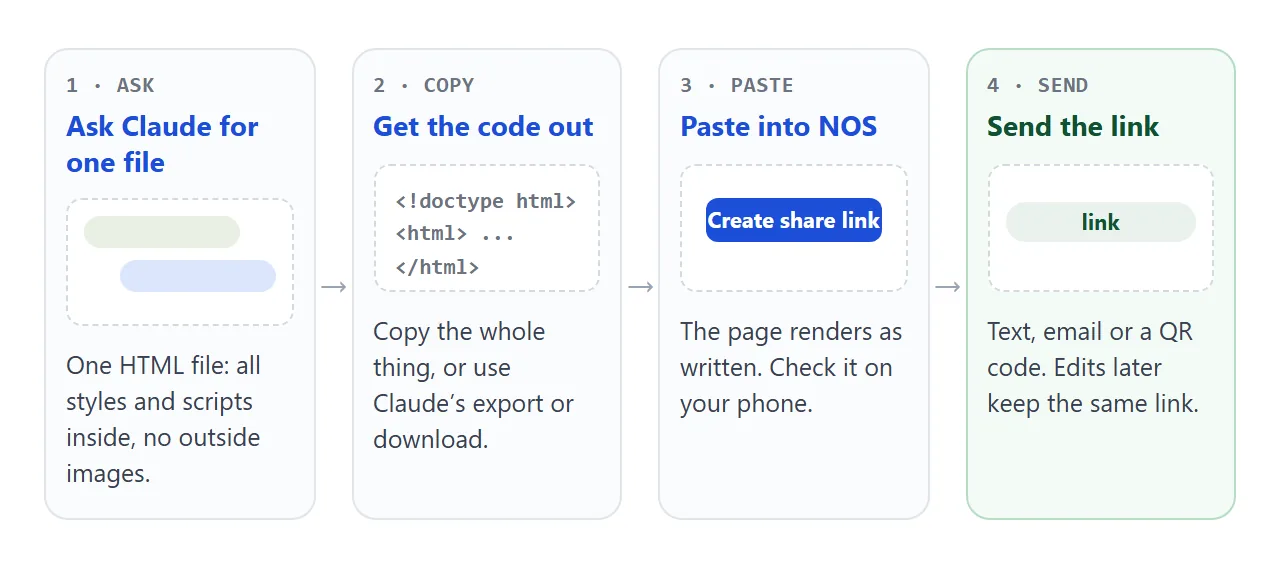
Getting the code out depends on what Claude gave you. For a legacy artifact, the help centre says the panel has controls to view, copy or download the code.
For Claude Design, it lists standalone HTML among the export formats. Screens change, so look for Export or Copy on yours.
- Copy the complete HTML from Claude.
- Paste it into a NOS document. The page renders as written, and its scripts run.
- Choose Create share link. HTML to link walks through it.
- Send the address. Guests open it in a browser, on a phone too, without an account. They can view the page but cannot edit it.
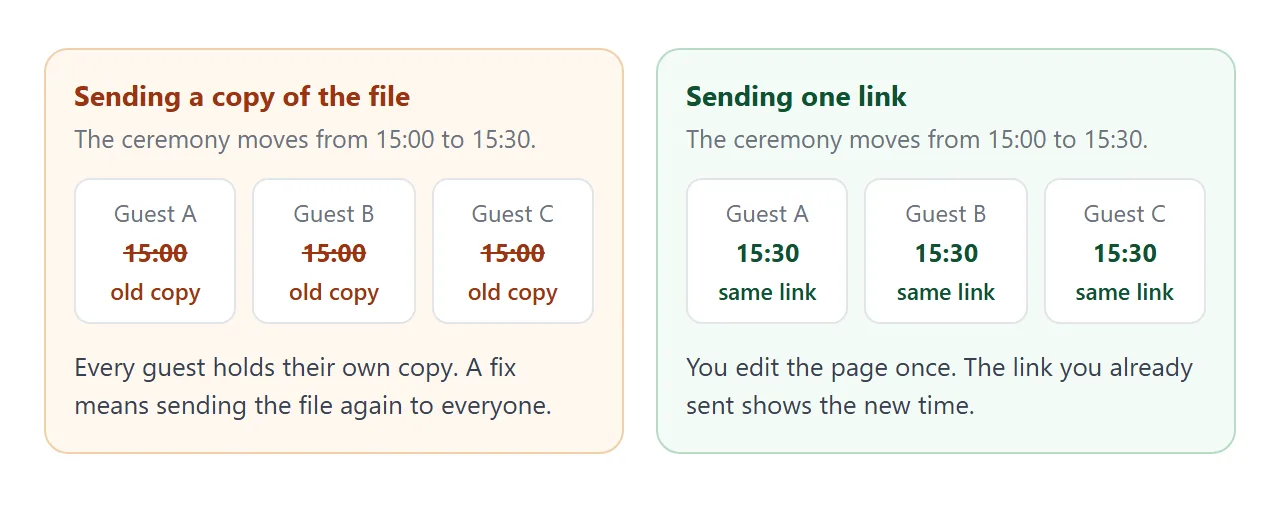
If you change the code later, the same link shows the new version. That matters for a wedding, where the start time or the shuttle changes.
Ways to get it to guests
| Way | Guest needs | If a detail changes |
|---|---|---|
| Claude Share button | A Claude account (as of October 2026) | Follows Claude's sharing rules |
| .html file as an attachment | A way to open an HTML file | Send the file again |
| Screenshot or PDF | Nothing special | Make it again and resend |
| NOS share link | A browser, no account | Edit once, same link |
For a printed card, turn the link into a QR code. QR code link covers it. For the written invitation side, see wedding invitation HTML.
Two small pages worth adding
Guests ask the same questions on the day: where do I sit, and where do I park. A seating finder answers the first one without anyone reading a printed chart.
<!doctype html>
<html lang="en">
<head>
<meta charset="utf-8">
<meta name="viewport" content="width=device-width, initial-scale=1">
<title>Where do I sit? Hana and Theo</title>
<style>
  * { box-sizing: border-box; }
  body { margin: 0; padding: 22px 16px 30px; font-family: system-ui, sans-serif; background: #faf7f0; color: #2f3a33; }
  .box { max-width: 520px; margin: 0 auto; }
  h1 { font: 400 26px Georgia, serif; text-align: center; margin: 0 0 4px; }
  p.sub { text-align: center; margin: 0 0 16px; color: #5d7263; font-size: 14px; }
  input { width: 100%; padding: 13px 14px; font: inherit; font-size: 16px; border: 1px solid #cfcab8; border-radius: 10px; background: #fff; }
  #out { margin: 14px 0; min-height: 60px; }
  .hit { display: flex; justify-content: space-between; align-items: center; gap: 10px; background: #fff; border: 1px solid #e3e0d4; border-radius: 10px; padding: 12px 14px; margin-bottom: 8px; font-size: 16px; }
  .hit span { background: #3f6b4f; color: #fff; border-radius: 999px; padding: 4px 12px; font-size: 14px; font-weight: 600; white-space: nowrap; }
  .none { color: #7c877f; font-size: 15px; padding: 8px 2px; }
  h2 { font-size: 15px; margin: 22px 0 8px; color: #5d7263; text-transform: uppercase; letter-spacing: 1.5px; }
  .tables { display: grid; grid-template-columns: repeat(auto-fill, minmax(140px, 1fr)); gap: 8px; }
  .t { background: #fff; border: 1px solid #e3e0d4; border-radius: 10px; padding: 10px 12px; font-size: 14px; }
  .t.on { border-color: #3f6b4f; background: #eaf2ec; }
  .t b { display: block; font-size: 15px; margin-bottom: 2px; }
</style>
</head>
<body>
<div class="box">
  <h1>Where do I sit?</h1>
  <p class="sub">Type your first or last name.</p>
  <input id="q" type="search" placeholder="e.g. Okafor" autocomplete="off" aria-label="Your name">
  <div id="out" aria-live="polite"></div>
  <h2>All tables</h2>
  <div class="tables" id="tables"></div>
</div>

<script>
  // Edit this list. One line per guest: name, table name.
  const guests = [
    ['Ada Lindqvist', 'Fern'], ['Ben Okafor', 'Fern'], ['Carys Okafor', 'Fern'],
    ['Dmitri Vale', 'Heather'], ['Elin Vale', 'Heather'], ['Farah Quist', 'Heather'],
    ['Gus Marlowe', 'Willow'], ['Hettie Marlowe', 'Willow'], ['Ines Brandt', 'Willow'],
    ['Jonas Pike', 'Clover'], ['Kemal Arden', 'Clover'], ['Lotte Arden', 'Clover'],
    ['Mara Quill', 'Rowan'], ['Noor Hesse', 'Rowan'], ['Otto Hesse', 'Rowan']
  ];

  const out = document.getElementById('out');
  const tablesBox = document.getElementById('tables');

  function show(query) {
    const q = query.trim().toLowerCase();
    const hits = q ? guests.filter(([name]) => name.toLowerCase().includes(q)) : [];
    out.innerHTML = '';
    if (q && !hits.length) {
      out.innerHTML = '<div class="none">No match. Try your last name, or ask at the door.</div>';
    }
    hits.forEach(([name, table]) => {
      const row = document.createElement('div');
      row.className = 'hit';
      row.innerHTML = '<div></div><span>' + table + ' table</span>';
      row.firstChild.textContent = name;   // textContent keeps typed text safe
      out.appendChild(row);
    });
    const mine = new Set(hits.map(([, t]) => t));
    document.querySelectorAll('.t').forEach((el) => el.classList.toggle('on', mine.has(el.dataset.t)));
  }

  const names = [...new Set(guests.map(([, t]) => t))];
  names.forEach((t) => {
    const el = document.createElement('div');
    el.className = 't';
    el.dataset.t = t;
    const who = guests.filter(([, x]) => x === t).map(([n]) => n.split(' ')[0]).join(', ');
    el.innerHTML = '<b></b><span></span>';
    el.querySelector('b').textContent = t;
    el.querySelector('span').textContent = who;
    tablesBox.appendChild(el);
  });

  document.getElementById('q').addEventListener('input', (e) => show(e.target.value));
</script>
</body>
</html>
The same warning applies as before. A seating list on a shared page can be read by anyone with the link, so use first names or only the tables if the list is long. Sharing wedding details with guests has more on what to publish.
RSVP: what works on a shared page
A form handled inside the page works. A form that sends its answers to a server is blocked on a NOS link, so a "Submit" button that mails you will do nothing.
The demo uses the safe pattern. The guest types their answer, the page builds a short message, and the guest sends it to you by text or email. For a proper response sheet, link out to a form service instead.
When it does not work
| What you see | Cause | Fix |
|---|---|---|
| A guest is asked to sign in to Claude | You sent Claude's own share link | Send the NOS link instead |
| The page is plain text with no style | You copied only part of the file | Ask Claude for the complete file, from doctype to the closing tag |
| A photo is missing | It points to an outside address or a folder on your computer | Ask for inline SVG or CSS art, or a different way to show the photo |
| The map area is empty | An embedded map is an iframe, which is blocked | Use a plain link to the map |
| The RSVP button does nothing | It tries to send to a server | Build a reply message, as in the demo |
| Guests still see the old time | They opened an old copy of the file | Send the link, not the file |