To send a cleaning service price list, put your services and starting prices on one web page and paste the same link into every reply to an enquiry. You stop retyping prices, and you stop attaching files that go out of date.
A price list is not an estimate and not an invoice. It tells a new customer what you charge in general, so they can decide whether to ask for a figure for their own home. Send a quote to a client covers the next step.
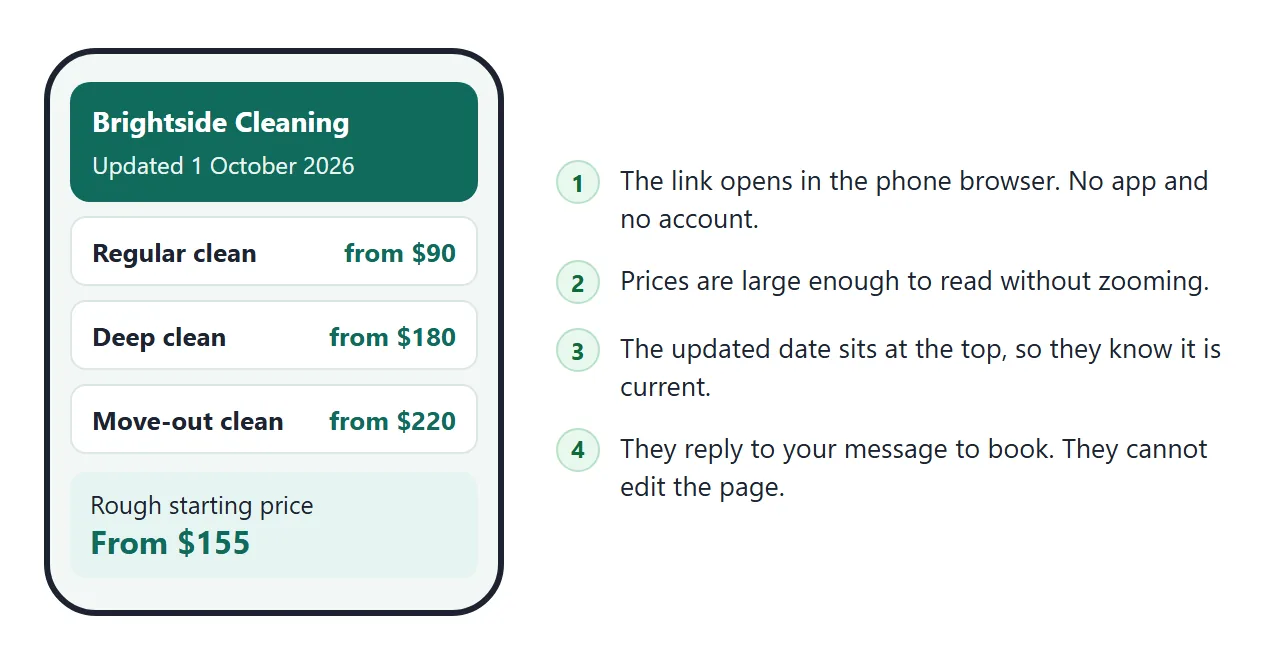
Here is a price list page for a made-up home cleaning business. Choose a service and a size, tick the extras, and the page shows a rough starting price. The services and prices sit in three short lists near the bottom of the code.
<!doctype html>
<html lang="en">
<head>
<meta charset="utf-8">
<meta name="viewport" content="width=device-width, initial-scale=1">
<title>Brightside Cleaning price list</title>
<style>
* { box-sizing: border-box; }
body { margin: 0; font-family: system-ui, sans-serif; background: #f2f7f6; color: #1c2b2a; line-height: 1.45; }
.wrap { max-width: 640px; margin: 0 auto; padding: 18px 16px 28px; }
header { background: #0f6b5c; color: #fff; border-radius: 14px; padding: 18px 18px 16px; }
header h1 { margin: 0 0 4px; font-size: 22px; }
header p { margin: 0; font-size: 14px; opacity: .92; }
h2 { font-size: 17px; margin: 24px 0 10px; }
.row { display: flex; justify-content: space-between; gap: 12px; align-items: baseline; background: #fff; border: 1px solid #dbe6e4; border-radius: 10px; padding: 12px 14px; margin-bottom: 8px; }
.row b { display: block; font-size: 16px; }
.row span.d { font-size: 13.5px; color: #4a5d5b; }
.from { white-space: nowrap; font-weight: 700; font-size: 16px; color: #0f6b5c; font-variant-numeric: tabular-nums; }
.from small { font-weight: 500; color: #4a5d5b; font-size: 12px; }
.helper { background: #fff; border: 1px solid #dbe6e4; border-radius: 12px; padding: 14px; }
label { display: block; font-size: 14px; font-weight: 600; margin: 10px 0 4px; }
label:first-of-type { margin-top: 0; }
select { width: 100%; font-size: 16px; padding: 9px 10px; border: 1px solid #b9ccc9; border-radius: 8px; background: #fff; }
.extra { display: flex; align-items: center; gap: 8px; font-weight: 400; margin: 6px 0; font-size: 15px; }
.extra input { width: 20px; height: 20px; }
.out { margin-top: 14px; background: #e6f4f1; border-radius: 10px; padding: 12px 14px; }
.out .big { font-size: 24px; font-weight: 800; color: #0f6b5c; }
.out .small { font-size: 13px; color: #3c4f4d; }
details { background: #fff; border: 1px solid #dbe6e4; border-radius: 10px; padding: 10px 14px; margin-bottom: 8px; }
summary { cursor: pointer; font-weight: 600; }
details ul { margin: 8px 0 2px; padding-left: 20px; font-size: 14.5px; }
.book { background: #fff7e6; border: 1px solid #f0d9a6; border-radius: 10px; padding: 12px 14px; font-size: 14.5px; }
.note { font-size: 12.5px; color: #5b6e6c; margin-top: 18px; }
</style>
</head>
<body>
<div class="wrap">
<header>
<h1>Brightside Cleaning</h1>
<p>Starting prices for home cleaning · updated 1 October 2026</p>
</header>
<h2>Services</h2>
<div id="services"></div>
<h2>Rough starting price</h2>
<div class="helper">
<label for="svc">Service</label>
<select id="svc"></select>
<label for="size">Size of home</label>
<select id="size"></select>
<label>Extras</label>
<div id="extras"></div>
<div class="out">
<div class="big" id="total">From $0</div>
<div class="small">A starting price, not a quote. We confirm the final price once we know the home and the day.</div>
</div>
</div>
<h2>What is included</h2>
<details>
<summary>Regular clean</summary>
<ul><li>Kitchen surfaces, sink and outside of appliances</li><li>Bathrooms, toilets and mirrors</li><li>Vacuum and mop all floors</li><li>Dusting of reachable surfaces</li></ul>
</details>
<details>
<summary>Deep clean</summary>
<ul><li>Everything in a regular clean</li><li>Skirting boards, door frames and light switches</li><li>Limescale and grout in bathrooms</li><li>Inside of cupboard fronts</li></ul>
</details>
<h2>How to book</h2>
<div class="book">Reply to the message that came with this link. Tell us the address, the size of the home and two days that suit you.</div>
<p class="note">Example business and example prices.</p>
</div>
<script>
// Edit these lists to change the page. Prices are the starting price for the smallest size.
const SERVICES = [
{ name: 'Regular clean', desc: 'Weekly or fortnightly upkeep', prices: [90, 120, 155] },
{ name: 'Deep clean', desc: 'First visit or once a year', prices: [180, 240, 310] },
{ name: 'Move-out clean', desc: 'Empty home, ready for the next person', prices: [220, 290, 370] }
];
const SIZES = ['Studio or 1-2 bedrooms', '3 bedrooms', '4 or more bedrooms'];
const EXTRAS = [
{ name: 'Inside the oven', price: 35 },
{ name: 'Inside the fridge', price: 25 },
{ name: 'Interior windows', price: 40 }
];
const list = document.getElementById('services');
const svc = document.getElementById('svc');
const size = document.getElementById('size');
const extras = document.getElementById('extras');
const total = document.getElementById('total');
SERVICES.forEach((s, i) => {
list.insertAdjacentHTML('beforeend',
'<div class="row"><div><b>' + s.name + '</b><span class="d">' + s.desc + '</span></div>' +
'<div class="from"><small>from</small> $' + s.prices[0] + '</div></div>');
svc.insertAdjacentHTML('beforeend', '<option value="' + i + '">' + s.name + '</option>');
});
SIZES.forEach((s, i) => size.insertAdjacentHTML('beforeend', '<option value="' + i + '">' + s + '</option>'));
EXTRAS.forEach((x, i) => extras.insertAdjacentHTML('beforeend',
'<label class="extra"><input type="checkbox" value="' + i + '"> ' + x.name + ' (+$' + x.price + ')</label>'));
function update() {
let sum = SERVICES[svc.value].prices[size.value];
extras.querySelectorAll('input:checked').forEach((c) => { sum += EXTRAS[c.value].price; });
total.textContent = 'From $' + sum;
}
document.addEventListener('change', update);
update();
</script>
</body>
</html>
The helper is optional, but it answers the question a customer asks next: what would it be for my home? It says "From" and states in plain words that the figure is not a quote.
Make it with AI
You do not need to write the page yourself. Type your services and prices into ChatGPT, Claude or Gemini with this prompt.
Make one HTML page, a price list for a cleaning business, from the
list below. Show each service with a "from" price and one line on
what it covers. Add a small helper: choose a service and a home size,
tick extras, and show "From $X" with a note that it is a starting
price, not a quote. Put all services, sizes and extras in JavaScript
lists near the bottom so I can edit them. Show "Prices updated" with a
date at the top. Big text, works on a phone. No outside libraries,
images or fonts. Do not save data anywhere.

[paste your services and prices here]
Then check the result before you send it:
- Every price. Compare each figure with your own list. An AI can change a number or swap two rows without saying so.
- Every "included" line. If the page says windows are covered and they are not, that is now your promise.
- The date. Replace it with the day your prices really took effect.
- Phone width. Make the browser window narrow. The prices should stay readable without zooming.
Send it as a link
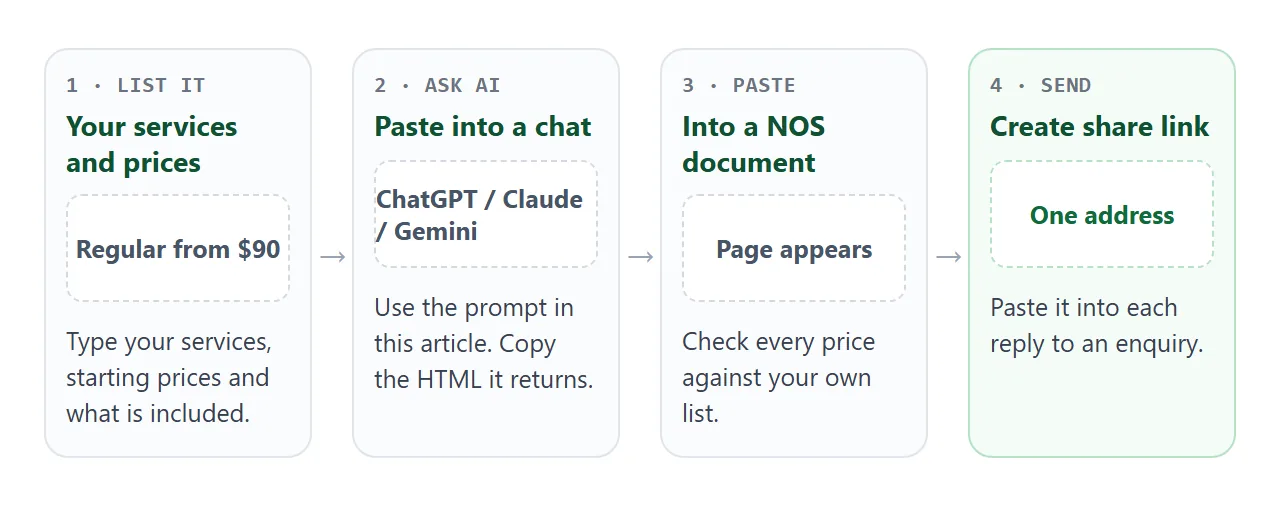
- Copy all of the code the AI returned.
- Paste it into a NOS document. The page renders and its scripts run, so try the helper yourself.
- Choose Create share link and copy the address. HTML to link walks through it.
- Paste that address into your reply to each enquiry.
Anyone with the link can open the page in a browser, on a phone or a computer, without an account. They cannot edit it. The ticks and choices a visitor makes in the helper are theirs and are not saved.
The link works the same in an email, a text message or a chat app, because it is only an address.
If you want it on a flyer or a van, turn it into a QR code. QR code link explains why the printed code can stay the same when the page behind it changes.
Change a price without resending anything
Prices move. A supplier costs more, you add an extra, you drop a service. With a file, each change is a new attachment, and the customers who already have the old one keep it.
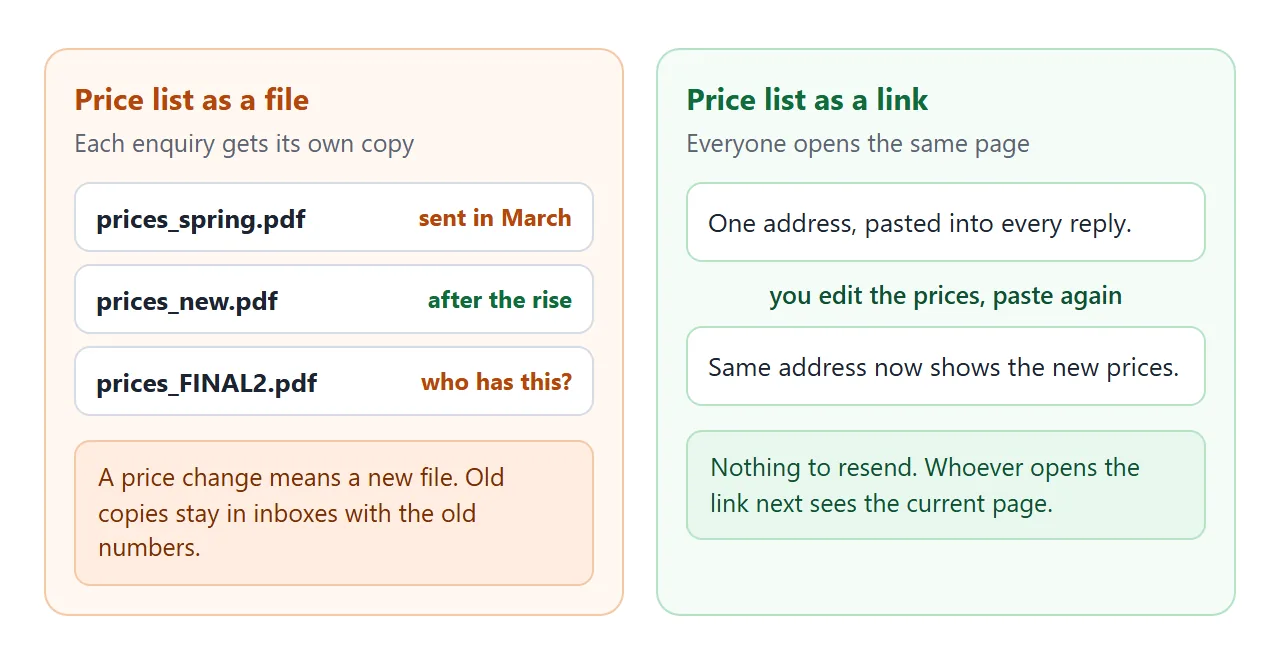
With a link, change the number in the code, or paste the code back to the AI and say what changed. Paste the new code into the same NOS document. The link already sitting in earlier replies now shows the new page.
Change the "updated" date at the same time. A customer who opens an old message then sees how recent the figures are. For more on dating and tiers, read how to share a price list as a link.
Ways to send a price list compared
| File attachment | Link to a page | QR code on paper | |
|---|---|---|---|
| What the customer holds | A copy | An address | An address |
| After a price change | Send a new file | Edit once, same link | Edit once, same code |
| On a phone | Depends on the phone and app | Opens in the browser | Opens in the browser |
| Needs a new message to update | Yes | No | No |
A file still has a place. If you need a signed or archived copy of a particular quote, keep your own document as the record. Use the page for the general price list.
If a phone shows an attached file as plain text, see opening an HTML file on a phone.
A price list for offices, by visit
Some cleaning is priced by how often you come. This page for a made-up office cleaner shows starting prices by office size, with a tab for weekly, fortnightly or monthly. Tap a tab and the prices change.
<!doctype html>
<html lang="en">
<head>
<meta charset="utf-8">
<meta name="viewport" content="width=device-width, initial-scale=1">
<title>Northfield Office Cleaning price list</title>
<style>
* { box-sizing: border-box; }
body { margin: 0; font-family: system-ui, sans-serif; background: #f4f5f8; color: #1d2230; line-height: 1.45; }
.wrap { max-width: 640px; margin: 0 auto; padding: 18px 16px 26px; }
h1 { margin: 0 0 2px; font-size: 22px; }
.sub { margin: 0 0 16px; font-size: 14px; color: #55607a; }
.tabs { display: flex; gap: 6px; margin-bottom: 12px; }
.tabs button { flex: 1; font: inherit; font-size: 15px; font-weight: 600; padding: 10px 6px; border: 1px solid #c4cbdb; background: #fff; color: #1d2230; border-radius: 10px; cursor: pointer; }
.tabs button[aria-pressed="true"] { background: #2b4acb; border-color: #2b4acb; color: #fff; }
.card { background: #fff; border: 1px solid #dde1ec; border-radius: 12px; overflow: hidden; }
.line { display: flex; justify-content: space-between; align-items: baseline; gap: 10px; padding: 13px 15px; border-bottom: 1px solid #edf0f6; }
.line:last-child { border-bottom: 0; }
.line b { display: block; font-size: 16px; }
.line .d { font-size: 13.5px; color: #55607a; }
.price { font-weight: 800; font-size: 18px; color: #2b4acb; white-space: nowrap; font-variant-numeric: tabular-nums; }
.price small { font-weight: 500; font-size: 12px; color: #55607a; }
.box { margin-top: 14px; padding: 12px 15px; background: #eef1fb; border-radius: 10px; font-size: 14.5px; }
.box ul { margin: 6px 0 0; padding-left: 20px; }
.note { margin-top: 16px; font-size: 12.5px; color: #66708a; }
</style>
</head>
<body>
<div class="wrap">
<h1>Northfield Office Cleaning</h1>
<p class="sub">Starting price per visit · updated 1 October 2026</p>
<div class="tabs" id="tabs" role="group" aria-label="How often"></div>
<div class="card" id="card"></div>
<div class="box">
<b>Every visit includes</b>
<ul>
<li>Desks wiped, bins emptied, floors vacuumed or mopped</li>
<li>Kitchenette and washrooms cleaned and restocked with your supplies</li>
</ul>
</div>
<div class="box">To get a firm price, reply with the address, the number of desks and the days you want.</div>
<p class="note">Example business and example prices.</p>
</div>
<script>
// Edit these lists to change the page. One price per size for each visit pattern.
const SIZES = [
{ name: 'Small office', desc: 'Up to 8 desks' },
{ name: 'Medium office', desc: '9 to 20 desks' },
{ name: 'Large office', desc: '21 to 40 desks' }
];
const PATTERNS = [
{ label: 'Weekly', prices: [70, 110, 170] },
{ label: 'Fortnightly', prices: [80, 125, 190] },
{ label: 'Monthly', prices: [95, 150, 230] }
];
const tabs = document.getElementById('tabs');
const card = document.getElementById('card');
function show(n) {
tabs.querySelectorAll('button').forEach((b, i) => b.setAttribute('aria-pressed', i === n));
card.innerHTML = SIZES.map((s, i) =>
'<div class="line"><div><b>' + s.name + '</b><span class="d">' + s.desc + '</span></div>' +
'<div class="price"><small>from</small> $' + PATTERNS[n].prices[i] + '</div></div>').join('');
}
PATTERNS.forEach((p, i) => {
const b = document.createElement('button');
b.textContent = p.label;
b.addEventListener('click', () => show(i));
tabs.appendChild(b);
});
show(0);
</script>
</body>
</html>
Ask for it by changing the prompt: "show starting prices per visit by office size, with tabs for weekly, fortnightly and monthly." Keep one page per kind of work, such as homes and offices, so each customer sees only their prices.
When it does not work
| Symptom | Cause | Fix |
|---|---|---|
| The customer sees code, not a page | The file was sent as an attachment and opened as text | Send the link, not the file |
| A price on the page is wrong | The AI changed or swapped a number | Fix the line in the code, paste again |
| The helper shows the wrong total | A line was lost when copying | Copy all of the AI's code again |
| Images or fonts are missing | They come from another website, which the page blocks | Ask for a version with no outside images or fonts |
| Customers cannot book on the page | Sending a form to a server is blocked | Ask them to reply to your message with the day and address |
| You cannot see who opened it | NOS does not record opens | Ask the customer to reply to your message |
Before you send any page an AI wrote, share AI-generated HTML lists what to check. Once a customer books and the work is done, sending an invoice to a client is the step after this one.