A college application portfolio can be one web page with your activities, two or three projects and a short summary of your essay, behind a single link. An AI chat can draft it in an afternoon, and there is no hosting account to set up.
Whether a college opens the link is the college's decision, so the section called "Where the link can go" shows how to read each one's own rules.
Here is a sample to copy. Filter the activities, open a project, and look at it at phone width.
<!doctype html>
<html lang="en">
<head>
<meta charset="utf-8">
<meta name="viewport" content="width=device-width, initial-scale=1">
<title>Jo Hartwell - Application portfolio</title>
<style>
* { box-sizing: border-box; }
body { margin: 0; font-family: system-ui, "Segoe UI", sans-serif; color: #1f2937; background: #f3f5f2; line-height: 1.5; }
.page { max-width: 780px; margin: 0 auto; padding: 20px 16px 28px; }
header { background: #14532d; color: #fff; border-radius: 14px; padding: 22px 22px 20px; }
header h1 { margin: 0 0 4px; font-size: 26px; }
header p { margin: 0; font-size: 15px; color: #d1fae5; }
.sample { display: inline-block; margin-top: 12px; font-size: 12px; background: #fef3c7; color: #78350f; padding: 3px 9px; border-radius: 99px; }
section { background: #fff; border-radius: 14px; padding: 18px 20px; margin-top: 14px; box-shadow: 0 1px 3px rgba(0,0,0,.06); }
h2 { margin: 0 0 10px; font-size: 18px; color: #14532d; }
.chips { display: flex; flex-wrap: wrap; gap: 8px; margin-bottom: 12px; }
.chips button { font: inherit; font-size: 13px; padding: 6px 12px; border-radius: 99px; border: 1px solid #bbd3c2; background: #fff; color: #14532d; cursor: pointer; }
.chips button[aria-pressed="true"] { background: #14532d; color: #fff; border-color: #14532d; }
.act { border-top: 1px solid #e5e7eb; padding: 10px 0; display: grid; grid-template-columns: 1fr auto; gap: 2px 12px; }
.act[hidden] { display: none; }
.act b { font-size: 15px; }
.act .meta { font-size: 13px; color: #6b7280; text-align: right; white-space: nowrap; }
.act p { grid-column: 1 / -1; margin: 2px 0 0; font-size: 14px; }
.grid { display: grid; grid-template-columns: 1fr 1fr; gap: 12px; }
.proj { border: 1px solid #e5e7eb; border-radius: 12px; overflow: hidden; }
.proj svg { display: block; width: 100%; height: 96px; }
.proj .in { padding: 10px 12px 12px; }
.proj h3 { margin: 0 0 4px; font-size: 15px; }
.proj p { margin: 0 0 6px; font-size: 14px; }
details { font-size: 14px; }
summary { cursor: pointer; color: #166534; font-weight: 600; }
.essay { border-left: 4px solid #86efac; padding-left: 14px; font-size: 15px; }
.note { font-size: 13px; color: #6b7280; margin-top: 8px; }
footer { margin-top: 14px; font-size: 13px; color: #6b7280; text-align: center; }
@media (max-width: 560px) {
.grid { grid-template-columns: 1fr; }
.act { grid-template-columns: 1fr; }
.act .meta { text-align: left; white-space: normal; }
header h1 { font-size: 22px; }
}
</style>
</head>
<body>
<div class="page">
<header>
<h1>Jo Hartwell</h1>
<p>Riverbend High School · Class of 2027 · Interested in environmental science</p>
<span class="sample">Sample page: replace every line with your own</span>
</header>
<section>
<h2>Activities</h2>
<div class="chips" id="chips">
<button type="button" aria-pressed="true" data-f="all">All</button>
<button type="button" aria-pressed="false" data-f="service">Service</button>
<button type="button" aria-pressed="false" data-f="stem">STEM</button>
<button type="button" aria-pressed="false" data-f="arts">Arts</button>
</div>
<div id="acts">
<div class="act" data-c="stem"><b>Founder, Science Club</b><span class="meta">Grades 10-12 · 3 hrs/week</span><p>Started the club with 6 members. Ran 9 lab sessions on water testing.</p></div>
<div class="act" data-c="service"><b>Volunteer, Riverside Cleanup</b><span class="meta">Grades 9-12 · 2 hrs/week</span><p>Led a weekend crew of 12. Logged litter by type for the town.</p></div>
<div class="act" data-c="arts"><b>Cellist, School Orchestra</b><span class="meta">Grades 9-12 · 4 hrs/week</span><p>Section leader in grade 12. Organised a spring benefit concert.</p></div>
<div class="act" data-c="service"><b>Peer tutor, Math Lab</b><span class="meta">Grades 11-12 · 2 hrs/week</span><p>Tutored 5 students in algebra each term.</p></div>
</div>
</section>
<section>
<h2>Projects</h2>
<div class="grid">
<div class="proj">
<svg viewBox="0 0 300 96" preserveAspectRatio="xMidYMid slice" role="img" aria-label="Rain garden drawing"><rect width="300" height="96" fill="#dcfce7"/><path d="M0 70 Q75 50 150 70 T300 70 V96 H0Z" fill="#86efac"/><circle cx="70" cy="44" r="14" fill="#16a34a"/><circle cx="150" cy="38" r="18" fill="#15803d"/><circle cx="230" cy="46" r="13" fill="#16a34a"/><path d="M40 8 l4 10 M90 4 l4 10 M200 6 l4 10 M255 10 l4 10" stroke="#38bdf8" stroke-width="3" stroke-linecap="round"/></svg>
<div class="in"><h3>Rain garden at the school lot</h3><p>Designed a planting bed that slows runoff after storms.</p>
<details><summary>What I did</summary>Measured the slope, picked native plants with a teacher, and presented the plan to the facilities team.</details></div>
</div>
<div class="proj">
<svg viewBox="0 0 300 96" preserveAspectRatio="xMidYMid slice" role="img" aria-label="Sensor graph drawing"><rect width="300" height="96" fill="#e0f2fe"/><polyline points="10,70 60,60 110,64 160,40 210,46 260,24 292,30" fill="none" stroke="#0369a1" stroke-width="4" stroke-linejoin="round"/><circle cx="160" cy="40" r="5" fill="#0369a1"/><circle cx="260" cy="24" r="5" fill="#0369a1"/></svg>
<div class="in"><h3>Stream temperature logger</h3><p>Built a low-cost sensor and charted one season of readings.</p>
<details><summary>What I did</summary>Wired the sensor, wrote the logging code, and compared readings with a rainfall record.</details></div>
</div>
</div>
</section>
<section>
<h2>My essay in three sentences</h2>
<div class="essay">My essay is about the summer I spent counting trash in a river I had always walked past. It shows how a boring task turned into a question I wanted to answer. The full essay is in my application.</div>
<p class="note">A summary, not the essay itself. The application is where the real essay lives.</p>
</section>
<footer>Contact: jo.hartwell@example.com · Last updated October 2026</footer>
</div>
<script>
// Filter the activity list by category
const chips = document.querySelectorAll('#chips button');
const rows = document.querySelectorAll('#acts .act');
chips.forEach((chip) => {
chip.addEventListener('click', () => {
chips.forEach((c) => c.setAttribute('aria-pressed', c === chip));
rows.forEach((r) => {
r.hidden = chip.dataset.f !== 'all' && r.dataset.c !== chip.dataset.f;
});
});
});
</script>
</body>
</html>
Make it with AI
Open ChatGPT, Claude or Gemini and paste this prompt. Put your own facts at the bottom.
Make one self-contained HTML page: a portfolio for a high-school student applying to college.
Use only the facts below. Do not invent anything. If a fact is missing, leave it out.
Sections: header with name, school and class year; Activities (role, organization, years, hours per week, one line each); Projects (title, two sentences, what I did myself); My essay in three sentences; Contact email.
Rules: one HTML file, CSS inside a style tag, no external images, fonts or scripts, readable on a phone, plain colours, no animation.
Facts:
[paste your activities, projects, essay summary and email here]
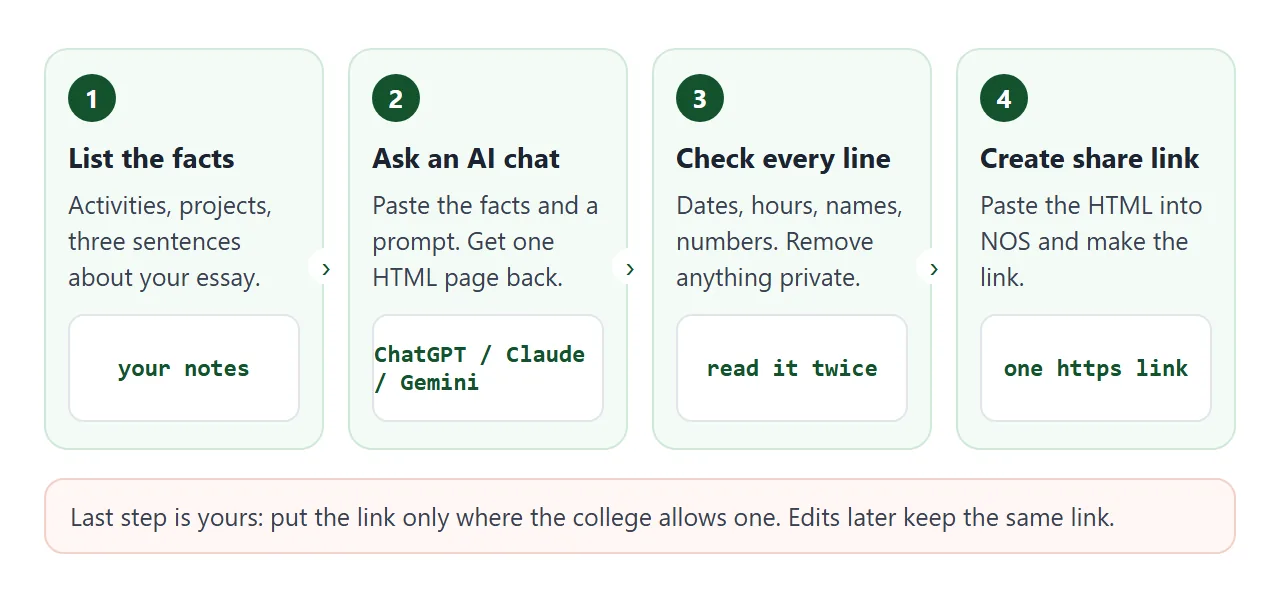
Then check the result line by line:
- Every number, date and hour matches your own records.
- Nothing was added that you did not say. AI tools sometimes add awards or flattering adjectives.
- Names are spelled correctly and no private details slipped in.
- It reads well when you narrow the browser window to phone width.
Send it as a link
Paste the finished HTML into a NOS document and choose Create share link. HTML to link walks through it. The link opens in a browser, on a phone too, with no account, and the person who opens it cannot edit the page.
If you fix a typo later, edit the code and the same link shows the new version. The reader always sees the latest page, so keep it matching what you submitted. Student portfolio covers a longer, project-heavy version.
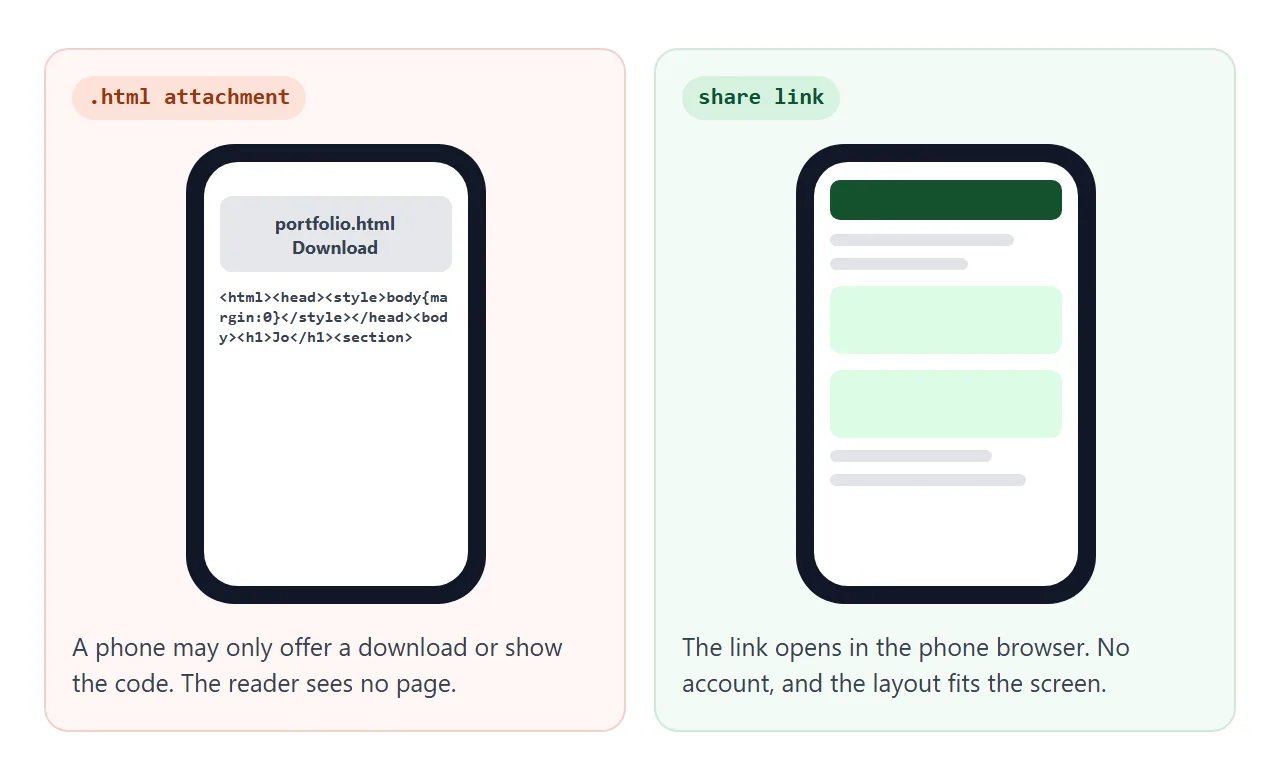
| .html attachment | Share link | |
|---|---|---|
| What the reader needs | A way to open the file | A browser |
| On a phone | May offer a download or show code | Opens as a page |
| Fixing a typo | Send a new file | Edit it, same link |
| Who can edit | Whoever holds the file | Only you |
Opening an HTML file on a phone explains the first column. For the same idea with a different focus, see portfolio to link.
What to put on the page, and what to leave off
Keep to things you can state as facts and check against your records.
- Activities: role, organization, years, hours per week, and one line about what changed because of you.
- Projects: two or three, each with what you made and what you did yourself.
- Essay summary: two or three sentences in your own words. The full essay stays in the application.
- Contact: one email address you actually check.
Leave off anything you would not hand to a stranger: home address, phone number, date of birth, grades, test scores. Anyone who gets the link can open the page.
Application forms give each activity a small box. As of October 2026 the Common App activity description box is 150 characters, so write the line first and then paste it. This helper counts for you. Change the limit to match your own form.
<!doctype html>
<html lang="en">
<head>
<meta charset="utf-8">
<meta name="viewport" content="width=device-width, initial-scale=1">
<title>Activity line fitter</title>
<style>
  * { box-sizing: border-box; }
  body { margin: 0; padding: 16px; font-family: system-ui, "Segoe UI", sans-serif; color: #1f2937; background: #f3f5f2; line-height: 1.45; }
  .card { max-width: 720px; margin: 0 auto; background: #fff; border-radius: 14px; padding: 18px 20px; box-shadow: 0 1px 3px rgba(0,0,0,.08); }
  h1 { margin: 0 0 4px; font-size: 20px; color: #14532d; }
  .hint { margin: 0 0 14px; font-size: 14px; color: #4b5563; }
  label { display: block; font-size: 13px; font-weight: 600; margin: 10px 0 4px; }
  input, textarea { width: 100%; font: inherit; font-size: 15px; padding: 8px 10px; border: 1px solid #c7d2c9; border-radius: 8px; }
  textarea { height: 78px; resize: vertical; }
  .row { display: flex; align-items: center; justify-content: space-between; gap: 10px; margin-top: 6px; flex-wrap: wrap; }
  .count { font-size: 14px; font-weight: 700; color: #166534; }
  .count.over { color: #b91c1c; }
  .limit { font-size: 13px; color: #4b5563; }
  .limit input { width: 70px; padding: 4px 6px; font-size: 13px; margin-left: 4px; }
  button { font: inherit; font-size: 14px; padding: 8px 14px; border-radius: 8px; border: 0; background: #14532d; color: #fff; cursor: pointer; }
  button.ghost { background: #fff; color: #14532d; border: 1px solid #14532d; }
  ul { list-style: none; margin: 14px 0 0; padding: 0; }
  li { border-top: 1px solid #e5e7eb; padding: 8px 0; font-size: 14px; display: grid; grid-template-columns: 1fr auto; gap: 2px 10px; }
  li small { grid-column: 1 / -1; color: #4b5563; }
  li .x { background: none; color: #b91c1c; padding: 0 4px; font-size: 13px; text-decoration: underline; }
  .out { margin-top: 12px; }
  .out textarea { height: 120px; font-size: 13px; }
</style>
</head>
<body>
<div class="card">
  <h1>Activity line fitter</h1>
  <p class="hint">Application boxes are small. Write the line here, watch the count, then paste it into the form.</p>

  <label for="org">Organization</label>
  <input id="org" value="Riverside Cleanup">
  <label for="role">Your role</label>
  <input id="role" value="Volunteer crew leader">
  <label for="desc">What you did</label>
  <textarea id="desc">Led a weekend crew of 12 volunteers every month. Logged litter by type and gave the town a one-page report.</textarea>

  <div class="row">
    <span class="count" id="count">0 / 150</span>
    <span class="limit">Box limit (characters) <input id="limit" type="number" min="20" max="2000" value="150"></span>
  </div>
  <div class="row"><button type="button" id="add">Add to list</button></div>

  <ul id="list"></ul>

  <div class="out" id="outbox" hidden>
    <label for="out">Copy-ready text</label>
    <textarea id="out" readonly></textarea>
    <div class="row"><button type="button" class="ghost" id="sel">Select all</button></div>
  </div>
</div>

<script>
  const $ = (id) => document.getElementById(id);
  const items = [];

  function update() {
    const n = $('desc').value.length;
    const max = Number($('limit').value) || 150;
    $('count').textContent = n + ' / ' + max;
    $('count').classList.toggle('over', n > max);
  }

  function draw() {
    $('list').innerHTML = '';
    items.forEach((it, i) => {
      const li = document.createElement('li');
      const t = document.createElement('span');
      t.textContent = it.role + ', ' + it.org;
      const x = document.createElement('button');
      x.type = 'button'; x.className = 'x'; x.textContent = 'remove';
      x.addEventListener('click', () => { items.splice(i, 1); draw(); });
      const s = document.createElement('small');
      s.textContent = it.desc.length + ' characters: ' + it.desc;
      li.append(t, x, s);
      $('list').append(li);
    });
    $('outbox').hidden = items.length === 0;
    $('out').value = items.map((it) => it.org + ' | ' + it.role + '\n' + it.desc).join('\n\n');
  }

  $('desc').addEventListener('input', update);
  $('limit').addEventListener('input', update);
  $('add').addEventListener('click', () => {
    const desc = $('desc').value.trim();
    if (!desc) return;
    items.push({ org: $('org').value.trim(), role: $('role').value.trim(), desc });
    draw();
  });
  $('sel').addEventListener('click', () => { $('out').focus(); $('out').select(); });
  update();
</script>
</body>
</html>
Where the link can go
Colleges differ, and the differences are on their own pages. As of October 2026:
| College | What its page says | What it means for your link |
|---|---|---|
| Stanford | No guarantee that readers will review links in the application or portal text box | Treat a link as optional |
| Penn | Cannot guarantee that supplementary materials will be reviewed; use the activities and additional information sections | Put the key facts in the application |
| Maryland (UMD) | No space to upload portfolios; note accomplishments in the Activities section | List the work there |
| MIT | Optional portfolios are sent through SlideRoom | Submit there, not by link |
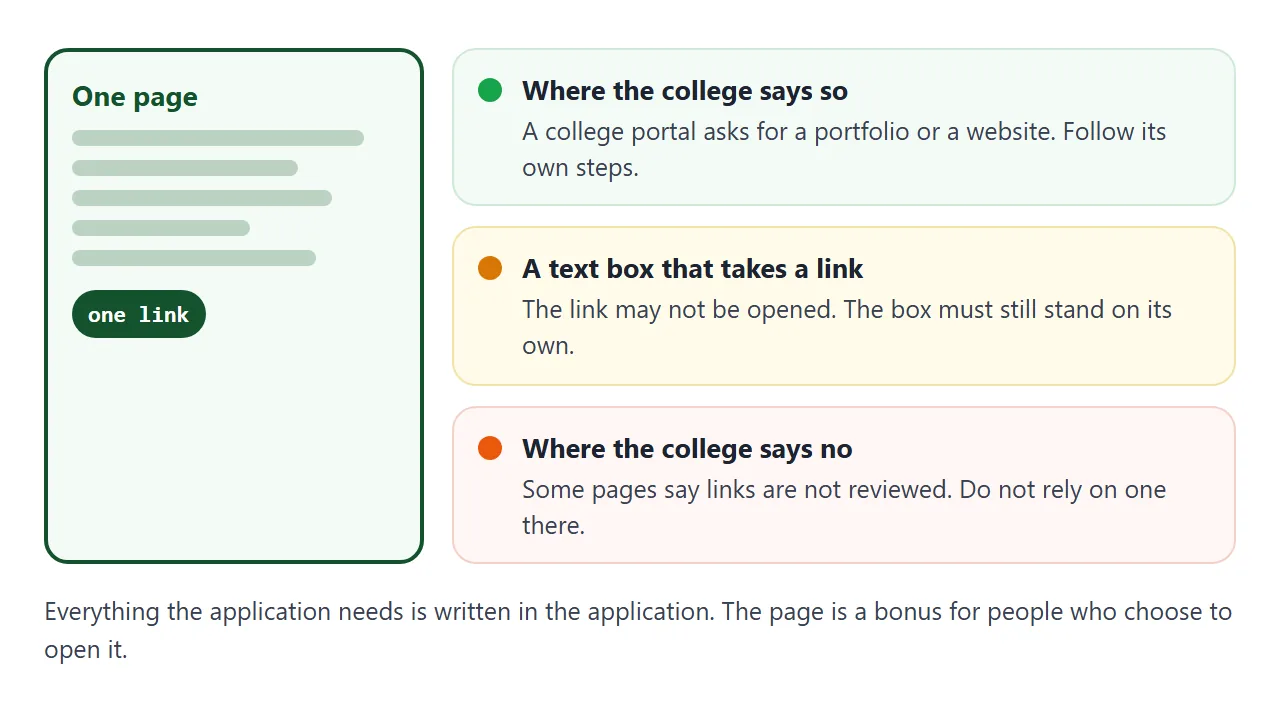
When a college uses the Common App portfolio supplement, the application shows a link to that school's own SlideRoom system, and you submit there. A page of your own does not replace it.
So the Activities list and the essay carry the application. The page is a bonus for anyone who chooses to open it. Where a form asks for a website or portfolio address, give the share link.
When it does not work
| What you see | Cause | Fix |
|---|---|---|
| The phone shows code or a download | The page was sent as an .html attachment | Send the share link |
| The page looks plain, no colours | The AI put the CSS in a separate file | Ask for one file with CSS in a style tag |
| A picture is missing | It pointed to an outside image, which is blocked | Ask for inline SVG shapes, or drop the picture |
| Numbers differ from the application | You edited one and not the other | Update both. The link shows the latest version |
| The college does not open the link | Its policy does not promise to review links | Put everything needed in the application itself |
| It is too long to read on a phone | The AI added extra sections | Ask it to cut to one short block per section |