A consulting one pager is a single page that says who you help, what you sell, what you have done and how to reach you.
Make the draft with an AI chat, check the figures yourself, then send it as a link rather than a file.
The link matters when the reader sits outside your own circle. An independent consultant described this need in a public feature request on the Claude Code repository in July 2026: to hand a polished deliverable to someone outside your org.
A shared link is one way to do it.
Here is a finished page. It is a made-up consultant with made-up figures, so you can see the shape before you write your own.
<!doctype html>
<html lang="en">
<head>
<meta charset="utf-8">
<meta name="viewport" content="width=device-width, initial-scale=1">
<title>Ines Varga - Finance operations consulting</title>
<style>
* { box-sizing: border-box; }
body { margin: 0; font-family: system-ui, -apple-system, "Segoe UI", sans-serif; color: #1c2430; background: #f5f3ee; line-height: 1.55; }
.page { max-width: 720px; margin: 0 auto; padding: 28px 20px 36px; }
header { border-bottom: 3px solid #1f4d3f; padding-bottom: 16px; }
.name { font-size: 14px; letter-spacing: .08em; text-transform: uppercase; color: #1f4d3f; font-weight: 700; }
h1 { font-size: 28px; line-height: 1.2; margin: 8px 0 8px; }
.sub { margin: 0; color: #4a5565; }
h2 { font-size: 13px; letter-spacing: .08em; text-transform: uppercase; color: #6b7280; margin: 26px 0 10px; }
.offers { display: grid; grid-template-columns: repeat(3, 1fr); gap: 10px; }
.offer { background: #fff; border: 1px solid #e3e0d8; border-radius: 10px; padding: 12px 13px; }
.offer b { display: block; font-size: 15px; margin-bottom: 4px; }
.offer span { display: block; font-size: 13.5px; color: #4a5565; }
.offer em { display: block; margin-top: 8px; font-size: 12.5px; font-style: normal; color: #1f4d3f; font-weight: 600; }
.proof { display: grid; grid-template-columns: repeat(3, 1fr); gap: 10px; }
.stat { background: #1f4d3f; color: #fff; border-radius: 10px; padding: 12px 13px; }
.stat b { display: block; font-size: 24px; line-height: 1.1; }
.stat span { display: block; margin-top: 6px; font-size: 13px; color: #d5e6df; }
.note { font-size: 12.5px; color: #6b7280; margin: 8px 0 0; }
ol { margin: 0; padding-left: 20px; }
ol li { margin: 4px 0; }
.contact { margin-top: 26px; background: #fff; border: 1px solid #e3e0d8; border-radius: 12px; padding: 16px; display: flex; flex-wrap: wrap; gap: 12px; align-items: center; justify-content: space-between; }
.contact p { margin: 0; font-size: 15px; }
.btn { display: inline-block; background: #1f4d3f; color: #fff; text-decoration: none; font-weight: 600; padding: 11px 18px; border-radius: 8px; }
.btn:focus-visible { outline: 3px solid #f2b84b; outline-offset: 2px; }
@media (max-width: 600px) {
.offers, .proof { grid-template-columns: 1fr; }
h1 { font-size: 24px; }
.btn { width: 100%; text-align: center; }
}
</style>
</head>
<body>
<main class="page">
<header>
<div class="name">Ines Varga · Finance operations</div>
<h1>I help finance teams close the month in half the time.</h1>
<p class="sub">Independent consultant for companies with 20 to 200 staff. Fixed scope, written plan, handover to your own team.</p>
</header>
<h2>What I do</h2>
<div class="offers">
<div class="offer"><b>Close review</b><span>Map where the month-end close loses days and rank the fixes.</span><em>2 weeks · written plan</em></div>
<div class="offer"><b>Close sprint</b><span>Put the top fixes in place with your team, then step back.</span><em>6 weeks · hands-on</em></div>
<div class="offer"><b>Monthly check-in</b><span>One call a month to keep the new routine from slipping.</span><em>3 months · light touch</em></div>
</div>
<h2>Proof</h2>
<div class="proof">
<div class="stat"><b>9 → 4 days</b><span>Month-end close, 3 finance staff, 6-week sprint</span></div>
<div class="stat"><b>31 → 6</b><span>Manual journal entries per month, same client</span></div>
<div class="stat"><b>12 clients</b><span>Closed engagements since 2021, 9 of them repeat or referred</span></div>
</div>
<p class="note">Sample figures for this demo. Replace them with your own, each with its base.</p>
<h2>How we start</h2>
<ol>
<li>A 20-minute call to check the problem is one I can solve.</li>
<li>A one-page scope with a fixed fee within two working days.</li>
<li>Start date agreed in the same message.</li>
</ol>
<div class="contact">
<p><b>Ines Varga</b><br>ines@example.com · Replies within one working day</p>
<a class="btn" href="mailto:ines@example.com?subject=20-minute%20call">Book a 20-minute call</a>
</div>
</main>
</body>
</html>
What goes on it
The page works because it leaves things out. Each block has one job, and a reader who gives it thirty seconds should still know whether to reply.
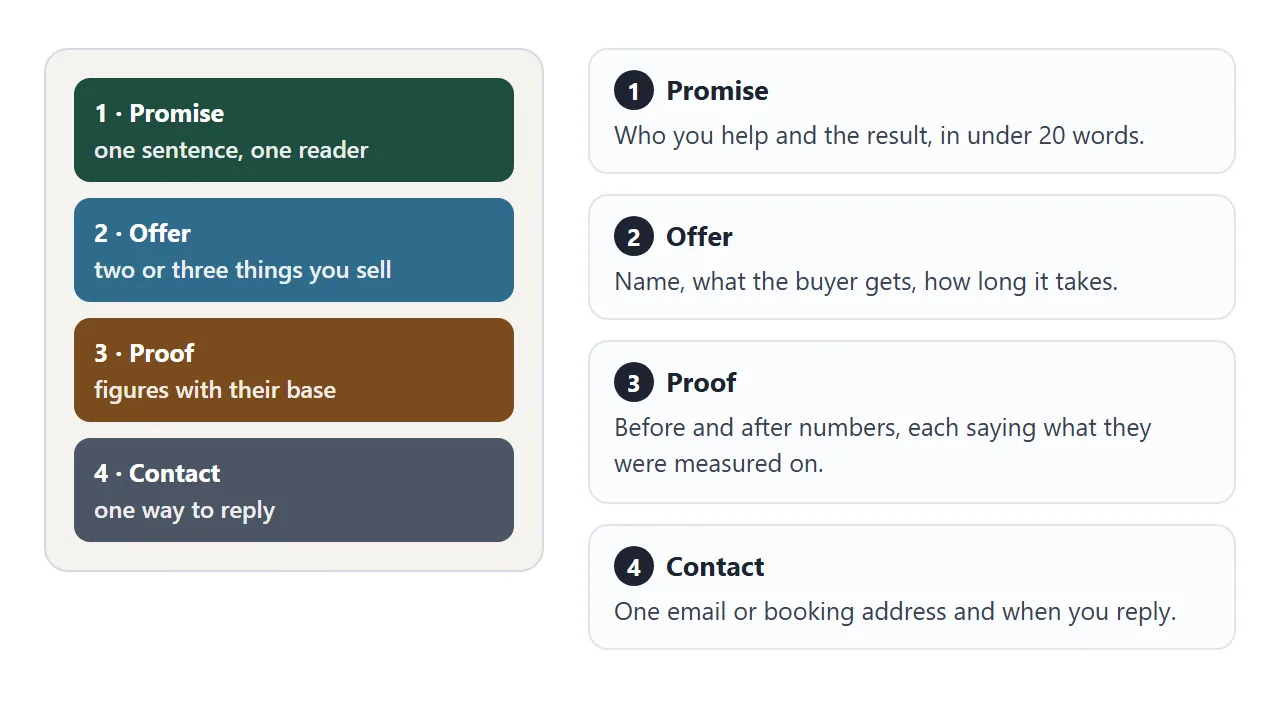
- Promise: one sentence naming the buyer and the result. If you cannot write it in under twenty words, you do not yet know who the page is for.
- Offer: two or three things you sell, each with what the buyer gets and how long it takes.
- Proof: figures with their base, such as "9 days to 4, three finance staff, six weeks". A number without its base cannot be checked.
- Contact: one address and when you reply. Two ways to reach you means a reader has to choose.
Make it with AI
Open ChatGPT, Claude or Gemini and paste the prompt below. Then add your own facts under it. The prompt asks for a plain page that works anywhere, so there is nothing to install and no images to chase.
Build one complete, self-contained HTML file: a one-page
consulting profile for a prospective client.

STRUCTURE
1. Promise: one sentence, under 20 words, naming the buyer
2. Offer: 2 or 3 services, each with a name, what the buyer
   gets, and how long it takes
3. Proof: 3 figures, each with what it was measured on
4. How we start: 3 short steps
5. Contact: one email address as a mailto link with a subject

RULES
- write "NOT MEASURED" where I give you no figure; never invent one
- no forms, no iframes, no images, no external fonts
- single column, max-width 720px, system fonts
- must work on a phone screen 390px wide
- plain language, no words like leverage, synergy, robust

MY FACTS
(who I help, my services, my figures with their base, my email)
When the page comes back, check four things before you send it:
- Every figure. A fluent sentence makes an invented number look measured. Compare each one with your records.
- Every claim about clients. Remove any name or result you do not have permission to show.
- The contact link. Click it. A mailto link opens the reader's email program, as described in MDN's reference for the link element.
- A phone screen. Narrow your browser window and read it once.
For a longer set of limits on length and wording, see the HTML one pager template. Its prompt targets reports; the same limits work here.
Send it as a link
Copy the HTML from the chat and paste it into a NOS document. The page renders as written. Choose Create share link and you get an address.
Anyone with the link can open it in a browser, a phone included, without making an account. HTML to link walks through the steps.
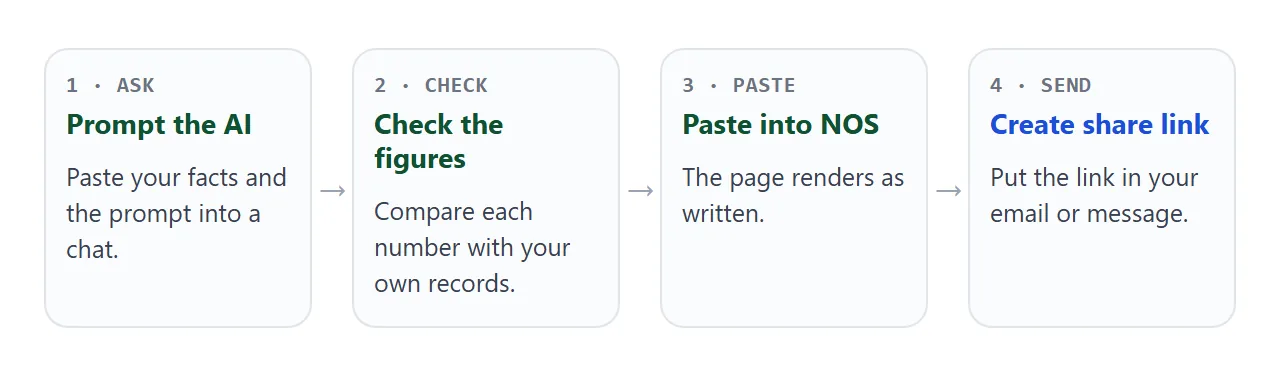
Put the link in the body of your email or message, with one sentence saying why you are sending it.
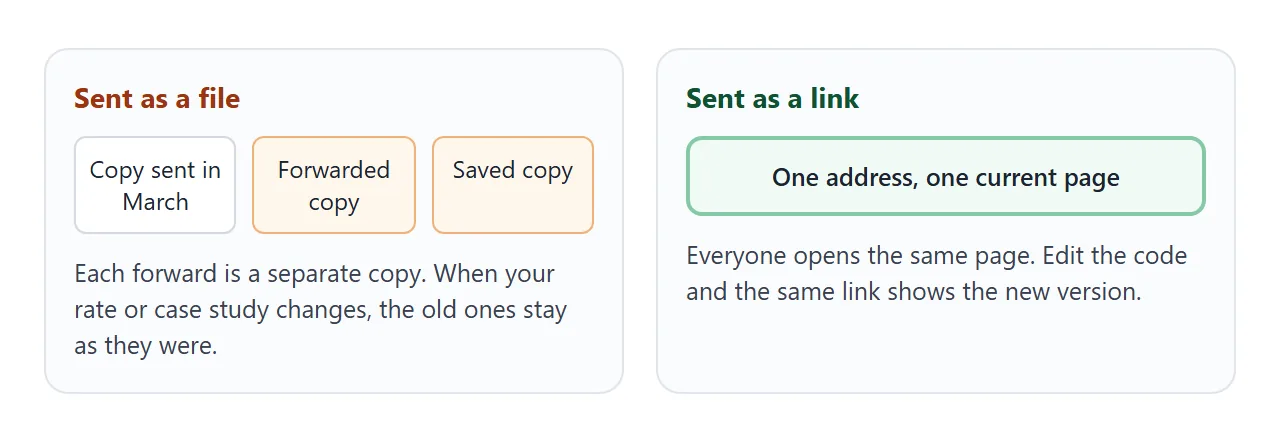
The people who open it cannot edit the page. If you change a figure or a service later, edit the code in your document and the same link shows the new version.
Link, PDF or attachment
| Shared link | File attachment (PDF or HTML) | |
|---|---|---|
| What the reader opens | A page in a browser, phone included | A file, with whatever program they have for it |
| Account needed to open | No | No |
| After you change a figure | Same link shows the new version | Copies already sent stay as they were |
| When the reader forwards it | One address | Another copy of the file |
| Can the reader edit it | No | Yes, if they have the file and a program to edit it |
Choose a PDF when a procurement portal asks for a document in that format. Choose a link when you want one current page. HTML or PDF for client documents covers the decision in more detail.
One page per audience
If you sell to two kinds of buyer, make two pages instead of one page that tries to speak to both. This variant shows two engagement formats in tabs, with an honest note on who each is not for. Click between them.
<!doctype html>
<html lang="en">
<head>
<meta charset="utf-8">
<meta name="viewport" content="width=device-width, initial-scale=1">
<title>Orla Brandt - Pricing strategy - Is this a fit?</title>
<style>
* { box-sizing: border-box; }
body { margin: 0; font-family: system-ui, -apple-system, "Segoe UI", sans-serif; background: #14181f; color: #e8ebf0; line-height: 1.55; }
.page { max-width: 640px; margin: 0 auto; padding: 26px 20px 32px; }
.eyebrow { font-size: 13px; letter-spacing: .08em; text-transform: uppercase; color: #8fb8ff; font-weight: 700; }
h1 { font-size: 26px; line-height: 1.2; margin: 8px 0 8px; }
p { margin: 0 0 12px; color: #b9c0cc; }
.tabs { display: flex; gap: 8px; margin: 18px 0 12px; }
.tab { flex: 1; font: inherit; font-weight: 600; padding: 10px 8px; border-radius: 8px; border: 1px solid #343c4b; background: #1c222c; color: #e8ebf0; cursor: pointer; }
.tab[aria-selected="true"] { background: #8fb8ff; color: #10203d; border-color: #8fb8ff; }
.tab:focus-visible, .btn:focus-visible { outline: 3px solid #f2b84b; outline-offset: 2px; }
.panel { background: #1c222c; border: 1px solid #343c4b; border-radius: 12px; padding: 16px; }
.panel h2 { font-size: 17px; margin: 0 0 8px; color: #fff; }
.panel ul { margin: 0 0 12px; padding-left: 20px; color: #b9c0cc; }
.panel li { margin: 3px 0; }
.meta { font-size: 14px; color: #8fb8ff; font-weight: 600; margin: 0; }
.not { margin-top: 14px; font-size: 14px; color: #b9c0cc; }
.not b { color: #ffb4a8; }
.contact { margin-top: 18px; display: flex; flex-wrap: wrap; gap: 12px; align-items: center; justify-content: space-between; }
.btn { background: #8fb8ff; color: #10203d; text-decoration: none; font-weight: 700; padding: 11px 18px; border-radius: 8px; }
@media (max-width: 480px) { .btn { width: 100%; text-align: center; } h1 { font-size: 22px; } }
</style>
</head>
<body>
<main class="page">
<div class="eyebrow">Orla Brandt · Pricing strategy</div>
<h1>Pricing that your sales team can explain in one sentence.</h1>
<p>Two ways to work together. Pick the one that matches where you are.</p>
<div class="tabs" role="tablist" aria-label="Engagement format">
<button class="tab" role="tab" id="t-sprint" aria-selected="true" aria-controls="panel">Pricing sprint</button>
<button class="tab" role="tab" id="t-retainer" aria-selected="false" aria-controls="panel">Advisory retainer</button>
</div>
<section class="panel" id="panel" role="tabpanel" aria-labelledby="t-sprint">
<h2 id="p-title"></h2>
<ul id="p-list"></ul>
<p class="meta" id="p-meta"></p>
<p class="not" id="p-not"></p>
</section>
<div class="contact">
<span>orla@example.com</span>
<a class="btn" id="cta" href="mailto:orla@example.com">Ask about this</a>
</div>
</main>
<script>
// One object per format: edit the text here and the page updates
const formats = {
sprint: {
title: 'Pricing sprint, 4 weeks',
items: ['Review current price list and discount habits', 'Test two new price structures with 5 of your customers', 'Final recommendation with a rollout plan'],
meta: 'Fixed fee, agreed before we start',
not: 'Not a fit if you are still choosing which product to sell.',
subject: 'Pricing sprint'
},
retainer: {
title: 'Advisory retainer, 6 months',
items: ['Two calls a month with the founder and head of sales', 'Review of every non-standard quote over a limit you set', 'Quarterly price review with a short written summary'],
meta: 'Monthly fee, cancel with 30 days notice',
not: 'Not a fit if you need someone to build the price list for you.',
subject: 'Advisory retainer'
}
};
const tabs = document.querySelectorAll('.tab');
const panel = document.getElementById('panel');
function show(key) {
const f = formats[key];
document.getElementById('p-title').textContent = f.title;
document.getElementById('p-list').innerHTML = f.items.map((t) => '<li>' + t + '</li>').join('');
document.getElementById('p-meta').textContent = f.meta;
document.getElementById('p-not').innerHTML = '<b>Honest note:</b> ' + f.not;
document.getElementById('cta').href = 'mailto:orla@example.com?subject=' + encodeURIComponent(f.subject);
tabs.forEach((t) => t.setAttribute('aria-selected', String(t.id === 't-' + key)));
panel.setAttribute('aria-labelledby', 't-' + key);
}
tabs.forEach((t) => t.addEventListener('click', () => show(t.id.replace('t-', ''))));
show('sprint');
</script>
</body>
</html>
Ask the AI for a copy of the first page with a different promise and a different offer list, and give each version its own link. You then know which version you sent to whom, because you chose the link.
When it does not work
| What you see | Cause | Fix |
|---|---|---|
| The page is long and the reader skims | The AI added background sections | Ask for four blocks and 70 words per block |
| A figure looks too neat | The AI filled a gap you left | Ask for NOT MEASURED where you gave no number |
| An image or font is missing | Outside images are blocked on the shared page | Ask for no images, or draw with CSS or inline SVG |
| A contact form does nothing | Sending a form to another server is blocked | Use a mailto link instead |
| You want to know who opened it | NOS does not report who opened a link | Ask for a reply in your message |
| The reader needs a PDF | Their process requires that format | Send the PDF and keep the link for everything else |
The most common failure is length. A one pager that scrolls for six screens is a brochure. Cut the section that you would not read aloud in a meeting.