A copywriting proposal is a short offer: the pieces you will write, the price of each, how many rounds of changes are included, what is left out, and when it is done.
Put that on one page at a link, and your email only needs three lines.
"How do I write a quotation mail to client?" is a question asked on Quora. A quotation email has to carry a lot: prices in the body, scope in an attachment, and a slightly different version for every client.
Here is a sample page. Tick the add-ons and the total changes. The names and numbers are made up, so replace them with your own.
<!doctype html>
<html lang="en">
<head>
<meta charset="utf-8">
<meta name="viewport" content="width=device-width, initial-scale=1">
<title>Copy proposal</title>
<style>
  * { box-sizing: border-box; }
  body { margin: 0; padding: 14px; font-family: system-ui, sans-serif; background: #eef1f0; color: #1d2625; line-height: 1.5; }
  .page { max-width: 640px; margin: 0 auto; background: #fff; border-radius: 12px; padding: 22px 20px 20px; box-shadow: 0 2px 10px rgba(0, 0, 0, .08); }
  .sample { display: inline-block; font-size: 11px; font-weight: 700; letter-spacing: .6px; color: #8a4b00; background: #ffe9c7; border-radius: 4px; padding: 1px 7px; }
  h1 { margin: 8px 0 2px; font-size: 22px; line-height: 1.25; }
  .for { margin: 0; color: #5b6967; font-size: 14px; }
  .top { display: flex; flex-wrap: wrap; gap: 10px 22px; align-items: baseline; margin: 16px 0 6px; padding: 14px 16px; background: #e8f4f1; border-radius: 10px; }
  .total { font-size: 30px; font-weight: 800; color: #0b5d51; line-height: 1; }
  .total small { display: block; font-size: 12px; font-weight: 600; color: #4b6a65; margin-bottom: 4px; }
  .meta { font-size: 14px; }
  .meta b { display: block; font-size: 12px; color: #4b6a65; font-weight: 600; }
  h2 { font-size: 14px; margin: 16px 0 4px; text-transform: uppercase; letter-spacing: .5px; color: #0b5d51; }
  .row { display: flex; justify-content: space-between; gap: 12px; padding: 7px 0; border-bottom: 1px solid #e6ebea; font-size: 15px; }
  .row .d { display: block; font-size: 13px; color: #5b6967; }
  .row .p { white-space: nowrap; font-weight: 700; }
  label.row { cursor: pointer; align-items: flex-start; }
  label.row .l { display: flex; gap: 10px; align-items: flex-start; }
  label.row input { margin-top: 5px; width: 18px; height: 18px; accent-color: #0b5d51; }
  .cols { display: grid; grid-template-columns: 1fr 1fr; gap: 0 22px; }
  ul { margin: 0; padding-left: 18px; font-size: 14px; }
  li { margin: 3px 0; }
  .next { margin-top: 16px; padding: 12px 14px; border-left: 4px solid #0b5d51; background: #f4f8f7; font-size: 14px; }
  @media (max-width: 520px) {
    body { padding: 8px; }
    .page { padding: 18px 14px; }
    .cols { gap: 0 14px; }
    h1 { font-size: 20px; }
  }
</style>
</head>
<body>
<div class="page">
  <span class="sample">SAMPLE - replace every name and number</span>
  <h1>Website copy: home page, product pages and welcome emails</h1>
  <p class="for">Prepared for Brightwell Tea Co. by Juno Marsh, freelance copywriter</p>

  <div class="top">
    <div class="total"><small>Total</small><span id="total">$0</span></div>
    <div class="meta"><b>Delivery</b>12 working days from deposit</div>
    <div class="meta"><b>Valid until</b>31 October 2026</div>
  </div>

  <h2>What you get</h2>
  <div id="items"></div>

  <h2>Optional add-ons</h2>
  <div id="addons"></div>

  <div class="cols">
    <div>
      <h2>Revisions</h2>
      <ul>
        <li>2 rounds of changes on each piece</li>
        <li>Extra rounds are an add-on</li>
      </ul>
    </div>
    <div>
      <h2>Not included</h2>
      <ul>
        <li>Photography and design</li>
        <li>Keyword research</li>
        <li>Translation</li>
      </ul>
    </div>
  </div>

  <div class="next"><b>Next step:</b> reply to my email with "Yes" and the add-ons you want. I will send the deposit details and a start date.</div>
</div>

<script>
  // Change these lists for each client. The page rebuilds itself.
  const items = [
    { name: 'Home page copy', detail: 'Headline, intro, three benefit blocks, call to action', price: 450 },
    { name: 'Product pages (up to 4)', detail: 'About 150 words each, plus a one-line tasting note', price: 520 },
    { name: 'Welcome email series', detail: '3 emails, 120 to 180 words each', price: 360 }
  ];
  const addons = [
    { name: 'About page', detail: 'Around 300 words', price: 280 },
    { name: 'Rush delivery', detail: 'Everything in 6 working days', price: 200 },
    { name: 'One extra revision round', detail: 'Across all pieces', price: 150 }
  ];

  const money = (n) => '$' + n.toLocaleString('en-US');
  const row = (x) => '<div class="row"><span>' + x.name + '<span class="d">' + x.detail + '</span></span><span class="p">' + money(x.price) + '</span></div>';

  document.getElementById('items').innerHTML = items.map(row).join('');
  document.getElementById('addons').innerHTML = addons.map((x, i) =>
    '<label class="row"><span class="l"><input type="checkbox" data-i="' + i + '"><span>' + x.name + '<span class="d">' + x.detail + '</span></span></span><span class="p">+ ' + money(x.price) + '</span></label>'
  ).join('');

  function update() {
    let sum = items.reduce((s, x) => s + x.price, 0);
    document.querySelectorAll('#addons input:checked').forEach((c) => { sum += addons[c.dataset.i].price; });
    document.getElementById('total').textContent = money(sum);
  }
  document.getElementById('addons').addEventListener('change', update);
  update();
</script>
</body>
</html>
What the page needs
Five things make a proposal easy to say yes to. If one is missing, the client will write back to ask for it.
- Deliverables with counts and lengths. "Four product pages, about 150 words each" is clear. "Website copy" is not.
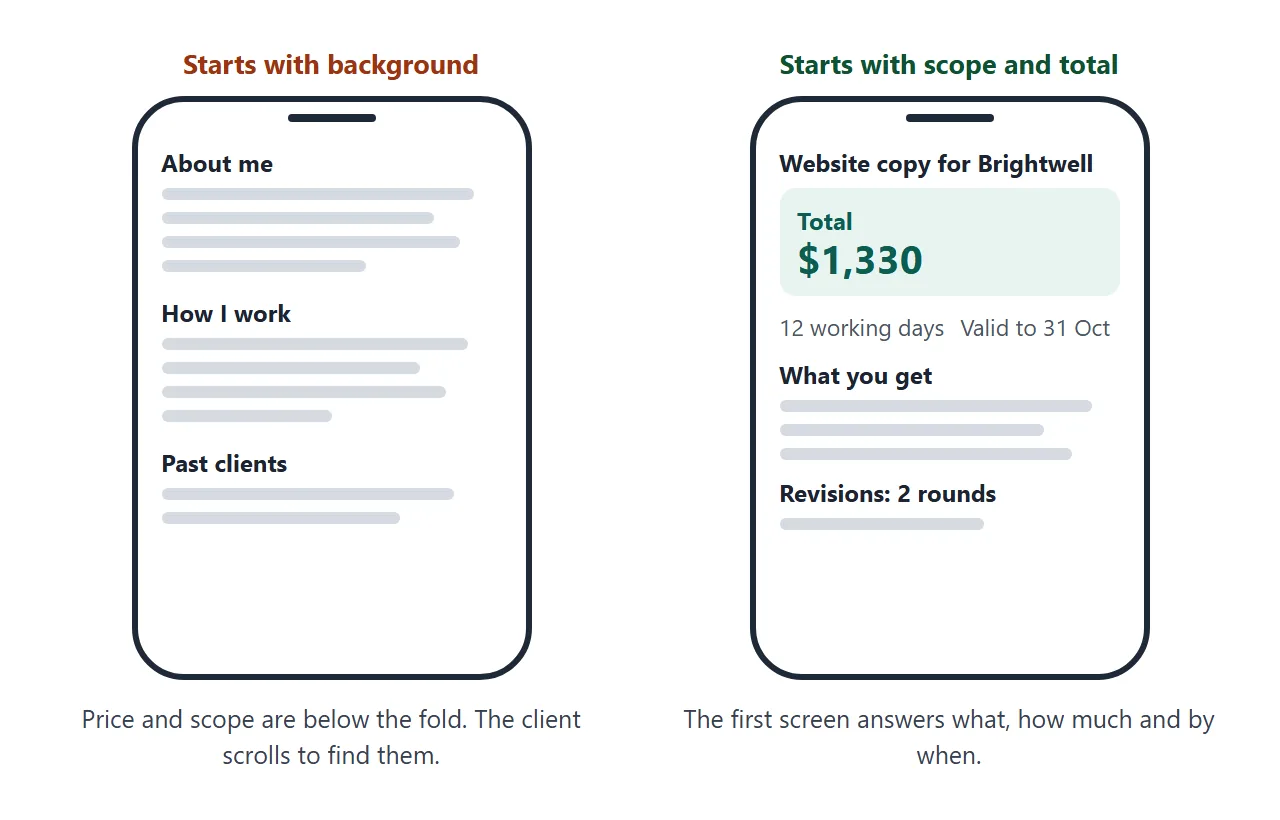
- A price for each, and the total. Show the total at the top.
- Revisions. Say how many rounds are included and what an extra one costs.
- What is not included. Photography, keyword research and translation are common ones. Naming them keeps the price honest.
- Timeline, validity and next step. Say how long the offer stands and what the client does to accept.
The first screen matters, because the client may open the link on a phone.
For the general case of any kind of proposal, see proposal link. For a one-line price, quote link is the shorter form.
Make it with AI
An AI can lay out the page from your notes. It will also fill gaps with believable prices and terms, so the prompt has to forbid that. Paste this into ChatGPT, Claude or Gemini, then fill in the facts at the bottom.
Write ONE self-contained HTML file: a copywriting proposal for a client.

Rules:
- Use only the facts below. Do not invent prices, dates, deliverables or terms.
- If something is missing, write [ADD: what is missing] instead of guessing.
- Top of the page: what I will write, the total price, the delivery time and the valid-until date.
- Then: deliverables (name, what is included, price), optional add-ons with prices, revision rounds included, what is NOT included, next step.
- Put the deliverables and prices in lists at the top of the script, and add up the total with JavaScript, so I can change them for the next client.
- Plain HTML and CSS, a little JavaScript is fine. It must read well on a phone.
- No external images, scripts or forms. Under 350 words.

Facts:
Client name:
Project:
Deliverables and prices:
Optional add-ons and prices:
Revision rounds included:
Not included:
Delivery time:
Valid until:
How the client accepts:
Then check the result before you send it:
- Total. Add it up yourself, with and without each add-on. Do not trust the AI's arithmetic.
- [ADD] marks. Fill each one with a fact you can stand behind, or delete the line.
- Terms. Revision rounds, deposit and dates must match what you really offer.
- Names. No other client's name, and no details about other work.
- Phone. Open it narrow, or ask for a viewport meta tag. See viewport meta tag.
Send it as a link
A proposal attached to an email is a copy. If a price changes, you send a second file and hope the client opens the right one. A link points at one page that you can still fix.
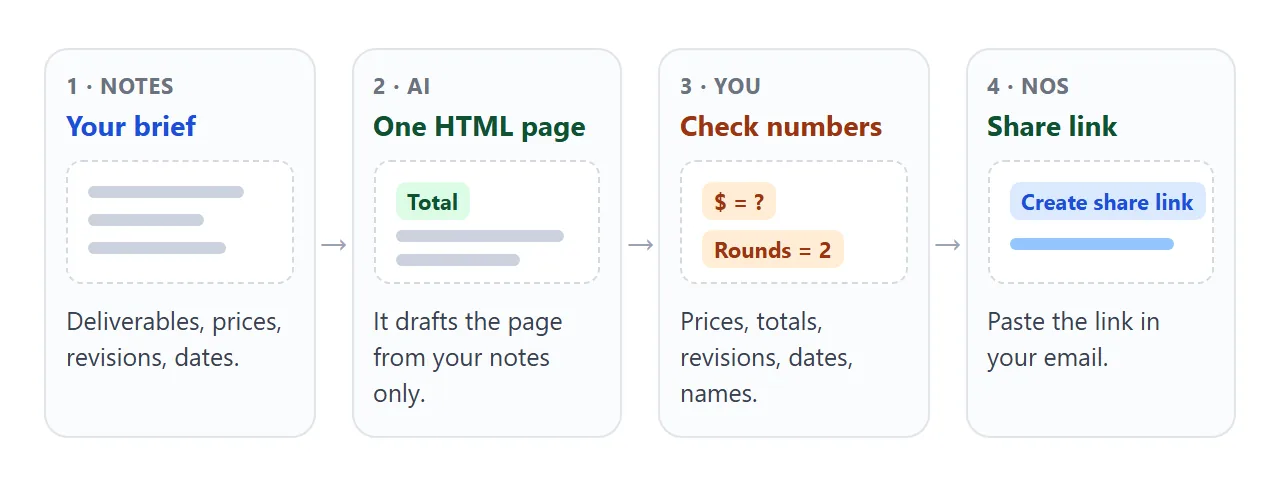
- Copy the whole HTML from the chat. Saving HTML from ChatGPT shows how.
- Paste it into a NOS document. The page renders as written, and the script that adds up the total runs.
- Choose Create share link. HTML to link walks through it.
- Open the link on your phone once, as the client will.
- Paste it into your email, with the total and the next step in the text.
Whoever opens the link sees the page in a browser, on a phone or a laptop, with no account to make. They cannot edit it. If you fix a line later, you edit the code and the same link shows the new version.
A draft email to paste around the link:
Subject: Copy proposal for [client name]

Hi [name],

Here is the proposal: scope, price and timeline on one page. The total is [total], valid until [date].
[link]

Reply "Yes" with any add-ons and I will send the deposit details.
As of October 2026, Gmail Help says to add a link on a computer by highlighting the text, pressing Ctrl + K, pasting the URL and clicking Apply. Other mail programs differ, so use whatever your own one offers.
Adjust it for each client
Most of the page is the same for every client: your terms, your exclusions, your wording. What changes is the name, the line items and the prices.
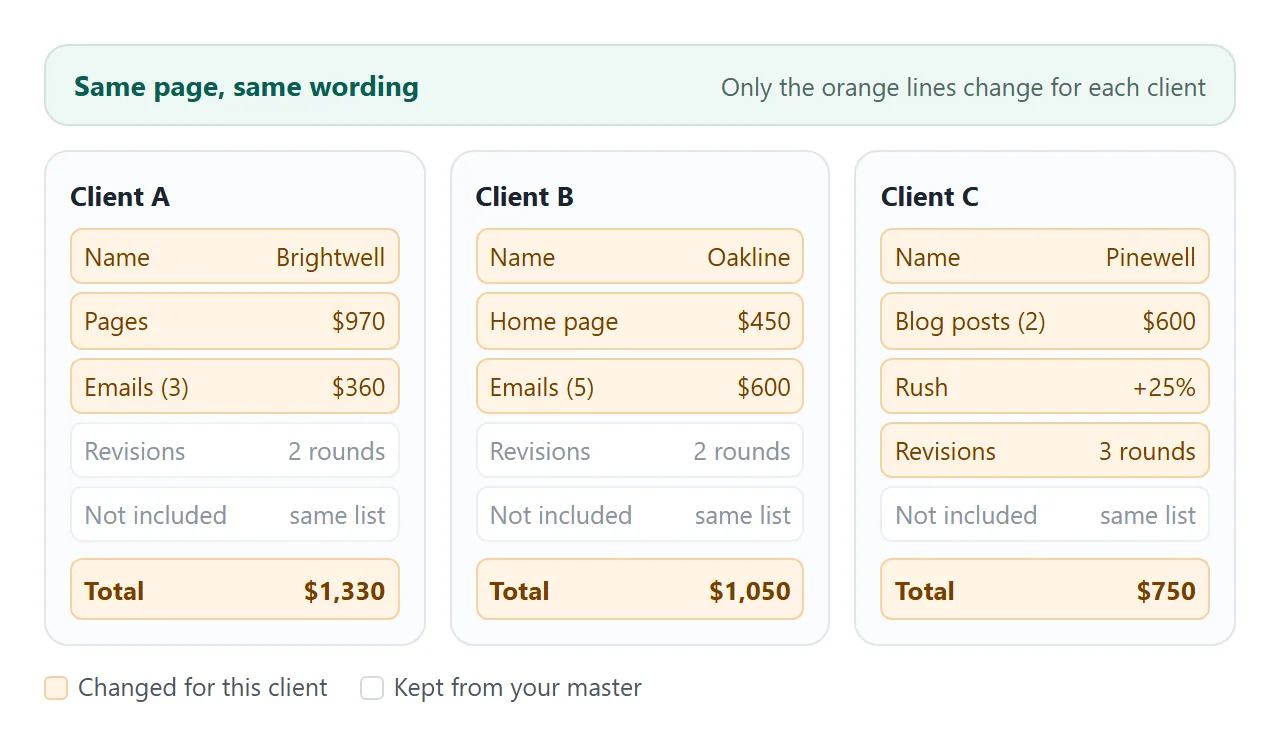
Keep one master version of the HTML in a file you control.
For each new client, paste the master into a new NOS document, change the name and the lists at the top of the script, and create a share link for that document. Each client gets their own address.
Anyone with a link can open the page, so never paste another client's details into it. Search for the old client's name before you share.
If you also publish a general price list, give it its own page.
<!doctype html>
<html lang="en">
<head>
<meta charset="utf-8">
<meta name="viewport" content="width=device-width, initial-scale=1">
<title>Rate sheet</title>
<style>
  * { box-sizing: border-box; }
  body { margin: 0; padding: 14px; font-family: system-ui, sans-serif; background: #f1efea; color: #26221c; line-height: 1.45; }
  .card { max-width: 600px; margin: 0 auto; background: #fff; border-radius: 12px; padding: 18px 18px 16px; box-shadow: 0 2px 10px rgba(0, 0, 0, .08); }
  .sample { display: inline-block; font-size: 11px; font-weight: 700; letter-spacing: .6px; color: #8a4b00; background: #ffe9c7; border-radius: 4px; padding: 1px 7px; }
  h1 { margin: 8px 0 2px; font-size: 20px; }
  .sub { margin: 0 0 10px; font-size: 14px; color: #6a6358; }
  .line { display: grid; grid-template-columns: 1fr auto 74px; gap: 10px; align-items: center; padding: 9px 0; border-bottom: 1px solid #ece8e0; }
  .name { font-size: 15px; }
  .name small { display: block; color: #6a6358; font-size: 13px; }
  .step { display: flex; align-items: center; gap: 6px; }
  .step button { width: 34px; height: 34px; border: 1px solid #cfc8bb; border-radius: 8px; background: #faf8f4; font-size: 18px; line-height: 1; cursor: pointer; }
  .step output { min-width: 22px; text-align: center; font-weight: 700; }
  .sub-t { text-align: right; font-weight: 700; font-size: 15px; }
  .rush { display: flex; gap: 10px; align-items: center; padding: 11px 0; font-size: 15px; cursor: pointer; }
  .rush input { width: 18px; height: 18px; accent-color: #9a4f12; }
  .sum { display: flex; justify-content: space-between; align-items: baseline; margin-top: 4px; padding-top: 10px; border-top: 2px solid #26221c; font-weight: 800; font-size: 22px; }
  .note { margin: 10px 0 0; font-size: 13px; color: #6a6358; }
</style>
</head>
<body>
<div class="card">
  <span class="sample">SAMPLE - use your own rates</span>
  <h1>Copywriting rates</h1>
  <p class="sub">Choose how much you need for a quick estimate.</p>
  <div id="lines"></div>
  <label class="rush"><input type="checkbox" id="rush"> Rush delivery (+25%)</label>
  <div class="sum"><span>Estimate</span><span id="total">$0</span></div>
  <p class="note">An estimate, not a quote. The proposal I send you has the final price.</p>
</div>

<script>
  // Edit the rates here. Each line gets its own stepper.
  const rates = [
    { name: 'Landing page', unit: 'per page, up to 500 words', price: 400, qty: 1 },
    { name: 'Product description', unit: 'per item, up to 100 words', price: 35, qty: 0 },
    { name: 'Email', unit: 'per email, up to 200 words', price: 120, qty: 0 },
    { name: 'Blog post', unit: 'per post, about 800 words', price: 300, qty: 0 }
  ];
  const money = (n) => '$' + n.toLocaleString('en-US');
  const box = document.getElementById('lines');

  box.innerHTML = rates.map((r, i) =>
    '<div class="line"><div class="name">' + r.name + '<small>' + money(r.price) + ' ' + r.unit + '</small></div>' +
    '<div class="step"><button type="button" data-i="' + i + '" data-d="-1" aria-label="Fewer ' + r.name + '">-</button>' +
    '<output id="q' + i + '">' + r.qty + '</output>' +
    '<button type="button" data-i="' + i + '" data-d="1" aria-label="More ' + r.name + '">+</button></div>' +
    '<div class="sub-t" id="s' + i + '"></div></div>'
  ).join('');

  function update() {
    let sum = 0;
    rates.forEach((r, i) => {
      document.getElementById('q' + i).textContent = r.qty;
      document.getElementById('s' + i).textContent = money(r.qty * r.price);
      sum += r.qty * r.price;
    });
    if (document.getElementById('rush').checked) sum = Math.round(sum * 1.25);
    document.getElementById('total').textContent = money(sum);
  }

  box.addEventListener('click', (e) => {
    const b = e.target.closest('button');
    if (!b) return;
    const r = rates[b.dataset.i];
    r.qty = Math.max(0, Math.min(20, r.qty + Number(b.dataset.d)));
    update();
  });
  document.getElementById('rush').addEventListener('change', update);
  update();
</script>
</body>
</html>
A rate sheet gives a rough number before a conversation. The proposal gives the real one after it.
Ways to send a proposal compared
| Price in the email body | PDF or file attached | Share link | |
|---|---|---|---|
| Fixing a price after sending | A new email | A new file | Edit the code, same link |
| Copies in circulation | One per message or forward | One per message or forward | One page |
| Can the client edit it | No, but they can quote and change a copy | They hold their own copy | No, view only |
| Add-ons that update the total | No | No | Yes, if the page has a script |
| Account needed to open it | No | No | No |
When a price does change after the client has seen it, add a dated line at the top, such as "Revised 8 October: rush add-on now $200". Proposal link explains why a visible revision note keeps trust.
When it does not work
| What you see | Cause | Fix |
|---|---|---|
| The total is wrong | The AI added up badly, or you changed one price | Add it up by hand and fix the lists |
| A logo or photo is missing | Outside images are blocked | Use text or an inline SVG |
| An Accept button sends nothing | Sending a form to a server is blocked | Ask the client to reply to your email |
| The text is tiny on a phone | No viewport meta tag | Ask the AI to add one |
| A font or script is missing | It loads from a site that is not allowed | Use Google Fonts, cdnjs, jsDelivr, unpkg, or nothing extra |
| The price in the email differs from the page | You edited only one of them | Keep the total in both, and change both together |
| The client says the price moved after saying yes | The page was edited after they accepted | Add a dated revision line, and confirm changes in writing |
| Another client's name shows up | The master was copied after an edit | Search for the old name before you share |