baseline-source decides which line of a multi-line inline box lines up with the text around it. first uses the box's first line, last uses its last line, and auto (the default) uses the last line for inline-block and the first line for everything else.
Chrome, Edge and Firefox support it. Safari does not.
Try it first. The card below has three lines and sits in the middle of a sentence. Press the buttons to change its baseline-source.
<!doctype html>
<html lang="en">
<head>
<meta charset="utf-8">
<meta name="viewport" content="width=device-width, initial-scale=1">
<title>baseline-source: auto, first, last</title>
<style>
  body { margin: 0; padding: 16px; font: 16px/1.5 system-ui, sans-serif; background: #f4f5f7; color: #1d2330; }
  .line { background: #fff; border-radius: 10px; padding: 18px 14px; }
  .card {
    display: inline-block;              /* a box with three lines of text */
    padding: 4px 10px; border-radius: 8px;
    background: #e8f0ff; border: 1px solid #b7c9ef; line-height: 1.3;
  }
  .buttons { margin-top: 14px; display: flex; gap: 8px; flex-wrap: wrap; }
  button { font: inherit; font-size: 14px; padding: 6px 12px; border-radius: 8px; border: 1px solid #c9cdd4; background: #fff; cursor: pointer; }
  button[aria-pressed="true"] { background: #1d2330; color: #fff; border-color: #1d2330; }
  #note { font-size: 13px; color: #5b6270; margin: 10px 0 0; }
</style>
</head>
<body>
<div class="line">
  The plan is <span class="card" id="card"><b>Pro</b><br>$12 a month<br>billed yearly</span> for the whole team.
</div>

<div class="buttons">
  <button aria-pressed="true" data-v="auto">auto</button>
  <button aria-pressed="false" data-v="first">first</button>
  <button aria-pressed="false" data-v="last">last</button>
</div>
<p id="note"></p>

<script>
  const card = document.getElementById('card');
  const note = document.getElementById('note');

  document.querySelectorAll('button').forEach((btn) => {
    btn.addEventListener('click', () => {
      card.style.baselineSource = btn.dataset.v;  // the one line that matters
      document.querySelectorAll('button').forEach((b) => b.setAttribute('aria-pressed', b === btn));
    });
  });

  // Tell the reader if the buttons can do anything in this browser
  note.textContent = CSS.supports('baseline-source', 'first')
    ? 'Your browser supports baseline-source.'
    : 'Your browser does not support baseline-source, so all three buttons look the same.';
</script>
</body>
</html>
With auto and last, the card rises so that "billed yearly" sits on the sentence. With first, "Pro" sits on the sentence and the rest of the card hangs below.
What baseline-source changes
Text in a line sits on a shared baseline, the line the letters rest on. A box inside that line has to put one of its own baselines on it. A box that holds several lines has several candidates.
The CSS Inline Layout spec says: when an inline-level box has more than one possible source for baseline information, baseline-source says whether its first or last baseline set is preferred for alignment.
.card {
  display: inline-block;
  baseline-source: first;  /* auto | first | last */
}
It does not move the text inside the box. It only moves the whole box up or down in its line.
Why auto means two different things
The default is auto, and it depends on the box. For inline-block it means the last line. For every other box, including inline-flex and inline-grid, it means the first line.
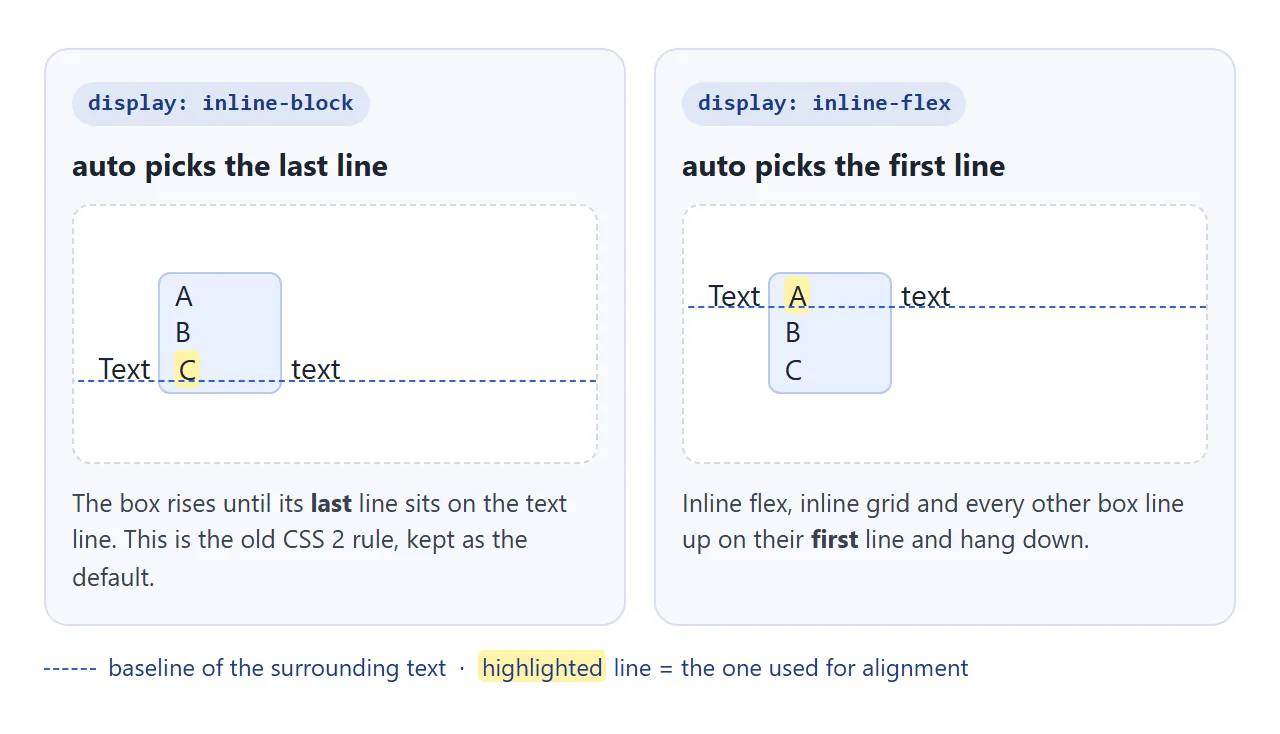
The inline-block rule is old. CSS 2.1 already defined the baseline of an inline-block as the baseline of its last line box. baseline-source keeps that as the default and adds a way to ask for the first line.
The three values
| Value | inline-block | inline-flex, inline-grid |
|---|---|---|
auto |
Last line | First line |
first |
First line | First line |
last |
Last line | Last line |
So first is the useful value on an inline-block, and last is the useful value on an inline flex or grid box. The other combinations match the default.
The property is not inherited. Set it on the box that sits in the line, not on its parent.
This example puts the same three-line box into a line of text as an inline-block, as a column inline flex box, and as an inline-block with overflow: hidden.
<!doctype html>
<html lang="en">
<head>
<meta charset="utf-8">
<meta name="viewport" content="width=device-width, initial-scale=1">
<title>baseline-source on three kinds of box</title>
<style>
  body { margin: 0; padding: 14px; font: 15px/1.5 system-ui, sans-serif; background: #f4f5f7; color: #1d2330; }
  .row { background: #fff; border-radius: 10px; padding: 12px 12px 14px; margin-bottom: 10px; }
  .row h3 { margin: 0 0 6px; font-size: 13px; color: #5b6270; font-weight: 600; }
  .box { width: 64px; padding: 2px 6px; line-height: 1.25; border: 1px solid #b7c9ef; background: #e8f0ff; border-radius: 6px; }
  .ib { display: inline-block; }
  .fx { display: inline-flex; flex-direction: column; }
  .scroll { display: inline-block; overflow: hidden; }  /* overflow: hidden makes a scroll container */
  .first { baseline-source: first; }
  .last { baseline-source: last; }
  code { font-size: 12px; background: #eef1f5; padding: 0 3px; border-radius: 4px; }
</style>
</head>
<body>
<div class="row">
  <h3>inline-block</h3>
  Text <span class="box ib">auto<br>B<br>C</span> text <span class="box ib first">first<br>B<br>C</span> text
</div>
<div class="row">
  <h3>inline-flex, column</h3>
  Text <span class="box fx"><span>auto</span><span>B</span><span>C</span></span> text <span class="box fx last"><span>A</span><span>B</span><span>last</span></span> text
</div>
<div class="row">
  <h3>inline-block with <code>overflow: hidden</code></h3>
  Text <span class="box scroll">auto<br>B<br>C</span> text <span class="box scroll first">first<br>B<br>C</span> text
</div>
</body>
</html>
The third row shows a case that surprises people. Setting overflow: hidden on an inline-block makes the whole box drop so that its bottom edge sits on the text line.
Why overflow: hidden drops the box
The CSS Box Alignment spec keeps a legacy rule. A block container that scrolls in the block direction, and whose baseline-source is auto, uses its bottom margin edge as its last baseline. A box with overflow: hidden counts, because it is a scroll container.
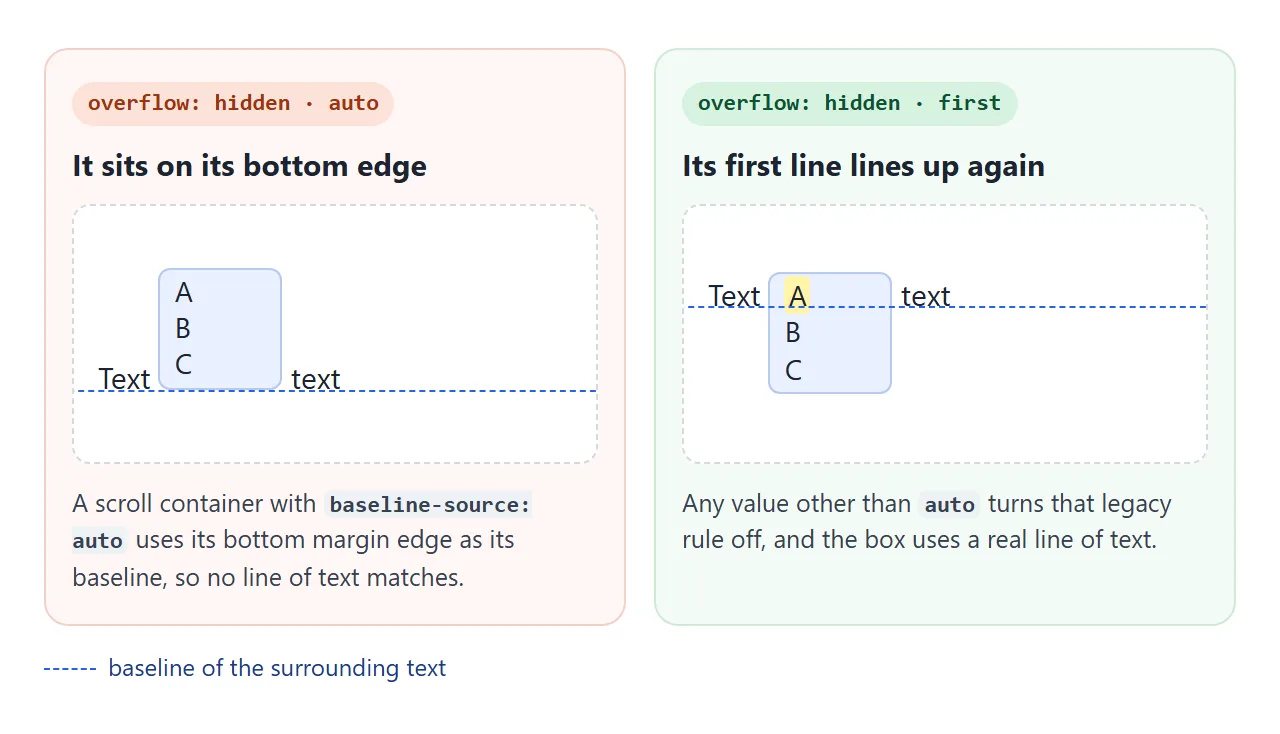
The legacy rule only applies while the value is auto. Setting baseline-source: first puts the first line of text on the sentence again, and last uses the real last line instead of the bottom edge.
The same fix works for overflow: auto and overflow: scroll. overflow: clip does not make a scroll container, so it never had the problem.
For more on the other ways to move an inline box up and down, see CSS vertical-align.
Browser support and a fallback
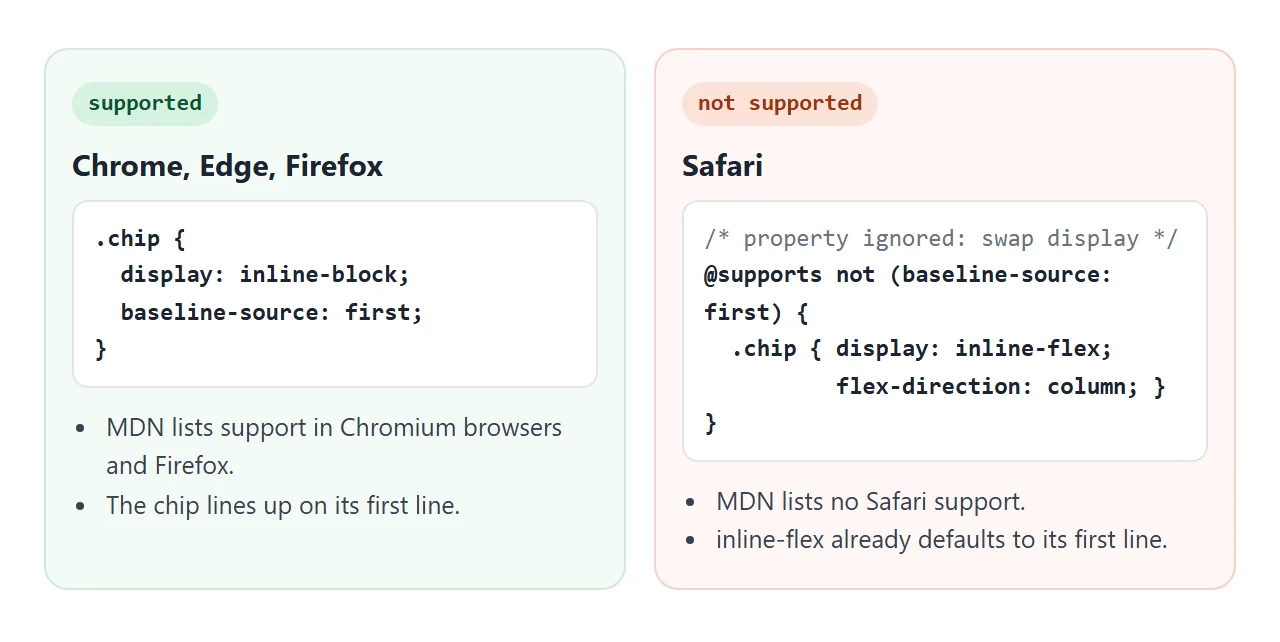
MDN's compatibility data lists baseline-source as supported in Chrome, Edge and Firefox, and in Chrome and Firefox for Android. It lists Safari, on macOS and iOS, as not supported.
I checked in Playwright's Chromium 147, Firefox 148 and WebKit 26.4: the first two applied it, WebKit ignored it.
A support check returned false in that WebKit build, so @supports can tell the two apart:
CSS.supports('baseline-source', 'first') // false in WebKit
The fallback is to change display, because each display type already has a default line:
@supports not (baseline-source: first) {
  /* inline-flex lines up on its first line by default */
  .chip { display: inline-flex; flex-direction: column; }
  /* inline-block lines up on its last line by default */
  .stat { display: inline-block; }
}
The spec also lets vertical-align take first or last as a shorthand. None of the three engines above accepted that syntax, so write the baseline-source longhand.
A finished example: chips and a stat inside a sentence
Two common cases. A person chip has a name and a role; the name should read as part of the sentence. A stat has a small label and a big number; the number should sit on the line.
<!doctype html>
<html lang="en">
<head>
<meta charset="utf-8">
<meta name="viewport" content="width=device-width, initial-scale=1">
<title>People chips and a stat in a sentence</title>
<style>
  body { margin: 0; padding: 16px; font: 16px/1.6 system-ui, sans-serif; background: #f4f5f7; color: #1d2330; }
  p { background: #fff; border-radius: 10px; padding: 14px 16px; margin: 0 0 12px; }

  /* Two-line chip: name on the first line lines up with the sentence */
  .chip {
    display: inline-block; baseline-source: first;
    padding: 2px 10px 4px 34px; border-radius: 10px; line-height: 1.3;
    background: #eef1f5 no-repeat 6px 6px / 22px 22px;
  }
  .chip b { font-weight: 600; }
  .chip small { display: block; color: #5b6270; font-size: 12px; }
  .a { background-image: radial-gradient(circle, #7aa7ff 64%, transparent 66%); }
  .b { background-image: radial-gradient(circle, #62c28d 64%, transparent 66%); }

  /* Stat: label on top, the number on the last line sits on the sentence */
  .stat {
    display: inline-flex; flex-direction: column; baseline-source: last;
    padding: 2px 10px; border-radius: 10px; background: #fff4d6; line-height: 1.2;
  }
  .stat small { font-size: 11px; color: #7a5b00; text-transform: uppercase; letter-spacing: .4px; }
  .stat b { font-size: 26px; }

  /* Browsers without baseline-source: swap display to get the same result */
  @supports not (baseline-source: first) {
    .chip { display: inline-flex; flex-direction: column; }  /* inline-flex uses its first line */
    .stat { display: inline-block; }                          /* inline-block uses its last line */
    .stat small { display: block; }
  }
</style>
</head>
<body>
<p>
  Review by <span class="chip a"><b>Ana Kim</b><small>Design</small></span>
  and <span class="chip b"><b>Ben Ito</b><small>Front end</small></span> is due on Friday.
</p>
<p>
  This sprint closed <span class="stat"><small>tickets</small><b>42</b></span> issues, up from last week.
</p>
</body>
</html>
- Chips:
display: inline-blockwithbaseline-source: first. The role hangs below the name. - Stat: a column inline flex box with
baseline-source: last. The label sits above the line and the number sits on it. - Fallback: the
@supports notblock swapsdisplayso Safari lines them up the same way.
If you only need the first line on a box, display: inline-flex with flex-direction: column gets it in every browser. baseline-source is for keeping the display you want.
When it does not work
| What you see | Cause | Fix |
|---|---|---|
| Nothing changes | The browser does not support it (Safari) | Swap display inside @supports not |
| Nothing changes on a block | It only affects inline-level boxes | Use inline-block, inline-flex or inline-grid |
| Flex items do not line up with each other | That is item alignment, not baseline-source |
align-items: first baseline or last baseline |
| The box sits on its bottom edge | It is a scroll container (overflow: hidden) with auto |
baseline-source: first or last |
| Setting it on the parent does nothing | It is not inherited | Put it on the box in the line |
vertical-align: first is dropped |
Browsers tested do not accept that shorthand form | Use baseline-source: first |
For lining up items inside a flex container rather than in a line of text, see align-items.
Share it as a link
Alignment is easier to judge by looking than by reading a description, and it can differ by browser. A screenshot only shows one browser, and an .html attachment may open as plain code on a phone.
To let someone check it in their own browser, paste the page into a NOS document and choose Create share link. HTML to link walks through it.
The page renders as written and its scripts run, so they can press the buttons themselves. If you change the code later, the same link shows the new version.