Japanese and Chinese punctuation is full width. A bracket such as 「 or a comma such as 、 fills a whole square, but its ink sits in one half. The other half is blank.
text-spacing-trim removes those blank halves, and text-autospace adds a thin gap where kanji or kana meet Latin letters and digits.
Try it first. Both lines use the same sentence. The first keeps every blank half; the second uses the value Chromium applies by default.
<!doctype html>
<html lang="ja">
<head>
<meta charset="utf-8">
<meta name="viewport" content="width=device-width, initial-scale=1">
<title>text-spacing-trim: space-all vs normal</title>
<style>
  body {
    margin: 0; padding: 14px; background: #f4f5f7; color: #1d2330;
    font-family: system-ui, sans-serif;
  }
  .note { margin: 0 0 12px; font-size: 13px; }
  .row { background: #fff; border-radius: 10px; padding: 10px 14px 12px; margin-bottom: 10px; }
  .row code { font: 600 12px ui-monospace, Consolas, monospace; color: #475467; }
  .row small { float: right; font-size: 12px; color: #667085; }
  .jp {
    margin: 6px 0 0; font-size: 22px; line-height: 1.6;
    font-family: "Hiragino Sans", "Yu Gothic", "Noto Sans CJK JP", "Noto Sans JP", sans-serif;
  }
  .jp span { background: #fff1c2; }  /* highlight shows the width of the line */
  .space-all { text-spacing-trim: space-all; }  /* every punctuation mark keeps its full width */
  .normal    { text-spacing-trim: normal; }     /* the default: adjacent marks share one gap */
</style>
</head>
<body>
<p class="note" lang="en" id="support"></p>

<div class="row" lang="en">
  <code>text-spacing-trim: space-all</code><small id="w1"></small>
  <p class="jp space-all" lang="ja"><span id="a">会議は「月曜」(午前)、「火曜」(午後)です。</span></p>
</div>

<div class="row" lang="en">
  <code>text-spacing-trim: normal</code><small id="w2"></small>
  <p class="jp normal" lang="ja"><span id="b">会議は「月曜」(午前)、「火曜」(午後)です。</span></p>
</div>

<script>
  // Is the property known to this browser?
  const ok = CSS.supports('text-spacing-trim', 'normal');
  document.getElementById('support').textContent = ok
    ? 'This browser supports text-spacing-trim.'
    : 'This browser does not support text-spacing-trim, so both lines look the same.';

  // Show the rendered width of the text, added up over every line it wraps to
  const show = (id, out) => {
    const rects = document.getElementById(id).getClientRects();
    const w = [...rects].reduce((sum, r) => sum + r.width, 0);
    document.getElementById(out).textContent = Math.round(w) + 'px of text';
  };
  const measure = () => { show('a', 'w1'); show('b', 'w2'); };
  measure();
  addEventListener('resize', measure);
</script>
</body>
</html>
In the Chromium build we tested, in a 640px-wide frame, the first line measured 503px and the second 459px. In the Firefox and WebKit builds, both lines had the same width, and the page says so.
Why full-width punctuation leaves holes
Each full-width mark takes one em, the width of one kanji. When two marks meet, such as 」 followed by (, the two blank halves sit side by side. The reader sees a gap as wide as a whole character.
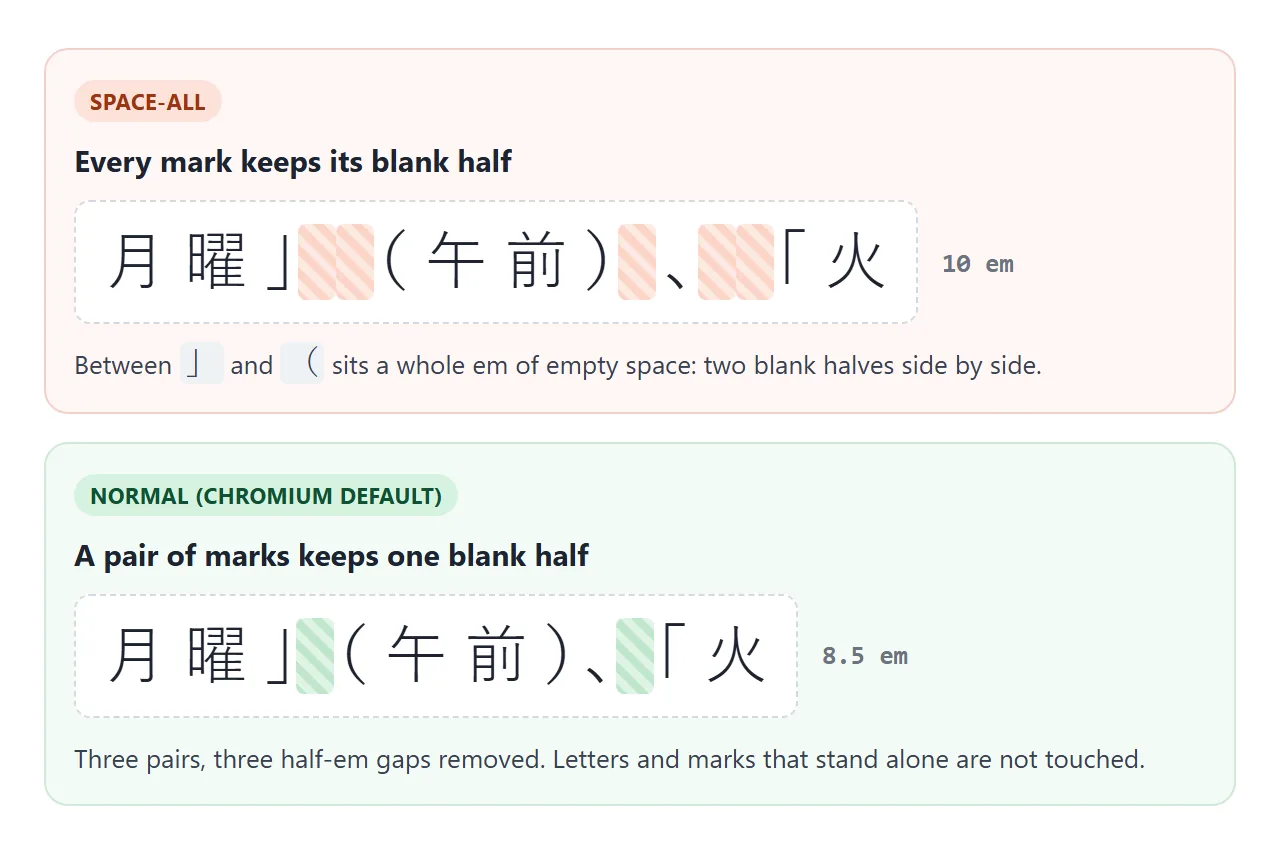
text-spacing-trim tells the browser which of these blank halves to remove.
The values that worked
We tested each value with CSS.supports and by measuring the text. The table is for the Chromium build that ships with Playwright.
| Value | What happened in our test |
|---|---|
space-all |
Nothing trimmed. Every mark stays full width |
normal |
Adjacent marks share one gap. The default |
space-first |
Like normal, and opening marks trimmed on wrapped lines, not the first line |
trim-start |
Like normal, and opening marks trimmed at the start of every line |
trim-both, trim-all, allow-end |
Rejected. The browser drops the declaration |
With Yu Gothic at 40px, the text 「東京」、(大阪)。 measured 400px with space-all and 340px with normal: three pairs, 20px saved on each. The same trimming happened in vertical text with writing-mode: vertical-rl.
Since normal is already the default in that build, many pages get the collapsed pairs without writing any CSS. You write the property when you want the other behaviors.
Opening brackets at the start of a line
Dialogue and quotations often start a line with 「 or (. With normal, the blank half stays, so those lines look indented by half a character.
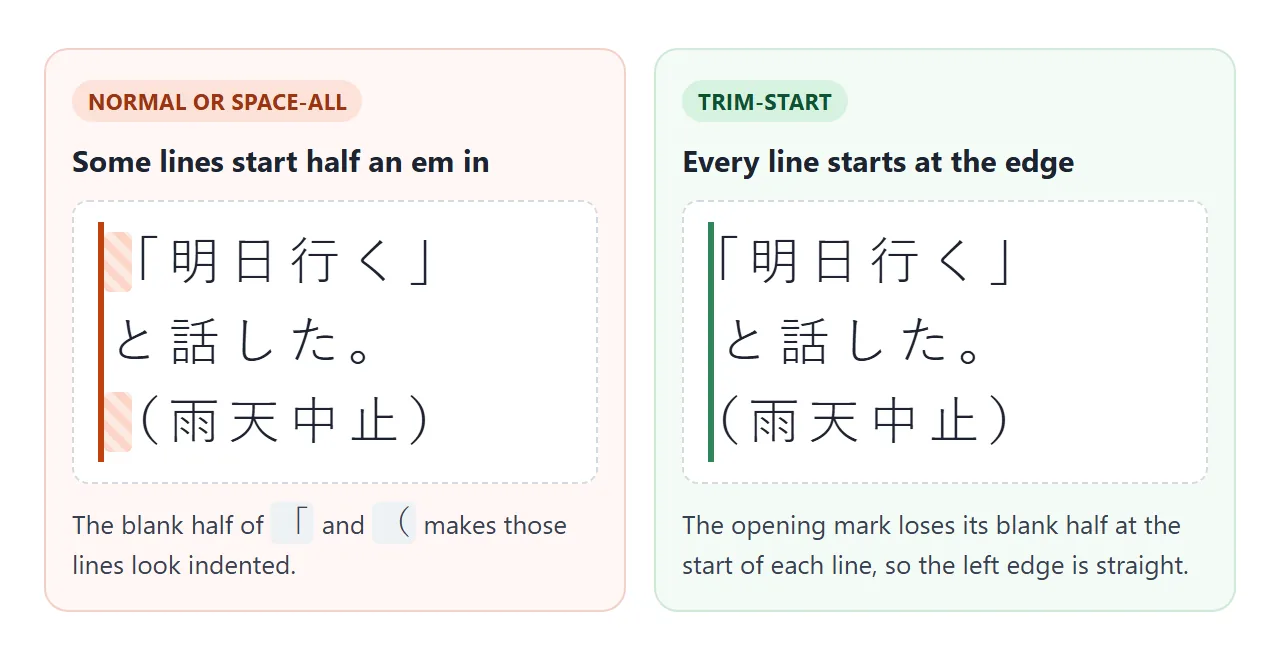
trim-start gives every line a straight left edge. Set it on the element that holds the text, or once for the whole page:
html { text-spacing-trim: trim-start; }
The property is inherited, so paragraphs, headings and list items all pick it up.
One quirk showed up in testing. When the same phrase had already been laid out with normal elsewhere on the page, a later trim-start on that phrase did not trim its opening bracket. Setting one value for the whole page, as above, avoided it.
Space between Japanese and English: text-autospace
Mixed text such as iPhoneで or 第3章 looks cramped when letters touch kanji. One fix is to type a space. text-autospace adds the gap in layout instead, and the text stays unchanged.
<!doctype html>
<html lang="ja">
<head>
<meta charset="utf-8">
<meta name="viewport" content="width=device-width, initial-scale=1">
<title>text-autospace</title>
<style>
  body {
    margin: 0; padding: 14px; background: #f4f5f7; color: #1d2330;
    font-family: system-ui, sans-serif;
  }
  .bar { display: flex; flex-wrap: wrap; gap: 8px; align-items: center; margin-bottom: 12px; font-size: 13px; }
  button {
    font: 600 13px system-ui, sans-serif; padding: 8px 12px; border-radius: 8px;
    border: 1px solid #c9cdd4; background: #fff; cursor: pointer;
  }
  button[aria-pressed="true"] { background: #1d2330; color: #fff; border-color: #1d2330; }
  .card { background: #fff; border-radius: 10px; padding: 12px 14px; margin-bottom: 10px; }
  .card small { display: block; font-size: 12px; color: #667085; margin-bottom: 4px; }
  .cjk {
    margin: 0; font-size: 20px; line-height: 1.7;
    font-family: "Hiragino Sans", "Yu Gothic", "Noto Sans CJK JP", "Microsoft YaHei", "PingFang SC", sans-serif;
  }
  .cjk:lang(zh) { font-family: "PingFang SC", "Microsoft YaHei", "Noto Sans CJK SC", sans-serif; }
  /* the whole demo: one class switches the spacing on and off */
  .on .cjk  { text-autospace: normal; }
  .off .cjk { text-autospace: no-autospace; }
</style>
</head>
<body class="off">
<div class="bar" lang="en">
  <button id="off" aria-pressed="true">no-autospace</button>
  <button id="on" aria-pressed="false">normal</button>
  <span id="support"></span>
</div>

<div class="card">
  <small lang="en">Japanese</small>
  <p class="cjk" lang="ja">iPhoneで撮った写真をHTMLにまとめ、2026年版として公開した。</p>
</div>
<div class="card">
  <small lang="en">Chinese</small>
  <p class="cjk" lang="zh-CN">我用CSS写了3个页面,然后在Chrome里测试。</p>
</div>
<div class="card">
  <small lang="en">Width of the Japanese line</small>
  <p class="cjk" lang="en" id="width" style="font: 600 15px system-ui, sans-serif"></p>
</div>

<script>
  const line = document.querySelector('.cjk');
  const out = document.getElementById('width');
  const buttons = { off: document.getElementById('off'), on: document.getElementById('on') };

  const set = (mode) => {
    document.body.className = mode;  // 'on' or 'off'
    buttons.on.setAttribute('aria-pressed', mode === 'on');
    buttons.off.setAttribute('aria-pressed', mode === 'off');
    // add up the width of the text on every line it wraps to
    const r = document.createRange();
    r.selectNodeContents(line);
    const total = [...r.getClientRects()].reduce((sum, rect) => sum + rect.width, 0);
    out.textContent = total.toFixed(1) + 'px of text';
  };

  buttons.off.addEventListener('click', () => set('off'));
  buttons.on.addEventListener('click', () => set('on'));

  document.getElementById('support').textContent =
    CSS.supports('text-autospace', 'normal') ? 'Supported here.' : 'Not supported here.';
  set('off');
</script>
</body>
</html>
In all three engines we tested, the gap was 1/8 em, which is 5px at a 40px font size. Without the property, the computed value was no-autospace, so nothing changes until you set it.
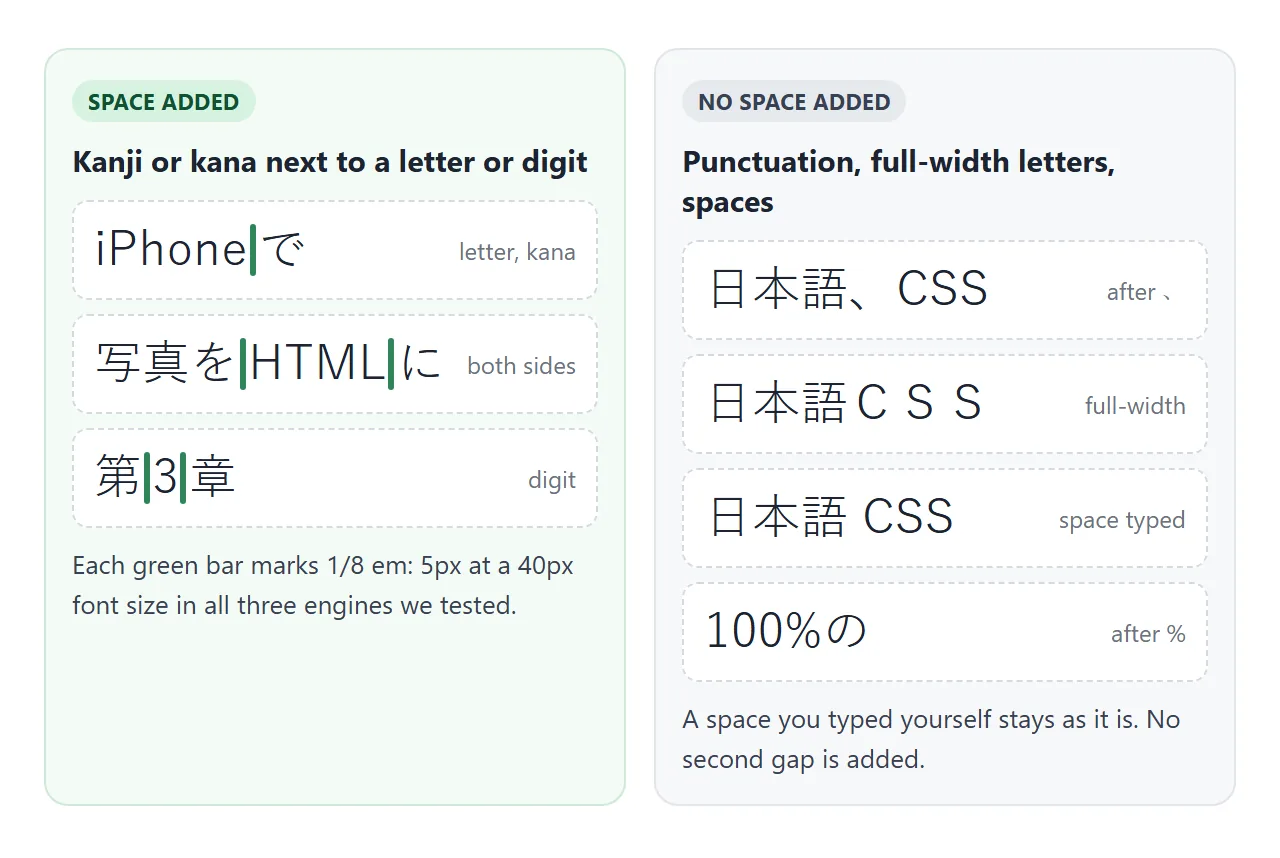
No gap was added next to punctuation, next to full-width letters such as CSS, next to % or brackets, or where a space was already typed. Firefox and WebKit also accepted finer values:
p { text-autospace: ideograph-alpha; }            /* letters only */
p { text-autospace: ideograph-alpha ideograph-numeric; }
The Chromium build rejected those and accepted only normal and no-autospace. One more difference: Chromium and Firefox added the gap across an element edge, as in 日本語<b>CSS</b>, and WebKit did not.
Which engines we tested
These results come from the three engines installed with Playwright on Windows. We did not test phones or other versions.
| Engine (Playwright build) | text-spacing-trim |
text-autospace |
|---|---|---|
| Chromium | Supported | normal and no-autospace only |
| Firefox | Not supported | Supported, with finer values |
| WebKit | Not supported | Supported, with finer values |
To check in your own page, ask the browser, as the demos above do:
const trims = CSS.supports('text-spacing-trim', 'trim-start');
const spaces = CSS.supports('text-autospace', 'normal');
Fonts decide whether trimming shows
Trimming uses narrow versions of the marks that come with the font. On the Windows machine we tested, Yu Gothic had them. MS Gothic, Microsoft YaHei and SimSun kept every mark at full width, whatever the value.
List a font that has narrow punctuation first. The font-family list covers how the browser falls back from one name to the next:
body {
  font-family: "Hiragino Sans", "Yu Gothic", "Noto Sans CJK JP", sans-serif;
}
A finished example with a fallback
This article card uses both properties. The Before button switches to space-all and no-autospace, so you can see what changed. Watch the green edge: in Chromium, lines that start with 「 or ( move to meet it.
<!doctype html>
<html lang="ja">
<head>
<meta charset="utf-8">
<meta name="viewport" content="width=device-width, initial-scale=1">
<title>Japanese article with tidy spacing</title>
<style>
  body {
    margin: 0; padding: 14px; background: #eceef1; color: #1d2330;
    font-family: system-ui, sans-serif;
  }
  .bar { display: flex; gap: 8px; margin-bottom: 12px; }
  button {
    font: 600 13px system-ui, sans-serif; padding: 8px 12px; border-radius: 8px;
    border: 1px solid #c9cdd4; background: #fff; cursor: pointer;
  }
  button[aria-pressed="true"] { background: #1d2330; color: #fff; border-color: #1d2330; }

  article {
    max-width: 22em; background: #fff; border-radius: 12px; padding: 16px 18px;
    border-left: 3px solid #2f855a;  /* the green edge makes line starts easy to compare */
    font-family: "Hiragino Sans", "Yu Gothic", "Noto Sans CJK JP", "Noto Sans JP", sans-serif;
    font-size: 17px; line-height: 1.8;
  }
  article h2 { font-size: 19px; margin: 0 0 8px; }
  article p { margin: 0 0 8px; }

  /* Before: every mark keeps its full width, no extra space next to Latin text */
  .before article { text-spacing-trim: space-all; text-autospace: no-autospace; }

  /* After: only where the browser knows the property */
  @supports (text-spacing-trim: trim-start) {
    .after article { text-spacing-trim: trim-start; }
  }
  @supports (text-autospace: normal) {
    .after article { text-autospace: normal; }
  }
</style>
</head>
<body class="after">
<div class="bar" lang="en">
  <button id="before" aria-pressed="false">Before</button>
  <button id="after" aria-pressed="true">After</button>
</div>

<article>
  <h2>「HTML共有」機能、9月にリリース</h2>
  <p>「リンクを送るだけで動くページが見られる」と担当者は話す。</p>
  <p>(試験版)では、iPhoneとAndroidの両方で3種類のデモを確認した。</p>
  <p>「次は、(縦書き)にも対応したい」とのこと。</p>
</article>

<script>
  const btn = { before: document.getElementById('before'), after: document.getElementById('after') };
  const show = (mode) => {
    document.body.className = mode;
    btn.before.setAttribute('aria-pressed', mode === 'before');
    btn.after.setAttribute('aria-pressed', mode === 'after');
  };
  btn.before.addEventListener('click', () => show('before'));
  btn.after.addEventListener('click', () => show('after'));
</script>
</body>
</html>
The pattern is to keep the untrimmed layout as the default and add the new properties only where the browser knows them:
@supports (text-spacing-trim: trim-start) {
  article { text-spacing-trim: trim-start; }
}
@supports (text-autospace: normal) {
  article { text-autospace: normal; }
}
Two separate blocks matter here, because an engine can support one property and not the other.
For vertical Japanese layout, see CSS writing-mode. For emphasis dots over characters, see CSS text-emphasis. If you want less space above and below a block rather than inside the line, text-box-trim is the property.
When it does not work
| What you see | Cause | Fix |
|---|---|---|
| No change in Firefox or Safari | text-spacing-trim is not supported there |
Keep a readable default and use @supports |
| No change in Chrome either | The font has no narrow punctuation | Put Hiragino Sans, Yu Gothic or Noto Sans CJK first |
trim-both does nothing |
The tested Chromium build rejected it | Use trim-start |
ideograph-alpha does nothing in Chrome |
That build accepts only normal and no-autospace |
Use normal |
trim-start works in a test file but not in the page |
The phrase was laid out earlier with normal |
Set one value on html |
| No gap next to bold English in Safari | WebKit did not add the gap across element edges | Accept it, or keep the word in the same element |
| Gap missing after a comma | Autospace only adds space next to kanji and kana | Nothing to fix |
Share it as a link
Spacing differences are hard to judge from a screenshot, because the result depends on the browser and the fonts on each device. A link to the working page lets people open it on their own phone and see what their browser does.
Paste the page into a NOS document and choose Create share link. HTML to link walks through it.
The page renders as written and its scripts run, so readers can press Before and After themselves. If you change the CSS later, the same link shows the new version.