The CSS dynamic-range-limit property caps how bright HDR content inside an element may get. standard keeps it no brighter than CSS white. no-limit, the default, lets it go as bright as the screen allows. Set it on an image, a video, or a whole page.
Try it first. The picture below is a small HDR PNG built into the page. Switch between the two values.
<!doctype html>
<html lang="en">
<head>
<meta charset="utf-8">
<meta name="viewport" content="width=device-width, initial-scale=1">
<title>dynamic-range-limit: basic</title>
<style>
  body { margin: 0; padding: 16px; font-family: system-ui, sans-serif; background: #f4f5f7; color: #1d2330; }
  .shot {
    display: block; width: 100%; max-width: 480px; aspect-ratio: 16 / 9;
    border-radius: 10px; background: #0b1020;
    dynamic-range-limit: standard;           /* no brighter than CSS white */
    transition: dynamic-range-limit 0.6s;    /* the limit can animate */
  }
  .shot.hdr { dynamic-range-limit: no-limit; }  /* as bright as the screen allows */
  .bar { display: flex; gap: 8px; margin: 12px 0; flex-wrap: wrap; }
  button { font: inherit; padding: 8px 14px; border-radius: 8px; border: 1px solid #c9ced8; background: #fff; cursor: pointer; }
  button[aria-pressed="true"] { background: #1d2330; color: #fff; border-color: #1d2330; }
  .out { font: 13px/1.5 ui-monospace, Consolas, monospace; background: #fff; border: 1px solid #e1e4ea; border-radius: 8px; padding: 10px 12px; }
  .note { margin-top: 10px; padding: 10px 12px; border-radius: 8px; background: #fff4e0; font-size: 14px; line-height: 1.45; }
</style>
</head>
<body>
<!-- A tiny HDR PNG made for this demo: BT.2020 colours, PQ curve, marked by a cICP chunk -->
<img class="shot" id="shot" alt="A night street with a bright sun and four street lamps" src="data:image/png;base64,iVBORw0KGgoAAAANSUhEUgAAAUAAAAC0CAIAAABqhmJGAAAABGNJQ1AJEAABTSMj/gAAA5ZJREFUeNrt3UFqE1EYwPEeqDv3LryACxfewDsoXkIKIu0FFEkpBBFqway6SBezkUBwLLWLnsMPBkqItk7avHnzXn7wW5hk2nwz5l+SyUyy9/TZS6BQezYBCBgQMCBgEDAgYEDAgIBBwICAAQGDgAEBAwIGBAwCBgQMCBgQMAgYEDAgYBAwIGBAwICAQcCAgAEBAwIGAQMCBgQMAgYEDAgYEDAIGDKbTD42zbxtF5eXy5ub37fiYlwZN8UCAobRubg4v7r6uRrtXWKxWFjAMAqz2bfr61990l0VPxI/KGDI5vDw/XL5Y9N0V8WPxy8RMGSot+dz5v8+o661YQFTeb11Nyxg6q+34oYFzBg98nXvPa+HBQzJ9zmnqLdT2X5pATM6D3jHaKP3lgQMCY/WSFdvp6ZjPATMuGx939U/92YJGJIc55y63k41x0sLmBFpmvkwAccdCRi2rG0XwwQcdyRg2LK1MwTTiTsSMGzZMPV2BAwCFjAIWMAIWMBgJ5aAwdtIAsaBHA7kEDAOpaz3UMrnL17BeAxzMkM1m0vAjMswpxMKGFJJfUJ/TdtKwIxO6o/UETCkle5D7SrbUAJmjI6OPqT4WNn4tQKG8hqusl4BsxMN11qvgCmg4cd/uVmt9QqYYvZLP/jrReveMgKmpGM8NvqC713YJgKmMJPJp6aZt+1i7dzDuBhXxk2xwO5sDQGDgAEBAwIGAQMCBgQMCBgEDAgYEDAIGBAwIGBAwCBgQMCAgAEBg4ABAQMCBgEDAgYEDAgYBAwIGBAwIGAQMCBgQMAgYGCHAz44eDedHp+dff0+Ow3xj7gYV+ZaSfOUNQ/ZAn795u3JyefucfC3uCkWGHL1zFPWPOQMOP6zT0+/3PVo6MQCgz0mzFPWPGQO+J6/5Wt/14dZN/OUNQ85A46XTH0eDZ0BXl+Zp6x5yBzwdHrc/wERC6deMfOUNQ+ZA77dh9lHLJx6xcxT1jxkDrj/o6GTesXMU9Y8CNg8Ahawp4jm8RTaTiw7acyDt5HM420kHMhhHgdyCNihgubByQxOHjAPTic0j9MJiYD3958AhRIwCBgQMCBgEDAgYEDAgIBBwICAAQGDgAEBAwIGBAwCBgQMCBgQMAgYEDAgYBAwIGBAwICAQcCAgAEBAwIGAQMCBgQMAgYEDAgYEDAIGBAwIGAQsK0AAgYEDAgYBAwIGBAwIGAQMCBgQMAgYEDAgIABAUPl/gCVZVDLydT8GQAAAABJRU5ErkJggg==">

<div class="bar">
  <button id="std" aria-pressed="true">standard</button>
  <button id="nl" aria-pressed="false">no-limit</button>
</div>
<div class="out" id="out"></div>
<p class="note" id="note" hidden></p>

<script>
  const shot = document.getElementById('shot');
  const out = document.getElementById('out');

  function show() {
    // What the browser computed, and what it can do
    const value = getComputedStyle(shot).getPropertyValue('dynamic-range-limit') || '(not supported)';
    out.textContent = 'computed: ' + value;
  }

  function pick(hdr) {
    shot.classList.toggle('hdr', hdr);
    document.getElementById('std').setAttribute('aria-pressed', !hdr);
    document.getElementById('nl').setAttribute('aria-pressed', hdr);
    setTimeout(show, 700);  // read the value after the 0.6s transition
  }
  document.getElementById('std').addEventListener('click', () => pick(false));
  document.getElementById('nl').addEventListener('click', () => pick(true));
  show();

  // Fallback notes: tell the reader why both buttons may look the same
  const note = document.getElementById('note');
  if (!CSS.supports('dynamic-range-limit', 'standard')) {
    note.hidden = false;
    note.textContent = 'This browser does not support dynamic-range-limit, so the buttons change nothing.';
  } else if (!matchMedia('(dynamic-range: high)').matches) {
    note.hidden = false;
    note.textContent = 'Your screen does not report HDR (dynamic-range: high), so both buttons look the same here.';
  }
</script>
</body>
</html>
On an SDR screen both buttons look the same, and the example says so. The value still changes, as the readout shows. To see the brightness change, open the page on an HDR display in a browser that supports the property.
What the property controls
Ordinary web content is SDR. Its brightest colour is CSS white, #ffffff. HDR content can be brighter than that. The spec calls CSS white the HDR reference white.
How far content can go above that white is its HDR headroom, counted in photographic stops. One stop doubles the brightness. SDR content has no headroom, and neither do screens that cannot show brighter colours.
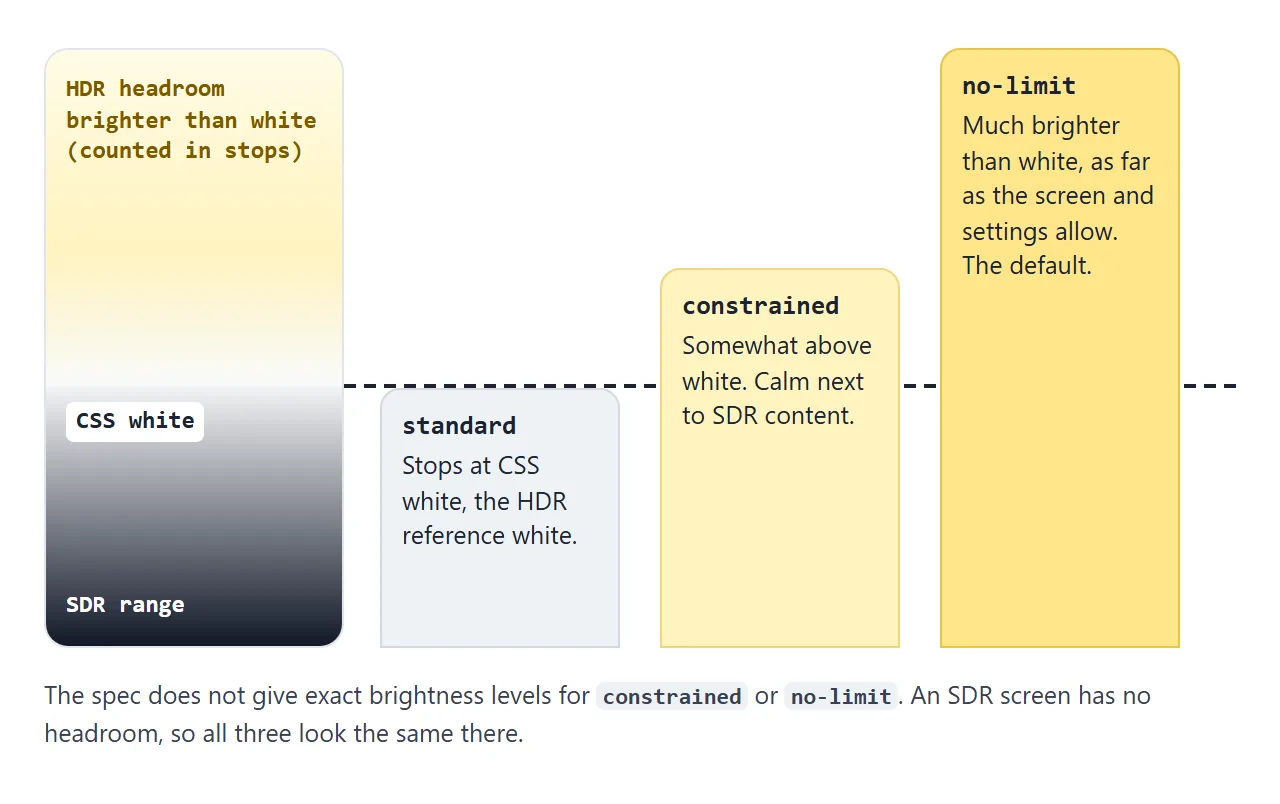
dynamic-range-limit sets the ceiling inside that headroom. SDR content has nothing above white, so the limit leaves it as it is.
The four values
| Value | Brightest HDR content may get |
|---|---|
standard |
CSS white, the HDR reference white |
constrained |
Somewhat above white, so HDR and SDR content sit together comfortably |
no-limit |
Much brighter than white. This is the initial value |
dynamic-range-limit-mix() |
A custom level between the keywords |
The spec does not give an exact level for constrained or no-limit. The property takes keywords and percentages only, so you cannot ask for a number of nits.
The property is inherited. Set standard on body and every image and video on the page starts from that limit, until a more specific rule changes it.
Custom limits with dynamic-range-limit-mix()
dynamic-range-limit-mix() blends two or more values by percentage. Each pair is a keyword, or another mix, followed by a percentage:
img.preview {
  dynamic-range-limit: dynamic-range-limit-mix(standard 70%, no-limit 30%);
}
Move the slider to change the share of no-limit, and watch the computed value.
<!doctype html>
<html lang="en">
<head>
<meta charset="utf-8">
<meta name="viewport" content="width=device-width, initial-scale=1">
<title>dynamic-range-limit: the three keywords and mix()</title>
<style>
  body { margin: 0; padding: 16px; font-family: system-ui, sans-serif; background: #f4f5f7; color: #1d2330; }
  .row { display: grid; grid-template-columns: repeat(3, 1fr); gap: 8px; max-width: 520px; }
  figure { margin: 0; }
  figcaption { font: 12px/1.4 ui-monospace, Consolas, monospace; margin-top: 4px; }
  img { display: block; width: 100%; aspect-ratio: 16 / 9; border-radius: 8px; background: #0b1020; }
  .standard    { dynamic-range-limit: standard; }
  .constrained { dynamic-range-limit: constrained; }
  .no-limit    { dynamic-range-limit: no-limit; }
  .big { max-width: 520px; margin-top: 16px; }
  label { display: block; margin: 10px 0 4px; font-size: 14px; }
  input { width: 100%; max-width: 520px; }
  .note { max-width: 496px; margin-top: 10px; padding: 10px 12px; border-radius: 8px; background: #fff4e0; font-size: 14px; line-height: 1.45; }
  .out { font: 13px/1.5 ui-monospace, Consolas, monospace; background: #fff; border: 1px solid #e1e4ea; border-radius: 8px; padding: 10px 12px; max-width: 496px; overflow-wrap: anywhere; white-space: pre-wrap; }
</style>
</head>
<body>
<div class="row">
  <figure><img class="standard" alt="HDR image, standard"><figcaption>standard</figcaption></figure>
  <figure><img class="constrained" alt="HDR image, constrained"><figcaption>constrained</figcaption></figure>
  <figure><img class="no-limit" alt="HDR image, no-limit"><figcaption>no-limit</figcaption></figure>
</div>

<div class="big">
  <img id="mixed" alt="The same HDR image with a custom limit">
  <label for="amount">no-limit share: <b id="pct">30</b>%</label>
  <input id="amount" type="range" min="0" max="100" value="30">
  <div class="out" id="out"></div>
  <p class="note" id="note" hidden></p>
</div>

<script>
  // A tiny HDR PNG made for this demo: BT.2020 colours, PQ curve, marked by a cICP chunk
  const HDR = 'data:image/png;base64,iVBORw0KGgoAAAANSUhEUgAAAUAAAAC0CAIAAABqhmJGAAAABGNJQ1AJEAABTSMj/gAAA5ZJREFUeNrt3UFqE1EYwPEeqDv3LryACxfewDsoXkIKIu0FFEkpBBFqway6SBezkUBwLLWLnsMPBkqItk7avHnzXn7wW5hk2nwz5l+SyUyy9/TZS6BQezYBCBgQMCBgEDAgYEDAgIBBwICAAQGDgAEBAwIGBAwCBgQMCBgQMAgYEDAgYBAwIGBAwICAQcCAgAEBAwIGAQMCBgQMAgYEDAgYEDAIGDKbTD42zbxtF5eXy5ub37fiYlwZN8UCAobRubg4v7r6uRrtXWKxWFjAMAqz2bfr61990l0VPxI/KGDI5vDw/XL5Y9N0V8WPxy8RMGSot+dz5v8+o661YQFTeb11Nyxg6q+34oYFzBg98nXvPa+HBQzJ9zmnqLdT2X5pATM6D3jHaKP3lgQMCY/WSFdvp6ZjPATMuGx939U/92YJGJIc55y63k41x0sLmBFpmvkwAccdCRi2rG0XwwQcdyRg2LK1MwTTiTsSMGzZMPV2BAwCFjAIWMAIWMBgJ5aAwdtIAsaBHA7kEDAOpaz3UMrnL17BeAxzMkM1m0vAjMswpxMKGFJJfUJ/TdtKwIxO6o/UETCkle5D7SrbUAJmjI6OPqT4WNn4tQKG8hqusl4BsxMN11qvgCmg4cd/uVmt9QqYYvZLP/jrReveMgKmpGM8NvqC713YJgKmMJPJp6aZt+1i7dzDuBhXxk2xwO5sDQGDgAEBAwIGAQMCBgQMCBgEDAgYEDAIGBAwIGBAwCBgQMCAgAEBg4ABAQMCBgEDAgYEDAgYBAwIGBAwIGAQMCBgQMAgYGCHAz44eDedHp+dff0+Ow3xj7gYV+ZaSfOUNQ/ZAn795u3JyefucfC3uCkWGHL1zFPWPOQMOP6zT0+/3PVo6MQCgz0mzFPWPGQO+J6/5Wt/14dZN/OUNQ85A46XTH0eDZ0BXl+Zp6x5yBzwdHrc/wERC6deMfOUNQ+ZA77dh9lHLJx6xcxT1jxkDrj/o6GTesXMU9Y8CNg8Ahawp4jm8RTaTiw7acyDt5HM420kHMhhHgdyCNihgubByQxOHjAPTic0j9MJiYD3958AhRIwCBgQMCBgEDAgYEDAgIBBwICAAQGDgAEBAwIGBAwCBgQMCBgQMAgYEDAgYBAwIGBAwICAQcCAgAEBAwIGAQMCBgQMAgYEDAgYEDAIGBAwIGAQsK0AAgYEDAgYBAwIGBAwIGAQMCBgQMAgYEDAgIABAUPl/gCVZVDLydT8GQAAAABJRU5ErkJggg==';
  document.querySelectorAll('img').forEach((img) => { img.src = HDR; });

  const mixed = document.getElementById('mixed');
  const amount = document.getElementById('amount');
  const out = document.getElementById('out');

  function update() {
    const n = Number(amount.value);
    document.getElementById('pct').textContent = n;
    // A custom limit between standard and no-limit
    const value = `dynamic-range-limit-mix(standard ${100 - n}%, no-limit ${n}%)`;
    mixed.style.setProperty('dynamic-range-limit', value);
    const computed = getComputedStyle(mixed).getPropertyValue('dynamic-range-limit');
    out.textContent = 'set:      ' + value + '\ncomputed: ' + (computed || '(not supported)');
  }
  amount.addEventListener('input', update);
  update();

  // Fallback note when the browser or the screen cannot show the difference
  const note = document.getElementById('note');
  if (!CSS.supports('dynamic-range-limit', 'constrained')) {
    note.hidden = false;
    note.textContent = 'This browser does not support constrained or dynamic-range-limit-mix(), so these rules are ignored.';
  } else if (!matchMedia('(dynamic-range: high)').matches) {
    note.hidden = false;
    note.textContent = 'Your screen does not report HDR, so all four images look the same. The computed values above are still real.';
  }
</script>
</body>
</html>
The readout shows the browser's rules for the computed value, which come from the spec:
- Percentages are scaled to add up to 100%.
standard 20%, no-limit 20%computes to 50% each. - The keywords are listed in the order
standard,constrained,no-limit, whatever order you wrote. - A value at 100% becomes that keyword. At 0% on the slider, the computed value is plain
standard.
Script can read these values but not the brightness they produce. The spec keeps the calculated level hidden for privacy reasons.
Because the property animates as a mix, it can be transitioned:
img { transition: dynamic-range-limit 0.6s; }
Halfway through, getComputedStyle returns a dynamic-range-limit-mix() between the start and end values. The CSS transition guide covers the rest of the syntax.
Browser support and fallbacks
The property is defined in CSS Color HDR Module Level 1, published by the W3C as a Working Draft. MDN's compatibility data lists support in Chrome and Edge, and in Safari. It lists no support in Firefox.
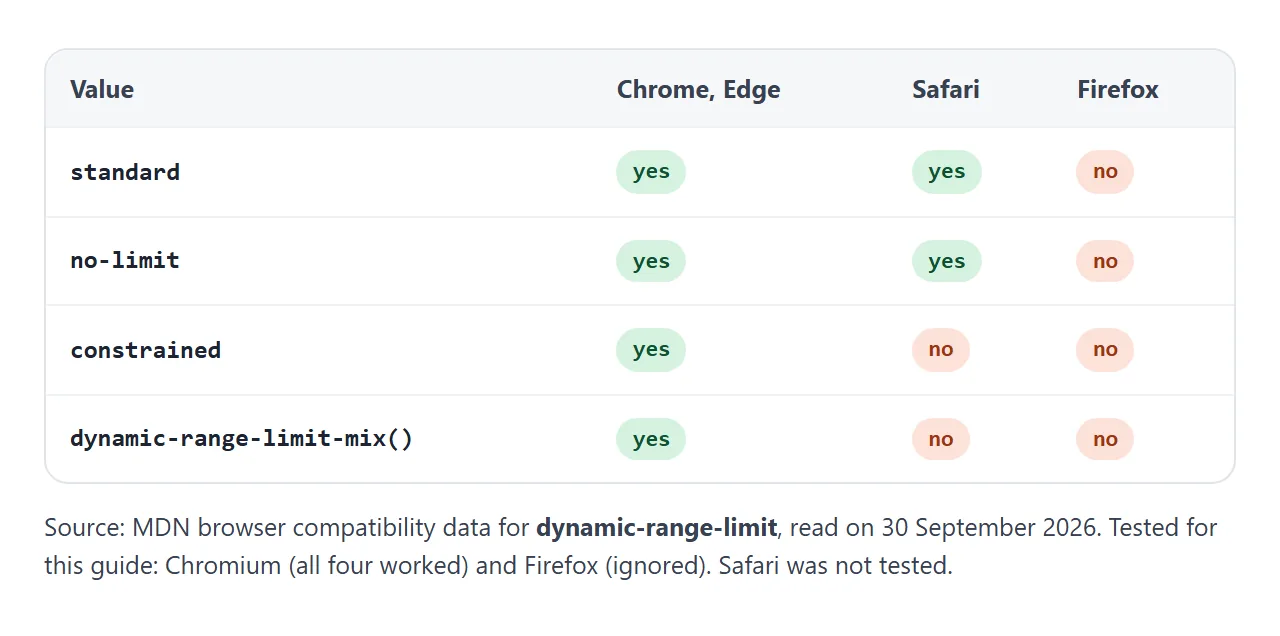
The keywords are not equal. MDN lists constrained and dynamic-range-limit-mix() only for Chromium browsers, and marks both as experimental. standard and no-limit are also listed for Safari.
I ran the examples in Chromium and Firefox. In Chromium all four values worked. Firefox ignored the property, and each example showed its fallback note. I had no Safari to test.
A browser drops a declaration it does not understand. Write the safe value first and the newer one second:
.grid img {
  dynamic-range-limit: standard;     /* kept if constrained is unknown */
  dynamic-range-limit: constrained;
}
To test the screen, use the dynamic-range media query. (dynamic-range: high) tells you the device can show HDR, not that HDR is switched on right now. Some devices, many TVs among them, draw video on a separate plane. video-dynamic-range tests that video plane.
A finished example: an HDR photo gallery
MDN's own use case for the property is a gallery. HDR brightness can be jarring, most of all when HDR and SDR content share a page. MDN suggests limiting the thumbnails and using no-limit when the user views a single image.
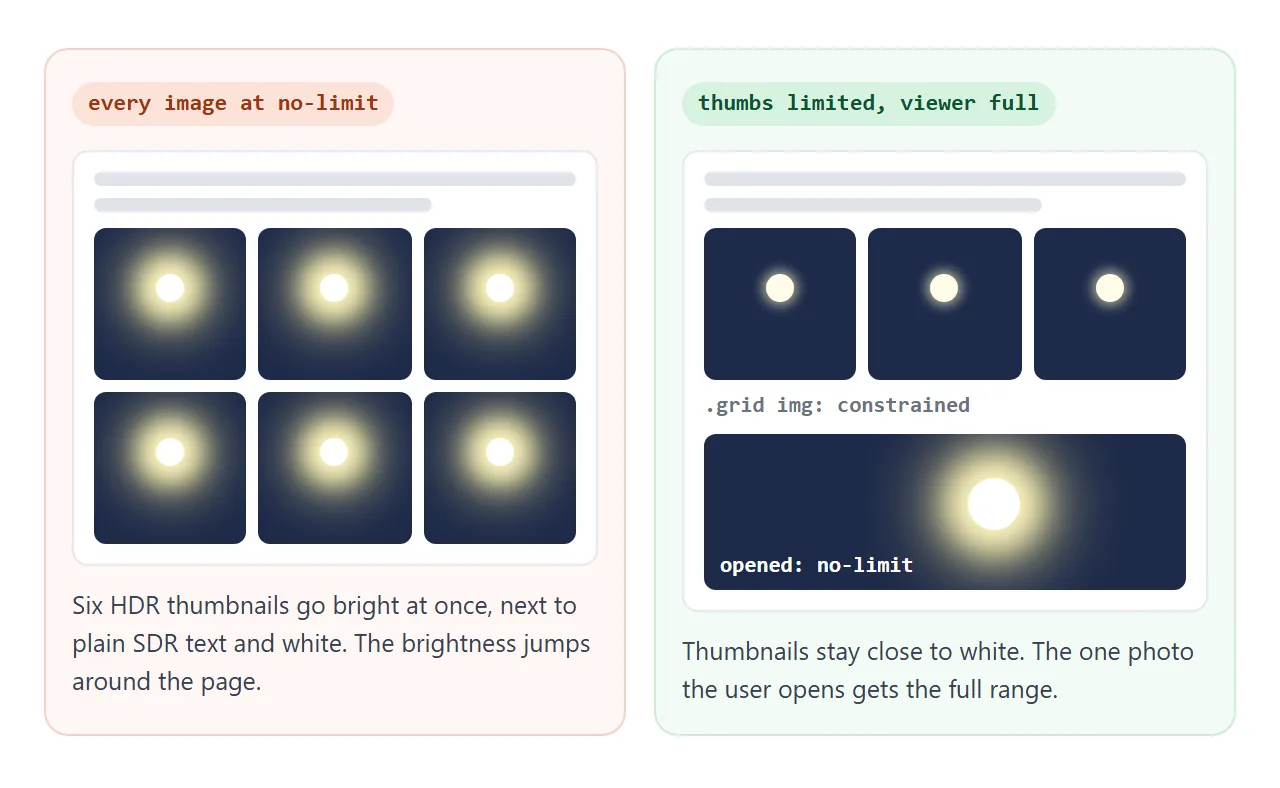
This gallery puts that into code. Click a thumbnail to open it in a dialog. The checkbox acts as a user setting for full brightness.
<!doctype html>
<html lang="en">
<head>
<meta charset="utf-8">
<meta name="viewport" content="width=device-width, initial-scale=1">
<title>HDR gallery with dynamic-range-limit</title>
<style>
  body {
    margin: 0; padding: 16px; font-family: system-ui, sans-serif; background: #f4f5f7; color: #1d2330;
    dynamic-range-limit: standard;  /* inherited: nothing on the page is brighter than white */
  }
  .grid { display: grid; grid-template-columns: repeat(auto-fill, minmax(110px, 1fr)); gap: 8px; max-width: 560px; }
  .grid button { padding: 0; border: 0; border-radius: 8px; overflow: hidden; cursor: zoom-in; background: #0b1020; }
  .grid img {
    display: block; width: 100%; aspect-ratio: 1; object-fit: cover;
    dynamic-range-limit: standard;     /* fallback where constrained is not supported */
    dynamic-range-limit: constrained;  /* a little above white, calm next to the page */
  }
  dialog { padding: 0; border: 0; border-radius: 12px; background: #0b1020; width: min(92vw, 640px); }
  dialog::backdrop { background: rgba(0, 0, 0, .75); }
  dialog img {
    display: block; width: 100%; aspect-ratio: 16 / 9;
    transition: dynamic-range-limit 0.6s;
  }
  dialog img.full { dynamic-range-limit: no-limit; }  /* full HDR only when opened */
  dialog form { display: flex; justify-content: space-between; align-items: center; gap: 8px; padding: 10px 12px; color: #fff; font-size: 14px; }
  dialog button { font: inherit; padding: 6px 12px; border-radius: 6px; border: 0; }
  label { display: block; margin: 12px 0; font-size: 14px; }
</style>
</head>
<body>
<label><input type="checkbox" id="allow" checked> Show full HDR brightness when a photo is opened</label>
<div class="grid" id="grid"></div>

<dialog id="viewer">
  <img id="big" alt="">
  <form method="dialog"><span id="value"></span><button>Close</button></form>
</dialog>

<script>
  // A tiny HDR PNG made for this demo: BT.2020 colours, PQ curve, marked by a cICP chunk
  const HDR = 'data:image/png;base64,iVBORw0KGgoAAAANSUhEUgAAAUAAAAC0CAIAAABqhmJGAAAABGNJQ1AJEAABTSMj/gAAA5ZJREFUeNrt3UFqE1EYwPEeqDv3LryACxfewDsoXkIKIu0FFEkpBBFqway6SBezkUBwLLWLnsMPBkqItk7avHnzXn7wW5hk2nwz5l+SyUyy9/TZS6BQezYBCBgQMCBgEDAgYEDAgIBBwICAAQGDgAEBAwIGBAwCBgQMCBgQMAgYEDAgYBAwIGBAwICAQcCAgAEBAwIGAQMCBgQMAgYEDAgYEDAIGDKbTD42zbxtF5eXy5ub37fiYlwZN8UCAobRubg4v7r6uRrtXWKxWFjAMAqz2bfr61990l0VPxI/KGDI5vDw/XL5Y9N0V8WPxy8RMGSot+dz5v8+o661YQFTeb11Nyxg6q+34oYFzBg98nXvPa+HBQzJ9zmnqLdT2X5pATM6D3jHaKP3lgQMCY/WSFdvp6ZjPATMuGx939U/92YJGJIc55y63k41x0sLmBFpmvkwAccdCRi2rG0XwwQcdyRg2LK1MwTTiTsSMGzZMPV2BAwCFjAIWMAIWMBgJ5aAwdtIAsaBHA7kEDAOpaz3UMrnL17BeAxzMkM1m0vAjMswpxMKGFJJfUJ/TdtKwIxO6o/UETCkle5D7SrbUAJmjI6OPqT4WNn4tQKG8hqusl4BsxMN11qvgCmg4cd/uVmt9QqYYvZLP/jrReveMgKmpGM8NvqC713YJgKmMJPJp6aZt+1i7dzDuBhXxk2xwO5sDQGDgAEBAwIGAQMCBgQMCBgEDAgYEDAIGBAwIGBAwCBgQMCAgAEBg4ABAQMCBgEDAgYEDAgYBAwIGBAwIGAQMCBgQMAgYGCHAz44eDedHp+dff0+Ow3xj7gYV+ZaSfOUNQ/ZAn795u3JyefucfC3uCkWGHL1zFPWPOQMOP6zT0+/3PVo6MQCgz0mzFPWPGQO+J6/5Wt/14dZN/OUNQ85A46XTH0eDZ0BXl+Zp6x5yBzwdHrc/wERC6deMfOUNQ+ZA77dh9lHLJx6xcxT1jxkDrj/o6GTesXMU9Y8CNg8Ahawp4jm8RTaTiw7acyDt5HM420kHMhhHgdyCNihgubByQxOHjAPTic0j9MJiYD3958AhRIwCBgQMCBgEDAgYEDAgIBBwICAAQGDgAEBAwIGBAwCBgQMCBgQMAgYEDAgYBAwIGBAwICAQcCAgAEBAwIGAQMCBgQMAgYEDAgYEDAIGBAwIGAQsK0AAgYEDAgYBAwIGBAwIGAQMCBgQMAgYEDAgIABAUPl/gCVZVDLydT8GQAAAABJRU5ErkJggg==';
  const crops = ['30% 20%', '75% 20%', '10% 70%', '40% 70%', '70% 50%', '95% 90%'];

  const grid = document.getElementById('grid');
  const viewer = document.getElementById('viewer');
  const big = document.getElementById('big');

  crops.forEach((pos, i) => {
    const b = document.createElement('button');
    b.innerHTML = `<img src="${HDR}" alt="Night street, crop ${i + 1}" style="object-position:${pos}">`;
    b.addEventListener('click', openViewer);
    grid.append(b);
  });

  function openViewer() {
    big.src = HDR;
    big.alt = 'Night street, full view';
    viewer.showModal();
    // Add the class one frame later so the limit transitions from standard
    requestAnimationFrame(() => requestAnimationFrame(() => {
      big.classList.toggle('full', document.getElementById('allow').checked);
    }));
    setTimeout(() => {
      const value = getComputedStyle(big).getPropertyValue('dynamic-range-limit') || 'not supported';
      const screen = matchMedia('(dynamic-range: high)').matches ? 'HDR screen' : 'SDR screen';
      document.getElementById('value').textContent = value + ' · ' + screen;
    }, 800);  // after the 0.6s transition
  }
  viewer.addEventListener('close', () => big.classList.remove('full'));
</script>
</body>
</html>
- Page:
standardonbodycovers everything by inheritance. - Thumbnails:
standard, thenconstrained, as shown above. - Viewer: a class sets
no-limit, with a 0.6s transition. The class is added after the dialog has rendered. Transitions do not run on an element's first style update, so adding it beforeshowModal()jumps straight tono-limit. - User choice: when the checkbox is off, the opened photo keeps the page limit.
The same layout without HDR is covered in the HTML image gallery guide and the lightbox guide.
Where the HDR image comes from
NOS share pages block outside images, so the image in these examples is built into the page as a data: URL. It is a PNG whose cICP chunk marks it as BT.2100 PQ.
The PNG spec defines that chunk and gives BT.2100 PQ as one of its examples. The Chromium I tested read that chunk and decoded the file as HDR.
When it does not work
| What you see | Cause | Fix |
|---|---|---|
| No difference between values | The screen is SDR or HDR is switched off | Test on an HDR display. Check (dynamic-range: high) |
| No difference, and the computed value is empty | The browser does not support the property | Check MDN's compatibility table. Nothing breaks, the image shows as usual |
constrained is ignored |
The browser supports only standard and no-limit |
Write standard first as a fallback |
| No HDR image gets brighter than white | standard on body is inherited by everything |
Set no-limit on the element that should be bright |
| No fade when a dialog opens | Transitions skip an element's first style update | Add the no-limit class after the dialog renders |
| An SDR photo does not change | SDR has nothing above white to limit | Expected. Only HDR content is affected |
Share it as a link
The point of an HDR page is what it looks like on the viewer's own screen. A link lets them see it there, and lets them press the buttons.
To send the working version, paste the page into a NOS document and choose Create share link. HTML to link walks through it.
The page renders as written and its scripts run, so the examples work for anyone who opens the link.
Outside images are blocked there, so keep the HDR image inside the page as a data: URL, as these examples do. If you change the code later, the same link shows the new version.