To stop people from clicking, focusing or tabbing into part of a page, add the inert attribute to it. A newer CSS property, interactivity: inert, does the same from a stylesheet. The region stays visible; it just cannot be used.
Press the blue button, then try the Save button and the field.
<!doctype html>
<html lang="en">
<head>
<meta charset="utf-8">
<meta name="viewport" content="width=device-width, initial-scale=1">
<title>The inert attribute</title>
<style>
  body { margin: 0; padding: 16px; font-family: system-ui, sans-serif; background: #f4f5f7; color: #1d2330; }
  .bar { display: flex; flex-wrap: wrap; gap: 10px; align-items: center; margin-bottom: 12px; }
  button, input { font: inherit; padding: 8px 12px; border-radius: 8px; border: 1px solid #c9ced8; }
  button { background: #fff; cursor: pointer; }
  #toggle { background: #1d4ed8; color: #fff; border-color: #1d4ed8; }
  .card { background: #fff; border-radius: 12px; padding: 14px 16px; box-shadow: 0 4px 14px rgba(0, 0, 0, .08); }
  .card h3 { margin: 0 0 10px; font-size: 16px; }
  .card input { width: 100%; box-sizing: border-box; margin-bottom: 10px; }
  /* inert does not change the look, so show it yourself */
  .card[inert] { opacity: .45; }
  code { background: #e8ebf0; border-radius: 4px; padding: 1px 5px; }
</style>
</head>
<body>
<div class="bar">
  <button id="toggle">Make the card inert</button>
  <span>card.inert = <code id="state">false</code></span>
</div>

<section class="card" id="card">
  <h3>Shipping address</h3>
  <input id="street" placeholder="Street" aria-label="Street">
  <button id="save">Save (clicked <span id="n">0</span>)</button>
</section>

<script>
  const card = document.getElementById('card');
  const toggle = document.getElementById('toggle');
  let clicks = 0;

  toggle.addEventListener('click', () => {
    card.inert = !card.inert;  // same as adding or removing the inert attribute
    document.getElementById('state').textContent = card.inert;
    toggle.textContent = card.inert ? 'Make it interactive again' : 'Make the card inert';
  });

  document.getElementById('save').addEventListener('click', () => {
    document.getElementById('n').textContent = ++clicks;
  });
</script>
</body>
</html>
The typical use is the page behind a panel. While a drawer or a sheet is open, the content underneath should be off limits for the mouse, the keyboard and screen readers alike.
What inert switches off
inert applies to the element and everything inside it. The HTML spec defines what that means, and we checked the parts a script can measure.
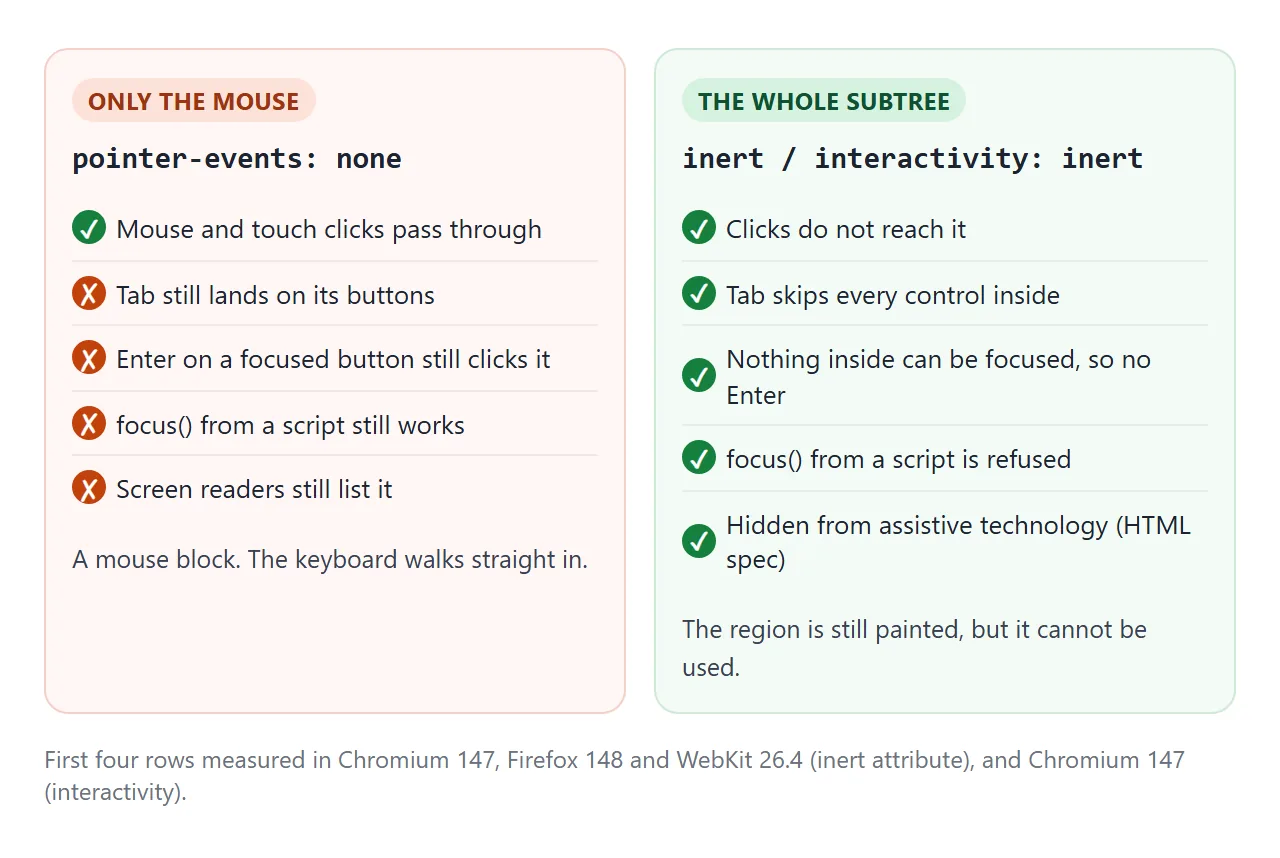
- Clicks do not reach the element. In our tests, the click event landed on the page body instead.
- Tab skips every link, button and field inside it.
- focus() from a script is refused, so nothing inside can become the active element.
- Assistive technology is not given the inert content, according to the HTML spec. We did not test a screen reader for this page.
Nothing changes visually. Add your own style, such as opacity: .45, so a locked region looks locked.
pointer-events: none is not the same thing
pointer-events: none is often used to disable a section, but it only stops the mouse and touch. A keyboard user can still Tab to the buttons and press Enter. Try all three below.
<!doctype html>
<html lang="en">
<head>
<meta charset="utf-8">
<meta name="viewport" content="width=device-width, initial-scale=1">
<title>pointer-events vs inert vs interactivity</title>
<style>
  body { margin: 0; padding: 14px; font-family: system-ui, sans-serif; background: #f4f5f7; color: #1d2330; font-size: 14px; }
  p { margin: 0 0 10px; }
  .grid { display: grid; grid-template-columns: repeat(auto-fit, minmax(170px, 1fr)); gap: 10px; margin-top: 10px; }
  .box { background: #fff; border-radius: 10px; padding: 12px; box-shadow: 0 3px 10px rgba(0, 0, 0, .07); }
  .box b { display: block; margin-bottom: 8px; font-family: ui-monospace, Consolas, monospace; font-size: 13px; }
  button, input { font: inherit; padding: 7px 10px; border-radius: 8px; border: 1px solid #c9ced8; background: #fff; }
  .box input { width: 100%; box-sizing: border-box; margin-top: 8px; }
  :focus-visible { outline: 3px solid #f59e0b; outline-offset: 2px; }

  /* two of the three ways to block a region (the third is the inert attribute) */
  .no-pointer { pointer-events: none; }
  .css-inert { interactivity: inert; }

  #log { margin-top: 10px; padding: 8px 10px; background: #fff; border-radius: 8px; }
  #support { font-weight: 600; }
</style>
</head>
<body>
<p>Click each button, then press <b>Start here</b> and Tab through. <span id="support"></span></p>
<button id="start">Start here</button>

<div class="grid">
  <div class="box no-pointer">
    <b>pointer-events: none</b>
    <button data-name="pointer-events: none">Click me</button>
    <input placeholder="Type here" aria-label="Field A">
  </div>
  <div class="box" inert>
    <b>inert attribute</b>
    <button data-name="inert attribute">Click me</button>
    <input placeholder="Type here" aria-label="Field B">
  </div>
  <div class="box css-inert">
    <b>interactivity: inert</b>
    <button data-name="interactivity: inert">Click me</button>
    <input placeholder="Type here" aria-label="Field C">
  </div>
</div>

<div id="log">Nothing yet.</div>

<script>
  const log = document.getElementById('log');
  const ok = CSS.supports('interactivity', 'inert');
  document.getElementById('support').textContent =
    'This browser ' + (ok ? 'supports' : 'does not support') + ' interactivity: inert.';

  document.querySelectorAll('[data-name]').forEach((btn) => {
    btn.addEventListener('click', () => log.textContent = 'Clicked: ' + btn.dataset.name);
    btn.addEventListener('focus', () => log.textContent = 'Tab reached: ' + btn.dataset.name);
  });
</script>
</body>
</html>
pointer-events: none |
inert attribute |
interactivity: inert |
|
|---|---|---|---|
| Where you set it | CSS | HTML or JavaScript | CSS |
| Blocks mouse and touch | Yes | Yes | Yes |
| Blocks Tab and focus | No | Yes | Yes |
| Worked in our Chromium 147 | Yes | Yes | Yes |
| Worked in our Firefox 148 and WebKit 26.4 | Yes | Yes | No, ignored |
For clicks passing through an overlay to what is under it, CSS pointer events is the right tool. For keyboard order in general, see tabindex.
The attribute vs the CSS property
The attribute is a switch that a script flips. The property is a CSS declaration, so a selector can decide when it applies.
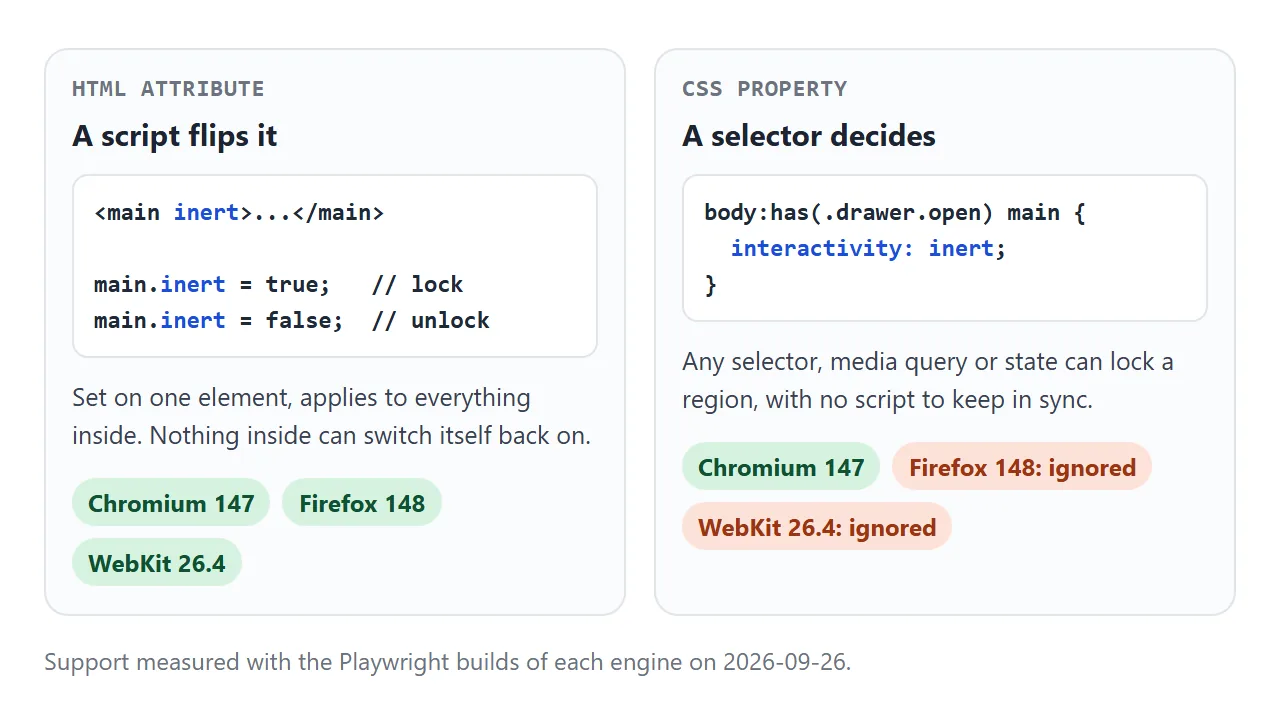
With the property, the page behind a drawer can be locked by one rule, with no script keeping it in sync:
body:has(.drawer.open) main {
  interactivity: inert;
  opacity: .5;
}
The :has() selector does the watching: when a drawer with the open class exists, main becomes inert. CSS :has() covers that selector.
Measured support
We ran the demos on this page in the Playwright builds of three engines on 2026-09-26: Chromium 147, Firefox 148 and WebKit 26.4. We did not test other browsers or versions.
- The
inertattribute blocked clicks, Tab andfocus()in all three. interactivity: inertworked in Chromium 147. Firefox 148 and WebKit 26.4 ignored the declaration, andCSS.supportsreturned false.
An engine that ignores the property leaves the region fully usable, so use it with a check and fall back to the attribute:
const cssInert = CSS.supports('interactivity', 'inert');
if (!cssInert) main.inert = open;
Modal dialogs already do this
A <dialog> opened with showModal() makes the rest of the page inert without any extra code.
In all three engines, focus moved into the dialog, Tab never reached the page behind it, Esc closed it, and focus went back to the button that opened it (we opened it from the keyboard).
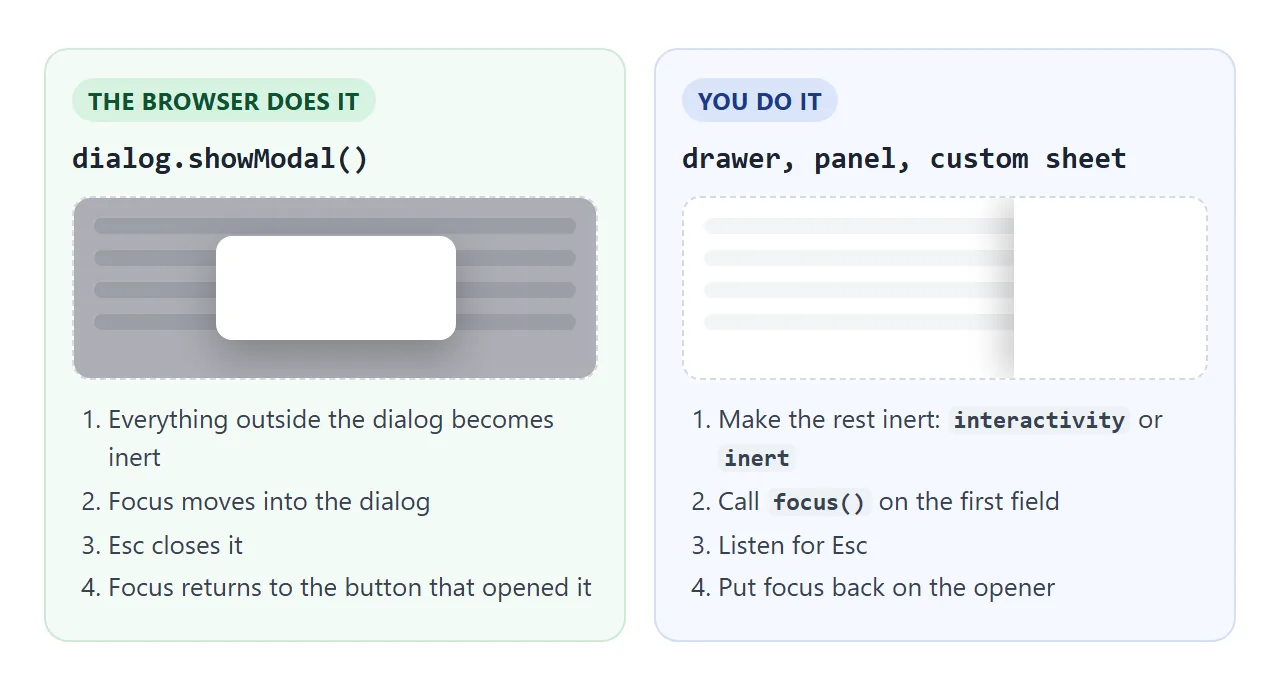
So you do not add inert around a modal dialog. You add it for everything the browser does not treat as modal: drawers, side panels, full-screen menus and overlays built from a div. HTML CSS modal compares the dialog element with a hand-built overlay.
Focus trapping, compared
Older focus traps listen for Tab and move focus back to the first or last control by hand. Making the background inert does the work instead: if nothing behind the panel can take focus, Tab has nowhere to go but the panel.
In our tests, pressing Tab past the last control in a modal dialog or an open drawer never landed on the page behind it. In Chromium and WebKit, focus left the page for the browser's own controls between rounds, then came back to the panel.
That exit is expected and lets keyboard users reach the address bar.
A finished example: dialog and drawer side by side
This page has both kinds. The dialog relies on showModal(). The drawer uses the CSS rule where it is supported and the attribute elsewhere; the grey line says which one ran.
<!doctype html>
<html lang="en">
<head>
<meta charset="utf-8">
<meta name="viewport" content="width=device-width, initial-scale=1">
<title>Modal dialog vs drawer with an inert background</title>
<style>
  body { margin: 0; font-family: system-ui, sans-serif; background: #f4f5f7; color: #1d2330; font-size: 15px; }
  main { padding: 16px; }
  h2 { margin: 0 0 6px; font-size: 18px; }
  .row { display: flex; flex-wrap: wrap; gap: 8px; margin: 12px 0; }
  button, input { font: inherit; padding: 8px 12px; border-radius: 8px; border: 1px solid #c9ced8; background: #fff; cursor: pointer; }
  .primary { background: #1d4ed8; color: #fff; border-color: #1d4ed8; }
  :focus-visible { outline: 3px solid #f59e0b; outline-offset: 2px; }
  #mode { font-size: 13px; color: #4b5563; margin: 0; }

  dialog { border: 0; border-radius: 12px; padding: 18px; max-width: 280px; box-shadow: 0 20px 50px rgba(0, 0, 0, .3); }
  dialog::backdrop { background: rgba(17, 24, 39, .45); }

  .drawer {
    position: fixed; top: 0; right: 0; bottom: 0; width: min(280px, 85vw);
    padding: 18px; box-sizing: border-box; background: #fff;
    box-shadow: -10px 0 30px rgba(0, 0, 0, .2);
    transform: translateX(100%); visibility: hidden;
    transition: transform .25s, visibility 0s .25s;  /* hide only after sliding out */
  }
  .drawer.open { transform: none; visibility: visible; transition: transform .25s; }
  .drawer input { width: 100%; box-sizing: border-box; margin: 10px 0; }

  /* the whole trick: while the drawer is open, the page behind it is inert */
  body:has(.drawer.open) main { interactivity: inert; opacity: .5; }
</style>
</head>
<body>
<main>
  <h2>Order #1042</h2>
  <p id="mode"></p>
  <div class="row">
    <button class="primary" id="openDialog">Open modal dialog</button>
    <button class="primary" id="openDrawer">Open drawer</button>
  </div>
  <div class="row">
    <button id="bg">Background button (clicked <span id="n">0</span>)</button>
    <input placeholder="Background field" aria-label="Background field">
  </div>
</main>

<dialog id="dialog">
  <p>showModal() made the page behind inert for you. Press Esc, or:</p>
  <button id="closeDialog">Close</button>
</dialog>

<aside class="drawer" id="drawer" aria-label="Edit note">
  <b>Edit note</b>
  <input id="note" placeholder="Note for the courier" aria-label="Note">
  <button id="closeDrawer">Done</button>
</aside>

<script>
  const main = document.querySelector('main');
  const drawer = document.getElementById('drawer');
  const dialog = document.getElementById('dialog');
  const opener = document.getElementById('openDrawer');
  const cssInert = CSS.supports('interactivity', 'inert');
  document.getElementById('mode').textContent = 'The drawer locks the page with ' +
    (cssInert ? 'CSS interactivity: inert.' : 'the inert attribute (fallback).');

  // modal dialog: the browser handles inertness, focus and Esc
  document.getElementById('openDialog').addEventListener('click', () => dialog.showModal());
  document.getElementById('closeDialog').addEventListener('click', () => dialog.close());

  // drawer: we lock the background, move focus in, and give it back
  function setDrawer(open) {
    drawer.classList.toggle('open', open);
    if (!cssInert) main.inert = open;  // engines without the property: use the attribute
    if (open) document.getElementById('note').focus();
    else opener.focus();
  }
  opener.addEventListener('click', () => setDrawer(true));
  document.getElementById('closeDrawer').addEventListener('click', () => setDrawer(false));
  document.addEventListener('keydown', (e) => {
    if (e.key === 'Escape' && drawer.classList.contains('open')) setDrawer(false);
  });

  let n = 0;
  document.getElementById('bg').addEventListener('click', () => {
    document.getElementById('n').textContent = ++n;
  });
</script>
</body>
</html>
The drawer code does four jobs:
- Lock the page: the
body:has(.drawer.open) mainrule, ormain.inert = openas the fallback. - Move focus in: call
focus()on the note field when the drawer opens. - Close on Esc: one
keydownlistener on the document. - Give focus back: focus the Open drawer button when it closes.
The drawer also gets visibility: hidden while closed, so its field cannot be tabbed into while it is off screen.
When it does not work
| What you see | Cause | Fix |
|---|---|---|
| Tab still reaches the locked buttons | You used pointer-events: none |
Use inert or interactivity: inert |
| Works in Chrome, not in Firefox or Safari | interactivity is ignored there |
Fall back to the inert attribute |
| The panel itself cannot be used | The panel is inside the inert element | Move it outside, next to main |
A child set to interactivity: auto is still locked |
The inert parent wins | Move that child out of the region |
| The region looks normal but ignores clicks | inert has no visual effect |
Add your own style, such as opacity |
| Focus is lost after closing the drawer | Nothing refocuses the opener | Call focus() on the opening button |
| Tab reaches a closed drawer's field | The drawer is only moved off screen | Add visibility: hidden while closed |
Share it as a link
Whether a lock works is something people need to try with a mouse and a keyboard; a screenshot cannot show it. To send the working version, paste the page into a NOS document and choose Create share link. HTML to link walks through it.
The page renders as written and its scripts run, so the people you send it to can open the drawer and press Tab themselves. If you change the code later, the same link shows the new version.