Set tab-size on the element that shows the tabs. pre { tab-size: 4; } makes every tab character four spaces wide instead of the default eight. It works the same on a <textarea>, and it changes only how tabs are drawn, not the text inside.
Try it. Every indent in this code is one real tab character. Press the buttons to change the width.
<!doctype html>
<html lang="en">
<head>
<meta charset="utf-8">
<meta name="viewport" content="width=device-width, initial-scale=1">
<title>tab-size basics</title>
<style>
  body { margin: 0; padding: 16px; font-family: system-ui, sans-serif; background: #f4f5f7; color: #1d2330; }
  .bar { display: flex; flex-wrap: wrap; gap: 6px; align-items: center; margin-bottom: 10px; }
  .bar button {
    font: 600 14px system-ui, sans-serif; padding: 7px 14px; border-radius: 8px;
    border: 1px solid #cfd5de; background: #fff; cursor: pointer;
  }
  .bar button[aria-pressed="true"] { background: #1d4ed8; border-color: #1d4ed8; color: #fff; }
  pre {
    margin: 0; padding: 14px 16px; border-radius: 10px; background: #1e2433; color: #e6e9ef;
    font: 15px/1.5 ui-monospace, Consolas, monospace;
    overflow-x: auto;
    tab-size: 4;  /* one tab = the width of 4 spaces (the default is 8) */
  }
  .rule { margin-top: 10px; font: 14px ui-monospace, Consolas, monospace; color: #374151; }
</style>
</head>
<body>
<div class="bar" id="bar">
  <span>Tab width:</span>
  <button data-size="2" aria-pressed="false">2</button>
  <button data-size="4" aria-pressed="true">4</button>
  <button data-size="8" aria-pressed="false">8</button>
</div>

<!-- every indent below is a real tab character -->
<pre id="code">function greet(name) {
	if (name) {
		return 'Hello, ' + name;
	}
	return 'Hello';
}</pre>

<p class="rule" id="rule">pre { tab-size: 4; }</p>

<script>
  const code = document.getElementById('code');
  const rule = document.getElementById('rule');

  document.getElementById('bar').addEventListener('click', (e) => {
    const btn = e.target.closest('button');
    if (!btn) return;
    code.style.tabSize = btn.dataset.size;  // same text, different tab width
    rule.textContent = 'pre { tab-size: ' + btn.dataset.size + '; }';
    document.querySelectorAll('#bar button').forEach((b) => b.setAttribute('aria-pressed', b === btn));
  });
</script>
</body>
</html>
The code is identical in all three states. Only the drawn width of each tab changes, so a copy of the code still contains tabs.
The value: a number or a length
A plain number counts space characters in the element's own font. tab-size: 4 is as wide as four spaces, so it grows with font-size. A length such as tab-size: 20px or tab-size: 2em sets the width directly.
| Value | What a tab is | Notes |
|---|---|---|
8 |
8 space widths | The initial value |
4 or 2 |
4 or 2 space widths | Narrower indents for code |
20px |
20 pixels | Does not follow the space width |
2em |
Twice the font size | Scales with the font |
0 |
No width | Tabs take no space |
Negative values are invalid, and the browser ignores the declaration. The property is inherited, which means one rule on body or on pre also covers the <code> inside it.
A tab jumps to the next tab stop
A tab is not a fixed gap. tab-size: 4 places tab stops every four columns, and each tab moves the text to the next stop after the point where it starts.
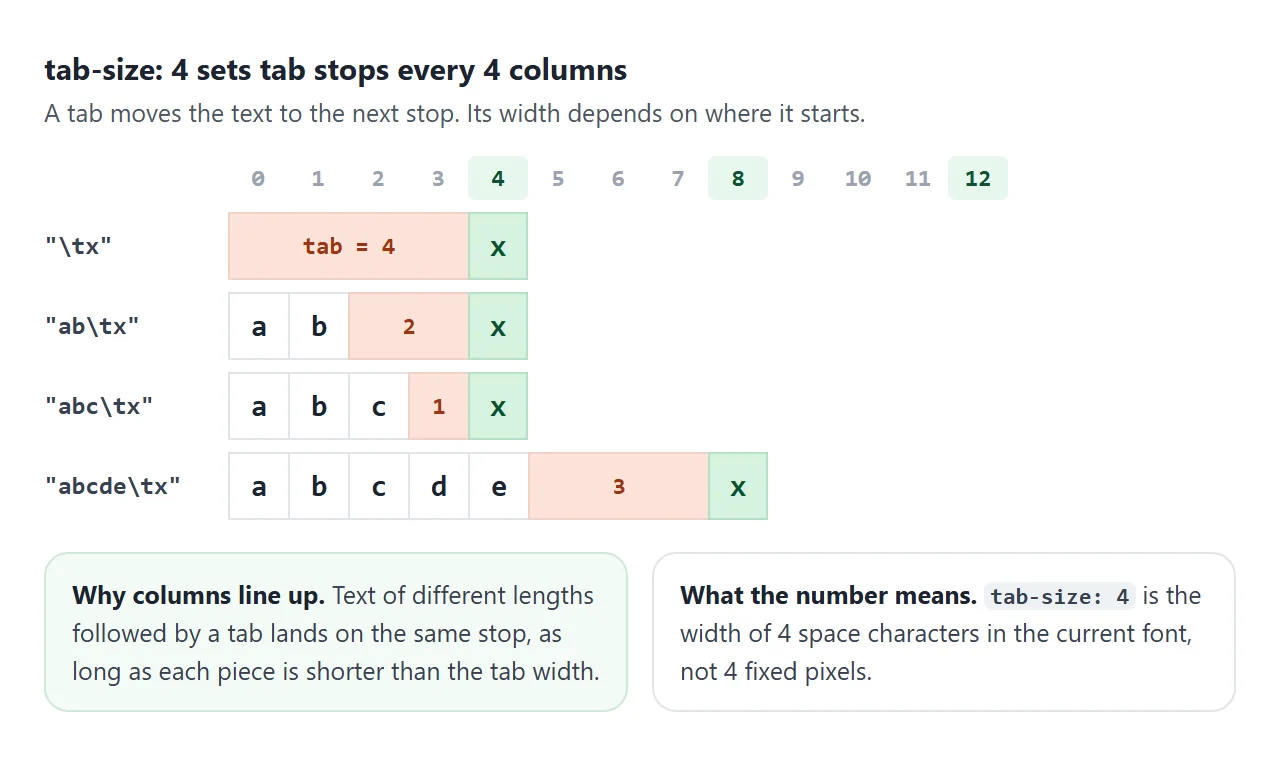
This is why tabs line up columns of text. In the code viewer at the end, the values after red:, green: and blue: start at the same column when the width is 4 or 8, because each tab stops at the same place.
The stops are counted from the start of the block, not from the tab itself.
Text that runs past a stop pushes its tab on to the following one. At width 2, green: ends one column later than red:, so its value lands on a different stop.
tab-size needs white-space that keeps tabs
tab-size sizes tabs that survive layout. In a normal paragraph, runs of spaces and tabs collapse into one space, and there is no tab left to size.
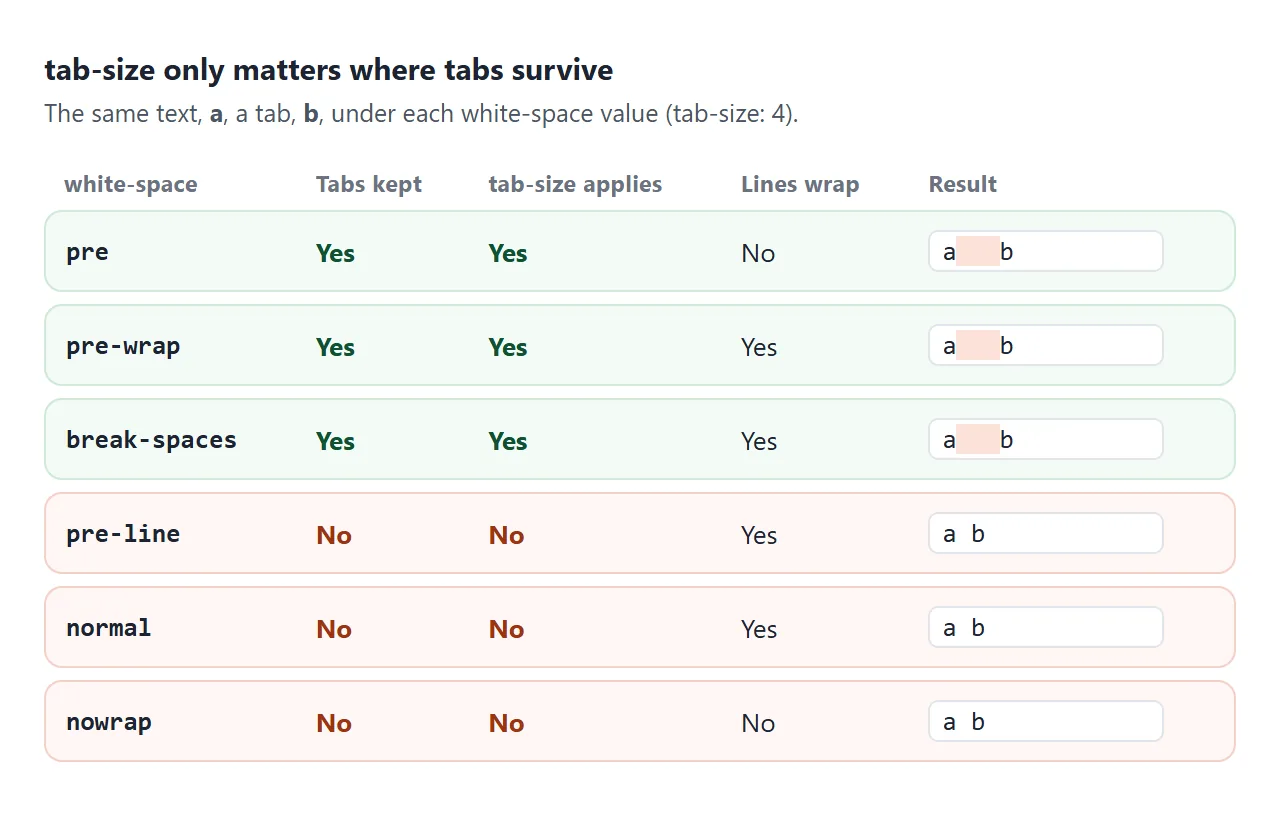
<pre>useswhite-space: preby default, so tabs are kept.<textarea>useswhite-space: pre-wrapby default. Tabs are kept and long lines wrap.- A
<div>or<code>inside a paragraph usesnormal. Addwhite-space: preorpre-wrapfirst.
The white-space guide compares every value in detail. For the elements themselves, see code and pre in HTML.
Tabs vs spaces: what tab-size can and cannot change
tab-size changes tab characters only. Code indented with spaces looks the same at every setting. Code that mixes both is the real trap.
<!doctype html>
<html lang="en">
<head>
<meta charset="utf-8">
<meta name="viewport" content="width=device-width, initial-scale=1">
<title>Tabs vs spaces</title>
<style>
body { margin: 0; padding: 14px; font-family: system-ui, sans-serif; background: #f4f5f7; color: #1d2330; }
.bar { display: flex; flex-wrap: wrap; gap: 8px 14px; margin-bottom: 12px; font-size: 14px; }
select { font: 14px system-ui, sans-serif; padding: 4px 6px; }
.grid { display: grid; grid-template-columns: repeat(auto-fit, minmax(230px, 1fr)); gap: 10px; }
h3 { margin: 0 0 6px; font-size: 14px; }
.box {
margin: 0; padding: 10px 12px; border-radius: 9px; background: #fff; border: 1px solid #dfe3e8;
font: 14px/1.5 ui-monospace, Consolas, monospace; overflow-x: auto;
}
.tab { background: #fde2da; } /* tab characters, made visible */
.sp { background: #dbeafe; } /* space characters */
@media (max-width: 500px) { .box { font-size: 13px; line-height: 1.35; padding: 8px 10px; } .grid { gap: 8px; } }
.key { font-size: 13px; color: #4b5563; margin-top: 10px; }
.key span { padding: 0 6px; border-radius: 3px; }
</style>
</head>
<body>
<div class="bar">
<label>tab-size
<select id="size"><option>2</option><option selected>4</option><option>8</option></select>
</label>
<label>white-space
<select id="ws">
<option>pre</option><option>pre-wrap</option><option>pre-line</option><option>normal</option>
</select>
</label>
</div>
<div class="grid">
<div><h3>Indented with tabs</h3>
<pre class="box" id="tabs">function sum(list) {
let total = 0;
for (const n of list) {
total += n;
}
return total;
}</pre></div>
<div><h3>Indented with 4 spaces</h3>
<pre class="box" id="spaces">function sum(list) {
let total = 0;
for (const n of list) {
total += n;
}
return total;
}</pre></div>
<div><h3>Mixed: tabs and spaces</h3>
<pre class="box" id="mixed">function sum(list) {
let total = 0;
for (const n of list) {
total += n;
}
return total;
}</pre></div>
</div>
<p class="key"><span class="tab">tab</span> <span class="sp">space</span> Only the tabs change width.</p>
<script>
const boxes = document.querySelectorAll('.box');
// wrap each tab and each run of spaces in a span, so you can see them
boxes.forEach((box) => {
box.innerHTML = box.textContent
.replace(/&/g, '&').replace(/</g, '<')
.replace(/\t/g, '<span class="tab">\t</span>')
.replace(/ {2,}/g, (s) => '<span class="sp">' + s + '</span>');
});
function apply() {
boxes.forEach((box) => {
box.style.tabSize = document.getElementById('size').value;
box.style.whiteSpace = document.getElementById('ws').value;
});
}
document.getElementById('size').addEventListener('change', apply);
document.getElementById('ws').addEventListener('change', apply);
apply();
</script>
</body>
</html>
In the mixed box, one line starts with a tab and the next with four spaces. They line up only when tab-size is exactly 4. At 2 or 8 the tab lines move and the space lines stay, so the nesting looks wrong.
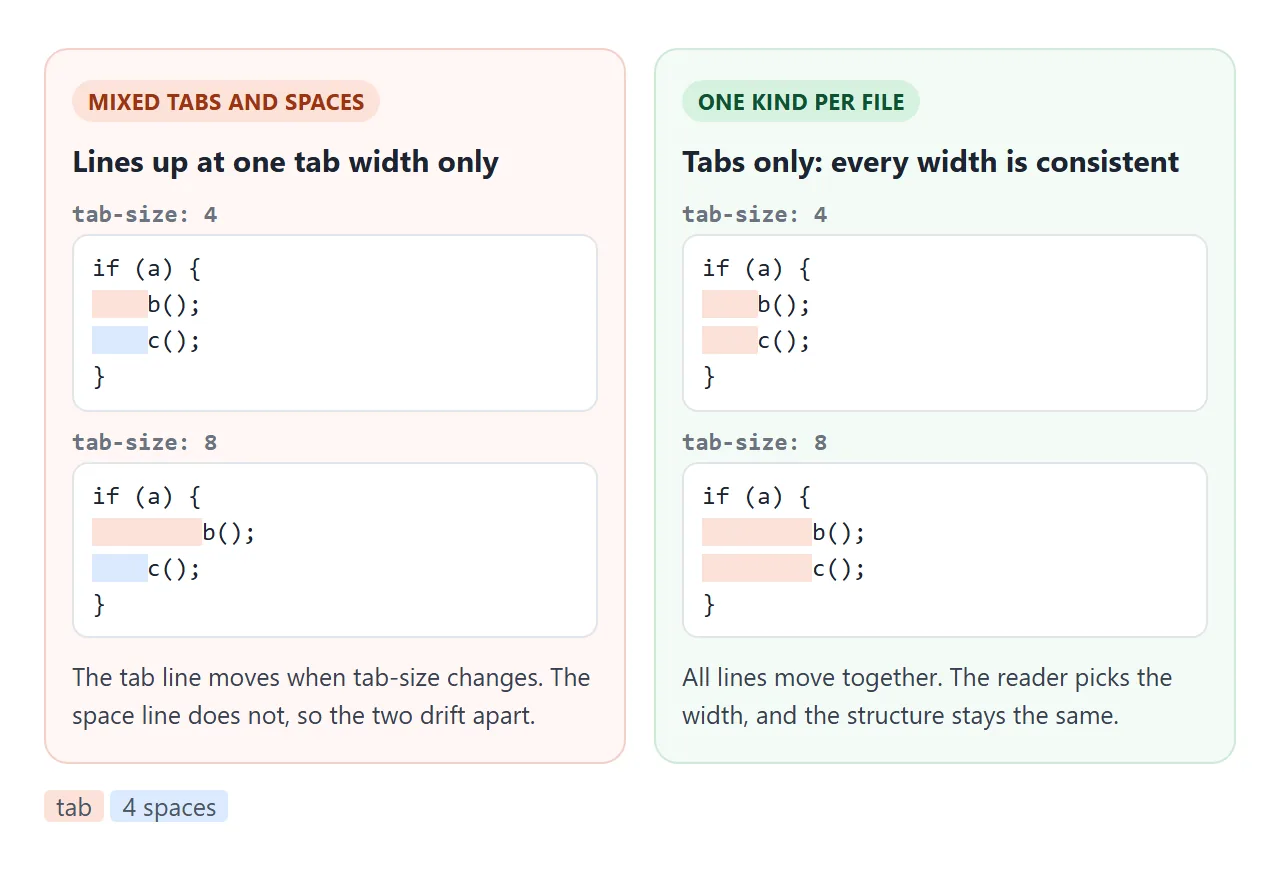
| Indented with | tab-size 2 | tab-size 8 | Reader can pick a width |
|---|---|---|---|
| Tabs only | Narrow, correct | Wide, correct | Yes |
| Spaces only | Unchanged | Unchanged | No |
| Tabs and spaces | Misaligned | Misaligned | No |
If the code comes from somewhere you do not control, converting tabs to spaces is the reliable fix. The code viewer below has a button that does it.
Typing a tab in a textarea
In a <textarea>, the Tab key moves focus to the next control. That is the right default for forms. For a code box, you can catch the key and insert a tab instead:
textarea.addEventListener('keydown', (e) => {
  if (e.key !== 'Tab' || e.shiftKey) return;
  e.preventDefault();
  const { selectionStart: s, selectionEnd: end } = textarea;
  textarea.setRangeText('\t', s, end, 'end');
});
setRangeText replaces the selection and puts the caret after the tab. It does not fire an input event, so call your own update function after it.
Taking over Tab traps keyboard users inside the box. The example below keeps an exit: press Esc, and the next Tab moves focus as usual. Keyboard focus and tabindex covers focus order in general, and the textarea guide covers the element itself.
A finished example: a code viewer with a tab width picker
This viewer puts the pieces together. One CSS variable drives tab-size for both the editor and the viewer, and a <select> changes it.
<!doctype html>
<html lang="en">
<head>
<meta charset="utf-8">
<meta name="viewport" content="width=device-width, initial-scale=1">
<title>Code viewer with a tab width selector</title>
<style>
body { margin: 0; padding: 14px; font-family: system-ui, sans-serif; background: #f4f5f7; color: #1d2330; }
.bar { display: flex; flex-wrap: wrap; gap: 8px 14px; align-items: center; margin-bottom: 10px; font-size: 14px; }
select, button { font: 14px system-ui, sans-serif; padding: 5px 8px; }
button { border-radius: 7px; border: 1px solid #cfd5de; background: #fff; cursor: pointer; }
label.t { font-size: 13px; color: #4b5563; display: block; margin: 8px 0 4px; }
textarea, pre {
box-sizing: border-box; width: 100%; margin: 0; padding: 10px 12px; border-radius: 9px;
font: 14px/1.5 ui-monospace, Consolas, monospace;
tab-size: var(--tab, 4); /* one variable drives both boxes */
}
textarea { height: 150px; border: 1px solid #cfd5de; resize: vertical; }
pre { background: #1e2433; color: #e6e9ef; min-height: 60px; white-space: pre; overflow-x: auto; }
pre.wrap { white-space: pre-wrap; }
pre.show .tab { background: rgba(251, 146, 60, .35); }
.hint { font-size: 12.5px; color: #6b7280; margin: 6px 0 0; }
</style>
</head>
<body>
<div class="bar">
<label>Tab width
<select id="size"><option>2</option><option>3</option><option selected>4</option><option>8</option></select>
</label>
<label><input type="checkbox" id="wrap"> Wrap lines</label>
<label><input type="checkbox" id="show" checked> Show tabs</label>
<button id="convert">Tabs to spaces</button>
</div>
<label class="t" for="ed">Edit (the Tab key types a tab. Press Esc, then Tab, to leave the box.)</label>
<textarea id="ed" spellcheck="false">const colors = {
red: '#e11d48',
green: '#16a34a',
blue: '#2563eb',
};
if (ready) {
paint(colors.red);
}</textarea>
<label class="t">Viewer</label>
<pre id="view" class="show"></pre>
<p class="hint" id="count"></p>
<script>
const ed = document.getElementById('ed');
const view = document.getElementById('view');
const size = document.getElementById('size');
function render() {
// escape the text, then wrap each tab in a span so it can be highlighted
view.innerHTML = ed.value
.replace(/&/g, '&').replace(/</g, '<')
.replace(/\t/g, '<span class="tab">\t</span>');
const tabs = (ed.value.match(/\t/g) || []).length;
document.getElementById('count').textContent = tabs + ' tab characters in the text';
}
// tab-size on the page follows the select
size.addEventListener('change', () => {
document.body.style.setProperty('--tab', size.value);
});
document.getElementById('wrap').addEventListener('change', (e) => view.classList.toggle('wrap', e.target.checked));
document.getElementById('show').addEventListener('change', (e) => view.classList.toggle('show', e.target.checked));
// Tab types a tab. Esc first lets the next Tab move focus as usual.
let leaving = false;
ed.addEventListener('keydown', (e) => {
if (e.key === 'Escape') { leaving = true; return; }
if (e.key !== 'Tab' || e.shiftKey || leaving) { leaving = false; return; }
e.preventDefault();
ed.setRangeText('\t', ed.selectionStart, ed.selectionEnd, 'end');
render();
});
ed.addEventListener('input', render);
// replace each tab with spaces up to the next tab stop
document.getElementById('convert').addEventListener('click', () => {
const n = Number(size.value);
ed.value = ed.value.split('\n').map((line) => {
let out = '';
for (const ch of line) {
out += ch === '\t' ? ' '.repeat(n - (out.length % n)) : ch;
}
return out;
}).join('\n');
render();
});
render();
</script>
</body>
</html>
The core is one line of CSS and one line of JavaScript:
textarea, pre { tab-size: var(--tab, 4); }
document.body.style.setProperty('--tab', select.value);
- Wrap lines switches the viewer from
pretopre-wrap. Tabs keep their width either way. - Show tabs wraps each tab in a
<span>with a background. The span is still sized by the tab stops of the<pre>. - Tabs to spaces walks each line and replaces every tab with enough spaces to reach the next stop, so the alignment stays exactly as it was.
The conversion must count columns. Replacing each tab with a fixed four spaces breaks the aligned values:
out += ch === '\t' ? ' '.repeat(n - (out.length % n)) : ch;
When it does not work
| What you see | Cause | Fix |
|---|---|---|
| Tabs are still very wide | tab-size is not set, so the default of 8 applies | tab-size: 4 on the pre or a parent |
| tab-size has no effect | white-space collapses the tabs | Use pre, pre-wrap or break-spaces |
| Some lines shift, others do not | The code mixes tabs and spaces | Convert to one kind of indent |
| The indent looks the same at every setting | The code uses spaces, not tabs | Nothing to size. Convert spaces to tabs if you want a picker |
| Tab key leaves the textarea | Default focus behavior | Handle keydown and insert a tab |
| Aligned values drift after converting | Each tab became a fixed number of spaces | Pad to the next tab stop |
Share it as a link
A code sample with a tab width picker is easier to try than to describe. A screenshot shows one width only, and an .html attachment may open as plain text on a phone.
To send the working version, paste the page into a NOS document and choose Create share link. HTML to link walks through it.
The page renders as written and its scripts run, so the people you send it to can change the tab width and type in the editor themselves. If you change the code later, the same link shows the new version.