To keep text on one line in CSS, use white-space: nowrap. The browser then only breaks the line at a <br>, and anything wider than its box runs past the edge.
.price { white-space: nowrap; }
The trick is where you put it. Try the two switches below and narrow the card with the slider.
<!doctype html>
<html lang="en">
<head>
<meta charset="utf-8">
<meta name="viewport" content="width=device-width, initial-scale=1">
<title>white-space: nowrap</title>
<style>
  body { margin: 0; padding: 16px; font-family: system-ui, sans-serif; background: #f4f5f7; color: #1d2330; }
  .controls { display: grid; gap: 8px; margin-bottom: 14px; font-size: 14px; }
  .controls label { display: flex; align-items: center; gap: 8px; }
  code { font: 13px ui-monospace, Consolas, monospace; background: #e8ebf0; padding: 1px 4px; border-radius: 4px; }
  .stage { overflow: hidden; }
  .card {
    width: 220px; padding: 12px; border: 2px dashed #9aa3b2; border-radius: 10px;
    background: #fff; line-height: 2.2;
  }
  .tag {
    padding: 3px 8px; border-radius: 99px;
    background: #d6f2df; color: #0f5132; font-size: 14px;
  }
  /* the two switches below */
  .tag-nowrap .tag { white-space: nowrap; }  /* each tag stays whole */
  .card-nowrap { white-space: nowrap; }      /* nothing in the card wraps */
</style>
</head>
<body>
<div class="controls">
  <label>Card width <input type="range" id="w" min="120" max="320" value="220"> <span id="wOut">220px</span></label>
  <label><input type="checkbox" id="tagNo"> <code>white-space: nowrap</code> on each tag</label>
  <label><input type="checkbox" id="cardNo"> <code>white-space: nowrap</code> on the whole card</label>
</div>
<div class="stage">
  <div class="card" id="card">
    <span class="tag">Free shipping</span>
    <span class="tag">In stock</span>
    <span class="tag">2-year warranty</span>
    <span class="tag">Ships in 24 hours</span>
  </div>
</div>

<script>
  const card = document.getElementById('card');
  const w = document.getElementById('w');

  w.addEventListener('input', () => {
    card.style.width = w.value + 'px';
    document.getElementById('wOut').textContent = w.value + 'px';
  });
  document.getElementById('tagNo').addEventListener('change', (e) => {
    card.classList.toggle('tag-nowrap', e.target.checked);
  });
  document.getElementById('cardNo').addEventListener('change', (e) => {
    card.classList.toggle('card-nowrap', e.target.checked);
  });
</script>
</body>
</html>
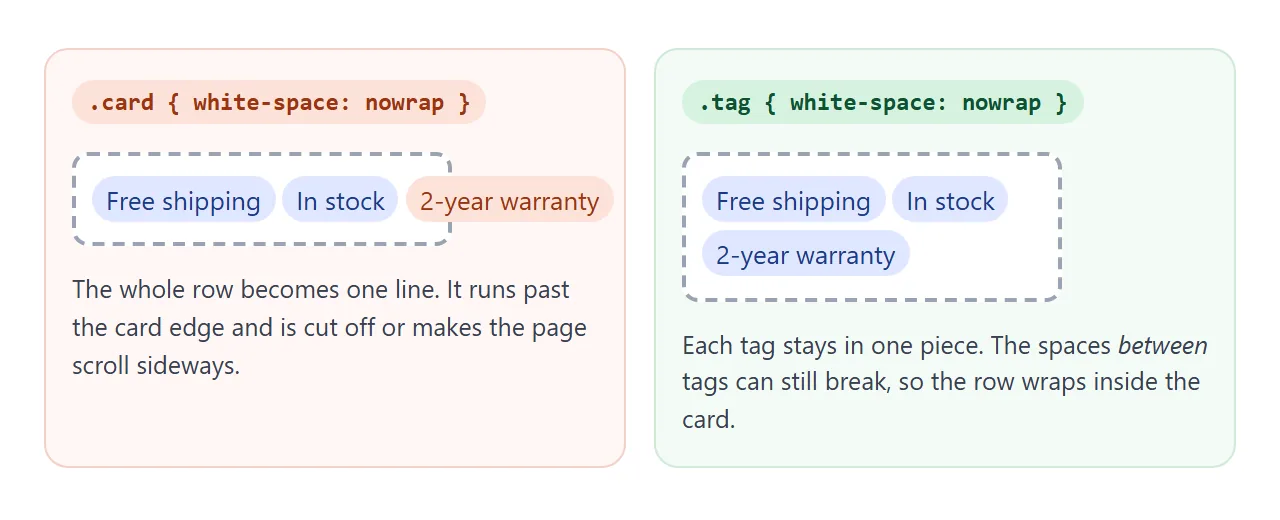
With nowrap on each tag, "2-year warranty" never splits in half, but the tags still move to the next line as a group. With nowrap on the card, the whole row becomes one line and overflows.
Put nowrap on the smallest piece
nowrap removes every place a line could break inside the element. On a card, a table cell or a nav bar, that usually means the content can no longer fit a phone screen.
Good candidates are short and fixed: a person's name, a date, a price with its currency, a button label, a keyboard shortcut. Wrap them in a <span> with a class and give that span nowrap.
For just two words, a non-breaking space does the same job in the HTML itself: 10 km or Page 4. The old <nobr> element is obsolete. Use nowrap instead.
The six values of white-space
white-space answers three questions at once: are runs of spaces merged into one, are line breaks in the source kept, and does the text wrap at the edge of its box?
<!doctype html>
<html lang="en">
<head>
<meta charset="utf-8">
<meta name="viewport" content="width=device-width, initial-scale=1">
<title>white-space values</title>
<style>
  body { margin: 0; padding: 16px; font-family: system-ui, sans-serif; background: #f4f5f7; color: #1d2330; }
  .btns { display: flex; flex-wrap: wrap; gap: 6px; margin-bottom: 10px; }
  button {
    font: 13px ui-monospace, Consolas, monospace; padding: 6px 10px; cursor: pointer;
    border: 1px solid #c9ced8; border-radius: 8px; background: #fff; color: #1d2330;
  }
  button[aria-pressed="true"] { background: #1d4ed8; border-color: #1d4ed8; color: #fff; }
  label { display: flex; align-items: center; gap: 8px; font-size: 14px; margin-bottom: 10px; }
  .stage { overflow: auto; background: #fff; border-radius: 10px; padding: 10px; }
  .box {
    width: 230px; padding: 8px; border: 2px dashed #9aa3b2; border-radius: 8px;
    font: 14px/1.5 ui-monospace, Consolas, monospace;
  }
  .box span { background: #fde68a; }  /* shows where the text really is */
  .facts { display: grid; grid-template-columns: repeat(3, 1fr); gap: 6px; margin-top: 10px; font-size: 13px; }
  .facts div { background: #fff; border-radius: 8px; padding: 6px 8px; }
  .facts b { display: block; font-size: 14px; }
  .yes { color: #0f5132; } .no { color: #9a3412; }
</style>
</head>
<body>
<div class="btns" id="btns"></div>
<label>Box width <input type="range" id="w" min="140" max="320" value="230"> <span id="wOut">230px</span></label>
<div class="stage"><div class="box" id="box"><span id="txt"></span></div></div>
<div class="facts">
  <div>Extra spaces<b id="fSp"></b></div>
  <div>Line breaks in the text<b id="fNl"></b></div>
  <div>Wraps at the box edge<b id="fWr"></b></div>
</div>

<script>
  // The text has double spaces, newlines and an indent, like a pasted note.
  document.getElementById('txt').textContent =
    'Name:    Ada Lovelace\nRole:    Analyst\n    (indented line)\nA longer sentence that will need to wrap somewhere.';

  // value: [spaces kept, newlines kept, wraps]
  const rules = {
    'normal':       [false, false, true],
    'nowrap':       [false, false, false],
    'pre':          [true,  true,  false],
    'pre-wrap':     [true,  true,  true],
    'pre-line':     [false, true,  true],
    'break-spaces': [true,  true,  true],
  };
  const box = document.getElementById('box');
  const btns = document.getElementById('btns');

  function show(id, ok, yes, no) {
    const el = document.getElementById(id);
    el.textContent = ok ? yes : no;
    el.className = ok ? 'yes' : 'no';
  }
  function pick(value) {
    box.style.whiteSpace = value;
    const [sp, nl, wr] = rules[value];
    show('fSp', sp, 'kept', 'collapsed');
    show('fNl', nl, 'kept', 'ignored');
    show('fWr', wr, 'yes', 'no');
    btns.querySelectorAll('button').forEach(b => b.setAttribute('aria-pressed', b.textContent === value));
  }

  Object.keys(rules).forEach(value => {
    const b = document.createElement('button');
    b.textContent = value;
    b.addEventListener('click', () => pick(value));
    btns.append(b);
  });
  document.getElementById('w').addEventListener('input', (e) => {
    box.style.width = e.target.value + 'px';
    document.getElementById('wOut').textContent = e.target.value + 'px';
  });
  pick('normal');
</script>
</body>
</html>
| Value | Runs of spaces | Line breaks in source | Wraps at box edge | Typical use |
|---|---|---|---|---|
normal |
Merged | Become spaces | Yes | Ordinary text (the default) |
nowrap |
Merged | Become spaces | No | Names, prices, labels |
pre |
Kept | Kept | No | Code, ASCII art |
pre-wrap |
Kept | Kept | Yes | User comments, chat messages |
pre-line |
Merged | Kept | Yes | Text with \n from JavaScript |
break-spaces |
Kept | Kept | Yes | Editors where every space counts |
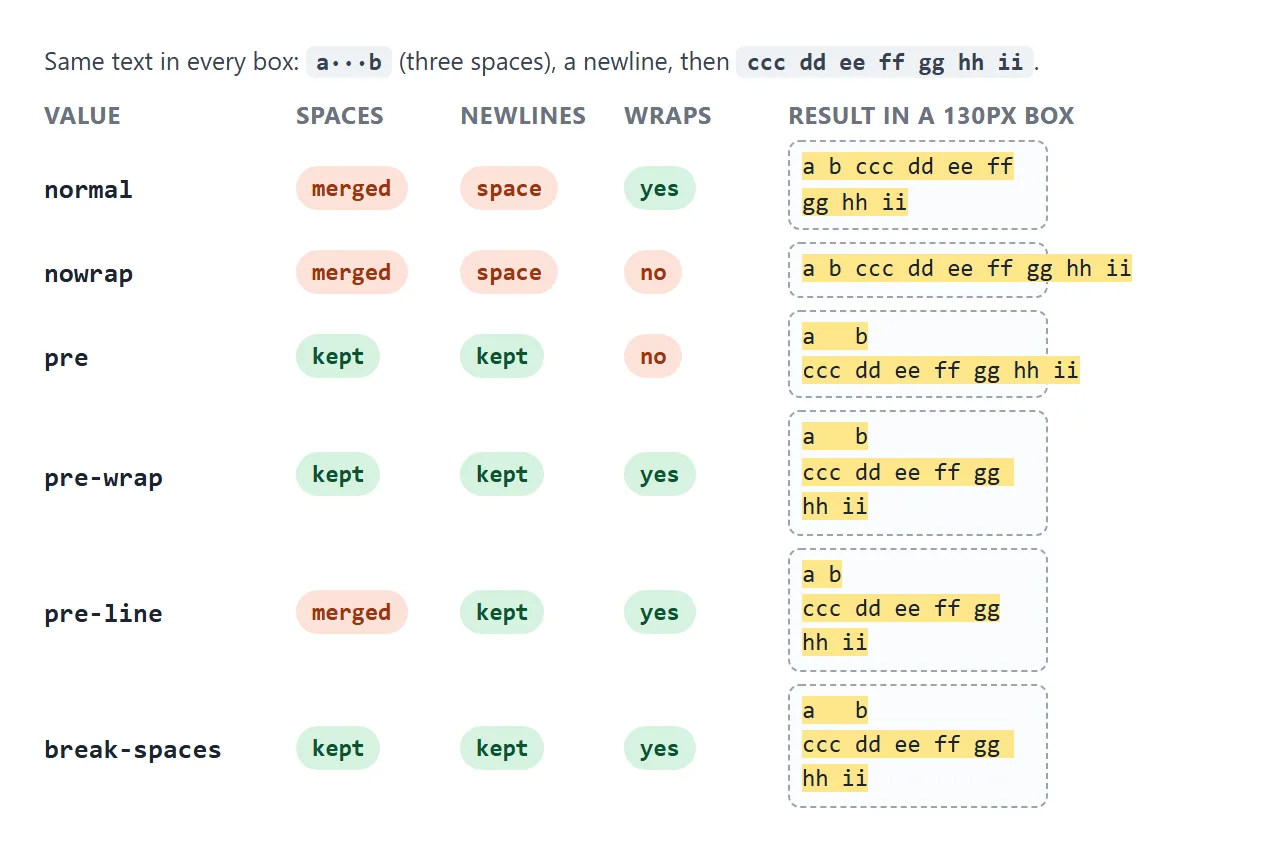
Browsers already use two of these on their own: <pre> has white-space: pre by default, and <textarea> has pre-wrap. That is why text in a code block keeps its indent.
pre-wrap vs break-spaces. They look the same most of the time. The difference is spaces at the end of a line.
With pre-wrap, trailing spaces hang past the edge and do not push anything down. With break-spaces, every space takes up room and a line can break after any of them.
Line breaks: br, newline characters, or CSS
There are three ways a new line appears, and they belong to different layers.
<br>is a forced break written in the HTML. It works under every white-space value, including nowrap. The br tag guide covers when it is the right tag.- A newline character (
\n) in the text only shows as a break underpre,pre-wrap,pre-lineorbreak-spaces. Undernormalit becomes a space. <wbr>is an optional break. If the line fits, nothing happens. If it does not, the line may break there.
That second point explains a common surprise. You set element.textContent = 'Line one\nLine two' and both lines appear side by side. Nothing is wrong with the string. Add white-space: pre-line to the element and the break shows.
Long words and URLs are a different property
white-space decides whether the browser may break at spaces. It does not let the browser break inside a word. A long URL may have no place the browser treats as a break, so under any value it can still overflow.
That is the job of overflow-wrap: anywhere (break a word only when it cannot fit) or word-break: break-all (break anywhere at the edge). word-break vs overflow-wrap compares them. If a box still refuses to wrap, HTML text not wrapping walks through the other causes.
text-wrap: balance and pretty
Two newer values of text-wrap change where lines break, not whether they break.
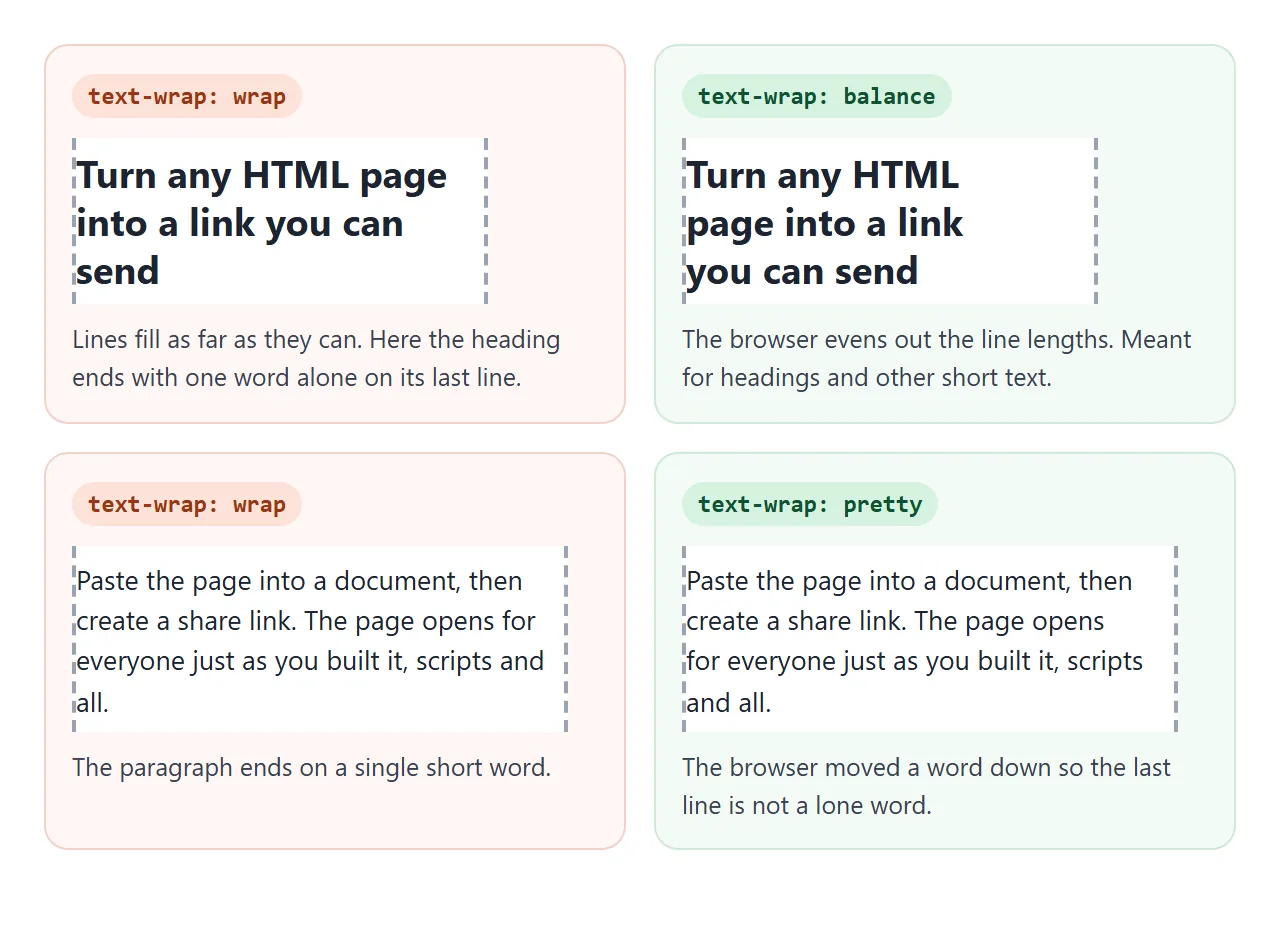
text-wrap: balancemakes the lines of a short block about the same length. Use it on headings, captions and card titles.text-wrap: prettytells the browser to favour a better layout over speed, mainly to avoid a single short word on the last line. It is meant for body text.
A browser that does not know a value ignores it and wraps as normal, so both are safe to add. Newer CSS also has text-wrap: nowrap. white-space: nowrap does the same and is the form every browser understands.
A finished example: comments that keep their line breaks
Text typed into a textarea keeps its line breaks there, because textarea uses pre-wrap. Show that text in a normal <div> and the breaks vanish. This comment list fixes it with three lines of CSS.
<!doctype html>
<html lang="en">
<head>
<meta charset="utf-8">
<meta name="viewport" content="width=device-width, initial-scale=1">
<title>Comment box that keeps line breaks</title>
<style>
  body { margin: 0; padding: 16px; font-family: system-ui, sans-serif; background: #f4f5f7; color: #1d2330; }
  h1 {
    font-size: 21px; line-height: 1.25; margin: 0 0 12px; max-width: 26ch;
    text-wrap: balance;  /* even line lengths in a short heading */
  }
  textarea {
    box-sizing: border-box; width: 100%; height: 92px; padding: 8px;
    font: 14px/1.4 system-ui, sans-serif; border: 1px solid #c9ced8; border-radius: 8px;
  }
  .row { display: flex; flex-wrap: wrap; align-items: center; gap: 10px; margin: 8px 0 14px; font-size: 14px; }
  button { font: 600 14px system-ui, sans-serif; padding: 7px 14px; border: 0; border-radius: 8px; background: #1d4ed8; color: #fff; cursor: pointer; }
  .comment { background: #fff; border-radius: 10px; padding: 10px 12px; margin-bottom: 8px; }
  .meta { display: flex; gap: 8px; font-size: 13px; color: #6b7280; margin-bottom: 4px; }
  .meta b { color: #1d2330; white-space: nowrap; }  /* never split a name */
  .meta time { white-space: nowrap; }
  .body {
    white-space: pre-wrap;      /* keep the writer's line breaks and spaces */
    overflow-wrap: anywhere;    /* long links break instead of overflowing */
    font-size: 14px; line-height: 1.5;
  }
  .plain .body { white-space: normal; }  /* the "before" view */
</style>
</head>
<body>
<h1>Comments keep their line breaks and never run off the card</h1>
<textarea id="text">Two things:
1. The link works  →  https://example.com/reports/2026/q3/customer-feedback-summary-final
2. Can we move the call to 3:30 pm?

Thanks!</textarea>
<div class="row">
  <button type="button" id="post">Post comment</button>
  <label><input type="checkbox" id="plain"> Show with white-space: normal</label>
</div>
<div id="list"></div>

<script>
  const list = document.getElementById('list');

  document.getElementById('post').addEventListener('click', () => {
    const text = document.getElementById('text').value.trim();
    if (!text) return;
    const c = document.createElement('div');
    c.className = 'comment';
    c.innerHTML = '<div class="meta"><b>Jamie Rivera</b><time></time></div><div class="body"></div>';
    c.querySelector('time').textContent = new Date().toLocaleTimeString([], { hour: 'numeric', minute: '2-digit' });
    c.querySelector('.body').textContent = text;  // plain text: newlines stay as \n characters
    list.prepend(c);
  });

  document.getElementById('plain').addEventListener('change', (e) => {
    list.classList.toggle('plain', e.target.checked);
  });

  document.getElementById('post').click();  // start with one comment on screen
</script>
</body>
</html>
white-space: pre-wrapon the comment body keeps the writer's line breaks and blank lines.overflow-wrap: anywherelets the long link break instead of running off the card.white-space: nowrapon the name and time keeps "Jamie Rivera" on one line.text-wrap: balanceon the heading evens out its lines.
Set the text with textContent, not innerHTML. The newlines stay as characters, and whatever the user types is shown as text, never run as HTML.
When it does not work
| What you see | Cause | Fix |
|---|---|---|
| The page scrolls sideways on a phone | nowrap on a container, a nav or a table | Move nowrap to the short pieces inside |
| No ellipsis appears | The box has overflow: visible or the text can wrap |
Add overflow: hidden and white-space: nowrap |
| A nowrap item in a flex row pushes out of its parent | Flex items do not shrink below their content by default | Add min-width: 0 to the flex item |
| Newlines from JavaScript show as spaces | The element uses white-space: normal |
Use pre-line or pre-wrap |
| Indentation from a textarea disappears | pre-line merges runs of spaces |
Use pre-wrap |
| A long URL still overflows | white-space only breaks at spaces | Add overflow-wrap: anywhere |
Extra indent or blank lines inside <pre> |
The indentation of your HTML source is kept | Start the text at the left margin of the source |
For cutting one line short with "...", see CSS text overflow ellipsis.
Share it as a link
Wrapping is the kind of thing that only shows up at a real width. A screenshot is taken at one width, and an .html attachment may not open at all on a phone.
To let people check it themselves, paste the page into a NOS document and choose Create share link. HTML to link walks through it.
The page renders as written and its scripts run, so the reader can resize, type and post on their own screen. If you change the code later, the same link shows the new version.