A currency converter needs no server and no library. Keep a table of rates in your script, read an amount and two currency codes, then divide by the source rate and multiply by the target rate. The version below is about 30 lines.
Try it first. Change the amount or either currency.
<!doctype html>
<html lang="en">
<head>
<meta charset="utf-8">
<meta name="viewport" content="width=device-width, initial-scale=1">
<title>Currency converter</title>
<style>
  body { margin: 0; padding: 18px; font-family: system-ui, sans-serif; background: #f4f5f7; color: #1d2330; }
  .box { max-width: 420px; margin: 0 auto; background: #fff; border-radius: 12px; padding: 18px; box-shadow: 0 6px 20px rgba(0,0,0,.1); }
  .row { display: flex; gap: 8px; margin-bottom: 10px; }
  input, select { font: inherit; padding: 9px 10px; border: 1px solid #cfd4dc; border-radius: 8px; min-width: 0; }
  input { flex: 1; }
  select { width: 96px; }
  #out { font-size: 26px; font-weight: 700; margin: 14px 0 4px; }
  small { color: #6b7280; }
</style>
</head>
<body>
<div class="box">
  <div class="row">
    <input id="amount" type="number" value="100" min="0" step="any" aria-label="Amount">
    <select id="from" aria-label="From"></select>
  </div>
  <div class="row">
    <span style="flex:1"></span>
    <select id="to" aria-label="To"></select>
  </div>
  <div id="out"></div>
  <small>Sample rates typed into the page, not live.</small>
</div>

<script>
  // Units of each currency that one US dollar buys (sample numbers)
  const rates = { USD: 1, EUR: 0.92, GBP: 0.79, JPY: 150 };

  const amount = document.getElementById('amount');
  const from = document.getElementById('from');
  const to = document.getElementById('to');
  const out = document.getElementById('out');

  for (const code of Object.keys(rates)) {
    from.add(new Option(code, code));
    to.add(new Option(code, code));
  }
  from.value = 'EUR';
  to.value = 'JPY';

  function convert() {
    const n = amount.valueAsNumber;
    if (!Number.isFinite(n)) { out.textContent = '—'; return; }
    const result = n / rates[from.value] * rates[to.value];  // via the base currency
    out.textContent = new Intl.NumberFormat('en-US', { style: 'currency', currency: to.value }).format(result);
  }

  [amount, from, to].forEach((el) => el.addEventListener('input', convert));
  convert();
</script>
</body>
</html>
The rates are made-up sample values typed into the code, so the answers are only as good as the numbers you put there. How to keep them current is covered further down.
How the code works, step by step
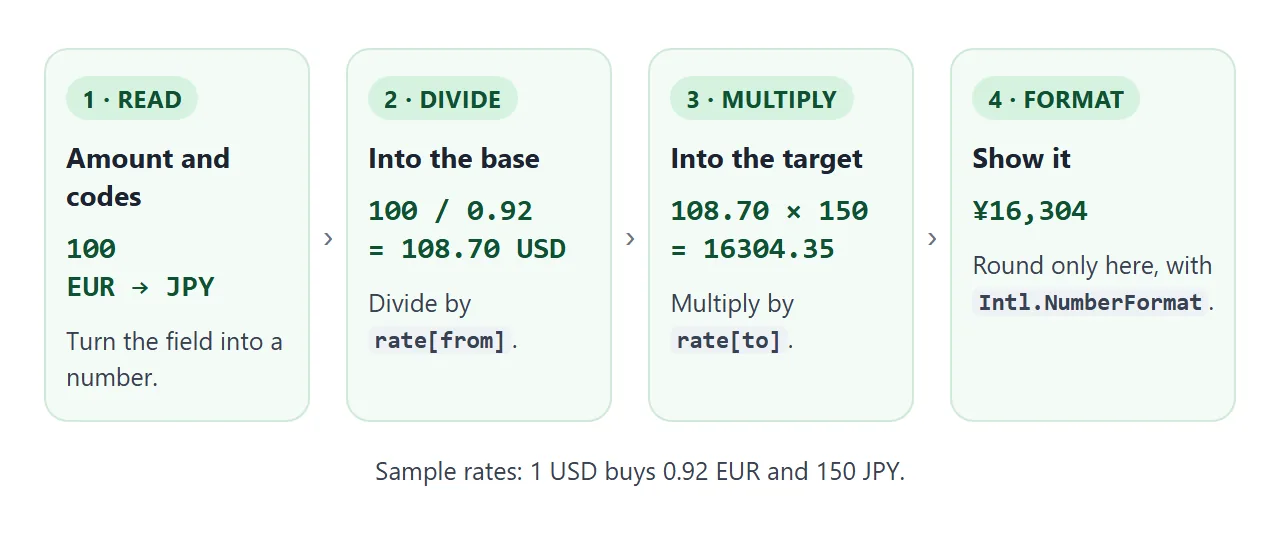
- Store the rates. One object, one base currency. Each value says how many units of that currency one US dollar buys, and the base itself is 1.
- Fill the dropdowns. Loop over
Object.keys(rates)and callselect.add(new Option(code, code))for each one. Adding a currency later means adding one line to the object. - Read the amount.
valueAsNumberon a number input gives a number, orNaNwhen the field is empty. Stop early with a dash in that case. - Convert.
amount / rates[from] * rates[to]goes through the base currency in two moves. - Format and listen. Print the result with
Intl.NumberFormat, and call the same function from aninputlistener on all three controls.
Convert through one base currency
Storing a rate for every pair does not scale. Five currencies already need twenty numbers, and each one has to stay consistent with the others.
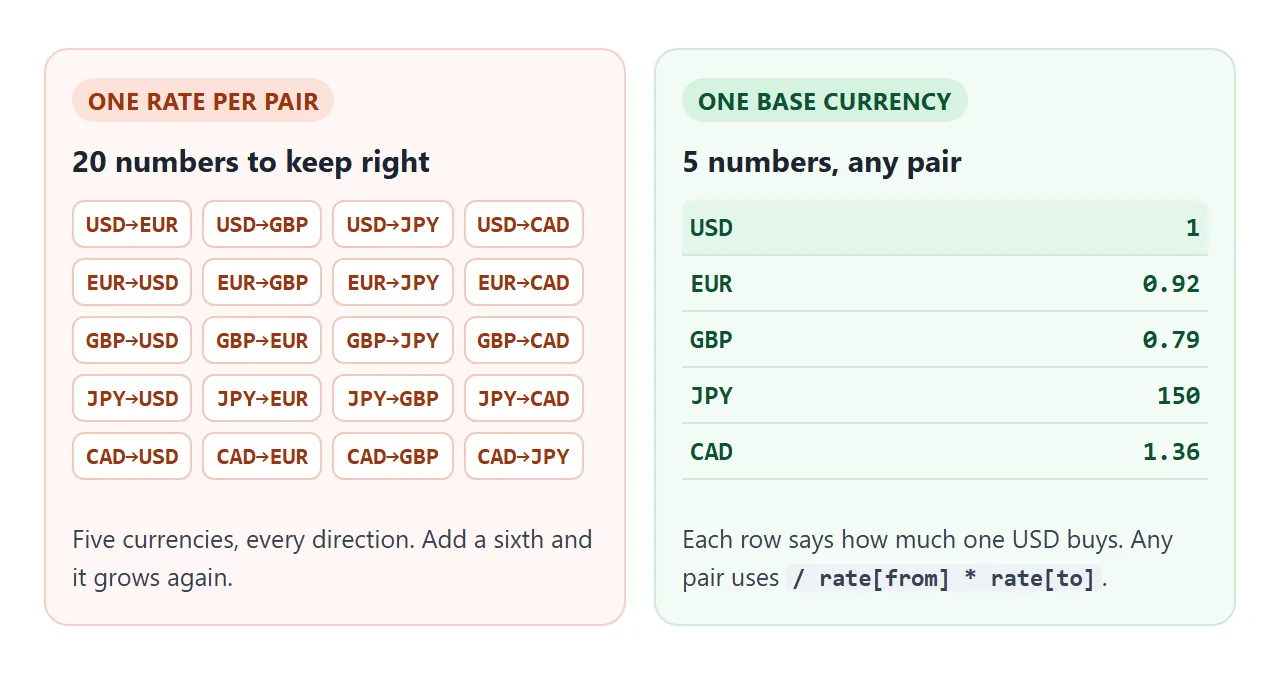
With a base, every row answers one question: how much does one dollar buy? Converting 100 euros to yen first divides by 0.92 to get dollars, then multiplies by 150. Euros to pounds, pounds to yen and any other pair use the same line.
The base can be any currency you like. It only has to be the one whose rate is 1.
Read the amount and format the result
The formula is short, so the bugs live around it. Try these three and compare the left column with the right one.
<!doctype html>
<html lang="en">
<head>
<meta charset="utf-8">
<meta name="viewport" content="width=device-width, initial-scale=1">
<title>Converter mistakes</title>
<style>
  body { margin: 0; padding: 16px; font-family: system-ui, sans-serif; background: #f4f5f7; color: #1d2330; }
  h2 { font-size: 15px; margin: 0 0 8px; }
  .card { background: #fff; border-radius: 12px; padding: 14px; margin-bottom: 14px; box-shadow: 0 4px 14px rgba(0,0,0,.08); }
  input, select { font: inherit; padding: 8px 10px; border: 1px solid #cfd4dc; border-radius: 8px; min-width: 0; }
  .ctl { display: flex; gap: 8px; flex-wrap: wrap; margin-bottom: 10px; }
  .ctl input { flex: 1; min-width: 120px; }
  .cols { display: grid; grid-template-columns: 1fr 1fr; gap: 10px; }
  .res { border-radius: 8px; padding: 9px 10px; font-size: 14px; }
  .res b { display: block; font-size: 20px; margin-top: 2px; word-break: break-word; }
  .res.bad { background: #fff7f5; border: 1px solid #f3d1c8; }
  .res.good { background: #f4fbf6; border: 1px solid #cfe9d7; }
  code { font: 600 12px ui-monospace, Consolas, monospace; }
</style>
</head>
<body>

<div class="card">
  <h2>1. What people type</h2>
  <div class="ctl"><input id="txt" type="text" value="1,250.5" aria-label="Amount as typed"></div>
  <div class="cols">
    <div class="res bad">parseFloat(text)<b id="t-bad"></b></div>
    <div class="res good">clean first<b id="t-good"></b></div>
  </div>
</div>

<div class="card">
  <h2>2. Which way the rate goes (100 of the first currency)</h2>
  <div class="ctl">
    <select id="from" aria-label="From"></select>
    <select id="to" aria-label="To"></select>
  </div>
  <div class="cols">
    <div class="res bad">amount * rate[from] / rate[to]<b id="d-bad"></b></div>
    <div class="res good">amount / rate[from] * rate[to]<b id="d-good"></b></div>
  </div>
</div>

<div class="card">
  <h2>3. Float noise</h2>
  <div class="cols">
    <div class="res bad">0.1 + 0.2<b id="f-bad"></b></div>
    <div class="res good">rounded for display<b id="f-good"></b></div>
  </div>
</div>

<script>
  const rates = { USD: 1, EUR: 0.92, GBP: 0.79, JPY: 150 };  // sample numbers
  const $ = (id) => document.getElementById(id);

  // 1. text to number
  function cleanNumber(text) {
    const n = Number(text.replace(/[,\s]/g, ''));        // drop thousands separators
    return text.trim() === '' ? NaN : n;                 // Number('') is 0, so treat empty as missing
  }
  function show1() {
    const t = $('txt').value;
    $('t-bad').textContent = String(parseFloat(t));      // stops at the comma: 1
    const c = cleanNumber(t);
    $('t-good').textContent = Number.isFinite(c) ? String(c) : '—';
  }
  $('txt').addEventListener('input', show1);

  // 2. direction
  for (const code of Object.keys(rates)) { $('from').add(new Option(code, code)); $('to').add(new Option(code, code)); }
  $('from').value = 'EUR'; $('to').value = 'JPY';
  function show2() {
    const f = $('from').value, t = $('to').value, n = 100;
    const fmt = (v) => new Intl.NumberFormat('en-US', { style: 'currency', currency: t }).format(v);
    $('d-bad').textContent = fmt(n * rates[f] / rates[t]);
    $('d-good').textContent = fmt(n / rates[f] * rates[t]);
  }
  $('from').addEventListener('input', show2);
  $('to').addEventListener('input', show2);

  // 3. float noise
  $('f-bad').textContent = String(0.1 + 0.2);
  $('f-good').textContent = (0.1 + 0.2).toFixed(2);

  show1(); show2();
</script>
</body>
</html>
- Commas.
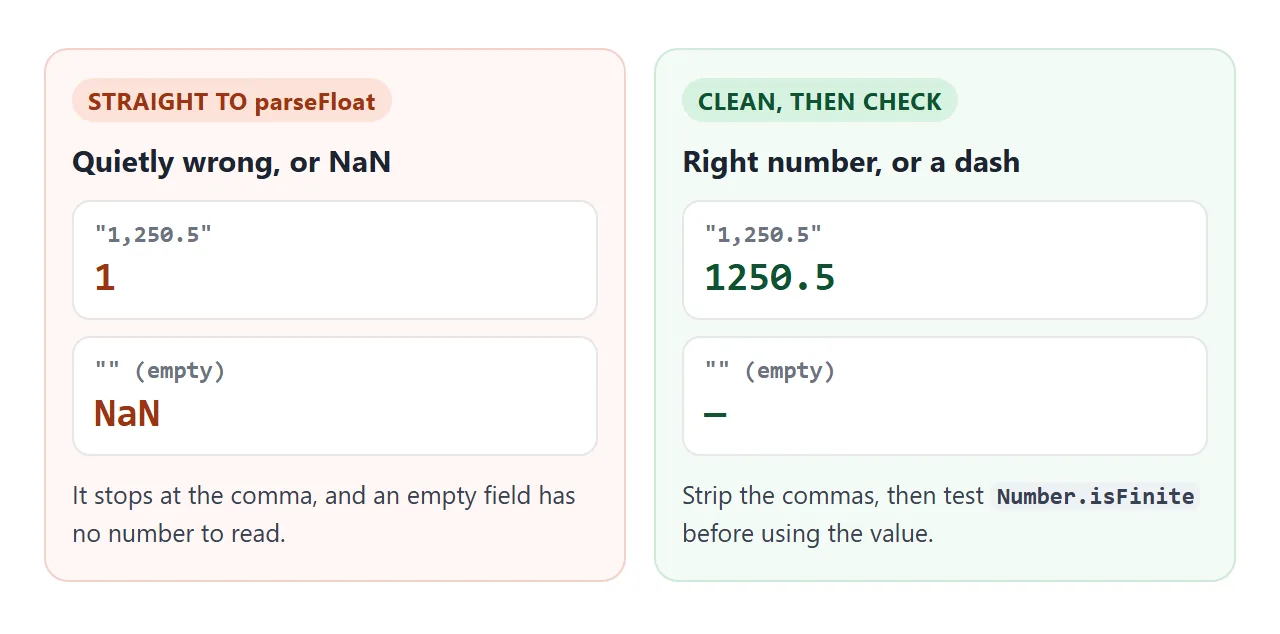
parseFloatreads from the start and stops at the first character that cannot belong to a number, so "1,250.5" becomes 1. A number input avoids the problem. If you use a text field, remove the commas first. That assumes a comma means thousands, which is not true in every locale. - Empty fields. An empty number input gives
NaN. Test withNumber.isFiniteand show a dash. - Wrong direction. Multiplying by the source rate and dividing by the target rate gives a plausible number that is simply wrong. The second card shows 100 euros turning into about one yen.
- Rounding.
0.1 + 0.2is0.30000000000000004in JavaScript, because numbers are stored in binary floating point. Keep full precision while you calculate and round once, when you display.
For the output, Intl.NumberFormat with style: 'currency' adds the symbol, the thousands separators and the right number of decimals for the code. Yen has no minor unit, so it prints whole numbers while euros and dollars print two decimals.
const money = (value, code) =>
  new Intl.NumberFormat('en-US', { style: 'currency', currency: code }).format(value);

money(16304.3478, 'JPY');  // "¥16,304"
It formats only. It never converts, so the multiplication stays yours. Pass undefined instead of 'en-US' to use the browser's default locale. The options are covered in Intl.NumberFormat in JavaScript, and reading fields is covered in get an input value in JavaScript.
Where the rates come from
A converter page cannot invent prices, so the numbers come from you. The simplest honest version types them into the object and prints the date next to them, as the examples here do.
A page can also ask a rates service for fresh numbers. That is a request to another origin, and the browser lets your script read the answer only if the server allows it. CORS explains the rule. Keep the typed rates as a fallback:
fetch('https://example.com/rates.json')
  .then((r) => { if (!r.ok) throw new Error(r.status); return r.json(); })
  .then((data) => Object.assign(rates, data))
  .catch(() => {});  // request failed: the typed rates stay
A shared NOS page blocks requests to other sites, so there the catch branch always runs. Treat the typed table as the real data and update it by editing the code.
A finished converter
The same pieces, plus a swap button, a list of the amount in every currency and an editable rate table. Change a rate and every result recalculates.
<!doctype html>
<html lang="en">
<head>
<meta charset="utf-8">
<meta name="viewport" content="width=device-width, initial-scale=1">
<title>Currency converter with editable rates</title>
<style>
body { margin: 0; padding: 16px; font-family: system-ui, sans-serif; background: #f4f5f7; color: #1d2330; }
.box { max-width: 460px; margin: 0 auto; background: #fff; border-radius: 12px; padding: 16px; box-shadow: 0 6px 20px rgba(0,0,0,.1); }
.top { display: flex; gap: 8px; align-items: center; margin-bottom: 14px; }
input, select, button { font: inherit; padding: 9px 10px; border: 1px solid #cfd4dc; border-radius: 8px; min-width: 0; background: #fff; }
#amount { flex: 1; width: 0; }
button { cursor: pointer; }
button:hover { background: #eef1f5; }
#big { font-size: 28px; font-weight: 700; margin: 4px 0 12px; word-break: break-word; }
table { width: 100%; border-collapse: collapse; font-size: 14px; }
th, td { text-align: left; padding: 6px 4px; border-bottom: 1px solid #e5e7eb; }
td.num { text-align: right; font-variant-numeric: tabular-nums; }
td input { width: 72px; padding: 5px 6px; text-align: right; }
h3 { font-size: 13px; text-transform: uppercase; letter-spacing: .4px; color: #6b7280; margin: 16px 0 6px; }
small { color: #6b7280; display: block; margin-top: 10px; }
</style>
</head>
<body>
<div class="box">
<div class="top">
<input id="amount" type="number" value="100" min="0" step="any" aria-label="Amount">
<select id="from" aria-label="From"></select>
<button id="swap" type="button" aria-label="Swap currencies">⇄</button>
<select id="to" aria-label="To"></select>
</div>
<div id="big"></div>
<h3>Same amount in every currency</h3>
<table><tbody id="all"></tbody></table>
<h3>Rates (1 USD buys)</h3>
<table><tbody id="rates"></tbody></table>
<small>Sample rates typed into the page on 2026-10-03, not live. Edit a number and every result updates.</small>
</div>
<script>
const rates = { USD: 1, EUR: 0.92, GBP: 0.79, JPY: 150, KRW: 1350, CAD: 1.36 }; // sample numbers
const codes = Object.keys(rates);
const $ = (id) => document.getElementById(id);
const money = (value, code) =>
new Intl.NumberFormat('en-US', { style: 'currency', currency: code }).format(value);
const convert = (n, f, t) => n / rates[f] * rates[t];
for (const c of codes) { $('from').add(new Option(c, c)); $('to').add(new Option(c, c)); }
$('from').value = 'EUR';
$('to').value = 'JPY';
// editable rate rows
for (const c of codes) {
const tr = document.createElement('tr');
tr.innerHTML = '<td>' + c + '</td><td class="num"><input type="number" step="any" min="0" value="' + rates[c] + '" aria-label="Rate for ' + c + '"></td>';
const input = tr.querySelector('input');
if (c === 'USD') input.disabled = true; // the base stays at 1
input.addEventListener('input', () => {
if (input.valueAsNumber > 0) rates[c] = input.valueAsNumber; // ignore blanks and zero
render();
});
$('rates').appendChild(tr);
}
function render() {
const n = $('amount').valueAsNumber;
const f = $('from').value, t = $('to').value;
if (!Number.isFinite(n)) {
$('big').textContent = '—';
$('all').innerHTML = '';
return;
}
$('big').textContent = money(n, f) + ' = ' + money(convert(n, f, t), t);
$('all').innerHTML = codes.map((c) =>
'<tr><td>' + c + '</td><td class="num">' + money(convert(n, f, c), c) + '</td></tr>').join('');
}
$('swap').addEventListener('click', () => {
const f = $('from').value;
$('from').value = $('to').value;
$('to').value = f;
render();
});
['amount', 'from', 'to'].forEach((id) => $(id).addEventListener('input', render));
render();
</script>
</body>
</html>
- Swap: exchange the two select values and call the render function again.
- One list: map over the currency codes and call the same conversion for each.
- Editable rates: each input writes back into the object, then calls render.
- Date label: shows when the numbers were typed, so nobody mistakes them for live prices.
When it does not work
| Symptom | Cause | Fix |
|---|---|---|
| Result shows NaN | Empty field or text that is not a number | Check Number.isFinite first |
| 1,250 becomes 1 | parseFloat stops at the comma |
Remove commas, or use a number input |
| Euros to yen comes out near 1 | Formula is the wrong way round | Divide by the source rate, multiply by the target |
| Result prints 0.30000000000000004 | Unrounded floating point | Format with Intl.NumberFormat |
| Dropdowns are empty | The fill loop never ran | Run it once on load |
| A rates request fails on a shared page | Requests to other sites are blocked | Type the rates into the page |
| Result never updates | Listener on the button only | Listen for input on the field and both selects |
Share it as a link
To send the working version, paste the page into a NOS document and choose Create share link. HTML to link walks through it.
The page renders as written and its scripts run, so the people you send it to can change the amount and the currencies themselves. If you update the rates later, the same link shows the new version.
Other pages with the same shape, a few inputs and a result, are covered in calculator to link.