You cannot embed an interactive HTML page by pasting it into Moodle: Moodle's help says scripting "is not allowed, and will be removed automatically". The fix is to give the page its own link and add that link to the course as a URL.
The question comes up wherever teachers make activities with AI. Under a TCEA post about building student interactives with Claude, a reader asked which LMS the activities would "integrate seamlessly to". For Moodle, the answer is a link.
Here is the kind of page that goes dead when pasted. Answer the questions, press Check answers, and watch the script work.
<!doctype html>
<html lang="en">
<head>
<meta charset="utf-8">
<meta name="viewport" content="width=device-width, initial-scale=1">
<title>Fractions check</title>
<style>
  * { box-sizing: border-box; }
  body { margin: 0; padding: 16px; font-family: system-ui, sans-serif; background: #f4f6fa; color: #1d2330; }
  .wrap { max-width: 640px; margin: 0 auto; }
  h1 { font-size: 20px; margin: 0 0 4px; }
  .sub { color: #5b6475; font-size: 14px; margin: 0 0 14px; }
  .q { background: #fff; border: 1px solid #dfe3ea; border-radius: 10px; padding: 12px 14px; margin-bottom: 10px; }
  .q p { margin: 0 0 8px; font-weight: 600; }
  .q label { display: block; padding: 7px 10px; margin: 4px 0; border: 1px solid #e3e6ec; border-radius: 8px; cursor: pointer; }
  .q label:hover { background: #f1f4fa; }
  .q.ok { border-color: #2f9e5b; background: #f3fbf6; }
  .q.no { border-color: #d9622b; background: #fff7f3; }
  .note { font-size: 13px; margin-top: 6px; min-height: 1em; }
  .bar { display: flex; gap: 10px; align-items: center; flex-wrap: wrap; margin-top: 12px; }
  button { font: inherit; font-weight: 600; padding: 10px 16px; border: 0; border-radius: 8px; background: #2457d6; color: #fff; cursor: pointer; }
  button.alt { background: #e6e9f0; color: #1d2330; }
  #score { font-weight: 700; }
</style>
</head>
<body>
<div class="wrap">
  <h1>Fractions check</h1>
  <p class="sub">Year 5 Maths, week 3. Pick one answer for each question, then press Check answers.</p>

  <form id="quiz">
    <div class="q" data-answer="b">
      <p>1. Which fraction is the same as 1/2?</p>
      <label><input type="radio" name="q1" value="a"> 2/3</label>
      <label><input type="radio" name="q1" value="b"> 4/8</label>
      <label><input type="radio" name="q1" value="c"> 3/5</label>
      <div class="note"></div>
    </div>
    <div class="q" data-answer="c">
      <p>2. What is 1/4 + 2/4?</p>
      <label><input type="radio" name="q2" value="a"> 3/8</label>
      <label><input type="radio" name="q2" value="b"> 2/4</label>
      <label><input type="radio" name="q2" value="c"> 3/4</label>
      <div class="note"></div>
    </div>
    <div class="q" data-answer="a">
      <p>3. Which is the largest?</p>
      <label><input type="radio" name="q3" value="a"> 3/4</label>
      <label><input type="radio" name="q3" value="b"> 2/3</label>
      <label><input type="radio" name="q3" value="c"> 1/2</label>
      <div class="note"></div>
    </div>
    <div class="bar">
      <button type="submit">Check answers</button>
      <button type="button" class="alt" id="again">Start again</button>
      <span id="score" role="status"></span>
    </div>
  </form>
</div>

<script>
  const form = document.getElementById('quiz');
  const score = document.getElementById('score');
  const cards = form.querySelectorAll('.q');

  form.addEventListener('submit', (e) => {
    e.preventDefault();  // no server: everything is checked inside the page
    let right = 0;
    cards.forEach((card) => {
      const picked = form.querySelector('input[name="' + card.querySelector('input').name + '"]:checked');
      const note = card.querySelector('.note');
      const correct = picked && picked.value === card.dataset.answer;
      card.classList.toggle('ok', !!correct);
      card.classList.toggle('no', !correct);
      note.textContent = !picked ? 'No answer chosen.' : correct ? 'Correct.' : 'Not quite. Try again.';
      if (correct) right++;
    });
    score.textContent = 'Score: ' + right + ' / ' + cards.length;
  });

  document.getElementById('again').addEventListener('click', () => {
    form.reset();
    score.textContent = '';
    cards.forEach((card) => {
      card.classList.remove('ok', 'no');
      card.querySelector('.note').textContent = '';
    });
  });
</script>
</body>
</html>
Why Moodle removes the script
Moodle treats text typed or pasted into its editor as untrusted. Its Formatting text page says scripting is not allowed and is removed automatically.
The site security settings explain the reason: Moodle cleans user text of "any possible bad scripts, media etc." that could be a security risk. That is a rule of the platform, not a mistake in your page.
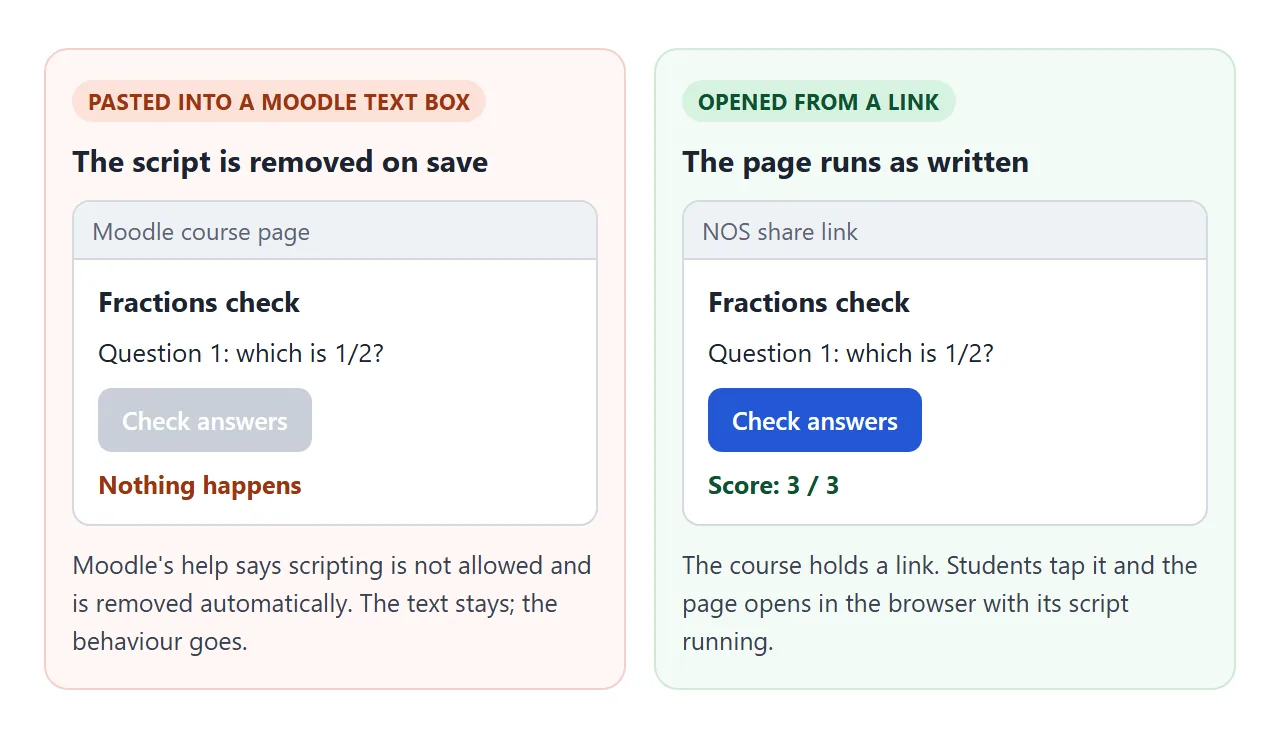
You will see the headings, the questions and the button. The button does nothing, because the script behind it is gone.
Moodle also has a Trusted content setting. An administrator can switch it on and give a role the Trust submitted content capability, and text from that role is then not cleaned. That is the administrators' decision, not a teacher's.
Make it with AI
Ask for one page that needs nothing else. A page with its own styles and script inside is the easiest to paste and to move later. Paste this into ChatGPT, Claude or Gemini and change the topic:
Make one HTML file for a Year 5 class: a 5-question multiple-choice quiz on fractions.
Put all CSS and JavaScript inside the file. Use no outside images, fonts or libraries.
Show a "Check answers" button, then green or orange feedback per question and a score.
Make it readable on a phone, with large tap targets. Give me only the code.
Check three things before you go on:
- It runs where you can see it. Open it in a browser, or paste it into NOS, and press every button.
- The answers are right. You are the teacher, so check each one.
- It stands alone. No outside images or requests to other sites, because NOS blocks those.
A second page type that works well is a set of flashcards, which students can flip through on a phone.
<!doctype html>
<html lang="en">
<head>
<meta charset="utf-8">
<meta name="viewport" content="width=device-width, initial-scale=1">
<title>Water cycle flashcards</title>
<style>
  * { box-sizing: border-box; }
  body { margin: 0; padding: 16px; font-family: system-ui, sans-serif; background: #eef3f8; color: #1d2330; }
  .wrap { max-width: 520px; margin: 0 auto; text-align: center; }
  h1 { font-size: 20px; margin: 0 0 4px; }
  .sub { color: #5b6475; font-size: 14px; margin: 0 0 14px; }
  #card {
    display: flex; flex-direction: column; justify-content: center; align-items: center;
    width: 100%; min-height: 190px; padding: 18px; border-radius: 14px; border: 2px solid #b9c9de;
    background: #fff; color: #1d2330; font: inherit; cursor: pointer;
    box-shadow: 0 6px 18px rgba(30, 60, 110, .12);
  }
  #card.back { background: #e9f4ee; border-color: #8cc3a2; }
  #word { font-size: 26px; font-weight: 700; }
  #hint { font-size: 13px; color: #5b6475; margin-top: 10px; }
  #def { font-size: 18px; line-height: 1.4; }
  .bar { display: flex; gap: 10px; justify-content: center; align-items: center; margin-top: 14px; flex-wrap: wrap; }
  .bar button { font: inherit; font-weight: 600; padding: 10px 16px; border: 0; border-radius: 8px; background: #2457d6; color: #fff; cursor: pointer; }
  .bar button.alt { background: #dfe5ee; color: #1d2330; }
  #count { font-size: 14px; color: #5b6475; min-width: 64px; }
</style>
</head>
<body>
<div class="wrap">
  <h1>Water cycle words</h1>
  <p class="sub">Tap the card to see the meaning. Use Next and Back to move through the set.</p>

  <button id="card" type="button" aria-live="polite">
    <span id="word"></span>
    <span id="def" hidden></span>
    <span id="hint">Tap to flip</span>
  </button>

  <div class="bar">
    <button type="button" class="alt" id="prev">Back</button>
    <span id="count"></span>
    <button type="button" id="next">Next</button>
    <button type="button" class="alt" id="shuffle">Shuffle</button>
  </div>
</div>

<script>
  // Edit this list: one word and one meaning per line
  const cards = [
    ['Evaporation', 'Liquid water turns into water vapour, usually because the sun warms it.'],
    ['Condensation', 'Water vapour cools and turns back into tiny drops of liquid water.'],
    ['Precipitation', 'Water falling from clouds as rain, snow, sleet or hail.'],
    ['Collection', 'Water gathering in rivers, lakes, oceans and underground.'],
    ['Water vapour', 'Water as an invisible gas in the air.']
  ];
  let i = 0, flipped = false;

  const card = document.getElementById('card');
  const word = document.getElementById('word');
  const def = document.getElementById('def');
  const hint = document.getElementById('hint');
  const count = document.getElementById('count');

  function show() {
    flipped = false;
    word.hidden = false; def.hidden = true; hint.hidden = false;
    card.classList.remove('back');
    word.textContent = cards[i][0];
    def.textContent = cards[i][1];
    count.textContent = (i + 1) + ' / ' + cards.length;
  }

  card.addEventListener('click', () => {
    flipped = !flipped;
    word.hidden = flipped; def.hidden = !flipped; hint.hidden = flipped;
    card.classList.toggle('back', flipped);
  });
  document.getElementById('next').addEventListener('click', () => { i = (i + 1) % cards.length; show(); });
  document.getElementById('prev').addEventListener('click', () => { i = (i - 1 + cards.length) % cards.length; show(); });
  document.getElementById('shuffle').addEventListener('click', () => {
    for (let k = cards.length - 1; k > 0; k--) {
      const j = Math.floor(Math.random() * (k + 1));
      [cards[k], cards[j]] = [cards[j], cards[k]];
    }
    i = 0; show();
  });

  show();
</script>
</body>
</html>
If the AI output will not display properly, AI HTML not rendering lists the usual causes.
Send it as a link
Paste the code into NOS and choose Create share link. HTML to link walks through it. The page opens in a browser, on a phone too, with its script running. Nobody needs an account, and nobody who opens it can edit it.
If you fix a question later, edit the code in NOS. The link stays the same, so the course needs no change.
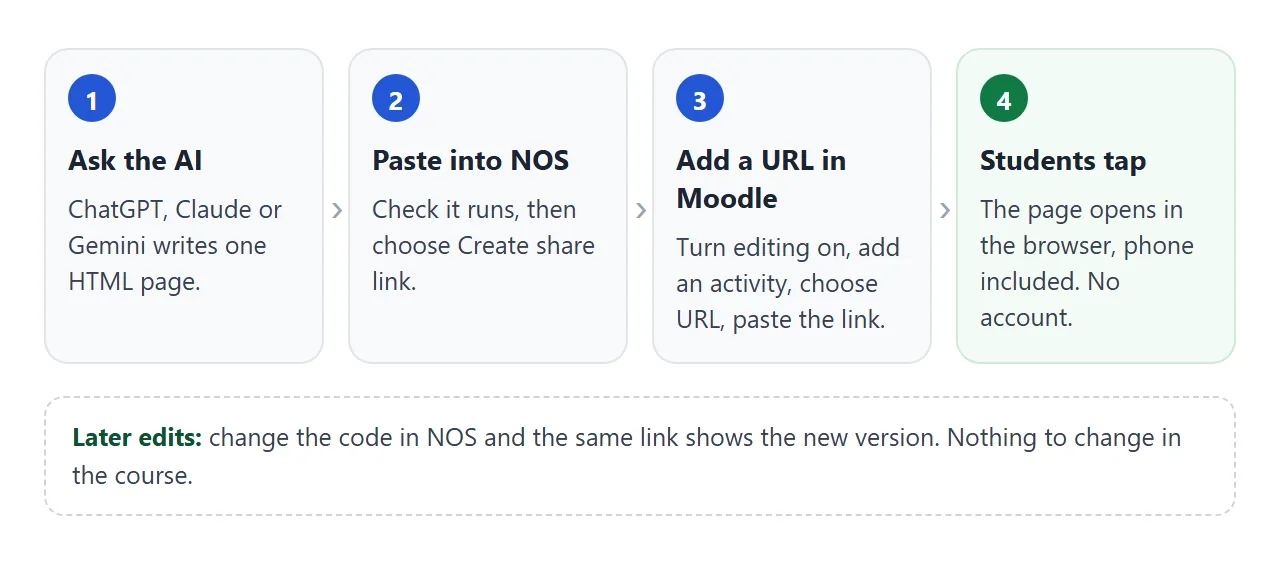
Add the link to your Moodle course
These steps follow Moodle's URL resource guide as of October 2026. Screens differ by Moodle version, theme and site.
- In your course, turn editing on and choose URL from the activity chooser. Give it a helpful name.
- In External URL, paste the NOS link. Include the full
https://at the start. - Under Appearance, choose how it displays. Choose Open.
- Click Save and return to course.
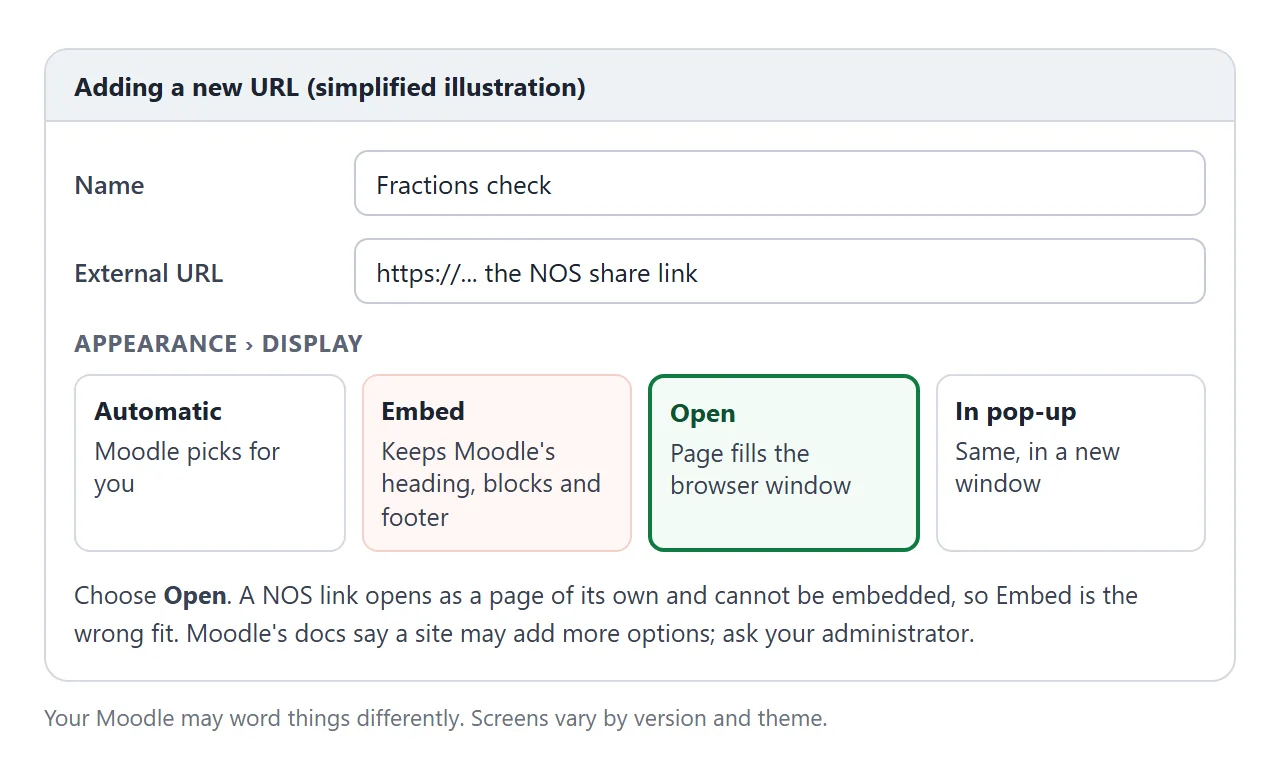
Moodle's docs describe the display options this way. Embed shows the Moodle page with its heading, blocks and footer. Open shows none of those and fills the browser window. In pop-up does the same in a new window.
A NOS link cannot be embedded, so Open is the one to pick.
Extra options such as In frame and New window only appear if your administrator has enabled them.
Paste, upload or link: what each does
| Pasted into a text box | URL to a NOS link | |
|---|---|---|
| What Moodle does with the script | Removes it automatically | Nothing, the link is only an address |
| Where the page runs | Nowhere, the script is gone | In the browser, on its own page |
| Changing a question later | Edit the pasted text | Edit in NOS, same link |
| Students need an account for the page | Not applicable | No |
| Scores reach the gradebook | No | No |
A link is a plain web address, so Moodle has nothing to strip. For more on why teachers host the page separately, see Moodle web host. To send materials outside Moodle as well, see send course materials.
When it does not work
| What you see | Cause | Fix |
|---|---|---|
| Questions appear but the button does nothing | The code was pasted into a Moodle text box and the script was removed | Put the page at its own link and add a URL |
| The link will not open | The address was typed without https:// | Paste the full link, starting with https:// |
| The page does not appear inside the Moodle page | Display is set to Embed, and a NOS link cannot be embedded | Edit the URL and choose Open or In pop-up |
| Score is not in the gradebook | A link does not report back to Moodle | Keep graded questions in a Moodle quiz |
| No Open or In pop-up choice | The site limits the options | Ask your Moodle administrator |
| The quiz does not work after a change | The AI left a typo in the code | Paste it into NOS again and test every button |
Some websites refuse to be shown inside another page, and Moodle's iframe help page says many sites do not allow it. Why an iframe shows nothing covers that case.
Before you share it with the class
- Run the page once on your phone from the course link, as a student would.
- Check the answers against your own key.
- Keep marks that count in a Moodle quiz. Use the link for practice and review.
- Tell students the page needs no login, so they can also open it at home.
For a quiz that checks answers inside the page, the HTML quiz guide shows how it is built and what a page alone cannot enforce.