An employee handbook template for a small team can be one page: the policies people ask about most, each in a few lines, with the name of the official document under it.
Think hours, time off, sick days, expenses, equipment and who to ask. The contracts and full policies stay in your HR system.
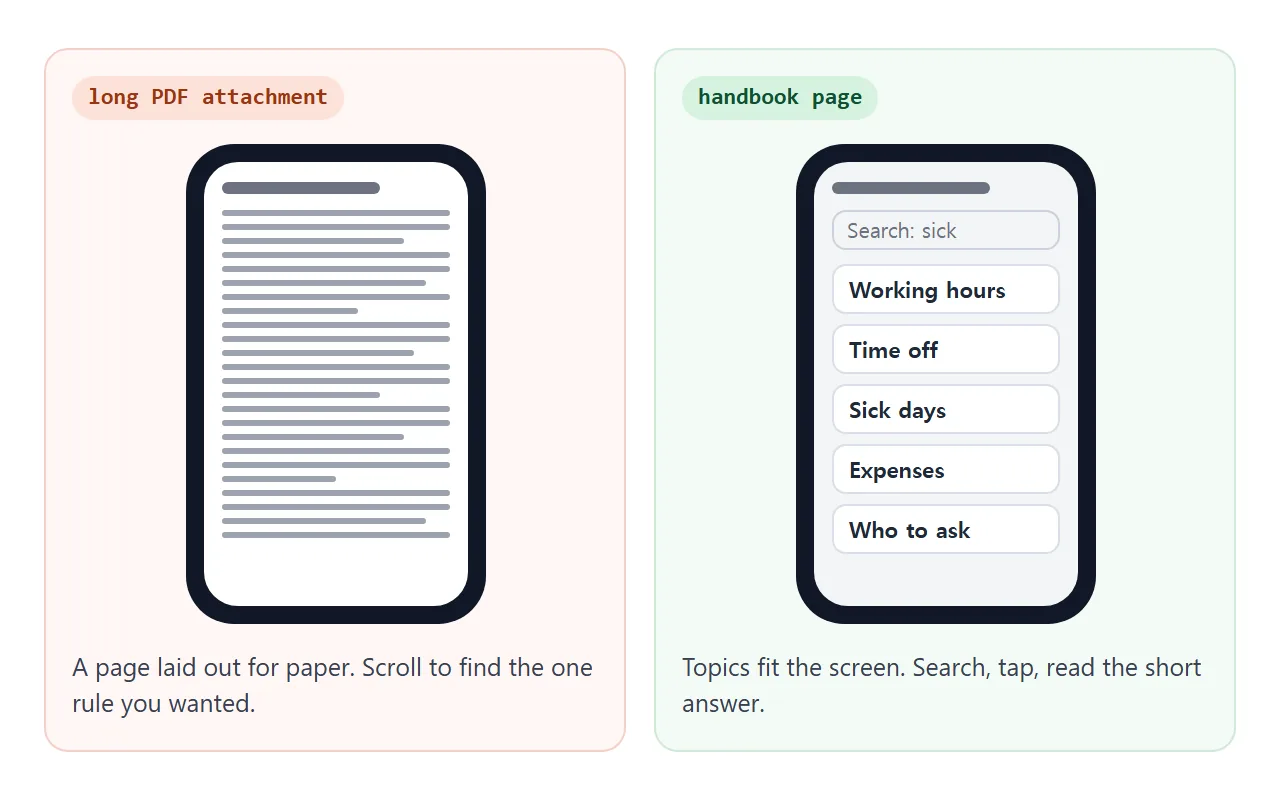
A long PDF answers every question and gets opened by nobody. The question then goes to chat, and someone types the answer again.
The US Small Business Administration says that detailing benefits in the employee handbook "helps your staff make decisions, and they can use it as a reference for workplace requirements." A reference only helps if people can find the line they need.
Here is a finished page for a made-up studio. Search for "sick" or "laptop", or tap a topic to open it.
<!doctype html>
<html lang="en">
<head>
<meta charset="utf-8">
<meta name="viewport" content="width=device-width, initial-scale=1">
<title>Larkspur Studio: team handbook</title>
<style>
* { box-sizing: border-box; }
body { margin: 0; font-family: system-ui, sans-serif; background: #f4f5f7; color: #1f2937; line-height: 1.5; }
.wrap { max-width: 720px; margin: 0 auto; padding: 20px 16px 32px; }
h1 { font-size: 24px; margin: 0 0 4px; }
.meta { font-size: 14px; color: #4b5563; margin: 0 0 14px; }
.note { background: #fff8e6; border: 1px solid #f1dca0; border-radius: 10px; padding: 10px 14px; font-size: 14px; margin-bottom: 14px; }
.tools { display: flex; gap: 8px; margin-bottom: 8px; }
.tools input { flex: 1; min-width: 0; font: inherit; font-size: 16px; padding: 10px 12px; border: 1px solid #cbd2dc; border-radius: 10px; }
.tools button { font: inherit; font-size: 14px; padding: 0 12px; border: 1px solid #cbd2dc; border-radius: 10px; background: #fff; cursor: pointer; }
.count { font-size: 13px; color: #4b5563; margin: 0 0 10px; }
details { background: #fff; border: 1px solid #e1e4ea; border-radius: 12px; margin-bottom: 8px; }
summary { cursor: pointer; padding: 13px 14px; font-weight: 600; font-size: 16px; list-style-position: inside; }
.body { padding: 0 14px 14px; }
.body p { margin: 0 0 8px; }
.body ul { margin: 0 0 8px; padding-left: 20px; }
.src { font-size: 13px; color: #374151; background: #eef2f7; border-radius: 8px; padding: 8px 10px; margin: 0; }
.src b { color: #111827; }
.empty { display: none; text-align: center; color: #4b5563; padding: 16px; }
mark { background: #fde68a; }
</style>
</head>
<body>
<div class="wrap">
<h1>Larkspur Studio: how we work</h1>
<p class="meta">Reviewed 1 Oct 2026 · Questions: Mara Okafor, office manager</p>
<div class="note"><b>This page is a short summary.</b> If it ever differs from the official document named under a topic, the official document wins.</div>
<div class="tools">
<input id="q" type="search" placeholder="Search: sick, expenses, laptop..." aria-label="Search the handbook">
<button id="all" type="button">Open all</button>
</div>
<p class="count" id="count"></p>
<div id="list">
<details>
<summary>Working hours</summary>
<div class="body">
<p>Core hours are 10:00 to 15:00. Be reachable then. Start and finish outside those hours as suits you.</p>
<p class="src"><b>Official:</b> Employment contract, clause 4 (HR system → My documents)</p>
</div>
</details>
<details>
<summary>Time off and holidays</summary>
<div class="body">
<ul>
<li>Ask in the team calendar and tell your lead.</li>
<li>Requests of a week or more: ask at least a month ahead.</li>
<li>Public holidays follow the studio calendar.</li>
</ul>
<p class="src"><b>Official:</b> Time Off Policy v3 (HR system → Policies)</p>
</div>
</details>
<details>
<summary>Sick days</summary>
<div class="body">
<p>Message your lead before 10:00 on the first day. You do not need to explain the illness. If you are off for several days, Mara will tell you what paperwork is needed.</p>
<p class="src"><b>Official:</b> Sick Leave Policy v2 (HR system → Policies)</p>
</div>
</details>
<details>
<summary>Expenses</summary>
<div class="body">
<ul>
<li>Keep the receipt. Photograph it the same day.</li>
<li>Submit within 30 days, with the project name.</li>
<li>Ask your lead first for anything over the limit in the policy.</li>
</ul>
<p class="src"><b>Official:</b> Expenses Policy v4 (finance folder → Policies)</p>
</div>
</details>
<details>
<summary>Working from home</summary>
<div class="body">
<p>Fine on any day without a client visit. Tell your lead in the team chat in the morning. Working from another city or country needs approval first.</p>
<p class="src"><b>Official:</b> Remote Work Policy v1 (HR system → Policies)</p>
</div>
</details>
<details>
<summary>Laptop and equipment</summary>
<div class="body">
<p>Your laptop is on loan from the studio. Report loss or damage to Mara the same day. Return everything on your last day.</p>
<p class="src"><b>Official:</b> Equipment Loan Form you signed (HR system → My documents)</p>
</div>
</details>
<details>
<summary>Who to ask</summary>
<div class="body">
<ul>
<li><b>Pay, contracts, time off:</b> Mara Okafor</li>
<li><b>Expenses:</b> Tomas Reyes, finance</li>
<li><b>Laptop or logins:</b> Priya Nair, IT</li>
</ul>
<p class="src"><b>Official:</b> Org chart (shared drive → Studio)</p>
</div>
</details>
</div>
<p class="empty" id="empty">Nothing matches. Try another word, or ask Mara.</p>
</div>
<script>
const input = document.getElementById('q');
const items = [...document.querySelectorAll('#list details')];
const count = document.getElementById('count');
const empty = document.getElementById('empty');
const allBtn = document.getElementById('all');
function update() {
const term = input.value.trim().toLowerCase();
let shown = 0;
items.forEach((d) => {
const hit = !term || d.textContent.toLowerCase().includes(term);
d.hidden = !hit;
if (hit) shown++;
if (term && hit) d.open = true; // open matches so the answer is visible
});
count.textContent = term ? shown + ' of ' + items.length + ' topics match' : items.length + ' topics';
empty.style.display = shown ? 'none' : 'block';
}
input.addEventListener('input', update);
allBtn.addEventListener('click', () => {
const open = allBtn.textContent === 'Open all';
items.forEach((d) => { d.open = open; });
allBtn.textContent = open ? 'Close all' : 'Open all';
});
update();
</script>
</body>
</html>
The page is plain HTML. Each topic is one block of text, so you change words, not layout.
What goes on the page and what stays in the system
The page is a summary. It does not replace anything.
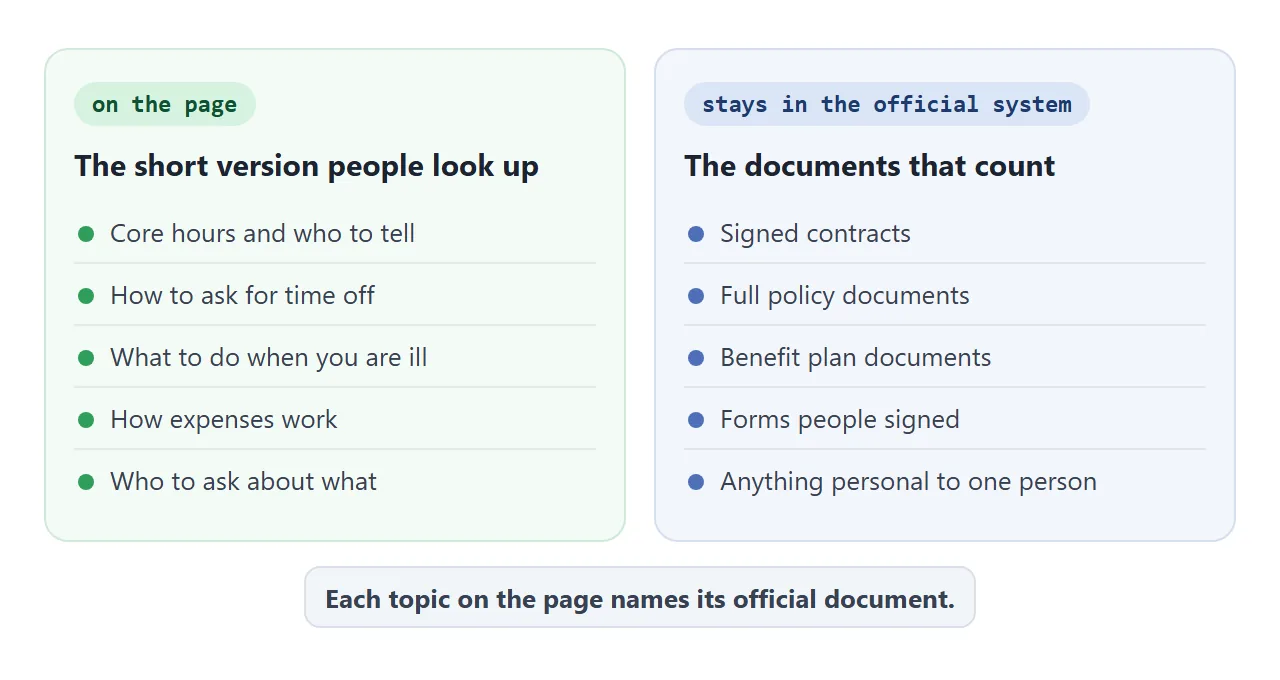
Put on the page what a person looks up in the moment: who to tell, how to ask, what the limit is. Keep out anything that is signed, personal to one employee, or would need a lawyer to reword.
Under every topic, name the official document and where it lives. That line does two jobs. It tells people where the full rule is, and it tells you which document to update when a rule changes.
The topic list in this article is an editorial suggestion, not a legal checklist. What a handbook must contain depends on your country, region and industry. Ask whoever is responsible for that before you rely on a summary.
Make it with AI
Paste this prompt into ChatGPT, Claude or Gemini. Put your own policies at the bottom, in plain sentences.
Write ONE self-contained HTML file: a team handbook summary page, read mostly on phones.
Rules:
- Plain HTML, CSS and JavaScript in one file. No images, no external files, no form that sends data.
- One column. Add a viewport meta tag. Text at least 16px.
- At the top: the team name, a "Reviewed" date and a contact person.
- Under that, a notice: "This page is a short summary. If it differs from the official document named under a topic, the official document wins."
- A search box that hides topics that do not match, and an "Open all" button.
- Each topic is a collapsible block: a title, 2 to 4 lines of answer, and a line "Official: <document title> (<where it is kept>)".
- Put all the text in one block at the top of the script, with the comment "Change the text here".
- If I did not give you a fact, write TODO. Do not invent limits, days, amounts or rules.
My policies:
Hours: ...
Time off: ...
Sick days: ...
Expenses: ...
Equipment: ...
Who to ask: ...
Official documents and where they are kept: ...
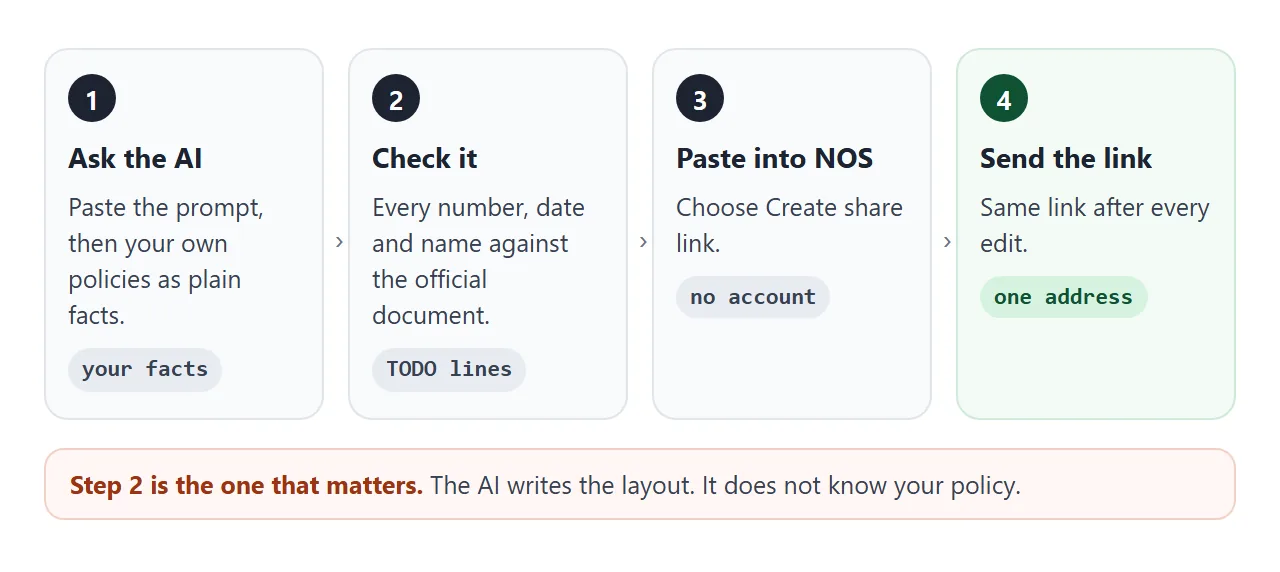
An AI is good at the layout and loose with facts. Read the page as a new hire would.
- Every number. Limits, notice periods and deadlines against the official document.
- Every TODO. Fill it in or delete the topic.
- Invented rules. Anything you did not tell it, such as probation, bonuses or overtime.
- The official lines. Each must name a real document in a real place.
- The phone. Open it on your own phone before the team does.
If the page looks wrong, fixing AI-generated HTML covers the usual causes.
Send it as a link
Paste the HTML into a NOS document and choose Create share link. HTML to link walks through it.
The result is a page anyone with the link can open in a browser, on a phone too, with no account. They can read it but not edit it. Scripts run, so the search box and the open-and-close blocks work for everyone who opens it.
Put the link wherever the team already looks: the welcome email for a new hire, the pinned line in your team chat, the top of the onboarding list. A link is just text, so it goes anywhere text goes.
To update it: change the official document first. Then open the page in NOS, edit the summary and the "Reviewed" date, and save. The same link shows the new version.
Anyone who has the link can read the page, and NOS has no password option. Put nothing on it you would not want a stranger to read. Salaries, personal data and anything confidential belong in your official system.
A page compared with the usual ways
| Long PDF by email | Document in a shared folder | Link to a page | |
|---|---|---|---|
| Opens on a phone | After a download | Depends on the folder tool | Yes, in the browser |
| Finding one rule | Scroll or search the file | Scroll or search the file | Search box and topics |
| After a change | Send a new file | Edit the file | Edit the page, same link |
| Old copies in circulation | Yes, every sent file | Only if people saved one | No, one address |
| Names the official source | Only if you add it | Only if you add it | One line per topic |
| Reader needs an account | No | Depends on sharing settings | No |
The folder column varies with the tool and the sharing settings you choose, so check yours. An attachment has to be downloaded to be read, and a change means sending a new file. That is a property of files, not of any product.
For more on when a link beats an attachment, see email vs link for documents and HTML vs PDF.
Answer the question people actually ask
People rarely look up "Section 4". They think "I am ill today" or "I paid for something for work". The second example is organised that way: pick a situation, get the steps, the person to tell and the official document.
<!doctype html>
<html lang="en">
<head>
<meta charset="utf-8">
<meta name="viewport" content="width=device-width, initial-scale=1">
<title>Larkspur Studio: what do I do if...</title>
<style>
  * { box-sizing: border-box; }
  body { margin: 0; font-family: system-ui, sans-serif; background: #f4f5f7; color: #1f2937; line-height: 1.5; }
  .wrap { max-width: 720px; margin: 0 auto; padding: 20px 16px 28px; }
  h1 { font-size: 24px; margin: 0 0 4px; }
  .sub { font-size: 14px; color: #4b5563; margin: 0 0 14px; }
  .picks { display: grid; grid-template-columns: repeat(auto-fit, minmax(180px, 1fr)); gap: 8px; margin-bottom: 14px; }
  .picks button { font: inherit; font-size: 15px; text-align: left; padding: 12px; border: 1px solid #cbd2dc; border-radius: 12px; background: #fff; cursor: pointer; }
  .picks button[aria-pressed="true"] { border-color: #2563eb; background: #eff5ff; font-weight: 600; }
  .card { background: #fff; border: 1px solid #e1e4ea; border-radius: 12px; padding: 14px 16px; }
  .card h2 { font-size: 18px; margin: 0 0 8px; }
  .card ol { margin: 0 0 10px; padding-left: 22px; }
  .card li { margin-bottom: 4px; }
  .who { font-size: 14px; margin: 0 0 8px; }
  .src { font-size: 13px; background: #eef2f7; border-radius: 8px; padding: 8px 10px; margin: 0; }
  .hint { color: #4b5563; margin: 0; }
</style>
</head>
<body>
<div class="wrap">
  <h1>What do I do if...?</h1>
  <p class="sub">Pick your situation. A short summary only: the official document wins.</p>
  <div class="picks" id="picks"></div>
  <div class="card" id="card" aria-live="polite"></div>
</div>

<script>
  // Change the answers here. Keep each one to a few short steps.
  const SITUATIONS = [
    { label: 'I am ill today', steps: ['Message your lead before 10:00.', 'You do not need to explain the illness.', 'Update the team calendar when you can.'], who: 'Your lead, then Mara Okafor if it lasts several days', doc: 'Sick Leave Policy v2 (HR system, Policies)' },
    { label: 'I want a week off', steps: ['Ask at least a month ahead.', 'Put the request in the team calendar.', 'Wait for your lead to confirm before you book.'], who: 'Your lead', doc: 'Time Off Policy v3 (HR system, Policies)' },
    { label: 'I paid for something for work', steps: ['Photograph the receipt the same day.', 'Submit it within 30 days, with the project name.', 'Over the limit? Ask your lead first.'], who: 'Tomas Reyes, finance', doc: 'Expenses Policy v4 (finance folder, Policies)' },
    { label: 'I broke or lost my laptop', steps: ['Tell Mara the same day.', 'Do not try to repair it yourself.', 'IT will lend you a spare.'], who: 'Mara Okafor and Priya Nair, IT', doc: 'Equipment Loan Form you signed (HR system, My documents)' }
  ];

  const picks = document.getElementById('picks');
  const card = document.getElementById('card');

  function show(i) {
    const s = SITUATIONS[i];
    [...picks.children].forEach((b, j) => b.setAttribute('aria-pressed', j === i ? 'true' : 'false'));
    card.innerHTML = '';
    const h = document.createElement('h2'); h.textContent = s.label;
    const ol = document.createElement('ol');
    s.steps.forEach((t) => { const li = document.createElement('li'); li.textContent = t; ol.appendChild(li); });
    const who = document.createElement('p'); who.className = 'who'; who.textContent = 'Who to tell: ' + s.who;
    const src = document.createElement('p'); src.className = 'src'; src.textContent = 'Official document: ' + s.doc;
    card.append(h, ol, who, src);
  }

  SITUATIONS.forEach((s, i) => {
    const b = document.createElement('button');
    b.type = 'button';
    b.textContent = s.label;
    b.setAttribute('aria-pressed', 'false');
    b.addEventListener('click', () => show(i));
    picks.appendChild(b);
  });

  card.innerHTML = '<p class="hint">Pick a situation above.</p>';
</script>
</body>
</html>
Four situations are enough to start. Add one each time someone asks you the same thing twice. For new hires, the same page can sit inside an onboarding page that stays current.
Keeping it honest
A summary that drifts from the official document is worse than none. Three habits keep the two together.
- Change the official document first, then the page.
- Update the "Reviewed" date every time you edit, even for a comma.
- Keep the notice that the official document wins. It is the line that protects you when the summary is out of date.
The page does not record who has read it. If you need proof that someone received or agreed to a policy, use the signed form in your official system and name it on the page.
When it does not work
| What you see | Cause | Fix |
|---|---|---|
| The page shows raw code in the chat | You copied the chat text, not the code block | Copy only the code, from the first doctype line to the last html tag |
| A policy on the page is wrong | The AI guessed a number or a rule | Ask for TODO on anything you did not state, then check each line |
| The search finds nothing | The word is not in the topic text | Add the word people use, such as "holiday" next to "time off" |
| A logo or photo is missing | Images from other sites are blocked | Ask for no images, or a logo drawn in SVG |
| A staff confirmation button does nothing | Forms cannot send to a server from the link | Keep acknowledgements in your official system |
| People see an old version | They have the page open, or the edit was not saved | Save in NOS, then ask them to reload |
| The text is tiny on a phone | No viewport meta tag | Ask the AI to add one, and a 16px base size |