A family reunion website can be one page. Put the dates and address first, then the schedule, the places to stay and what to bring, and send relatives a single link. It opens in a browser, with nothing to install and no account.
Here is a page you can copy. It is built for a phone held at arm's length: big type, one column, and a phone number that is a button.
<!doctype html>
<html lang="en">
<head>
<meta charset="utf-8">
<meta name="viewport" content="width=device-width, initial-scale=1">
<title>Alder Family Reunion 2027</title>
<style>
  * { box-sizing: border-box; }
  body {
    margin: 0; background: #f6f3ea; color: #26302a;
    font-family: system-ui, "Segoe UI", sans-serif; font-size: 18px; line-height: 1.5;
  }
  .wrap { max-width: 720px; margin: 0 auto; padding: 0 18px 40px; }
  header {
    background: linear-gradient(135deg, #2f5d46, #4f8a68); color: #fff;
    padding: 28px 18px 26px; text-align: center;
  }
  header h1 { margin: 0 0 6px; font-size: 30px; line-height: 1.2; }
  header p { margin: 0; font-size: 19px; }
  h2 { font-size: 22px; margin: 30px 0 10px; color: #2f5d46; }
  .card { background: #fff; border-radius: 12px; padding: 16px 18px; box-shadow: 0 1px 4px rgba(0,0,0,.08); }
  .when { font-size: 21px; font-weight: 700; margin: 0 0 4px; }
  .call { display: inline-block; margin-top: 8px; padding: 12px 18px; border-radius: 10px;
    background: #c2571a; color: #fff; font-weight: 700; text-decoration: none; }
  table { width: 100%; border-collapse: collapse; }
  th { text-align: left; font-size: 16px; color: #5b665f; padding: 6px 8px 6px 0; }
  td { padding: 9px 8px 9px 0; border-top: 1px solid #e7e2d3; vertical-align: top; }
  td.t { white-space: nowrap; font-weight: 700; width: 5.5em; }
  .day { margin: 18px 0 6px; font-weight: 700; }
  ul.stay { list-style: none; padding: 0; margin: 0; }
  ul.stay li { padding: 12px 0; border-top: 1px solid #e7e2d3; }
  ul.stay li:first-child { border-top: 0; }
  ul.stay b { display: block; }
  .small { color: #5b665f; font-size: 16px; }
  label.item { display: flex; gap: 12px; align-items: flex-start; padding: 10px 0; border-top: 1px solid #e7e2d3; cursor: pointer; }
  label.item:first-of-type { border-top: 0; }
  label.item input { width: 24px; height: 24px; margin-top: 3px; flex: none; accent-color: #2f5d46; }
  label.item input:checked + span { color: #7a857e; text-decoration: line-through; }
  .print { margin-top: 26px; text-align: center; }
  .print button { font: inherit; padding: 12px 20px; border-radius: 10px; border: 2px solid #2f5d46; background: #fff; color: #2f5d46; font-weight: 700; cursor: pointer; }
  @media print { .print, .call { display: none; } body { background: #fff; } header { background: #fff; color: #000; border-bottom: 2px solid #000; } }
</style>
</head>
<body>
<header>
  <h1>Alder Family Reunion</h1>
  <p>Saturday 17 and Sunday 18 July 2027 · Pinecrest Lodge, Lake Marren</p>
</header>

<div class="wrap">
  <h2>Where and when</h2>
  <div class="card">
    <p class="when">Arrive from 11:00 on Saturday</p>
    <p style="margin:0">Pinecrest Lodge, 14 Lakeshore Road, Marren Falls. Park in the field behind the red barn. Signs start at the main gate.</p>
    <a class="call" href="tel:+15550142">Call Dana: 555-0142</a>
    <p class="small" style="margin:8px 0 0">If you are lost or running late, call. Dana answers on the day.</p>
  </div>

  <h2>The schedule</h2>
  <div class="card">
    <p class="day" style="margin-top:0">Saturday</p>
    <table>
      <tr><td class="t">11:00</td><td>Arrive and park. Say hello at the picnic shelter.</td></tr>
      <tr><td class="t">12:00</td><td>Sandwich lunch at the shelter</td></tr>
      <tr><td class="t">14:00</td><td>Cabin check-in opens</td></tr>
      <tr><td class="t">15:30</td><td>Lake games: relay, tug of war, boat rides for the little ones</td></tr>
      <tr><td class="t">18:00</td><td>Potluck dinner</td></tr>
      <tr><td class="t">20:00</td><td>Photos and stories by the fire</td></tr>
    </table>
    <p class="day">Sunday</p>
    <table>
      <tr><td class="t">08:30</td><td>Pancake breakfast</td></tr>
      <tr><td class="t">10:30</td><td>Group photo on the dock</td></tr>
      <tr><td class="t">11:30</td><td>Check-out and goodbyes</td></tr>
    </table>
  </div>

  <h2>Where to stay</h2>
  <div class="card">
    <ul class="stay">
      <li><b>Cabins at the lodge</b>Six cabins, each sleeps six. Dana keeps the cabin list, so tell her who is sharing.</li>
      <li><b>Lakeview Motel</b>10 minutes away by car. Book by phone and say you are with the Alder reunion.</li>
      <li><b>Camping field</b>Next to the lodge. Bring your own tent and bedding.</li>
    </ul>
  </div>

  <h2>What to bring</h2>
  <div class="card">
    <label class="item"><input type="checkbox"><span>A dish for the Saturday potluck (enough for six)</span></label>
    <label class="item"><input type="checkbox"><span>A folding chair</span></label>
    <label class="item"><input type="checkbox"><span>Swimsuit and towel</span></label>
    <label class="item"><input type="checkbox"><span>Bug spray and sun hat</span></label>
    <label class="item"><input type="checkbox"><span>Bedding, if you sleep in a cabin or tent</span></label>
    <label class="item"><input type="checkbox"><span>One old family photo for the wall, with names on the back</span></label>
    <p class="small" style="margin:10px 0 0">Tick things off as you pack. Ticks are only for you.</p>
  </div>

  <div class="print"><button type="button" id="print">Print this page</button></div>
</div>

<script>
  // Opens the browser's print dialog, for relatives who prefer paper
  document.getElementById('print').addEventListener('click', () => window.print());
</script>
</body>
</html>
The names, place and phone number are made up. Replace them with yours, or let an AI do it, as the next section shows.
What goes on the page
People open a reunion page to answer one of four questions: when do I arrive, where do I sleep, what do I bring, and who do I call. Put those in that order, with the arrival time in the largest type.
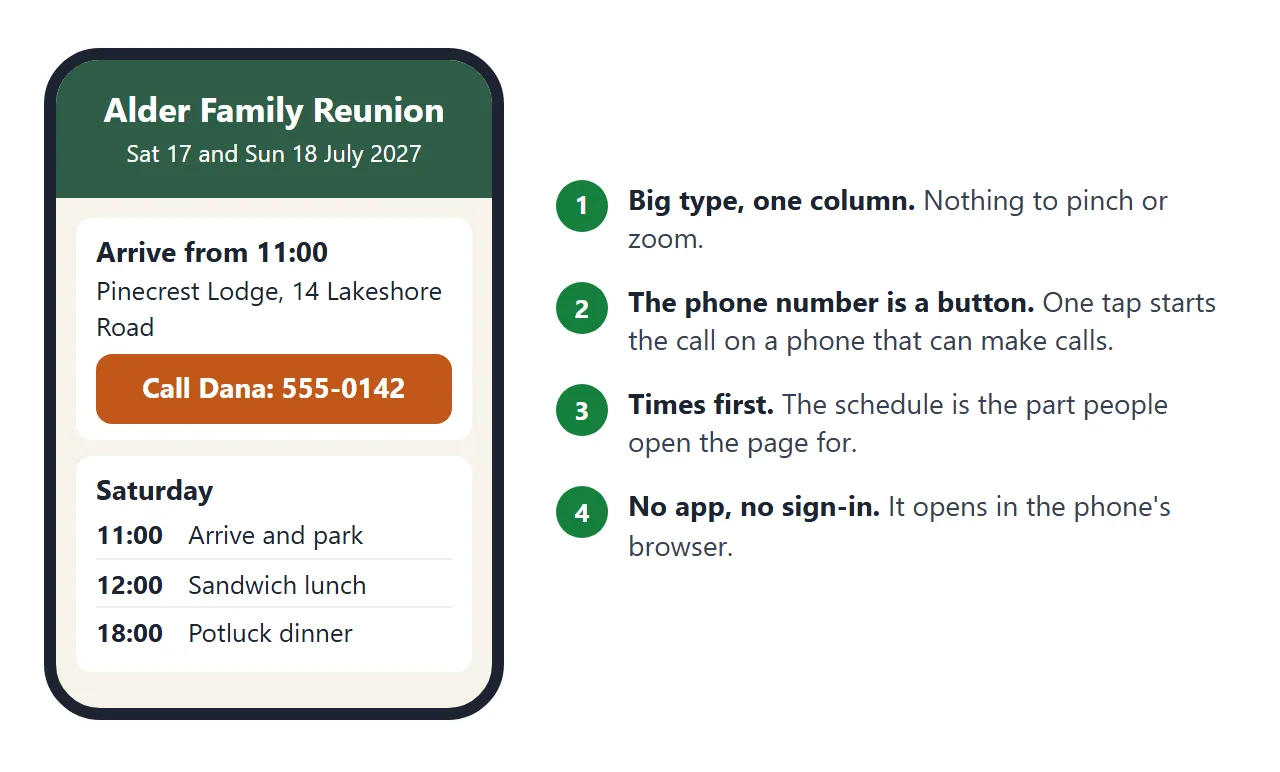
Keep the schedule to times and one line each. Put one phone number on the page as a tap-to-call link.
According to MDN, a tel: link starts a call on devices that can make calls, and other devices may do something else, such as saving the number. Show the number as text too.
Anyone who has the link can open the page, and NOS has no password option. Leave out other people's home addresses and phone numbers.
Make it with AI
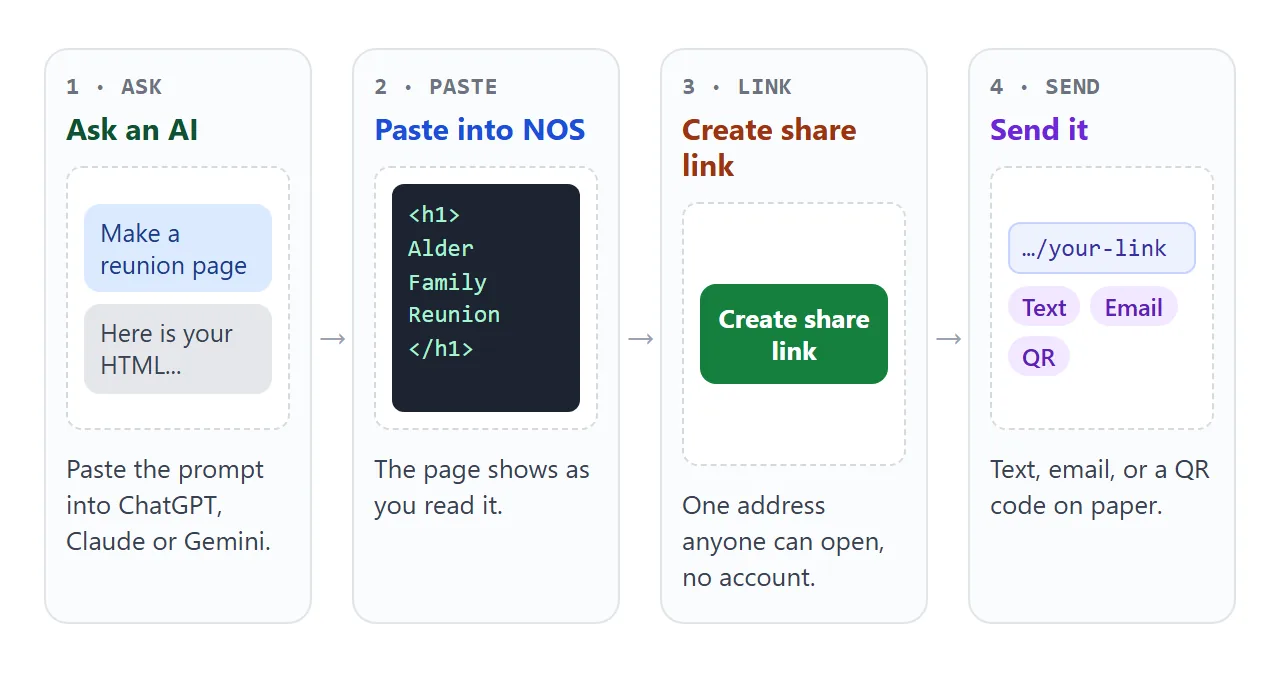
Paste this into ChatGPT, Claude or Gemini. Fill in the brackets with your own facts before you send it.
Write one self-contained HTML page for a family reunion.
Mobile first, single column, body text at least 18px,
large buttons, no external images, fonts or scripts.

Order of sections:
1. Header: [family name] reunion, [dates], [place]
2. Where and when: [address], [arrival time], a button
   that calls [phone number] using a tel: link
3. Schedule: a table of times and activities for each day
4. Where to stay: [lodging options, one line each]
5. What to bring: a checklist with a checkbox per item
6. A "Print this page" button that opens the print dialog

Here are my facts:
[paste your schedule, lodging and packing list]

Use only the facts I gave. Do not invent times, prices or names.
Then check the result against your own list. Read every time, the address, the phone number and each date. AI tools fill gaps with plausible details, so look for anything you did not write.
Send it as a link
Paste the HTML into a NOS document and choose Create share link. HTML to link walks through it. The page renders as written, scripts included, so checkboxes and the print button work.
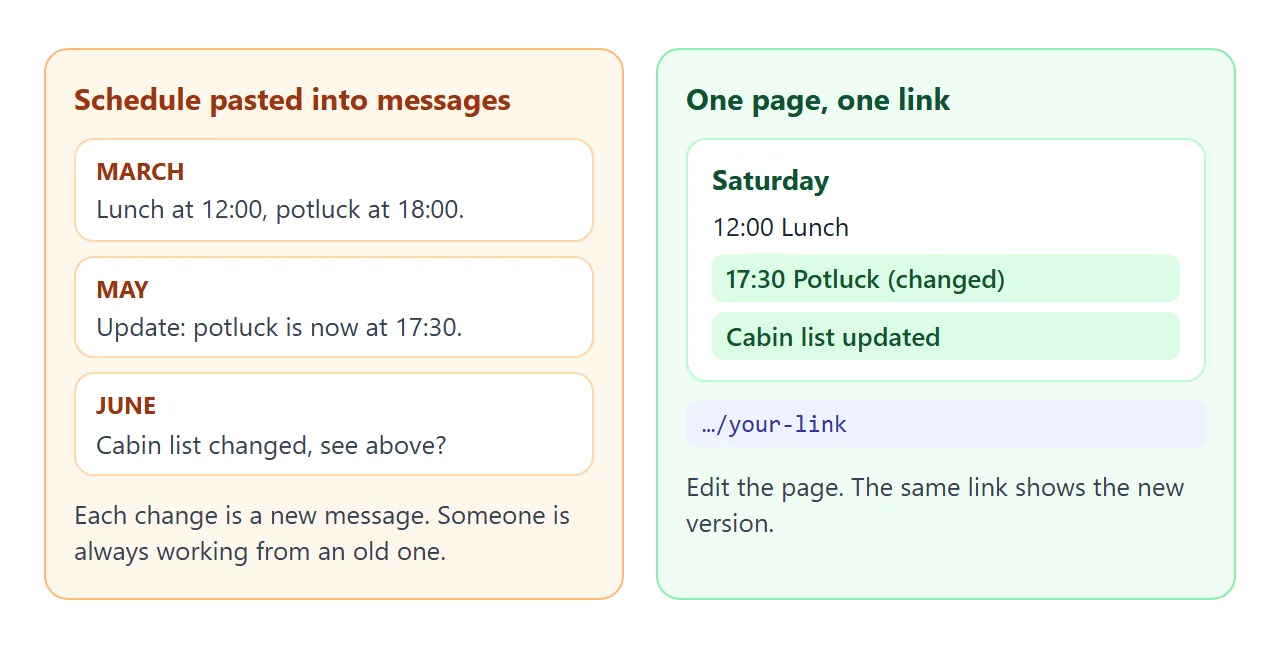
What a relative sees: the page, in a browser, on a phone or a computer, with no account. They cannot edit it. If you change the code later, the same link shows the new version.
Now choose how the link reaches each person. Relatives differ, so use more than one route.
| Route | What the relative does | Good for |
|---|---|---|
| Text message | Taps the link | Anyone who already texts |
| Taps the link in the message | Relatives who read email, not chat apps | |
| QR code on a printed invitation | Points the phone camera at the code | Relatives who get paper mail |
| Printed copy of the page | Reads paper | Relatives without a smartphone |
| Phone call to you | Asks you | Everyone, as the fallback |
For the QR route, Apple's help says to open Camera on the iPhone, frame the code, and tap the link that appears.
Google's help for Camera from Google says to point the camera at the code and tap the banner, on selected devices (as of October 2026). Any QR code generator can encode the link.
QR code link explains why a printed code can stay the same while the page changes.
For chat apps, sending an HTML file in WhatsApp explains why a link works better than an attached file. For a group with more moving parts, itinerary link shows how to structure the days.
Keep a bring list you can tick
A shared sign-up sheet usually needs everyone to type into it. Many relatives will not, so flip it: they tell you, and you keep the list.
<!doctype html>
<html lang="en">
<head>
<meta charset="utf-8">
<meta name="viewport" content="width=device-width, initial-scale=1">
<title>Who brings what: Alder reunion</title>
<style>
  * { box-sizing: border-box; }
  body { margin: 0; padding: 18px; background: #f6f3ea; color: #26302a;
    font-family: system-ui, "Segoe UI", sans-serif; font-size: 17px; line-height: 1.45; }
  .box { max-width: 680px; margin: 0 auto; }
  h1 { font-size: 24px; margin: 0 0 4px; color: #2f5d46; }
  .note { margin: 0 0 14px; color: #5b665f; font-size: 16px; }
  .card { background: #fff; border-radius: 12px; padding: 6px 16px; box-shadow: 0 1px 4px rgba(0,0,0,.08); }
  .row { display: flex; gap: 12px; align-items: center; padding: 11px 0; border-top: 1px solid #e7e2d3; }
  .row:first-child { border-top: 0; }
  .row input[type=checkbox] { width: 24px; height: 24px; flex: none; accent-color: #2f5d46; }
  .row .what { flex: 1; }
  .row .who { color: #5b665f; font-size: 16px; text-align: right; }
  .row.done .what { text-decoration: line-through; color: #7a857e; }
  .count { margin: 12px 0; font-weight: 700; }
  form { display: grid; grid-template-columns: 1fr 1fr auto; gap: 8px; margin-top: 12px; }
  input[type=text] { font: inherit; padding: 10px 12px; border: 1px solid #c9c4b3; border-radius: 8px; min-width: 0; }
  button { font: inherit; font-weight: 700; padding: 10px 16px; border: 0; border-radius: 8px; background: #2f5d46; color: #fff; cursor: pointer; }
  @media (max-width: 480px) { form { grid-template-columns: 1fr; } .row { flex-wrap: wrap; } .row .who { text-align: left; width: 100%; padding-left: 36px; } }
</style>
</head>
<body>
<div class="box">
  <h1>Who brings what</h1>
  <p class="note">Relatives who do not use apps can phone or text Dana. Dana ticks each item once it is confirmed.</p>
  <div class="count" id="count"></div>
  <div class="card" id="list"></div>
  <form id="add">
    <input type="text" id="what" placeholder="Item, e.g. lemonade" required>
    <input type="text" id="who" placeholder="Brought by" required>
    <button type="submit">Add row</button>
  </form>
</div>

<script>
  const list = document.getElementById('list');
  const count = document.getElementById('count');

  function update() {
    const rows = list.querySelectorAll('.row');
    const done = list.querySelectorAll('.row.done').length;
    count.textContent = done + ' of ' + rows.length + ' confirmed';
  }

  function addRow(what, who, done) {
    const row = document.createElement('label');
    row.className = 'row' + (done ? ' done' : '');
    const box = document.createElement('input');
    box.type = 'checkbox';
    box.checked = done;
    box.addEventListener('change', () => { row.classList.toggle('done', box.checked); update(); });
    const w = document.createElement('span'); w.className = 'what'; w.textContent = what;
    const o = document.createElement('span'); o.className = 'who'; o.textContent = who;
    row.append(box, w, o);
    list.append(row);
    update();
  }

  [
    ['Potato salad, serves 12', 'Aunt Maren', true],
    ['Two folding tables', 'Cousin Theo', true],
    ['Watermelons (3)', 'Grandpa Ewan', false],
    ['Cooler with ice', 'Priya and Sam', false],
    ['Corn hole set', 'Uncle Bram', false],
    ['Paper plates and cups', 'Dana', true],
  ].forEach((r) => addRow(r[0], r[1], r[2]));

  document.getElementById('add').addEventListener('submit', (e) => {
    e.preventDefault();
    const what = document.getElementById('what');
    const who = document.getElementById('who');
    addRow(what.value.trim(), who.value.trim(), false);
    what.value = ''; who.value = ''; what.focus();
  });
</script>
</body>
</html>
You open your own link, tick an item when an aunt phones to confirm, and add a row for the cousin who texted. Those View-mode changes are saved. Anything a visitor ticks stays on their own screen.
Do not add a name-and-email form that posts to a server. In NOS, sending a form to a server is blocked, and forms handled inside the page work. Event landing page covers which facts to put first on an event page.
When it does not work
| Symptom | Cause | Fix |
|---|---|---|
| A relative says the page has old times | They are looking at a text message or a printout, not the link | Put "latest version at the link" on every printout and message |
| The phone number does not dial | The device cannot make calls | Show the number as plain text too |
| A relative ticked a box and it vanished | Visitors' changes are not saved | Ask them to tell you, and tick it yourself |
| Images from a photo site are missing | Outside images are blocked | Use inline SVG or CSS, or leave pictures out |
| A sign-up form sends nothing | Posting a form to a server is blocked | Collect replies by phone or text |
| The QR code does not scan | Small print, glare or a tilted phone | Print it larger on plain paper and test it first |
Test the finished link on your own phone, then on a relative's phone if you can. Keep one printed copy of the page ready for relatives who never open links.
Start small
You do not need every section on day one. Send the dates, address and arrival time first, then add the schedule and lodging as they get settled. Each edit keeps the same link.
Share wedding details with guests uses the same approach for another kind of gathering.