"Hosting" here means Firebase Hosting, the web hosting part of Google's Firebase platform. It stores your files and serves them over HTTPS, and it is built for static pages and single-page web apps.
For one HTML file, save it as index.html in your public folder and deploy.
Before you deploy, make sure the page works on its own. This is a complete page in one file. It reads its own address and shows where it is being served from.
<!doctype html>
<html lang="en">
<head>
<meta charset="utf-8">
<meta name="viewport" content="width=device-width, initial-scale=1">
<title>My first page</title>
<style>
  body {
    margin: 0; padding: 20px; font-family: system-ui, sans-serif;
    background: #f4f5f7; color: #1d2330;
  }
  body.night { background: #1d2330; color: #f4f5f7; }
  main { max-width: 460px; margin: 0 auto; }
  h1 { font-size: 22px; margin: 0 0 6px; }
  p { margin: 0 0 14px; line-height: 1.5; }
  .box {
    background: #fff; color: #1d2330; border-radius: 10px; padding: 12px 14px;
    box-shadow: 0 4px 14px rgba(0, 0, 0, .1); font-size: 14px; line-height: 1.6;
  }
  code { font-family: ui-monospace, Consolas, monospace; font-size: 13px; background: #eef1f5; border-radius: 4px; padding: 0 4px; }
  button {
    margin-top: 14px; padding: 10px 16px; font-size: 15px; border: 0;
    border-radius: 8px; background: #2563eb; color: #fff; cursor: pointer;
  }
</style>
</head>
<body>
<main>
  <h1>Hello from one file</h1>
  <p>This whole page is a single <code>index.html</code>. No build step.</p>
  <div class="box">
    <div>Protocol: <code id="proto"></code></div>
    <div>Host: <code id="host"></code></div>
    <div id="where"></div>
  </div>
  <button id="toggle" type="button">Switch theme</button>
</main>

<script>
  // Read where this page is being served from
  const host = location.hostname;
  document.getElementById('proto').textContent = location.protocol;
  document.getElementById('host').textContent = host || '(none)';

  let msg = 'Served from another address.';
  if (location.protocol === 'file:') msg = 'Opened from a file on your computer.';
  else if (host.endsWith('.web.app') || host.endsWith('.firebaseapp.com')) msg = 'Served from a Firebase Hosting address.';
  else if (location.protocol === 'about:' || !host) msg = 'Shown inside an embedded preview.';
  document.getElementById('where').textContent = msg;

  document.getElementById('toggle').addEventListener('click', () => {
    document.body.classList.toggle('night');
  });
</script>
</body>
</html>
Nothing in that file is specific to Firebase. Hosting only serves it. If you want the page to size correctly on a phone, it needs the viewport meta tag.
Deploy one index.html in four steps
You need a Google account, a Firebase project, and Node.js with npm installed. Then:
- Create a project in the Firebase console and install Node.js and npm.
- Install the command-line tool, then sign in.
- Run the setup once. It asks for the public folder. Put your page there as
index.html. - Deploy, then open your project's address.
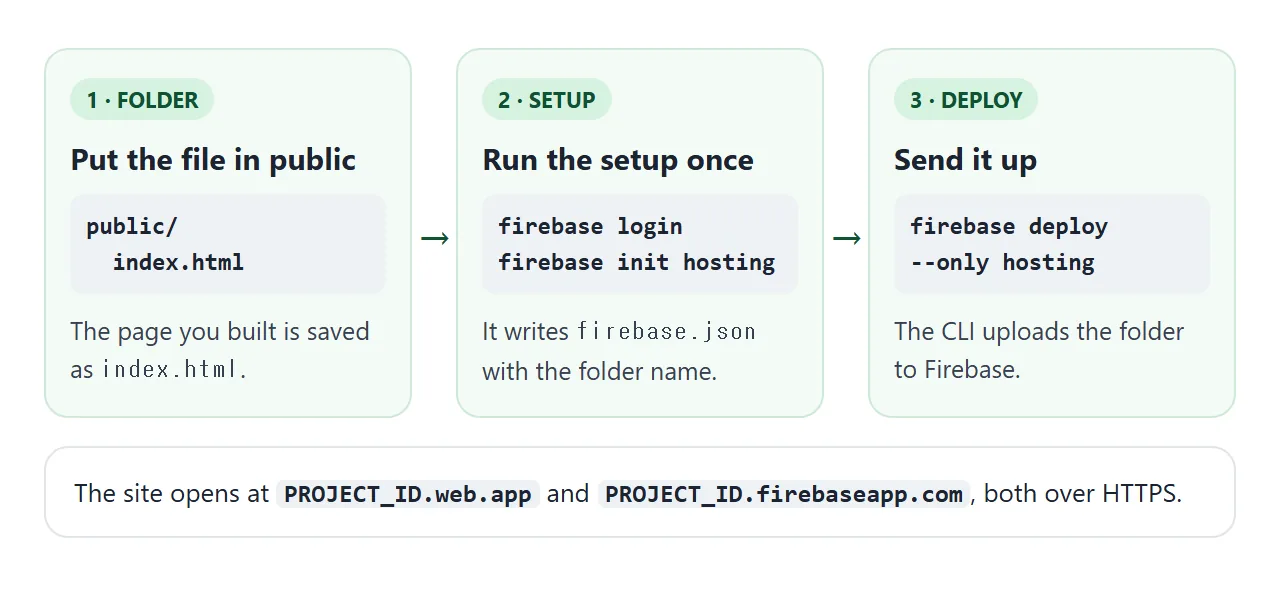
The commands for steps 2 to 4:
npm install -g firebase-tools
firebase login
firebase init hosting
firebase deploy --only hosting
The setup suggests public as the folder name. It also asks whether to configure the site as a single-page app. For one plain page, you do not need that.
Your site is then served at PROJECT_ID.web.app and PROJECT_ID.firebaseapp.com, both free subdomains. Firebase can also connect your own domain name and provisions the SSL certificates for it.
What firebase.json holds
The setup writes a firebase.json file. Its hosting block says which folder to upload and what to leave out.
{
  "hosting": {
    "public": "public",
    "ignore": ["firebase.json", "**/.*", "**/node_modules/**"]
  }
}
public is the folder that gets deployed. You can change it to another existing folder, for example dist/app. The ignore list is the default: the config file itself, files whose names start with a dot, and node_modules.
If the folder has no index.html or 404.html, Firebase creates them for you. That is why a first deploy can show a starter page instead of yours.
Which file does an address show?
When a visitor asks for a path, Hosting follows a fixed order. Redirects come first. Then an exact static file wins. A rewrite applies only when no file exists at that path. After that comes your 404.html, then the default 404 page.
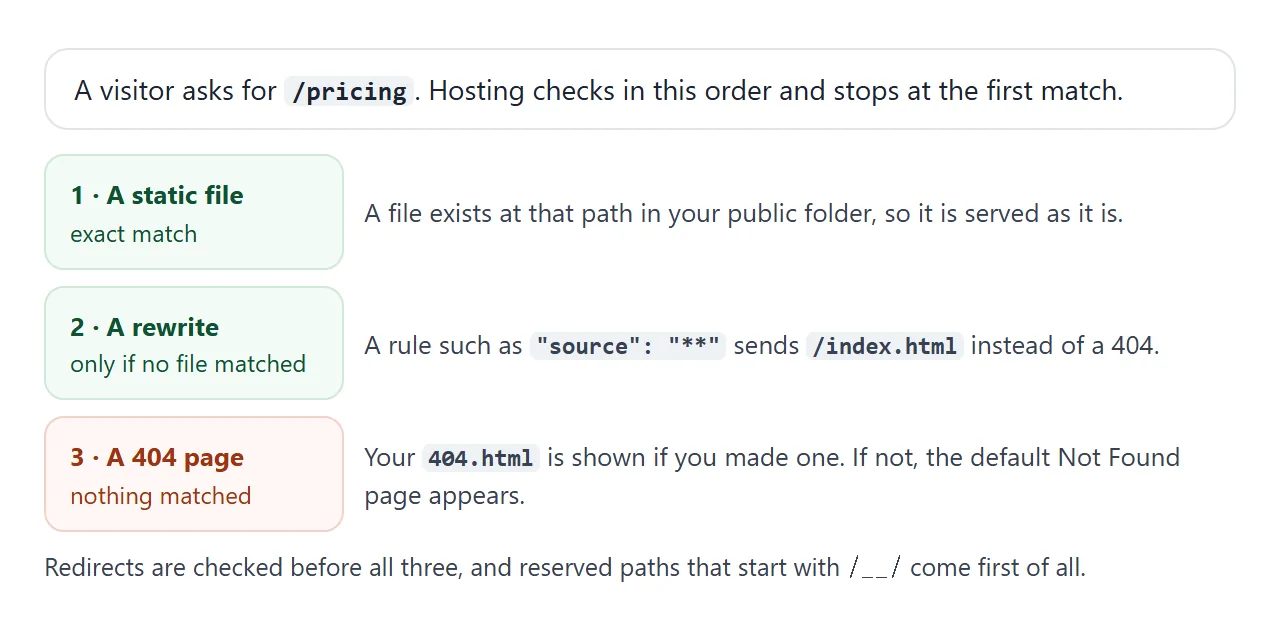
Try the order yourself. Untick about.html, switch the rewrite on, and see what each address shows. The model is simplified, and it covers only the rules above.
<!doctype html>
<html lang="en">
<head>
<meta charset="utf-8">
<meta name="viewport" content="width=device-width, initial-scale=1">
<title>What does this URL show?</title>
<style>
  * { box-sizing: border-box; }
  body { margin: 0; padding: 16px; font-family: system-ui, sans-serif; background: #f4f5f7; color: #1d2330; }
  h1 { font-size: 18px; margin: 0 0 10px; }
  fieldset { border: 1px solid #d5d9e0; border-radius: 10px; background: #fff; margin: 0 0 12px; padding: 10px 12px; }
  legend { font-size: 13px; font-weight: 700; padding: 0 6px; }
  label { display: block; font-size: 14px; padding: 3px 0; }
  code { font-family: ui-monospace, Consolas, monospace; font-size: 13px; background: #eef1f5; border-radius: 4px; padding: 0 4px; }
  .row { display: flex; gap: 8px; flex-wrap: wrap; align-items: center; }
  input[type=text] { flex: 1 1 160px; min-width: 0; padding: 9px 10px; font: 15px ui-monospace, Consolas, monospace; border: 1px solid #b9c0cc; border-radius: 8px; }
  button { padding: 8px 12px; font-size: 14px; border: 1px solid #b9c0cc; border-radius: 8px; background: #fff; cursor: pointer; }
  #result { border-radius: 10px; padding: 12px 14px; font-size: 14px; line-height: 1.5; border: 1px solid; }
  #result.ok { background: #f4fbf6; border-color: #cfe9d7; }
  #result.bad { background: #fff7f5; border-color: #f3d1c8; }
  #result b { font-size: 16px; }
  ol { margin: 8px 0 0; padding-left: 20px; font-size: 13px; color: #374151; }
  .note { font-size: 12px; color: #6b7280; margin: 8px 0 0; }
</style>
</head>
<body>
<h1>What does this URL show?</h1>

<fieldset>
  <legend>Files in your public folder</legend>
  <label><input type="checkbox" class="file" value="/index.html" checked> <code>index.html</code></label>
  <label><input type="checkbox" class="file" value="/about.html" checked> <code>about.html</code></label>
  <label><input type="checkbox" class="file" value="/404.html"> <code>404.html</code></label>
</fieldset>

<fieldset>
  <legend>firebase.json settings</legend>
  <label><input type="checkbox" id="spa"> rewrite <code>**</code> to <code>/index.html</code></label>
  <label><input type="checkbox" id="clean"> <code>"cleanUrls": true</code></label>
</fieldset>

<fieldset>
  <legend>Visitor opens this path</legend>
  <div class="row">
    <input type="text" id="path" value="/pricing" autocomplete="off" spellcheck="false" aria-label="URL path">
    <button type="button" data-p="/">/</button>
    <button type="button" data-p="/about.html">/about.html</button>
    <button type="button" data-p="/about">/about</button>
    <button type="button" data-p="/pricing">/pricing</button>
  </div>
</fieldset>

<div id="result" aria-live="polite"></div>
<p class="note">Simplified model: no redirects, and the path <code>/</code> is treated as <code>/index.html</code>.</p>

<script>
  const $ = (id) => document.getElementById(id);

  function resolve(raw) {
    const have = new Set([...document.querySelectorAll('.file:checked')].map((c) => c.value));
    const spa = $('spa').checked, clean = $('clean').checked;
    let p = raw.trim().split(/[?#]/)[0];
    if (!p.startsWith('/')) p = '/' + p;
    const steps = [];

    // 1. cleanUrls: a .html address is redirected to the version without the extension
    if (clean && p.endsWith('.html') && p !== '/index.html' && have.has(p)) {
      steps.push('cleanUrls is on and the address ends in .html.');
      return { ok: true, title: '301 redirect to ' + p.slice(0, -5), steps };
    }
    // 2. exact static file (cleanUrls also lets /about find about.html)
    const file = p === '/' ? '/index.html' : p;
    steps.push('Is there a static file at ' + file + '? ' + (have.has(file) ? 'Yes.' : 'No.'));
    if (have.has(file)) return { ok: true, title: '200 - serves ' + file, steps };
    if (clean && p !== '/' && have.has(p + '.html')) {
      steps.push('cleanUrls is on, so ' + p + ' finds ' + p + '.html. Yes.');
      return { ok: true, title: '200 - serves ' + p + '.html', steps };
    }
    // 3. rewrites only run when no file matched
    if (spa) {
      steps.push('Rewrite ** matches, so /index.html is sent instead.');
      if (have.has('/index.html')) return { ok: true, title: '200 - serves /index.html for ' + p + '', steps };
      steps.push('But /index.html is not in the folder.');
    } else steps.push('No rewrite is set.');
    // 4. custom 404, then the default one
    if (have.has('/404.html')) {
      steps.push('Your 404.html is shown.');
      return { ok: false, title: '404 - serves your 404.html', steps };
    }
    steps.push('No 404.html, so the default 404 page is shown.');
    return { ok: false, title: '404 - default Not Found page', steps };
  }

  function render() {
    const r = resolve($('path').value);
    const box = $('result');
    box.className = r.ok ? 'ok' : 'bad';
    box.replaceChildren();
    const b = document.createElement('b'); b.textContent = r.title; box.appendChild(b);
    const ol = document.createElement('ol');
    r.steps.forEach((s) => { const li = document.createElement('li'); li.textContent = s; ol.appendChild(li); });
    box.appendChild(ol);
  }

  document.querySelectorAll('input').forEach((el) => el.addEventListener('input', render));
  document.querySelectorAll('button[data-p]').forEach((btn) =>
    btn.addEventListener('click', () => { $('path').value = btn.dataset.p; render(); }));
  render();
</script>
</body>
</html>
A catch-all rewrite is the usual setup for single-page apps:
"rewrites": [{ "source": "**", "destination": "/index.html" }]
For a plain page, it hides mistakes: every wrong address shows your home page instead of a 404. Add a 404.html and skip the rewrite instead. Setting "cleanUrls": true makes Hosting drop .html from file URLs and redirect addresses that include it.
Check what actually gets uploaded
Two mistakes lead to empty or half-empty sites: the page is not at the top of the public folder, or a file matches the ignore list. Paste your file paths below and see which ones deploy.
<!doctype html>
<html lang="en">
<head>
<meta charset="utf-8">
<meta name="viewport" content="width=device-width, initial-scale=1">
<title>Deploy folder checker</title>
<style>
  * { box-sizing: border-box; }
  body { margin: 0; padding: 16px; font-family: system-ui, sans-serif; background: #f4f5f7; color: #1d2330; }
  h1 { font-size: 18px; margin: 0 0 6px; }
  p { margin: 0 0 10px; font-size: 14px; line-height: 1.5; }
  label { display: block; font-size: 13px; font-weight: 700; margin: 10px 0 4px; }
  textarea, input { width: 100%; padding: 9px 10px; font: 14px ui-monospace, Consolas, monospace; border: 1px solid #b9c0cc; border-radius: 8px; background: #fff; }
  textarea { height: 150px; resize: vertical; }
  #summary { margin: 12px 0 8px; padding: 10px 12px; border-radius: 10px; font-size: 14px; border: 1px solid; }
  #summary.ok { background: #f4fbf6; border-color: #cfe9d7; color: #0f5132; }
  #summary.bad { background: #fff7f5; border-color: #f3d1c8; color: #9a3412; }
  ul { list-style: none; margin: 0; padding: 0; }
  li { display: flex; gap: 8px; align-items: baseline; padding: 6px 8px; border-bottom: 1px solid #e1e4ea; font-size: 13px; background: #fff; }
  li:first-child { border-radius: 8px 8px 0 0; } li:last-child { border-radius: 0 0 8px 8px; border-bottom: 0; }
  .tag { flex: none; width: 62px; font: 700 11px/1 system-ui, sans-serif; padding: 4px 0; text-align: center; border-radius: 99px; }
  .go .tag { background: #d6f2df; color: #0f5132; }
  .skip .tag { background: #fde2da; color: #9a3412; }
  .path { font-family: ui-monospace, Consolas, monospace; word-break: break-all; }
  .why { color: #6b7280; font-size: 12px; display: block; }
</style>
</head>
<body>
<h1>Deploy folder checker</h1>
<p>Paste your project's file paths, one per line, and see which ones end up on the site.</p>

<label for="pub">Public folder (the <code>public</code> value in firebase.json)</label>
<input id="pub" value="public" autocomplete="off" spellcheck="false">

<label for="files">Project files</label>
<textarea id="files" spellcheck="false">firebase.json
.firebaserc
src/app.js
public/index.html
public/style.css
public/images/logo.svg
public/.env
public/node_modules/lib/x.js</textarea>

<div id="summary" aria-live="polite"></div>
<ul id="list"></ul>

<script>
  const $ = (id) => document.getElementById(id);

  function check(path, pub) {
    let rel = path;
    if (pub && pub !== '.') {
      if (!path.startsWith(pub + '/')) return { go: false, why: 'outside the public folder' };
      rel = path.slice(pub.length + 1);
    }
    const parts = rel.split('/');
    if (rel === 'firebase.json') return { go: false, why: 'default ignore: firebase.json', rel };
    if (parts.some((s) => s.startsWith('.'))) return { go: false, why: 'default ignore: name starts with a dot', rel };
    if (parts.includes('node_modules')) return { go: false, why: 'default ignore: node_modules', rel };
    return { go: true, why: '', rel };
  }

  function render() {
    const pub = $('pub').value.trim().replace(/^\.?\/+|\/+$/g, '') || '.';
    const lines = $('files').value.split('\n').map((l) => l.trim().replace(/^\.\//, '')).filter(Boolean);
    const list = $('list');
    list.replaceChildren();
    let hasIndex = false;
    lines.forEach((line) => {
      const r = check(line, pub);
      if (r.go && r.rel === 'index.html') hasIndex = true;
      const li = document.createElement('li');
      li.className = r.go ? 'go' : 'skip';
      const tag = document.createElement('span'); tag.className = 'tag'; tag.textContent = r.go ? 'DEPLOYS' : 'SKIPPED';
      const box = document.createElement('span');
      const p = document.createElement('span'); p.className = 'path'; p.textContent = line;
      box.appendChild(p);
      if (!r.go) { const w = document.createElement('span'); w.className = 'why'; w.textContent = r.why; box.appendChild(w); }
      li.append(tag, box);
      list.appendChild(li);
    });
    const s = $('summary');
    s.className = hasIndex ? 'ok' : 'bad';
    s.textContent = hasIndex
      ? 'index.html is at the top of the public folder.'
      : 'No index.html at the top of the public folder. Visitors will not get your page.';
  }

  $('pub').addEventListener('input', render);
  $('files').addEventListener('input', render);
  render();
</script>
</body>
</html>
Cache and preview
Firebase's documentation says requested static content is automatically cached on the CDN. To change that for some paths, add a headers rule:
"headers": [{
  "source": "/posts/**",
  "headers": [{ "key": "Cache-Control", "value": "no-cache, no-store" }]
}]
Cache busting covers the browser side of the same problem.
To check a change before it goes live, deploy to a preview channel:
firebase hosting:channel:deploy CHANNEL_ID
You get a temporary URL that is hard to guess. Anyone who has it can open it, so treat it as shared.
Cost in one paragraph
Firebase offers a no-cost Spark plan and a pay-as-you-go Blaze plan. Its Hosting usage page lists storage for Hosting content at no cost up to 10 GB.
The same page sets a maximum of 2 GB for a single file. Check it for the current transfer limits.
When it does not work
| What you see | Cause | Fix |
|---|---|---|
| A starter page, not yours | Firebase created a default index.html in the public folder | Save your page there as index.html and deploy again |
| Page Not Found at the main address | No index.html at the top of the public folder, or public points to the wrong folder | Check the public value in firebase.json |
| One file is missing from the live site | It matches the ignore list | Rename it, or move it out of a dot or node_modules path |
| /about fails but /about.html works | There is no file named about | Link to the .html address, or set cleanUrls to true |
| Every wrong address shows the home page | A rewrite sends all paths to index.html | Remove the rewrite and add a 404.html |
| The old version still shows | A cached copy is being served | Reload without cache, or set a Cache-Control header |
| The firebase command is not found | The CLI is not installed | Install it with npm, which needs Node.js |
| Live site did not change after an edit | The file was saved but not deployed | Run the deploy command again |
Two routes to a working link
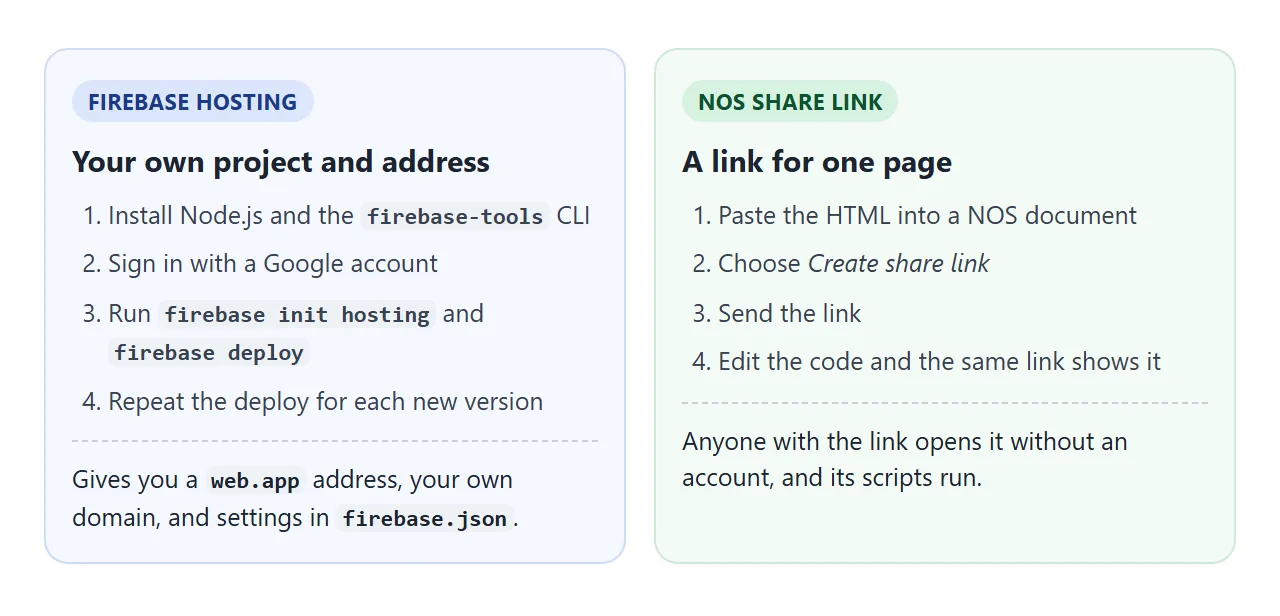
Firebase Hosting gives you a project of your own, a firebase.json file, your own domain and a deploy for every version. That fits a site you will keep and grow. For one page you only want to show someone, a share link needs less setup.
Other ways to publish one file are in hosting a single HTML file and free static website hosting.
Share it as a link
A deployed page is only useful if the other person can try it. A screenshot cannot be clicked, and a file attachment may open as plain code on a phone.
To send the working version without a project or a command line, paste the page into a NOS document and choose Create share link. HTML to link walks through it.
The link opens without an account, and the page renders as written with its scripts running, so the person you send it to can use it directly. If you change the code later, the same link shows the new version.