The vocab test is on Friday. You have ten words on a sheet of paper.
You read the list top to bottom. Then again. By the third pass you are still reading "la cocina", a word you knew on Monday.
Paper cards help, but you have to cut them, and they end up in a pile on the floor.
These days people ask ChatGPT, Claude or Gemini for it and get a finished page in one reply. A free flashcard maker you build yourself, with your own words, that opens on your phone.
Here is one. Tap the card to flip it, then tell it whether you knew it.
<!doctype html>
<html lang="en">
<head>
<meta charset="utf-8">
<meta name="viewport" content="width=device-width, initial-scale=1">
<title>Spanish flashcards: around the house</title>
<style>
* { box-sizing: border-box; }
body { margin: 0; min-height: 100vh; background: radial-gradient(circle at 10% 0%, #ffe7cf, transparent 45%), radial-gradient(circle at 100% 20%, #d9f0ff, transparent 40%), #fbf7f1; color: #24203a; font-family: system-ui, -apple-system, "Segoe UI", sans-serif; }
.page { max-width: 520px; margin: 0 auto; padding: 18px 16px 28px; }
.top { display: flex; align-items: flex-end; justify-content: space-between; gap: 10px; margin-bottom: 12px; }
h1 { margin: 0; font-size: 21px; line-height: 1.2; }
.sub { font-size: 13px; color: #6b6585; margin-top: 3px; }
.shuffle { flex: none; border: 0; border-radius: 12px; padding: 9px 12px; background: #24203a; color: #fff; font: 600 13px system-ui; cursor: pointer; }
.stats { display: grid; grid-template-columns: repeat(3, 1fr); gap: 8px; margin-bottom: 10px; }
.stat { background: #fff; border-radius: 12px; padding: 8px 6px; text-align: center; box-shadow: 0 2px 0 #ebe3d6; }
.stat b { display: block; font-size: 20px; }
.stat span { font-size: 12px; color: #6b6585; }
.stat.k b { color: #1f9d63; } .stat.a b { color: #e0503a; }
.bar { height: 7px; border-radius: 9px; background: #ece4d8; overflow: hidden; margin-bottom: 14px; }
.bar i { display: block; height: 100%; width: 0; background: linear-gradient(90deg, #ffb347, #1f9d63); transition: width .4s; }
.stage { perspective: 1200px; height: 250px; position: relative; }
.card { position: absolute; inset: 0; cursor: pointer; transform-style: preserve-3d; transition: transform .55s cubic-bezier(.3,.7,.3,1.2), opacity .35s; }
.card.flipped { transform: rotateY(180deg); }
.card.out-l { transform: translateX(-120%) rotate(-12deg); opacity: 0; }
.card.out-r { transform: translateX(120%) rotate(12deg); opacity: 0; }
.card.in { animation: in .35s ease-out; }
@keyframes in { from { transform: translateY(18px) scale(.96); opacity: 0; } }
.face { position: absolute; inset: 0; backface-visibility: hidden; -webkit-backface-visibility: hidden; border-radius: 22px; display: grid; place-items: center; padding: 22px; text-align: center; }
.front { background: #fff; box-shadow: 0 14px 30px rgba(60,40,20,.13), 0 3px 0 #ebe3d6; }
.back { background: linear-gradient(140deg, #3b2f8f, #6b4fd8); color: #fff; transform: rotateY(180deg); box-shadow: 0 14px 30px rgba(60,40,80,.25); }
.face .w { font-size: clamp(26px, 8vw, 36px); font-weight: 800; line-height: 1.15; }
.face .hint { position: absolute; bottom: 14px; left: 0; right: 0; font-size: 12px; letter-spacing: .08em; text-transform: uppercase; opacity: .55; }
.face .n { position: absolute; top: 14px; left: 18px; font-size: 12px; opacity: .55; }
.nav { display: grid; grid-template-columns: 1fr 1.3fr 1fr; gap: 8px; margin-top: 14px; }
.nav button, .sort button { border: 0; border-radius: 14px; padding: 12px 6px; font: 700 15px system-ui; cursor: pointer; transition: transform .1s; }
.nav button:active, .sort button:active { transform: scale(.96); }
.nav button { background: #fff; color: #24203a; box-shadow: 0 2px 0 #e3d9cb; }
.nav .flip { background: #ffcf4a; box-shadow: 0 2px 0 #e0ae22; }
.sort { display: grid; grid-template-columns: 1fr 1fr; gap: 8px; margin-top: 8px; opacity: .35; pointer-events: none; transition: opacity .25s; }
.sort.ready { opacity: 1; pointer-events: auto; }
.sort .again { background: #ffe1dc; color: #b83322; }
.sort .knew { background: #d6f5e5; color: #127349; }
.done { display: none; text-align: center; background: #fff; border-radius: 22px; padding: 26px 18px; box-shadow: 0 14px 30px rgba(60,40,20,.13); height: 250px; flex-direction: column; justify-content: center; gap: 10px; }
.done big { font-size: 26px; font-weight: 800; }
.done p { margin: 0; color: #6b6585; font-size: 15px; }
.done .row { display: flex; gap: 8px; justify-content: center; flex-wrap: wrap; margin-top: 6px; }
.done button { border: 0; border-radius: 12px; padding: 11px 14px; font: 700 14px system-ui; cursor: pointer; background: #24203a; color: #fff; }
.done button.alt { background: #ece4d8; color: #24203a; }
.list { margin-top: 20px; padding: 14px; border-radius: 16px; background: rgba(255,255,255,.75); }
.list h2 { margin: 0 0 8px; font-size: 12px; letter-spacing: .1em; text-transform: uppercase; color: #6b6585; }
.list ol { margin: 0; padding: 0 0 0 22px; display: grid; gap: 4px; font-size: 14px; }
.list li span { color: #6b6585; }
.list li span::before { content: " = "; }
.list li.k { color: #1f9d63; } .list li.a { color: #e0503a; }
</style>
</head>
<body>
<main class="page">
<div class="top">
<div><h1>Spanish: around the house</h1><div class="sub">Tap the card to flip. Then sort it.</div></div>
<button class="shuffle" id="shuffle">Shuffle</button>
</div>
<div class="stats">
<div class="stat"><b id="left">0</b><span>to go</span></div>
<div class="stat k"><b id="knew">0</b><span>knew it</span></div>
<div class="stat a"><b id="again">0</b><span>again</span></div>
</div>
<div class="bar"><i id="bar"></i></div>
<div class="stage" id="stage">
<div class="card" id="card">
<div class="face front"><span class="n" id="n1"></span><div class="w" id="q"></div><span class="hint">tap to flip</span></div>
<div class="face back"><span class="n" id="n2"></span><div class="w" id="ans"></div><span class="hint">did you know it?</span></div>
</div>
</div>
<div class="done" id="done">
<big id="doneTitle"></big>
<p id="doneText"></p>
<div class="row"><button id="redo">Study the misses</button><button class="alt" id="restart">Start over</button></div>
</div>
<div class="nav">
<button id="prev">← Back</button>
<button class="flip" id="flip">Flip</button>
<button id="next">Next →</button>
</div>
<div class="sort" id="sort">
<button class="again" id="bAgain">Again</button>
<button class="knew" id="bKnew">I knew it</button>
</div>
<section class="list">
<h2>The cards (front = back)</h2>
<ol id="deck">
<li><b>la cocina</b><span>the kitchen</span></li>
<li><b>la ventana</b><span>the window</span></li>
<li><b>la puerta</b><span>the door</span></li>
<li><b>la mesa</b><span>the table</span></li>
<li><b>la silla</b><span>the chair</span></li>
<li><b>la cama</b><span>the bed</span></li>
<li><b>el espejo</b><span>the mirror</span></li>
<li><b>la escalera</b><span>the stairs</span></li>
<li><b>el baño</b><span>the bathroom</span></li>
<li><b>la llave</b><span>the key</span></li>
</ol>
</section>
</main>
<script>
const $ = (id) => document.getElementById(id);
const card = $('card'), sort = $('sort');
let cards = [], order = [], pos = 0, mark = {}, onlyThese = null;
// Cards come from the visible list, so editing a line on the page changes the card.
function readDeck() {
cards = [...document.querySelectorAll('#deck li')].map((li, i) => ({
i, q: (li.querySelector('b') || li).textContent.trim(), a: (li.querySelector('span') || {}).textContent?.trim() || '',
})).filter((c) => c.q);
}
function start(ids) {
readDeck(); onlyThese = ids || null;
order = cards.map((c) => c.i).filter((i) => !ids || ids.includes(i));
mark = {}; pos = 0; showStage(true); show(); paintList();
}
function showStage(on) { $('stage').style.display = on ? 'block' : 'none'; $('done').style.display = on ? 'none' : 'flex'; document.querySelector('.nav').style.display = on ? 'grid' : 'none'; sort.style.display = on ? 'grid' : 'none'; }
function show(anim) {
const c = cards.find((x) => x.i === order[pos]); if (!c) return;
card.style.transition = 'none'; card.className = 'card'; void card.offsetWidth; card.style.transition = '';
if (anim) card.classList.add('in');
$('q').textContent = c.q; $('ans').textContent = c.a;
$('n1').textContent = $('n2').textContent = (pos + 1) + ' / ' + order.length;
sort.classList.remove('ready'); count();
}
function count() {
const v = Object.values(mark);
const k = v.filter((x) => x === 'k').length, a = v.filter((x) => x === 'a').length;
$('knew').textContent = k; $('again').textContent = a; $('left').textContent = order.length - k - a;
$('bar').style.width = (order.length ? (k + a) / order.length * 100 : 0) + '%';
}
function flip() { card.classList.toggle('flipped'); if (card.classList.contains('flipped')) sort.classList.add('ready'); }
function go(step) { if (!order.length) return; pos = (pos + step + order.length) % order.length; show(true); }
function decide(m) {
mark[order[pos]] = m; paintList(); count();
card.classList.add(m === 'k' ? 'out-r' : 'out-l'); sort.classList.remove('ready');
setTimeout(() => {
const next = order.findIndex((id, j) => j > pos && !mark[id]);
const first = order.findIndex((id) => !mark[id]);
if (next >= 0) { pos = next; show(true); } else if (first >= 0) { pos = first; show(true); } else finish();
}, 320);
}
function finish() {
const miss = order.filter((id) => mark[id] === 'a');
const k = order.length - miss.length;
showStage(false);
$('doneTitle').textContent = miss.length ? k + ' of ' + order.length + ' known' : 'All ' + order.length + ' known!';
$('doneText').textContent = miss.length ? 'Go round the ' + miss.length + ' you missed, just those.' : 'Nice. Shuffle and try them in a new order.';
$('redo').style.display = miss.length ? '' : 'none';
$('redo').textContent = 'Study the ' + miss.length + ' again';
$('redo').onclick = () => start(miss);
}
function paintList() {
document.querySelectorAll('#deck li').forEach((li, i) => { li.className = mark[i] === 'k' ? 'k' : mark[i] === 'a' ? 'a' : ''; });
}
card.onclick = flip; $('flip').onclick = flip;
$('next').onclick = () => go(1); $('prev').onclick = () => go(-1);
$('bKnew').onclick = () => decide('k'); $('bAgain').onclick = () => decide('a');
$('restart').onclick = () => start();
$('shuffle').onclick = () => {
for (let i = order.length - 1; i > 0; i--) { const j = Math.floor(Math.random() * (i + 1)); [order[i], order[j]] = [order[j], order[i]]; }
pos = 0; showStage(true); show(true);
};
document.addEventListener('keydown', (e) => {
if (e.key === ' ') { e.preventDefault(); flip(); }
if (e.key === 'ArrowRight') go(1); if (e.key === 'ArrowLeft') go(-1);
});
// If the list text is edited while the page is open, refresh the card text in place.
new MutationObserver(() => { readDeck(); show(); }).observe($('deck'), { subtree: true, characterData: true, childList: true });
start();
</script>
</body>
</html>
Three things that make flashcards work
1. One idea per card. "la ventana = the window" is a card. "la ventana, la puerta, la pared" is a list pretending to be a card. If you cannot answer it in a second or two, split it.
2. Sort, do not just flip. Flipping through every card every time feels like work and teaches little. Two buttons, "I knew it" and "Again", let the page set aside what you already know.
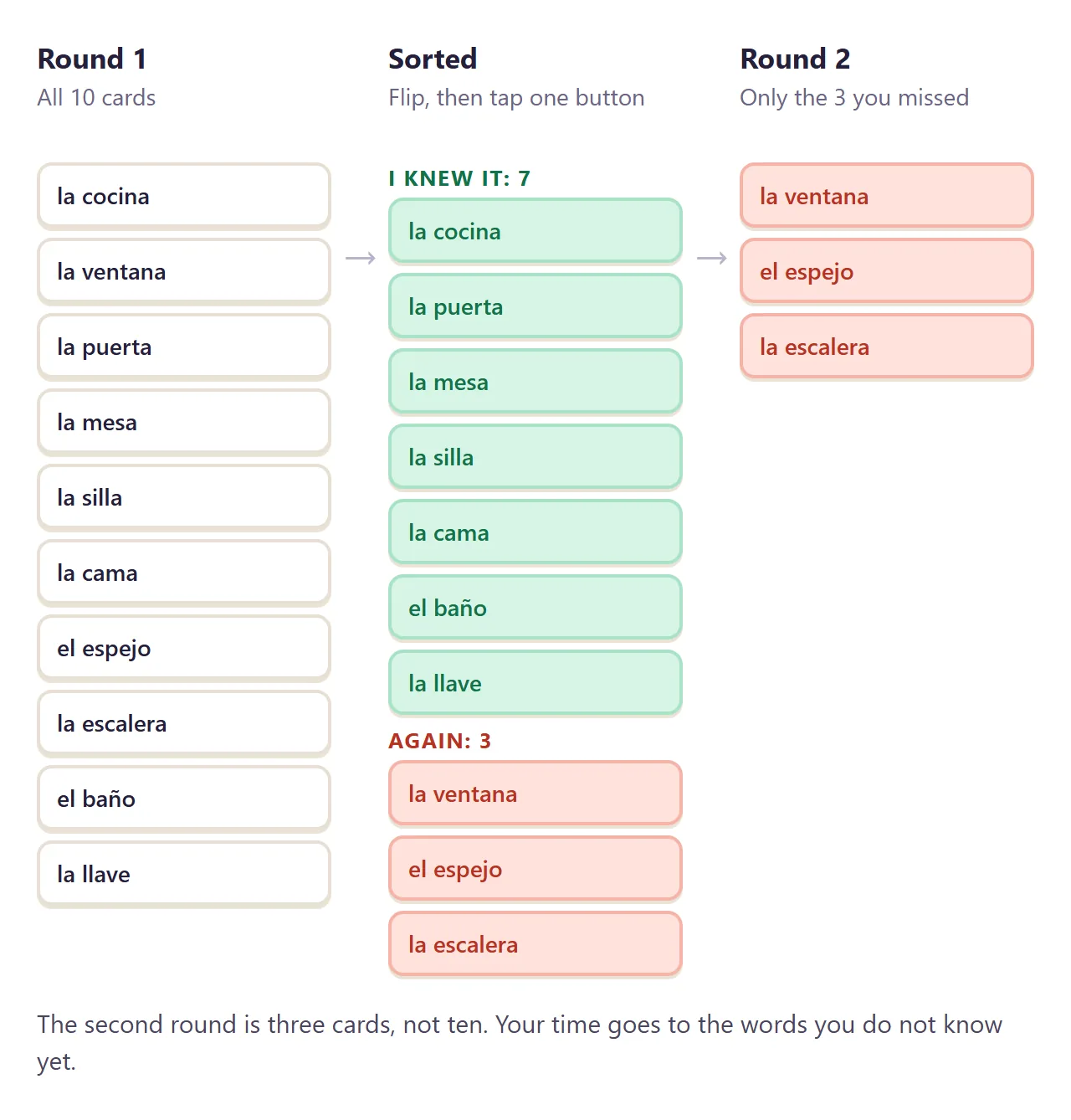
3. The second round is the real one. After the first pass, study only the "Again" pile. Ten cards become three. Your time goes to the words you do not know yet.
Make it with AI
This prompt is the whole free flashcard maker. Open ChatGPT, Claude or Gemini and paste it. Change the words in capitals and paste your cards at the end.
Make one complete HTML file: a flashcard page.
Title: TOPIC, for WHO IS STUDYING.
One big card in the middle. Tap it to flip
between front and back. Buttons: Back, Flip, Next,
Shuffle. After flipping, show two buttons:
"I knew it" and "Again". Count both. At the end,
offer a round with only the "Again" cards.
Show my cards as a plain numbered list at the
bottom of the page, one line each, front = back,
and read the cards from that list.
Rules: all CSS and JavaScript inside the file, no
images or fonts from other sites, nothing sent
anywhere, large text that works on a phone.
Use only my cards. Do not invent cards or answers.
Cards: PASTE ONE PER LINE, FRONT = BACK
"Use only my cards" matters most. An AI asked for ten Spanish words may helpfully add five more, and one of them might be wrong. You want to study your teacher's list, not its guesses.
The same prompt works for more than languages. Add one line asking for a multiple-choice mode, and you get this training deck for new café staff.
<!doctype html>
<html lang="en">
<head>
<meta charset="utf-8">
<meta name="viewport" content="width=device-width, initial-scale=1">
<title>New barista flashcards</title>
<style>
  * { box-sizing: border-box; }
  body { margin: 0; min-height: 100vh; background: linear-gradient(170deg, #2b1d14, #4a3122 55%, #6b4630); color: #fff8ef; font-family: system-ui, -apple-system, "Segoe UI", sans-serif; }
  .page { max-width: 520px; margin: 0 auto; padding: 18px 16px 28px; }
  .brand { display: flex; align-items: center; gap: 10px; margin-bottom: 4px; }
  .brand svg { flex: none; }
  h1 { margin: 0; font-size: 20px; }
  .sub { font-size: 13px; color: #e8cfb3; margin: 0 0 14px; }
  .modes { display: grid; grid-template-columns: 1fr 1fr; background: rgba(255,255,255,.1); border-radius: 14px; padding: 4px; margin-bottom: 14px; }
  .modes button { border: 0; border-radius: 11px; padding: 9px; background: transparent; color: #f3dfc8; font: 700 14px system-ui; cursor: pointer; }
  .modes button.on { background: #fff8ef; color: #3a271b; }
  .meta { display: flex; justify-content: space-between; align-items: center; font-size: 13px; color: #e8cfb3; margin-bottom: 8px; }
  .streak { background: rgba(255,200,90,.18); color: #ffd58a; border-radius: 99px; padding: 4px 10px; font-weight: 700; }
  .streak.pop { animation: pop .4s; }
  @keyframes pop { 50% { transform: scale(1.25); } }
  .stage { perspective: 1200px; height: 190px; }
  .card { position: relative; height: 100%; transform-style: preserve-3d; transition: transform .55s cubic-bezier(.3,.7,.3,1.2); cursor: pointer; }
  .card.flipped { transform: rotateY(180deg); }
  .card.in { animation: in .35s ease-out; }
  @keyframes in { from { transform: translateY(16px) scale(.96); opacity: 0; } }
  .face { position: absolute; inset: 0; backface-visibility: hidden; -webkit-backface-visibility: hidden; border-radius: 20px; display: grid; place-items: center; padding: 20px; text-align: center; }
  .front { background: #fff8ef; color: #3a271b; box-shadow: 0 16px 30px rgba(0,0,0,.3); }
  .back { background: linear-gradient(140deg, #d9822b, #b4532a); transform: rotateY(180deg); box-shadow: 0 16px 30px rgba(0,0,0,.3); }
  .face .w { font-size: clamp(22px, 6.4vw, 28px); font-weight: 800; line-height: 1.2; }
  .face .a { font-size: clamp(17px, 4.8vw, 21px); font-weight: 700; line-height: 1.35; }
  .tag { position: absolute; top: 12px; left: 16px; font-size: 12px; letter-spacing: .1em; text-transform: uppercase; opacity: .6; }
  .choices { display: grid; gap: 8px; margin-top: 14px; }
  .choices button { border: 2px solid rgba(255,255,255,.18); border-radius: 14px; padding: 12px 14px; background: rgba(255,255,255,.08); color: #fff8ef; font: 600 15px/1.3 system-ui; text-align: left; cursor: pointer; transition: background .2s, transform .1s; }
  .choices button:active { transform: scale(.98); }
  .choices button.right { background: #2f9e64; border-color: #2f9e64; }
  .choices button.wrong { background: #c9473a; border-color: #c9473a; animation: shake .35s; }
  @keyframes shake { 25% { transform: translateX(-6px); } 75% { transform: translateX(6px); } }
  .flipnav { display: none; grid-template-columns: 1fr 1fr; gap: 8px; margin-top: 14px; }
  .flipnav button { border: 0; border-radius: 14px; padding: 12px; font: 700 15px system-ui; cursor: pointer; background: #fff8ef; color: #3a271b; }
  .flipnav .again { background: #ffd9d3; color: #a3301f; } .flipnav .knew { background: #d3f3e2; color: #146b42; }
  .result { display: none; text-align: center; padding: 14px 0 4px; }
  .ring { width: 150px; height: 150px; margin: 0 auto 10px; position: relative; }
  .ring svg { transform: rotate(-90deg); }
  .ring b { position: absolute; inset: 0; display: grid; place-items: center; font-size: 30px; }
  .result p { margin: 0 0 12px; color: #e8cfb3; }
  .result button { border: 0; border-radius: 12px; padding: 11px 16px; font: 700 14px system-ui; cursor: pointer; background: #ffd58a; color: #3a271b; margin: 3px; }
  .list { margin-top: 22px; padding: 14px; border-radius: 16px; background: rgba(255,255,255,.08); }
  .list h2 { margin: 0 0 8px; font-size: 12px; letter-spacing: .1em; text-transform: uppercase; color: #e8cfb3; }
  .list dl { margin: 0; display: grid; grid-template-columns: auto 1fr; gap: 6px 12px; font-size: 14px; }
  .list dt { font-weight: 700; } .list dd { margin: 0; color: #f0dcc6; }
</style>
</head>
<body>
<main class="page">
  <div class="brand">
    <svg width="38" height="38" viewBox="0 0 38 38" aria-hidden="true"><circle cx="19" cy="19" r="19" fill="#ffd58a"/><path d="M10 15h15v6a7 7 0 0 1-7 7h-1a7 7 0 0 1-7-7z" fill="#3a271b"/><path d="M25 17h2a3 3 0 0 1 0 6h-2" stroke="#3a271b" stroke-width="2" fill="none"/><path d="M14 8c0 2 2 2 2 4M19 8c0 2 2 2 2 4" stroke="#3a271b" stroke-width="1.6" fill="none" stroke-linecap="round"/></svg>
    <h1>Harbor Lane Coffee: week one</h1>
  </div>
  <p class="sub">House drinks every new barista learns first. Made-up café, made-up recipes.</p>

  <div class="modes"><button class="on" id="mQuiz">Quiz me</button><button id="mFlip">Flip cards</button></div>
  <div class="meta"><span id="count"></span><span class="streak" id="streak">streak 0</span></div>

  <div id="play">
    <div class="stage"><div class="card" id="card">
      <div class="face front"><span class="tag">drink</span><div class="w" id="q"></div></div>
      <div class="face back"><span class="tag" id="tagB">recipe</span><div class="a" id="ans"></div></div>
    </div></div>
    <div class="choices" id="choices"></div>
    <div class="flipnav" id="flipnav"><button class="again" id="fAgain">Again</button><button class="knew" id="fKnew">I knew it</button></div>
  </div>

  <div class="result" id="result">
    <div class="ring"><svg width="150" height="150"><circle cx="75" cy="75" r="64" stroke="rgba(255,255,255,.15)" stroke-width="14" fill="none"/><circle id="arc" cx="75" cy="75" r="64" stroke="#ffd58a" stroke-width="14" fill="none" stroke-linecap="round" stroke-dasharray="402" stroke-dashoffset="402" style="transition: stroke-dashoffset 1s ease-out"/></svg><b id="score">0</b></div>
    <p id="resultText"></p>
    <button id="redo">Practice the misses</button><button id="again">New round</button>
  </div>

  <section class="list">
    <h2>The cards</h2>
    <dl id="deck">
      <dt>Harbor Latte</dt><dd>2 espresso shots, oat milk, pinch of cinnamon</dd>
      <dt>Lane Mocha</dt><dd>2 shots, cocoa, whole milk, cocoa dust on top</dd>
      <dt>Foghorn Cold Brew</dt><dd>Cold brew over ice, splash of maple</dd>
      <dt>Pier Flat White</dt><dd>2 ristretto shots, thin layer of milk foam</dd>
      <dt>Lighthouse Chai</dt><dd>Chai concentrate, steamed milk, honey</dd>
      <dt>Tidepool Tonic</dt><dd>Tonic water, ice, 1 espresso shot poured last</dd>
      <dt>Sailor's Cortado</dt><dd>2 shots, equal amount of warm milk</dd>
      <dt>Driftwood Americano</dt><dd>2 shots topped with hot water</dd>
    </dl>
  </section>
</main>
<script>
  const $ = (id) => document.getElementById(id);
  let cards = [], order = [], pos = 0, right = 0, streak = 0, missed = [], mode = 'quiz', locked = false;

  // Cards and answer choices both come from the visible list on the page.
  function readDeck() {
    const dts = [...document.querySelectorAll('#deck dt')];
    cards = dts.map((dt) => ({ q: dt.textContent.trim(), a: (dt.nextElementSibling?.tagName === 'DD' ? dt.nextElementSibling.textContent.trim() : '') })).filter((c) => c.q && c.a);
  }
  const shuffle = (arr) => { for (let i = arr.length - 1; i > 0; i--) { const j = Math.floor(Math.random() * (i + 1)); [arr[i], arr[j]] = [arr[j], arr[i]]; } return arr; };

  function round(only) {
    readDeck();
    order = shuffle((only || cards.map((c) => c.q)).slice());
    pos = 0; right = 0; missed = []; streak = 0; setStreak();
    $('play').style.display = 'block'; $('result').style.display = 'none';
    show();
  }
  function show() {
    locked = false;
    const c = cards.find((x) => x.q === order[pos]);
    const card = $('card'); card.className = 'card in';
    $('q').textContent = c.q; $('ans').textContent = c.a; $('tagB').textContent = c.q;
    $('count').textContent = 'Card ' + (pos + 1) + ' of ' + order.length;
    const box = $('choices'); box.innerHTML = '';
    $('flipnav').style.display = mode === 'flip' ? 'grid' : 'none';
    box.style.display = mode === 'quiz' ? 'grid' : 'none';
    if (mode !== 'quiz') return;
    const others = shuffle(cards.filter((x) => x.q !== c.q)).slice(0, 3).map((x) => x.a);
    shuffle([c.a, ...others]).forEach((txt) => {
      const b = document.createElement('button'); b.textContent = txt;
      b.onclick = () => pick(b, txt === c.a, c); box.append(b);
    });
  }
  function pick(btn, ok, c) {
    if (locked) return; locked = true;
    btn.classList.add(ok ? 'right' : 'wrong');
    if (!ok) [...$('choices').children].forEach((b) => { if (b.textContent === c.a) b.classList.add('right'); });
    $('card').classList.add('flipped');
    score(ok, c);
    setTimeout(next, ok ? 900 : 1700);
  }
  function score(ok, c) {
    if (ok) { right++; streak++; } else { streak = 0; missed.push(c.q); }
    setStreak();
  }
  function setStreak() { const s = $('streak'); s.textContent = 'streak ' + streak; s.classList.remove('pop'); void s.offsetWidth; if (streak > 1) s.classList.add('pop'); }
  function next() { pos++; if (pos < order.length) show(); else finish(); }
  function finish() {
    $('count').textContent = 'Round done';
    $('play').style.display = 'none'; $('result').style.display = 'block';
    const pct = Math.round(right / order.length * 100);
    $('score').textContent = right + '/' + order.length;
    $('arc').style.strokeDashoffset = 402;
    requestAnimationFrame(() => requestAnimationFrame(() => { $('arc').style.strokeDashoffset = 402 - 402 * pct / 100; }));
    $('resultText').textContent = missed.length ? 'Missed: ' + missed.join(', ') : 'Every drink right. Ready for the bar.';
    $('redo').style.display = missed.length ? '' : 'none';
    const m = missed.slice(); $('redo').onclick = () => round(m);
  }
  $('card').onclick = () => { if (mode === 'flip') $('card').classList.toggle('flipped'); };
  $('fKnew').onclick = () => { score(true, cards.find((x) => x.q === order[pos])); next(); };
  $('fAgain').onclick = () => { score(false, cards.find((x) => x.q === order[pos])); next(); };
  $('again').onclick = () => round();
  function setMode(m) { mode = m; $('mQuiz').classList.toggle('on', m === 'quiz'); $('mFlip').classList.toggle('on', m === 'flip'); round(); }
  $('mQuiz').onclick = () => setMode('quiz'); $('mFlip').onclick = () => setMode('flip');
  round();
</script>
</body>
</html>
Getting the cards to the people studying
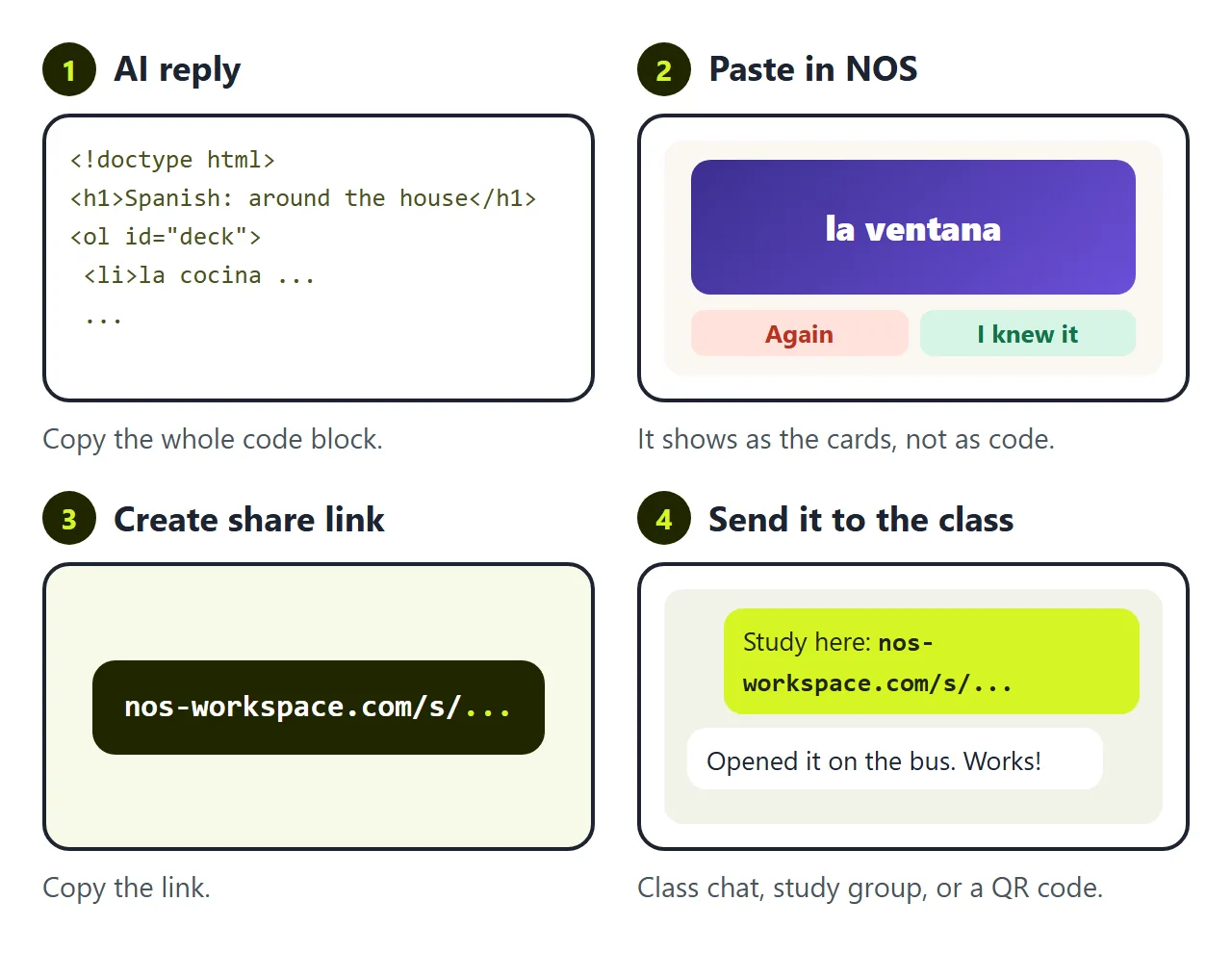
You have a free flashcard maker page that works. The AI gave it to you as HTML code, though, and code is not something a classmate can tap on a bus.
The first wall is getting it onto their phones. Send the file in a chat and many phones open it as code or a download. To be a page people tap, it has to live somewhere with an address.
In NOS you paste the code into a document and it becomes the cards straight away. Choose Create share link and drop that link into the class chat, a study group, or a QR code on the board.
The second wall is a wrong answer. Someone messages you on Wednesday night. "Number 9 in the list says el baño is the bedroom?" It should say the bathroom.
If you ask the AI again, you wait for a new reply. It often changes other parts too, so you check every card again. Then you have a new file and a new link, and half the group is still studying the old one.
In NOS you click "the bedroom" in the card list on the page and type "the bathroom". The link stays the same. The next person who flips that card sees the right answer.
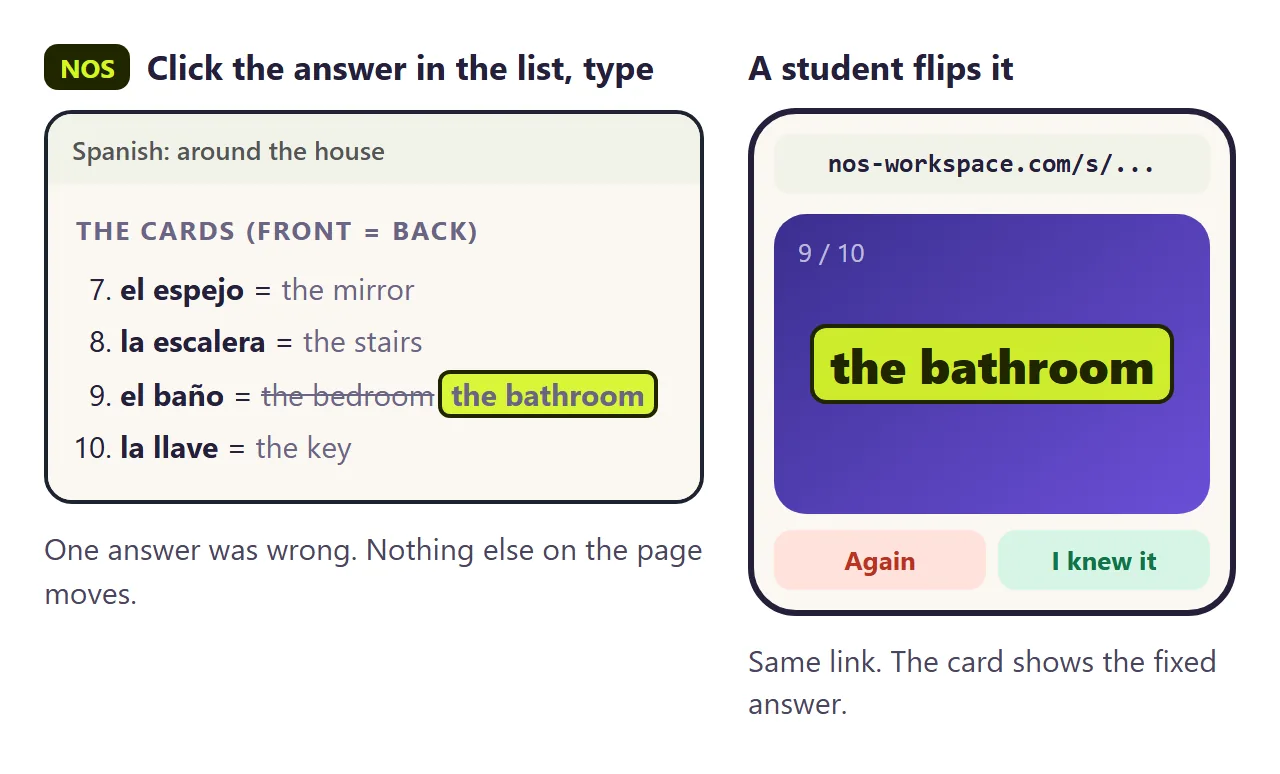
This works because the page reads the cards from the list you can see. If an AI ever puts the cards only inside the script, that lives in the code; change it in the code view, or ask for the list version.
Before you share it
- Study one full round yourself. It is the quickest way to catch a wrong back.
- Check the list at the bottom. Every card should be there, one per line.
- Try it on your phone. The buttons should be easy to hit with a thumb.
- Keep it to one topic. Two short decks beat one long one.
The page does not remember progress between visits or keep scores for a teacher. For a scored check, see HTML quiz. For practice sheets with instant feedback, see Interactive worksheet.