A food truck menu is easiest to keep current as one web page at one link. You edit the page each morning, and the link that is already on your window and your profile shows the new menu. Nothing needs reprinting or resending.
Someone on Quora asks, "Is there any free digital menu software out there?" For a menu that only has to be read, you may not need software at all. You need a page that fits a phone and an address that never changes.
Here is a page you can copy. It has today's spot and hours, three sections, allergens as plain text, and one dish already struck through as sold out.
<!doctype html>
<html lang="en">
<head>
<meta charset="utf-8">
<meta name="viewport" content="width=device-width, initial-scale=1">
<title>Today's menu</title>
<style>
* { box-sizing: border-box; }
body { margin: 0; font-family: system-ui, sans-serif; background: #fff7ed; color: #2b2118; }
.wrap { max-width: 460px; margin: 0 auto; padding: 18px 16px 28px; }
header { display: flex; align-items: center; gap: 12px; }
header svg { flex: none; }
h1 { margin: 0; font-size: 22px; line-height: 1.2; }
.tag { margin: 2px 0 0; font-size: 14px; color: #7a6a5a; }
.today { margin: 16px 0; padding: 12px 14px; border-radius: 12px; background: #2b2118; color: #fff7ed; }
.today b { display: block; font-size: 13px; letter-spacing: .06em; text-transform: uppercase; color: #fdba74; }
.today p { margin: 4px 0 0; font-size: 17px; line-height: 1.4; }
h2 { margin: 22px 0 4px; font-size: 14px; letter-spacing: .06em; text-transform: uppercase; color: #c2410c; }
.dish { display: flex; justify-content: space-between; gap: 14px; padding: 10px 0; border-bottom: 1px solid #f1dcc6; font-size: 17px; line-height: 1.4; }
.dish .name { font-weight: 600; }
.dish .name small { display: block; margin-top: 2px; font-weight: 400; font-size: 14px; color: #7a6a5a; }
.dish .price { font-variant-numeric: tabular-nums; font-weight: 600; }
.dish.out .name, .dish.out .price { text-decoration: line-through; color: #a8998a; }
.out-tag { display: inline-block; margin-left: 6px; padding: 1px 7px; border-radius: 999px; background: #fee2e2; color: #991b1b; font-size: 12px; font-weight: 700; text-decoration: none; }
.note { margin-top: 20px; font-size: 14px; line-height: 1.5; color: #7a6a5a; }
</style>
</head>
<body>
<div class="wrap">
<header>
<svg width="48" height="48" viewBox="0 0 48 48" role="img" aria-label="Flame logo">
<circle cx="24" cy="24" r="24" fill="#c2410c"/>
<path d="M24 9c1 6 8 9 8 17a8 8 0 0 1-16 0c0-4 2-6 4-8 0 3 1 4 3 4-1-5 0-9 1-13z" fill="#fff7ed"/>
</svg>
<div>
<h1>Salt & Ember Kitchen</h1>
<p class="tag">Wood-fired street food, on wheels</p>
</div>
</header>
<section class="today">
<b>Today · Thursday</b>
<p>Pine Street & 5th, by the fountain<br>11:00 to 14:00, until it sells out</p>
</section>
<h2>Mains</h2>
<div class="dish"><span class="name">Smoked brisket bun<small>Slaw, pickles. Contains gluten.</small></span><span class="price">$12</span></div>
<div class="dish out"><span class="name">Harissa chicken wrap<span class="out-tag">Sold out</span><small>Yogurt sauce. Contains gluten, dairy.</small></span><span class="price">$11</span></div>
<div class="dish"><span class="name">Charred corn bowl<small>Lime, chili, rice. Vegan, no gluten.</small></span><span class="price">$10</span></div>
<h2>Sides</h2>
<div class="dish"><span class="name">Rosemary fries<small>No allergens listed.</small></span><span class="price">$5</span></div>
<div class="dish"><span class="name">Peanut slaw<small>Contains peanuts.</small></span><span class="price">$4</span></div>
<h2>Drinks</h2>
<div class="dish"><span class="name">Hibiscus lemonade</span><span class="price">$4</span></div>
<div class="dish"><span class="name">Cold brew</span><span class="price">$5</span></div>
<p class="note">Cash and card. The menu changes every day, so check this page again tomorrow.</p>
</div>
</body>
</html>
The page has no photo files to load, only a small logo drawn inside the page itself, and the text is large enough to read at arm's length.
Make it with AI
You do not need to write the HTML yourself. Paste this into ChatGPT, Claude or Gemini and replace the details in capitals with your own.
Write one self-contained HTML file for my food truck menu.
Truck name: YOUR TRUCK NAME. Tagline: ONE LINE.
Top box: today's day, location, and hours.
Sections: Mains, Sides, Drinks. One line per dish: name, price on the right, and a short allergen note in plain text under the name.
Mobile first: one column, text at least 17px, high contrast.
No external images, fonts or scripts. Draw any logo as inline SVG.
Put each dish on its own line so I can edit one price without touching the rest.
Here are today's dishes and prices: PASTE YOUR LIST.
Before you use the result, check three things.
- Prices. Read every price against your list. AI can copy a number wrong.
- Allergens. Make sure each note matches what is really in the dish. Delete a note you cannot stand behind.
- One dish per line. If the dishes are tangled together, ask the AI to put each dish on its own line.
Send it as a link
Paste the finished HTML into a NOS document and choose Create share link. The page renders as written. HTML to link walks through the steps.
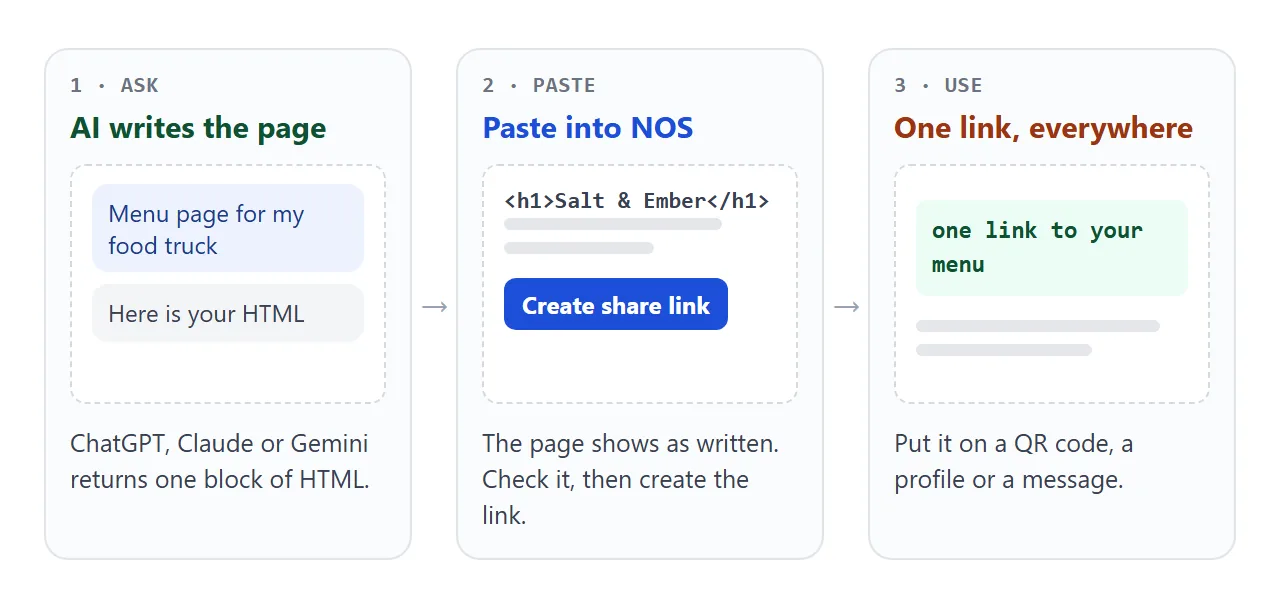
The link opens in a browser, on a phone too, and the person opening it needs no account. They can read the page but cannot edit it. If you change the code later, the same link shows the new version.
An attached HTML file is a different thing. It has to be downloaded and opened, and a fix means sending a new file. Opening an HTML file on a phone explains why that goes wrong.
Change it every morning
This is the part that makes a link better than a file for a truck. The next morning you open your NOS document and change the lines that changed: the location, a price, a new special.
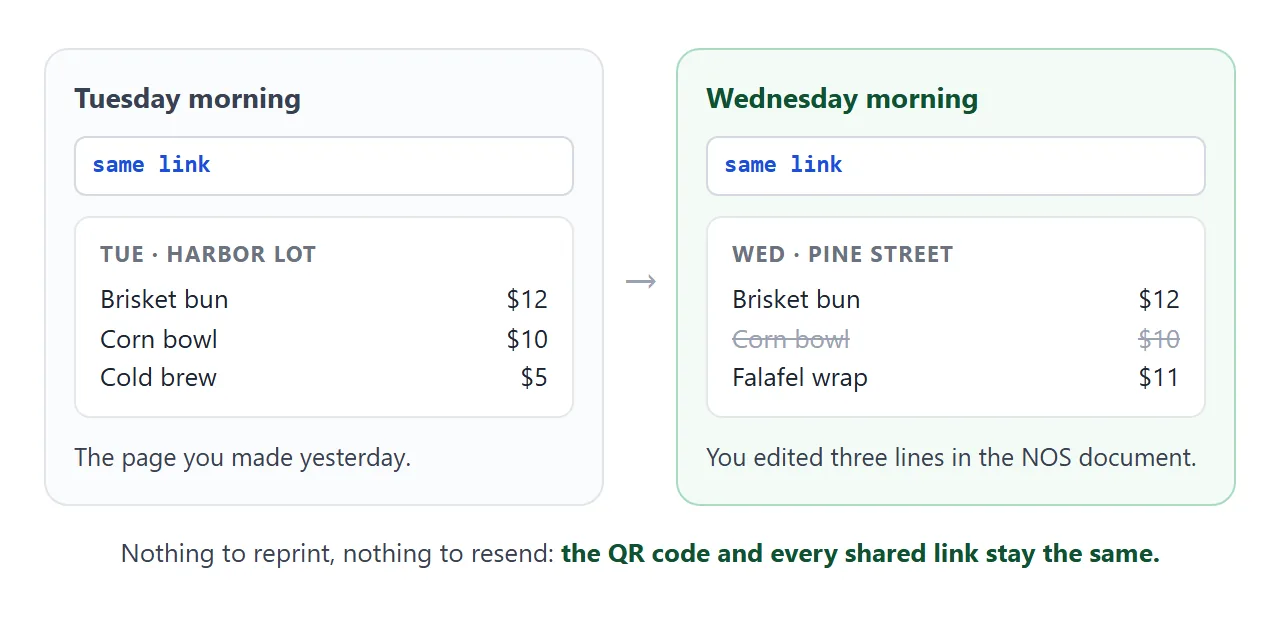
A dish is one line, so a new special is one new line:
<div class="dish"><span class="name">Falafel wrap</span><span class="price">$11</span></div>
Copy a similar line, change the name and price, and delete the lines for anything you are not selling. The heading at the top, with the day and the location, is the line to check first. It tells a customer the page is current.
During service you can keep a private checklist of what has run out. This page is a tick board for the kitchen.
<!doctype html>
<html lang="en">
<head>
<meta charset="utf-8">
<meta name="viewport" content="width=device-width, initial-scale=1">
<title>Sold-out board</title>
<style>
  * { box-sizing: border-box; }
  body { margin: 0; font-family: system-ui, sans-serif; background: #fff7ed; color: #2b2118; }
  .wrap { max-width: 460px; margin: 0 auto; padding: 18px 16px 24px; }
  h1 { margin: 0 0 4px; font-size: 21px; }
  .hint { margin: 0 0 14px; font-size: 14px; line-height: 1.5; color: #7a6a5a; }
  .count { display: flex; align-items: center; justify-content: space-between; gap: 10px; padding: 10px 14px; border-radius: 12px; background: #2b2118; color: #fff7ed; font-size: 16px; }
  .count button { min-height: 36px; padding: 0 12px; border: 1px solid #fdba74; border-radius: 8px; background: transparent; color: #fdba74; font: inherit; font-size: 14px; cursor: pointer; }
  .row { display: flex; align-items: center; gap: 12px; padding: 12px 0; border-bottom: 1px solid #f1dcc6; }
  .row label { display: flex; flex: 1; align-items: center; gap: 12px; min-height: 44px; font-size: 17px; cursor: pointer; }
  .row input { width: 24px; height: 24px; flex: none; accent-color: #b91c1c; }
  .row .price { font-variant-numeric: tabular-nums; font-weight: 600; }
  .row.out .name, .row.out .price { text-decoration: line-through; color: #a8998a; }
  .row .badge { display: none; padding: 1px 7px; border-radius: 999px; background: #fee2e2; color: #991b1b; font-size: 12px; font-weight: 700; }
  .row.out .badge { display: inline-block; }
</style>
</head>
<body>
<div class="wrap">
  <h1>Sold-out board</h1>
  <p class="hint">Owner view. Tick a dish when it runs out and it is struck through.</p>

  <div class="count"><span id="count">0 of 5 sold out</span><button type="button" id="reset">Clear all</button></div>

  <div class="row"><label><input type="checkbox"><span class="name">Smoked brisket bun</span><span class="badge">Sold out</span></label><span class="price">$12</span></div>
  <div class="row"><label><input type="checkbox"><span class="name">Harissa chicken wrap</span><span class="badge">Sold out</span></label><span class="price">$11</span></div>
  <div class="row"><label><input type="checkbox"><span class="name">Charred corn bowl</span><span class="badge">Sold out</span></label><span class="price">$10</span></div>
  <div class="row"><label><input type="checkbox"><span class="name">Rosemary fries</span><span class="badge">Sold out</span></label><span class="price">$5</span></div>
  <div class="row"><label><input type="checkbox"><span class="name">Hibiscus lemonade</span><span class="badge">Sold out</span></label><span class="price">$4</span></div>
</div>

<script>
  const boxes = document.querySelectorAll('.row input');
  const count = document.getElementById('count');

  function refresh() {
    let n = 0;
    boxes.forEach((box) => {
      box.closest('.row').classList.toggle('out', box.checked);  // strike the dish
      if (box.checked) n++;
    });
    count.textContent = n + ' of ' + boxes.length + ' sold out';
  }

  boxes.forEach((box) => box.addEventListener('change', refresh));
  document.getElementById('reset').addEventListener('click', () => {
    boxes.forEach((box) => { box.checked = false; });
    refresh();
  });
</script>
</body>
</html>
NOS saves the owner's own changes made in View mode, such as ticks. A visitor's changes are not saved. Try it on your own link before service so you know how it behaves. For the page customers read, edit the dish line instead.
Where to put the link
A link only helps if customers can reach it from where they already look. Make it once and use it in several places.
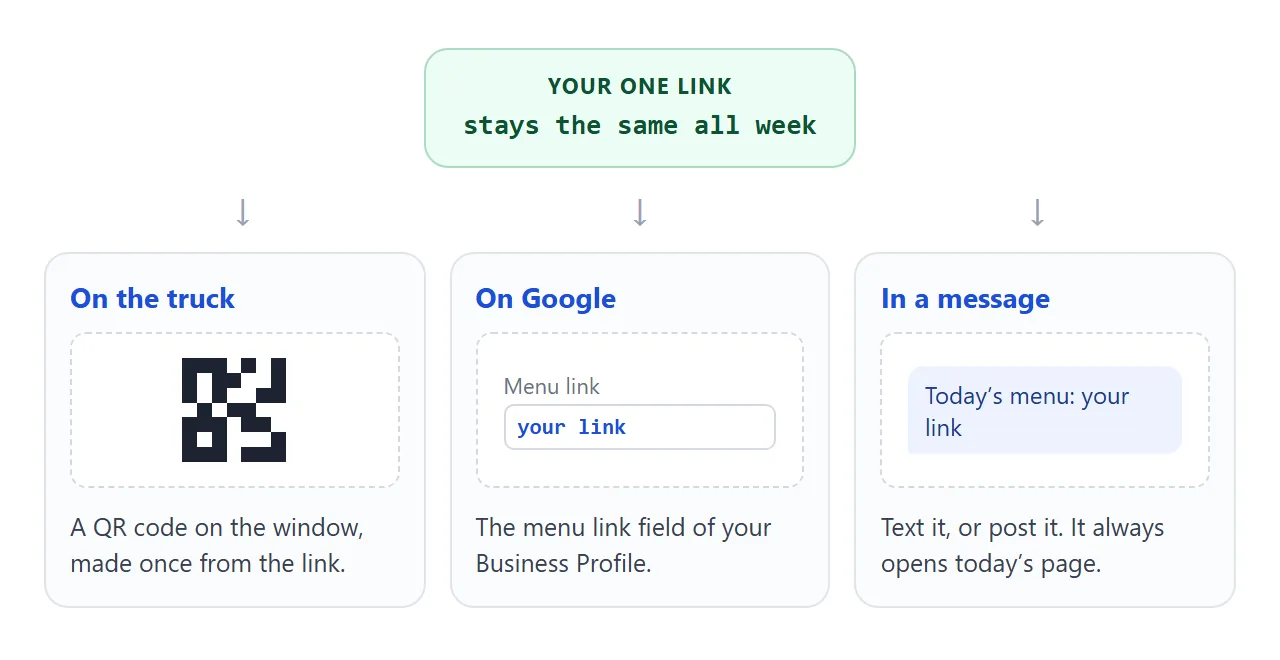
- A QR code on the truck. Make the code from the share link, print it, and leave it. QR code link covers size and contrast.
- Google Business Profile. As of October 2026, Google lets food and drink businesses add a menu link. Choose Edit profile, then Business information, then Contact, then Menu link, enter the address and save. Google's help page lists the steps.
- Messages and posts. Paste the link into a text or a post. It opens today's page, not the day it was sent.
For a longer look at menus in general, see menu link and host a menu.
A photo, a PDF or a link
| Photo of the board | PDF attached | Page at a link | |
|---|---|---|---|
| What the customer opens | An image | A file, laid out for paper | A page that fits the phone |
| Text can be searched | No | Depends on the file | Yes |
| Change a price | Take a new photo and repost | Make and send a new file | Edit one line |
| Printed QR code | Points at a stale photo | Points at one file | Keeps working |
| Daily location | Written on the board | Another edit | The top line of the page |
A photo is quick and a PDF is fine for a fixed menu. For a menu that changes every day, the link is the one that does not go stale.
When it does not work
| Symptom | Cause | Fix |
|---|---|---|
| Customers see yesterday's menu | They opened an old photo or a one-day copy | Share the link itself and make the QR code from it |
| A picture of a dish does not show | The image is hosted on another site, and outside images are blocked | Draw it inline in the page, or drop the picture |
| An order form does nothing | Sending a form to a server is blocked | Show the menu only, and take orders at the window |
| The text is tiny on a phone | The page has no viewport tag, or the type is small | Ask the AI for a viewport tag and 17px text |
| A price is wrong after AI wrote it | The AI copied or rounded a number | Compare every price with your list before sharing |
| Only your own ticks stick | Visitors' changes are not saved | Edit the page itself for what customers see |
Anyone with the link can open the page, so put only what you would pin to the truck window.