To put a funeral program online, turn the order of service into one web page and send its link to the people who cannot come. They open it on a phone with no account.
When a time changes, you edit the page once and the link stays the same.
People who search for a free or cheap site builder for a simple one-page site do not need one here. The program is a single file. Here is a finished page to copy.
<!doctype html>
<html lang="en">
<head>
<meta charset="utf-8">
<meta name="viewport" content="width=device-width, initial-scale=1">
<title>Order of service - Harold Dunmore</title>
<style>
* { box-sizing: border-box; }
body { margin: 0; background: #f3f0ea; color: #2b2724; font-family: Georgia, "Times New Roman", serif; line-height: 1.55; }
main { max-width: 560px; margin: 0 auto; padding: 22px 16px 36px; }
header { text-align: center; padding: 6px 0 14px; }
header svg { width: 46px; height: 46px; }
.kicker { margin: 4px 0 0; font-size: 13px; letter-spacing: .14em; text-transform: uppercase; color: #7a6f63; }
h1 { margin: 4px 0 2px; font-size: 28px; font-weight: 600; }
.dates { margin: 0; color: #6b6158; }
.notice { background: #fff4d6; border: 1px solid #e6c766; border-radius: 10px; padding: 11px 14px; margin: 12px 0 16px; font-family: system-ui, sans-serif; font-size: 15px; }
.notice b { display: block; margin-bottom: 2px; }
.card { background: #fff; border-radius: 12px; padding: 16px 18px; margin: 0 0 14px; box-shadow: 0 1px 3px rgba(0,0,0,.08); }
h2 { margin: 0 0 8px; font-size: 14px; letter-spacing: .1em; text-transform: uppercase; color: #7a6f63; font-family: system-ui, sans-serif; }
.big { font-size: 20px; margin: 0; }
.small { font-size: 15px; color: #4a423b; margin: 4px 0 0; }
.yours { margin-top: 10px; padding-top: 10px; border-top: 1px solid #e8e2d8; font-family: system-ui, sans-serif; font-size: 15px; }
.btn { display: inline-block; margin-top: 12px; padding: 12px 18px; border-radius: 8px; background: #3d5a4c; color: #fff; text-decoration: none; font-family: system-ui, sans-serif; font-size: 16px; }
.btn.alt { background: #fff; color: #3d5a4c; border: 1px solid #3d5a4c; margin-right: 8px; }
ol.order { list-style: none; margin: 0; padding: 0; }
ol.order li { display: grid; grid-template-columns: 62px 1fr; gap: 10px; padding: 9px 0; border-bottom: 1px solid #eee8de; }
ol.order li:last-child { border-bottom: 0; }
ol.order time { color: #7a6f63; font-family: system-ui, sans-serif; font-size: 14px; padding-top: 2px; }
ol.order span { display: block; color: #6b6158; font-size: 15px; }
details { border-top: 1px solid #e8e2d8; padding: 10px 0; }
details:first-of-type { border-top: 0; }
summary { cursor: pointer; font-family: system-ui, sans-serif; font-size: 16px; padding: 4px 0; }
details p { margin: 6px 0 2px; font-size: 16px; }
footer { text-align: center; color: #8a7f73; font-family: system-ui, sans-serif; font-size: 13px; margin-top: 18px; }
</style>
</head>
<body>
<main>
<header>
<svg viewBox="0 0 48 48" role="img" aria-label="A small leaf ornament"><path d="M24 6c10 6 14 16 8 28-3 6-8 8-8 8s-5-2-8-8C10 22 14 12 24 6z" fill="#cfd9cf" stroke="#3d5a4c" stroke-width="1.5"/><path d="M24 12v28" stroke="#3d5a4c" stroke-width="1.5"/></svg>
<p class="kicker">Order of service</p>
<h1>Harold Dunmore</h1>
<p class="dates">March 3, 1938 – October 9, 2026</p>
</header>
<!-- Edit this box when something changes. Delete it when it is no longer news. -->
<div class="notice" id="update">
<b>Update, Thursday, October 15, 6:40 p.m.</b>
The procession to the cemetery now leaves at 12:30, not 12:15. Everything else is unchanged.
</div>
<section class="card">
<h2>When and where</h2>
<p class="big">Saturday, October 17, 2026<br>11:00 a.m. Eastern Time</p>
<p class="small">St. Aidan's Chapel, 22 Orchard Lane, Brookhaven</p>
<a class="btn alt" href="https://www.google.com/maps/search/?api=1&query=22+Orchard+Lane+Brookhaven" target="_blank" rel="noopener">Directions</a>
<p class="yours" id="yours">Start time where you are: <b id="local">...</b></p>
</section>
<section class="card">
<h2>If you cannot be there</h2>
<p class="small">The service will be shown live. The video link will be posted on this page by 10:30 a.m. on the day. Reload the page to see it.</p>
<!-- Replace the address below with your own video link -->
<a class="btn" href="https://example.com/live" target="_blank" rel="noopener">Watch the service live</a>
</section>
<section class="card">
<h2>Order of service</h2>
<ol class="order">
<li><time>11:00</time><div>Gathering music<span>Quiet piano while everyone arrives</span></div></li>
<li><time>11:15</time><div>Welcome<span>Rev. Anna Calloway</span></div></li>
<li><time>11:20</time><div>Opening hymn<span>“Amazing Grace”</span></div></li>
<li><time>11:25</time><div>Reading<span>Psalm 23, read by Peter Dunmore</span></div></li>
<li><time>11:35</time><div>Remembering Harold<span>Ruth Okafor and Daniel Dunmore</span></div></li>
<li><time>11:55</time><div>Closing prayer</div></li>
<li><time>12:05</time><div>Recessional music<span>The family leaves first</span></div></li>
</ol>
</section>
<section class="card">
<h2>Good to know</h2>
<details>
<summary>After the service</summary>
<p>The procession to Hillcrest Cemetery leaves at 12:30. A light lunch follows at the Brookhaven Community Hall, 4 Mill Street, from 1:30.</p>
</details>
<details>
<summary>Flowers and donations</summary>
<p>The family asks for donations to the Brookhaven Library Friends in place of flowers.</p>
</details>
<details>
<summary>Sending a message from far away</summary>
<p>Write to the family at memories@example.com. Messages will be read and kept.</p>
</details>
</section>
<footer>Last edited Thursday, October 15, 6:40 p.m.</footer>
</main>
<script>
// The service starts at 11:00 a.m. Eastern Daylight Time (UTC-4 on that date) = 15:00 UTC.
const start = new Date('2026-10-17T15:00:00Z');
// No timeZone option: the browser uses the time zone of whoever opened the page.
const fmt = new Intl.DateTimeFormat('en-US', {
weekday: 'long', month: 'long', day: 'numeric',
hour: 'numeric', minute: '2-digit', timeZoneName: 'short'
});
document.getElementById('local').textContent = fmt.format(start);
</script>
</body>
</html>
Every name, date and place in the example is made up. Replace them with yours. The yellow box near the top is the one you will edit most.
What goes on the page
Most people open the link on a phone, and what they want first is when and where. So the time, the place and the way to watch sit at the top, and the order of service comes after.
Keep the page short and mostly text. It opens faster on a weak signal, and a family member reading it on the day can find the next item at a glance.
The folds under "Good to know" use a native HTML element called details. MDN documents it as a heading that opens and closes the text below it, with no JavaScript. Parking, lunch afterwards and donations can stay out of sight until someone wants them.
The Directions button is an ordinary link to a Google Maps search address. Google documents that format in its Maps URLs guide, and for more on map links see linking to a map location.
Show the start time where the viewer lives
A relative on another continent has to work out what 11:00 a.m. Eastern means for them, and sometimes the date changes too. The page can do that for them.
The script in the example holds the start as one fixed moment, and asks the browser to print it. MDN says the default is the time zone the browser runs in, unless you give one, so each person sees their own time.
const start = new Date('2026-10-17T15:00:00Z');
new Intl.DateTimeFormat('en-US', { timeZoneName: 'short' }).format(start);
Daylight saving changes on different dates in different countries, so ask the AI to show you the fixed moment it used. Check it against a converter you trust before you share the page.
Make it with AI
Paste this prompt into ChatGPT, Claude or Gemini after replacing the words in capitals. Write the facts yourself first, because the AI will not know them.
Write one self-contained HTML file: an order of service page.
Name: FULL NAME. Dates: BORN DATE - DIED DATE.
Service: DAY, DATE, TIME and TIME ZONE NAME (for example
America/New_York) at PLACE NAME, FULL ADDRESS.
Order of service: ONE LINE PER ITEM, WITH TIMES.
Afterwards, donations: ONE LINE EACH.
A yellow update box at the top, with a date and time, that I can edit.
A button that opens this video link in a new tab: VIDEO LINK.
A button that opens a Google Maps search for the address.
Show the start time in the viewer's own time zone with
Intl.DateTimeFormat, and tell me the UTC time you used.
One column, readable on a phone, include the viewport meta tag.
Calm serif font. No external images, no iframes, no libraries.
Return only the code.
Then check the result yourself. The AI can change a fact without any sign.
- The day of the week matches the date.
- Every name is spelled exactly as the family writes it.
- The times and the address are as you wrote them.
- The UTC time the AI reports matches the local time you gave.
- The video button opens your link, and no placeholder text is left.
- Nothing is on the page that you would not want a stranger to read.
Send it as a link
Paste the finished code into a NOS document and choose Create share link. The page renders as written, scripts included. HTML to link walks through it.
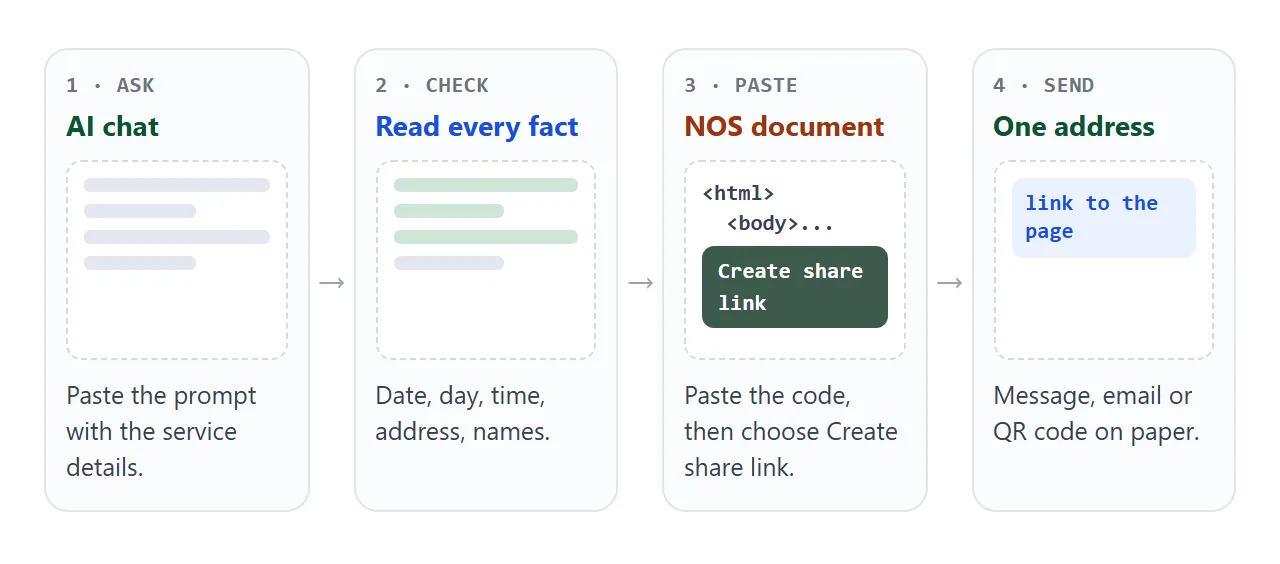
Anyone with the link opens it in a browser, on a phone too, with no account. They cannot edit it.
A file sent as an attachment is a copy, and an HTML file may not open at all on a phone. Opening an HTML file on a phone explains why.
When a time changes, edit the code and the same link shows the new version. Nobody needs a second link.
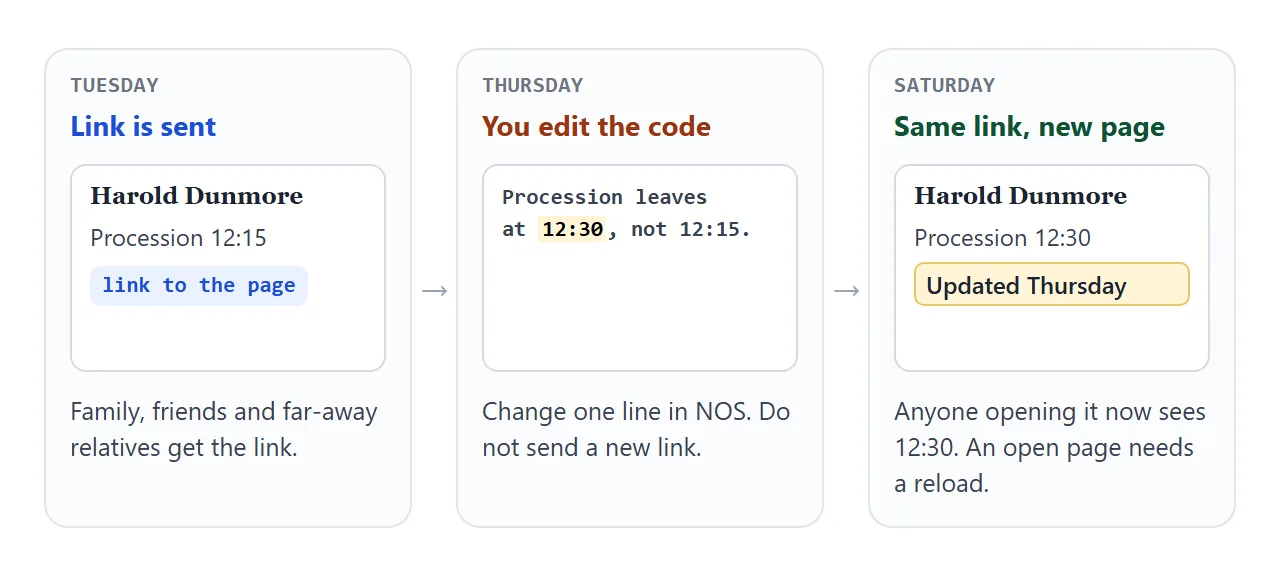
Put the change in the yellow box with the day and time, so a reader can tell it is new. Someone who has the page open sees the old version until they reload it.
For a live video, the page holds the link and not the player. As of October 2026, YouTube's help says a live stream can be public, private or unlisted.
It also says unlisted videos can be seen and shared by anyone with the link, with no Google account needed to watch. What your account needs to go live is in YouTube's help.
To send the page through a chat app, see sharing a page on WhatsApp. For the wider idea of one address per event, see event link.
The printed program and the page together
Most families still hand out a printed program. The page does not replace it. It sits beside it for the people who are away, and for anything that changes after the printing.
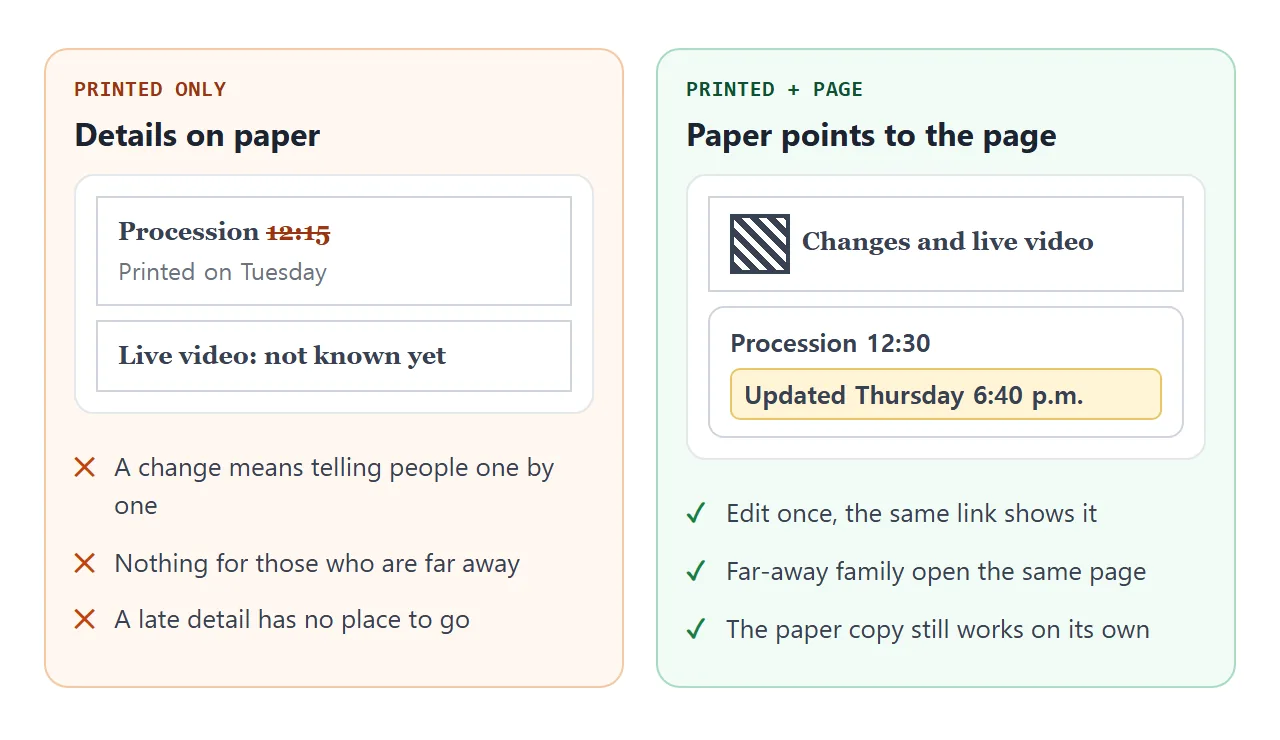
Print the page address, or a QR code made from the share link, on the program. QR code link shows how. A QR code holds the address, so a page edited later is still what a scan opens.
You can also print the page itself. The next example is a booklet-style page with rules for printing.
MDN describes the print media type as the one used for paged material, and it can hide parts of the page such as the note at the top.
<!doctype html>
<html lang="en">
<head>
<meta charset="utf-8">
<meta name="viewport" content="width=device-width, initial-scale=1">
<title>Printed program - Harold Dunmore</title>
<style>
* { box-sizing: border-box; }
body { margin: 0; background: #e9e5de; font-family: Georgia, "Times New Roman", serif; color: #2b2724; line-height: 1.5; }
.note { max-width: 520px; margin: 0 auto; padding: 14px 16px 0; font: 14px/1.45 system-ui, sans-serif; color: #4a423b; }
.sheet { max-width: 520px; margin: 12px auto 28px; background: #fff; border: 1px solid #d8d1c6; padding: 28px 26px 24px; text-align: center; }
.sheet h1 { margin: 0; font-size: 26px; font-weight: 600; }
.sheet .dates { margin: 2px 0 14px; color: #6b6158; }
.sheet .when { margin: 0 0 18px; font-size: 17px; }
.rule { border: 0; border-top: 1px solid #cfc7ba; margin: 16px 40px; }
.sheet h2 { margin: 0 0 6px; font-size: 13px; letter-spacing: .14em; text-transform: uppercase; color: #7a6f63; }
.item { margin: 0 0 10px; font-size: 17px; }
.item span { display: block; font-size: 15px; color: #6b6158; }
.hymn { font-style: italic; font-size: 16px; margin: 0 0 12px; }
.online { margin-top: 18px; padding: 12px 14px; border: 1px dashed #9aa39c; border-radius: 6px; font: 15px/1.45 system-ui, sans-serif; }
.online b { word-break: break-all; }
@media print {
body { background: #fff; }
.note { display: none; }
.sheet { border: 0; margin: 0 auto; max-width: none; padding: 0; }
.item, .hymn, .online { break-inside: avoid; }
.online { border-style: solid; border-color: #000; }
}
</style>
</head>
<body>
<p class="note">This page prints like a booklet page. Use your browser's Print menu (or Save as PDF). This note does not print.</p>
<article class="sheet">
<h1>Harold Dunmore</h1>
<p class="dates">March 3, 1938 – October 9, 2026</p>
<p class="when">Saturday, October 17, 2026, 11:00 a.m.<br>St. Aidan's Chapel, Brookhaven</p>
<hr class="rule">
<h2>Order of service</h2>
<p class="item">Gathering music<span>Piano</span></p>
<p class="item">Welcome<span>Rev. Anna Calloway</span></p>
<p class="item">Opening hymn<span>“Amazing Grace”</span></p>
<p class="item">Reading: Psalm 23<span>Peter Dunmore</span></p>
<p class="item">Remembering Harold<span>Ruth Okafor and Daniel Dunmore</span></p>
<p class="item">Closing prayer</p>
<p class="item">Recessional</p>
<hr class="rule">
<h2>Interment</h2>
<p class="item">Hillcrest Cemetery<span>Family and close friends</span></p>
<h2>Afterwards</h2>
<p class="item">Brookhaven Community Hall<span>4 Mill Street, from 1:30 p.m.</span></p>
<div class="online">
For the live video and any change to this program, open:<br>
<b>https://example.com/harold-dunmore</b>
</div>
</article>
</body>
</html>
This page uses no script at all. For more on print rules, see print stylesheet.
Ways to share the program compared
| Way | How people open it | A change reaches them |
|---|---|---|
| HTML file as attachment | Depends on the phone and the app | Only if you send it again |
| NOS share link | In the browser, no account | Yes, the same link updates |
| Google Sites page | In the browser, once published | See Google's help |
| Printed program with QR code | Scan, then the link opens | Yes, if the code holds the share link |
| Printed program only | On paper | No |
Google Sites is a separate tool with its own page editor. As of October 2026, Google's help says you publish a site with a web address and choose whether it is restricted to people you invite or public.
If only invited people should see the program, weigh that against a link that opens for anyone who has it.
When it does not work
| What you see | Cause | Fix |
|---|---|---|
| The page looks tiny on a phone | The viewport meta tag is missing | Ask the AI to add it, see viewport meta tag |
| The live video does not play inside the page | NOS blocks iframes | Use a button that opens the video link |
| A photo is missing | An image hosted on another site is blocked | Put it inside the file, or leave it out |
| Someone still sees the old time | They have the old page open | Ask them to reload the link |
| The converted time is wrong for them | The AI used the wrong offset | Ask for the UTC time it used, and check it |
| The AI changed a date or a name | Generated text can drift from your input | Read every fact before sharing |