A JavaScript game engine is a library that runs the repeated parts of a browser game for you: the loop that redraws the screen, mouse and touch input, timers and sometimes physics.
This guide uses Phaser, an engine you can load with a single <script> tag, so the finished game is one HTML file.
Try it first. Tap or click the game and the ball jumps.
<!doctype html>
<html lang="en">
<head>
<meta charset="utf-8">
<meta name="viewport" content="width=device-width, initial-scale=1">
<title>Phaser in one HTML file</title>
<style>
  body { margin: 0; font-family: system-ui, sans-serif; background: #f4f5f7; color: #1d2330; }
  #game { height: 290px; background: #1d2330; touch-action: none; }  /* a finger taps the game, not the page */
  #info { margin: 0; padding: 8px 14px; font-size: 14px; }
</style>
</head>
<body>
<div id="game"></div>
<p id="info">Loading Phaser...</p>

<!-- 1. the engine, pinned to one version. It creates a global called Phaser -->
<script src="https://cdn.jsdelivr.net/npm/phaser@4.2.1/dist/phaser.min.js"></script>
<script>
  let ball, bounces = 0;

  function create() {
    // 3. build the scene once: a circle with an Arcade Physics body
    ball = this.add.circle(180, 60, 18, 0x4f8cff);
    this.physics.add.existing(ball);
    ball.body.setCircle(18);
    ball.body.setBounce(0.85).setCollideWorldBounds(true);

    // tap or click anywhere: kick the ball upward
    this.input.on('pointerdown', () => ball.body.setVelocityY(-420));

    // count the bounces off the floor
    ball.body.onWorldBounds = true;
    this.physics.world.on('worldbounds', (body, up, down) => { if (down) bounces++; });
  }

  function update(time, delta) {
    // 4. runs once per frame; delta is the milliseconds since the last frame
    document.getElementById('info').textContent =
      'Phaser ' + Phaser.VERSION + ' - bounces off the floor: ' + bounces + ' - tap to kick';
  }

  // 2. one config object describes the whole game
  new Phaser.Game({
    type: Phaser.AUTO,                  // WebGL if available, else Canvas
    parent: 'game',                     // id of the element that receives the canvas
    backgroundColor: '#1d2330',
    scale: { mode: Phaser.Scale.FIT, autoCenter: Phaser.Scale.CENTER_BOTH, width: 360, height: 240 },
    physics: { default: 'arcade', arcade: { gravity: { y: 600 } } },
    scene: { create, update },
  });
</script>
</body>
</html>
The ball falls, bounces and counts its bounces. All of that is a short script, because the engine supplies the loop, the physics and the input.
What an engine does for you
A game has the same skeleton every time. Something has to redraw the screen again and again, read input, move things and check what touches what. An engine ships that skeleton, and you write the rules on top.
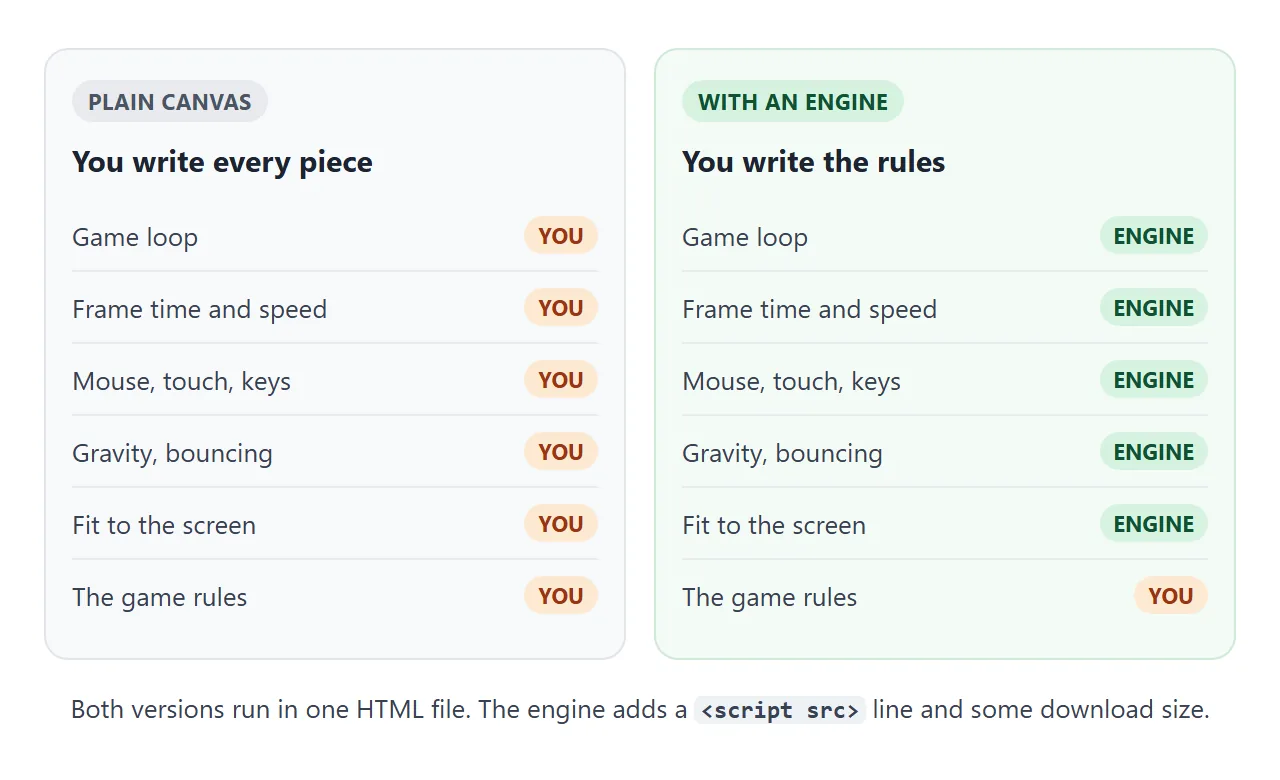
Phaser's own README describes it as a free, open source HTML5 game framework with WebGL and Canvas rendering. It lists a scene-based design, a loader, built-in physics, input handling, cameras, tweens and more. You use only the parts a game needs.
The smallest page, step by step
The example above has four parts. Each one is a few lines.
- A container. An empty
<div id="game">is where the canvas goes. - The library tag. One
<script src>loads Phaser from cdn.jsdelivr.net and creates a global calledPhaser. - A config object. It names the container, the canvas size, the physics system and the scene functions.
createandupdate. Build objects once increate. Put rules that run every frame inupdate.
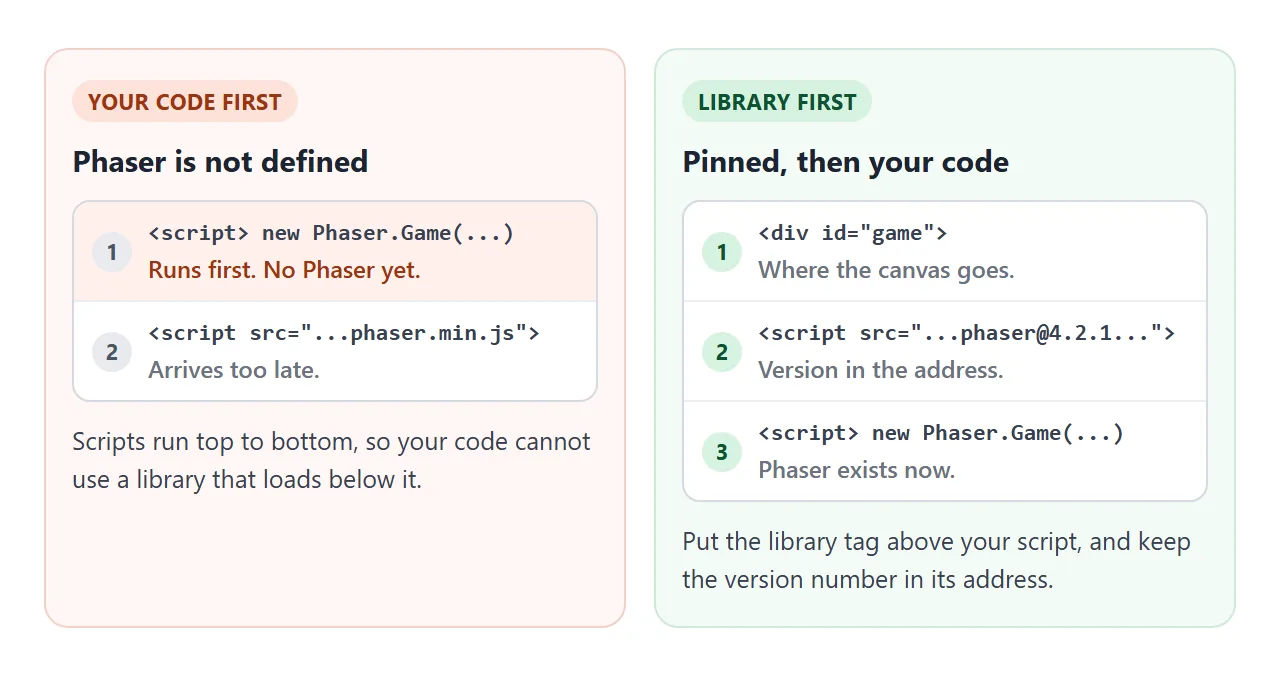
The order of the tags matters. A classic script is fetched and run before the browser reads further down the page, so the library tag has to sit above your own code.
The game loop: create once, update every frame
Phaser calls create one time, then calls update(time, delta) for every frame. The engine's docs describe the game loop as starting right after boot, updating its internal systems and rendering as it goes.
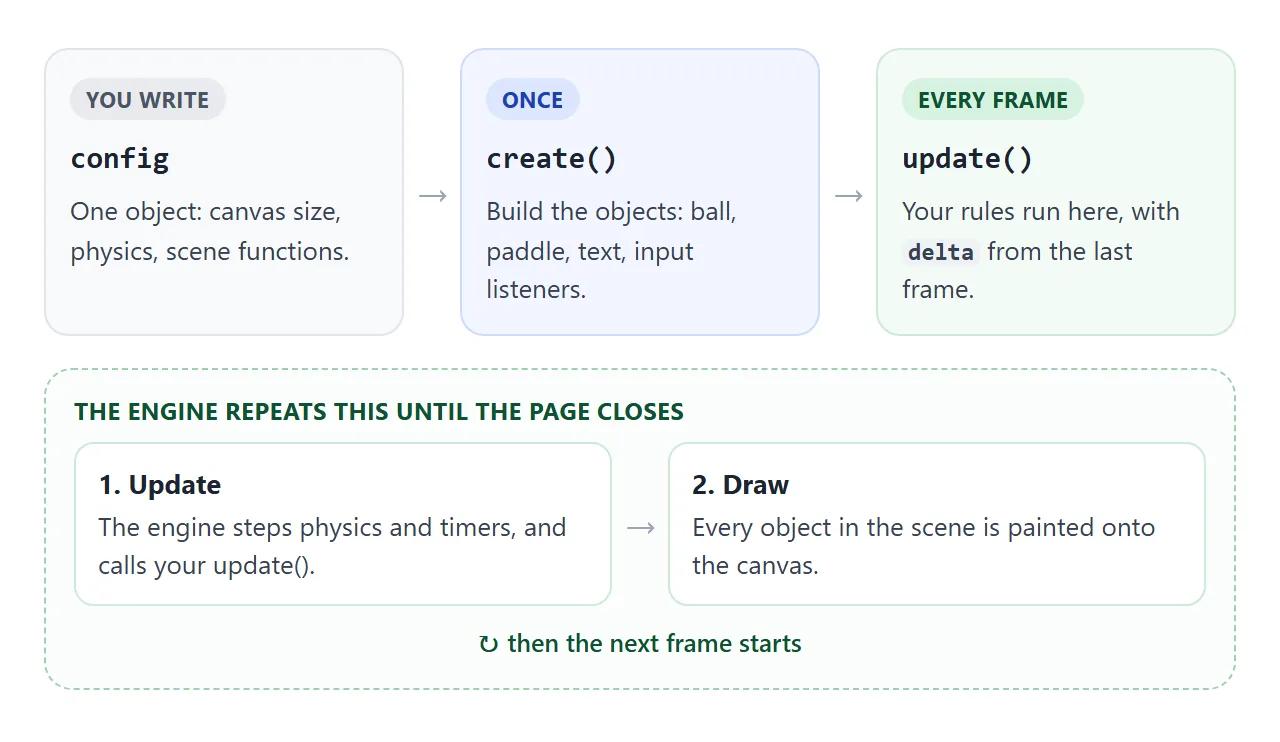
delta is the time since the last frame, in milliseconds. Use it for anything that moves by hand, such as a paddle on the arrow keys.
A speed written as pixels per frame runs faster on a screen that refreshes faster. MDN warns about this for requestAnimationFrame loops, and the same reasoning applies here.
The same ball with no engine
You can see what the engine hides by writing the same ball with a plain canvas. It is not worse or better. It is the same game with the loop, the tap handler and the gravity written by hand.
<!doctype html>
<html lang="en">
<head>
<meta charset="utf-8">
<meta name="viewport" content="width=device-width, initial-scale=1">
<title>The same ball with no engine</title>
<style>
  body { margin: 0; font-family: system-ui, sans-serif; background: #f4f5f7; color: #1d2330; }
  canvas { display: block; width: 100%; max-width: 360px; height: auto; margin: 0 auto; background: #1d2330; touch-action: none; }
  p { margin: 0; padding: 8px 14px; font-size: 14px; text-align: center; }
</style>
</head>
<body>
<canvas id="c" width="360" height="240"></canvas>
<p id="info">Plain canvas, no library - tap to kick</p>

<script>
  const canvas = document.getElementById('c');
  const ctx = canvas.getContext('2d');
  const ball = { x: 180, y: 60, vy: 0, r: 18 };
  let bounces = 0, last = 0;

  // the tap handler an engine would give you, written by hand
  canvas.addEventListener('pointerdown', () => { ball.vy = -420; });

  // the game loop an engine would give you, written by hand
  function frame(now) {
    const dt = Math.min((now - last) / 1000, 0.05);   // seconds since last frame, capped
    last = now;

    ball.vy += 600 * dt;                              // gravity
    ball.y += ball.vy * dt;
    if (ball.y > canvas.height - ball.r) {            // floor: bounce with some loss
      ball.y = canvas.height - ball.r;
      if (ball.vy > 30) bounces++;
      ball.vy = -ball.vy * 0.85;
    }

    ctx.clearRect(0, 0, canvas.width, canvas.height);
    ctx.fillStyle = '#4f8cff';
    ctx.beginPath();
    ctx.arc(ball.x, ball.y, ball.r, 0, Math.PI * 2);
    ctx.fill();

    document.getElementById('info').textContent =
      'Plain canvas - bounces off the floor: ' + bounces + ' - tap to kick';
    requestAnimationFrame(frame);
  }
  requestAnimationFrame(frame);
</script>
</body>
</html>
This version needs no library download. The loop, input and physics code is yours to maintain as the game grows. Single HTML file games and HTML game code cover the plain approach in more depth.
A finished example: catch the blocks
Here is a small complete game. A paddle follows your finger or mouse, or the arrow keys. Green blocks add a point, red blocks take two away, and a 30 second timer ends the round.
<!doctype html>
<html lang="en">
<head>
<meta charset="utf-8">
<meta name="viewport" content="width=device-width, initial-scale=1">
<title>Catch the blocks - Phaser</title>
<style>
  body { margin: 0; font-family: system-ui, sans-serif; background: #f4f5f7; color: #1d2330; }
  header { display: flex; align-items: center; gap: 14px; padding: 10px 14px; font-size: 15px; }
  header span { white-space: nowrap; }
  button { margin-left: auto; font: inherit; padding: 6px 14px; border: 0; border-radius: 8px; background: #2563eb; color: #fff; }
  #game { height: 360px; background: #1d2330; touch-action: none; }  /* a finger moves the paddle, not the page */
  #msg { padding: 8px 14px; font-size: 14px; min-height: 20px; }
</style>
</head>
<body>
<header>
  <span>Score: <b id="score">0</b></span>
  <span>Time: <b id="time">30</b></span>
  <button id="restart" type="button">Restart</button>
</header>
<div id="game"></div>
<div id="msg">Drag, or use the left and right arrow keys, to catch the green blocks. Miss the red ones.</div>

<script src="https://cdn.jsdelivr.net/npm/phaser@4.2.1/dist/phaser.min.js"></script>
<script>
  const W = 360, H = 320;
  const HELP = 'Drag, or use the left and right arrow keys, to catch the green blocks. Avoid the red ones.';
  let paddle, items, cursors, spawner, clock, score, timeLeft, over;

  function create() {
    score = 0; timeLeft = 30; over = false;
    show();
    paddle = this.add.rectangle(W / 2, H - 22, 90, 16, 0x4f8cff);
    this.physics.add.existing(paddle);
    paddle.body.setImmovable(true).setAllowGravity(false);
    items = this.physics.add.group();
    cursors = this.input.keyboard.createCursorKeys();

    // dragging with a mouse or a finger moves the paddle
    const follow = (p) => { if (!over) paddle.x = Phaser.Math.Clamp(p.x, 45, W - 45); };
    this.input.on('pointerdown', follow);
    this.input.on('pointermove', follow);

    // green blocks add a point, red blocks take two away
    this.physics.add.overlap(paddle, items, (pad, item) => {
      score += item.good ? 1 : -2;
      item.destroy();
      show();
    });

    spawner = this.time.addEvent({ delay: 550, loop: true, callback: () => {
      const good = Math.random() < 0.7;
      const b = this.add.rectangle(20 + Math.random() * (W - 40), -16, 26, 26, good ? 0x22c55e : 0xef4444);
      b.good = good;
      items.add(b);                                   // adding to a physics group gives it a body
      b.body.setVelocityY(110 + Math.random() * 120);
    } });

    clock = this.time.addEvent({ delay: 1000, loop: true, callback: () => {
      timeLeft--; show();
      if (timeLeft <= 0) finish(this);
    } });
  }

  function update(time, delta) {
    if (over) return;
    const dir = (cursors.right.isDown ? 1 : 0) - (cursors.left.isDown ? 1 : 0);
    paddle.x = Phaser.Math.Clamp(paddle.x + dir * 320 * delta / 1000, 45, W - 45);
    // remove blocks that fell past the bottom
    items.getChildren().slice().forEach((b) => { if (b.y > H + 30) b.destroy(); });
  }

  function finish(scene) {
    over = true;
    spawner.remove(); clock.remove();
    scene.physics.pause();
    document.getElementById('msg').textContent = 'Time is up. Final score: ' + score + '. Press Restart to play again.';
  }

  function show() {
    document.getElementById('score').textContent = score;
    document.getElementById('time').textContent = Math.max(timeLeft, 0);
    if (!over) document.getElementById('msg').textContent = HELP;
  }

  const game = new Phaser.Game({
    type: Phaser.AUTO,
    parent: 'game',
    backgroundColor: '#1d2330',
    scale: { mode: Phaser.Scale.FIT, autoCenter: Phaser.Scale.CENTER_BOTH, width: W, height: H },
    physics: { default: 'arcade' },
    scene: { create, update },
  });

  // restart: run the scene's create() again
  document.getElementById('restart').addEventListener('click', () => {
    game.scene.scenes[0].scene.restart();
  });
</script>
</body>
</html>
- Input: Phaser combines mouse and touch into one pointer API, so one listener handles both. Without an engine, see pointer events.
- Physics group: objects added to an Arcade Physics group get a physics body automatically, so the overlap check needs no extra setup.
- No image files: the blocks are rectangles drawn by the engine, so nothing is fetched from another address.
- Phone friendly: the container has
touch-action: none, so a finger plays instead of scrolling. See touch-action.
Pin the version
The demos load phaser@4.2.1, which was the latest release on npm on 1 October 2026. Keep the exact version in the address. jsDelivr's own README says that omitting the version loads the latest one and is not recommended for production use.
Phaser 3 and Phaser 4 are different major versions, and the project publishes a migration guide for what changed. If a tutorial behaves differently from your page, compare its version with the one in your script address.
When you need a build step
A single file is enough for a small game. A larger project usually moves to npm and a bundler, which a plain HTML file cannot do. These commands are from the Phaser README and run in a terminal, not in the page:
npm install phaser
npm create @phaserjs/game@latest
The first adds Phaser to a project. The second starts the project generator. Neither is needed for the examples here, and neither runs inside a pasted HTML page.
When it does not work
| What you see | Cause | Fix |
|---|---|---|
| Console says Phaser is not defined | Your script runs above the library tag | Put the library tag first |
| A canvas appears at the bottom of the page | The parent id matches no element |
Make parent equal the container id |
| Cannot read properties of undefined in create | create is an arrow function, so this is not the scene |
Use a normal function or method |
| A tutorial's code fails or acts differently | It was written for another major version | Match the version in your script address |
| On a phone the page scrolls instead of playing | The finger is taken as a scroll | touch-action: none on the container |
| An image never appears | The loader needs an address it is allowed to fetch | Draw shapes with code, as the catch example does |
| Movement speed changes between screens | Speed is written per frame | Multiply by delta |
Share it as a link
A game is easier to play than to describe. A screenshot cannot be played, and an .html attachment may open as plain code, or not at all, on a phone. Host a game online and game link cover the options.
To send the working version, paste the page into a NOS document and choose Create share link. HTML to link walks through it.
The page renders as written, its scripts run, and the engine loads from jsDelivr, so the people you send it to can play it themselves.
If you change the code later, the same link shows the new version. Images from other sites are blocked there, so draw shapes in code.