highlight.js is an open-source syntax highlighter written in JavaScript. On a web page it finds the code inside <pre><code> tags and colours keywords, strings and comments.
In a single HTML file you need three things: a theme stylesheet, one script tag and one call to hljs.highlightAll().
There is nothing to install and no build step. Here is the whole thing. Edit the code inside a block and the example reruns.
<!doctype html>
<html lang="en">
<head>
<meta charset="utf-8">
<meta name="viewport" content="width=device-width, initial-scale=1">
<title>highlight.js in one HTML file</title>
<!-- 1. a theme: without it the code gets classes but no colours -->
<link rel="stylesheet" href="https://cdnjs.cloudflare.com/ajax/libs/highlight.js/11.12.0/styles/github.min.css">
<style>
body { margin: 0; padding: 16px; font-family: system-ui, sans-serif; background: #f6f7f9; color: #1d2330; }
h2 { font-size: 14px; margin: 0 0 6px; color: #4b5563; }
pre { margin: 0 0 16px; border: 1px solid #d9dde3; border-radius: 8px; overflow: auto; }
pre code.hljs { font-size: 14px; line-height: 1.5; }
</style>
</head>
<body>
<h2>JavaScript</h2>
<pre><code class="language-javascript">// say hello after one second
function greet(name) {
const msg = `Hello, ${name}!`;
setTimeout(() => console.log(msg), 1000);
return msg.length;
}</code></pre>
<h2>HTML (written with &lt; and &gt;)</h2>
<pre><code class="language-html"><button class="buy" onclick="pay()">
Buy now
</button>
<!-- one comment --></code></pre>
<!-- 2. the library (pinned version), 3. one call that colours every pre code -->
<script src="https://cdnjs.cloudflare.com/ajax/libs/highlight.js/11.12.0/highlight.min.js"></script>
<script>
hljs.highlightAll();
</script>
</body>
</html>
The README says highlight.js works in the browser and on the server, does not depend on other frameworks, and can detect the language by itself. It is released under the BSD License.
The smallest working file
Copy this into an empty .html file and open it in a browser:
<!doctype html>
<meta charset="utf-8">
<link rel="stylesheet"
  href="https://cdnjs.cloudflare.com/ajax/libs/highlight.js/11.12.0/styles/github.min.css">

<pre><code class="language-javascript">const total = price * 2;
console.log(total);</code></pre>

<script src="https://cdnjs.cloudflare.com/ajax/libs/highlight.js/11.12.0/highlight.min.js"></script>
<script>hljs.highlightAll();</script>
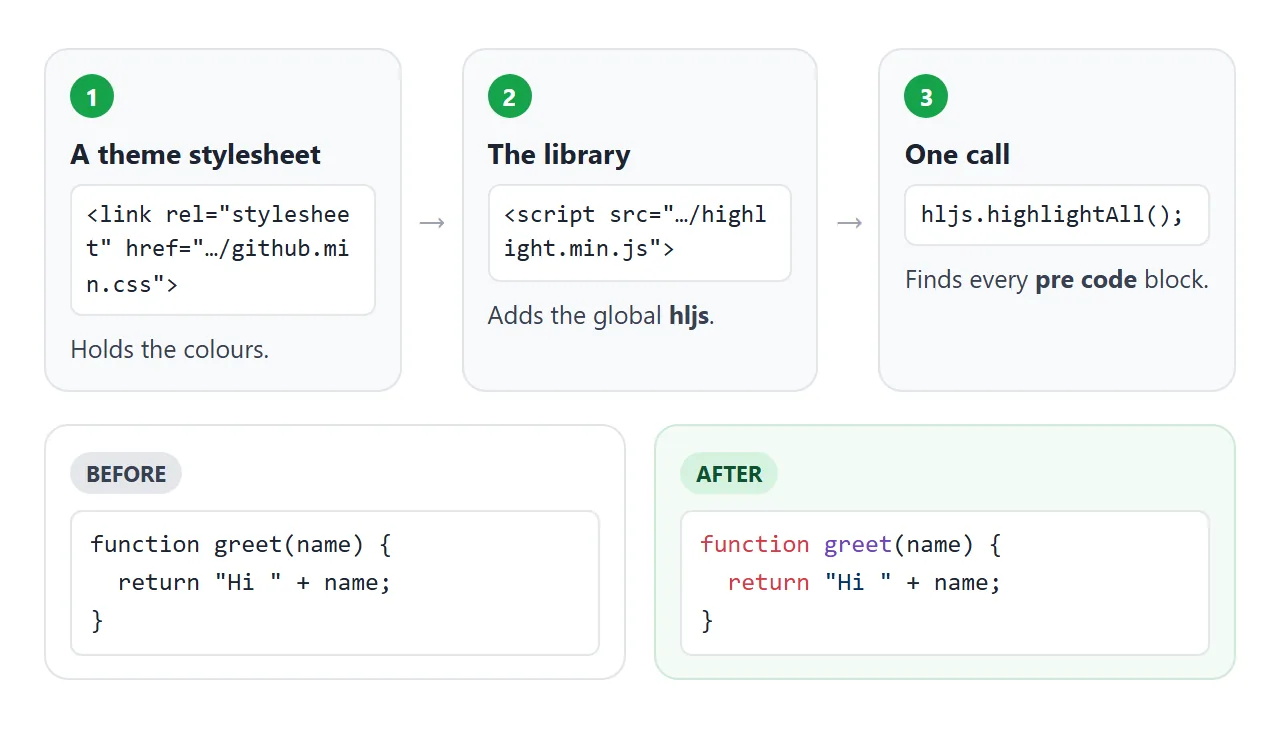
- The stylesheet is a theme with the colours. Without it, highlight.js still adds classes, but nothing changes colour.
- The script tag loads
highlight.min.js, which puts one global,hljs, on the page. hljs.highlightAll()finds every block that matchespre codeand colours it.
The class="language-javascript" on the <code> tag names the language. Leave it out and highlight.js guesses. To keep a block uncoloured, give it the class nohighlight.
Escape the tags in HTML examples
This mistake comes up when the code you show is itself HTML. The browser reads the page before highlight.js runs. A raw <h1> inside <code> becomes a real heading, and the tags never reach the highlighter.
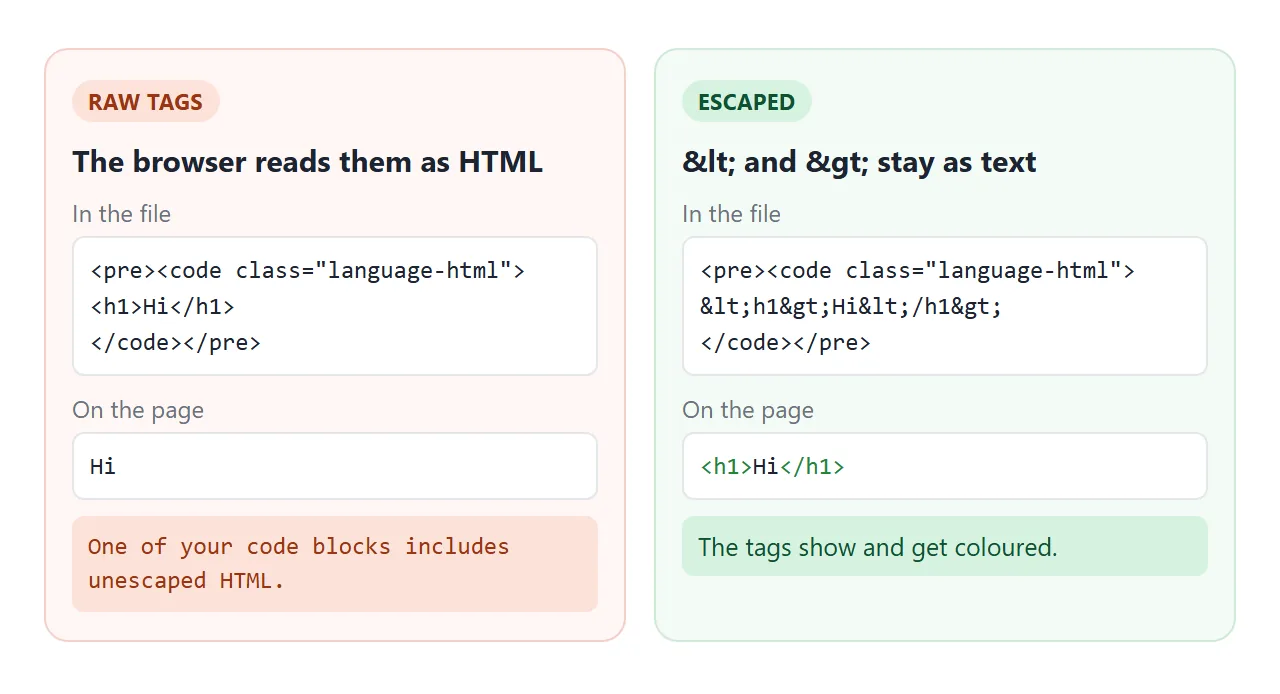
In a test with version 11.12.0, a block holding a raw <h1>Hi</h1> showed only "Hi". The console logged "One of your code blocks includes unescaped HTML. This is a potentially serious security risk."
Inside the block, write the characters as entities:
<pre><code class="language-html"><button class="buy">Buy now</button></code></pre>
Write & as & too, so an entity inside your example stays as typed. HTML entities lists the common ones, and the code and pre tags explains the markup itself.
Which CDN address to use
The highlight.js README lists three CDNs: cdnjs, jsDelivr and unpkg. Each has a pinned address for the library and the themes:
<!-- cdnjs -->
<script src="https://cdnjs.cloudflare.com/ajax/libs/highlight.js/11.12.0/highlight.min.js"></script>
<!-- jsDelivr -->
<script src="https://cdn.jsdelivr.net/gh/highlightjs/cdn-release@11.12.0/build/highlight.min.js"></script>
<!-- unpkg -->
<script src="https://unpkg.com/@highlightjs/cdn-assets@11.12.0/highlight.min.js"></script>
On 1 October 2026 the latest version on npm is 11.12.0, and all three addresses above load it. The README also says not to link to the GitHub source files directly, because the library has to be built first.
Themes live in the styles/ folder next to the script. github.min.css is light and github-dark.min.css is dark.
Languages that are not in the default build
The README says the core library supports over 180 languages, but the CDN highlight.min.js does not bundle every one. In version 11.12.0, hljs.listLanguages() returned 36 names, including JavaScript, Python, CSS, SQL, Go and Rust.
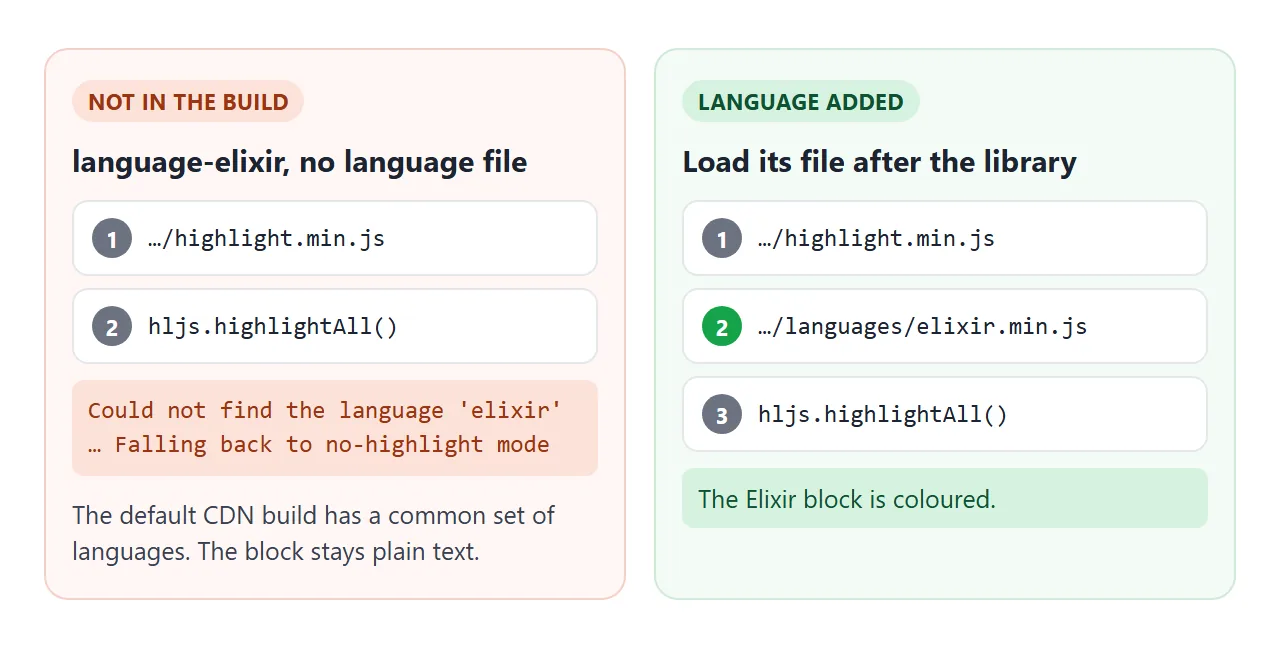
For anything else, load its file from the languages/ folder, after the library and before highlightAll():
<script src="https://cdnjs.cloudflare.com/ajax/libs/highlight.js/11.12.0/highlight.min.js"></script>
<script src="https://cdnjs.cloudflare.com/ajax/libs/highlight.js/11.12.0/languages/elixir.min.js"></script>
<script>hljs.highlightAll();</script>
Without that file, a language-elixir block stays plain. The console says "Could not find the language 'elixir'" and "Falling back to no-highlight mode".
Highlighting text you get at runtime
highlightAll() colours the blocks it finds when it runs. Code you add to the page later stays plain. For that, the API offers three other calls:
| Call | Takes | Gives back |
|---|---|---|
hljs.highlightAll() |
Nothing | Colours every pre code on the page |
hljs.highlightElement(el) |
One element | Colours that element in place |
hljs.highlight(text, options) |
A string and a language | An object; .value is coloured HTML |
hljs.highlightAuto(text) |
A string | The same, plus the detected .language and .relevance |
This example calls highlight() or highlightAuto() on every keystroke and puts .value into a <code> element:
<!doctype html>
<html lang="en">
<head>
<meta charset="utf-8">
<meta name="viewport" content="width=device-width, initial-scale=1">
<title>Highlight text as you type</title>
<link rel="stylesheet" href="https://cdnjs.cloudflare.com/ajax/libs/highlight.js/11.12.0/styles/github.min.css">
<style>
  body { margin: 0; padding: 14px; font-family: system-ui, sans-serif; background: #f6f7f9; color: #1d2330; }
  .row { display: flex; flex-wrap: wrap; gap: 8px; align-items: center; margin-bottom: 8px; font-size: 14px; }
  select { padding: 6px 8px; font: inherit; border: 1px solid #c9ced6; border-radius: 6px; background: #fff; }
  textarea { box-sizing: border-box; width: 100%; height: 130px; padding: 8px; font: 14px/1.5 ui-monospace, monospace; border: 1px solid #c9ced6; border-radius: 8px; resize: vertical; }
  pre { margin: 10px 0 0; border: 1px solid #d9dde3; border-radius: 8px; overflow: auto; }
  pre code.hljs { font-size: 14px; line-height: 1.5; min-height: 120px; }
  #info { margin: 8px 0 0; font-size: 14px; color: #4b5563; }
</style>
</head>
<body>
<div class="row">
  <label for="lang">Language</label>
  <select id="lang">
    <option value="auto">Detect automatically</option>
    <option value="javascript">JavaScript</option>
    <option value="python">Python</option>
    <option value="xml">HTML / XML</option>
    <option value="css">CSS</option>
    <option value="sql">SQL</option>
  </select>
</div>
<textarea id="src" spellcheck="false">SELECT name, total
FROM orders
WHERE total > 100
ORDER BY total DESC;</textarea>
<pre><code id="out" class="hljs"></code></pre>
<p id="info"></p>

<script src="https://cdnjs.cloudflare.com/ajax/libs/highlight.js/11.12.0/highlight.min.js"></script>
<script>
  const src = document.getElementById('src');
  const lang = document.getElementById('lang');
  const out = document.getElementById('out');
  const info = document.getElementById('info');

  function render() {
    // highlight() and highlightAuto() take a string and return escaped HTML in .value
    const result = lang.value === 'auto'
      ? hljs.highlightAuto(src.value)
      : hljs.highlight(src.value, { language: lang.value });
    out.innerHTML = result.value;
    info.textContent = 'Language: ' + result.language + ', relevance: ' + result.relevance;
  }

  src.addEventListener('input', render);
  lang.addEventListener('change', render);
  render();
</script>
</body>
</html>
Automatic detection is a guess. In our test, a four-line Python function was detected as CSS until the code grew longer. When you know the language, pass it, or put the language- class on the block.
Typing <img> into the box shows text, not an image. In our test, the .value string had the tag escaped, so it was safe to put into innerHTML.
A finished example: a code snippet card
Tabs for four languages, a light and dark theme switch, and a footer with the language and line count. Elixir is loaded as an extra language file.
<!doctype html>
<html lang="en">
<head>
<meta charset="utf-8">
<meta name="viewport" content="width=device-width, initial-scale=1">
<title>Code snippet card</title>
<!-- two themes; the dark one starts disabled -->
<link id="light" rel="stylesheet" href="https://cdnjs.cloudflare.com/ajax/libs/highlight.js/11.12.0/styles/github.min.css">
<link id="dark" rel="stylesheet" href="https://cdnjs.cloudflare.com/ajax/libs/highlight.js/11.12.0/styles/github-dark.min.css" disabled>
<style>
body { margin: 0; padding: 14px; font-family: system-ui, sans-serif; background: #eef0f3; color: #1d2330; }
body.is-dark { background: #161b22; color: #e6edf3; }
.card { max-width: 680px; margin: 0 auto; border-radius: 12px; overflow: hidden; border: 1px solid #c9ced6; }
.is-dark .card { border-color: #30363d; }
.bar { display: flex; flex-wrap: wrap; gap: 4px; padding: 8px; background: #fff; }
.is-dark .bar { background: #0d1117; }
.bar button { padding: 6px 11px; font: inherit; font-size: 14px; border: 0; border-radius: 6px; background: transparent; color: inherit; cursor: pointer; }
.bar button.on { background: #2563eb; color: #fff; }
.bar .theme { margin-left: auto; border: 1px solid #c9ced6; }
pre { margin: 0; }
pre[hidden] { display: none; }
pre code.hljs { font-size: 14px; line-height: 1.55; padding: 14px; }
.foot { display: flex; justify-content: space-between; padding: 6px 12px; font-size: 13px; background: #fff; color: #4b5563; }
.is-dark .foot { background: #0d1117; color: #8b949e; }
</style>
</head>
<body>
<div class="card">
<div class="bar" id="tabs">
<button class="on" data-tab="0">HTML</button>
<button data-tab="1">CSS</button>
<button data-tab="2">JS</button>
<button data-tab="3">Elixir</button>
<button class="theme" id="theme">Dark theme</button>
</div>
<pre><code class="language-html"><form id="signup">
<label>Email <input type="email" required></label>
<button>Join</button>
</form></code></pre>
<pre hidden><code class="language-css">#signup {
display: flex;
gap: 8px;
}
#signup button { background: #2563eb; color: white; }</code></pre>
<pre hidden><code class="language-javascript">document.getElementById('signup')
.addEventListener('submit', (e) => {
e.preventDefault();
console.log('Thanks!');
});</code></pre>
<pre hidden><code class="language-elixir">defmodule Signup do
def join(email) when is_binary(email) do
{:ok, String.downcase(email)}
end
end</code></pre>
<div class="foot"><span id="lang"></span><span id="lines"></span></div>
</div>
<script src="https://cdnjs.cloudflare.com/ajax/libs/highlight.js/11.12.0/highlight.min.js"></script>
<!-- Elixir is not in the default build, so load its language file after the library -->
<script src="https://cdnjs.cloudflare.com/ajax/libs/highlight.js/11.12.0/languages/elixir.min.js"></script>
<script>
const blocks = document.querySelectorAll('.card pre');
const buttons = document.querySelectorAll('#tabs [data-tab]');
// highlightElement() runs right away (highlightAll() may wait for the page to finish loading)
blocks.forEach(pre => hljs.highlightElement(pre.querySelector('code')));
function show(i) {
blocks.forEach((pre, n) => pre.hidden = n !== i);
buttons.forEach((b, n) => b.classList.toggle('on', n === i));
const code = blocks[i].querySelector('code');
// the last language-* class is the one highlight.js used (html becomes xml)
const used = [...code.classList].filter(c => c.startsWith('language-')).pop();
document.getElementById('lang').textContent = used.slice(9);
document.getElementById('lines').textContent = code.textContent.split('\n').length + ' lines';
}
buttons.forEach((b, i) => b.addEventListener('click', () => show(i)));
show(0);
// swap themes by turning one stylesheet off and the other on
document.getElementById('theme').addEventListener('click', (e) => {
const dark = document.getElementById('dark');
dark.disabled = !dark.disabled;
document.getElementById('light').disabled = !dark.disabled;
document.body.classList.toggle('is-dark', !dark.disabled);
e.target.textContent = dark.disabled ? 'Dark theme' : 'Light theme';
});
</script>
</body>
</html>
- Theme switch: both stylesheets are linked, the dark one with the
disabledattribute. The button flipsdisabledon each. Dark mode with CSS covers following the system setting instead. - Language label: highlight.js adds the language it used as a class. A block marked
language-htmlalso getslanguage-xml, because HTML is highlighted as XML. - Highlighting right away: the card calls
highlightElement()on each block. While the page is loading,highlightAll()waits for it to finish, so code right after it still sees plain blocks.
A copy button is a common next step. HTML copy button shows one in a few lines.
highlight.js with npm and a bundler
In a project with a bundler or Node.js, you install the package and import it. The README gives this for loading only the languages you need:
// npm install highlight.js
import hljs from 'highlight.js/lib/core';
import javascript from 'highlight.js/lib/languages/javascript';
hljs.registerLanguage('javascript', javascript);
Those bare imports need a bundler. For a single HTML file, use the script tags above, or the ES module files the README lists under each CDN.
When it does not work
| What you see | Cause | Fix |
|---|---|---|
hljs is not defined |
Your call runs before the library tag | Put the highlight.js script tag first |
| Code is plain, no colours | No theme stylesheet | Add a styles/*.min.css link |
| HTML example shows only text | Raw < in the code block |
Write < and > |
| "Could not find the language" | The language is not in the default build | Load its languages/*.min.js file |
| Wrong language colours | Auto detection guessed | Add a language- class |
| Code added later stays plain | highlightAll() already ran |
Call hljs.highlightElement(el) |
| "Element previously highlighted" | The same element was highlighted twice | Highlight it once, or clear dataset.highlighted first |
An inline <code> is not coloured |
The default selector is pre code |
Wrap it in <pre> or call highlightElement |
Each row was reproduced in Chromium with version 11.12.0. HTML JavaScript not working covers reading the console.
Share it as a link
Coloured code is easier to send as a page than as a file. An .html attachment may open as plain text on a phone, and a screenshot cannot be copied from or switched to the dark theme.
To send the working version, paste the page into a NOS document and choose Create share link. HTML to link walks through it.
The page renders as written, its scripts run and highlight.js loads from cdnjs, so the people you send it to see the coloured code and can use the tabs themselves.
Anyone with the link can open it without an account. If you change the code later, the same link shows the new version. Share HTML code as a link covers more ways to send code.