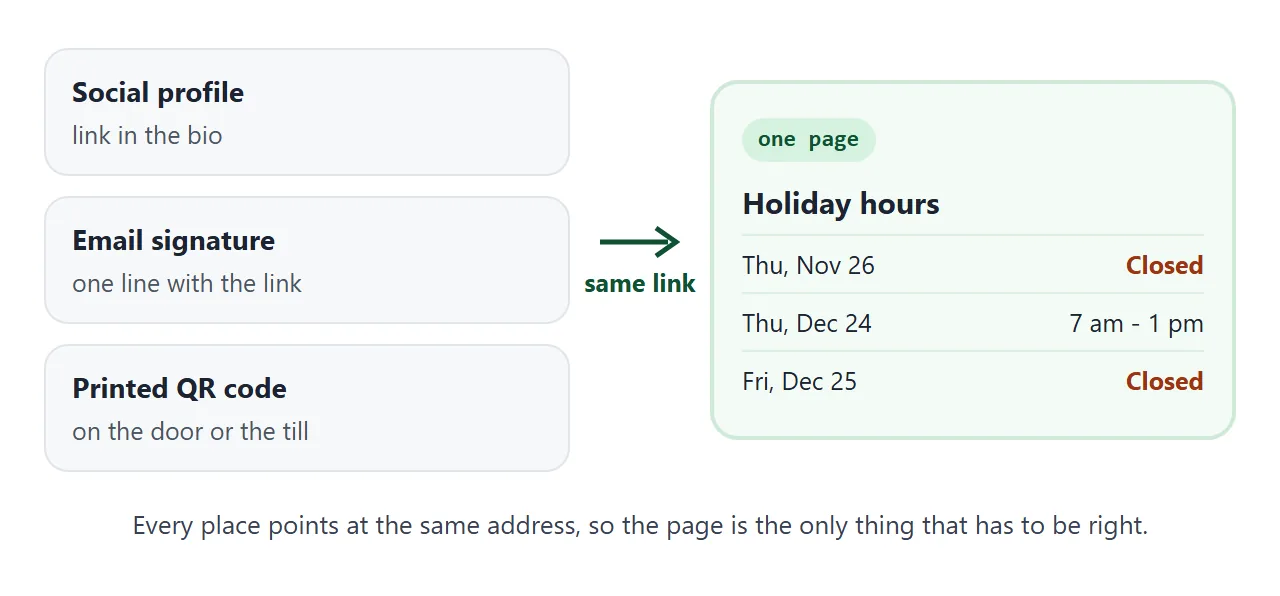
A holiday hours notice that people read says three things for each date: which day, open or closed, and the hours. Put those on one web page and link it from your social profiles.
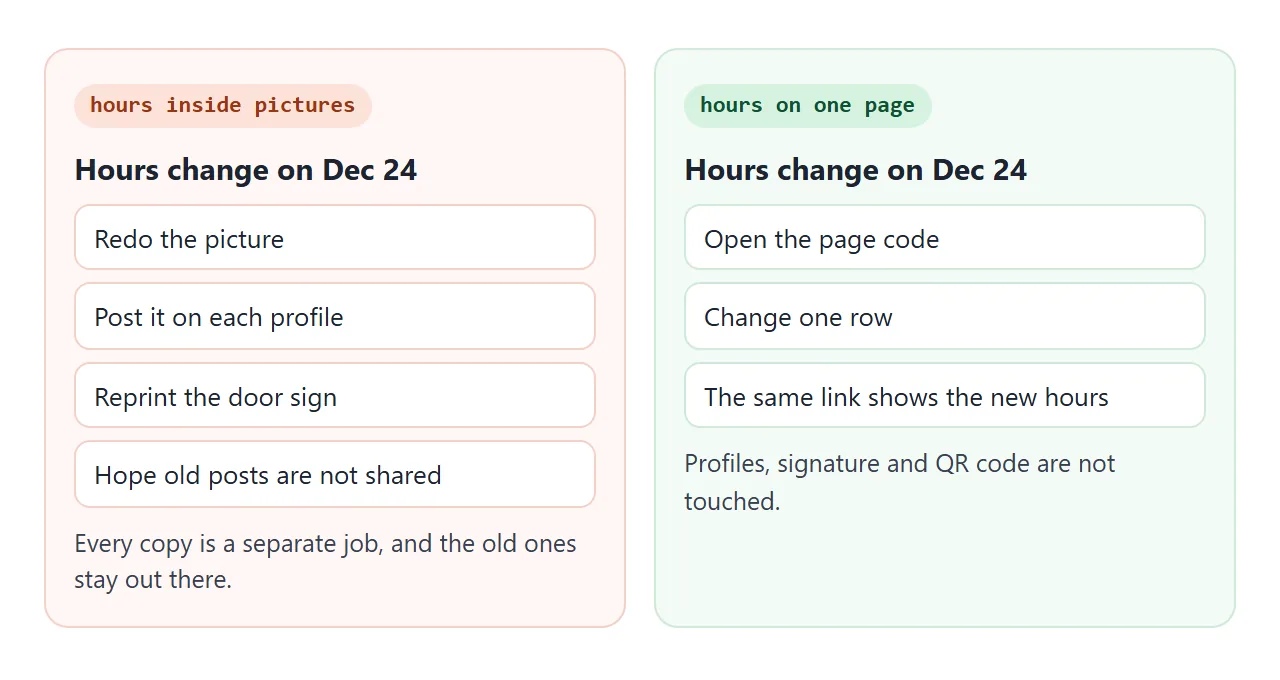
Then a change to a date is one edit, not a round of new posts.
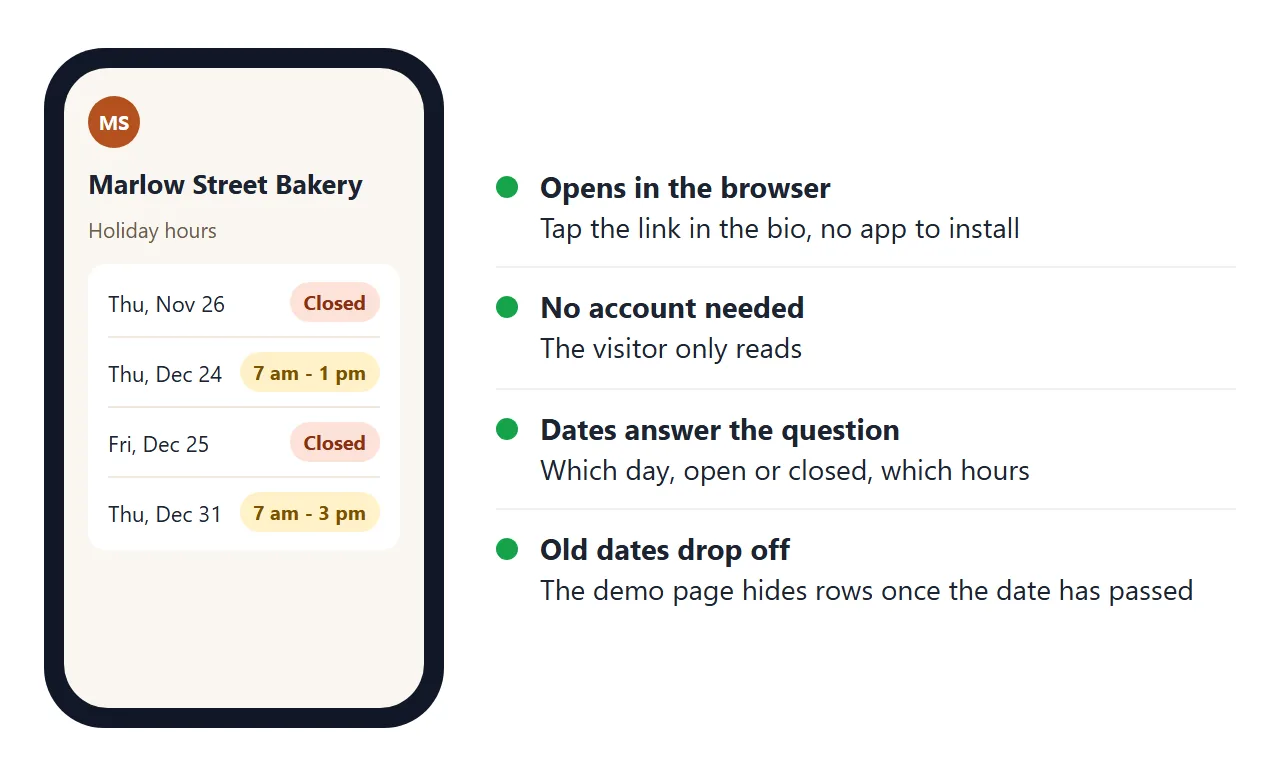
Here is a page you can copy. It lists the usual hours, the changes for the holidays, and hides each row after its date has passed.
<!doctype html>
<html lang="en">
<head>
<meta charset="utf-8">
<meta name="viewport" content="width=device-width, initial-scale=1">
<title>Holiday hours - Marlow Street Bakery</title>
<style>
  * { box-sizing: border-box; }
  body { margin: 0; font-family: system-ui, sans-serif; background: #faf6f0; color: #2b2118; }
  .wrap { max-width: 520px; margin: 0 auto; padding: 22px 16px 30px; }
  .logo { width: 44px; height: 44px; border-radius: 50%; background: #b4501f; color: #fff; display: grid; place-items: center; font-weight: 700; }
  h1 { font-size: 24px; margin: 12px 0 2px; }
  .sub { margin: 0 0 16px; color: #6b5b4b; font-size: 15px; }
  .card { background: #fff; border-radius: 14px; padding: 6px 16px; box-shadow: 0 2px 10px rgba(60, 40, 20, .08); margin-bottom: 16px; }
  .card h2 { font-size: 13px; letter-spacing: .06em; text-transform: uppercase; color: #8a6a4a; margin: 12px 0 4px; }
  .row { display: flex; justify-content: space-between; align-items: center; gap: 12px; padding: 11px 0; border-top: 1px solid #f0e8de; font-size: 16px; }
  .row:first-of-type { border-top: 0; }
  .when small { display: block; color: #6b5b4b; font-size: 13px; }
  .tag { white-space: nowrap; font-weight: 700; font-size: 14px; padding: 5px 10px; border-radius: 99px; }
  .closed { background: #fde2da; color: #8a2f10; }
  .short { background: #fff1c9; color: #7a5200; }
  .open { background: #d9f2e0; color: #0f5132; }
  #none { display: none; padding: 12px 0 14px; color: #0f5132; font-weight: 600; }
  .foot { font-size: 14px; color: #6b5b4b; }
</style>
</head>
<body>
<div class="wrap">
  <div class="logo">MS</div>
  <h1>Marlow Street Bakery</h1>
  <p class="sub">Holiday hours - updated October 2, 2026</p>

  <div class="card">
    <h2>Our usual hours</h2>
    <div class="row"><span>Tuesday to Saturday</span><span>7:00 am - 5:00 pm</span></div>
    <div class="row"><span>Sunday</span><span>8:00 am - 2:00 pm</span></div>
    <div class="row"><span>Monday</span><span>Closed</span></div>
  </div>

  <div class="card" id="holidays">
    <h2>Changes for the holidays</h2>
    <!-- EDIT HERE: one row per date. data-date is year-month-day. A row disappears after its date. -->
    <div class="row" data-date="2026-11-26"><span class="when">Thursday, Nov 26<small>Thanksgiving</small></span><span class="tag closed">Closed</span></div>
    <div class="row" data-date="2026-12-24"><span class="when">Thursday, Dec 24<small>Christmas Eve</small></span><span class="tag short">7 am - 1 pm</span></div>
    <div class="row" data-date="2026-12-25"><span class="when">Friday, Dec 25<small>Christmas Day</small></span><span class="tag closed">Closed</span></div>
    <div class="row" data-date="2026-12-31"><span class="when">Thursday, Dec 31<small>New Year's Eve</small></span><span class="tag short">7 am - 3 pm</span></div>
    <div class="row" data-date="2027-01-01"><span class="when">Friday, Jan 1<small>New Year's Day</small></span><span class="tag open">Open 9 am - 3 pm</span></div>
    <div id="none">No changes coming up. Our usual hours apply.</div>
  </div>

  <p class="foot">Questions? Call us on 555-0142. Pre-orders for the holiday table close two days before each date.</p>
</div>

<script>
  // Hide every holiday row whose date has already passed.
  const today = new Date();
  today.setHours(0, 0, 0, 0);
  let shown = 0;
  document.querySelectorAll('#holidays [data-date]').forEach((row) => {
    const [y, m, d] = row.dataset.date.split('-').map(Number);
    if (new Date(y, m - 1, d) < today) row.style.display = 'none';
    else shown++;
  });
  // If nothing is left, say so instead of showing an empty box.
  if (shown === 0) document.getElementById('none').style.display = 'block';
</script>
</body>
</html>
The reason to use a page rather than a picture is the next change. A picture has the dates baked in, so a new date means a new picture on every profile. A page keeps the dates as text, and the address never changes.
Make it with AI
You do not need to write the page. Paste this into ChatGPT, Claude or Gemini and replace the details in capitals with your own.
Make one self-contained HTML page called "Holiday hours" for
SHOP NAME. It must work on a phone, with a viewport meta tag.

Usual hours: TUESDAY TO SATURDAY 7 AM - 5 PM, SUNDAY 8 AM - 2 PM,
MONDAY CLOSED.

Holiday changes, one row each with weekday, date and a label for
Closed, shortened hours, or Open:
- THURSDAY, NOV 26: CLOSED
- THURSDAY, DEC 24: 7 AM - 1 PM
- FRIDAY, DEC 25: CLOSED

Show a line "Updated" with today's date. Plain text and CSS only,
no outside images, fonts or scripts from other sites. Put a comment
above the holiday rows saying where to edit them.
Then check the result before you share it:
- Every weekday matches its date on your calendar. An AI can get a weekday wrong.
- Closed days say Closed, and shortened days show both the opening and closing time.
- The phone number, if you added one, is the right one.
- There is no invented content, such as a promotion you never mentioned.
Send it as a link
Paste the HTML into a NOS document and choose Create share link. HTML to link walks through it. The page opens in any browser, on a phone too, and the person opening it needs no account. They can read it but cannot edit it.
If you change the code later, the same link shows the new version. That is what lets you print the link on a door sign once. QR code link covers making a printed code that points at an address you can keep editing.
Instagram has a website field in the profile. As of October 2026, its help page says to tap Edit Profile, add the URL to your website and tap Done.
Other profiles have their own link field in a different place, so look in your profile settings.
An attached file is the wrong tool here. A phone may not open it as a page, and each change means sending a new file. Opening an HTML file on a phone explains why.
Change a day with a click
Typing a new time into the code works, but it is not the only way. A page can hold a tick box beside each date, so closing a day is one tap.
<!doctype html>
<html lang="en">
<head>
<meta charset="utf-8">
<meta name="viewport" content="width=device-width, initial-scale=1">
<title>Holiday hours with ticks - Harbor Light Hardware</title>
<style>
  * { box-sizing: border-box; }
  body { margin: 0; font-family: system-ui, sans-serif; background: #f2f5f8; color: #1d2330; }
  .wrap { max-width: 520px; margin: 0 auto; padding: 20px 16px 28px; }
  h1 { font-size: 22px; margin: 0 0 4px; }
  .sub { margin: 0 0 14px; color: #52607a; font-size: 15px; }
  #banner { padding: 12px 14px; border-radius: 12px; font-weight: 600; margin-bottom: 14px; background: #d9f2e0; color: #0f5132; }
  #banner.warn { background: #fff1c9; color: #7a5200; }
  ul { list-style: none; margin: 0; padding: 0; background: #fff; border-radius: 14px; box-shadow: 0 2px 10px rgba(20, 30, 50, .08); }
  li { display: flex; align-items: center; justify-content: space-between; gap: 10px; padding: 12px 16px; border-top: 1px solid #edf0f4; }
  li:first-child { border-top: 0; }
  .name small { display: block; color: #52607a; font-size: 13px; }
  .state { font-weight: 700; font-size: 14px; color: #0f5132; margin-left: auto; text-align: right; }
  li.is-closed .state { color: #8a2f10; }
  label { display: flex; align-items: center; gap: 8px; font-size: 15px; cursor: pointer; min-height: 44px; }
  input[type=checkbox] { width: 22px; height: 22px; }
  form { display: flex; flex-wrap: wrap; gap: 8px; margin-top: 14px; }
  form input[type=text] { flex: 1 1 140px; min-width: 0; padding: 10px; font-size: 16px; border: 1px solid #c9ced8; border-radius: 8px; }
  form button { padding: 10px 16px; font-size: 16px; border: 0; border-radius: 8px; background: #1f4fd8; color: #fff; }
</style>
</head>
<body>
<div class="wrap">
  <h1>Harbor Light Hardware</h1>
  <p class="sub">Tick Closed on a day and the page updates.</p>
  <div id="banner"></div>
  <ul id="days">
    <li data-open="9 am - 6 pm"><span class="name">Thu, Nov 26<small>Thanksgiving</small></span><span class="state"></span><label><input type="checkbox" checked> Closed</label></li>
    <li data-open="9 am - 6 pm"><span class="name">Fri, Nov 27<small>Day after Thanksgiving</small></span><span class="state"></span><label><input type="checkbox"> Closed</label></li>
    <li data-open="9 am - 6 pm"><span class="name">Thu, Dec 24<small>Christmas Eve</small></span><span class="state"></span><label><input type="checkbox"> Closed</label></li>
    <li data-open="9 am - 6 pm"><span class="name">Fri, Dec 25<small>Christmas Day</small></span><span class="state"></span><label><input type="checkbox" checked> Closed</label></li>
  </ul>
  <form id="add">
    <input type="text" id="day" placeholder="Date, e.g. Jan 1" required>
    <input type="text" id="note" placeholder="Reason, e.g. New Year's Day">
    <button type="submit">Add a day</button>
  </form>
</div>

<script>
  const list = document.getElementById('days');
  const banner = document.getElementById('banner');

  // Redraw every row's label and the banner from the tick boxes.
  function refresh() {
    let closed = 0;
    list.querySelectorAll('li').forEach((li) => {
      const isClosed = li.querySelector('input').checked;
      li.classList.toggle('is-closed', isClosed);
      li.querySelector('.state').textContent = isClosed ? 'Closed' : li.dataset.open;
      if (isClosed) closed++;
    });
    if (closed === 0) {
      banner.textContent = 'Open as usual on every listed day.';
    } else {
      banner.textContent = closed + (closed === 1 ? ' day' : ' days') + ' closed. See the list below.';
    }
    banner.classList.toggle('warn', closed > 0);
  }

  list.addEventListener('change', refresh);

  // Add a new row. The form never leaves the page.
  document.getElementById('add').addEventListener('submit', (e) => {
    e.preventDefault();
    const day = document.getElementById('day');
    const note = document.getElementById('note');
    const li = document.createElement('li');
    li.dataset.open = '9 am - 6 pm';
    li.innerHTML = '<span class="name"></span><span class="state"></span><label><input type="checkbox"> Closed</label>';
    li.querySelector('.name').textContent = day.value;
    if (note.value) {
      const s = document.createElement('small');
      s.textContent = note.value;
      li.querySelector('.name').appendChild(s);
    }
    list.appendChild(li);
    day.value = '';
    note.value = '';
    refresh();
  });

  refresh();
</script>
</body>
</html>
In NOS, changes the owner makes in View mode, such as ticks and added rows, are saved. A visitor's changes are not.
So you can tick Closed on Christmas Eve on your phone and the next person who opens the link sees it closed. A visitor who ticks a box only changes their own screen.
Ask the AI for this version with one extra line: add a Closed tick box beside each date, and a form that adds a new row. Then try it yourself before you rely on it.
Ways to tell customers, compared
| Way | When a date changes | What the visitor gets |
|---|---|---|
| Picture posted on a profile | Make a new picture and post it again | A picture, hard to search or select |
| Printed sign on the door | Print a new sign | Only people who walk up to the door |
| Page behind a link or QR code | Edit one row or tick a box | Current text, readable on a phone |
| Google Business Profile special hours | Edit them in the profile | Hours in your Google listing |
They do not replace each other. The page is the one you control end to end, and the others are where some customers will look first.
Keep your Google hours in step
The page does not change what Google shows for your business. As of October 2026, Google's help says to open your Business Profile, choose Edit profile, then Hours.
Find Special hours and select the edit icon. Pick the date, set the hours or leave it Closed, and save.
Two limits from the same page: special hours can cover up to 6 consecutive days, and they only show if your business hours are set to Open with main hours.
For a closure of 7 or more days in a row, Google says to mark the business as temporarily closed instead.
Dates in the page and in Google should match, so update both on the same day. Plans and account types can change what Google offers, so check the screen you see.
When it does not work
| What you see | Cause | Fix |
|---|---|---|
| The link shows old hours | You pasted a second copy and shared that link | Edit the code of the original document and keep using its link |
| A tick you made is gone | Ticks are saved for the owner in View mode, not for visitors | Make the change in your own document, in View mode |
| A customer says they ticked a box and nothing happened | A visitor's changes are not saved | Make the change yourself |
| The page is empty or says no changes | Every row has passed its date | Add rows for the next holidays |
| The logo or photo is missing | Images from other sites are blocked | Use text, or an inline SVG |
| The page looks tiny on a phone | The viewport tag is missing | Ask the AI to add it, see viewport meta tag |
| Google still shows normal hours | The page does not change your Google listing | Set special hours in the Business Profile |
For the same idea on a menu that changes, see host a menu. To reuse the page next year instead of asking again, see make an HTML template.