The <base> element sets the address that every relative URL on the page starts from. With <base href="https://example.com/docs/"> in the head, <a href="page.html"> goes to https://example.com/docs/page.html, wherever the page itself lives. Its other attribute, target, sets where links open by default.
Try it. Pick a base or type your own, and watch where each link in the table would go.
<!doctype html>
<html lang="en">
<head>
<meta charset="utf-8">
<meta name="viewport" content="width=device-width, initial-scale=1">
<title>Where a base tag sends each link</title>
<style>
body { margin: 0; padding: 14px; font-family: system-ui, sans-serif; background: #f4f5f7; color: #1d2330; }
.page { font-size: 13px; color: #5b6270; margin: 0 0 8px; overflow-wrap: anywhere; }
label { display: block; font-size: 13px; font-weight: 600; margin-bottom: 4px; }
input { width: 100%; box-sizing: border-box; font: 14px ui-monospace, Consolas, monospace; padding: 8px; border: 1px solid #c9cdd4; border-radius: 8px; }
.presets { display: flex; flex-wrap: wrap; gap: 6px; margin: 8px 0 12px; }
.presets button { font: 12px system-ui, sans-serif; padding: 5px 9px; border: 1px solid #c9cdd4; border-radius: 99px; background: #fff; cursor: pointer; }
table { width: 100%; border-collapse: collapse; background: #fff; border-radius: 10px; overflow: hidden; font-size: 12.5px; }
th, td { text-align: left; padding: 7px 8px; border-bottom: 1px solid #eceef2; vertical-align: top; }
th { background: #eef1f5; font-size: 12px; }
td code { font: 12px ui-monospace, Consolas, monospace; overflow-wrap: anywhere; }
tr.moved td { background: #fff4ec; }
tr.moved td:last-child { color: #9a3412; }
</style>
</head>
<body>
<p class="page">This page lives at <b id="page">https://example.com/blog/post.html</b></p>
<label for="base"><base href="…"></label>
<input id="base" value="https://example.com/docs/" spellcheck="false">
<div class="presets">
<button data-v="">No base</button>
<button data-v="https://example.com/docs/">docs/</button>
<button data-v="https://example.com/docs">docs (no slash)</button>
<button data-v="https://cdn.example.org/v2/">Another site</button>
</div>
<table>
<thead><tr><th>Link in the page</th><th>Where it goes</th></tr></thead>
<tbody id="rows"></tbody>
</table>
<script>
const PAGE = document.getElementById('page').textContent;
const LINKS = ['page.html', 'img/logo.png', '../index.html', '/about.html', '?page=2', '#contact'];
// A scratch document with a real <base> and <a>: the browser does the resolving
const doc = document.implementation.createHTMLDocument('');
const base = doc.head.appendChild(doc.createElement('base'));
const a = doc.body.appendChild(doc.createElement('a'));
function resolve(href, from) {
base.setAttribute('href', from);
a.setAttribute('href', href);
return a.href;
}
function render() {
const value = document.getElementById('base').value.trim();
// A relative base href is itself resolved against the page address
const from = value ? resolve(value, PAGE) : PAGE;
document.getElementById('rows').innerHTML = LINKS.map((href) => {
const to = resolve(href, from);
const moved = href.startsWith('#') && to.split('#')[0] !== PAGE;
return `<tr class="${moved ? 'moved' : ''}"><td><code>${href}</code></td>` +
`<td><code>${to}</code>${moved ? '<br>Loads another page instead of scrolling' : ''}</td></tr>`;
}).join('');
}
document.getElementById('base').addEventListener('input', render);
document.querySelectorAll('.presets button').forEach((b) => {
b.addEventListener('click', () => {
document.getElementById('base').value = b.dataset.v;
render();
});
});
render();
</script>
</body>
</html>
The row to watch is #contact. With no base, it scrolls this page. With almost any base, it loads a different page.
What the base tag looks like
It is a void element: one tag, no closing tag, and it belongs in the <head>.
<head>
  <meta charset="utf-8">
  <base href="https://example.com/docs/" target="_self">
  <link rel="stylesheet" href="style.css">
</head>
It has two attributes, and either one alone is fine:
| Attribute | What it sets | Example |
|---|---|---|
href |
The starting address for every relative URL | <base href="/docs/"> |
target |
Where links and forms open when they have no target of their own |
<base target="_blank"> |
Only the first <base> with an href counts, and only the first with a target. A second base tag is silently ignored.
The standard also asks for the base to come before any other element that uses an address, so put it near the top of the head. The head tag guide shows where it sits among the rest.
How base href changes relative links
Without a base, a relative address starts from the folder the page sits in. With one, it starts from the base instead.
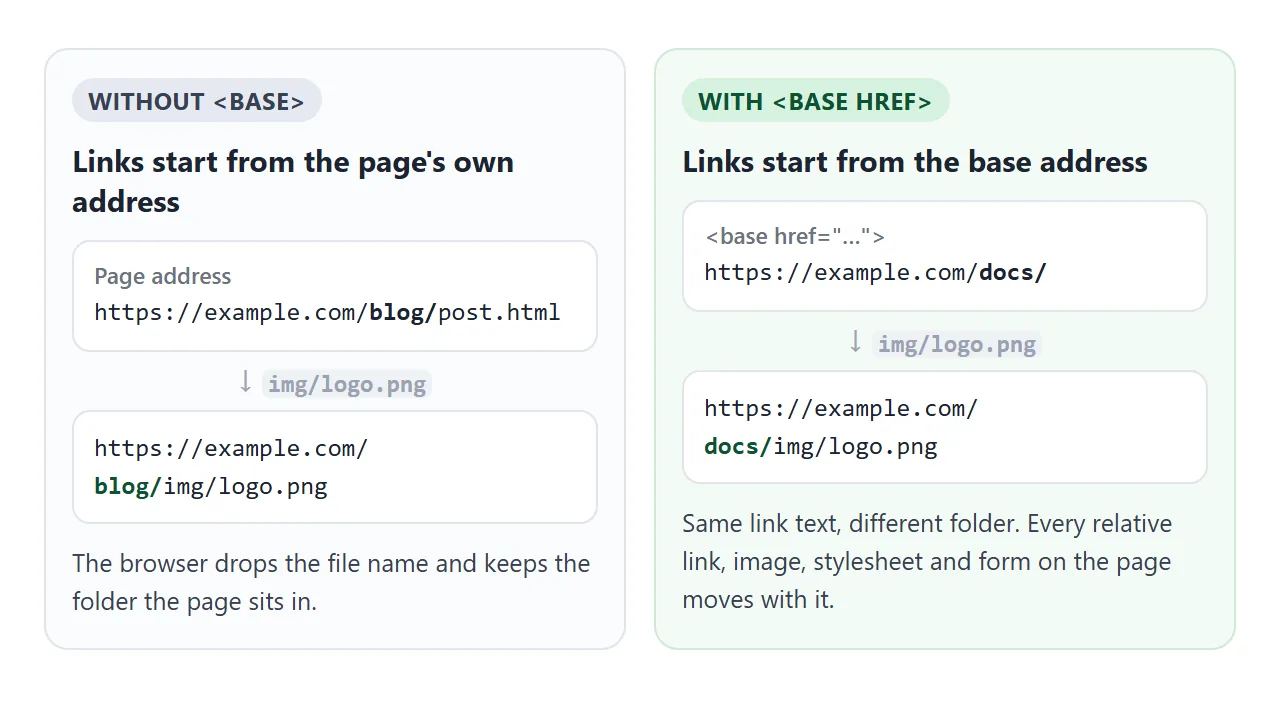
Everything that takes an address follows the base, not just links:
<a href>and<area href><img src>,<video src>,<source><link href>for stylesheets and icons, and<script src><form action>url()in a<style>block orstyleattributefetch('api/items')in scripts
Each kind of relative address behaves the way it would from a page at the base address:
| In the page | With base https://example.com/docs/ |
|---|---|
page.html |
https://example.com/docs/page.html |
../index.html |
https://example.com/index.html |
/about.html |
https://example.com/about.html |
?page=2 |
https://example.com/docs/?page=2 |
#contact |
https://example.com/docs/#contact |
https://other.example/ |
Unchanged. Full addresses ignore the base |
A base href can itself be relative, such as <base href="assets/">. It is resolved against the page address first. For the wider picture of the four kinds of path, see relative vs absolute paths.
The trailing slash matters
A base address is read exactly like a page address. The part after the last / is treated as a file name and dropped when a relative link is added.
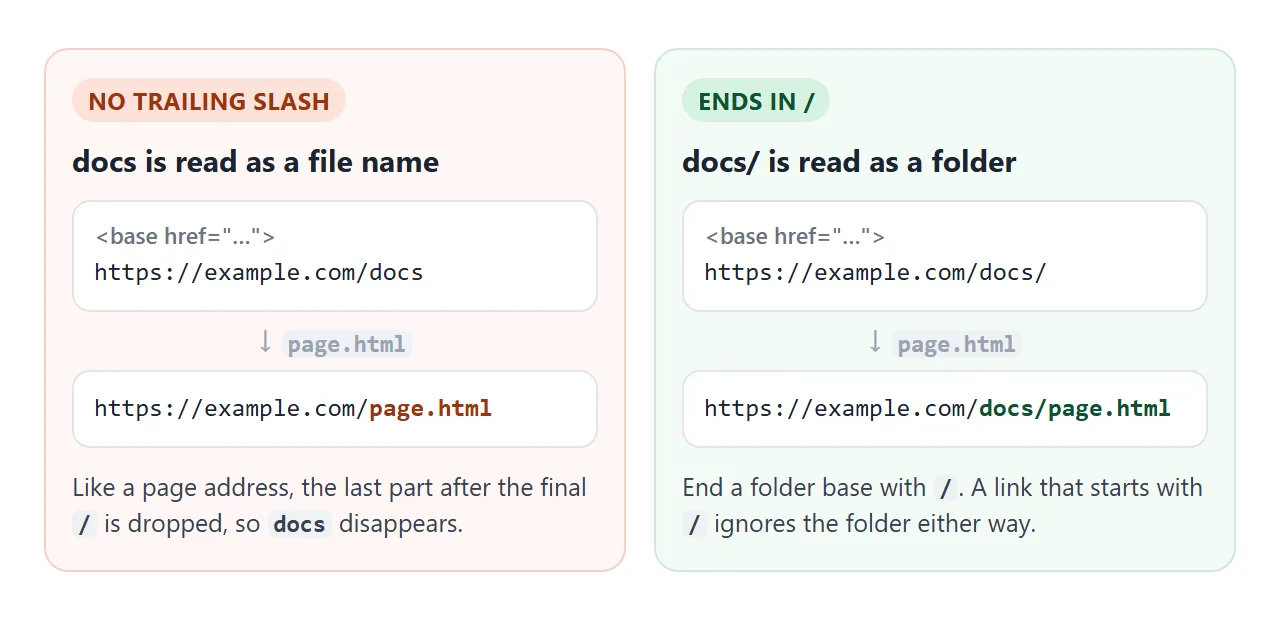
So <base href="https://example.com/docs"> sends page.html to https://example.com/page.html, not into docs. The browser shows no warning. Pick the "docs (no slash)" button in the first example to see it.
The #anchor trap
This is the base tag's best-known surprise. An in-page link like <a href="#faq"> is a relative address too, and it resolves against the base like any other.
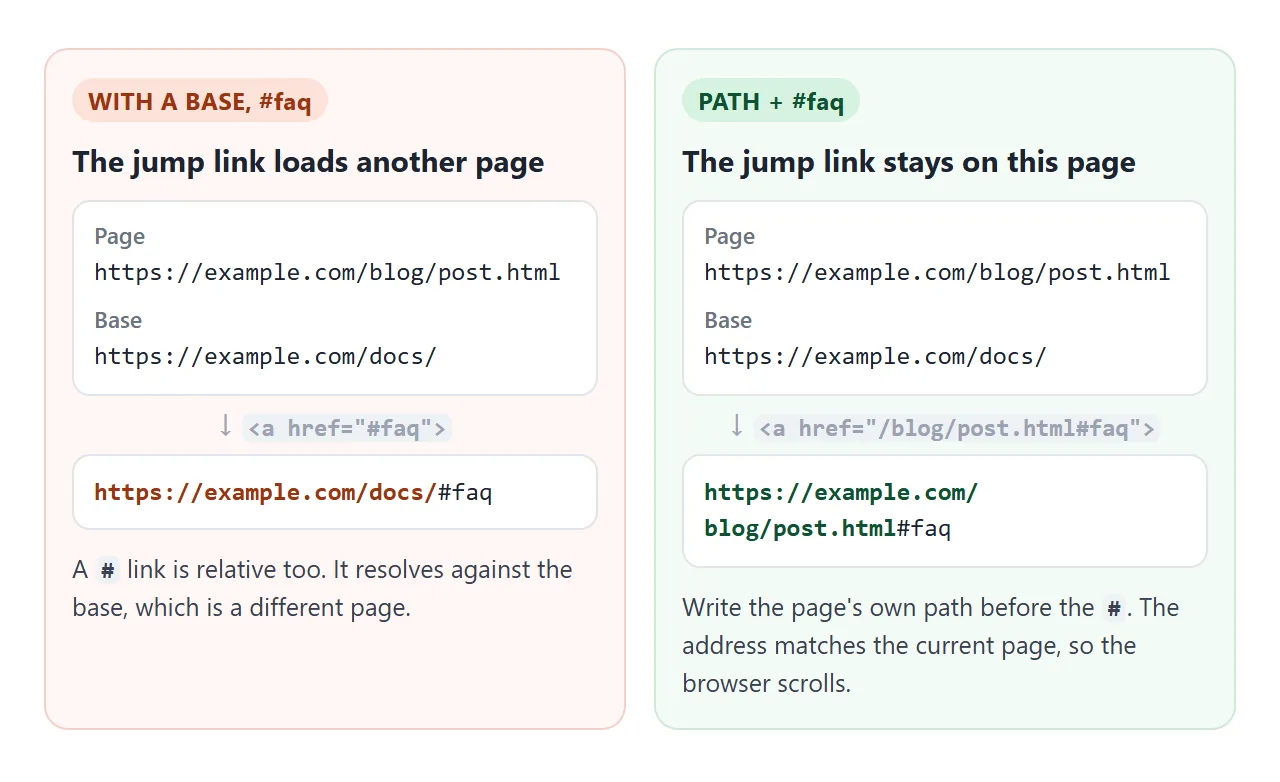
If the base is not this exact page, the result is another page's address plus #faq. Clicking it leaves the page instead of scrolling. Three ways out:
- Write the page's own address before the #.
<a href="/blog/post.html#faq">resolves to the current address, so the browser only scrolls. If the base is on another site, use the full address instead. - Handle jump links in JavaScript. Catch clicks on
a[href^="#"], callpreventDefault()and thenscrollIntoView()on the target element. - Drop the base. Use full or root-relative addresses for the few links that needed it.
The same thing happens with href="" and ?page=2: both point at the base, not at the current page. Linking to an anchor on the same page covers ids and jump links in general.
One case uses this behaviour on purpose. A page shown with srcdoc takes its base address from the parent page, so its # links resolve against the parent page. Adding <base href="about:srcdoc"> makes them resolve inside the frame again.
base target: one default for every link
<base target="viewer"> makes every link without its own target open in the frame or window named viewer. A target on the link itself always wins.
<!doctype html>
<html lang="en">
<head>
<meta charset="utf-8">
<meta name="viewport" content="width=device-width, initial-scale=1">
<!-- Every link without its own target opens in the frame named "viewer" -->
<base target="viewer">
<title>base target</title>
<style>
body { margin: 0; padding: 14px; font-family: system-ui, sans-serif; background: #f4f5f7; color: #1d2330; }
nav { display: flex; flex-wrap: wrap; gap: 8px; margin-bottom: 12px; }
nav a { font-size: 14px; padding: 7px 11px; border-radius: 8px; background: #fff; border: 1px solid #c9cdd4; color: #1d4ed8; text-decoration: none; }
nav a.own { border-color: #e0a36a; color: #9a3412; }
.panes { display: grid; grid-template-columns: 1fr 1fr; gap: 10px; }
.pane h3 { margin: 0 0 4px; font-size: 13px; }
iframe { width: 100%; height: 230px; box-sizing: border-box; border: 1px solid #c9cdd4; border-radius: 8px; background: #fff; }
@media (max-width: 420px) {
.panes { grid-template-columns: 1fr; }
iframe { height: 110px; }
}
</style>
</head>
<body>
<nav>
<a href="data:text/html,<h2>Pricing</h2><p>Opened in the viewer.</p>">Pricing</a>
<a href="data:text/html,<h2>Features</h2><p>Opened in the viewer.</p>">Features</a>
<a href="data:text/html,<h2>Contact</h2><p>Opened in the viewer.</p>">Contact</a>
<a class="own" href="data:text/html,<h2>Notes</h2><p>This link has target=side.</p>" target="side">Notes (own target)</a>
</nav>
<div class="panes">
<div class="pane"><h3>name="viewer" (from <base>)</h3><iframe name="viewer" title="viewer"></iframe></div>
<div class="pane"><h3>name="side" (link's own target)</h3><iframe name="side" title="side"></iframe></div>
</div>
</body>
</html>
This is handy for a menu that loads pages into one frame.
The common use, <base target="_blank">, has a side effect: it also applies to in-page jump links. A #faq link then opens the same page in a new tab rather than scrolling. Give those links target="_self".
Opening links in a new tab shows a narrower way to target only external links.
A finished example: check a page before adding a base
The checker below reads a page's HTML the way a browser would. It uses the first base with an href, flags any extra ones, warns when the base does not end in /, and marks every # link that would leave the page.
<!doctype html>
<html lang="en">
<head>
<meta charset="utf-8">
<meta name="viewport" content="width=device-width, initial-scale=1">
<title>Base tag link checker</title>
<style>
body { margin: 0; padding: 14px; font-family: system-ui, sans-serif; background: #f4f5f7; color: #1d2330; }
label { display: block; font-size: 13px; font-weight: 600; margin: 0 0 4px; }
input, textarea { width: 100%; box-sizing: border-box; font: 12.5px/1.45 ui-monospace, Consolas, monospace; padding: 8px; border: 1px solid #c9cdd4; border-radius: 8px; }
textarea { height: 150px; resize: vertical; }
button { margin: 10px 0; font: 600 14px system-ui, sans-serif; padding: 8px 14px; border: 0; border-radius: 8px; background: #1d4ed8; color: #fff; cursor: pointer; }
.row { margin-bottom: 10px; }
ul { list-style: none; margin: 0; padding: 0; font-size: 12.5px; }
li { background: #fff; border-radius: 8px; padding: 7px 9px; margin-bottom: 6px; border-left: 4px solid #3aa55d; overflow-wrap: anywhere; }
li.warn { border-left-color: #e0782f; background: #fff4ec; }
li code { font: 12px ui-monospace, Consolas, monospace; }
li small { display: block; color: #9a3412; margin-top: 2px; }
</style>
</head>
<body>
<div class="row">
<label for="page">Page address</label>
<input id="page" value="https://example.com/blog/post.html" spellcheck="false">
</div>
<label for="src">Page HTML</label>
<textarea id="src" spellcheck="false"><head>
<base href="https://example.com/assets">
<base href="https://example.com/old/">
</head>
<a href="#faq">FAQ</a>
<a href="/blog/post.html#faq">FAQ (fixed)</a>
<img src="logo.png">
<a href="guide.html">Guide</a></textarea>
<button id="check">Check links</button>
<ul id="out"></ul>
<script>
// Scratch document: a real <base> and <a> do the resolving
const doc = document.implementation.createHTMLDocument('');
const base = doc.head.appendChild(doc.createElement('base'));
const a = doc.body.appendChild(doc.createElement('a'));

function resolve(href, from) {
  base.setAttribute('href', from);
  a.setAttribute('href', href);
  return a.href;
}
const esc = (s) => s.replace(/[&<>"]/g, (c) => '&#' + c.charCodeAt(0) + ';');
function check() {
const page = document.getElementById('page').value.trim();
const html = new DOMParser().parseFromString(document.getElementById('src').value, 'text/html');
const bases = [...html.querySelectorAll('base[href]')];
const items = [];
let from = page;
if (bases.length) {
const href = bases[0].getAttribute('href');
from = resolve(href, page);
const path = new URL(from).pathname;
items.push({ text: `Base: <code>${esc(from)}</code>` });
if (!path.endsWith('/')) {
items.push({ warn: 'The base does not end in /, so its last part is dropped.', text: `<code>${esc(href)}</code> acts like <code>${esc(resolve('./', from))}</code>` });
}
bases.slice(1).forEach((b) => items.push({ warn: 'Ignored: only the first base href counts.', text: `<code>${esc(b.getAttribute('href'))}</code>` }));
}
html.querySelectorAll('a[href], img[src], link[href], script[src], form[action]').forEach((el) => {
const attr = el.hasAttribute('href') ? 'href' : el.hasAttribute('src') ? 'src' : 'action';
const raw = el.getAttribute(attr);
const to = resolve(raw, from);
let warn = '';
if (raw.startsWith('#') && to.split('#')[0] !== page.split('#')[0]) {
// Suggest the page's own address plus the #id (path only if the base is on the same site)
const own = new URL(from).origin === new URL(page).origin ? new URL(page).pathname : page.split('#')[0];
warn = `Leaves this page. Write it as ${esc(own + raw)}`;
}
items.push({ warn, text: `<code>${esc(raw)}</code> → <code>${esc(to)}</code>` });
});
document.getElementById('out').innerHTML = items.map((i) =>
`<li class="${i.warn ? 'warn' : ''}">${i.text}${i.warn ? `<small>${i.warn}</small>` : ''}</li>`).join('');
}
document.getElementById('check').addEventListener('click', check);
check();
</script>
</body>
</html>
The resolving trick is worth copying. A scratch document from document.implementation.createHTMLDocument() holds one <base> and one <a>. Set both attributes and read a.href, and the browser does the work:
const doc = document.implementation.createHTMLDocument('');
const base = doc.head.appendChild(doc.createElement('base'));
const a = doc.body.appendChild(doc.createElement('a'));
function resolve(href, from) {
base.setAttribute('href', from);
a.setAttribute('href', href);
return a.href;
}
In a script on a normal page, document.baseURI gives the current base. Pass it to new URL(path, document.baseURI), because new URL(path) alone does not use the base and throws on a relative path.
Base tag and security
Because one tag redirects every relative script and stylesheet, an injected <base> is an attack path. A Content Security Policy with base-uri 'self' or base-uri 'none' limits which base addresses the page accepts.
When it does not work
| What you see | Cause | Fix |
|---|---|---|
| A #section link loads another page | #id resolves against the base |
Write the page's own address before the # |
| Links land one folder too high | The base href has no trailing / |
End the folder with / |
| The base seems to be ignored | Another <base href> comes first |
Keep a single base, first in the head |
| Images and CSS vanish after adding a base | Their files are not at the base address | Move them there, or use full addresses |
| A link starting with / skips the base folder | Root-relative paths keep only the base's domain | Drop the leading / |
| In-page links open new tabs | <base target="_blank"> applies to them too |
Add target="_self" to those links |
new URL('x') throws in a script |
It does not read the base | Use new URL('x', document.baseURI) |
| A form posts to the wrong place | Its relative action resolves against the base | Give the form a full or root-relative action |
Share it as a link
Base tag behaviour is easier to show than to explain. The people you send a page to can click the links and see where they go, which a screenshot cannot do.
To send the working version, paste the page into a NOS document and choose Create share link. HTML to link walks through it.
The page renders as written and its scripts run, so the examples above work for whoever opens the link. If you change the code later, the same link shows the new version.