Relative vs absolute paths in HTML is the difference between a reference that says where something is in relation to this file and one that says where it is on the web. images/chart.png is relative: the browser looks for an images folder beside the page, which exists on your machine and nowhere else. https://cdn.example.com/chart.png is absolute: it resolves the same from any page anywhere.
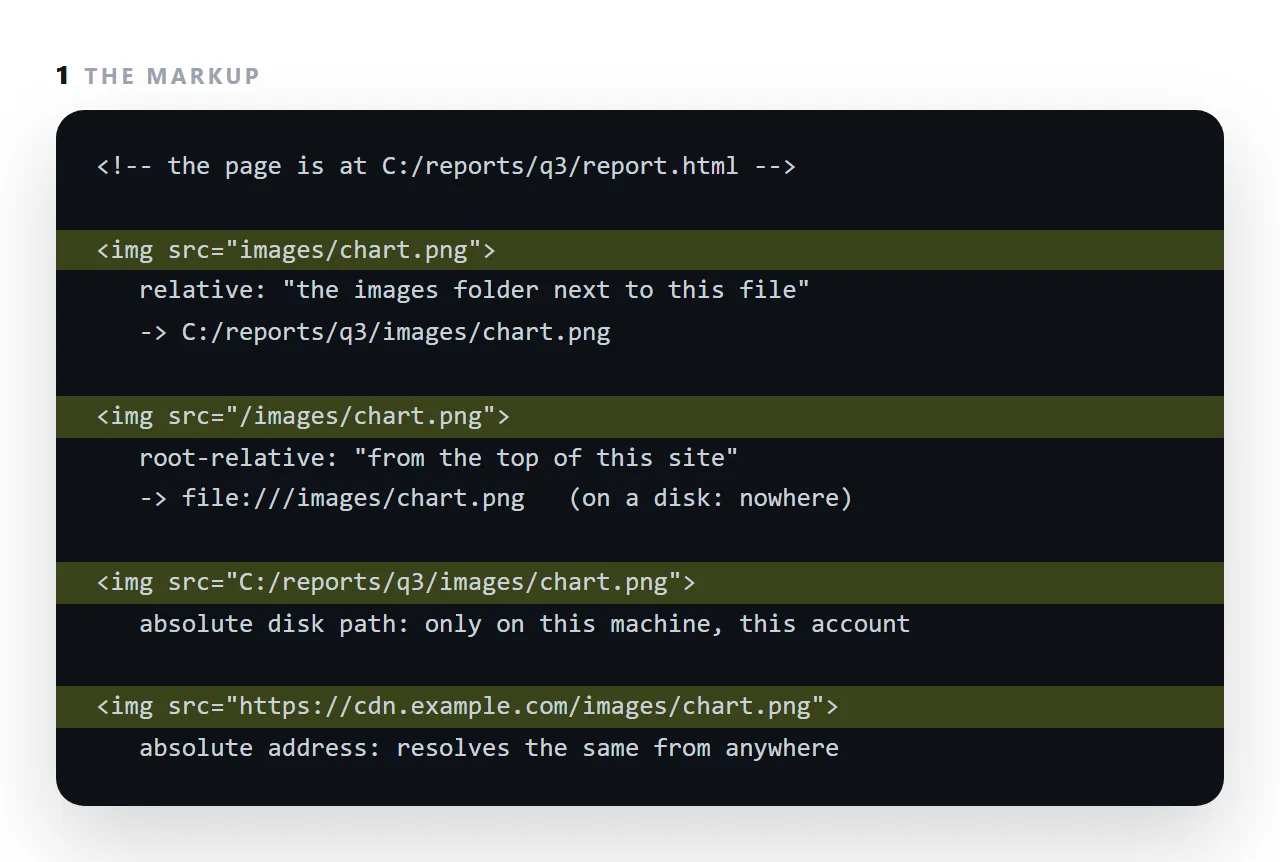
A third form, a disk path like C:/Users/…, works on one account on one machine. This guide covers the four forms, why document-relative references break when a page is sent, uploaded or embedded, and how to convert a page so nothing breaks.
The four forms of a path in HTML
<!-- 1. relative to this document -->
<img src="logo.png">
<img src="images/logo.png">
<img src="../shared/logo.png">

<!-- 2. relative to the site root -->
<img src="/images/logo.png">

<!-- 3. protocol-relative — avoid -->
<img src="//example.com/logo.png">

<!-- 4. absolute -->
<img src="https://example.com/logo.png">
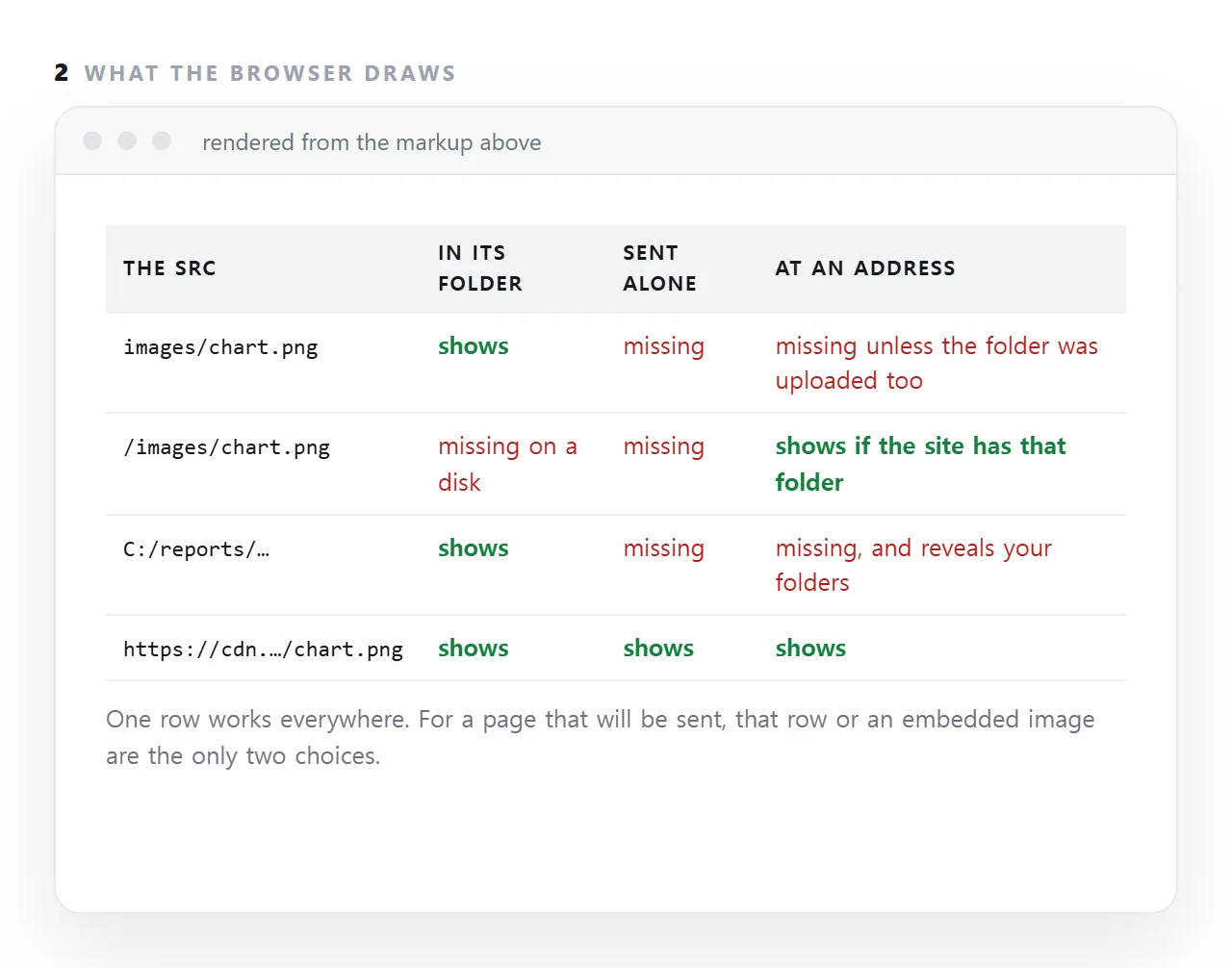
| Form | Resolves against | Survives the page moving | Survives being sent as a file |
|---|---|---|---|
| Document-relative | The page's own folder | No | No |
| Root-relative | The site root | Yes | No |
| Protocol-relative | The page's scheme | Yes | No — breaks over file:// |
| Absolute | Nothing | Yes | Yes, with a network |
Why document-relative breaks
src="logo.png" means "a file called logo.png in the same folder as this document". That is a statement about the current location, and the location changes:
/reports/q3.html      → looks for /reports/logo.png
/archive/q3.html      → looks for /archive/logo.png
sent as an attachment → looks next to a file that has no folder
inside a preview frame → no document address to resolve against at all
The reference text never changed. What it points at did. This is the single most common cause of images not showing.
Root-relative, for a site
<img src="/images/logo.png">
The leading slash means "from the site root", so the page can move between folders and the reference still resolves. For a multi-page site this is the right default.
It still does not survive the page being sent as a file, because a local file has no site root.
Absolute, for anything that travels
<img src="https://example.com/images/logo.png">
Resolves identically from a frame, from another machine, from a local copy. The cost is a dependency on that address continuing to serve — which is acceptable when you control it.
Avoid protocol-relative
<img src="//example.com/logo.png">
It inherits the page's scheme, which was useful when sites were migrating to https. Opened from a disk, the scheme is file and //example.com resolves to a local path that does not exist. Write https explicitly.
The case-sensitivity trap
<img src="Logo.PNG"> <!-- the file on disk is logo.png -->
Windows and macOS filesystems usually ignore case, so this works locally. Most servers do not, so it 404s once published.
This produces the most frustrating version of the problem: the page is correct on your machine and broken in production with nothing visibly wrong. Keep every filename lowercase with hyphens, as a rule, and it cannot happen.
Inside a frame with srcdoc
<iframe srcdoc="<img src='logo.png'>"></iframe>
There is no document address at all, so every relative path resolves to nothing. Content destined for a srcdoc frame must use absolute addresses or embedded images.
The rule
Will this document ever be alone?
If yes — sent as a file, embedded, previewed, opened offline — it needs absolute addresses or embedded content. See self-contained HTML.
If it lives on a site and will stay there, root-relative paths are cleaner and let pages move.
What breaks where
| Path form | Page moves folder | Sent as a file | Inside a srcdoc frame |
Opened offline |
|---|---|---|---|---|
logo.png |
Breaks | Breaks | Breaks | Works if the folder is there |
/images/logo.png |
Works | Breaks | Breaks | Breaks |
//example.com/logo.png |
Works | Breaks over file:// |
Works | Breaks |
https://example.com/logo.png |
Works | Works | Works | Breaks |
| Embedded as a data URI | Works | Works | Works | Works |
Only the last row survives every column, which is the argument for embedding in anything that has to travel alone.
The debugging move
Open the console's network list and read the full requested address of whatever is missing. That address tells you the cause immediately:
- Begins
file:///and points at a folder that is not there — a document-relative path in a file that travelled. - Begins
file:///C:/Users/— an absolute disk path. - Looks correct and returns 404 — a case mismatch, most likely.
- No request at all — a frame blocking outside resources.
Guessing from the appearance of the page wastes far more time than reading one line — see images not showing for the full set.
The base element, and why it rarely helps
<base href="https://example.com/reports/"> in the head makes every relative reference resolve from that address instead of from the file's location.
It looks like a fix for a page that will be sent, and it is only a fix if the folder exists at that address and stays there.
For a page whose images live in a folder on your laptop, a base element points every reference at a folder that is not on the web.
Use it for a site that moves as a whole; do not use it as a substitute for full addresses.
Root-relative paths and where the root is
/images/chart.png starts at the site root, which is stable within a site and meaningless anywhere else. Opened from disk, the root is the drive. Embedded in another site, the root is that site's. Pasted into a document tool, there is no root. A page that will leave its site should not use them.
Making a page's references survive: 4 steps
- Search the file for
src=andhref=. Every reference is one of the four forms. List them. - Convert relative and disk paths to full
https://addresses or embeds. Images you control go at an address; small ones can be embedded. Stylesheets fold into a style tag. - Leave relative links for pages within the same site. Site-internal links move with the site; that is exactly what relative is for.
- Open the file from a different folder to test. Copy it to the desktop and open it, or drop it into the file opener. Anything missing was relative to the old folder.