The course is over. People are asking for their certificates.
You open a slide tool, drag a border around, type a name, export, and do it again for the next person. By the fifth one the date has moved and a name is cut off.
An HTML certificate template does the layout once. Change the name, print, and every certificate looks the same.
These days you do not need a design tool for it. People ask ChatGPT, Claude or Gemini for a certificate and get a finished page in one reply.
Here is one. Change the name in the code and it redraws.
<!doctype html>
<html lang="en">
<head>
<meta charset="utf-8">
<meta name="viewport" content="width=device-width, initial-scale=1">
<title>Certificate of completion</title>
<style>
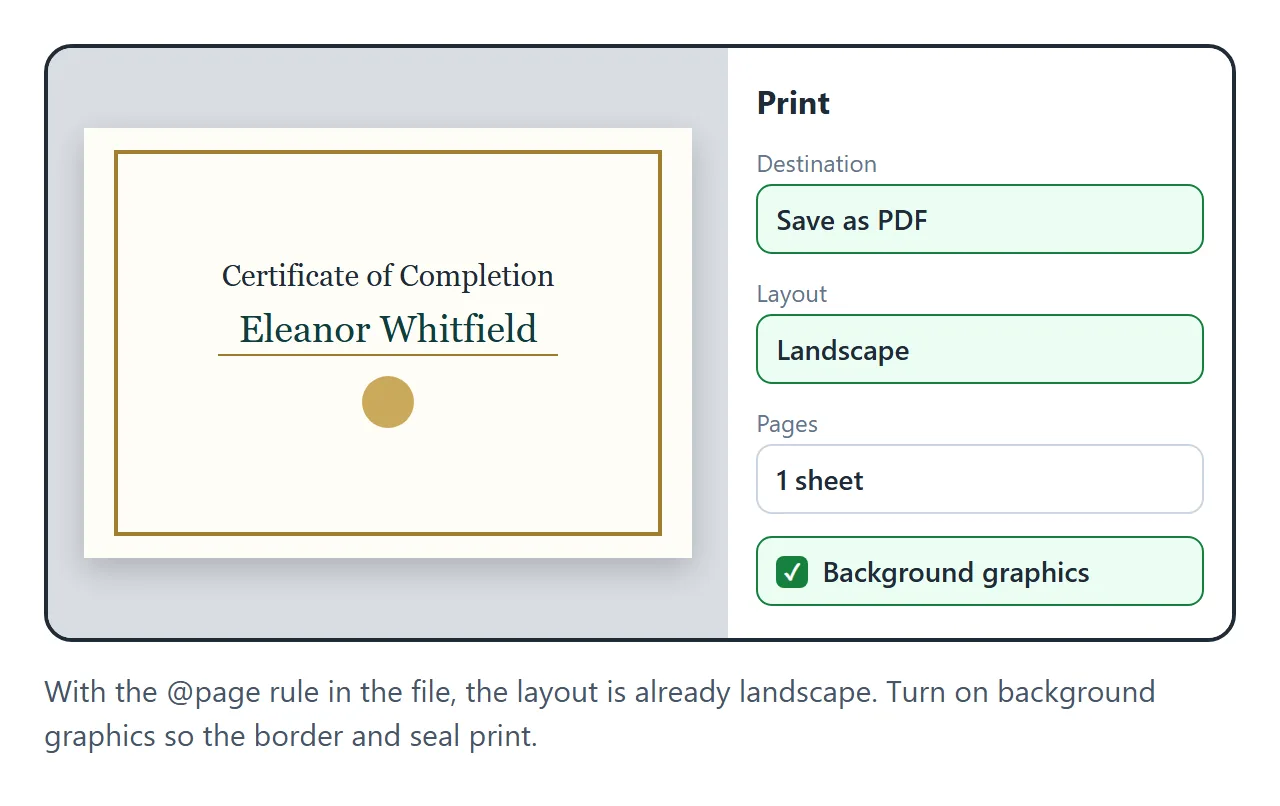
  @page { size: A4 landscape; margin: 0; }
  * { box-sizing: border-box; }
  html, body { margin: 0; background: #e9e4d8; }
  body { display: grid; place-items: center; min-height: 100vh; padding: 16px; font-family: Georgia, "Times New Roman", serif; color: #1f2a37; }
  .cert {
    position: relative; width: min(100%, 960px); aspect-ratio: 297 / 210; padding: 4.2%;
    background: radial-gradient(circle at 50% 40%, #fffdf6, #f6efdc); box-shadow: 0 18px 40px rgba(0,0,0,.18);
    -webkit-print-color-adjust: exact; print-color-adjust: exact;
  }
  .frame { position: absolute; inset: 2.4%; border: 3px double #a07d2e; }
  .frame::after { content: ""; position: absolute; inset: 7px; border: 1px solid #c9a95a; }
  .corner { position: absolute; width: 9%; aspect-ratio: 1; }
  .c1 { top: 1.2%; left: 1%; } .c2 { top: 1.2%; right: 1%; transform: scaleX(-1); } .c3 { bottom: 1.2%; left: 1%; transform: scaleY(-1); } .c4 { bottom: 1.2%; right: 1%; transform: scale(-1); }
  .inner { position: relative; height: 100%; display: flex; flex-direction: column; align-items: center; text-align: center; }
  .kicker { margin-top: 2%; font: 600 clamp(9px, 1.4vw, 13px) system-ui, sans-serif; letter-spacing: .32em; color: #a07d2e; text-transform: uppercase; }
  h1 { margin: 1.5% 0 0; font-weight: 400; font-size: clamp(22px, 4.6vw, 46px); letter-spacing: .04em; }
  .lead { margin-top: 3%; font-style: italic; font-size: clamp(11px, 1.7vw, 17px); color: #4b5563; }
  .name { margin-top: 1.5%; padding: 0 4% .6%; border-bottom: 1.5px solid #a07d2e; font-size: clamp(24px, 5.2vw, 52px); color: #0f3d3e; white-space: nowrap; max-width: 90%; overflow: hidden; }
  .what { margin-top: 2.5%; font-size: clamp(11px, 1.7vw, 17px); color: #374151; line-height: 1.5; }
  .what b { color: #1f2a37; }
  .foot { margin-top: auto; width: 100%; display: grid; grid-template-columns: 1fr auto 1fr; align-items: end; gap: 4%; }
  .sig { text-align: center; font-size: clamp(9px, 1.3vw, 13px); color: #4b5563; }
  .sig .line { border-top: 1px solid #6b7280; padding-top: 6px; }
  .sig .hand { font-style: italic; font-size: clamp(14px, 2.4vw, 24px); color: #1f2a37; margin-bottom: 2px; }
  .seal { width: clamp(64px, 12vw, 116px); }
  @media print { html, body { background: none; padding: 0; } .cert { width: 297mm; height: 210mm; box-shadow: none; } }
</style>
</head>
<body>
<div class="cert">
  <div class="frame"></div>
  <svg class="corner c1" viewBox="0 0 60 60" aria-hidden="true"><path d="M4 56 V14 Q4 4 14 4 H56" fill="none" stroke="#a07d2e" stroke-width="2"/><path d="M12 48 V20 Q12 12 20 12 H48" fill="none" stroke="#c9a95a" stroke-width="1"/><circle cx="14" cy="14" r="3.5" fill="#a07d2e"/></svg>
  <svg class="corner c2" viewBox="0 0 60 60" aria-hidden="true"><path d="M4 56 V14 Q4 4 14 4 H56" fill="none" stroke="#a07d2e" stroke-width="2"/><path d="M12 48 V20 Q12 12 20 12 H48" fill="none" stroke="#c9a95a" stroke-width="1"/><circle cx="14" cy="14" r="3.5" fill="#a07d2e"/></svg>
  <svg class="corner c3" viewBox="0 0 60 60" aria-hidden="true"><path d="M4 56 V14 Q4 4 14 4 H56" fill="none" stroke="#a07d2e" stroke-width="2"/><path d="M12 48 V20 Q12 12 20 12 H48" fill="none" stroke="#c9a95a" stroke-width="1"/><circle cx="14" cy="14" r="3.5" fill="#a07d2e"/></svg>
  <svg class="corner c4" viewBox="0 0 60 60" aria-hidden="true"><path d="M4 56 V14 Q4 4 14 4 H56" fill="none" stroke="#a07d2e" stroke-width="2"/><path d="M12 48 V20 Q12 12 20 12 H48" fill="none" stroke="#c9a95a" stroke-width="1"/><circle cx="14" cy="14" r="3.5" fill="#a07d2e"/></svg>
  <div class="inner">
    <div class="kicker">Riverside Community Workshop</div>
    <h1>Certificate of Completion</h1>
    <div class="lead">This certifies that</div>
    <div class="name" id="name">Eleanor Whitfield</div>
    <div class="what">has completed <b>Introduction to Watercolour</b>,<br>eight evening sessions, September - October 2026</div>
    <div class="foot">
      <div class="sig"><div class="hand">M. Okafor</div><div class="line">Marcus Okafor, Instructor</div></div>
      <svg class="seal" viewBox="0 0 120 120" aria-hidden="true">
        <g fill="#a07d2e">
          <path d="M44 92 L36 118 L50 110 L58 120 L60 94 Z"/><path d="M76 92 L84 118 L70 110 L62 120 L60 94 Z"/>
        </g>
        <circle cx="60" cy="56" r="44" fill="#c9a95a"/>
        <circle cx="60" cy="56" r="44" fill="none" stroke="#a07d2e" stroke-width="4" stroke-dasharray="3 3"/>
        <circle cx="60" cy="56" r="33" fill="#a07d2e"/>
        <text x="60" y="52" text-anchor="middle" font-family="Georgia, serif" font-size="11" fill="#fffdf6" letter-spacing="1">COMPLETED</text>
        <text x="60" y="68" text-anchor="middle" font-family="Georgia, serif" font-size="14" fill="#fffdf6">2026</text>
      </svg>
      <div class="sig"><div class="hand">October 24, 2026</div><div class="line">Date</div></div>
    </div>
  </div>
</div>
<script>
  // Shrinks a long name until it fits on its line.
  const n = document.getElementById('name');
  function fit() { n.style.fontSize = ''; let s = parseFloat(getComputedStyle(n).fontSize); while (n.scrollWidth > n.clientWidth && s > 12) { s -= 1; n.style.fontSize = s + 'px'; } }
  addEventListener('resize', fit); fit();
</script>
</body>
</html>
Three things that make it print right
1. Tell the page it is landscape.
A certificate is wider than it is tall. Without a print rule, the browser prints it on a portrait page and the right side falls off. One line fixes it: @page { size: A4 landscape; margin: 0; }, or letter landscape in the US. MDN lists the size descriptor as Baseline since December 2024 (MDN).
2. Fit everything on one sheet. Ask for the certificate to be sized to the page and not to the screen. Then open print preview: one page, nothing cut off. If the border disappears, turn on Background graphics in the print options.
3. The name is the only thing that changes. Keep the wording fixed and the name in one obvious place. Long names are the usual problem, so ask for the name to shrink to fit its line.
Make it with AI
Open ChatGPT, Claude or Gemini and paste this. Change the words in capitals.
Make one complete HTML file: a certificate.
Title: CERTIFICATE OF COMPLETION
Line before the name: This certifies that
Name: FULL NAME
Line after the name: has completed COURSE NAME
Date: DATE   Signed by: NAME, ROLE (two lines)
Style: STYLE, e.g. classic with a thin double border
and a round seal drawn in SVG.
Rules: one landscape page. Add
@page { size: A4 landscape; margin: 0; }
Size the certificate to the page, not the screen.
Make long names shrink to fit one line.
All CSS inside the file, no images from other
sites, no fonts from other sites.
Use my wording exactly. Do not add a logo,
a registration number or any claim of accreditation.
The last rule matters. An AI likes to add a serial number or "accredited by" line to make it look official. Your certificate should only say what is true.
When there are twenty people, you do not need twenty files. Ask for a page that holds the list of names and fills in the one each person picks.
<!doctype html>
<html lang="en">
<head>
<meta charset="utf-8">
<meta name="viewport" content="width=device-width, initial-scale=1">
<title>Find your certificate</title>
<style>
@page { size: A4 landscape; margin: 0; }
* { box-sizing: border-box; }
body { margin: 0; background: #0f2a2b; color: #e8f1ef; font-family: system-ui, -apple-system, "Segoe UI", sans-serif; }
.page { max-width: 900px; margin: 0 auto; padding: 22px 16px 26px; }
.pick h1 { margin: 0 0 4px; font-size: 22px; }
.pick p { margin: 0 0 12px; color: #9cc0ba; font-size: 14px; }
.search { width: 100%; padding: 12px 14px; border-radius: 12px; border: 0; font: 16px system-ui; margin-bottom: 10px; }
.names { display: flex; flex-wrap: wrap; gap: 6px; margin-bottom: 16px; }
.names button { border: 1.5px solid #2f5d5c; background: #143a3b; color: #e8f1ef; border-radius: 999px; padding: 8px 12px; font: 600 14px system-ui; cursor: pointer; }
.names button.on { background: #d4b25a; border-color: #d4b25a; color: #0f2a2b; }
.cert { position: relative; width: 100%; aspect-ratio: 297 / 210; padding: 5%; background: #fffdf8; color: #1d2b2b; font-family: Georgia, serif; text-align: center; border-radius: 6px; -webkit-print-color-adjust: exact; print-color-adjust: exact; overflow: hidden; }
.cert::before { content: ""; position: absolute; inset: 0; background: linear-gradient(135deg, #0f3d3e 0 16%, transparent 16% 84%, #0f3d3e 84%); opacity: .95; }
.cert::after { content: ""; position: absolute; inset: 3.2%; border: 2px solid #d4b25a; }
.in { position: relative; z-index: 1; height: 100%; display: flex; flex-direction: column; align-items: center; justify-content: center; }
.k { font: 700 clamp(8px, 1.3vw, 12px) system-ui; letter-spacing: .3em; color: #b08d2f; text-transform: uppercase; }
.t { margin-top: 2%; font-size: clamp(18px, 4vw, 40px); }
.l { margin-top: 3%; font-style: italic; color: #4b5b5b; font-size: clamp(10px, 1.6vw, 16px); }
.n { margin-top: 1%; font-size: clamp(22px, 5vw, 50px); color: #0f3d3e; border-bottom: 1.5px solid #d4b25a; padding: 0 3% .5%; white-space: nowrap; max-width: 86%; overflow: hidden; transition: opacity .25s; }
.w { margin-top: 2.5%; font-size: clamp(10px, 1.6vw, 16px); color: #374747; }
.d { margin-top: 5%; font-size: clamp(9px, 1.3vw, 13px); color: #4b5b5b; }
.print { margin-top: 14px; width: 100%; padding: 14px; border: 0; border-radius: 14px; background: #d4b25a; color: #0f2a2b; font: 800 16px system-ui; cursor: pointer; }
.list { margin-top: 18px; padding: 12px 14px; border-radius: 12px; background: #143a3b; font-size: 13px; color: #9cc0ba; }
.list h2 { margin: 0 0 6px; font-size: 12px; letter-spacing: .1em; text-transform: uppercase; }
.list ul { margin: 0; padding: 0; list-style: none; display: flex; flex-wrap: wrap; gap: 3px 12px; }
@media print { body { background: none; } .pick, .print, .list { display: none; } .page { padding: 0; max-width: none; } .cert { width: 297mm; height: 210mm; border-radius: 0; } }
</style>
</head>
<body>
<main class="page">
<section class="pick">
<h1>Find your certificate</h1>
<p>Spring Robotics Club, 2026. Pick your name, then print or save as PDF.</p>
<input class="search" id="q" placeholder="Type your name" autocomplete="off">
<div class="names" id="names"></div>
</section>
<div class="cert">
<div class="in">
<div class="k">Spring Robotics Club</div>
<div class="t">Certificate of Participation</div>
<div class="l">awarded to</div>
<div class="n" id="who">Pick your name above</div>
<div class="w">for twelve weeks of building, testing and racing robots</div>
<div class="d">June 2026 · Coach Dana Reyes</div>
</div>
</div>
<button class="print" onclick="print()">Print or save as PDF</button>
<section class="list">
<h2>Names on this page</h2>
<ul id="list">
<li>Amara Osei</li><li>Ben Kowalski</li><li>Chloe Nguyen</li><li>Diego Fernández</li>
<li>Ethan Brooks</li><li>Farah Haddad</li><li>Grace Liu</li><li>Hiroshi Tanaka</li>
<li>Isla MacLeod</li><li>Jonah Abrams</li><li>Siobhan O'Connor</li><li>Zoe Papadopoulos</li>
</ul>
</section>
</main>
<script>
// Names are read from the list on the page, so editing that list is all it takes.
const names = [...document.querySelectorAll('#list li')].map((li) => li.textContent.trim()).filter(Boolean);
const box = document.getElementById('names'), who = document.getElementById('who'), q = document.getElementById('q');
function fit() { who.style.fontSize = ''; let s = parseFloat(getComputedStyle(who).fontSize); while (who.scrollWidth > who.clientWidth && s > 12) { s -= 1; who.style.fontSize = s + 'px'; } }
function draw() {
const f = q.value.trim().toLowerCase();
box.innerHTML = '';
names.filter((n) => n.toLowerCase().includes(f)).forEach((n) => {
const b = document.createElement('button'); b.textContent = n;
if (n === who.textContent) b.classList.add('on');
b.onclick = () => { who.style.opacity = 0; setTimeout(() => { who.textContent = n; fit(); who.style.opacity = 1; draw(); }, 180); };
box.append(b);
});
}
q.addEventListener('input', draw);
addEventListener('resize', fit);
draw();
</script>
</body>
</html>
Getting it to the people who earned it
You have a certificate. The AI gave it to you as HTML code, though, and that is not something you can hand to a participant.
The first wall is getting it to them. You could print to PDF twenty times and attach twenty files to twenty emails. Or send the HTML file and watch people reply that it opened as code on their phone.
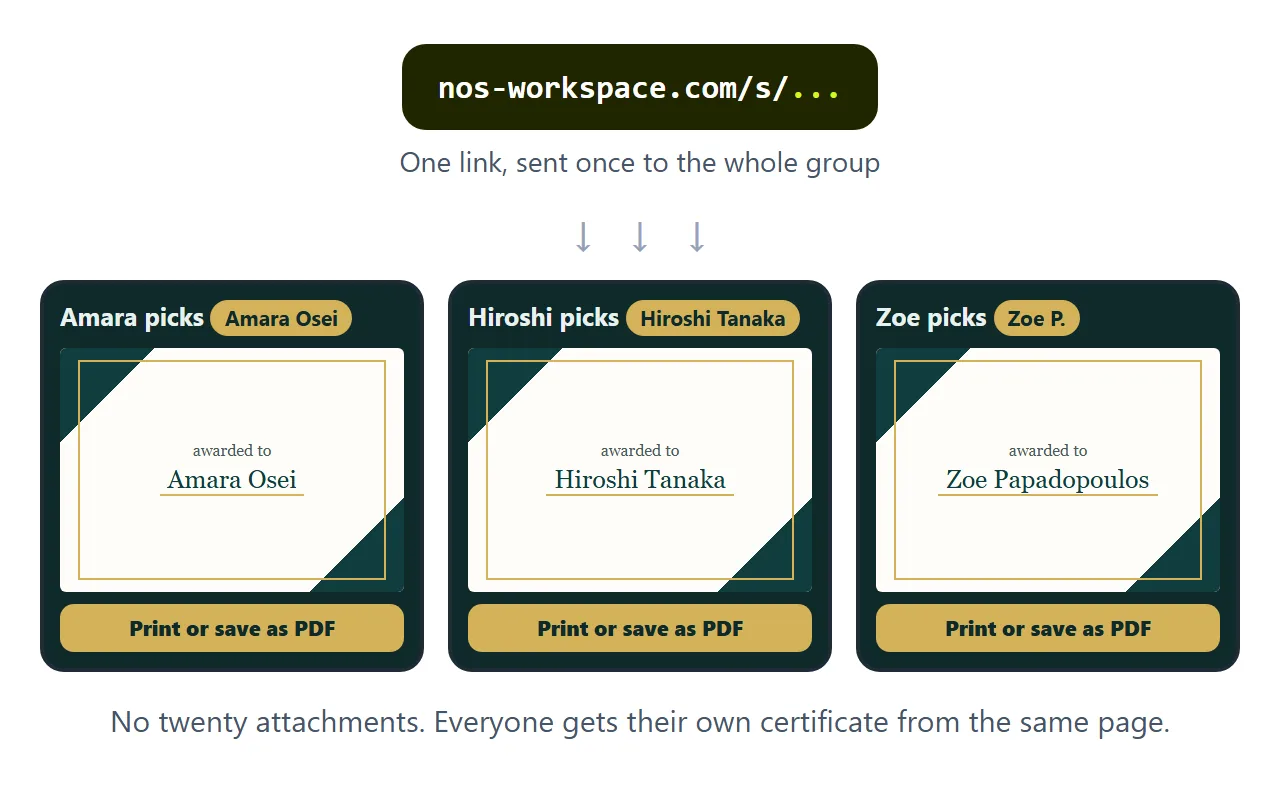
In NOS you paste the code into a document and it becomes the certificate straight away. Choose Create share link and send one link to the group. Each person opens it, picks their name, and prints or saves their own PDF.
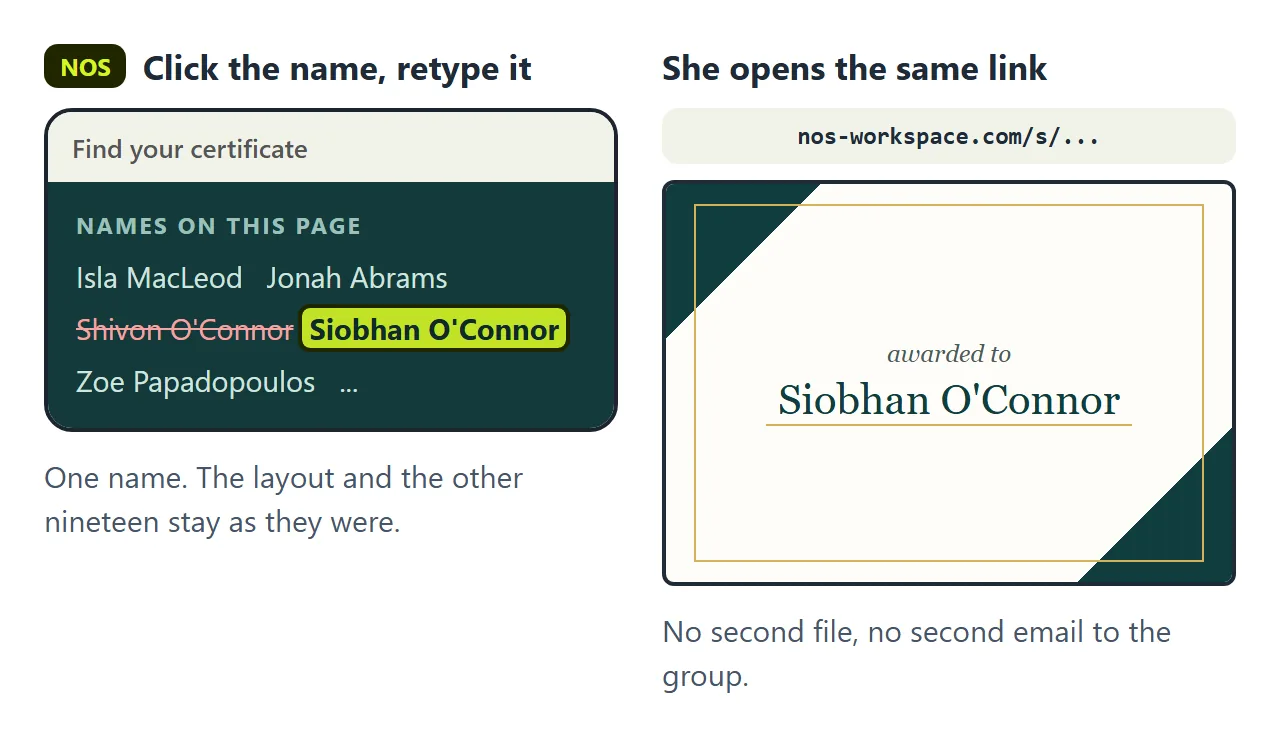
The second wall is the misspelled name. "It is Siobhan, not Shivon." Someone always writes back.
If you ask the AI again, you wait for a new reply, and it may nudge the layout so the certificates no longer match the ones already printed. Then you make a new file and send it again, and the group now has two versions.
In NOS you click the name in the list on the page and type it correctly. The link does not change. That person opens the same link and prints the fixed certificate.
What it is and is not
It is a well laid out page that prints on one sheet. It is not a verification system: anyone could change a copy of the file, and nothing checks who earned it.
That is fine for a workshop, a class, a club or a team award. Where a certificate has to be verified, use the system your institution provides.
For more on print rules, see CSS print media. For saving any page as a PDF, see Export HTML to PDF.