The <del> tag marks text that was removed from a document, and <ins> marks text that was added. Together they record an edit: the old words stay visible with a line through them, and the new words sit next to them.
For a price that is no longer valid, use <s> instead.
<p>The launch moves from <del>Friday</del> <ins>Monday</ins>.</p>
Try it below. Show dates reads the hidden datetime attribute. Clean copy hides the deletions, which is the document as it reads now.
<!doctype html>
<html lang="en">
<head>
<meta charset="utf-8">
<meta name="viewport" content="width=device-width, initial-scale=1">
<title>del and ins</title>
<style>
  body { margin: 0; padding: 16px; font-family: system-ui, sans-serif; background: #f4f5f7; color: #1d2330; }
  .doc { background: #fff; border-radius: 12px; padding: 14px 18px; box-shadow: 0 4px 16px rgba(0, 0, 0, .08); line-height: 1.55; }
  h2 { font-size: 17px; margin: 0 0 6px; }
  p { margin: 0; }
  ul { margin: 8px 0 0; padding-left: 20px; }
  del { color: #9a3412; background: #fdecea; }
  ins { color: #0f5132; background: #e3f6e8; }
  /* the browser does not show datetime; this reads it from the attribute */
  .dates del::after, .dates ins::after {
    content: attr(datetime);
    display: inline-block;  /* keeps the strike line off the label */
    margin-left: 4px; padding: 0 5px; border-radius: 4px;
    font: 12px ui-monospace, Consolas, monospace; background: #eef1f5; color: #475569;
  }
  .clean del { display: none; }  /* clean copy: hide what was removed */
  .clean ins { background: none; color: inherit; text-decoration: none; }
  .bar { display: flex; flex-wrap: wrap; gap: 8px; margin-top: 12px; }
  button { font: inherit; font-size: 14px; padding: 7px 12px; border: 1px solid #cfd5dd; border-radius: 8px; background: #fff; cursor: pointer; }
  button[aria-pressed="true"] { background: #1d2330; color: #fff; border-color: #1d2330; }
</style>
</head>
<body>
<div class="doc" id="doc">
  <h2>Launch notes</h2>
  <p>The launch moves from
    <del datetime="2026-09-24T09:30Z" cite="https://example.com/minutes/42">Friday</del>
    <ins datetime="2026-09-24T09:30Z" cite="https://example.com/minutes/42">Monday</ins>.</p>
  <ul>
    <li>Final copy review</li>
    <li><del datetime="2026-09-25">Beta badge on the pricing page</del></li>
    <li><ins datetime="2026-09-25">Press kit link in the footer</ins></li>
  </ul>
</div>
<div class="bar">
  <button id="dates" aria-pressed="false">Show dates</button>
  <button id="clean" aria-pressed="false">Clean copy</button>
</div>

<script>
  const doc = document.getElementById('doc');
  // each button toggles one class on the document
  ['dates', 'clean'].forEach((name) => {
    const btn = document.getElementById(name);
    btn.addEventListener('click', () => {
      const on = doc.classList.toggle(name);
      btn.setAttribute('aria-pressed', on);
    });
  });
</script>
</body>
</html>
del, ins, s or CSS: pick by meaning
All three of <del>, <s> and CSS line-through draw the same line. What differs is what the page says to anything that reads the markup: scripts, assistive technology, and the next person who edits the file.
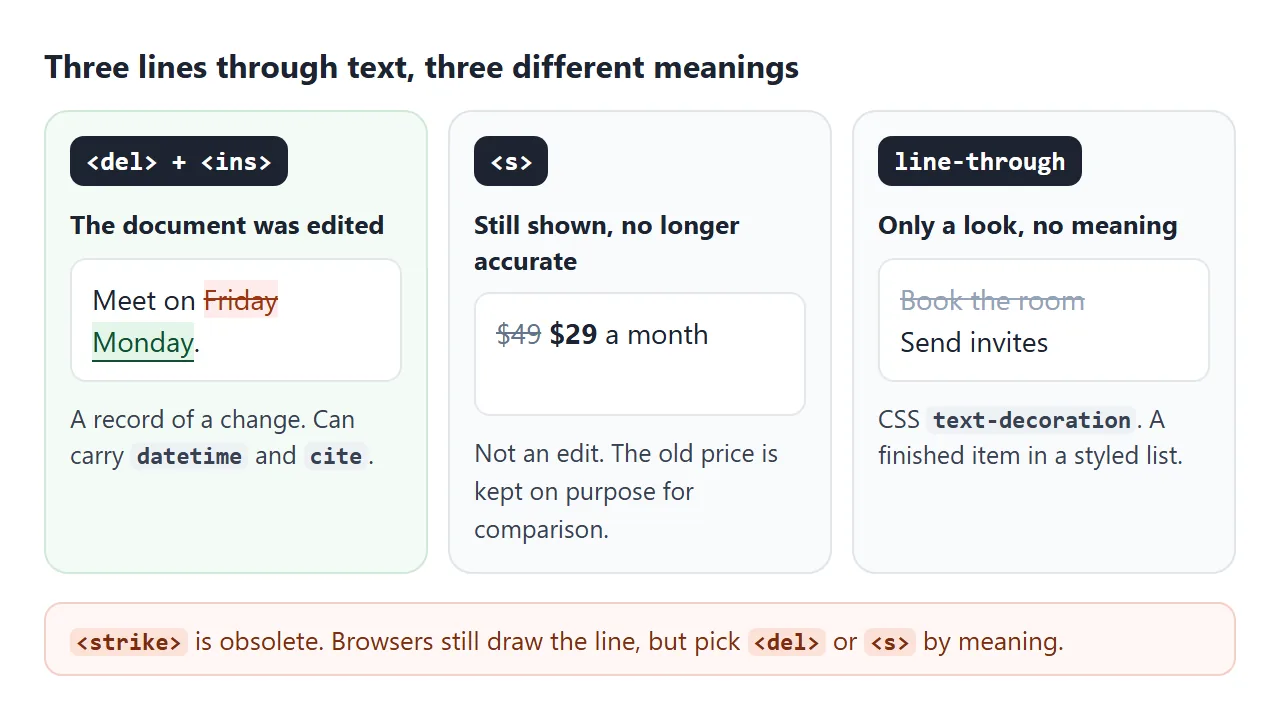
| Markup | Meaning | Typical use | Default look |
|---|---|---|---|
<del> |
Removed in an edit | A changed date in minutes, a dropped line in a contract draft | Line through |
<ins> |
Added in an edit | The replacement text | Underline |
<s> |
No longer accurate or relevant | An old price, a sold-out ticket tier | Line through |
line-through in CSS |
No meaning, only a look | A finished to-do item | Line through |
<strike> |
Obsolete, do not use | Old pages | Line through |
A quick test: if you would say "we changed this", it is <del> and <ins>. If you would say "this used to be true", it is <s>. If nobody needs to know either way, it is CSS.
The CSS side, including line colour and thickness, is covered in text-decoration in CSS.
The datetime and cite attributes
<del> and <ins> take two optional attributes. Neither appears on the page, so they cost nothing visually.
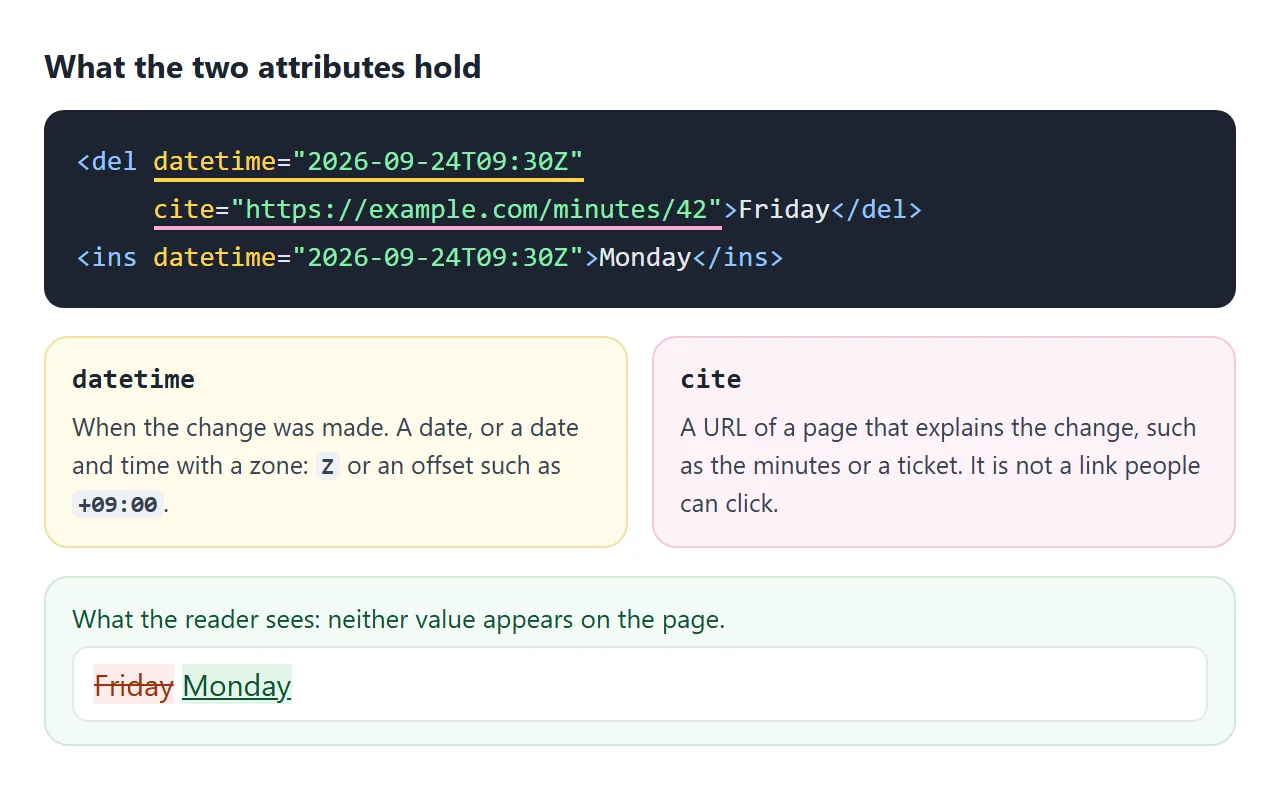
datetimeis when the change was made. It takes a date (2026-09-24) or a date and time. A time must carry a zone:Zfor UTC or an offset such as+09:00.2026-09-24T09:30without one is not valid here.citeis the URL of a page that explains the change, for example the meeting minutes or a ticket. Browsers do not turn it into a link.
Scripts read both through the element's dateTime and cite properties. To show the date on screen, as the first example does, CSS can print the attribute:
del::after { content: attr(datetime); display: inline-block; }
The display: inline-block keeps the strike line off the label. Without it, the line from <del> runs through the date too.
A strikethrough price that makes sense out loud
On a sale price, <s> is the right element: the old price is still shown on purpose, it is simply no longer the price.
The line alone is a visual cue, though. In text form, the card reads "$49$29 / month", with no hint which price applies.
Press the button to see the text of each card with the styling taken away.
<!doctype html>
<html lang="en">
<head>
<meta charset="utf-8">
<meta name="viewport" content="width=device-width, initial-scale=1">
<title>Strikethrough price</title>
<style>
  body { margin: 0; padding: 16px; font-family: system-ui, sans-serif; background: #f4f5f7; color: #1d2330; }
  .row { display: grid; grid-template-columns: repeat(auto-fit, minmax(150px, 1fr)); gap: 12px; }
  .card { background: #fff; border-radius: 12px; padding: 14px 16px; box-shadow: 0 4px 16px rgba(0, 0, 0, .08); }
  .label { font-size: 12px; font-weight: 700; color: #64748b; text-transform: uppercase; letter-spacing: .3px; }
  h3 { margin: 6px 0 4px; font-size: 16px; }
  .price { font-size: 26px; font-weight: 800; }
  .old { font-size: 16px; font-weight: 400; color: #64748b; margin-right: 6px; }
  .fake { text-decoration: line-through; }  /* card A: the line is only styling */
  /* hidden on screen, still part of the page text */
  .sr { position: absolute; width: 1px; height: 1px; overflow: hidden; clip-path: inset(50%); white-space: nowrap; }
  button { margin-top: 14px; font: inherit; font-size: 14px; padding: 7px 12px; border: 1px solid #cfd5dd; border-radius: 8px; background: #fff; cursor: pointer; }
  pre { white-space: pre-wrap; margin: 10px 0 0; padding: 10px 12px; border-radius: 8px; background: #1d2330; color: #e5e7eb; font: 13px/1.5 ui-monospace, Consolas, monospace; }
</style>
</head>
<body>
<div class="row">
  <div class="card" id="a">
    <div class="label">A: CSS line only</div>
    <h3>Pro plan</h3>
    <div class="price"><span class="old fake">$49</span>$29 <small>/ month</small></div>
  </div>
  <div class="card" id="b">
    <div class="label">B: s + hidden words</div>
    <h3>Pro plan</h3>
    <div class="price"><s class="old"><span class="sr">Was </span>$49</s><span class="sr">, now </span>$29 <small>/ month</small></div>
  </div>
</div>
<button id="read">Show the text without styling</button>
<pre id="out" hidden></pre>

<script>
  // The strike line is styling. This is the text that is left without it.
  const flat = (card) => card.querySelector('h3').textContent + ': ' +
    card.querySelector('.price').textContent.replace(/\s+/g, ' ').trim();

  document.getElementById('read').addEventListener('click', () => {
    const out = document.getElementById('out');
    out.textContent = 'A  ' + flat(document.getElementById('a')) + '\n' +
                      'B  ' + flat(document.getElementById('b'));
    out.hidden = false;
  });
</script>
</body>
</html>
<del> and <ins> carry the ARIA roles deletion and insertion, but whether a screen reader says anything about them depends on the reader and its settings. When the difference matters, put it in words. A visually hidden span does that without changing the design:
<s><span class="sr">Was </span>$49</s><span class="sr">, now </span>$29
.sr {
  position: absolute; width: 1px; height: 1px;
  overflow: hidden; clip-path: inset(50%); white-space: nowrap;
}
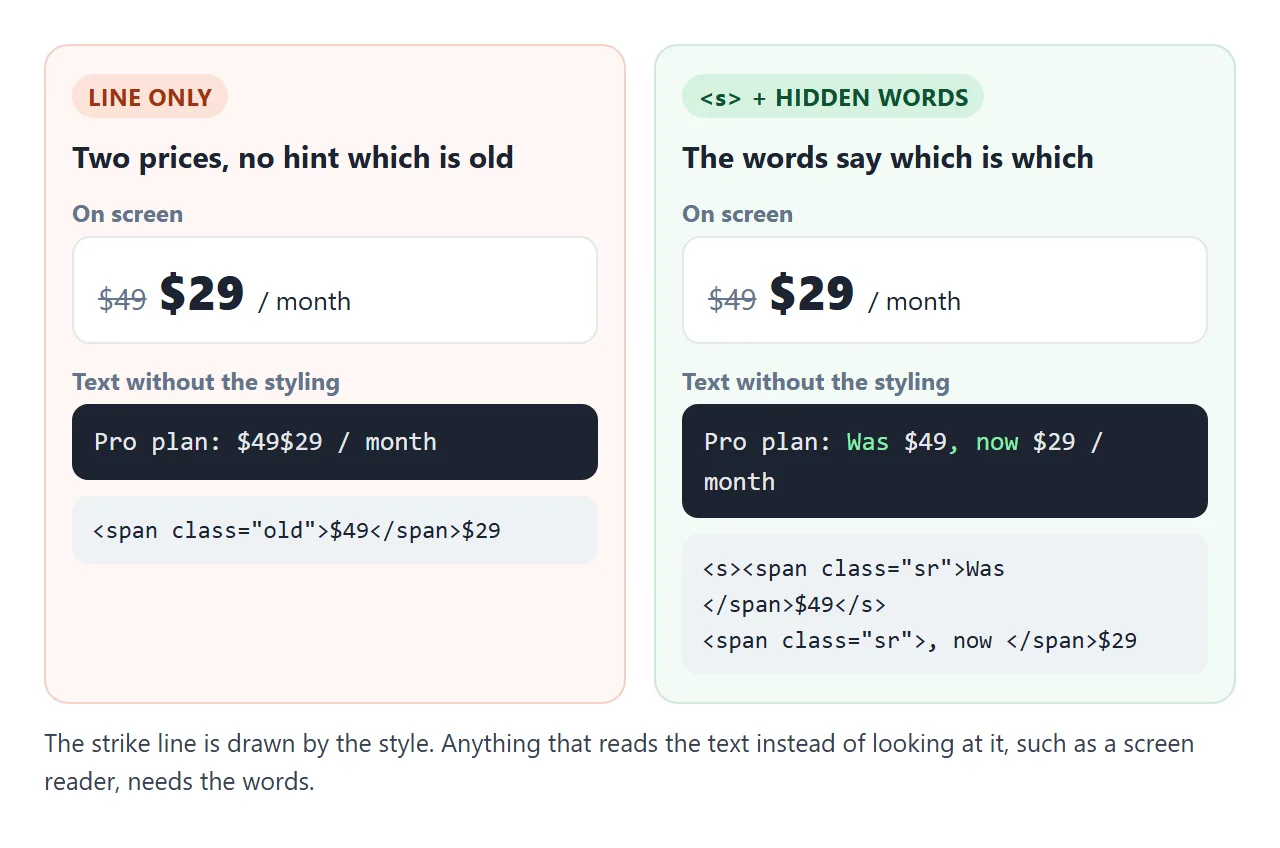
Do not use display: none for these words. It removes them from the accessibility tree as well as from the screen.
Where del and ins can go
Both elements are unusual: they can wrap a single word inside a sentence, or several whole paragraphs. What they contain must still be allowed where they sit.
- Inside a sentence: wrap only the words that changed.
- Around blocks:
<del><p>...</p><p>...</p></del>removes two paragraphs in one element. - In lists: a
<ul>takes only<li>children, so put<del>inside the<li>, as the first example does. - In tables: do the same inside each cell. A
<del>cannot wrap a table row.
A finished example: track changes between two versions
Writing <del> and <ins> by hand is fine for one edit. For a whole paragraph, let a script compare the two versions and write the markup. Edit either box and the result updates. Markup shows the HTML it produced.
<!doctype html>
<html lang="en">
<head>
<meta charset="utf-8">
<meta name="viewport" content="width=device-width, initial-scale=1">
<title>Track changes with del and ins</title>
<style>
  body { margin: 0; padding: 14px; font-family: system-ui, sans-serif; background: #f4f5f7; color: #1d2330; }
  .cols { display: grid; grid-template-columns: repeat(auto-fit, minmax(160px, 1fr)); gap: 10px; }
  label { font-size: 13px; font-weight: 700; color: #475569; }
  textarea { box-sizing: border-box; width: 100%; height: 92px; margin-top: 4px; padding: 8px; font: 14px/1.4 system-ui, sans-serif; border: 1px solid #cfd5dd; border-radius: 8px; resize: vertical; }
  .bar { display: flex; flex-wrap: wrap; gap: 6px; margin: 10px 0; }
  button { font: inherit; font-size: 14px; padding: 7px 11px; border: 1px solid #cfd5dd; border-radius: 8px; background: #fff; cursor: pointer; }
  button[aria-pressed="true"] { background: #1d2330; color: #fff; border-color: #1d2330; }
  #result { background: #fff; border-radius: 10px; padding: 12px 14px; line-height: 1.6; min-height: 48px; box-shadow: 0 4px 16px rgba(0, 0, 0, .08); }
  del { color: #9a3412; background: #fdecea; }
  ins { color: #0f5132; background: #e3f6e8; }
  del + ins { margin-left: 3px; }  /* a gap between old and new */
  #result.clean del { display: none; }
  #result.clean ins { background: none; color: inherit; text-decoration: none; }
  pre { white-space: pre-wrap; word-break: break-word; margin: 0; font: 12.5px/1.5 ui-monospace, Consolas, monospace; }
  .count { font-size: 13px; color: #475569; margin-top: 8px; }
</style>
</head>
<body>
<div class="cols">
  <div><label for="before">Before</label>
    <textarea id="before">The workshop starts at 10:00 on Friday in room 4. Bring a laptop.</textarea></div>
  <div><label for="after">After</label>
    <textarea id="after">The workshop starts at 13:00 on Monday in room 4. Bring a laptop and a charger.</textarea></div>
</div>
<div class="bar">
  <button data-view="changes" aria-pressed="true">Changes</button>
  <button data-view="clean" aria-pressed="false">Clean copy</button>
  <button data-view="markup" aria-pressed="false">Markup</button>
</div>
<div id="result"></div>
<div class="count" id="count"></div>

<script>
  const before = document.getElementById('before');
  const after = document.getElementById('after');
  const result = document.getElementById('result');
  let view = 'changes';

  // Word-level diff: longest common subsequence of two token lists.
  function diff(a, b) {
    const n = a.length, m = b.length;
    const L = Array.from({ length: n + 1 }, () => new Array(m + 1).fill(0));
    for (let i = n - 1; i >= 0; i--)
      for (let j = m - 1; j >= 0; j--)
        L[i][j] = a[i] === b[j] ? L[i + 1][j + 1] + 1 : Math.max(L[i + 1][j], L[i][j + 1]);
    const ops = [];
    let i = 0, j = 0;
    while (i < n || j < m) {
      if (i < n && j < m && a[i] === b[j]) { ops.push(['same', a[i]]); i++; j++; }
      else if (i < n && (j === m || L[i + 1][j] >= L[i][j + 1])) { ops.push(['del', a[i]]); i++; }
      else { ops.push(['ins', b[j]]); j++; }
    }
    return ops;
  }

  function render() {
    // split into words, spaces and punctuation, keeping all of them
    const words = (s) => s.split(/(\s+|[.,;!?])/).filter(Boolean);
    const ops = diff(words(before.value), words(after.value));
    const stamp = new Date().toISOString().slice(0, 16) + 'Z';  // e.g. 2026-09-26T10:00Z
    const out = document.createElement('p');
    out.style.margin = 0;
    let dels = 0, inss = 0;

    // join neighbouring words of the same kind into one element
    ops.forEach(([kind, text]) => {
      const last = out.lastChild;
      if (kind === 'same') { out.append(text); return; }
      if (last && last.localName === kind) { last.textContent += text; return; }
      const el = document.createElement(kind);
      el.setAttribute('datetime', stamp);
      el.textContent = text;
      out.append(el);
      kind === 'del' ? dels++ : inss++;
    });
    out.normalize();  // merge neighbouring text nodes

    result.className = view === 'clean' ? 'clean' : '';
    if (view === 'markup') {
      const pre = document.createElement('pre');
      pre.textContent = out.innerHTML;
      result.replaceChildren(pre);
    } else {
      result.replaceChildren(out);
    }
    document.getElementById('count').textContent = dels + ' deletion(s), ' + inss + ' insertion(s)';
  }

  document.querySelectorAll('[data-view]').forEach((btn) => {
    btn.addEventListener('click', () => {
      view = btn.dataset.view;
      document.querySelectorAll('[data-view]').forEach((b) => b.setAttribute('aria-pressed', b === btn));
      render();
    });
  });
  before.addEventListener('input', render);
  after.addEventListener('input', render);
  render();
</script>
</body>
</html>
How it works, in short:
- Split both texts into words, spaces and punctuation.
- Find the longest run of tokens the two versions share, in order.
- Everything only in the old text becomes
<del>, everything only in the new text becomes<ins>. - Neighbouring tokens of the same kind join into one element, and each gets the current time as
datetime.
The script builds elements with createElement and textContent, so anything typed into the boxes stays plain text. That matters when the input comes from other people. For a published record of changes over time, see HTML for changelogs.
When it does not work
| What you see | Cause | Fix |
|---|---|---|
| New text is underlined and looks like a link | Browsers underline <ins> by default |
ins { text-decoration: none; } and give it a colour |
| The date shows nothing | datetime is never displayed |
Read it with attr(datetime) or el.dateTime |
| The date label has a line through it | ::after inherits the line from <del> |
display: inline-block on the ::after |
A validator flags <strike> |
The element is obsolete | Use <del> or <s> |
A validator flags <del> in a list |
<del> is a direct child of <ul> |
Move it inside the <li> |
| Hidden "Was" text is missing in a screen reader | The span uses display: none |
Use the .sr clip pattern instead |
Share it as a link
A marked-up edit is easiest to review in the browser, where the colours and the clean-copy toggle work. A screenshot freezes one view, and an .html attachment may open as raw code on the other side.
To send the working version, paste the page into a NOS document and choose Create share link. HTML to link walks through it.
The page renders as written and its scripts run, so reviewers can switch between changes and the clean copy themselves. If you update the text later, the same link shows the new version.