The <mark> tag highlights text that is relevant right now, like a search match or the key line in a quote. Wrap the words in <mark>…</mark> and browsers draw them yellow. CSS can restyle it like any other element.
<p>Results for "tea": green <mark>tea</mark> has less caffeine.</p>
Here is the default next to three restyled versions. Untick the checkbox to see what happens when a highlight wraps onto a second line.
<!doctype html>
<html lang="en">
<head>
<meta charset="utf-8">
<meta name="viewport" content="width=device-width, initial-scale=1">
<title>Styling the mark tag</title>
<style>
  body { margin: 0; padding: 14px; font: 15px/1.7 system-ui, sans-serif; background: #f4f5f7; color: #1d2330; }
  .box { background: #fff; border-radius: 10px; padding: 10px 14px; margin-bottom: 10px; }
  .box h3 { margin: 0 0 2px; font-size: 12px; color: #6b7280; text-transform: uppercase; letter-spacing: .4px; }
  .box p { margin: 0; max-width: 300px; }

  /* 2. Highlighter pen: soft colour, rounded ends, a little padding */
  mark.pen {
    background: #fde68a; color: inherit;
    padding: 0 .25em; border-radius: .35em;
    -webkit-box-decoration-break: clone;  /* some browsers only know the prefixed name */
    box-decoration-break: clone;          /* repeat padding + radius on every line */
  }
  /* switched off by the checkbox, to show the difference */
  .slice mark.pen { -webkit-box-decoration-break: slice; box-decoration-break: slice; }

  /* 3. Underline stroke: colour only the lower part of the line */
  mark.under {
    background: linear-gradient(transparent 60%, #a7f3d0 60%);
    color: inherit;
  }

  /* 4. Dark theme: set background AND text colour together */
  .dark { background: #111827; color: #e5e7eb; }
  .dark h3 { color: #9ca3af; }
  .dark mark { background: #854d0e; color: #fef9c3; padding: 0 .2em; border-radius: .25em; }

  label { font-size: 13px; display: inline-flex; gap: 6px; align-items: center; cursor: pointer; }
</style>
</head>
<body>
<div class="box">
  <h3>1. Browser default</h3>
  <p>Search results for “tea”: green <mark>tea</mark> has less caffeine than black <mark>tea</mark>.</p>
</div>

<div class="box" id="penBox">
  <h3>2. Highlighter pen</h3>
  <p>A quoted review: <mark class="pen">the battery easily lasts a full working day and then some</mark>, which surprised us.</p>
  <label><input type="checkbox" id="clone" checked> box-decoration-break: clone</label>
</div>

<div class="box">
  <h3>3. Underline stroke</h3>
  <p>The contract says rent is due <mark class="under">on the first working day of each month</mark>.</p>
</div>

<div class="box dark">
  <h3>4. Dark theme</h3>
  <p>Matches for “log”: the <mark>log</mark> file rotates daily and old <mark>log</mark>s are zipped.</p>
</div>

<script>
  // Untick the box to see the default (slice): padding and rounded corners
  // appear only at the very start and very end of the highlight.
  document.getElementById('clone').addEventListener('change', (e) => {
    document.getElementById('penBox').classList.toggle('slice', !e.target.checked);
  });
</script>
</body>
</html>
What mark means
The HTML standard describes <mark> as text highlighted for reference because of its relevance in another context. In plain words: the text is not important by itself. It stands out because of what the reader is doing or looking at.
Good uses:
- Search results. The words that match what the user typed.
- Quotes. The part of a quoted passage you want the reader to look at, when the original did not highlight it.
- Code or text review. The line a comment refers to.
If the words would matter to every reader on every visit, <mark> is the wrong tag. That is the job of <strong>.
Styling mark with CSS
The default look is a plain yellow block. To change it, set the background and the text colour together:
mark {
  background: #fde68a;   /* softer yellow */
  color: inherit;        /* keep the paragraph's text colour */
  padding: 0 .25em;
  border-radius: .35em;
}
For an underline stroke, paint only the lower part of the line with a gradient: background: linear-gradient(transparent 60%, #a7f3d0 60%). CSS background-color covers colour values and contrast in more depth.
Highlights that wrap onto two lines
Padding and rounded corners look fine on one word. On a phrase that breaks across lines, the browser draws the highlight as one long box cut into pieces. The ends where the line breaks are flat, with no padding.
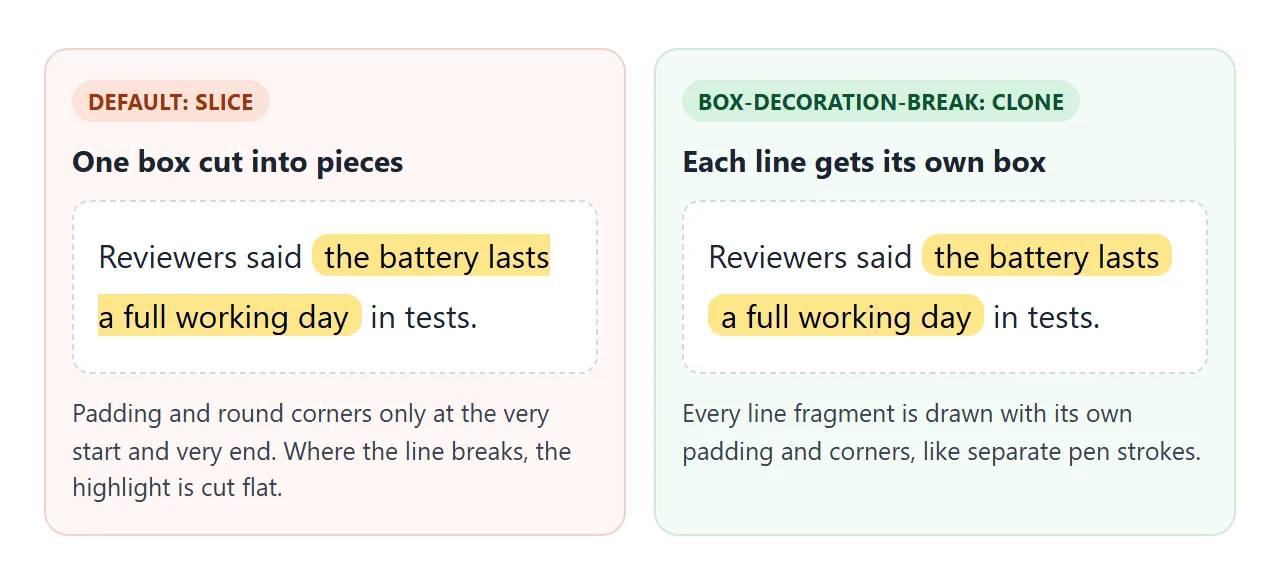
One property fixes it:
mark {
  -webkit-box-decoration-break: clone;
  box-decoration-break: clone;
}
Keep both lines. Some browsers only recognise the prefixed name, and the one they do not know is simply ignored.
mark vs strong vs span
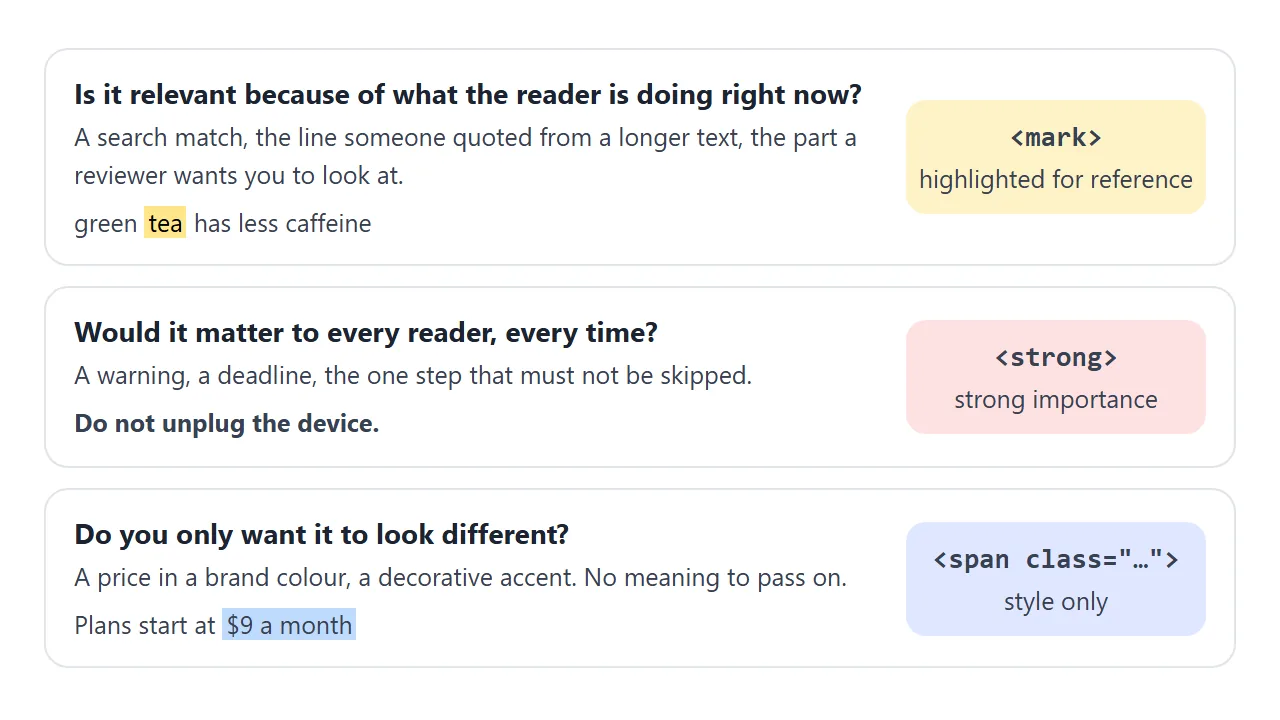
Three tags can make words stand out, and each says something different. The look is only the default; CSS can change any of them.
<!doctype html>
<html lang="en">
<head>
<meta charset="utf-8">
<meta name="viewport" content="width=device-width, initial-scale=1">
<title>mark vs strong vs span</title>
<style id="pageCss">
/* The page's own styles. Turn them off to see what each tag does by itself. */
mark { background: #fde68a; color: inherit; padding: 0 .15em; border-radius: .2em; }
strong { color: #b91c1c; }
.highlight { background: #bfdbfe; padding: 0 .15em; border-radius: .2em; }
</style>
<style>
body { margin: 0; padding: 14px; font: 15px/1.6 system-ui, sans-serif; background: #f4f5f7; color: #1d2330; }
.row { background: #fff; border-radius: 10px; padding: 10px 14px; margin-bottom: 10px; }
.row p { margin: 0 0 4px; }
.why { font-size: 13px; color: #4b5563; }
code { font: 13px ui-monospace, Consolas, monospace; background: #eef1f5; border-radius: 4px; padding: 0 3px; }
label { font-size: 14px; display: inline-flex; gap: 6px; align-items: center; cursor: pointer; }
.show-tags mark, .show-tags strong, .show-tags .highlight { outline: 1px dashed #6b7280; }
</style>
</head>
<body>
<div class="row">
<p>You searched for “refund”: a <mark>refund</mark> is issued within 14 days.</p>
<div class="why"><code><mark></code> relevant here, because of what the reader is looking for.</div>
</div>
<div class="row">
<p><strong>Do not unplug the device</strong> while the update is running.</p>
<div class="why"><code><strong></code> important on any day, whatever the reader searched for.</div>
</div>
<div class="row">
<p>Plans start at <span class="highlight">$9 a month</span> for one user.</p>
<div class="why"><code><span class="highlight"></code> a look only, no meaning.</div>
</div>
<label><input type="checkbox" id="css" checked> Page CSS on</label>
<label style="margin-left:12px"><input type="checkbox" id="tags"> Outline the tags</label>
<script>
// Turning off the page CSS leaves only the browser defaults:
// mark stays highlighted, strong stays bold, the span looks like plain text.
document.getElementById('css').addEventListener('change', (e) => {
document.getElementById('pageCss').disabled = !e.target.checked;
});
document.getElementById('tags').addEventListener('change', (e) => {
document.body.classList.toggle('show-tags', e.target.checked);
});
</script>
</body>
</html>
| Tag | Meaning | Default look | Use it for |
|---|---|---|---|
<mark> |
Relevant in this context | Yellow background | Search matches, quoted highlights |
<strong> |
Strong importance | Bold | Warnings, must-not-miss steps |
<em> |
Stress emphasis | Italic | A word you would stress when speaking |
<span class="…"> |
None | Nothing | Colour or decoration only |
The span tag guide goes further into when a plain span is the right answer. Semantic HTML applies the same idea to whole pages.
mark and screen readers
Screen readers read the text inside <mark>, but in their default settings they often do not say that it is highlighted. For a decorative highlight that is fine. If the highlight is the information, give it in words as well.
Two common ways:
- A live region. A
role="status"element that says "3 of 7" is read out when it changes. The example below uses one. - Visually hidden text. Add a short phrase such as "highlight start" inside the mark, with CSS that hides it on screen but keeps it for assistive technology.
Highlight search results with JavaScript, safely
The tempting shortcut is to take the container's innerHTML, run a replace on it, and write it back. That damages the page in three ways.
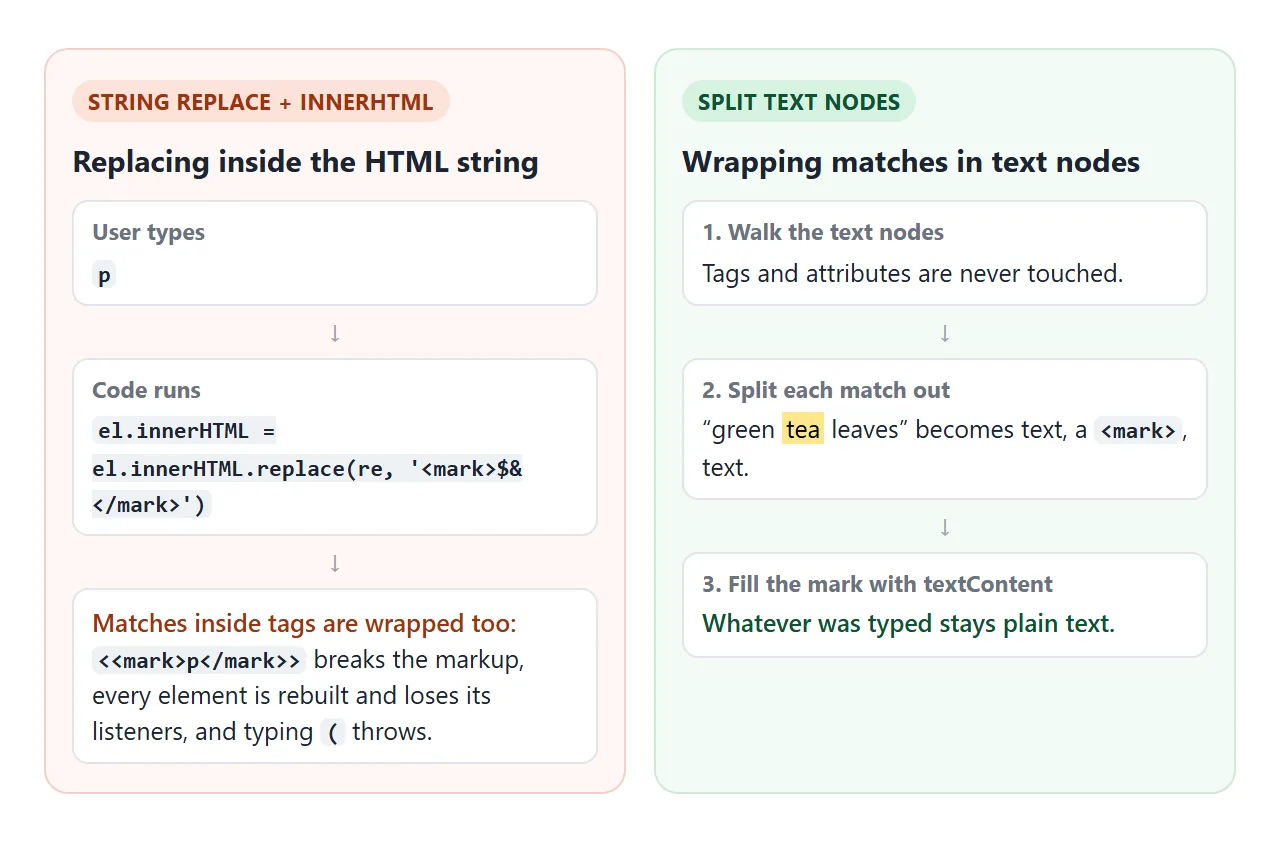
- A match inside a tag or attribute gets wrapped too, which breaks the markup.
- Every element is rebuilt from the string, so event listeners attached to them are gone.
- The typed text usually goes straight into a regular expression, so typing
(throws an error.
The safe way works on text nodes only. Find each text node, split it around the matches, and put each match in a <mark> created with createElement and filled with textContent. The typed text never becomes HTML. innerHTML explains why that matters.
Try the finished version. Search for tea, then TEA, then ( or $.
<!doctype html>
<html lang="en">
<head>
<meta charset="utf-8">
<meta name="viewport" content="width=device-width, initial-scale=1">
<title>Search in page with mark</title>
<style>
body { margin: 0; padding: 14px; font: 15px/1.6 system-ui, sans-serif; background: #f4f5f7; color: #1d2330; }
.bar { display: flex; flex-wrap: wrap; gap: 6px; align-items: center; margin-bottom: 10px; }
input { font: inherit; flex: 1 1 160px; min-width: 0; padding: 7px 10px; border: 1px solid #c9cdd4; border-radius: 8px; }
button { font: inherit; font-size: 14px; padding: 6px 12px; border: 1px solid #c9cdd4; border-radius: 8px; background: #fff; cursor: pointer; }
button:disabled { opacity: .45; cursor: default; }
#count { font-size: 13px; color: #4b5563; min-width: 70px; }
#doc {
position: relative; /* so mark.offsetTop is measured from this box */
height: 360px; overflow: auto; background: #fff; border-radius: 10px; padding: 4px 16px;
}
#doc h2 { font-size: 16px; margin: 14px 0 4px; }
#doc p { margin: 0 0 10px; }
mark { background: #fde68a; color: inherit; border-radius: .2em; }
mark.current { background: #f97316; color: #fff; }
</style>
</head>
<body>
<div class="bar">
<input id="q" type="search" placeholder="Search this page, e.g. tea or (" aria-label="Search this page">
<button id="prev" type="button" aria-label="Previous match" disabled>↑</button>
<button id="next" type="button" aria-label="Next match" disabled>↓</button>
<span id="count" role="status" aria-live="polite"></span>
</div>
<div id="doc">
<h2>Brewing tea</h2>
<p>Green tea tastes best with water just below boiling (around 80 °C). Black tea can take water straight off the boil.</p>
<p>Steep green tea for two minutes and black tea for three to five. Longer steeping makes Tea bitter, not stronger.</p>
<h2>Storing tea</h2>
<p>Keep leaves in an airtight tin, away from light and strong smells (coffee, spices). Loose tea keeps for months; tea bags lose flavour sooner.</p>
<p>Prices: a 100 g tin costs $12.50 [sale price], or 2 tins for $20.</p>
<h2>Questions</h2>
<p>Can I reuse the leaves? Yes, good oolong and green tea leaves can be steeped two or three times.</p>
<p>Is <b>matcha</b> a tea? Yes, it is powdered green tea, whisked into the water instead of steeped.</p>
</div>
<script>
const doc = document.getElementById('doc');
const q = document.getElementById('q');
const count = document.getElementById('count');
const prev = document.getElementById('prev');
const next = document.getElementById('next');
let marks = [];
let current = -1;
// Remove old marks: put their text back and merge the split text nodes.
function clearMarks() {
doc.querySelectorAll('mark').forEach((m) => m.replaceWith(m.textContent));
doc.normalize();
marks = [];
current = -1;
}
// Treat the typed text as plain text: ( [ . $ ? * + become literal.
function escapeRegExp(s) {
  return s.replace(/[.*+?^${}()|[\]\\]/g, '\\$&');
}
function search(term) {
clearMarks();
if (term) {
const re = new RegExp(escapeRegExp(term), 'gi'); // g = all, i = any case
// Collect text nodes first, then change them (changing while walking skips nodes).
const walker = document.createTreeWalker(doc, NodeFilter.SHOW_TEXT);
const nodes = [];
while (walker.nextNode()) nodes.push(walker.currentNode);
nodes.forEach((node) => {
const text = node.nodeValue;
const frag = document.createDocumentFragment();
let last = 0;
for (const m of text.matchAll(re)) {
frag.append(text.slice(last, m.index)); // plain text before the match
const mark = document.createElement('mark');
mark.textContent = m[0]; // textContent, never innerHTML
frag.append(mark);
marks.push(mark);
last = m.index + m[0].length;
}
if (last > 0) { // node had at least one match
frag.append(text.slice(last));
node.replaceWith(frag);
}
});
}
go(marks.length ? 0 : -1);
}
// Make match i the current one and scroll it into the middle of the box.
function go(i) {
if (current >= 0) marks[current].classList.remove('current');
current = i;
if (i >= 0) {
const m = marks[i];
m.classList.add('current');
doc.scrollTop = m.offsetTop - doc.clientHeight / 2;
count.textContent = (i + 1) + ' of ' + marks.length;
} else {
count.textContent = q.value ? 'No matches' : '';
}
prev.disabled = next.disabled = marks.length < 2;
}
q.addEventListener('input', () => search(q.value));
next.addEventListener('click', () => go((current + 1) % marks.length));
prev.addEventListener('click', () => go((current - 1 + marks.length) % marks.length));
// Enter = next match, Shift+Enter = previous
q.addEventListener('keydown', (e) => {
if (e.key === 'Enter' && marks.length) {
e.preventDefault();
(e.shiftKey ? prev : next).click();
}
});
</script>
</body>
</html>
What each part of the code does:
- Clear the old highlights. Replace every
<mark>with its text and callnormalize(). Otherwise marks pile up with every keystroke. - Escape the term.
escapeRegExpputs a backslash before characters such as(,.and$, so they match literally. - Collect text nodes first. A
TreeWalkerwithSHOW_TEXTlists them. Changing nodes while still walking can make it skip some. - Split into a fragment. Text before the match, a
<mark>, then the rest. OnereplaceWithswaps it in. - Navigate. The marks are kept in an array. Next and previous move a
currentclass and scroll the box.
The escape function is short enough to copy on its own:
function escapeRegExp(s) {
return s.replace(/[.*+?^${}()|[\]\\]/g, '\\$&');
}
When it does not work
| What you see | Cause | Fix |
|---|---|---|
| Highlight has flat, cut ends where the line wraps | Default box-decoration-break: slice |
Add box-decoration-break: clone and the -webkit- line |
Searching for a word like p or class breaks the layout |
Replace ran on the innerHTML string |
Split text nodes, fill marks with textContent |
Typing ( or [ throws an error |
The term went into new RegExp unescaped |
Escape it with escapeRegExp first |
| Highlighted text disappears in dark mode | Light text colour on a light mark background | Set color with background, and restyle under prefers-color-scheme: dark |
| Old highlights stay, or marks nest inside marks | Previous marks were not removed | Unwrap all marks and call normalize() before each search |
| Buttons stop working after a search | The container was rebuilt from an HTML string | Only replace text nodes, never the container's HTML |
For themes, dark mode in CSS shows how to switch colours with prefers-color-scheme.
Share it as a link
A highlight is easy to show and hard to describe. A screenshot cannot be searched, and an .html attachment may open as plain code on a phone.
To send the working version, paste the page into a NOS document and choose Create share link. HTML to link walks through it.
The page renders as written and its scripts run, so the people you send it to can type in the search box themselves. If you change the code later, the same link shows the new version.