An HTML link to a network drive is a file: link with a server name in it, and it only works when the page is opened from disk and the reader has that share available.
<a href="file://fileserver/finance/2026/q3-actuals.xlsx">Q3 actuals</a>
That is the UNC form. It names the server and the share rather than a drive letter, which is the first thing to get right.
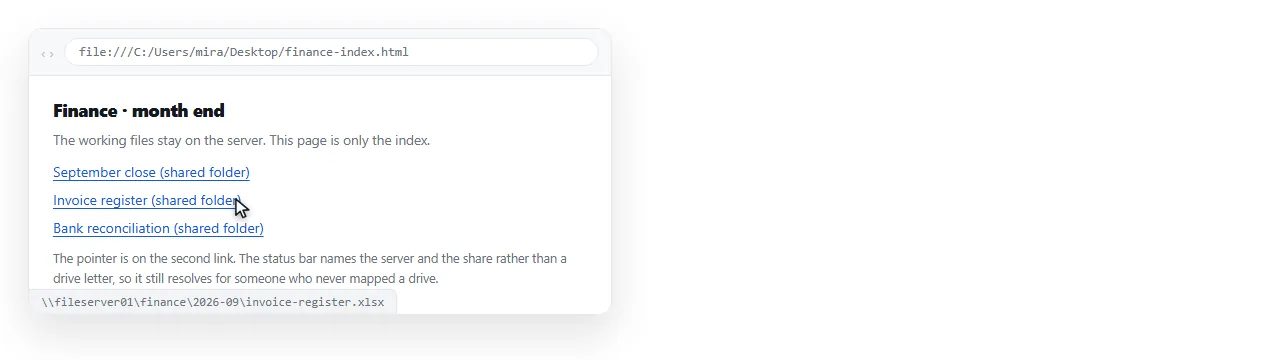
Drive letters are a personal setting
S:\Finance\2026 looks like an address. It is not. It is whatever that one machine has mapped to S.
On another person's computer S may be a different share, a USB stick, or unassigned. The link will open the wrong folder or fail, and both outcomes are confusing.
The UNC path refers to the same server for everybody who can reach that server, so it removes one of the two variables. The other variable is permission, and nothing in HTML can help with that.
| Form | Travels between machines | Notes |
|---|---|---|
file:///S:/Finance/file.xlsx |
No | Drive letters are per user mappings |
file://fileserver/finance/file.xlsx |
Sometimes | Needs the server reachable and permitted |
\\fileserver\finance\file.xlsx pasted as text |
Sometimes | Not a link, but it pastes into Explorer |
https://intranet/finance/file.xlsx |
Yes | A real address, works on phones too |
The last row is the only one with a yes in the middle column.
The blocked case, which looks like a broken link
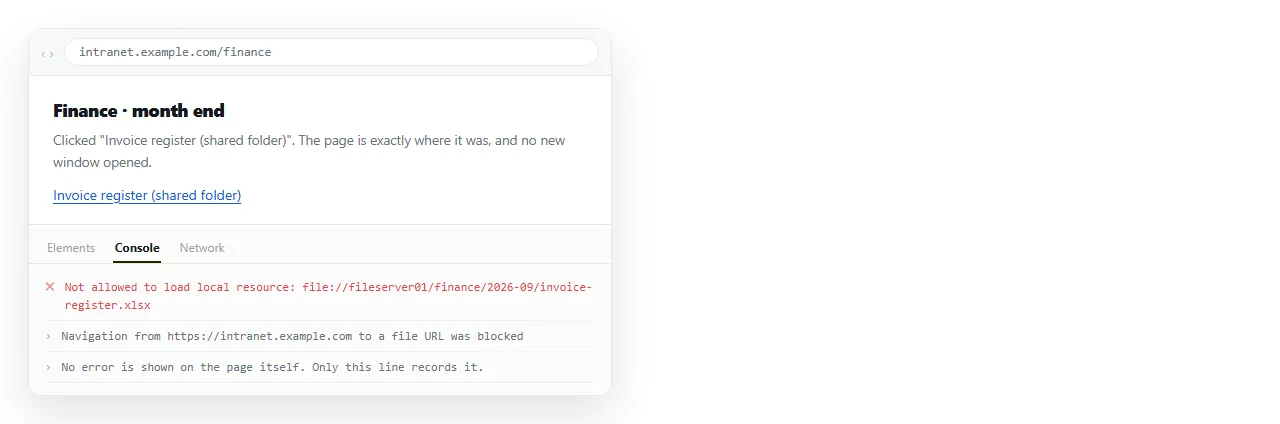
If the page containing the link is served over http or https, the browser will not follow a file: link at all.
The click does nothing. There is no dialog and usually no visible error, only a console message. People assume the path is wrong and spend an afternoon on the path.
This is the same boundary described in the file protocol, and it is deliberate. A web page that could reach into your file shares would be a serious problem.
So check the address bar first. If your page is on file: and theirs is on http, you are not testing the same thing at all.
Everything else that has to be true
Even in the working case, a network path depends on a stack of conditions you do not control.
- The reader is on the corporate network or a VPN with routing to that server.
- Their account has read permission on the share.
- The server name resolves from their machine, which is not guaranteed across sites.
- They are on a desktop. Phones and tablets have none of this.
- The path has not changed since you wrote it, which is not how file shares behave over a year.
Any single one of these failing produces the same reply: the link does not work. There is no way for the reader to tell you which condition failed.
Syntax details that cause false failures
Even with everything else correct, the string itself is easy to get wrong.
Slashes. URLs use forward slashes. Explorer shows backslashes. Convert them.
Spaces. file://server/Shared Docs/x.xlsx breaks at the space. Write Shared%20Docs.
Slash count. file://server/share has two slashes before a server name. file:///C:/... has three, because the empty hostname slot is skipped.
Non ASCII characters. Accented folder names need percent encoding to survive.
What to send instead
The question behind the link is usually "how does my colleague get this document". A file share is one answer and a poor one for anything that crosses a team boundary.
- Put the file on an intranet web server. Same file, real address, works from a phone on VPN, and linking to a PDF or a spreadsheet becomes an ordinary anchor.
- Paste the path as plain text, not a link. Ugly, but honest. The reader copies it into Explorer, which does understand backslashes and mapped drives.
- Put the content itself at an address. If what people actually need is the numbers rather than the file, the file was never the point.
When the page itself is the deliverable
A common pattern is a status page or index full of network links, kept on the share next to the files it points at. Inside that folder, on a desktop, it works.
The moment someone emails the page, or pastes it somewhere to show a colleague, every link in it dies. The page left the folder and the relative context went with it.
Relative and absolute paths covers the general version of this. Linking to a local file covers the single machine case.
If the page needs to be readable by people who are not on the share, turning the HTML into a link is the shorter route. In a NOS document the pasted HTML renders as written and the document has its own address.
Links inside it to hosted files and to other web pages work normally. Links to \\fileserver\... do not, and that is the same rule every browser applies, not a limitation of any one tool.
A quick diagnosis
Ask two questions in order, and you will know which problem you have.
Is the page on file: or http:? If http:, the protocol is the blocker and the path does not matter.
If it is on file:, can the reader open the same path by pasting it into Explorer? If not, the problem is the network or the permissions, and the HTML is correct.