htmx is a small JavaScript library. Its site says it "gives you access to AJAX, CSS Transitions, WebSockets and Server Sent Events directly in HTML, using attributes".
In practice you write hx-get="/hello" on a button, and htmx sends that request on click and puts the HTML that comes back into the page. You write no JavaScript for it.
Try it first. Click the button: htmx makes the request and swaps the reply into the box.
<!doctype html>
<html lang="en">
<head>
<meta charset="utf-8">
<meta name="viewport" content="width=device-width, initial-scale=1">
<title>htmx in one HTML file</title>
<style>
  body { margin: 0; padding: 20px; font-family: system-ui, sans-serif; background: #f4f5f7; }
  button {
    font: inherit; padding: 9px 16px; border: 0; border-radius: 8px;
    background: #3d72d7; color: #fff; cursor: pointer;
  }
  #out {
    margin-top: 14px; padding: 14px 16px; border-radius: 10px; min-height: 22px;
    background: #fff; box-shadow: 0 4px 14px rgba(0, 0, 0, .1);
  }
  #out p { margin: 0; }
  .note { color: #666; font-size: 13px; margin-top: 12px; }
</style>
</head>
<body>

<!-- htmx reads these attributes: GET /hello on click, put the reply in #out -->
<button hx-get="/hello" hx-target="#out">Say hello</button>
<div id="out">Nothing loaded yet.</div>
<p class="note">No JavaScript of your own runs on the click. htmx does it.</p>

<script src="https://cdn.jsdelivr.net/npm/htmx.org@2.0.11/dist/htmx.min.js"></script>

<script>
// Pretend server, so this file works with no server behind it.
// On a real site, delete this script: your server answers the same URLs with HTML.
let hellos = 0;
const routes = {
  'GET /hello': () => '<p>Hello #' + (++hellos) + '. This HTML was swapped in at ' +
    new Date().toLocaleTimeString() + '.</p>'
};
document.addEventListener('htmx:configRequest', (e) => {
  const d = e.detail;
  const route = routes[d.verb.toUpperCase() + ' ' + d.path];
  if (!route) return;
  e.preventDefault(); // answer here instead of over the network
  const swap = (d.elt.closest('[hx-swap]')?.getAttribute('hx-swap') || 'innerHTML').split(' ')[0];
  setTimeout(() => htmx.swap(d.target, route(d.parameters), { swapStyle: swap }), 200);
});
</script>
</body>
</html>
One thing to know up front: htmx expects a server to answer its requests. This single file has none, so the last script is a small pretend server that answers inside the page. On a real site you delete it.
The smallest working page
Every htmx page has the same parts:
- The htmx script tag. It loads the library. The quick start on htmx.org uses jsDelivr with a pinned version.
- An element with a request attribute.
hx-get,hx-post,hx-put,hx-patchorhx-delete, followed by a URL. - Somewhere to put the reply.
hx-targettakes a CSS selector. Without it, htmx updates the element that sent the request.
<button hx-get="/hello" hx-target="#out">Say hello</button>
<div id="out"></div>

<script src="https://cdn.jsdelivr.net/npm/htmx.org@2.0.11/dist/htmx.min.js"></script>
That is the whole client side. When the button is clicked, htmx sends GET /hello and puts the reply inside #out.
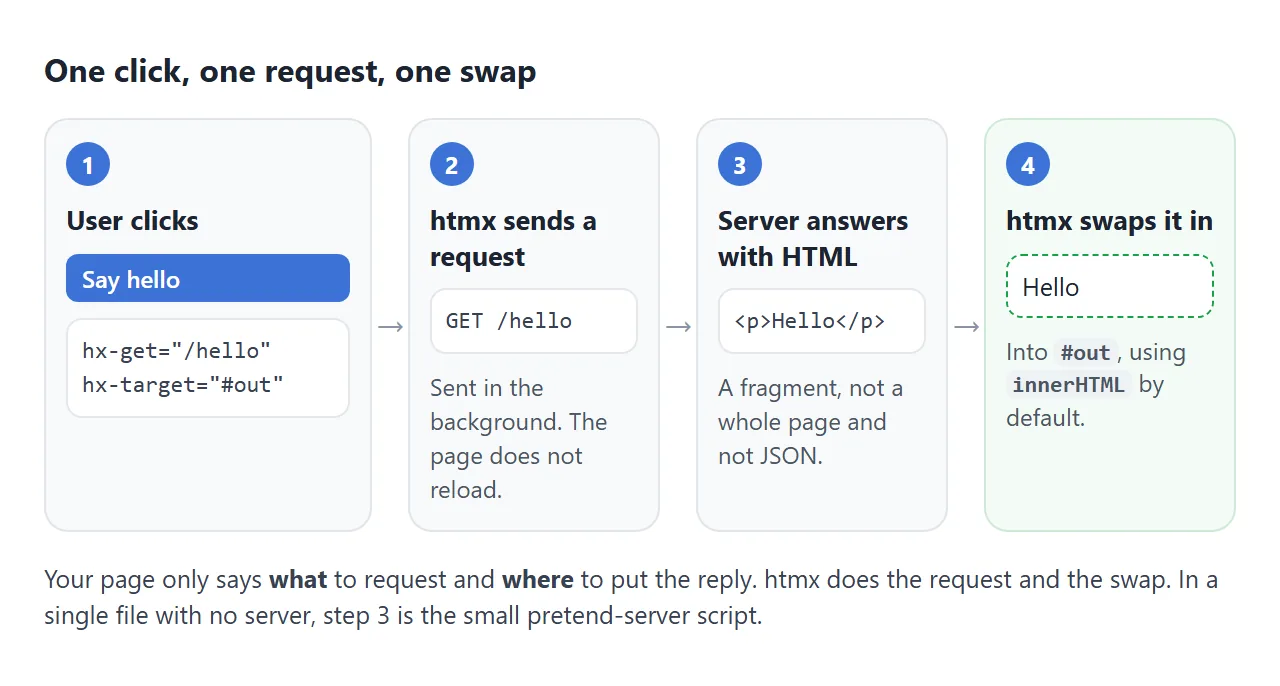
When does htmx send the request?
You do not wire up events yourself. The htmx docs list the default, called the "natural" event for each element:
| Element | Sends its request on |
|---|---|
input, textarea, select |
change |
form |
submit |
| Everything else | click |
To use a different event, add hx-trigger. It also takes modifiers, such as changed (only if the value changed) and delay (wait until the user pauses). The search example further down uses both.
hx-swap: where the reply lands
By default htmx replaces the inside of the target, which is innerHTML. hx-swap picks a different spot. Click each button below and watch the dashed box.
<!doctype html>
<html lang="en">
<head>
<meta charset="utf-8">
<meta name="viewport" content="width=device-width, initial-scale=1">
<title>hx-swap compared</title>
<style>
  body { margin: 0; padding: 14px; font-family: system-ui, sans-serif; background: #f4f5f7; font-size: 14px; }
  .row { display: flex; flex-wrap: wrap; gap: 6px; margin-bottom: 12px; }
  button {
    font: inherit; padding: 8px 10px; border: 0; border-radius: 8px;
    background: #3d72d7; color: #fff; cursor: pointer;
  }
  button.reset { background: #6b7280; }
  code { font-size: 12px; background: #eef1f5; padding: 1px 4px; border-radius: 4px; }
  #box {
    padding: 12px; border: 2px dashed #3d72d7; border-radius: 10px; background: #fff; min-height: 30px;
  }
  .chip {
    display: inline-block; margin: 3px; padding: 4px 9px; border-radius: 99px;
    background: #d4f5dc; color: #14532d;
  }
  .label { color: #555; margin: 0 0 6px; }
</style>
</head>
<body>

<div id="stage">
  <div class="row">
    <button hx-get="/chip" hx-target="#box" hx-swap="innerHTML">innerHTML</button>
    <button hx-get="/chip" hx-target="#box" hx-swap="beforeend">beforeend</button>
    <button hx-get="/chip" hx-target="#box" hx-swap="afterend">afterend</button>
    <button hx-get="/chip" hx-swap="outerHTML">outerHTML (this button)</button>
  </div>
  <p class="label">Target: <code>#box</code> (dashed border)</p>
  <div id="box"><span class="chip">start</span></div>
</div>
<p><button class="reset" hx-get="/reset" hx-target="#stage" hx-swap="outerHTML">Reset</button></p>

<script src="https://cdn.jsdelivr.net/npm/htmx.org@2.0.11/dist/htmx.min.js"></script>

<script>
// Pretend server, so this file works with no server behind it.
// On a real site, delete this script: your server answers the same URLs with HTML.
const start = document.getElementById('stage').outerHTML;
let n = 0;
const routes = {
  'GET /chip': () => '<span class="chip">reply ' + (++n) + '</span>',
  'GET /reset': () => { n = 0; return start; }
};
document.addEventListener('htmx:configRequest', (e) => {
  const d = e.detail;
  const route = routes[d.verb.toUpperCase() + ' ' + d.path];
  if (!route) return;
  e.preventDefault(); // answer here instead of over the network
  const swap = (d.elt.closest('[hx-swap]')?.getAttribute('hx-swap') || 'innerHTML').split(' ')[0];
  setTimeout(() => htmx.swap(d.target, route(d.parameters), { swapStyle: swap }), 150);
});
</script>
</body>
</html>
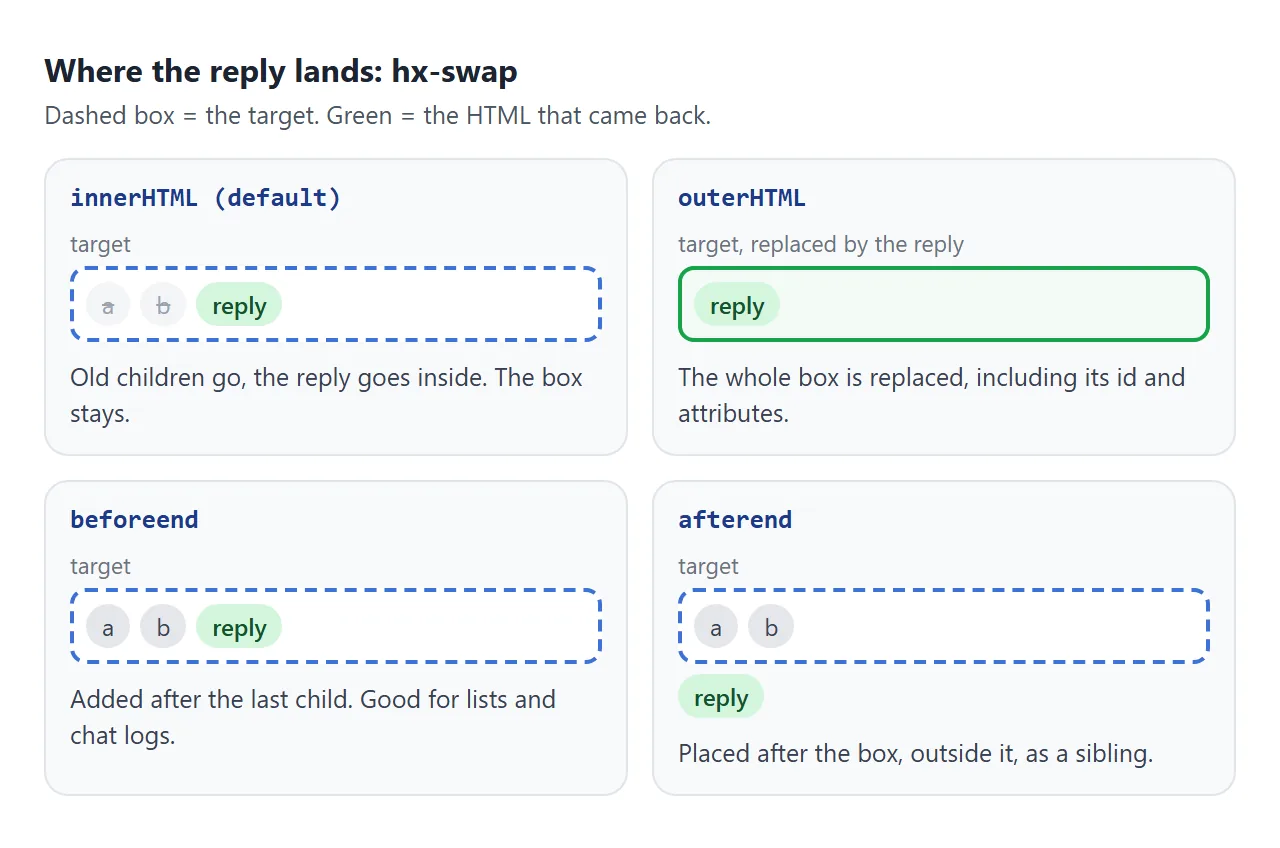
The hx-swap reference lists these values:
| Value | What it does |
|---|---|
innerHTML |
Replaces the inner HTML of the target (the default) |
outerHTML |
Replaces the whole target element |
afterbegin |
Inserts before the target's first child |
beforeend |
Inserts after the target's last child |
beforebegin |
Inserts before the target element |
afterend |
Inserts after the target element |
delete |
Deletes the target, whatever the reply is |
none |
Does not add the reply to the page |
Watch out with outerHTML. The target, its id included, is gone after the swap. If later requests still point at that id, the reply must contain an element with the same id.
The server sends HTML, not JSON
The htmx docs put it plainly: "on the server side you typically respond with HTML, not JSON." htmx does not build markup from data. It takes the reply and inserts it.
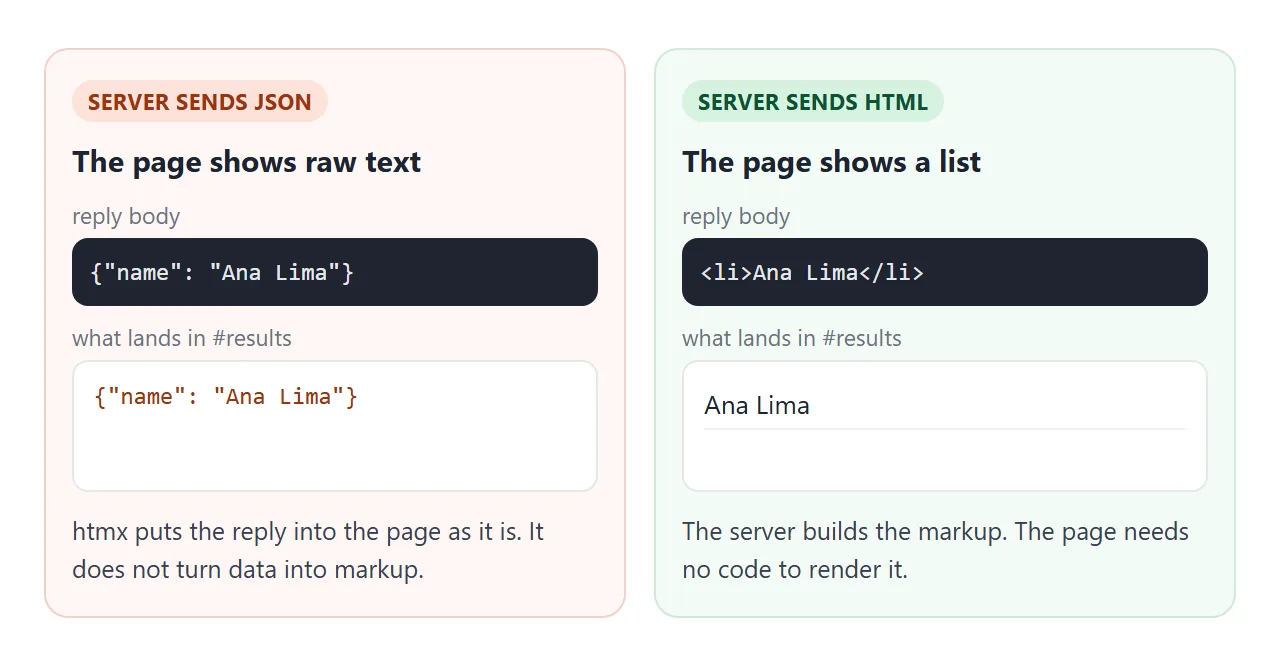
So a search endpoint returns list items, not an array:
<li><b>Ana Lima</b><span>Designer</span></li>
<li><b>Farah Khan</b><span>Designer</span></li>
Anything the user typed that goes back into that HTML must be escaped first. Otherwise a query such as <b>x becomes markup. The esc() function in the next example does this.
How the pretend server works
A single HTML file has no server behind it. If you double-click the file, the address starts with file:// and a request to /hello has nowhere to go. In Chromium, htmx then fires htmx:sendError and nothing changes on screen.
The examples here solve that with one listener. htmx fires htmx:configRequest before it sends a request, with the verb, path, parameters and target in e.detail. The script:
- looks up a route such as
GET /hello; - cancels the real request with
e.preventDefault(); - calls
htmx.swap()with the target, the HTML it built and the swap style.
htmx.swap() is part of the htmx API: it "performs swapping (and settling) of HTML content". New content goes through htmx too, which is why the Reset button above brings back working buttons.
When you move to a real server, delete the pretend server and keep the HTML as it is. The attributes stay the same.
A finished example: active search
This directory searches as you type. It shows a "Searching..." label while waiting, and the counter shows how many requests went out.
<!doctype html>
<html lang="en">
<head>
<meta charset="utf-8">
<meta name="viewport" content="width=device-width, initial-scale=1">
<title>Active search with htmx</title>
<style>
  body { margin: 0; padding: 16px; font-family: system-ui, sans-serif; background: #eceef1; }
  .app {
    max-width: 460px; margin: 0 auto; background: #fff; border-radius: 12px;
    padding: 16px; box-shadow: 0 4px 16px rgba(0, 0, 0, .1);
  }
  h2 { margin: 0 0 12px; font-size: 18px; }
  input {
    box-sizing: border-box; width: 100%; font: inherit; padding: 9px 10px;
    border: 1px solid #cfd4dc; border-radius: 8px;
  }
  .meta { display: flex; justify-content: space-between; color: #666; font-size: 13px; margin: 8px 0; }
  ul { list-style: none; padding: 0; margin: 0; }
  li { padding: 8px 10px; border-bottom: 1px solid #eef0f3; display: flex; justify-content: space-between; gap: 8px; }
  li span { color: #666; font-size: 13px; }
  .empty { color: #888; padding: 8px 10px; }
</style>
</head>
<body>
<div class="app">
  <h2>Team directory</h2>

  <!-- Ask the server after typing stops for 300 ms, show "Searching" meanwhile -->
  <input type="search" name="q" placeholder="Type a name or a role"
         hx-get="/search"
         hx-trigger="input changed delay:300ms"
         hx-target="#results"
         hx-indicator="#spin">

  <div class="meta">
    <span id="spin" class="htmx-indicator">Searching...</span>
    <span>Requests sent: <b id="count">0</b></span>
  </div>

  <ul id="results"><li class="empty">Start typing to search 12 people.</li></ul>
</div>

<script src="https://cdn.jsdelivr.net/npm/htmx.org@2.0.11/dist/htmx.min.js"></script>

<script>
// Pretend server, so this file works with no server behind it.
// On a real site, delete this script: your server answers the same URLs with HTML.
const people = [
  ['Ana Lima', 'Designer'], ['Ben Okafor', 'Developer'], ['Chen Wei', 'Developer'],
  ['Dana Cohen', 'Product manager'], ['Eli Novak', 'Support'], ['Farah Khan', 'Designer'],
  ['Gus Moreau', 'Sales'], ['Hana Sato', 'Developer'], ['Ivan Petrov', 'Support'],
  ['Jade Brooks', 'Marketing'], ['Kofi Mensah', 'Sales'], ['Lena Fischer', 'Developer']
];
const esc = (s) => s.replace(/[&<>"']/g, (c) => '&#' + c.charCodeAt(0) + ';');
const routes = {
  'GET /search': (params) => {
    const q = (params.q || '').trim().toLowerCase();
    if (!q) return '<li class="empty">Start typing to search 12 people.</li>';
    const hits = people.filter(([name, role]) => (name + ' ' + role).toLowerCase().includes(q));
    if (!hits.length) return '<li class="empty">No one matches "' + esc(q) + '".</li>';
    return hits.map(([name, role]) => '<li><b>' + esc(name) + '</b><span>' + esc(role) + '</span></li>').join('');
  }
};
let count = 0;
document.addEventListener('htmx:configRequest', (e) => {
  const d = e.detail;
  const route = routes[d.verb.toUpperCase() + ' ' + d.path];
  if (!route) return;
  e.preventDefault(); // answer here instead of over the network
  document.getElementById('count').textContent = ++count;
  const ind = document.querySelector(d.elt.getAttribute('hx-indicator') || 'none');
  ind?.classList.add('htmx-request');
  setTimeout(() => {
    ind?.classList.remove('htmx-request');
    htmx.swap(d.target, route(d.parameters), { swapStyle: 'innerHTML' });
  }, 400);
});
</script>
</body>
</html>
The input carries four attributes:
<input type="search" name="q"
       hx-get="/search"
       hx-trigger="input changed delay:300ms"
       hx-target="#results"
       hx-indicator="#spin">
hx-getsendsGET /search?q=.... The input'snamebecomes the parameter.hx-triggerwaits until typing stops for 300 ms, and fires only if the value changed.hx-indicatorpoints at the "Searching..." label. The htmx docs give thehtmx-indicatorclass an opacity of 0, and it shows while a request is running.
A real server would read q and send back the matching <li> items, just as the pretend server does. For a fancier waiting state, see the CSS loading spinner.
When it does not work
| What you see | Cause | Fix |
|---|---|---|
| Clicking does nothing, no error | htmx never loaded (wrong URL or typo) | Check the script URL; typeof htmx in the console should not be undefined |
| Nothing happens on a double-clicked file | No server behind file://; htmx fires htmx:sendError |
Run a server, or add a pretend server script |
Raw {"name": ...} text appears |
The server replied with JSON | Reply with an HTML fragment |
| A 404 or 500 reply changes nothing | Docs: 4xx and 5xx replies are not swapped by default | Listen for htmx:responseError and show a message |
Buttons added by your own JavaScript ignore hx-get |
htmx has not seen the new elements | Call htmx.process(element) after inserting them |
| A request to another domain is refused | selfRequestsOnly defaults to true |
Keep requests on your own domain |
| A request fires on every keystroke | No delay in hx-trigger |
Add changed delay:300ms |
For problems that are not htmx-specific, such as a script tag in the wrong place, see HTML JavaScript not working.
Share it as a link
An htmx page is easier to show than to describe. A screenshot cannot be clicked, and an .html attachment may open as plain code on a phone.
To send the working version, paste the page into a NOS document and choose Create share link. HTML to link walks through it.
The page renders as written, htmx loads from jsDelivr and its scripts run, so the people you send it to can click and search themselves. If you change the code later, the same link shows the new version.
A shared page has no server of its own, and requests to other sites are blocked. Keep the pretend server in the file you share. For more pages that run from one file, see single HTML file apps.