You get to the slide with the big number. You click, the number appears, and everyone reads it before you have finished your sentence.
Then they wait for the next slide.
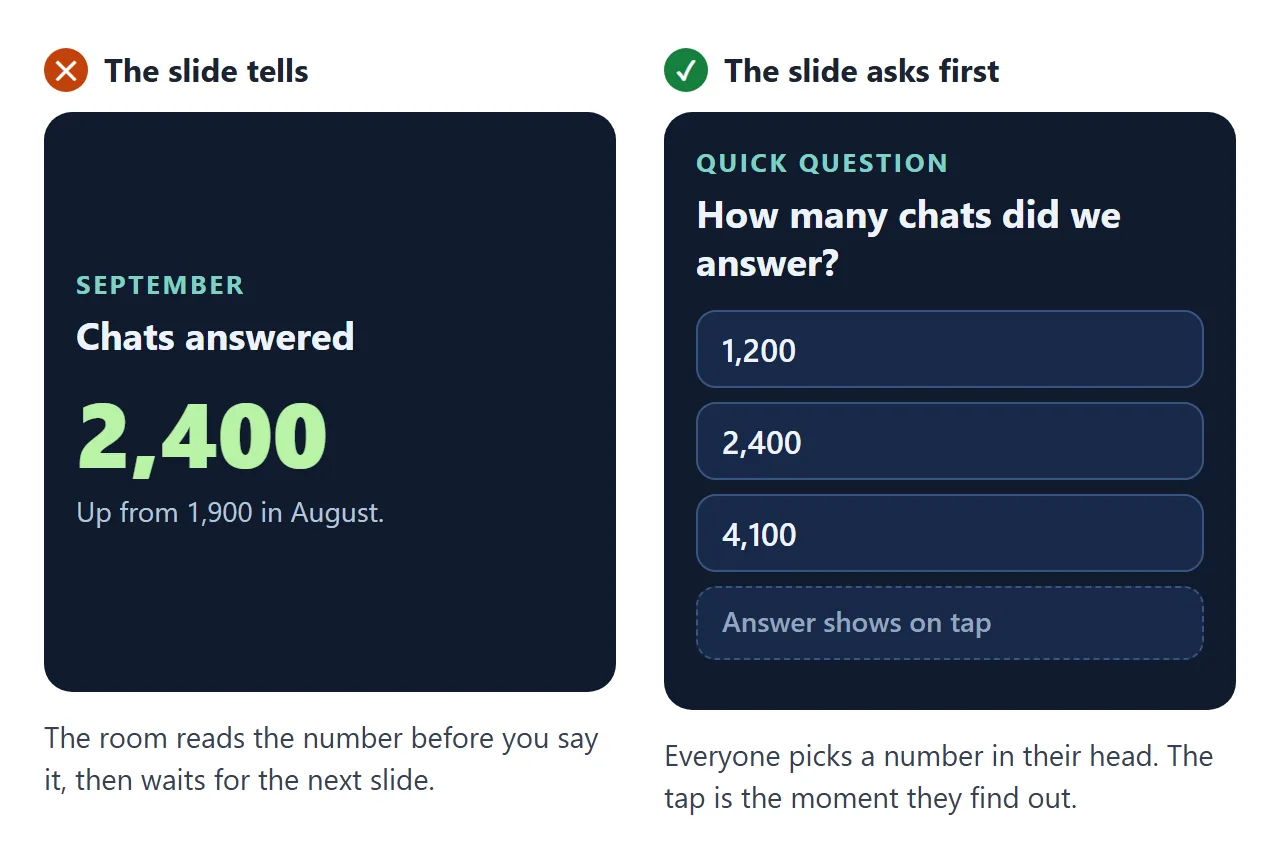
That is the moment an interactive presentation is for. Ask the room first. "How many chats do you think we answered?" Hands go up, people commit to a guess, and the tap that shows the answer actually lands.
You do not need presentation software with a special plugin for this. These days people ask ChatGPT, Claude or Gemini for it and get a finished set of slides in one reply.
Here is a short team update. Press the right arrow or tap the green button. On slide 2 each press shows one more point. On slide 3, pick an answer.
<!doctype html>
<html lang="en">
<head>
<meta charset="utf-8">
<meta name="viewport" content="width=device-width, initial-scale=1">
<title>Fernway Support - September review</title>
<style>
* { box-sizing: border-box; }
html, body { height: 100%; }
body { margin: 0; background: #0f1b2d; color: #eef3fb; font-family: system-ui, -apple-system, "Segoe UI", sans-serif; overflow: hidden; }
.deck { position: relative; height: 100%; display: flex; flex-direction: column; }
.stage { position: relative; flex: 1; overflow: hidden; touch-action: pan-y; }
.slide { position: absolute; inset: 0; padding: 30px 26px 20px; display: flex; flex-direction: column; justify-content: center; opacity: 0; transform: translateX(40px); transition: opacity .45s ease, transform .45s ease; pointer-events: none; background: radial-gradient(120% 90% at 100% 0%, #1f3a63 0%, #0f1b2d 60%); }
.slide.on { opacity: 1; transform: none; pointer-events: auto; }
.slide.left { transform: translateX(-40px); }
.kicker { font-size: 13px; letter-spacing: .14em; text-transform: uppercase; color: #7fd1c4; margin: 0 0 10px; font-weight: 700; }
h1 { font-size: clamp(30px, 8vw, 46px); line-height: 1.08; margin: 0 0 14px; }
h2 { font-size: clamp(24px, 6vw, 34px); line-height: 1.15; margin: 0 0 18px; }
.sub { color: #b6c4d8; font-size: 16px; line-height: 1.5; margin: 0; }
.hint { margin-top: 26px; display: inline-flex; gap: 8px; align-items: center; color: #94a6bf; font-size: 14px; }
kbd { background: #24395a; border: 1px solid #3a5580; border-bottom-width: 3px; border-radius: 6px; padding: 2px 8px; font: 600 13px/1.4 system-ui, sans-serif; color: #eef3fb; }
.points { list-style: none; margin: 0; padding: 0; display: grid; gap: 12px; }
.points li { padding: 14px 16px; border-radius: 14px; background: rgba(255,255,255,.06); border: 1px solid rgba(255,255,255,.1); font-size: 17px; line-height: 1.4; opacity: .12; transform: translateY(8px); transition: opacity .4s, transform .4s, background .4s; }
.points li.shown { opacity: 1; transform: none; }
.points li.latest { background: rgba(127,209,196,.14); border-color: rgba(127,209,196,.5); }
.points b { color: #7fd1c4; }
.wait { font-size: 13px; color: #94a6bf; margin-top: 12px; }
.opts { display: grid; gap: 10px; }
.opts button { font: 600 18px/1.2 system-ui, sans-serif; color: #eef3fb; text-align: left; padding: 15px 16px; border-radius: 14px; border: 1.5px solid #3a5580; background: #18294a; cursor: pointer; display: flex; justify-content: space-between; align-items: center; transition: background .3s, border-color .3s, transform .15s; }
.opts button:active { transform: scale(.98); }
.opts button.right { background: #12463f; border-color: #7fd1c4; }
.opts button.picked:not(.right) { background: #4a2330; border-color: #ff8fa3; }
.opts button span { font-size: 14px; font-weight: 700; }
.answer { margin-top: 14px; padding: 12px 14px; border-radius: 12px; background: rgba(127,209,196,.12); font-size: 15px; line-height: 1.45; display: none; }
.answer.open { display: block; animation: rise .4s ease; }
.note { margin-top: 12px; font-size: 13px; color: #94a6bf; }
@keyframes rise { from { opacity: 0; transform: translateY(8px); } to { opacity: 1; transform: none; } }
.big { font-size: clamp(56px, 17vw, 92px); font-weight: 800; line-height: 1; margin: 0 0 6px; background: linear-gradient(90deg, #7fd1c4, #b8f2a6); -webkit-background-clip: text; background-clip: text; color: transparent; font-variant-numeric: tabular-nums; }
.cmp { margin-top: 22px; display: grid; gap: 10px; }
.cmp div { display: grid; grid-template-columns: 92px 1fr; gap: 10px; align-items: center; font-size: 14px; color: #b6c4d8; }
.cmp i { display: block; height: 16px; border-radius: 8px; width: 0; transition: width 1s ease .2s; }
.cmp .now i { background: linear-gradient(90deg, #7fd1c4, #b8f2a6); }
.cmp .was i { background: #3a5580; }
.dots { display: flex; gap: 8px; flex-wrap: wrap; margin-top: 22px; }
.dots button { width: 40px; height: 40px; border-radius: 50%; border: 1.5px solid #3a5580; background: #18294a; color: #eef3fb; font: 700 15px system-ui, sans-serif; cursor: pointer; }
.bar { display: flex; align-items: center; gap: 10px; padding: 10px 14px 12px; background: #0b1424; border-top: 1px solid #1c2c47; }
.bar button { width: 44px; height: 40px; border-radius: 12px; border: 0; background: #24395a; color: #eef3fb; font-size: 20px; cursor: pointer; }
.bar button.next { background: #7fd1c4; color: #0f1b2d; }
.bar button:disabled { opacity: .35; cursor: default; }
.track { flex: 1; height: 6px; border-radius: 3px; background: #1c2c47; overflow: hidden; }
.track i { display: block; height: 100%; width: 0; background: linear-gradient(90deg, #7fd1c4, #b8f2a6); transition: width .45s ease; }
.count { font: 600 13px system-ui, sans-serif; color: #94a6bf; min-width: 36px; text-align: right; font-variant-numeric: tabular-nums; }
@media (min-width: 600px) { .slide { padding: 40px 56px 28px; } .opts { grid-template-columns: 1fr 1fr 1fr; } }
</style>
</head>
<body>
<div class="deck">
<div class="stage" id="stage">
<section class="slide">
<p class="kicker">Fernway Support</p>
<h1>September review</h1>
<p class="sub">Five minutes, six slides. One question for the room on slide 3.</p>
<p class="hint"><kbd>→</kbd> or tap the green button</p>
</section>
<section class="slide">
<p class="kicker">What changed</p>
<h2>Three changes this month</h2>
<ul class="points">
<li><b>Chat is open until 9 pm</b>, two hours later than before.</li>
<li><b>Saved replies</b> for the ten most common questions.</li>
<li><b>One person on refunds</b> each day, so refunds stop waiting.</li>
</ul>
<p class="wait">Each press of Next shows one more point.</p>
</section>
<section class="slide">
<p class="kicker">Quick question</p>
<h2>How many chats did we answer in September?</h2>
<div class="opts" id="opts">
<button>1,200</button>
<button data-right>2,400</button>
<button>4,100</button>
</div>
<p class="answer" id="answer">2,400 chats, up from 1,900 in August. The late hours brought most of the difference.</p>
<p class="note">Hands up in the room, then tap. Tapping shows the answer on this screen only.</p>
</section>
<section class="slide">
<p class="kicker">The number that matters</p>
<h2>Median first reply</h2>
<p class="big" id="figure">3.2 hours</p>
<p class="sub">August was <span id="before">5.0 hours</span>. Saved replies did most of it.</p>
<div class="cmp">
<div class="was"><span>August</span><i id="barWas"></i></div>
<div class="now"><span>September</span><i id="barNow"></i></div>
</div>
</section>
<section class="slide">
<p class="kicker">October</p>
<h2>Two things to try next</h2>
<ul class="points">
<li><b>Weekend cover</b> on Saturday mornings.</li>
<li><b>A refund guide</b> customers can read before they write.</li>
</ul>
</section>
<section class="slide">
<p class="kicker">Thank you</p>
<h1>Questions?</h1>
<p class="sub">Jump back to any slide.</p>
<div class="dots" id="dots"></div>
</section>
</div>
<nav class="bar">
<button id="prev" aria-label="Previous">←</button>
<div class="track"><i id="fill"></i></div>
<span class="count" id="count">1 / 6</span>
<button id="next" class="next" aria-label="Next">→</button>
</nav>
</div>
<script>
const slides = [...document.querySelectorAll('.slide')];
let at = 0;
// The figure on slide 4 is read from the words on the slide, so editing the text changes the count and the bars.
const figEl = document.getElementById('figure');
function parse(text) { const m = text.match(/-?\d+(?:[.,]\d+)?/); return m ? { n: parseFloat(m[0].replace(',', '.')), dec: (m[0].split(/[.,]/)[1] || '').length, unit: text.slice(m.index + m[0].length) } : null; }
const fig = parse(figEl.textContent);
const was = parse(document.getElementById('before').textContent);
function countUp() {
if (!fig) return;
const t0 = performance.now();
function step(t) {
const k = Math.min(1, (t - t0) / 900);
const v = fig.n * (1 - Math.pow(1 - k, 3));
figEl.textContent = v.toFixed(fig.dec) + fig.unit;
if (k < 1) requestAnimationFrame(step);
}
requestAnimationFrame(step);
const top = Math.max(fig.n, was ? was.n : 0) || 1;
document.getElementById('barNow').style.width = (fig.n / top * 100) + '%';
if (was) document.getElementById('barWas').style.width = (was.n / top * 100) + '%';
}
function resetBars() { document.getElementById('barNow').style.width = 0; document.getElementById('barWas').style.width = 0; }
function hiddenPoints(s) { return [...s.querySelectorAll('.points li:not(.shown)')]; }
function show(i) {
i = Math.max(0, Math.min(slides.length - 1, i));
slides.forEach((s, k) => { s.classList.toggle('on', k === i); s.classList.toggle('left', k < i); });
at = i;
document.getElementById('fill').style.width = ((i + 1) / slides.length * 100) + '%';
document.getElementById('count').textContent = (i + 1) + ' / ' + slides.length;
document.getElementById('prev').disabled = i === 0;
document.getElementById('next').disabled = i === slides.length - 1 && hiddenPoints(slides[i]).length === 0;
if (slides[i].contains(figEl)) countUp(); else resetBars();
const first = slides[i].querySelector('.points li');
if (first && !first.classList.contains('shown')) first.classList.add('shown', 'latest');
}
function next() {
const h = hiddenPoints(slides[at]);
if (h.length) { h[0].parentNode.querySelectorAll('li').forEach((x) => x.classList.remove('latest')); h[0].classList.add('shown', 'latest'); if (at === slides.length - 1) show(at); return; }
show(at + 1);
}
function prev() { show(at - 1); }
document.getElementById('next').addEventListener('click', next);
document.getElementById('prev').addEventListener('click', prev);
document.addEventListener('keydown', (e) => {
if ((e.key === ' ' || e.key === 'Enter') && e.target.tagName === 'BUTTON') return;
if (['ArrowRight', 'PageDown', ' ', 'Enter'].includes(e.key)) { e.preventDefault(); next(); }
if (['ArrowLeft', 'PageUp'].includes(e.key)) { e.preventDefault(); prev(); }
if (e.key === 'Home') show(0);
if (e.key === 'End') show(slides.length - 1);
});
let x0 = null;
const stage = document.getElementById('stage');
stage.addEventListener('pointerdown', (e) => { x0 = e.clientX; });
stage.addEventListener('pointerup', (e) => {
if (x0 === null) return;
const dx = e.clientX - x0; x0 = null;
if (Math.abs(dx) > 50) dx < 0 ? next() : prev();
});
const opts = [...document.querySelectorAll('#opts button')];
opts.forEach((b) => b.addEventListener('click', () => {
opts.forEach((o) => { o.classList.remove('picked'); if (o.hasAttribute('data-right')) { o.classList.add('right'); if (!o.querySelector('span')) o.insertAdjacentHTML('beforeend', '<span>Right</span>'); } });
b.classList.add('picked');
document.getElementById('answer').classList.add('open');
}));
const dots = document.getElementById('dots');
slides.forEach((s, k) => {
const d = document.createElement('button');
d.textContent = k + 1;
d.setAttribute('aria-label', 'Go to slide ' + (k + 1));
d.addEventListener('click', () => show(k));
dots.appendChild(d);
});
show(0);
</script>
</body>
</html>
Three things that keep a room with you
1. One question, asked before the answer. A slide that states "2,400 chats" gets read in a second. The same slide as a question, with three options, gets ten seconds of people thinking about your number. One question per talk is plenty. More than two starts to feel like a quiz.
2. Points that arrive as you say them. If all three points are on screen, people read point three while you explain point one. Ask for each press of Next to show one more point, and for the newest one to stand out.
3. A bar that says how far along you are. A thin progress bar and "3 / 6" in the corner answer the question everyone has and nobody asks. It also helps someone opening the link later, without you there, to know how much is left.
Make it with AI
Open ChatGPT, Claude or Gemini and paste this. Change the words in capitals and paste your own figures at the end.
Make one complete HTML file: an interactive presentation.
Title: TALK TITLE, for AUDIENCE.
Slides, in order: SLIDE 1 TITLE, SLIDE 2 TITLE, ...
On slides with a list, show one point per press of Next.
One question slide: QUESTION, options OPTION A,
OPTION B, OPTION C. Correct answer: ANSWER. Show the
answer and one line of context only when an option is
tapped. Mark the correct option in green.
Show the key figure on slide KEY SLIDE as plain text
on the slide, and read it from that text if you animate it.
Controls: arrow keys, Space, a Next and Back button,
swipe on phones. A progress bar and "3 / 6" at the bottom.
Rules: large text, works on a phone and on a projector,
all CSS and JavaScript inside the file, no images or
fonts from other sites, nothing sent anywhere.
Use only my figures. Do not invent numbers or quotes.
If something is missing, write TODO.
My figures: PASTE THEM HERE
"Use only my figures" matters most. A presentation goes in front of people who know the numbers, and an AI fills gaps with figures that look right.
The line about plain text on the slide matters next week, when you need to fix one. More on that below.
The same idea works for a deck nobody presents. Here is a welcome deck sent to a new starter to read on their phone: stories-style progress at the top, days that open on tap, guess-first questions, and cards that flip.
<!doctype html>
<html lang="en">
<head>
<meta charset="utf-8">
<meta name="viewport" content="width=device-width, initial-scale=1">
<title>Welcome to Fernway</title>
<style>
  * { box-sizing: border-box; }
  html, body { height: 100%; }
  body { margin: 0; background: #fbf4ea; color: #2b2118; font-family: system-ui, -apple-system, "Segoe UI", sans-serif; overflow: hidden; }
  .wrap { height: 100%; max-width: 520px; margin: 0 auto; display: flex; flex-direction: column; padding: 12px 14px 14px; }
  .segs { display: flex; gap: 5px; margin-bottom: 10px; }
  .segs i { flex: 1; height: 5px; border-radius: 3px; background: #ead9c2; overflow: hidden; position: relative; }
  .segs i::after { content: ""; position: absolute; inset: 0; width: 0; background: #e2683c; border-radius: 3px; transition: width .35s ease; }
  .segs i.done::after { width: 100%; }
  .top { display: flex; justify-content: space-between; align-items: center; font-size: 13px; color: #8a7360; margin-bottom: 10px; }
  .top b { color: #2b2118; }
  .stage { position: relative; flex: 1; }
  .card { position: absolute; inset: 0; border-radius: 22px; background: #fff; box-shadow: 0 18px 40px rgba(110, 70, 30, .16); padding: 24px 22px; display: flex; flex-direction: column; opacity: 0; transform: scale(.96); transition: opacity .35s, transform .35s; pointer-events: none; overflow: auto; }
  .card.on { opacity: 1; transform: none; pointer-events: auto; }
  .tag { align-self: flex-start; font-size: 12px; font-weight: 700; letter-spacing: .08em; text-transform: uppercase; background: #fde3d4; color: #b4461f; padding: 5px 10px; border-radius: 999px; margin-bottom: 14px; }
  h1 { font-size: 32px; line-height: 1.1; margin: 0 0 10px; }
  h2 { font-size: 24px; line-height: 1.2; margin: 0 0 14px; }
  p { font-size: 16px; line-height: 1.5; margin: 0 0 10px; color: #5a4636; }
  .wave { width: 120px; height: 120px; margin: auto auto 6px; }
  .wave .hand { transform-origin: 60px 92px; animation: wave 1.6s ease-in-out infinite; }
  @keyframes wave { 0%, 60%, 100% { transform: rotate(0); } 15%, 45% { transform: rotate(14deg); } 30% { transform: rotate(-8deg); } }
  .days { display: grid; gap: 8px; }
  .day { border: 1.5px solid #ead9c2; border-radius: 14px; background: #fffaf3; font: inherit; color: inherit; text-align: left; padding: 12px 14px; cursor: pointer; }
  .day b { display: flex; justify-content: space-between; font-size: 16px; }
  .day b::after { content: "+"; color: #e2683c; font-size: 20px; line-height: 1; transition: transform .25s; }
  .day.open b::after { transform: rotate(45deg); }
  .day span { display: block; max-height: 0; overflow: hidden; font-size: 14.5px; color: #6b5442; transition: max-height .3s ease, margin .3s; }
  .day.open { border-color: #e2683c; background: #fff3ea; }
  .day.open span { max-height: 80px; margin-top: 6px; }
  .opts { display: grid; gap: 9px; margin-top: 4px; }
  .opts button { font: 700 18px system-ui, sans-serif; color: #2b2118; padding: 14px; border-radius: 14px; border: 1.5px solid #ead9c2; background: #fffaf3; cursor: pointer; transition: background .25s, border-color .25s; }
  .opts button.right { background: #e3f4e6; border-color: #3f9d5a; }
  .opts button.wrong { background: #fde6e6; border-color: #d65a5a; }
  .reveal { display: none; margin-top: 12px; padding: 12px 14px; background: #fff3ea; border-radius: 12px; font-size: 15px; line-height: 1.45; }
  .reveal.open { display: block; animation: pop .35s ease; }
  @keyframes pop { from { opacity: 0; transform: translateY(6px); } to { opacity: 1; transform: none; } }
  .people { display: grid; grid-template-columns: 1fr 1fr; gap: 10px; }
  .flip { perspective: 700px; height: 150px; border: 0; background: none; padding: 0; cursor: pointer; font: inherit; color: inherit; }
  .flip .in { position: relative; width: 100%; height: 100%; transition: transform .5s; transform-style: preserve-3d; }
  .flip.turned .in { transform: rotateY(180deg); }
  .face { position: absolute; inset: 0; border-radius: 16px; backface-visibility: hidden; display: flex; flex-direction: column; align-items: center; justify-content: center; padding: 10px; text-align: center; }
  .front { background: #fffaf3; border: 1.5px solid #ead9c2; }
  .back { background: #2b2118; color: #fbf4ea; transform: rotateY(180deg); font-size: 14px; line-height: 1.4; }
  .av { width: 50px; height: 50px; border-radius: 50%; display: grid; place-items: center; color: #fff; font-weight: 800; font-size: 18px; margin-bottom: 8px; }
  .front b { font-size: 15px; }
  .front small { font-size: 13px; color: #8a7360; }
  .score { font-size: 64px; font-weight: 800; color: #e2683c; margin: 10px 0 0; line-height: 1; }
  .again { margin-top: auto; align-self: flex-start; font: 700 16px system-ui, sans-serif; background: #2b2118; color: #fbf4ea; border: 0; border-radius: 12px; padding: 13px 18px; cursor: pointer; }
  .nav { display: flex; justify-content: space-between; align-items: center; margin-top: 12px; }
  .nav button { font: 700 15px system-ui, sans-serif; border: 0; border-radius: 12px; padding: 12px 18px; cursor: pointer; background: #ead9c2; color: #2b2118; }
  .nav button.go { background: #e2683c; color: #fff; }
  .nav button:disabled { opacity: .35; cursor: default; }
  .nav small { font-size: 13px; color: #8a7360; }
</style>
</head>
<body>
<div class="wrap">
  <div class="segs" id="segs"></div>
  <div class="top"><span><b>Welcome to Fernway</b></span><span id="pos">1 of 6</span></div>
  <div class="stage">

    <section class="card">
      <span class="tag">Hello</span>
      <h1>Welcome, Sam</h1>
      <p>Your first week, in six short screens. Swipe, or tap Next. Take it on the bus.</p>
      <svg class="wave" viewBox="0 0 120 120" aria-hidden="true"><circle cx="60" cy="60" r="56" fill="#fde3d4"/><g class="hand"><rect x="44" y="40" width="32" height="52" rx="14" fill="#e2683c"/><rect x="40" y="26" width="9" height="30" rx="4.5" fill="#e2683c"/><rect x="51" y="20" width="9" height="30" rx="4.5" fill="#e2683c"/><rect x="62" y="22" width="9" height="30" rx="4.5" fill="#e2683c"/><rect x="72" y="30" width="8" height="26" rx="4" fill="#e2683c"/></g></svg>
    </section>

    <section class="card">
      <span class="tag">Your week</span>
      <h2>Tap a day to see the plan</h2>
      <div class="days">
        <button class="day"><b>Monday</b><span>Laptop, accounts, lunch with the team at 12:30.</span></button>
        <button class="day"><b>Tuesday</b><span>Sit in on live chats with Priya. Just watch.</span></button>
        <button class="day"><b>Wednesday</b><span>Answer your first ten chats with Priya beside you.</span></button>
        <button class="day"><b>Thursday</b><span>Refunds training, 10:00 - 11:30.</span></button>
        <button class="day"><b>Friday</b><span>Coffee with your manager. Bring one question.</span></button>
      </div>
    </section>

    <section class="card quiz">
      <span class="tag">Guess first</span>
      <h2>How many people are on the support team?</h2>
      <div class="opts"><button>6</button><button data-right>11</button><button>25</button></div>
      <p class="reveal">Eleven, including you. Seven work days and four work evenings.</p>
    </section>

    <section class="card">
      <span class="tag">Who to ask</span>
      <h2>Tap a card to flip it</h2>
      <div class="people">
        <button class="flip"><div class="in"><div class="face front"><span class="av" style="background:#e2683c">PN</span><b>Priya Nair</b><small>Your buddy</small></div><div class="face back">Anything about chats, saved replies and tone.</div></div></button>
        <button class="flip"><div class="in"><div class="face front"><span class="av" style="background:#3f8f9d">TO</span><b>Tom Okoro</b><small>Refunds</small></div><div class="face back">Refunds over $200 and anything that feels odd.</div></div></button>
        <button class="flip"><div class="in"><div class="face front"><span class="av" style="background:#7a5bd6">LM</span><b>Lena Moss</b><small>Your manager</small></div><div class="face back">Rota, leave, and how you are finding it.</div></div></button>
        <button class="flip"><div class="in"><div class="face front"><span class="av" style="background:#3f9d5a">IT</span><b>IT desk</b><small>Room 2</small></div><div class="face back">Passwords, headsets, the laptop that will not wake up.</div></div></button>
      </div>
    </section>

    <section class="card quiz">
      <span class="tag">Guess first</span>
      <h2>What do most customers write to us about?</h2>
      <div class="opts"><button data-right>Delivery dates</button><button>Refunds</button><button>Passwords</button></div>
      <p class="reveal">Delivery dates. That is why the saved replies start there.</p>
    </section>

    <section class="card">
      <span class="tag">Done</span>
      <h2>You guessed</h2>
      <p class="score" id="score">0 of 2</p>
      <p>Only you can see this. Nothing is sent anywhere.</p>
      <p>See you Monday at 9:00, front desk.</p>
      <button class="again" id="again">Start again</button>
    </section>

  </div>
  <div class="nav"><button id="back">Back</button><small>Swipe or use the buttons</small><button id="fwd" class="go">Next</button></div>
</div>
<script>
  const cards = [...document.querySelectorAll('.card')];
  const segs = document.getElementById('segs');
  cards.forEach(() => segs.appendChild(document.createElement('i')));
  let at = 0;
  const right = new Set();

  function show(i) {
    at = Math.max(0, Math.min(cards.length - 1, i));
    cards.forEach((c, k) => c.classList.toggle('on', k === at));
    [...segs.children].forEach((s, k) => s.classList.toggle('done', k <= at));
    document.getElementById('pos').textContent = (at + 1) + ' of ' + cards.length;
    document.getElementById('back').disabled = at === 0;
    document.getElementById('fwd').disabled = at === cards.length - 1;
    const total = document.querySelectorAll('.quiz').length;
    document.getElementById('score').textContent = right.size + ' of ' + total;
  }
  document.getElementById('fwd').addEventListener('click', () => show(at + 1));
  document.getElementById('back').addEventListener('click', () => show(at - 1));
  document.addEventListener('keydown', (e) => {
    if (e.key === 'ArrowRight') show(at + 1);
    if (e.key === 'ArrowLeft') show(at - 1);
  });
  let x0 = null;
  const stage = document.querySelector('.stage');
  stage.addEventListener('pointerdown', (e) => { x0 = e.clientX; });
  stage.addEventListener('pointerup', (e) => { if (x0 === null) return; const dx = e.clientX - x0; x0 = null; if (Math.abs(dx) > 50) show(at + (dx < 0 ? 1 : -1)); });

  document.querySelectorAll('.day').forEach((d) => d.addEventListener('click', () => {
    const was = d.classList.contains('open');
    document.querySelectorAll('.day').forEach((x) => x.classList.remove('open'));
    if (!was) d.classList.add('open');
  }));

  document.querySelectorAll('.quiz').forEach((q, qi) => {
    const btns = [...q.querySelectorAll('.opts button')];
    btns.forEach((b) => b.addEventListener('click', () => {
      if (q.dataset.done) return;
      q.dataset.done = '1';
      btns.forEach((x) => { if (x.hasAttribute('data-right')) x.classList.add('right'); });
      if (b.hasAttribute('data-right')) right.add(qi); else b.classList.add('wrong');
      q.querySelector('.reveal').classList.add('open');
    }));
  });

  document.querySelectorAll('.flip').forEach((f) => f.addEventListener('click', () => f.classList.toggle('turned')));

  document.getElementById('again').addEventListener('click', () => {
    right.clear();
    document.querySelectorAll('.quiz').forEach((q) => {
      delete q.dataset.done;
      q.querySelectorAll('.opts button').forEach((x) => x.classList.remove('right', 'wrong'));
      q.querySelector('.reveal').classList.remove('open');
    });
    show(0);
  });

  show(0);
</script>
</body>
</html>
Getting it to the room and back out again
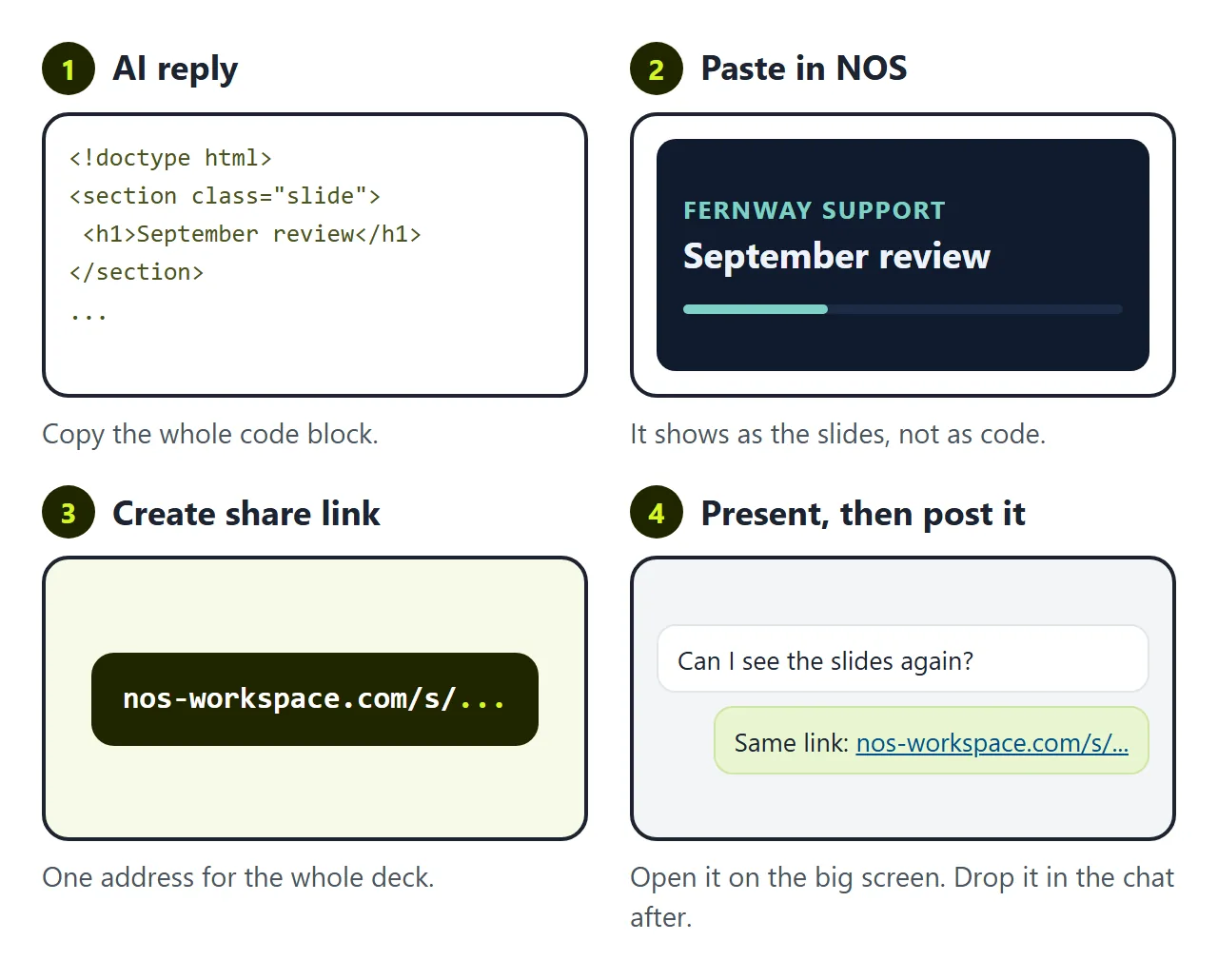
You have an interactive presentation. The AI gave it to you as HTML code, though, and you cannot click through code at the front of a meeting.
The first wall is getting it somewhere you can open it. Send the file and some people see code, some download it and never open it. The taps only work when the slides open as a page.
In NOS you paste the code into a document and the slides appear straight away. Choose Create share link. Open that link on the screen in the room, and drop the same link in the meeting chat afterwards. People who open it can click through and tap the question themselves, and they cannot change your slides. Slide deck to link covers presenting from a link in more detail.
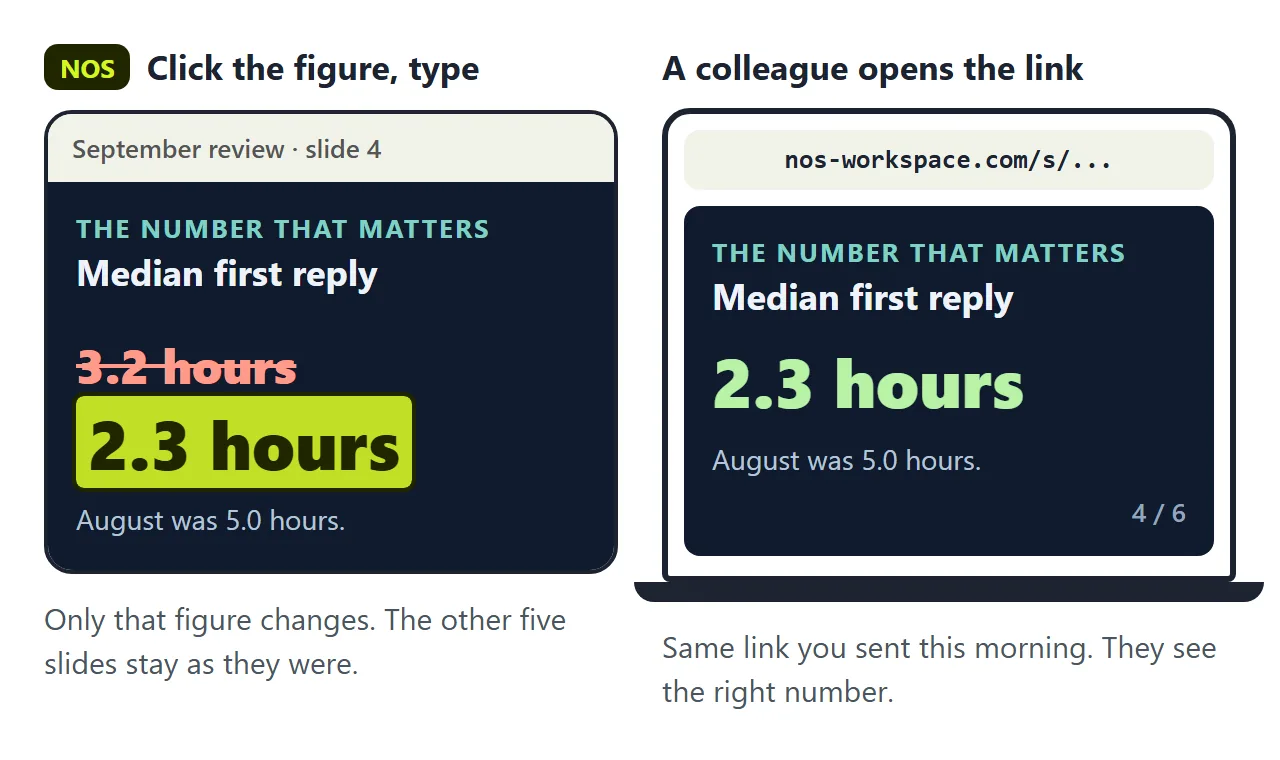
The second wall is the figure on slide 4. An hour after the meeting, someone points out that the median reply time was 2.3 hours, not 3.2. Two digits swapped. The link is already in the chat.
If you ask the AI again, you wait for a new reply. It often rewrites wording or layout you did not ask about, so you click through every slide again. Then you have a new file and a new link, and the wrong number is still in the chat under the old one.
In NOS you click the figure on slide 4 and type the correct one. The link does not change. Anyone who opens it from the chat now sees 2.3 hours. In the example above, the count-up and the bars read the figure from the slide text, so they follow.
Which option is correct on the question slide lives in the code, not in the visible text. If you change the question, change that too in the code view, or ask the AI for just that line.
What it does not do
The question slide does not collect votes. Nothing is sent anywhere. Tapping an option changes only the screen it is tapped on, so on the projector it is your tap, and on someone's phone it is theirs alone.
That is why the examples say "hands up in the room, then tap". If you need real counts from a crowd, use a tool made for live polls, and keep this page for the slides.
For sending a deck people read without you, see Digital presentation. For a quiz with a score, see HTML quiz.