jQuery is a JavaScript library. Its own site describes it as making "HTML document traversal and manipulation, event handling, animation, and Ajax much simpler".
To use it in a single HTML file, add one <script> tag that loads jQuery, then a second tag with your own code.
Try it first. Click the button: the box slides, the counter updates and the label changes.
<!doctype html>
<html lang="en">
<head>
<meta charset="utf-8">
<meta name="viewport" content="width=device-width, initial-scale=1">
<title>jQuery in one HTML file</title>
<style>
  body { margin: 0; padding: 20px; font-family: system-ui, sans-serif; background: #f4f5f7; }
  button {
    font: inherit; padding: 9px 16px; border: 0; border-radius: 8px;
    background: #0769ad; color: #fff; cursor: pointer;
  }
  .panel {
    margin-top: 14px; padding: 14px 16px; border-radius: 10px;
    background: #fff; box-shadow: 0 4px 14px rgba(0, 0, 0, .1);
  }
  #clicks { color: #555; margin-left: 10px; }
</style>
</head>
<body>
<button id="toggle">Hide details</button><span id="clicks">0 clicks</span>
<div class="panel" id="panel">
  <b>Details</b><br>This box slides up and down. jQuery does the animation.
</div>

<!-- 1. Load jQuery first (pinned version) -->
<script src="https://code.jquery.com/jquery-4.0.0.min.js"></script>
<!-- 2. Then your own code, which uses $ -->
<script>
  $(function () {          // runs once the page is ready
    let n = 0;
    $('#toggle').on('click', function () {
      $('#panel').slideToggle(200);
      n++;
      $('#clicks').text(n + (n === 1 ? ' click' : ' clicks'));
      $(this).text($(this).text() === 'Hide details' ? 'Show details' : 'Hide details');
    });
  });
</script>
</body>
</html>
Nothing here needs a build step, a package manager or a server. The file opens in a browser as it is.
The smallest working page
Every jQuery page has the same three parts, in this order:
- The jQuery script tag. It loads the library and defines
$. - Your own script tag, below it. Your code uses
$, so it must come second. $(function () { ... })around your code. The function runs once the page is ready.
<button id="hello">Say hello</button>
<p id="out"></p>

<script src="https://code.jquery.com/jquery-4.0.0.min.js"></script>
<script>
  $(function () {
    $('#hello').on('click', function () {
      $('#out').text('Hello from jQuery');
    });
  });
</script>
Putting both tags at the end of <body> is the simplest layout. The jQuery API documentation recommends the $(handler) form for the ready handler. The longer $(document).ready(handler) still works but is marked deprecated since jQuery 3.0.
Which script tag to use
The jQuery release page at releases.jquery.com lists jQuery Core 4.0.0 as the current 4.x release and 3.7.1 as the latest 3.x. The jQuery home page says 3.x will now only receive critical updates.
All of the files are served from code.jquery.com. For 4.0.0 there are four main builds:
| File | What it contains |
|---|---|
jquery-4.0.0.js |
Everything, readable source |
jquery-4.0.0.min.js |
Everything, minified. The usual choice |
jquery-4.0.0.slim.js |
Without the ajax and effects modules |
jquery-4.0.0.slim.min.js |
Slim, minified |
Keep the version number in the URL. A pinned file stays the same, so the page you test today behaves the same next year.
The slim build is the trap. It leaves out effects, so slideToggle, fadeIn and animate are missing, and calling one throws "is not a function". Use the regular .min.js unless you are sure you need neither.
The integrity attribute
The download page says the jQuery CDN supports Subresource Integrity. Clicking a version on releases.jquery.com gives a complete tag with a hash in it:
<script src="https://code.jquery.com/jquery-4.0.0.min.js"
        integrity="sha384-fgGyf7Mo7DURSOMnOy7ed+dkq5Job205Gnzu6QIg0BOHKaqt4D76Dt8VlDCzcMHV"
        crossorigin="anonymous"></script>
The browser compares the downloaded file with the hash and refuses to run it if they differ. That also means a hash copied for one version blocks every other version. Copy the whole tag together, never just the URL.
Script order: why $ is not defined
The browser runs scripts from top to bottom. If your code comes first, it calls $ before jQuery has loaded, and the console shows this error:
Uncaught ReferenceError: $ is not defined
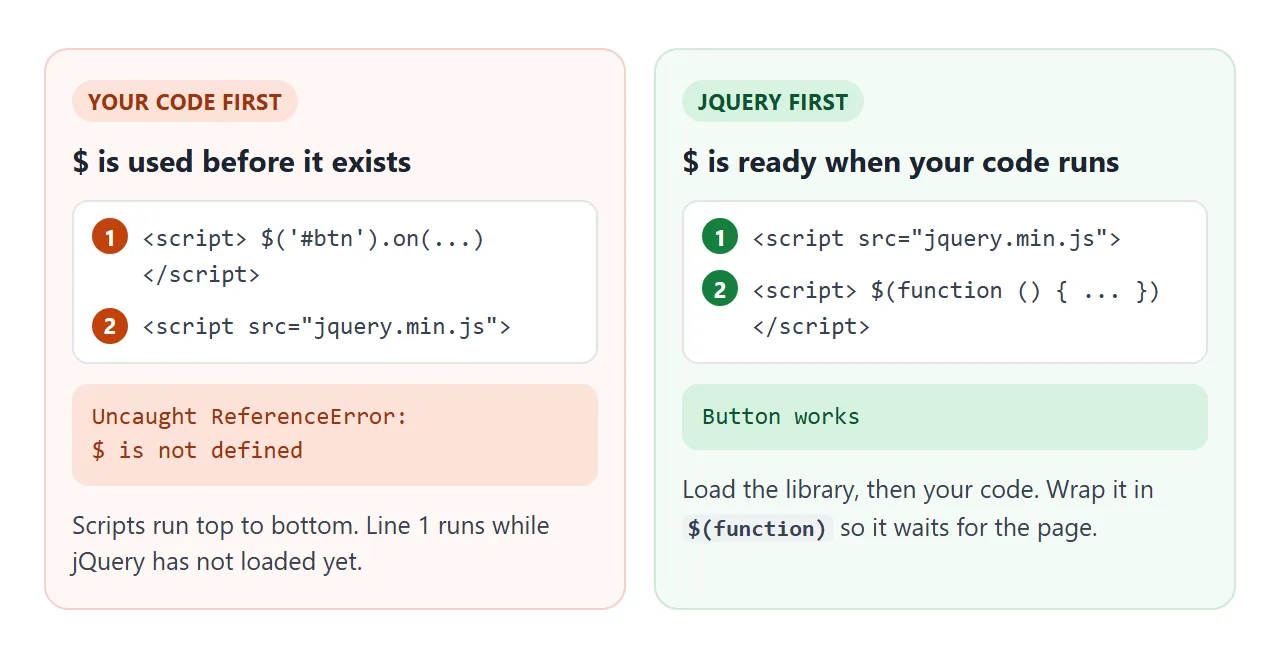
The same error appears when the URL is wrong, because the file never arrives. Open the browser's developer tools and check in the Network tab that the jQuery file loaded. HTML JavaScript not working covers the other reasons a script stays silent.
What $() gives you back
$('.note') takes a CSS selector and returns a jQuery object: a set of every matching element, with jQuery's methods attached. Calling a method on the set changes every element in it, so most code needs no loop.
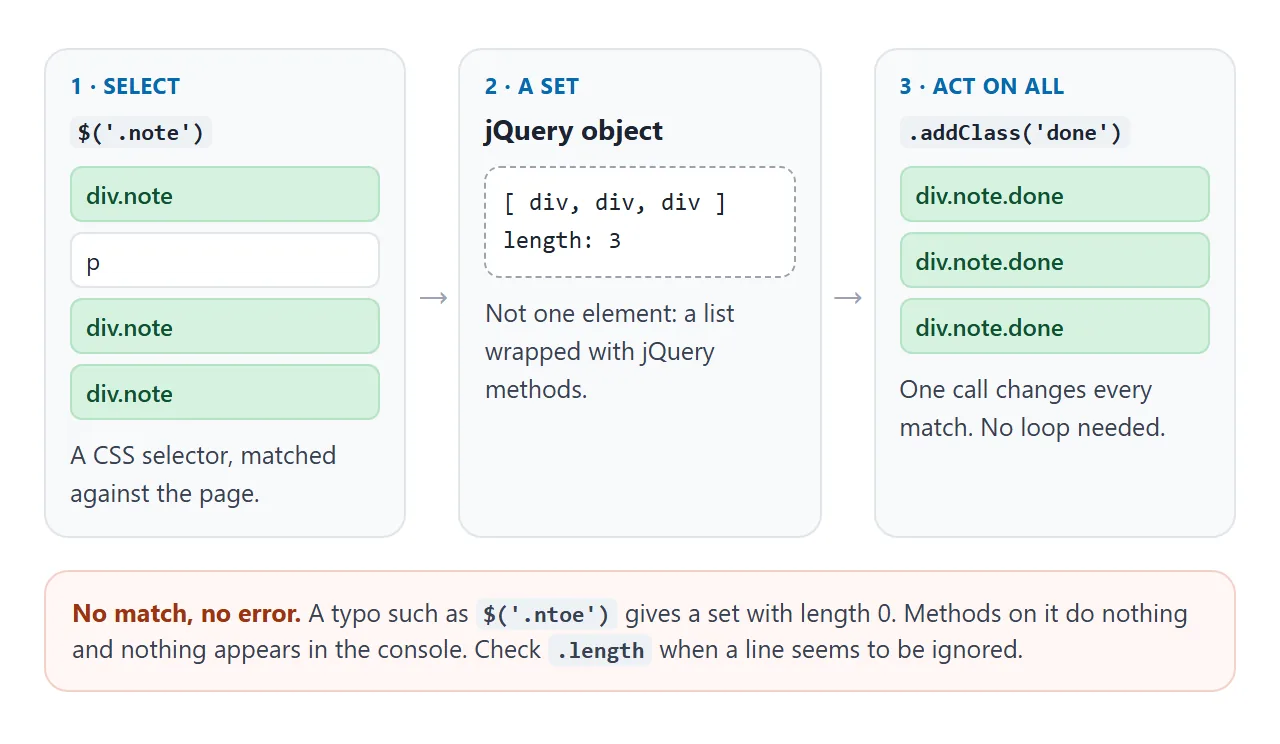
The catch is the empty set. If no element matches, the jQuery documentation says the object "contains no elements and has .length property of 0". Methods on an empty set do nothing and raise no error.
When a line seems to be ignored, log $('.note').length and check for a typo.
Common methods, and what they do:
| jQuery | What it does | Plain JavaScript |
|---|---|---|
$('#id') |
Select elements | querySelectorAll |
.on('click', fn) |
Listen for an event | addEventListener |
.text('Hi') |
Set text, no HTML | textContent |
.val() |
Read an input | .value |
.toggleClass('on') |
Add or remove a class | classList.toggle |
.slideToggle() |
Animate show and hide | CSS transitions |
Both columns work in a single file. For the plain versions, see addEventListener and classList.
Clicks on items added later
A frequent jQuery question: new list items ignore clicks that the old ones handle. The jQuery .on() documentation explains it. Direct handlers "are bound only to the currently selected elements", which must exist when .on() runs.
Click the items on both sides, then add an item and click the new one:
<!doctype html>
<html lang="en">
<head>
<meta charset="utf-8">
<meta name="viewport" content="width=device-width, initial-scale=1">
<title>Direct vs delegated events</title>
<style>
  body { margin: 0; padding: 14px; font-family: system-ui, sans-serif; background: #f4f5f7; font-size: 14px; }
  .cols { display: grid; grid-template-columns: 1fr 1fr; gap: 12px; }
  .col { background: #fff; border-radius: 10px; padding: 12px; box-shadow: 0 3px 10px rgba(0, 0, 0, .08); }
  h3 { margin: 0 0 4px; font-size: 14px; }
  code { font-size: 12px; background: #eef1f5; padding: 1px 4px; border-radius: 4px; }
  ul { list-style: none; padding: 0; margin: 10px 0; }
  li {
    padding: 7px 9px; margin-bottom: 6px; border-radius: 6px;
    background: #eef3f8; cursor: pointer; user-select: none;
  }
  li.done { background: #d4f5dc; text-decoration: line-through; }
  button { font: inherit; padding: 8px 12px; border: 0; border-radius: 8px; background: #0769ad; color: #fff; cursor: pointer; }
</style>
</head>
<body>
<p style="margin:0 0 10px">Click items to mark them done. Then add an item and click the new one.</p>
<div class="cols">
  <div class="col">
    <h3>Direct</h3><code>$('li').on('click')</code>
    <ul id="direct"><li>Item 1</li><li>Item 2</li></ul>
  </div>
  <div class="col">
    <h3>Delegated</h3><code>on('click', 'li')</code>
    <ul id="delegated"><li>Item 1</li><li>Item 2</li></ul>
  </div>
</div>
<p><button id="add">Add an item to both lists</button></p>

<script src="https://code.jquery.com/jquery-4.0.0.min.js"></script>
<script>
  $(function () {
    // Direct: binds only to the li elements that exist right now
    $('#direct li').on('click', function () {
      $(this).toggleClass('done');
    });

    // Delegated: the list listens, so items added later work too
    $('#delegated').on('click', 'li', function () {
      $(this).toggleClass('done');
    });

    let count = 2;
    $('#add').on('click', function () {
      count++;
      $('#direct, #delegated').append('<li>Item ' + count + ' (new)</li>');
    });
  });
</script>
</body>
</html>
The fix is a delegated handler. Attach the listener to a parent that is always there, and pass a selector as the second argument:
// Works for li elements added at any time
$('#list').on('click', 'li', function () {
  $(this).toggleClass('done');
});
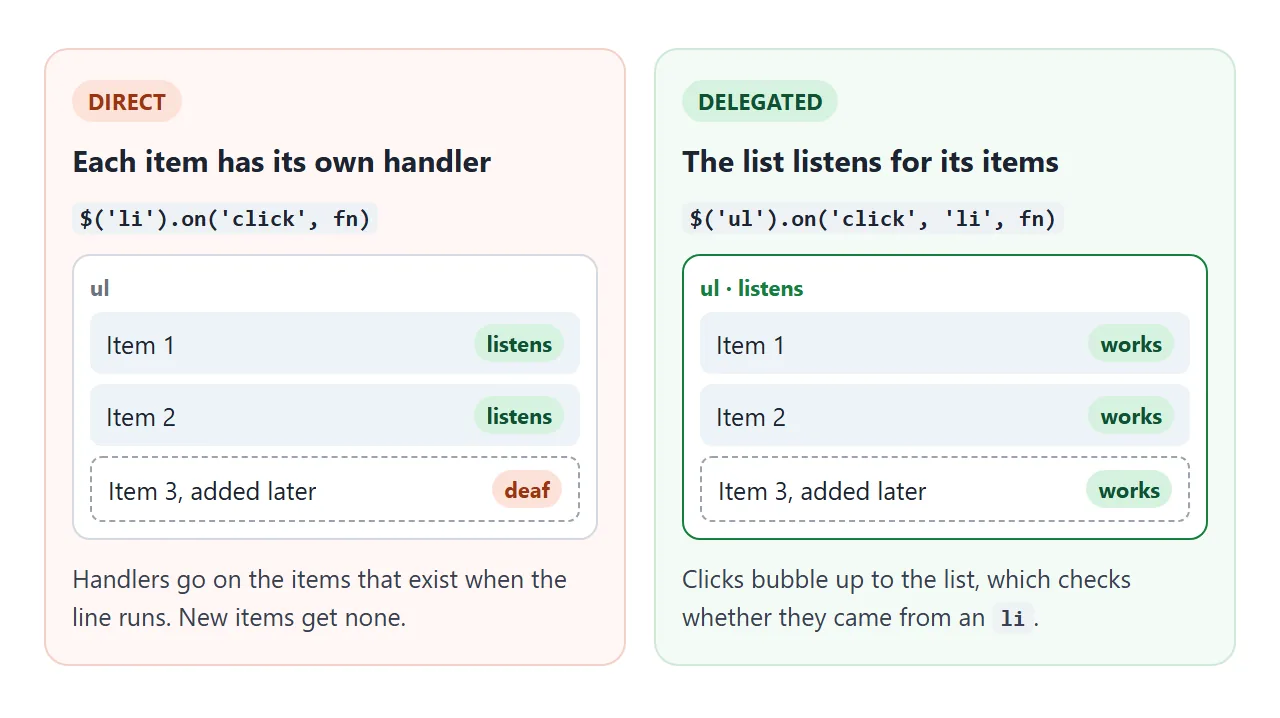
Inside the handler, this is the element that matched the selector, here the clicked li.
A finished example: a reading list
This page puts the pieces together: a form that adds items, delegated clicks to mark and remove them, filters, a counter, and fades from the effects module.
<!doctype html>
<html lang="en">
<head>
<meta charset="utf-8">
<meta name="viewport" content="width=device-width, initial-scale=1">
<title>Reading list with jQuery</title>
<style>
body { margin: 0; padding: 16px; font-family: system-ui, sans-serif; background: #eceef1; }
.app { max-width: 460px; margin: 0 auto; background: #fff; border-radius: 12px; padding: 16px; box-shadow: 0 4px 16px rgba(0, 0, 0, .1); }
h2 { margin: 0 0 12px; font-size: 18px; }
form { display: flex; gap: 8px; }
input { flex: 1; min-width: 0; font: inherit; padding: 8px 10px; border: 1px solid #cfd4dc; border-radius: 8px; }
button { font: inherit; padding: 8px 12px; border: 0; border-radius: 8px; background: #0769ad; color: #fff; cursor: pointer; }
.filters { margin: 12px 0 6px; display: flex; gap: 6px; }
.filters button { background: #eef1f5; color: #333; padding: 5px 10px; font-size: 13px; }
.filters button.on { background: #0769ad; color: #fff; }
ul { list-style: none; padding: 0; margin: 0; }
li { display: flex; align-items: center; gap: 8px; padding: 8px 4px; border-bottom: 1px solid #eef0f3; }
li span { flex: 1; cursor: pointer; }
li.read span { color: #8a929e; text-decoration: line-through; }
li .del { background: none; color: #b42318; padding: 2px 8px; font-size: 18px; line-height: 1; }
#count { color: #666; font-size: 13px; margin-top: 10px; }
</style>
</head>
<body>
<div class="app">
<h2>Reading list</h2>
<form id="add">
<input id="title" placeholder="Add a book" autocomplete="off">
<button>Add</button>
</form>
<div class="filters">
<button type="button" data-show="all" class="on">All</button>
<button type="button" data-show="unread">Unread</button>
<button type="button" data-show="read">Read</button>
</div>
<ul id="list">
<li><span>The Pragmatic Programmer</span><button class="del" aria-label="Remove">×</button></li>
<li class="read"><span>Don't Make Me Think</span><button class="del" aria-label="Remove">×</button></li>
</ul>
<div id="count"></div>
</div>
<script src="https://code.jquery.com/jquery-4.0.0.min.js"
integrity="sha384-fgGyf7Mo7DURSOMnOy7ed+dkq5Job205Gnzu6QIg0BOHKaqt4D76Dt8VlDCzcMHV"
crossorigin="anonymous"></script>
<script>
$(function () {
const $list = $('#list');
let show = 'all';
function update() {
$list.children().each(function () {
const read = $(this).hasClass('read');
$(this).toggle(show === 'all' || (show === 'read') === read);
});
const left = $list.children(':not(.read)').length;
$('#count').text(left + ' unread of ' + $list.children().length);
}
// Add: the form is handled in the page, nothing is sent anywhere
$('#add').on('submit', function (e) {
e.preventDefault();
const title = $('#title').val().trim();
if (!title) return;
const $li = $('<li><span></span><button class="del" aria-label="Remove">×</button></li>');
$li.find('span').text(title); // .text() so typed HTML is shown, not run
$li.hide().appendTo($list).fadeIn(200);
$('#title').val('').trigger('focus');
update();
});
// Delegated handlers: they also work for items added later
$list.on('click', 'span', function () {
$(this).parent().toggleClass('read');
update();
});
$list.on('click', '.del', function () {
$(this).parent().fadeOut(200, function () { $(this).remove(); update(); });
});
$('.filters').on('click', 'button', function () {
$('.filters button').removeClass('on');
show = $(this).addClass('on').data('show');
update();
});
update();
});
</script>
</body>
</html>
Three details are worth copying:
.text()for user input. Typed HTML shows as text instead of becoming markup.e.preventDefault()on submit. The form is handled in the page, so the browser does not reload or send it.- One
update()function. Every change calls it, so the filter and the counter never disagree.
Ajax and other things a single file cannot do alone
jQuery's $.ajax and $.getJSON request data from a server. The code is short:
$.getJSON('https://api.example.com/items', function (items) {
  // build the list from items
});
It needs a server that answers the request and allows your page to read the reply.
A shared NOS page also blocks requests to other sites, so the live examples here keep their data inside the page. For data you can paste in, a JavaScript array at the top of the script does the same job.
When it does not work
| What you see | Cause | Fix |
|---|---|---|
$ is not defined |
Your script runs before jQuery loads | Put the jQuery tag above your script |
$ is not defined, tag order is fine |
Wrong URL, the file never loaded | Check the request in the Network tab |
slideToggle is not a function |
The slim build has no effects | Use jquery-4.0.0.min.js |
$.ajax is not a function |
The slim build has no ajax | Use the regular build |
| The script is blocked, integrity error | Hash and file do not match | Copy the full tag from releases.jquery.com |
| A line runs but nothing changes | The selector matched nothing | Log .length and check the selector |
| New items ignore clicks | Direct handler bound earlier | Use a delegated handler |
| Code in the head does nothing | It ran before the elements existed | Wrap it in $(function) |
Share it as a link
A page with buttons and animations is easier to show than to describe. A screenshot cannot be clicked, and an .html attachment may open as code on a phone.
To send the working version, paste the page into a NOS document and choose Create share link. HTML to link walks through it.
The page renders as written, the jQuery script from code.jquery.com loads and your code runs, so the people you send it to can click it themselves without an account. If you change the code later, the same link shows the new version.
For the same kind of page without a library, show and hide a div does it in plain JavaScript.