"JSFiddle" here means the online code playground at jsfiddle.net, where you write HTML, CSS and JavaScript in separate panels and watch the result beside them.
A fiddle can run React, and so can a plain .html file. You need one <div>, three script tags and a script of your own.
Try the single-file version first. Click the button.
<!doctype html>
<html lang="en">
<head>
<meta charset="utf-8">
<meta name="viewport" content="width=device-width, initial-scale=1">
<title>React in one HTML file</title>
<style>
  body { margin: 0; padding: 24px; font-family: system-ui, sans-serif; background: #f4f5f7; color: #1d2330; }
  .card { max-width: 340px; padding: 18px 20px; border-radius: 12px; background: #fff; box-shadow: 0 6px 20px rgba(0, 0, 0, .1); }
  h1 { margin: 0 0 6px; font-size: 20px; }
  p { margin: 0 0 14px; color: #4b5563; }
  button { font: inherit; padding: 8px 16px; border: 0; border-radius: 8px; background: #2563eb; color: #fff; cursor: pointer; }
  button:active { background: #1d4ed8; }
</style>
</head>
<body>
<!-- 1. the element React will fill (JSFiddle's HTML panel) -->
<div id="root"></div>

<!-- 2. React, React DOM, then Babel, in this order (JSFiddle's Resources list) -->
<script crossorigin src="https://unpkg.com/react@18.3.1/umd/react.development.js"></script>
<script crossorigin src="https://unpkg.com/react-dom@18.3.1/umd/react-dom.development.js"></script>
<script src="https://unpkg.com/@babel/standalone@7.26.4/babel.min.js"></script>

<!-- 3. your code (JSFiddle's JavaScript panel, language set to Babel + JSX) -->
<script type="text/babel" data-presets="react">
  const { useState } = React;

  function Counter() {
    const [count, setCount] = useState(0);
    return (
      <div className="card">
        <h1>Clicked {count} times</h1>
        <p>React {React.version}, running from a single file.</p>
        <button onClick={() => setCount(count + 1)}>Add one</button>
      </div>
    );
  }

  // createRoot needs a real element, so #root must already exist above
  ReactDOM.createRoot(document.getElementById('root')).render(<Counter />);
</script>
</body>
</html>
The comments in the code say which fiddle panel each part came from.
What a fiddle is made of
JSFiddle's getting-started page describes four panels: HTML, CSS, JavaScript and a result preview. Libraries are added separately, either as a URL or by typing a name and picking it from the CDNJS suggestions. A single HTML file holds the same pieces.
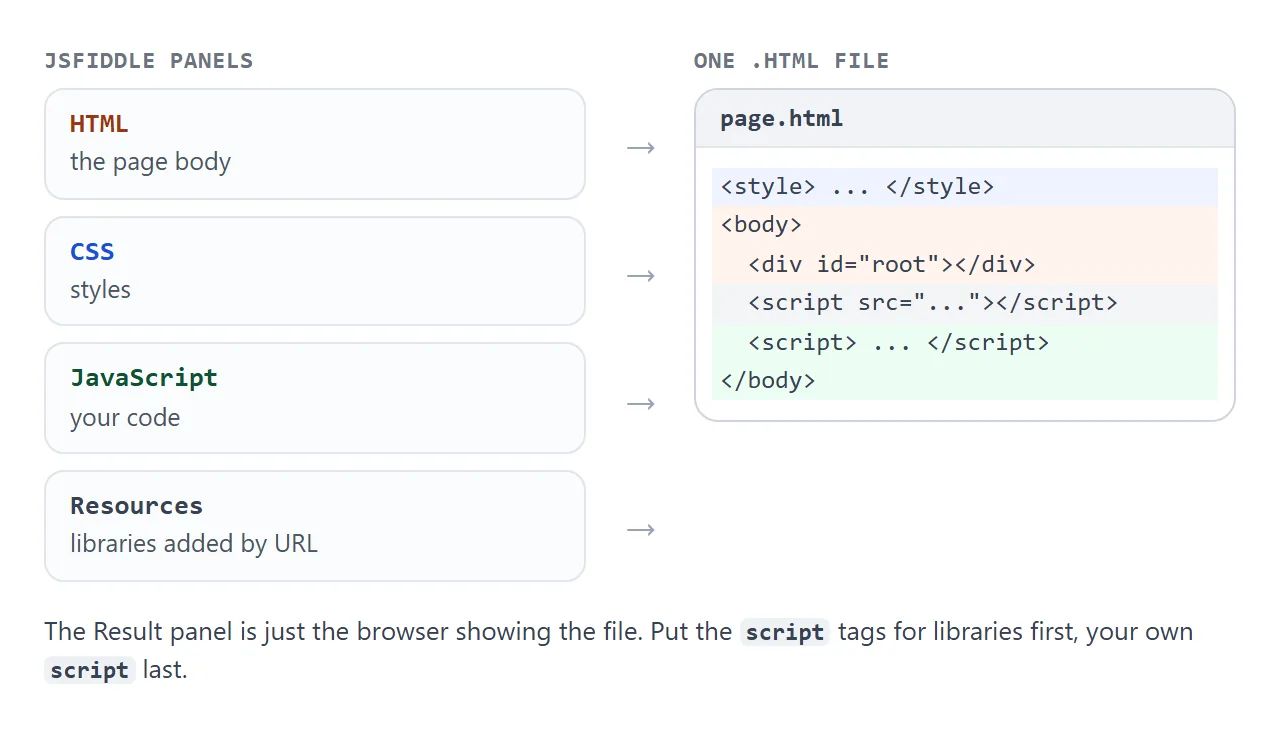
| Fiddle part | In a single HTML file |
|---|---|
| HTML panel | Elements inside body, such as the div React fills |
| CSS panel | A style element in head |
| JavaScript panel | A script element at the end of body |
| External resources | script tags above your own script |
| Result panel | The browser window |
In a file you assemble those pieces yourself, and the order matters.
React needs three script tags
React's CDN page lists two files for React 18: react and react-dom. Add Babel's standalone build as a third so the browser can read JSX. They load in this order, and your own script comes last.
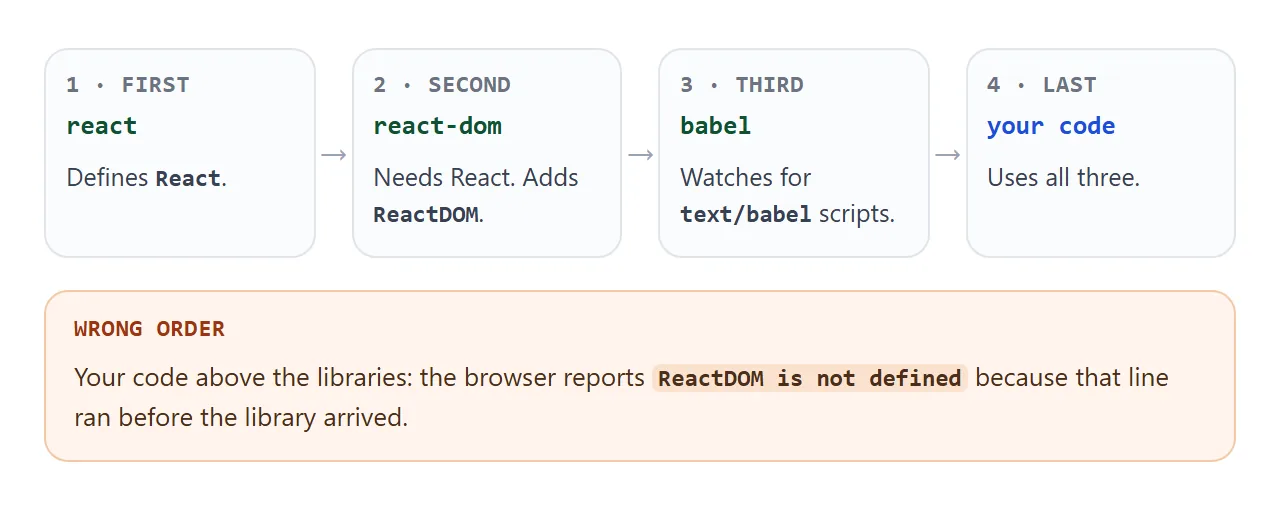
<div id="root"></div>

<script crossorigin src="https://unpkg.com/react@18.3.1/umd/react.development.js"></script>
<script crossorigin src="https://unpkg.com/react-dom@18.3.1/umd/react-dom.development.js"></script>
<script src="https://unpkg.com/@babel/standalone@7.26.4/babel.min.js"></script>

<script type="text/babel" data-presets="react">
  // your component and ReactDOM.createRoot(...) go here
</script>
Pin the version in the URL, as above, so the page does not change when a new release comes out.
React's docs say the development files are not suitable for production. For a page you send around, switch to the .production.min.js files, as the finished example below does.
Why JSX needs Babel
JSX is a syntax extension to JavaScript, not JavaScript itself. A browser cannot read <Counter /> inside a normal script.
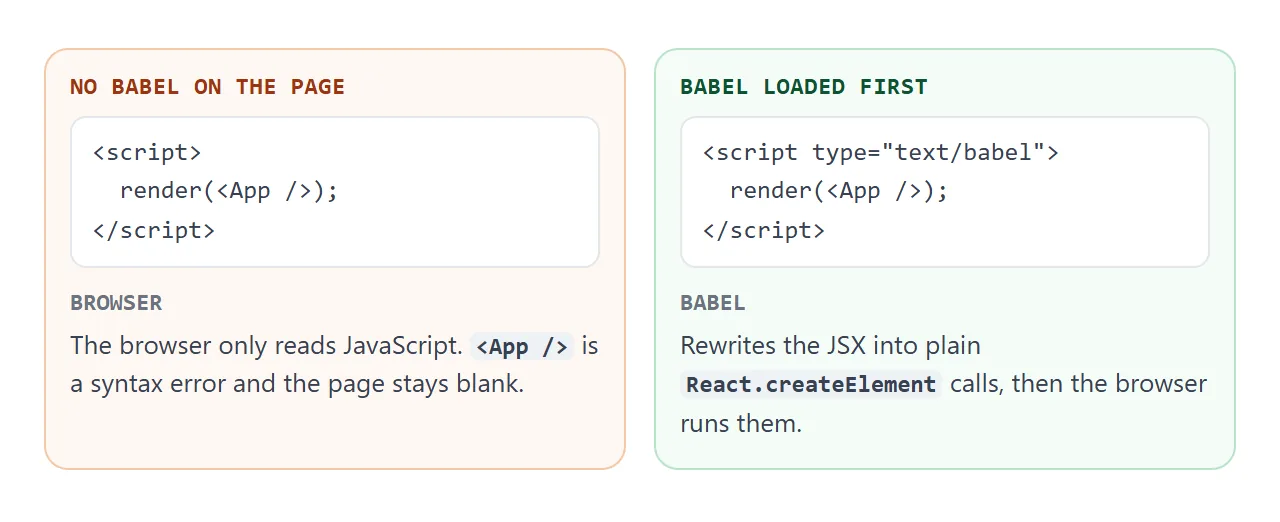
Babel's standalone build compiles every script tag whose type is text/babel. The browser itself treats a script with an unknown type as a data block and does not run it.
So if Babel fails to load, a text/babel script does nothing and the page stays blank, with no error to point at it.
The console will also show a warning that you are using the in-browser Babel transformer. That is expected. Babel's docs recommend precompiling scripts for production, which is the build step this single file skips on purpose.
React 19 has no script-tag build
Older tutorials load React from a /umd/ path. The React team has said that starting with React 19 it no longer produces those UMD builds.
For script-tag use they recommend an ESM-based CDN such as esm.sh. Their example looks like this, shown for reference and not run in this article:
<script type="module">
  import React from "https://esm.sh/react@19/?dev"
  import ReactDOMClient from "https://esm.sh/react-dom@19/client?dev"
  // ...
</script>
The examples on this page pin React 18.3.1 and load only from the unpkg.com and cdn.jsdelivr.net hosts, which NOS pages can load from.
Without Babel: React and htm
If you would rather not ship a compiler, you can skip JSX. The htm library lets you write JSX-like markup inside a template string. Its readme describes it as JSX-like syntax in plain JavaScript with no transpiler necessary.
<!doctype html>
<html lang="en">
<head>
<meta charset="utf-8">
<meta name="viewport" content="width=device-width, initial-scale=1">
<title>React without Babel</title>
<style>
  body { margin: 0; padding: 24px; font-family: system-ui, sans-serif; background: #f4f5f7; color: #1d2330; }
  .card { max-width: 340px; padding: 18px 20px; border-radius: 12px; background: #fff; box-shadow: 0 6px 20px rgba(0, 0, 0, .1); }
  h1 { margin: 0 0 10px; font-size: 20px; }
  input { box-sizing: border-box; width: 100%; font: inherit; padding: 8px 10px; border: 1px solid #cbd2dc; border-radius: 8px; }
  ul { margin: 12px 0 0; padding-left: 20px; min-height: 96px; }
  .none { color: #9a3412; list-style: none; margin-left: -20px; }
</style>
</head>
<body>
<div id="root"></div>

<script crossorigin src="https://unpkg.com/react@18.3.1/umd/react.development.js"></script>
<script crossorigin src="https://unpkg.com/react-dom@18.3.1/umd/react-dom.development.js"></script>
<!-- htm: JSX-like markup in a tagged template, no compile step -->
<script src="https://cdn.jsdelivr.net/npm/htm@3.1.1/dist/htm.umd.js"></script>

<script>
  const { useState } = React;
  const html = htm.bind(React.createElement);

  const FRUIT = ['apple', 'apricot', 'banana', 'blueberry', 'cherry', 'grape'];

  function Filter() {
    const [q, setQ] = useState('');
    const hits = FRUIT.filter((f) => f.includes(q.trim().toLowerCase()));
    return html`
      <div className="card">
        <h1>Filter the list</h1>
        <input value=${q} placeholder="type a, b, or ch" onInput=${(e) => setQ(e.target.value)} />
        <ul>
          ${hits.length
            ? hits.map((f) => html`<li key=${f}>${f}</li>`)
            : html`<li className="none">No match</li>`}
        </ul>
      </div>
    `;
  }

  ReactDOM.createRoot(document.getElementById('root')).render(html`<${Filter} />`);
</script>
</body>
</html>
The only new line is htm.bind(React.createElement). After it, html followed by a template string builds React elements. The demo uses className, the React name for the class attribute.
Where your script goes
JSFiddle's JavaScript panel has a Load type setting: run on load, run on DOM ready, or place the code unwrapped at the bottom of head or body. In a file the equivalent is placement. Put your script after the div it uses.
React's createRoot documentation explains why. A script cannot see elements that come after it in the HTML, so getElementById returns null and React reports that the target container is not a DOM element.
A finished example: split the bill
The same three tags scale to a real small tool. This one keeps three numbers in state and recomputes the result on every change. The inputs are handled inside the page, and nothing is submitted anywhere.
<!doctype html>
<html lang="en">
<head>
<meta charset="utf-8">
<meta name="viewport" content="width=device-width, initial-scale=1">
<title>Split the bill</title>
<style>
  * { box-sizing: border-box; }
  body { margin: 0; padding: 20px; font-family: system-ui, sans-serif; background: #f4f5f7; color: #1d2330; }
  .card { max-width: 380px; margin: 0 auto; padding: 18px 20px 20px; border-radius: 12px; background: #fff; box-shadow: 0 6px 20px rgba(0, 0, 0, .1); }
  h1 { margin: 0 0 14px; font-size: 20px; }
  label { display: block; margin: 0 0 12px; font-size: 14px; color: #4b5563; }
  .lbl { font-size: 14px; color: #4b5563; }
  input[type=number] { display: block; width: 100%; margin-top: 4px; font: inherit; font-size: 16px; padding: 8px 10px; border: 1px solid #cbd2dc; border-radius: 8px; color: #1d2330; }
  .tips { display: flex; gap: 8px; margin: 4px 0 14px; }
  .tips button { flex: 1; font: inherit; padding: 8px 0; border: 1px solid #cbd2dc; border-radius: 8px; background: #fff; color: #1d2330; cursor: pointer; }
  .tips button[aria-pressed=true] { background: #2563eb; border-color: #2563eb; color: #fff; }
  .out { padding: 12px 14px; border-radius: 10px; background: #ecfdf3; color: #0f5132; }
  .out b { font-size: 24px; }
  .out small { display: block; margin-top: 2px; color: #3f6f57; }
</style>
</head>
<body>
<div id="root"></div>

<script crossorigin src="https://unpkg.com/react@18.3.1/umd/react.production.min.js"></script>
<script crossorigin src="https://unpkg.com/react-dom@18.3.1/umd/react-dom.production.min.js"></script>
<script src="https://unpkg.com/@babel/standalone@7.26.4/babel.min.js"></script>

<script type="text/babel" data-presets="react">
  const { useState } = React;
  const TIPS = [0, 10, 15, 20];

  function App() {
    const [bill, setBill] = useState(84);
    const [tip, setTip] = useState(15);
    const [people, setPeople] = useState(3);

    const total = bill * (1 + tip / 100);
    const each = people > 0 ? total / people : 0;
    const money = (n) => n.toFixed(2);

    return (
      <div className="card">
        <h1>Split the bill</h1>
        <label>Bill
          <input type="number" min="0" value={bill} onChange={(e) => setBill(+e.target.value)} />
        </label>
        <div className="lbl">Tip</div>
        <div className="tips">
          {TIPS.map((t) => (
            <button key={t} aria-pressed={t === tip} onClick={() => setTip(t)}>{t}%</button>
          ))}
        </div>
        <label>People
          <input type="number" min="1" value={people} onChange={(e) => setPeople(+e.target.value)} />
        </label>
        <div className="out">
          <b id="each">{money(each)}</b> each
          <small id="total">Total with tip: {money(total)}</small>
        </div>
      </div>
    );
  }

  ReactDOM.createRoot(document.getElementById('root')).render(<App />);
</script>
</body>
</html>
- State:
useStateholds each value, and the result is calculated while rendering, not stored. - Buttons: the selected tip uses
aria-pressed, which both styles the button and marks it as pressed for assistive technology. - Guard: zero people shows 0.00 instead of dividing by zero.
When it does not work
| Symptom | Cause | Fix |
|---|---|---|
Blank page, Unexpected token '<' |
JSX inside a plain script | Use type="text/babel" and load Babel first |
| Blank page, no error | A text/babel script and Babel did not load |
Check the Babel URL in the Network tab |
ReactDOM is not defined |
Your script runs before the libraries, or a URL failed | Libraries first, then check each URL |
| Library never loads | React 19 has no UMD files | Pin 18.3.1, or use an ESM CDN |
| Error: Target container is not a DOM element | The script sits above the div | Move the script below the div |
| Error: Cannot use import statement outside a module | import inside a text/babel script |
Add data-type="module", or use the globals |
| Console: Invalid DOM property class | class written in JSX |
Write className |
| Babel warning in the console | The in-browser transformer is in use | Expected. Precompile for a real site |
If a different kind of script problem shows up, JavaScript not working in an HTML file covers the general checks. To host a project that does have a build step, see hosting a built front end.
Share it as a link
A fiddle's own link is made for showing code to other developers. A playground or a page compares the two. When the person opening it should see the working page, send the page.
Paste the whole file into a NOS document and choose Create share link. HTML to link walks through it. The page renders as written and its scripts run, so the people you send it to can click the counter themselves.
The scripts from unpkg.com and cdn.jsdelivr.net load, and anyone with the link can open it without an account. If you change the code later, the same link shows the new version.